
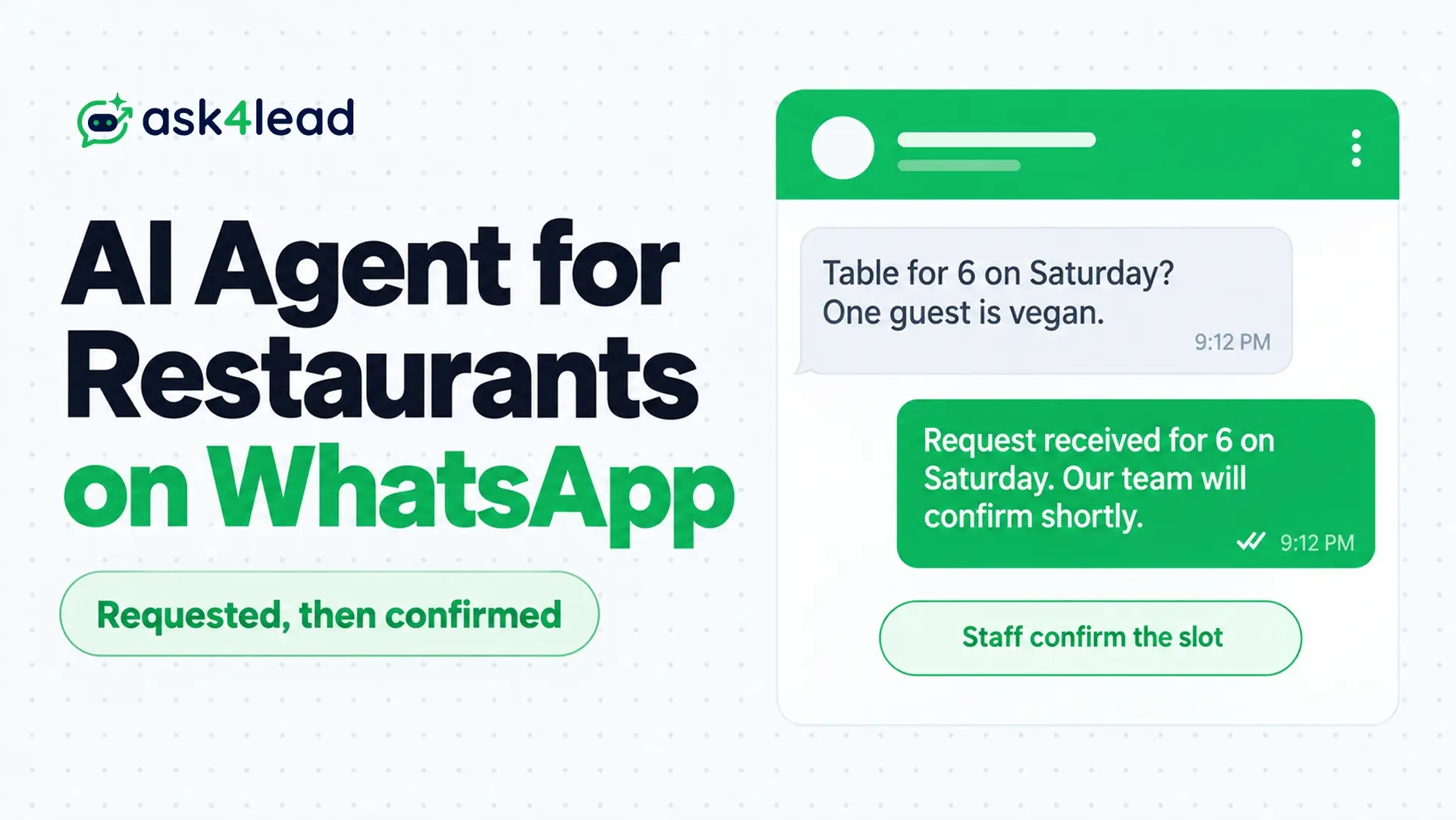
An AI agent for restaurants is software that reads guest messages on WhatsApp, answers menu questions and collects orders and table reservations. Unlike a button-menu bot, it understands free text such as “table for 6 on Saturday, 1 guest is vegan.”
It works best as a front desk for the kitchen. The agent captures complete requests, and your team confirms whatever the system cannot check.
Quick answer: Let the agent answer menu questions, take complete order details and log table reservations as requests. Mark a table confirmed only after an availability check returns a slot. Keep a person on allergens, large parties and refunds, and start with after-hours messages.
Key takeaways
- Treat table reservations as “requested” until staff or your reservation system confirms the slot.
- WhatsApp food ordering needs 1 source for dishes, prices and sold-out items, because stale menus cause the loudest failures.
- Free-form replies stop 24 hours after the guest’s last message, and later reminders need pre-approved templates.
- Direct orders beat delivery-app commissions of 15% to 30% only when you can hand over the food yourself.
What Is an AI Agent for Restaurants?
An AI agent for restaurants is a software assistant that chats with guests on WhatsApp, answers from your own menu and policies, and records order or reservation details. It does not cook, seat or charge anyone, so its value depends on what happens after the chat.
Restaurant chatbot vs AI agent
A restaurant chatbot follows a script, while an AI agent reads free text.
- Restaurant chatbot: The guest taps “1 for menu,” and anything off the script fails.
- AI agent: The guest writes a sentence, and the agent pulls out the date, party size and diet.
The AI Sales Assistant in Ask4Lead mixes both: it can use button menus for known choices, then steps in with an open question when a guest’s need is not listed.
The 6 jobs an AI agent for restaurants can take on
| Task | Agent’s part | Human’s part |
| 1. Menu and hours answers | Replies from your menu, hours and policies | Staff keep the source current |
| 2. WhatsApp food ordering | Collects items, add-ons, address and time | Kitchen accepts the ticket |
| 3. Table reservations | Captures name, date, time, party size and notes | Staff or booking system confirms |
| 4. Events and catering | Gathers headcount, date and budget, then quotes | Manager closes the deal |
| 5. Reminders and follow-up | Sends approved templates before and after a visit | Staff set the rules |
| 6. Handoff | Flags complaints, allergens and refunds | A person replies |
When WhatsApp beats a booking link
A booking link handles standard table reservations well, so WhatsApp earns its place elsewhere. Guests use it for special requests, group bookings, late changes and dish questions. In WhatsApp-first markets, it is also the app they already have open.
Print a scannable WhatsApp link on menus and table cards. Your Google Business Profile can list the number too, so Maps visitors can message you.
How an AI Agent for Restaurants Takes Food Orders
An AI agent for restaurants runs WhatsApp food ordering by asking for each missing detail, then reading the full order back before the kitchen sees it. The readback catches many mistakes, particularly on dishes with add-ons, swaps and spice levels.
Here is the order flow for WhatsApp food ordering:
- Ask: Whether the guest wants delivery or pickup, then the address or collection time.
- Build: Add dishes in turn, with sizes, add-ons and notes.
- Read back: Say the order out in full, with total and prep time.
- Pay: Send a payment link, or mark cash on delivery.
- Hand over: Pass the confirmed ticket to staff.
Messy orders break most restaurant chatbot setups. A delivery owner with 100 to 200 daily WhatsApp orders said guests send them in many formats, often with several items and quantities in 1 message. Structured prompts help, so use WhatsApp Flows forms where guests pick items instead of typing.
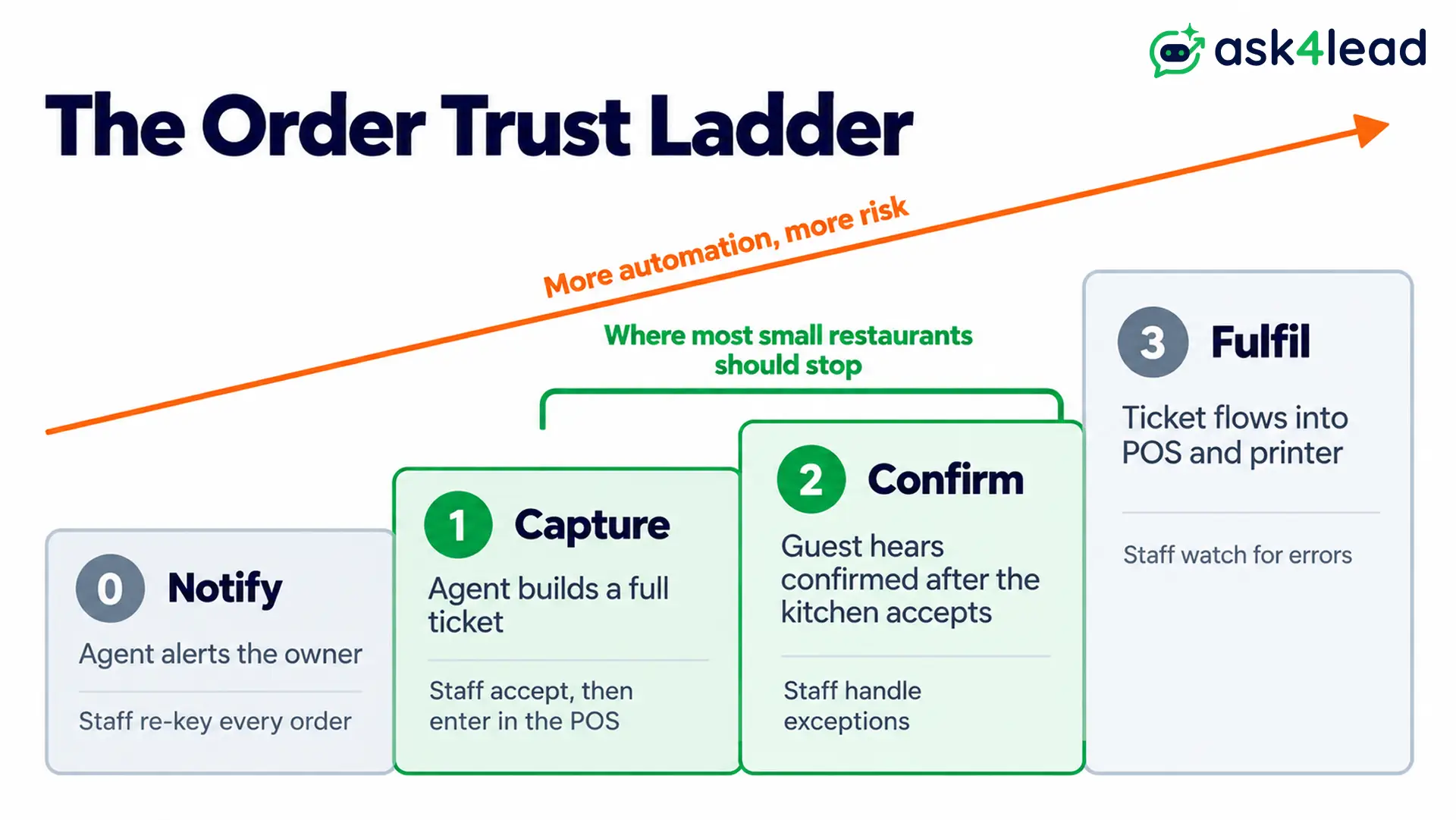
The Order Trust Ladder
Each level of WhatsApp food ordering automation moves 1 more job from staff to software, and each adds risk.
| Level | What happens | Staff still do |
| 0. Notify | Agent alerts the owner about each chat | Retype every order |
| 1. Capture | Agent builds a complete ticket in the inbox | Accept it, then enter it in the point-of-sale (POS) system |
| 2. Confirm | Guest hears “confirmed” after the kitchen accepts | Handle exceptions |
| 3. Fulfil | Ticket flows into the POS and kitchen printer | Watch for errors |
An operator warned that retyping an order into the POS only moves the bottleneck. Most small restaurants should stop at level 1 or 2, then send order status updates once the kitchen accepts.
Ask4Lead works at those levels: its feature pages document no POS link, so the AI builds the record and your team accepts it.
Payments for WhatsApp food ordering: send a link
A screenshot needs a person to check it. A payment link from your gateway confirms itself through an automatic notice from the payment provider, so the agent can mark the order paid.
In India, Meta’s payments API supports UPI, the national instant-payment system, so guests review and pay inside the chat. Its page lists Indian rupees as the only currency. Elsewhere, send your gateway’s link.
How an AI Agent for Restaurants Handles Table Reservations
An AI agent for restaurants should treat table reservations as requests until a real availability check returns a slot. Taking down a name, time, date and party size does not secure a table, and an early promise causes double bookings.
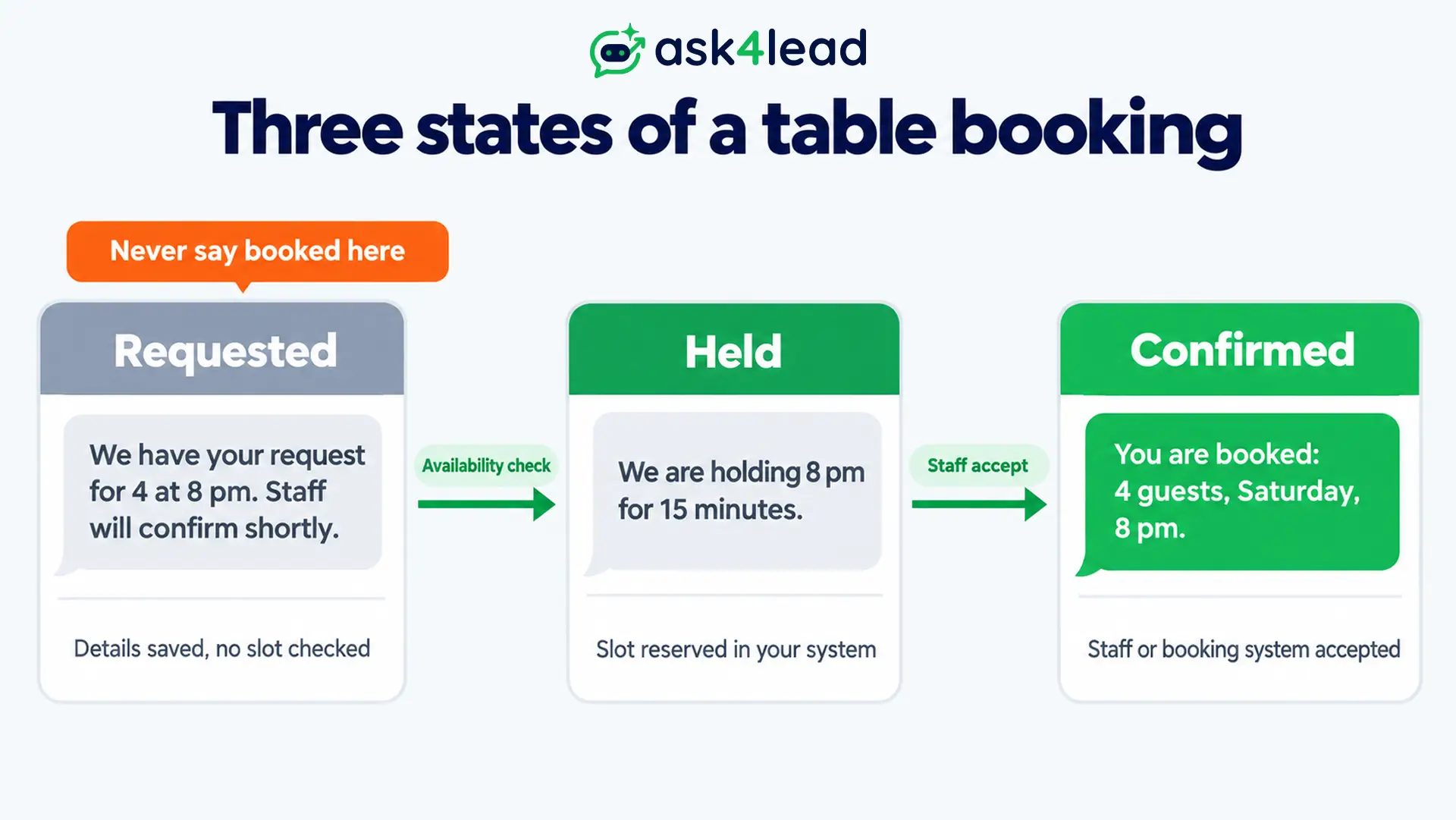
The Booking Truth Rule: requested, held, confirmed
| Status | What the guest reads | What must be true |
| Requested | “We have your request for 4 at 8 pm. Staff will confirm shortly.” | Details saved, no slot checked |
| Held | “We are holding 8 pm for 15 minutes.” | Slot reserved in your system |
| Confirmed | “You are booked: 4 guests, Saturday, 8 pm.” | Staff or booking system accepted |
Without a booking-system link, stay at “requested” and let staff confirm. Among the vendor pages that rank for this topic, 3 describe reservations, yet none explains where the availability check happens.
Large parties, events and catering
Big bookings carry the most revenue and the oddest asks: a cake, balloons, a projector, a set menu. Collect headcount, date, budget and dietary needs, then send a price.
In Ask4Lead, the Quotes tab builds that proposal inside the chat from your Services Catalog prices.
Reminders, cancellations and waitlists
Reminders protect table reservations. A reservation-software vendor’s data from about 50 locations shows 3.7% of booked parties as no-shows and 15% as cancellations.
Treat those figures as directional; they suggest a quick cancel reply frees tables for the waitlist.
By then the 24-hour window has usually closed, so reminders go out as approved utility templates, the category for messages about an existing booking.
Ask4Lead’s WhatsApp Templates lets you pick the Utility category, submit to Meta and track Pending, Approved or Rejected. When Meta turns a template down, the common rejection fixes show what to change.
Keeping an AI Agent for Restaurants Accurate
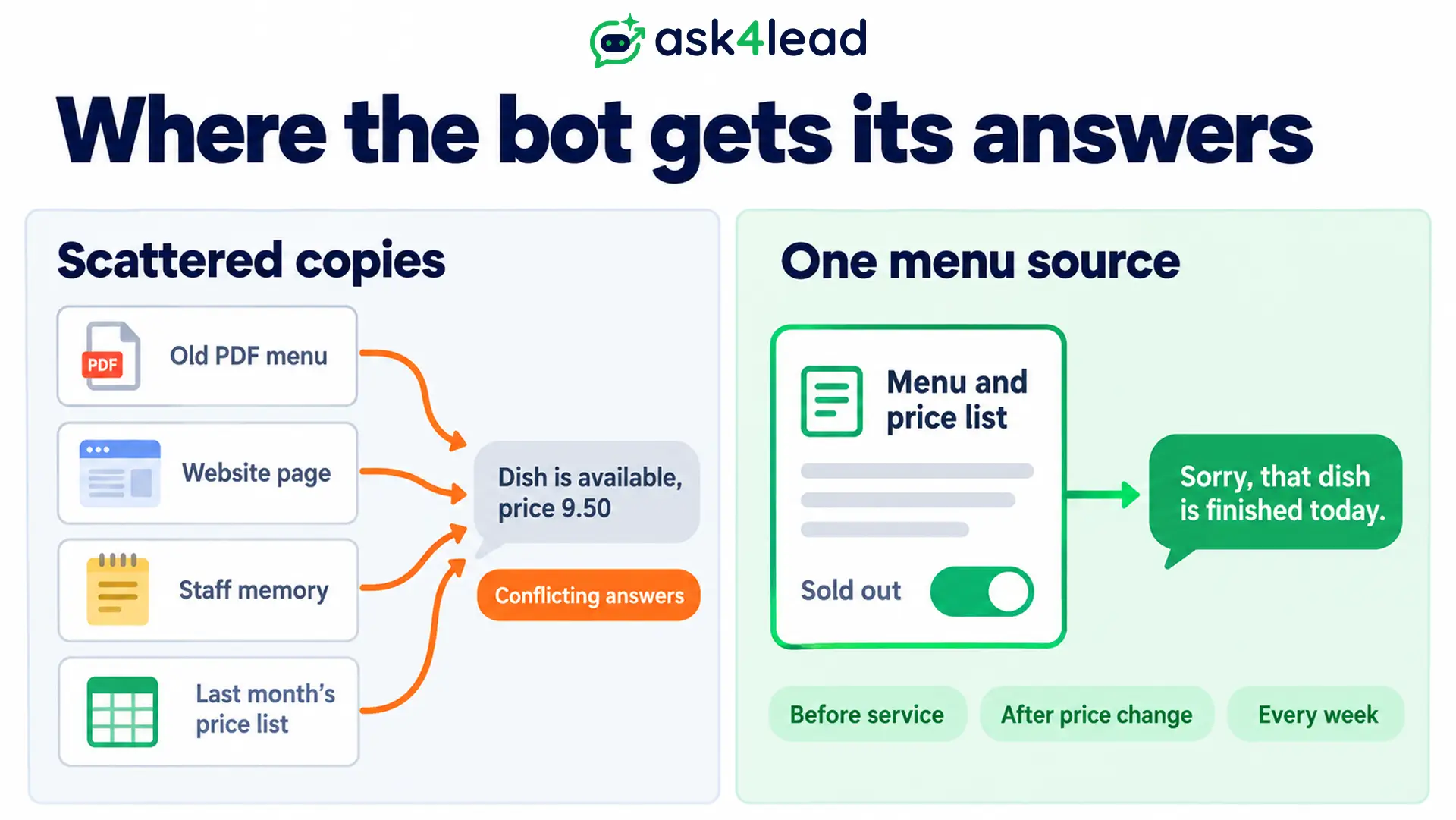
An AI agent for restaurants stays accurate only when it reads from 1 place that staff update every day. Stale menus, sold-out dishes and wrong holiday hours cause the loudest failures, because the bot repeats them with complete confidence to every guest.
A single menu source for an AI agent for restaurants
Builders repeat the same fix: 1 place where the owner flips a dish to sold out, and the bot reads it on every reply.
Ask4Lead’s Services Catalog behaves like that switch. Set an item inactive and the AI stops offering it, and a new price reaches the AI at once.
The AI Knowledge Profile covers the rest. Upload your menu PDF or paste your website URL, and answers come only from those files. When they run out, it asks the guest a question or flags the chat.
Run this 4-step accuracy check:
- Before service: Mark sold-out dishes inactive.
- After a price change: Message the bot yourself and confirm the new price.
- Every week: Ask about a dish you disabled. The bot must decline.
- Each morning: Update specials, early closing, holiday hours and the busy-night wait.
Allergen rules for an AI agent for restaurants
A confident wrong answer is dangerous on allergens. In England, Wales and Northern Ireland, the Food Standards Agency’s 2025 guidance, summarised by Allergy UK, encourages written allergen information plus a conversation between staff and customers.
So let the agent share only your verified allergen chart, and send every “can I eat this” question to a person. With Human Approval, you can hold any reply for review, and the guest sees nothing until someone approves it.
WhatsApp Rules Every AI Agent for Restaurants Must Follow
Meta, which owns WhatsApp, sets rules that shape every message an AI agent for restaurants sends. Free-form text works only while a 24-hour customer service window is open; after that, only approved templates work. Its non-template pricing page adds that service messages are charged from 1 October 2026.
How the 24-hour clock affects confirmations
- Inside the window: Answers and order updates go out as free-form text. A new guest message restarts the clock, and the rule’s edge cases are covered separately.
- Outside the window: Reminders and win-back messages need approved templates.
- From an ad: A guest who starts a chat from a click-to-WhatsApp ad in the mobile app opens 72 hours of free messaging when you reply inside 24 hours, per Meta’s pricing page.
What Meta charges for WhatsApp food ordering
Meta charges all marketing templates, while utility templates inside an open window are free. The non-template pricing page adds the October 2026 change for service messages. Rates differ by country, so check the rate card and our WhatsApp API pricing guide before you budget.
Why Meta allows an AI agent for restaurants
On 15 January 2026, Meta kept AI assistants built for general use off its Business API. Per Meta’s statement to TechCrunch, companies using AI for their own customer service are unaffected. Answering menu questions is business use, but reminders and promotions still need the guest’s opt-in consent.
What an AI Agent for Restaurants Costs and Saves
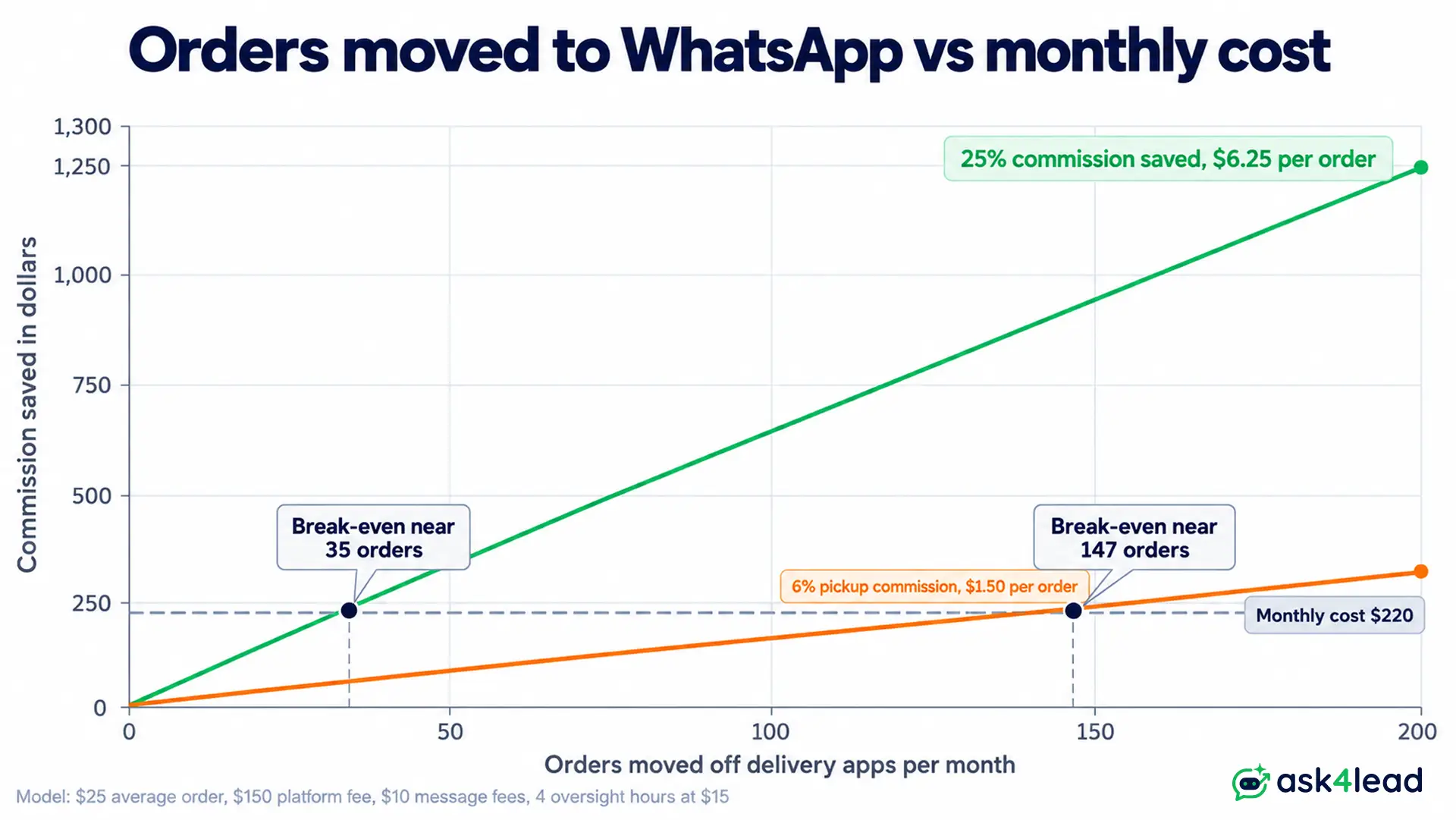
An AI agent for restaurants saves money mainly by moving orders from delivery apps to your own WhatsApp line. DoorDash lists 15%, 25% or 30% delivery commission by plan, and 6% on pickup. Direct WhatsApp food ordering skips that fee, but you must hand over the food yourself.
Break-even for WhatsApp food ordering
Orders needed = monthly cost ÷ (average order value × commission saved)
| Input | Assumption |
| Average order | $25 |
| Commission saved | 25%, or $6.25 per order |
| Agent platform | $150 per month |
| Message fees | $10 a month |
| Oversight | 4 hours at $15, or $60 |
| Monthly cost | $220 |
| Break-even | 35 moved orders a month |
At 100 moved orders, the saving is $625 against $220 of cost, or $405 net. These are our assumptions, so swap in your own.
The saving shrinks on pickup at 6%, where break-even rises to about 147 orders. If delivery apps supply your couriers, you need your own riders first.
Missed calls still cost money
Maple’s analysis of 1.2 million calls reports that restaurants miss 33% of peak-hour calls and puts an unanswered call at $85 of lost revenue. Both figures rest on merchant estimates, and Maple sells phone AI, so read them as directional.
A WhatsApp message, by contrast, stays waiting instead of ringing out.
How to Launch an AI Agent for Restaurants in 3 Phases
Launch an AI agent for restaurants in 3 phases. Begin with after-hours questions and table reservations, because mistakes there cost little. Add WhatsApp food ordering after the answers hold up for 2 weeks, since a wrong dish costs more than a wrong opening time.
1. Week 1: after-hours questions and requests
Load your menu, hours, address and policies. Allow 1 answer for gaps: “someone will confirm.” Then run the testing checklist before real guests arrive.
2. Weeks 2 to 3: WhatsApp food ordering for takeaway
Add the 5-step order flow with a readback, a payment link and a kitchen-accept step. Put a pause switch for the agent on your phone.
3. Month 2: delivery, reminders and promotions
Add delivery zones, reminder templates and repeat-order offers. Our repeat-purchase campaign guide covers the offers.
Peak-hour and handoff checklist
- Split messages: Guests send “hey,” then “table for 4,” then “tomorrow.” Choose an agent that waits a few seconds, then answers the whole thought.
- Message floods: Plan for the Friday rush using our rate limit guide.
- Voice notes: Ask any vendor whether it transcribes them. Ask4Lead’s documentation is silent on voice notes, so your team should answer them by hand through the shared team inbox.
- Handoff triggers: Complaints, refunds, allergens and large parties go to a person. Ask4Lead sends chats the AI is unsure about to the Work Queue, bucket “Needs Human Review.”
- Pilot measure: Count requests that reached staff with enough detail to act, not messages handled.
FAQs
1. Can AI take table reservations on WhatsApp?
Yes, as requests. Table reservations become confirmed only after staff or your reservation system accepts the slot.
2. Will an AI agent connect to my POS?
Some tools do through APIs. Ask4Lead’s feature pages document no POS link, so staff accept each ticket.
3. What does WhatsApp food ordering cost?
Expect a platform fee plus Meta’s message charges for WhatsApp food ordering, which vary by country and template type.
4. Can the agent answer allergy questions?
It can share your written allergen chart. A person should handle any question about a real allergy.
5. Must a restaurant use the WhatsApp Business API?
For automation at scale, yes. The API is WhatsApp’s official software interface, while the free app has limited automation; our app versus API comparison shows the differences.
Conclusion: AI Agent for Restaurants
An AI agent for restaurants works when it captures complete requests, reads 1 fresh menu and hands risky chats to people. Treat table reservations as requests until confirmed, and expand only after the after-hours answers hold up for 2 weeks.
Tick these 5 boxes before go-live:
- A single menu source with a sold-out switch.
- Wording for requested, held and confirmed table reservations.
- A written allergen rule that routes questions to a person.
- Approved utility templates for reminders.
- A pause switch and written handoff triggers.
Meta revises fees and AI rules often, so revisit this setup each quarter.
Win back orders lost to unanswered messages
A guest who messages at 9 pm and hears nothing orders from someone else.
Ask4Lead keeps guests moving with WhatsApp Campaigns, which sends approved repeat-order offers, a Sales Pipeline with 9 stages for catering and event deals, WhatsApp Account Health to track Meta’s quality rating of your number and your sending limit, and the AI Dashboard to review out-of-hours chats and handoffs.
