
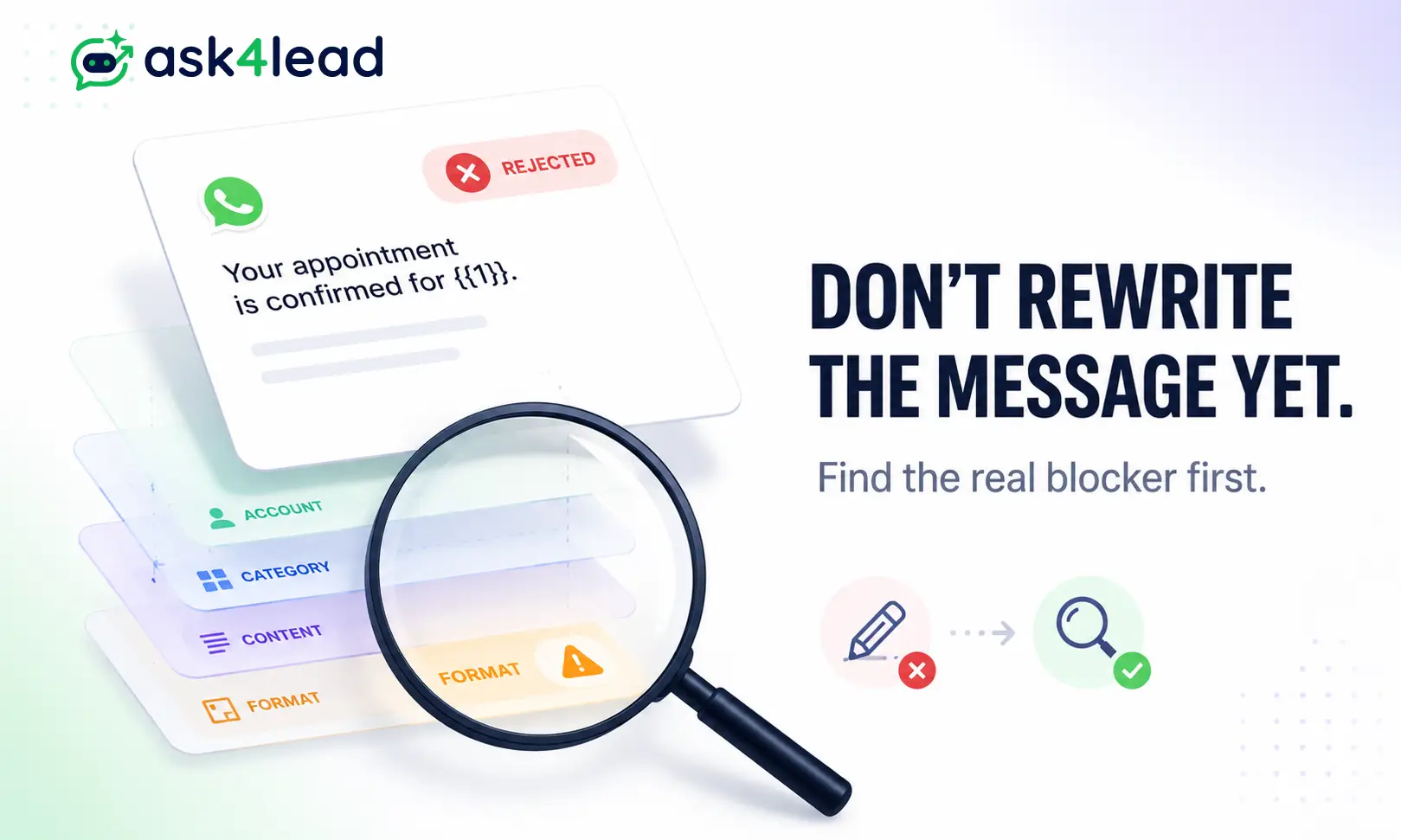
A WhatsApp template is a pre-written message Meta must approve before you can contact a customer outside the 24-hour reply window.
Meta rejects it for 1 of 4 reasons: an account block, a category mismatch, a policy breach, or a formatting error. Start by checking how WhatsApp templates work.
Roughly half of all “rejected template” complaints are account problems, not writing problems. Rewriting the message body cannot fix those.
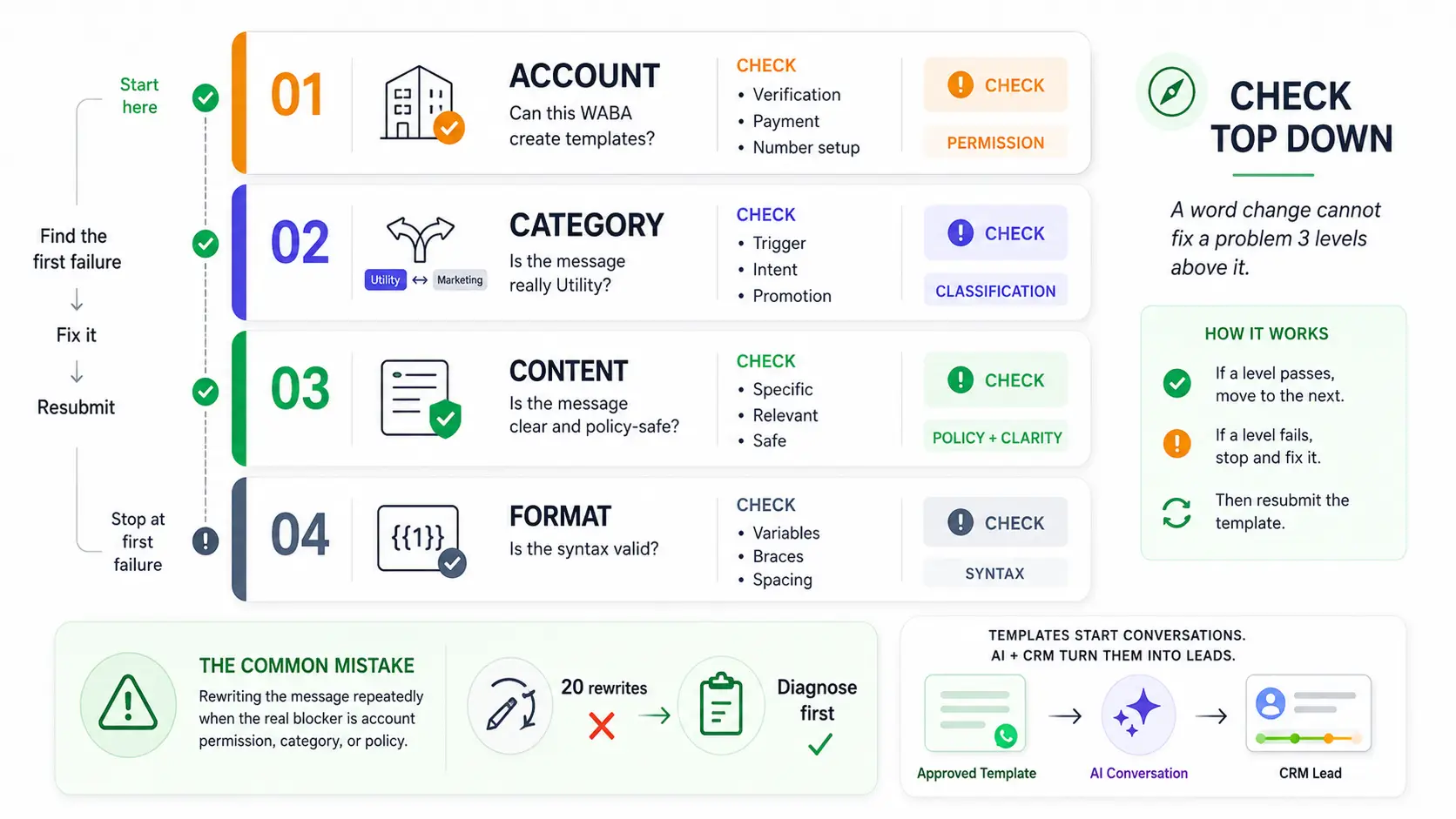
Quick Answer: Diagnose top down. Confirm your account is permitted to create templates, then check category, then content, then format. A word change cannot fix a block sitting 3 levels above it. That single ordering mistake is why businesses resubmit the same template 20 times.
Key Takeaways
- Rejection is per template. Your number is not banned and other templates are unaffected.
INVALID_FORMATandTAG_CONTENT_MISMATCHare the 2 codes you will see most.- Utility becomes Marketing when the body has no named trigger like an order or booking ID.
- Unverified businesses get 250 templates. Verified ones get 6,000.
- Paused and Disabled come from recipient complaints, not from review.
- Category appeals stay open for 60 days and succeed more often than most teams expect.
What a WhatsApp Template Rejection Actually Means
Rejection means Meta declined that exact combination of body, header, footer, and buttons. It is not a strike against your number.
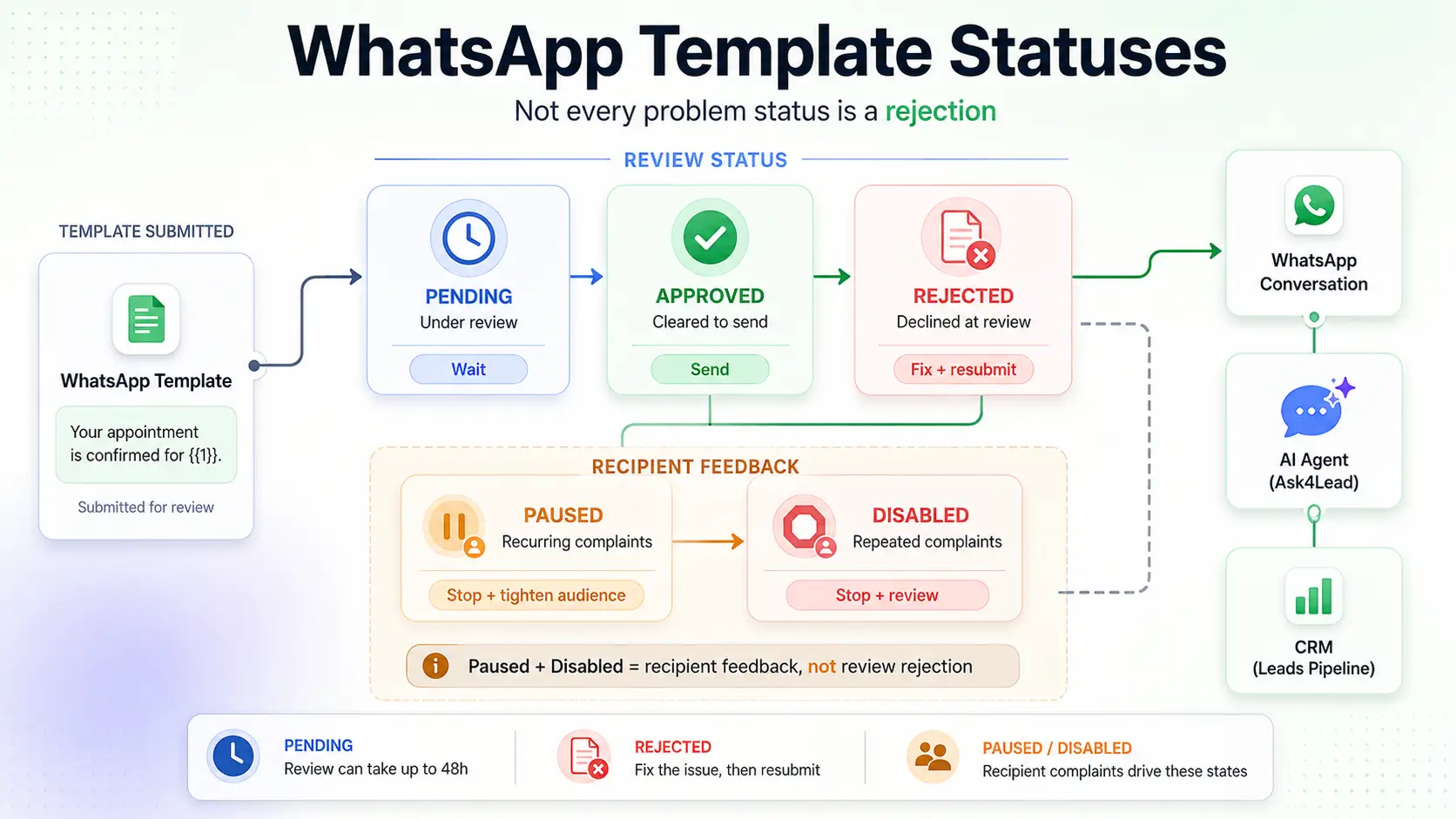
You can fix and resubmit immediately. The confusion starts because 5 statuses get called “rejected” in conversation, and only 1 of them is.
1. The 5 statuses, and why 2 of them are not rejections
| Status | What it means | Your move |
| Pending | Under review, up to 48 hours | Wait. Never resubmit a duplicate |
| Approved | Cleared and sendable | Nothing |
| Rejected | Declined at review | Fix 1 thing, resubmit |
| Paused | Recurring recipient complaints | Stop sending, tighten audience |
| Disabled | Repeated complaints or policy breach | Rewrite fully, appeal if wrong |
Paused and Disabled are misread constantly. Both mean real recipients blocked or reported you.
Fixing grammar will not help there. The message already passed review, so the problem is relevance, not wording.
2. What review speed tells you about the cause
Meta runs an automated pass, then routes anything unresolved to a human. Timing is a free diagnostic:
- Under 5 minutes. A syntax check caught you. Cheapest category to fix.
- 1 to 24 hours. Automated classification flagged your category or intent.
- Up to 48 hours. A person read it and disagreed. Expect a policy or category reason.
The Rejection Ladder: Check These 4 Levels in Order
Every guide online gives you a flat list of reasons. That is the wrong shape, because causes sit at different levels.
Work down these rungs and stop at the first failure:
- Account level. Is your WhatsApp Business Account permitted to create templates at all?
- Category level. Does the content genuinely match Utility, Marketing, or Authentication?
- Content level. Is the message specific, safe, and clearly attributable to you?
- Format level. Are variables, spacing, and characters syntactically valid?
Businesses burn weeks rewriting copy while the real blocker is an unattached payment method.
Level 1: Account Blocks Disguised as Template Rejections
Almost nobody writes about this rung. It is where the most time gets lost.
These 2 error messages tell you instantly that content is irrelevant:
- “This WABA is not allowed to create or update templates”
- “This WhatsApp Business account does not have permission to create message template”
Both are account states. Rewriting the body 20 times will not move either one.
1. What actually triggers the WABA permission error
Check these in order. The first 2 resolve most cases:
- Verification documents mismatched. Your legal business name must match uploaded documents character for character.
- Payment method not attached to the WABA. A card on the Meta Business account is not the same thing. This trips up teams certain they already paid.
- Number registration incomplete. A number showing offline in WhatsApp Manager cannot support template creation.
- Display name unapproved. Template capacity is tied to having 1 number with an approved display name.
2. The undocumented 2,000/24h gate on authentication templates
Meta publishes this nowhere. Partners who onboard accounts daily hit it constantly.
Authentication and verification templates require business verification plus a messaging limit of at least 2,000 conversations per 24 hours.
Below that tier, authentication templates fail creation with a permission error rather than a content rejection. Rewriting the OTP text changes nothing.
This is brutal for new integrations. OTP templates are usually the first thing anyone builds, so day-1 accounts hit an invisible wall and conclude the platform is broken.
3. Template limits are not what most guides say
Per Meta’s WhatsApp Business Account documentation, the cap depends entirely on verification:
| Business portfolio status | Templates per WABA |
| Unverified | 250 |
| Verified, with 1 approved display name | 6,000 |
Most published guides quote 250 alone. That leaves verified businesses deleting templates they never needed to delete.
4. When your provider’s app permissions are the real cause
Third-party platforms create templates using the whatsapp_business_management permission. If their app has not cleared Meta App Review, every creation call fails on their side.
You see a generic error toast or an instant rejection with no readable policy reason. The giveaway:
- API returns 200 OK
- Template comes back REJECTED in the same response
- No policy issue is named anywhere in Business Support Home
That combination means permissions or account state. It never means content. A platform that already passed Meta review removes this failure mode entirely.
Ask4Lead’s WhatsApp Business API integration handles the permission layer and Embedded Signup before you write a single template.
If verification itself is the blocker, the green tick and business verification guide covers the document mismatches that cause most rejections.
Level 2: Why Utility Templates Keep Becoming Marketing
Meta reclassifies Utility as Marketing when the content is not tied to something the customer already did.
Since April 2025, Meta approves the template under the corrected category instead of rejecting it. You often notice only when the bill arrives.
Marketing costs several times more than Utility and carries tighter per-user delivery caps.
1. The 3-question Utility test
Per Meta’s template categorization rules, Utility content must be non-promotional and either user-requested or genuinely essential. Run every draft through these:
- Is there a named trigger in the body? An order, payment, booking, ticket, or appointment, with its reference number visible.
- Does the customer lose something by missing it? Utility informs. If nothing is lost, it is Marketing.
- Is anything being sold? One upsell line flips the entire template, even if the other 90% is transactional.
2. The 2-button trap on confirmation templates
This catches order and appointment templates constantly. Adding 2 choice-style buttons pushes a Utility template into Marketing.
Examples that get reclassified:
- “Confirm” alongside “Reschedule”
- “Confirm” alongside “Cancel”
- “Yes, proceed” alongside “Change my order”
The logic is consistent. A pure Utility message informs and stops.
Ask the recipient to choose, and review treats it as driving engagement rather than notifying. Nobody documents this, and it costs businesses Marketing rates on genuinely transactional messages.
The workaround is to split the flow. Send a single-button Utility confirmation, then handle changes inside the 24-hour customer service window where free-form replies cost nothing.
3. Words that silently reclassify your template
Strip these from anything you want priced as Utility:
- Offer, deal, discount, sale, limited time, hurry, last chance
- Exclusive, special, just for you, don’t miss out
- Explore, discover, check out, browse, shop now
- Free, unless describing something already purchased
- Congratulations, winner, prize, claim
- Decorative emojis carrying tone rather than meaning
One less obvious trigger: vagueness itself reads as Marketing.
A body made almost entirely of variables gives review nothing transactional to anchor on. It defaults to the promotional bucket.
Level 3: Content and Policy Rejections
These are rejections where a human read your message and said no. They split into 3 groups with different fixes.
1. Templates too vague to review
A body reading Hi {{1}}, please check {{2}} for details gives a reviewer nothing to assess.
If a person cannot tell what the message is for or who sent it, it is declined as a potential spam shell. These 3 rules keep you clear:
- Keep roughly 3 words of fixed text per variable
- Name the transaction type in plain words, not just a placeholder
- Write sample data as a real message to a real customer
Leaving [Insert Name] in a sample field is an automatic decline. Reviewers judge the sample, not your intentions.
2. Sensitive data, threats, and restricted verticals
Meta’s WhatsApp Business Messaging Policy blocks these permanently, regardless of phrasing:
- Requests for full card numbers, bank account numbers, or national ID numbers
- Threatening tone, including legal action warnings, debt intimidation, or public shaming
- Gambling, adult services, weapons, and drugs
- Guaranteed financial returns or unsubstantiated health claims
- Political campaigning
For anything needing sensitive input, link to a secure page on your own domain. Never collect it in chat.
3. Links Meta reads as phishing
URL problems are the most fixable content rejection. The flagged patterns:
- Shorteners such as bit.ly and TinyURL
- Tracker domains that do not match your registered business domain
wa.melinks placed inside a template body- Any non-HTTPS link
Use the full HTTPS URL on your own domain. The wa.me rule surprises teams who use those links everywhere else.
Marketing templates also need a visible opt-out path. That connects directly to sending bulk WhatsApp messages without a ban.
Level 4: Format Errors in the INVALID_FORMAT Bucket
These are syntax problems, invisible to a human reader and caught instantly by pattern checks. They are also the fastest to fix.
1. Variable rules that trigger instant rejection
| Mistake | Example | Fix |
| Variable opens the body | {{1}}, your order shipped |
Hi {{1}}, your order shipped |
| Variable closes the body | Body ending on {{2}} |
Add a closing line after it |
| Non-sequential numbering | {{1}}, {{2}}, {{4}} |
Renumber without gaps |
| Adjacent variables | {{1}} {{2}} |
Put real words between every pair |
| Broken braces | {1}} or {{1} |
Always 2 braces each side |
A variable can expand into anything. That is why Meta refuses to let one open or close a message.
2. The named-parameter trap developers hit
API users who submit with parameter_format: named hit a failure almost nobody documents.
Parameters like {{name}} and {{payment_id}} return a 200 OK status, then immediately mark the template REJECTED with an Invalid Format reason.
Named parameters are supported. They are simply stricter about naming conventions and about the same dangling-variable rules.
If a named payload keeps failing with no readable reason, switch to numbered {{1}} positional parameters and resubmit. It costs nothing functionally and clears the rejection in most cases.
3. Emojis, spacing, and invisible characters
Most format rejections come from characters you cannot see in the editor:
- Runs of 2 or more spaces between words
- Tab characters and consecutive blank lines
- A trailing blank line, since the body must end on its last line of text
- Decorative glyphs and checkmarks outside your selected language set
- A language tag that does not match the body text
Emoji count deserves its own warning. Templates fail repeatedly with everything else correct, then pass after removing a single emoji.
That happens even when near-identical templates with emojis cleared previously. Treat emojis as the first variable to strip when troubleshooting. Keep Utility templates emoji-free entirely. Stay well under 10 on Marketing templates.
Once formatting is clean, timing becomes the constraint. Templates are what make scheduled WhatsApp messages possible outside the free reply window.
Why the Same Template Passes on 1 Account and Fails on Another
This is the most reported and least explained pattern in WhatsApp support. Identical text, 2 accounts, opposite outcomes.
Review weighs account signals alongside content. A verified account with sending history clears checks a fresh account fails on the same words.
That has 4 practical consequences:
- New accounts wait longer. Unverified numbers, especially virtual ones, take a full 24 hours where established accounts get 2 minutes.
- Duplicate detection works across accounts. The same template name or near-identical content elsewhere can trigger a rejection on the second account.
- Submission velocity matters. Creating many templates in a short window looks like abuse and raises rejection rates on all of them.
- Meta has platform-wide review incidents. When unrelated businesses and providers report identical failures the same day, waiting 24 hours and resubmitting unchanged genuinely works.
That last point saves the most wasted effort. Check whether the failure is universal before you rewrite anything.
Account health sits upstream of all of it. Tracking your quality rating through WhatsApp Account Health tells you whether you are climbing toward a higher tier or drifting toward paused templates.
How to Appeal a Rejected Template
Appeals are worth filing, especially for category reclassifications. Genuine Utility templates get restored regularly.
Meta allows a review request for 60 days from creation, or from the date a category changed. Most businesses never appeal because they do not know the option exists.
1. The appeal path in Business Support Home
- Open Meta Business Support Home.
- Select the WhatsApp Business Account holding the template.
- Open Rejected Template Messages, or Review category updates for a reclassification.
- Select the template. The stated Policy Issue appears alongside it.
- Click Request Review, choose your reason, and submit.
- Wait 24 to 48 hours for a decision.
One caveat catches smaller accounts. Direct Meta support is not available to everyone.
If Business Support Home says you are not eligible, your only route is a Business Solution Provider or Tech Partner who can escalate for you.
2. What to write, and what never works
Keep the appeal factual and short. What works:
- Name the exact user action that triggers the message
- Point to the reference number visible in the body as proof it is transactional
- If a soft call to action exists, remove it and say you removed it
What fails every time:
- Defending promotional language
- Arguing about pricing or cost
- Resubmitting an identical template with no change
3. The 30-day name lock and submission pacing
After a rejection, Meta blocks reuse of that template name for 30 days.
Version your names from day 1 using order_confirm_v1 and order_confirm_v2. A rejection then never costs you a day.
Change 1 thing per resubmission. Rewrite everything at once and you learn nothing about which rule you broke.
Pacing protects more than patience. Repeated miscategorised submissions create account-level risk, and that path ends in recovering a blocked WhatsApp Business account rather than fixing a template.
Rejected vs Approved: 4 Real Rewrites
The gap between a rejected template and an approved one is usually 1 small edit.
| Rejected | Why it failed | Approved |
{{1}}, your appointment is confirmed for {{2}} |
Variable opens the body | Hi {{1}}, your appointment on {{2}} is confirmed. |
Thanks for your order! Use code SAVE10 next time. |
Upsell flips Utility to Marketing | Thanks for your order. Order {{1}} ships on {{2}}. |
Hi {{1}}, please check {{2}}: bit.ly/xy3k |
Vague plus a shortened URL | Hi {{1}}, invoice {{2}} is ready at https://yourdomain.com/invoices |
Your booking {{1}} with Confirm and Reschedule |
Choice buttons read as engagement | Your booking {{1}} on {{2}} is confirmed. with 1 Call button |
The pattern across all 4 is identical. Add a concrete noun, remove the sell, use your own domain, stop asking the recipient to choose. Teams writing templates in volume should keep each one attached to the campaign that sends it.
Inside Ask4Lead, templates sit beside WhatsApp campaigns and the 9-stage pipeline, so every template is tied to the stage it serves.
Approved but Still Not Delivering: Error 131049
An approved template that never arrives is a separate problem with a separate error.
Code 131049 returns as “This message was not delivered to maintain healthy ecosystem engagement.” That is a per-user marketing cap, not a fault in your template.
WhatsApp limits how many marketing messages any individual receives from all businesses combined. Past that ceiling, further marketing templates are dropped regardless of your quality rating.
These 4 moves genuinely change the number:
- Move eligible messages to Utility. Utility is exempt from the per-user marketing cap. This is the larger reason category accuracy matters, beyond cost.
- Retry after 24 hours, not harder. Automated retries spread across 48 to 60 hours lift delivery meaningfully.
- Switch to the Marketing Messages Lite API. Meta reports a 7% to 10% delivery improvement over standard marketing sends.
- Build real two-way conversation. Recipients who replied to you recently are not treated as cold marketing targets.
Only the last one compounds. Everything else is a ceiling workaround.
Broadcast-only strategies decay for exactly this reason. Pairing campaigns with an AI sales assistant that holds a genuine conversation raises deliverability instead of eroding it.
Volume mechanics are covered separately in the guide to WhatsApp broadcast limits.
One reporting caveat matters here. Template analytics run 6 to 48 hours behind, and reply tracking stays empty until volume reaches the thousands. A template showing 0 replies on day 1 is not failing. It is unmeasured.
FAQs
1. How long does WhatsApp template approval take?
Most templates clear automated review in 1 to 5 minutes. Human review takes up to 48 hours, and verified businesses are consistently faster.
2. Why was my template rejected when the same text was approved elsewhere?
Review weighs account signals alongside content. A verified account with sending history passes checks a new account fails on identical wording.
3. Can I edit a rejected template instead of creating a new one?
Yes, edit and resubmit immediately. But you cannot reuse the same template name for 30 days, so version your names from the start.
4. How many templates can 1 WhatsApp Business Account hold?
Unverified portfolios are capped at 250 per WABA. Verified portfolios with an approved display name get 6,000.
5. Are emojis allowed in WhatsApp templates?
Yes, in moderation. Keep Utility templates emoji-free, stay under 10 on Marketing, and remove emojis first when troubleshooting.
6. Why did my Utility template become Marketing after approval?
Meta re-scans approved templates and reclassifies promotional-sounding ones. Request a review within 60 days of the category change.
7. Does a rejected template hurt my quality rating?
No. Quality rating reflects how recipients respond to delivered messages, and a rejected template was never sent.
8. What does “This WABA is not allowed to manage templates” mean?
Your account is not permitted to create templates right now. Check verification, a payment method attached to the WABA, number registration, and display name approval.
What to Do Next
Most template rejections are not writing problems. Work down the ladder: account, category, content, format. Appeal every category reclassification. The 60-day window is generous and reversals are common.
The deeper issue is different, though. Most template frustration comes from running an entire customer relationship through outbound broadcasts.
Templates are the permission slip to start a conversation. They are not the conversation. Businesses that fight approvals least are the ones getting replies.
An active thread means fewer templates, better deliverability, and cheaper messaging, because replies inside the 24-hour window are free.
Turn Approved Templates Into Real Conversations
That gap is what Ask4Lead is built for. Most WhatsApp tools send a button menu and stop the moment a customer asks something the menu does not cover.
Ask4Lead holds a real plain-English conversation instead:
- It asks what the customer actually needs, in their own words
- It follows up in context instead of repeating a menu
- It hands your rep the problem, need, and urgency, not just a name and number
- You keep control with human approval before any AI reply sends and one-click takeover
See how it maps to your sector in the industry playbooks, or browse the full feature set.
Start free with 100 AI credits. No card required, and your first conversation runs in minutes.
