

Promotional emails often sit unread in a Promotions or Spam folder. A WhatsApp message lands in the same chat list your customers check every day.
Standard WhatsApp broadcast lists reach only people who saved your number, and they cap each list at 256 contacts. Everyone else on your list never sees the message.
Filter your CRM by custom tags, select an approved WhatsApp template, and launch your campaign. Watch the replies flood into your shared inbox instantly.
Reach your audience where they actually read messages.

Why You Need WhatsApp Marketing Software
If you want people to see your promotion, you must send it on WhatsApp.
The Campaigns feature allows you to send mass messages to hundreds or thousands of contacts simultaneously. Because it uses the official WhatsApp Business API, you avoid the unofficial bulk senders that get numbers banned. Keep your quality rating high by messaging only opted-in customers.
This is the fastest way to reactivate cold leads or announce a new product launch.
Stop Wasting Money on Ignored Emails
Promotional emails often sit unread in a Promotions or Spam folder. A WhatsApp message lands in the same chat list your customers check every day.
Standard WhatsApp broadcast lists reach only people who saved your number, and they cap each list at 256 contacts. Everyone else on your list never sees the message. You lose massive reach.
Key Insight: Ask4Lead sends through the official WhatsApp Business API, so your message reaches opted-in customers whether or not they saved your number.
How to Launch a Campaign, Step by Step
Sending a broadcast is safer and easier than sending an email:
- Build your audience: Filter your CRM database using custom tags (e.g., “Cold Leads”).
- Select a template: Choose a pre-approved WhatsApp message template.
- Personalize variables: The system automatically inserts each customer’s first name into the template.
- Schedule the send: Choose to broadcast immediately or schedule it for a specific date and time.
- Handle the replies: As customers reply, the chats land directly in your Shared Team Inbox.
Core Capabilities of the Campaigns Engine
Our WhatsApp marketing software is built for ROI:
- Filter audiences precisely using tags, lead source, or pipeline stage to ensure high relevance.
- Support for rich media templates, including images, videos, and PDF attachments.
- Include interactive buttons (e.g., “Buy Now” or “Opt-Out”) directly in your broadcast message.
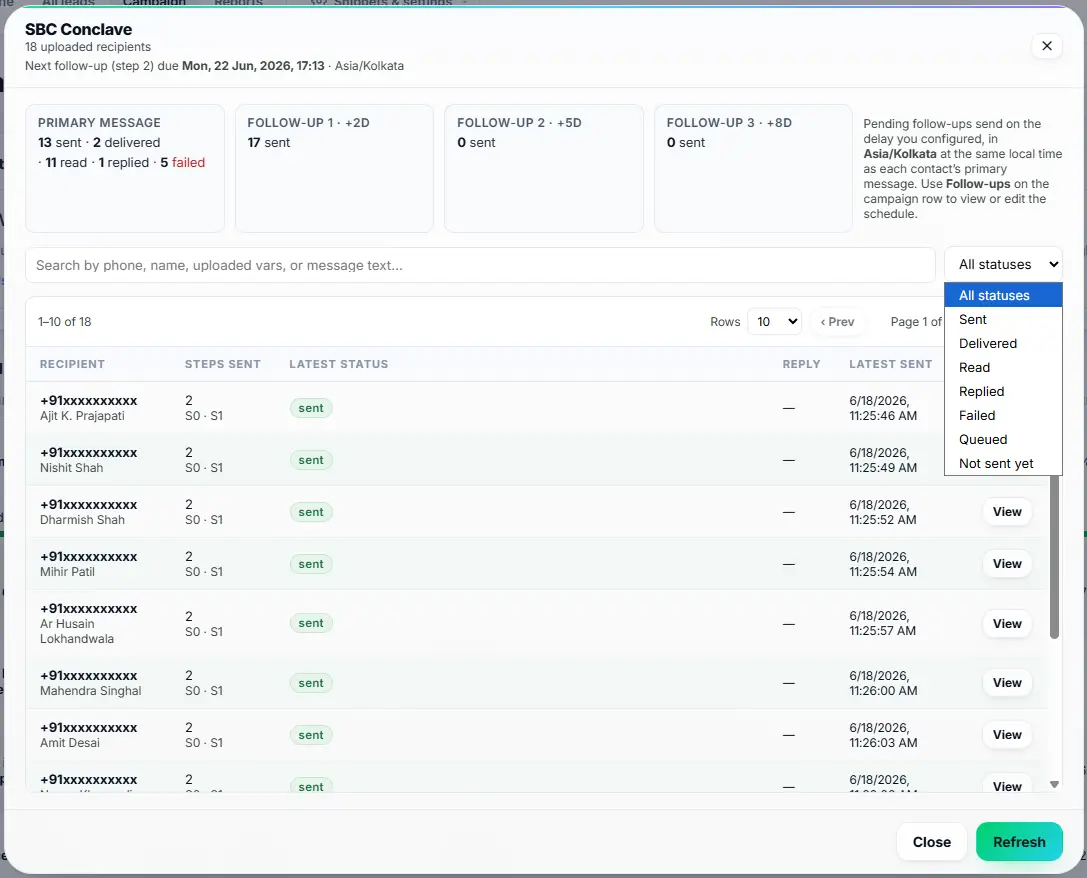
- Track real-time delivery rates, open rates, and read receipts on the analytics dashboard.
- Schedule campaigns across different time zones to hit your audience at the perfect hour.
- Automate follow-up actions when a customer clicks a specific button in your message.
Email Marketing vs. WhatsApp Campaigns
| Traditional Email Marketing | Ask4Lead WhatsApp Marketing Software |
| Lands in a Promotions or Spam folder | Lands in the customer’s WhatsApp chat list |
| Replies go to an unmonitored inbox | Replies drop into the active Shared Team Inbox |
| Delivery and read status are hard to track | Delivery status shows per message, and read status where the customer has read receipts on |
How Campaigns Connect to Your CRM
Campaigns rely entirely on your Lead Management data to target the right people. You build the messages using WhatsApp Templates. When a campaign succeeds, the replies flow straight into the Shared Team Inbox.
- Lead Management: Provides the audience data and custom tags used for targeting.
- WhatsApp Templates: The pre-approved message formats you use for your broadcast.
- Shared Team Inbox: Where your agents handle the massive influx of replies generated by the campaign.
Industries That Maximize WhatsApp Marketing
- E-commerce Brands use campaigns to send Black Friday discount codes with interactive “Buy Now” buttons.
- Real Estate Agents broadcast new property listings to massive lists of segmented, active house hunters.
- Gyms & Fitness Centers send reactivation offers to former members who canceled their subscriptions last year.
- Event Organizers send last-minute ticket availability updates and parking instructions to attendees.
FAQs
Will my number get banned for sending bulk messages?
Not for using Ask4Lead, because it runs on the official WhatsApp Business API with Meta-approved templates. Meta can still restrict any number that gets many blocks or spam reports, so send only to customers who opted in and honour every opt-out.
Can I send promotional messages?
Yes. Meta allows promotional templates (like discount codes and sales announcements) as long as you follow their commerce policies.
Do contacts need to have my number saved to receive the message?
No. Unlike standard WhatsApp broadcast lists, API campaigns deliver to anyone who has opted in, regardless of whether they saved your contact.
How do I handle the replies from a massive campaign?
You can configure the AI Sales Assistant to handle the initial wave of responses. This filters out the noise before your human agents step in.
Can I personalize the bulk messages?
Absolutely. You can insert dynamic variables like {{First Name}} or {{Company Name}}. The system auto-fills these from the lead profile.
Is there a limit to how many messages I can send?
Yes. Meta limits how many unique people your business can message outside open chats in 24 hours. New businesses start at 250, and business verification raises that to 2,000. After that, Meta raises the limit to 10,000, 100,000 and then unlimited when your quality rating stays high and you use at least half your limit in 7 days. All numbers in one business portfolio share the same limit.
Related Features

Launch AI Email Campaign in WhatsApp
Run personalized email campaigns where AI writes a unique subject and body for each recipient, sent across multiple mailboxes for better deliverability.

WhatsApp Templates
If you want to initiate a chat with a customer or run a bulk campaign, you must use pre-approved WhatsApp message templates. Ask4Lead makes this complex approval process simple.

Reports and Analytics
Stop managing your sales team blindly. Our visual WhatsApp analytics dashboard gives you total visibility into every metric that matters.