
WhatsApp Status ads are paid vertical images or videos that Meta places between people’s Status updates in the WhatsApp Updates tab. You buy them in Meta Ads Manager like any Facebook ad. A tap opens a chat or a web page.
They follow the same chat rules as click to WhatsApp ads. Meta documents the setup. It publishes no price list, though, and several settings quietly stop the ads from delivering.
Quick answer: Build the ad in Meta Ads Manager and keep the Instagram Stories placement on, because Status cannot be bought alone. Target by location, language and age, and keep Advantage+ on. Judge results by cost per qualified lead, as Meta lists no Status rate card.
Key takeaways
- Paired placement: Status ads need Instagram Stories, so spend cannot be isolated to Status.
- Narrow targeting backfires: Custom audiences, detailed targeting and excluded age groups can cut delivery.
- No rate card: Cost comes from the auction, and vendor figures online are unsourced estimates.
- Quality is your job: Chats from a passive scroll need a fast reply, a qualifying question and a human check on pricing.
What Are WhatsApp Status Ads?
WhatsApp Status ads are paid slots in the Updates tab. They sit between the vertical photos and videos that people post as Status updates, apart from personal chats and calls.
Meta says more than 1.5 billion people use the Updates tab daily. Reach is large, but you get fewer targeting signals than on Facebook.
Where WhatsApp Status ads appear
The ads sit only in the Updates tab. Statuses there are single 9:16 vertical images or videos that vanish after 24 hours. Your creative must read at a glance, in full screen.
Meta’s help page on ads in WhatsApp Status says rollout is gradual. Your account may not show the placement yet.
What data decides who sees Status ads
WhatsApp’s Help Center lists the signals it uses:
- Account basics: country code and age, where applicable.
- Device: the device language.
- Location: general location, such as city or country.
- Activity: channels followed, content engaged with, and ads clicked in Status or Channels.
Personal messages, calls, chat locations, device contacts and group membership are not used. In practice, you buy a place, a language and an age band, not an interest. Our guide to WhatsApp data privacy covers the consent side.
WhatsApp Status ads vs click to WhatsApp ads vs organic Status
| Format | Where it shows | Cost | Best for |
| Status ads | Updates tab, between Statuses | Auction, bought in Meta Ads Manager | Reaching people who do not have you saved |
| Click to WhatsApp ads | Facebook and Instagram, including Instagram Stories | Auction, bought in Meta Ads Manager | People already browsing feeds |
| Organic Status | Your contacts and chosen audiences | Free | Nurturing people who know you |
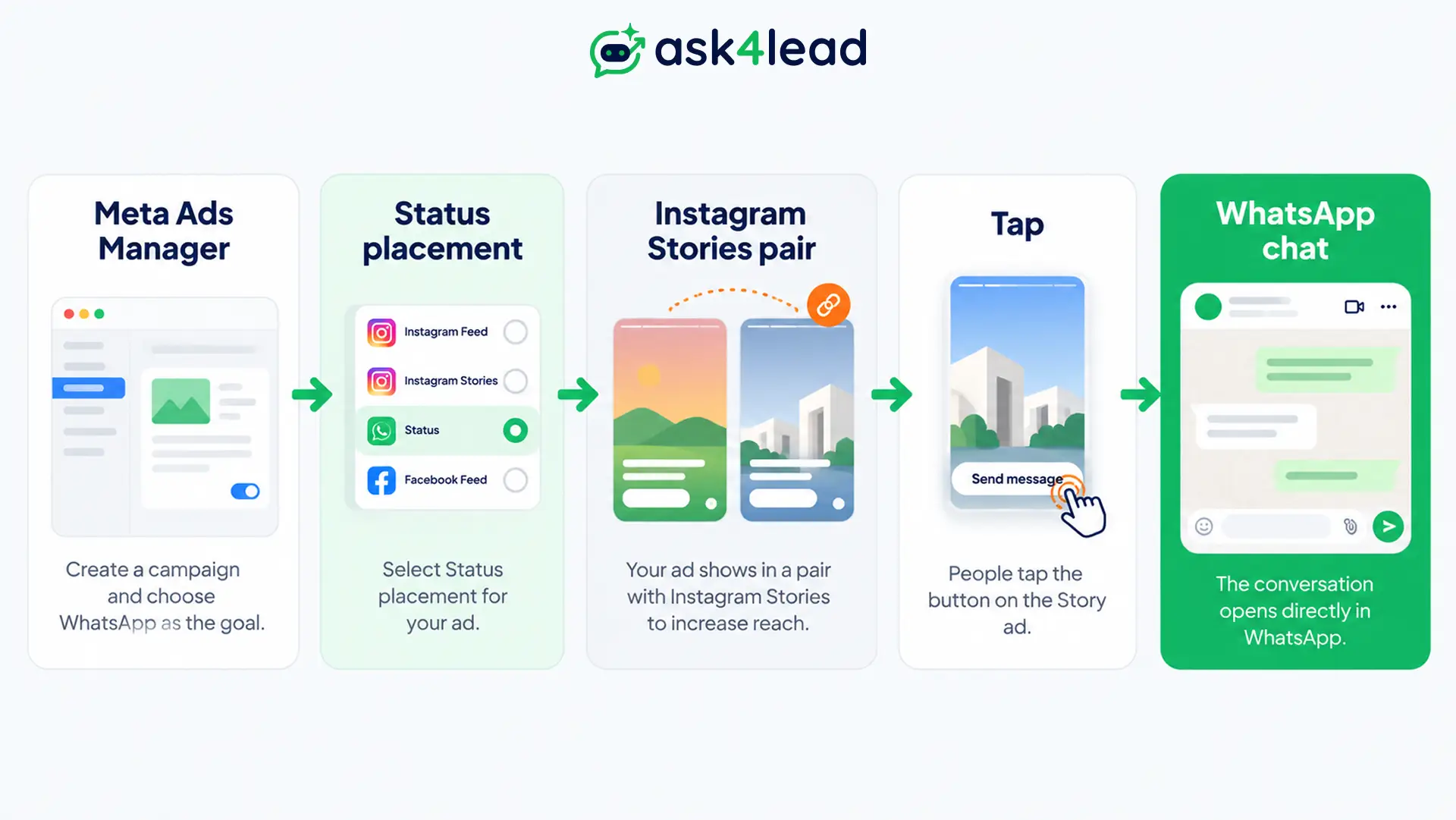
Status is a placement you add to a Meta campaign beside Instagram Stories, not a separate ad product. Free organic Status updates still do the warming-up work.
WhatsApp Status Ads Setup: Steps Inside Meta Ads Manager
To set up WhatsApp Status ads, create a campaign in Meta Ads Manager and pick a supported objective. Switch Dynamic Creative off, and keep both the Status and Instagram Stories placements on. You need a Facebook Page, plus a WhatsApp Business account when the chat is the destination.
What you need before you start
- Facebook Page for the business, required for every Status ad.
- WhatsApp Business account, made in the free Business app or linked through its API, which is Meta’s route for larger-scale messaging. Our app vs API comparison helps you choose.
- Shared business portfolio holding both, so your profile photo and name show in the ad preview.
- No special ad category. Credit, employment and housing campaigns are incompatible, so read our guide to financial services compliance first.
1. Pick an objective and a performance goal
Meta Ads Manager supports 5 objectives for Status. Vendor guides disagree on which objective enables it, but Meta’s page lists all 5:
| Objective | Destination | Goals you can pick |
| Awareness | Website or WhatsApp | Unique reach, impressions, ThruPlay views |
| Traffic | Website or Messaging apps | Link clicks, reach, conversations, impressions |
| Engagement | Website, Messaging apps or On your ad | Same, plus conversions (Website only) |
| Leads | Website or WhatsApp | Conversations (WhatsApp), conversions (Website) |
| Sales | Website or Message destinations | Conversions (Website), conversations (messages) |
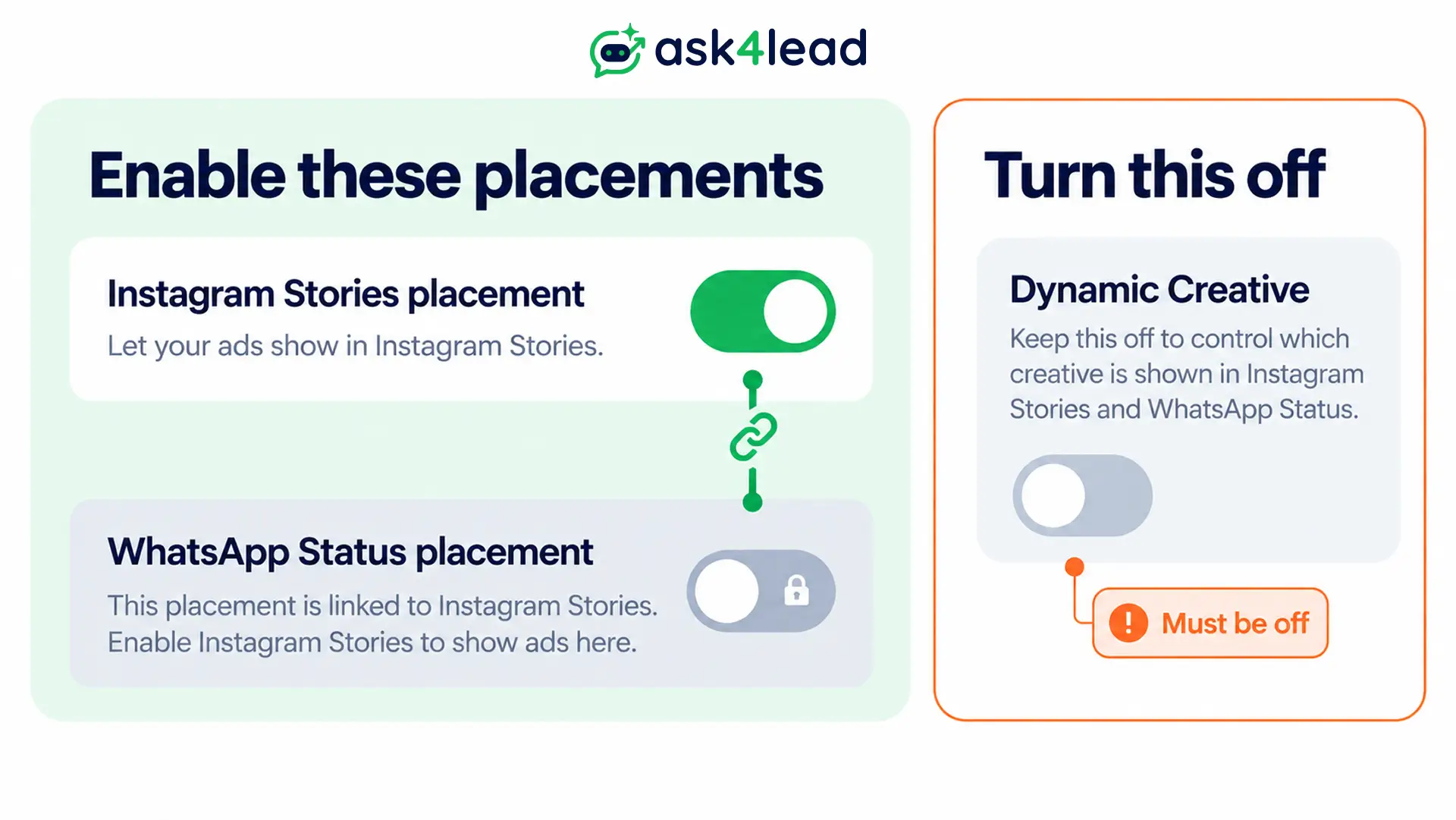
2. Turn off Dynamic Creative and keep Instagram Stories on
Dynamic Creative must be off, or Status cannot be selected. Meta’s setup guide also says you must include the Instagram Stories placement, so Status is never bought alone. Check these 3 points:
- Advantage+ placements: these include Status by default.
- Brand safety controls: advertisers who used them in the past 12 months are opted out automatically. Check Manual placements in Meta Ads Manager.
- Unconfirmed tips: an advertiser reported that most impressions still landed on Instagram Stories. Another tip says you can avoid the pairing by building the ad in the WhatsApp Business app. Meta documents only the Meta Ads Manager route.
3. Build the vertical creative and the opening message
Upload a single image or video. Traffic, Engagement and Leads also allow a carousel of 2 to 10 cards. Design for 9:16 and keep the offer readable without sound.
For a chat destination, you also write the message template, which is the opening line the person sends. Try “Hi, is the 2BHK offer from your Status still open?” That line tells your team which ad produced the chat. A click-to-chat link can carry the same prefilled text for organic traffic.
Whoever answers it sets the tone. Ask4Lead includes an AI Sales Assistant that answers inside a minute, day or night, and asks follow-up questions in free text instead of repeating a menu.
4. Publish and read the right report
After approval, Meta Ads Manager reports impressions, clicks and messaging conversations started. Judge results over 3 to 7 days, because daily numbers on small budgets swing widely.
Claims about Status ads that Meta’s pages contradict
| Claim in circulating guides | What Meta’s pages say |
| Use Manual placements to run Status alone | Instagram Stories must stay included |
| Build custom and lookalike audiences | They can substantially reduce Status delivery without Advantage+ |
| Video must be 30 seconds, approval takes 24 hours | Meta Ads Manager setup steps list no 30-second cap and no approval time |
| Status ads are fully rolled out | Rollout is gradual and varies by region |
| Replies after the click carry no conversation charges | Billing is per delivered message, with a free window for chats that start from an ad |
WhatsApp Status Ads Targeting: What You Can Control
WhatsApp Status ads targeting in Meta Ads Manager is limited to location, language and age. Meta recommends Advantage+ audience features, because narrow setups can restrict delivery. Treat the creative as your targeting, since it decides who taps.
Our WhatsApp marketing strategies guide has offer ideas.
Core targeting options for WhatsApp Status ads
| Option | What it does | Watch out for |
| Location | Country, region or town/city | Small towns shrink reach fast |
| Language | Matches people by language | Write the ad copy in it |
| Age | Sets an age range | Unknown-age viewers are included by default |
| Advantage+ audience | Lets Meta widen delivery | Turning it off can lower reach |
People on WhatsApp whose age is unknown must see ads suitable for all ages. You can exclude them, but Meta warns this may substantially reduce delivery.
Settings that block WhatsApp Status ads delivery
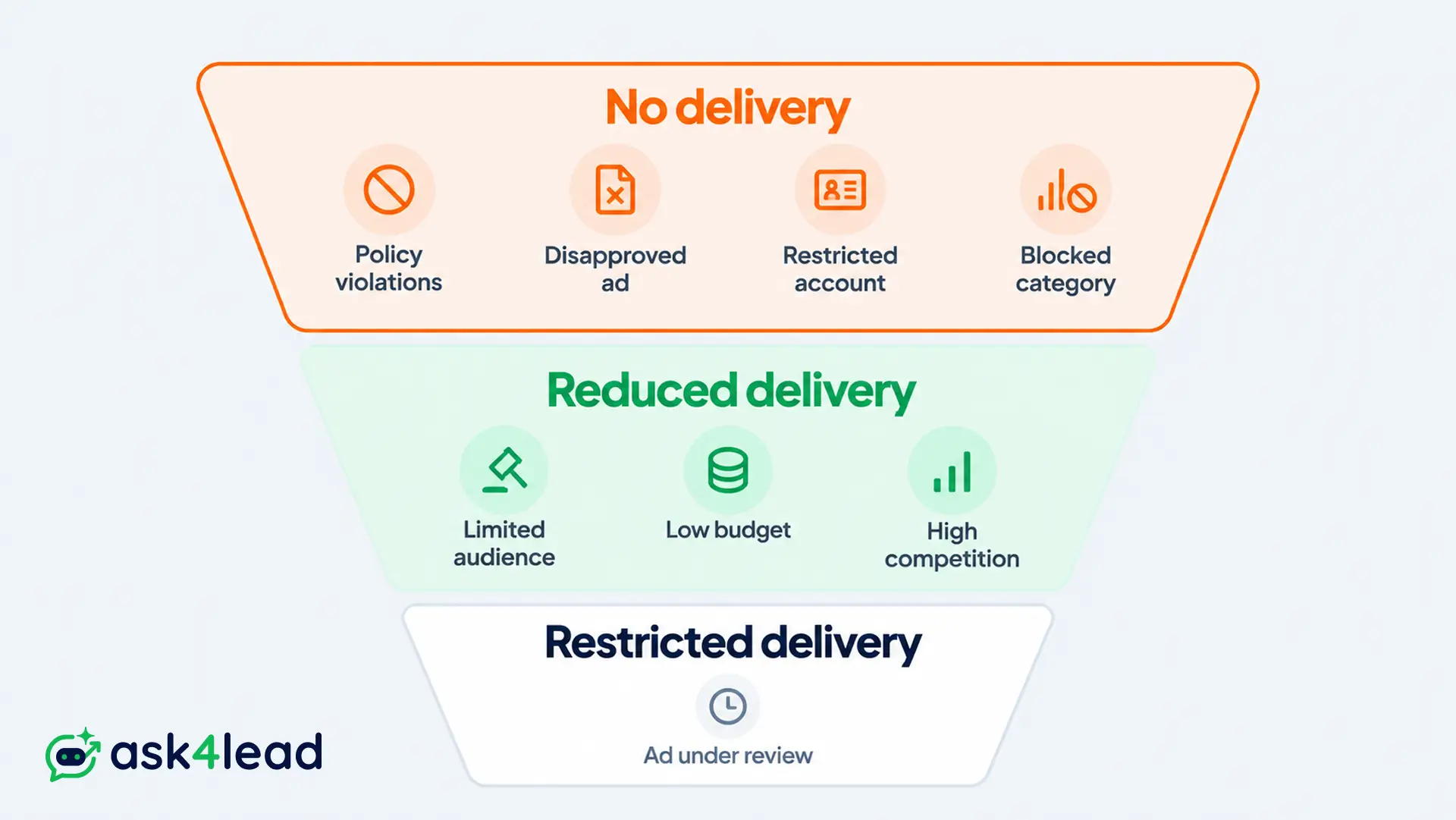
| Effect | Settings, per Meta’s help page |
| No delivery | Shops ads, creative testing, Meta experiments, special ad categories, Collection ads, Instant Experience, Facebook event, phone call, messaging apps without WhatsApp |
| Reduced delivery | Ad account-level audience controls, custom and lookalike audiences without Advantage+, excluding unknown age |
| Restricted delivery | Detailed targeting without Advantage+ detailed targeting |
WhatsApp Status Ads Cost: What You Actually Pay
WhatsApp Status ads cost whatever the Meta auction charges for your audience, creative and budget. Meta publishes no Status-specific rate card, so your total is ad spend plus any WhatsApp message fees once the chat starts. The number that matters is cost per qualified lead.
How WhatsApp Status ads are priced
Meta’s pages describe delivery and goals, but they give no prices. Vendor ranges do not agree either.
A vendor guide quotes ₹15 to ₹60 per conversation in India, and $1 to $5 in the US and UK. It cites no source. Another quotes ₹25 to ₹90 CPM (cost per 1,000 impressions), also unsourced.
Use them as sanity checks, not forecasts. Run a small test, then calculate your own numbers.
Messaging fees after the click
Per Meta’s pricing page, these rules apply:
- Free entry point window: answer a chat from an ad within 24 hours, and the next 72 hours carry no message charges.
- Service messages: the first 1,000 per business phone number each month are free.
- Billing unit: Meta charges per delivered message, not per conversation.
Meta ties the free window to chats that start from an ad. It does not name Status, so confirm that Status chats open it in your account. The 24-hour rule explains the reply window that starts it.
On the software side, Ask4Lead’s prepaid credits start at ₹0.50 per outbound message, and sending pauses at a zero balance.
Cost per qualified lead for WhatsApp Status ads
Cost per qualified lead = ad spend ÷ (chats × reply rate × qualified rate)
| Step | Strong follow-up | Slow follow-up |
| Ad spend | ₹30,000 | ₹30,000 |
| Chats at ₹30 each | 1,000 | 1,000 |
| Reply to first question | 40% | 20% |
| Qualified share of replies | 25% | 15% |
| Qualified leads | 100 | 30 |
| Cost per qualified lead | ₹300 | ₹1,000 |
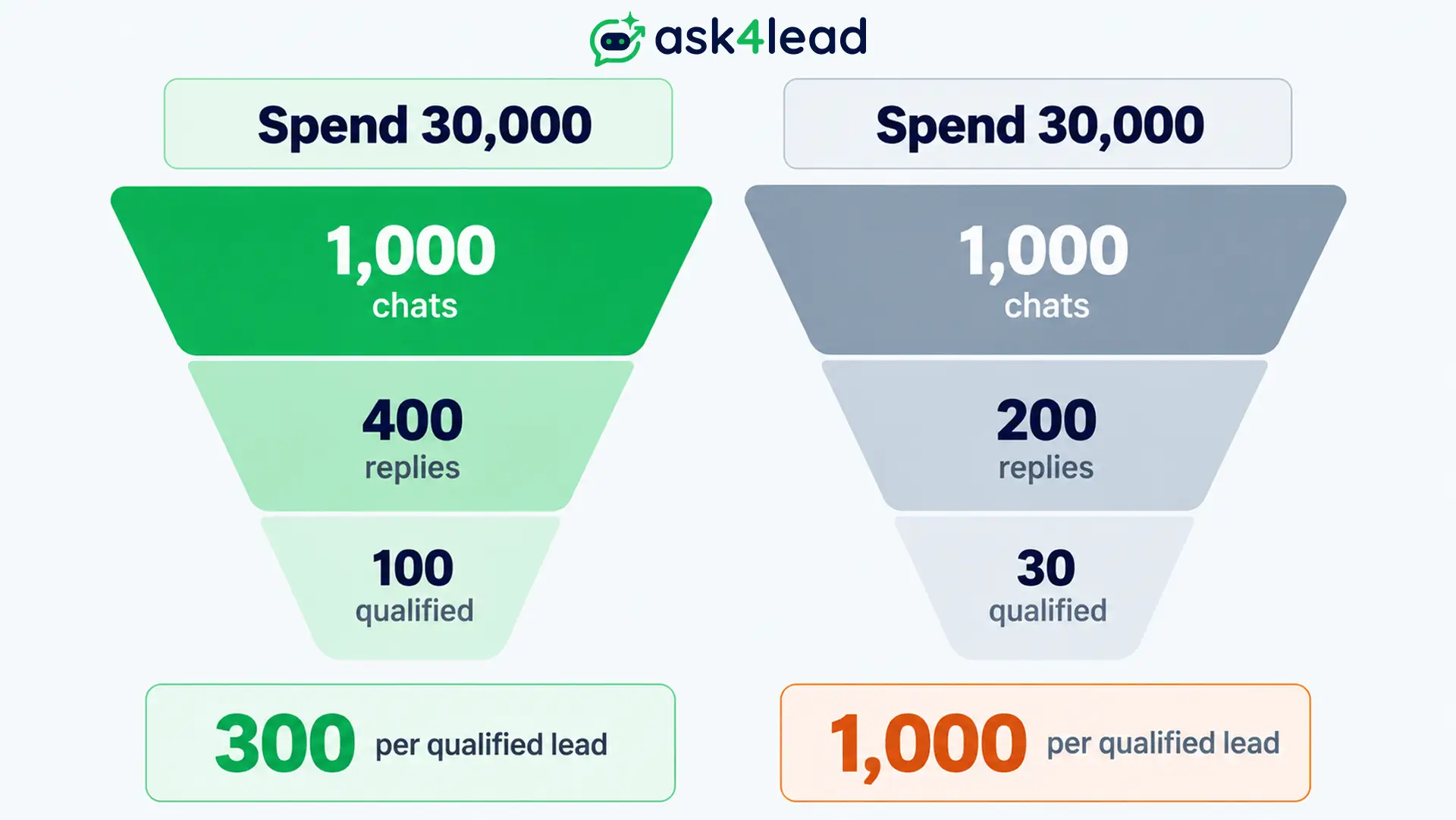
These are example assumptions, not benchmarks. The same ad spend produced a 3x gap in lead cost, and follow-up caused it. The Ask4Lead AI Dashboard shows qualification rate and filters performance by marketing campaign.
How to Improve WhatsApp Status Ads Lead Quality
Status ads reach people mid-scroll, so many taps are curiosity rather than intent. Quality improves when the ad filters people before the tap and the chat qualifies them after it. Your goal should also match what you want, so each lever fixes a different part of the funnel.
Put the offer and price in the first frame
Several advertisers report that broad delivery with no filter just brings more of the same junk. Naming the offer, the price band and the city in the first frame lets low-intent viewers scroll past.
A visible price invites pricing questions. Ask4Lead’s Human Approval holds pricing questions for a person. Nothing reaches the customer until a team member approves the reply.
Qualify inside the chat before a human sees it
Speed matters here, as our piece on speed to lead shows. Then use 2 steps:
- Ask 2 questions: what the person needs and when they want it. WhatsApp Flows can run this form step inside the chat.
- Record the answers: in Lead Management, the AI saves name, budget and requirements to the lead record during the chat.
Split Status from deeper-event campaigns
Chasing chat starts teaches Meta to find people who start chats, not buyers. These 2 facts shape the fix:
- Deeper events exist: Meta’s Conversions API for business messaging supports events such as LeadSubmitted and QualifiedLead.
- Status limits goals: Meta’s Status page lists only conversation, click, reach and impression goals for messaging destinations. Conversion goals appear only for website destinations.
Use Status for chat starts, and keep deeper-event goals in your Feed and Reels ad sets.
Follow up inside the free window
Free messages end with the window. Later outreach needs a paid marketing template plus valid opt-in records. The Ask4Lead Work Queue surfaces open deals with no recent reply, so stale chats get a human nudge.
Why WhatsApp Status Ads Do Not Deliver
Most Status delivery problems come from a handful of settings, not from Meta penalising the account. If spend is low or zero, check the placement pairing, Dynamic Creative, brand safety opt-outs, narrow audiences and regional rollout in Meta Ads Manager first. Do that before you edit the creative or raise the budget.
| Symptom | Likely cause | Fix |
| Status cannot be selected | Dynamic Creative on, or Instagram Stories missing | Turn it off, add Instagram Stories |
| Placement on, no Status spend | Brand safety controls opted you out | Opt in under Manual placements |
| Spend lands on Instagram Stories | Paired placement, no split control | Judge the pair together |
| Very low reach | Custom audiences or narrow targeting | Use Advantage+, keep unknown age on |
| Placement missing | Gradual regional rollout | Recheck later, use other placements |
| Ad or number restricted | Policy or low quality rating | Fix the cause, then appeal |
FAQs
1. Can I run WhatsApp Status ads without a WhatsApp Business account?
Yes, if the destination is a website, because a Facebook Page is the only requirement then. A chat destination needs a WhatsApp Business account.
2. What is the minimum budget for WhatsApp Status ads?
Meta’s Status help pages state no Status-specific minimum. As a practical rule, size the test to produce about 100 chats, then judge it over 7 days.
3. Can people hide or block WhatsApp Status ads?
People can tap “Why you’re seeing this ad,” hide or report an ad, and manage ad preferences. Ad-blocker vendors report that DNS filtering cannot remove them.
4. Do WhatsApp Status ads read private messages?
No. WhatsApp says personal messages, calls and Status updates are end-to-end encrypted and are not used to show ads.
5. Are WhatsApp Status ads available in my country?
Meta says rollout is gradual and varies by region. The reliable test is whether Status appears under placements in your Meta Ads Manager account.
Conclusion
Status ads are a paired, auction-priced placement with limited targeting. Results depend on careful setup and on what happens after the tap.
Before you launch, check that:
- Instagram Stories is included and Dynamic Creative is off.
- Advantage+ audience is on, with unknown age left included.
- The first reply lands within 60 seconds and asks a qualifying question.
- Pricing questions reach a person before a figure is promised.
- Your report tracks cost per qualified lead, not cost per chat.
Meta says newly compatible formats will deliver to Status automatically, so recheck its help page each quarter.
Stop paying for Status ad chats that go cold
A Status ad fills the inbox fast, and a chat left waiting loses its intent. Ask4Lead answers each new chat in free text and moves every lead along a 9-stage pipeline in its CRM.
Your team shares a single inbox, and the platform tracks which follow-up templates Meta approved. Pair that with a strong WhatsApp lead generation process, and the ad budget has somewhere to go.
