
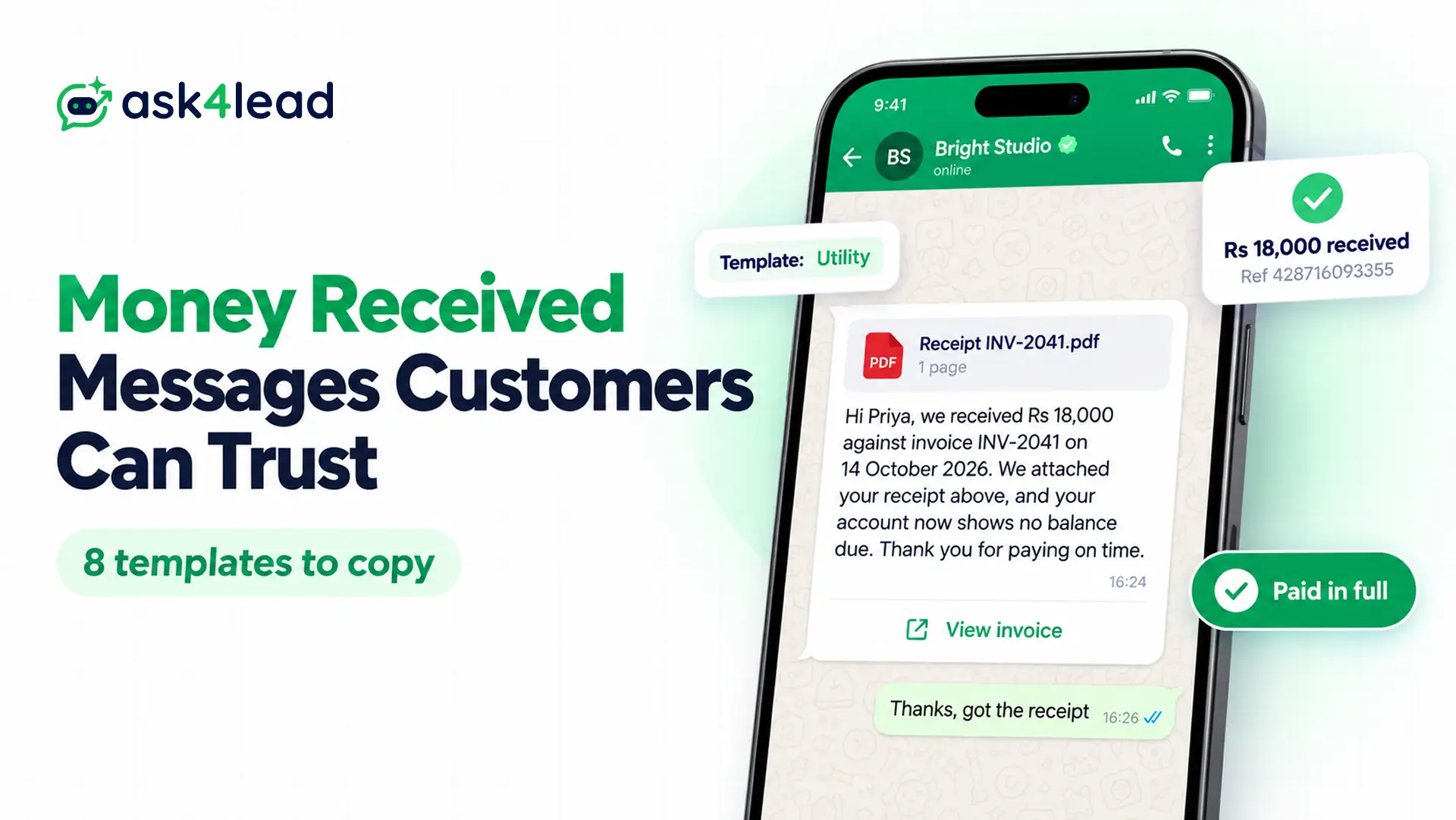
A money received message tells your customer that their payment reached you, with the amount, what it paid for, the date and a reference number. Below, you get 8 templates to copy for WhatsApp, and each one shows its Meta category, variables and buttons.
Scammers now copy this exact message, so you will also see how to tell a real money received message from a fake one.
8 money received message templates for WhatsApp
Each template below confirms a payment the customer already made. So each one fits Meta’s utility category, as long as you add no offer.
A template is a message format Meta approves in advance. You need one when you message a customer first, or after the 24-hour customer service window closes.
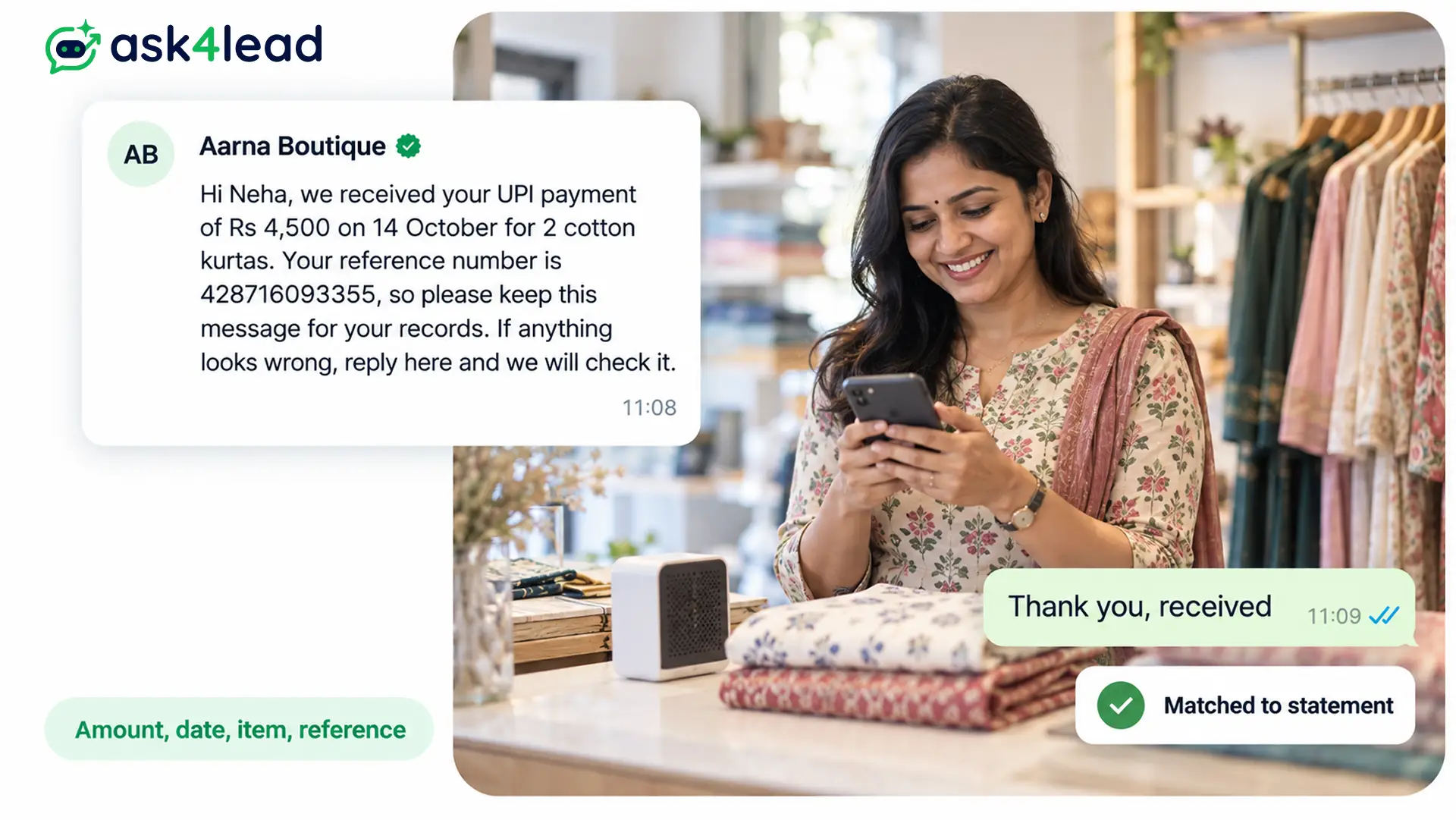
1. UPI money received message for a shop or service
Hi {{1}}, we received your UPI payment of Rs {{2}} on {{3}} for {{4}}. Your reference number is {{5}}, so please keep this message for your records. If anything looks wrong, reply here and we will check it.
Variables: first name, amount, date, item or service, UPI reference. Category: utility. Buttons: none needed.
2. Online order payment confirmation with a tracking button
Hi {{1}}, thank you for your payment of Rs {{2}} for order {{3}}. We are packing it now, and we will send the tracking details to this chat when it ships.
Button (URL): View order
Category: utility. The URL button can end in the order number, so each customer opens their own order page. Online sellers can also let a WhatsApp AI agent for e-commerce answer the “where is my order?” chats that follow.
3. Invoice paid message with a PDF receipt
Header: PDF document (the receipt)
Hi {{1}}, we received Rs {{2}} against invoice {{3}} on {{4}}. We attached your receipt above, and your account now shows no balance due. Thank you for paying on time.
Category: utility. In fact, Meta’s own order confirmation example puts a PDF receipt in the header.
4. School or coaching fee payment received
Dear {{1}}, we received Rs {{2}} towards {{3}}’s fees for {{4}}. Your receipt number is {{5}}, and you can also collect a printed copy from the office.
Category: utility. Name the student, because parents often pay for more than one child. For admission and fee chats, see the WhatsApp AI agent for education.
5. Advance or part payment received, with the balance due
Hi {{1}}, we received your advance of Rs {{2}} for {{3}}. The balance of Rs {{4}} falls due on {{5}}, and we will send you a reminder 2 days before.
Button (URL): Pay balance
Category: utility. Meta lists a payment reminder among its own utility examples, so a balance line keeps the template in utility.
6. EMI or instalment received
Hi {{1}}, we received your EMI of Rs {{2}} for the loan account ending {{3}}. Your next EMI of Rs {{4}} falls due on {{5}}, so you need to do nothing until then.
Category: utility. Show only the last 4 digits of an account, since Meta rejects templates that ask for full card numbers.
7. Refund processed message
Hi {{1}}, we processed your refund of Rs {{2}} for order {{3}} on {{4}}. Your bank may take a few working days to show it, so check your statement before you contact us.
Category: utility. Also, a refund note is one of Meta’s own utility examples.
8. Personal money received message (no template needed)
To a friend: Got it, Ravi. Rs 2,500 reached my account this morning, so we are all settled for the trip. Thanks!
To a client: Hi Mr Mehta, I received your payment of Rs 15,000 today for the September design work. Thank you for clearing it on time.
Short: Received Rs 2,500, thanks! The UPI reference is 428716093355.
For a friend or a single client, you type these from your own WhatsApp, so no approval applies. However, check your bank app first, for the reason the fraud section explains.
Variables every payment confirmation message needs
A payment confirmation message needs 5 details, so the customer can match it to their bank statement without calling you. Also keep fixed words around every variable, because Meta rejects a body made mostly of placeholders.
| Variable | Sample value | Tip |
| Customer name | Priya | Use it once, in the greeting |
| Amount | 4,500 | Write “Rs” outside the variable, since Meta rejects symbols such as $ and % inside one |
| What it paid for | Order 10482 | So a customer with 2 orders knows which one |
| Date | 14 October 2026 | Because most disputes start with “when did I pay?” |
| Reference number | 428716093355 | Since it matches the line on the bank statement |
Many free sample libraries mix {{1}} with names such as {{transaction id}} in one template. Instead, pick one style: numbers ({{1}}, {{2}}) or lowercase names with underscores, as in Meta’s own examples ({{order_number}}).
Is a money received message utility or marketing?
A money received message is utility when it confirms a payment the customer made and promotes nothing. Meta’s template categorization page starts utility messages with a user’s own action or request, and its examples include an order confirmation and a refund.
However, an offer turns the whole template into marketing, because Meta files mixed content as marketing. Meta also bars upsells in order messages. Still, a closing “Thank you for your business” is fine, since Meta’s refund example ends with it.
| Message | Likely category | Why |
| Templates 1 to 7 | Utility | Because the customer’s payment triggers each one |
| Confirmation plus “Use SAVE10 on your next order” | Marketing | Since the offer makes it mixed content |
| Confirmation plus “You may also like…” | Marketing | Because Meta bars upsells in order messages |
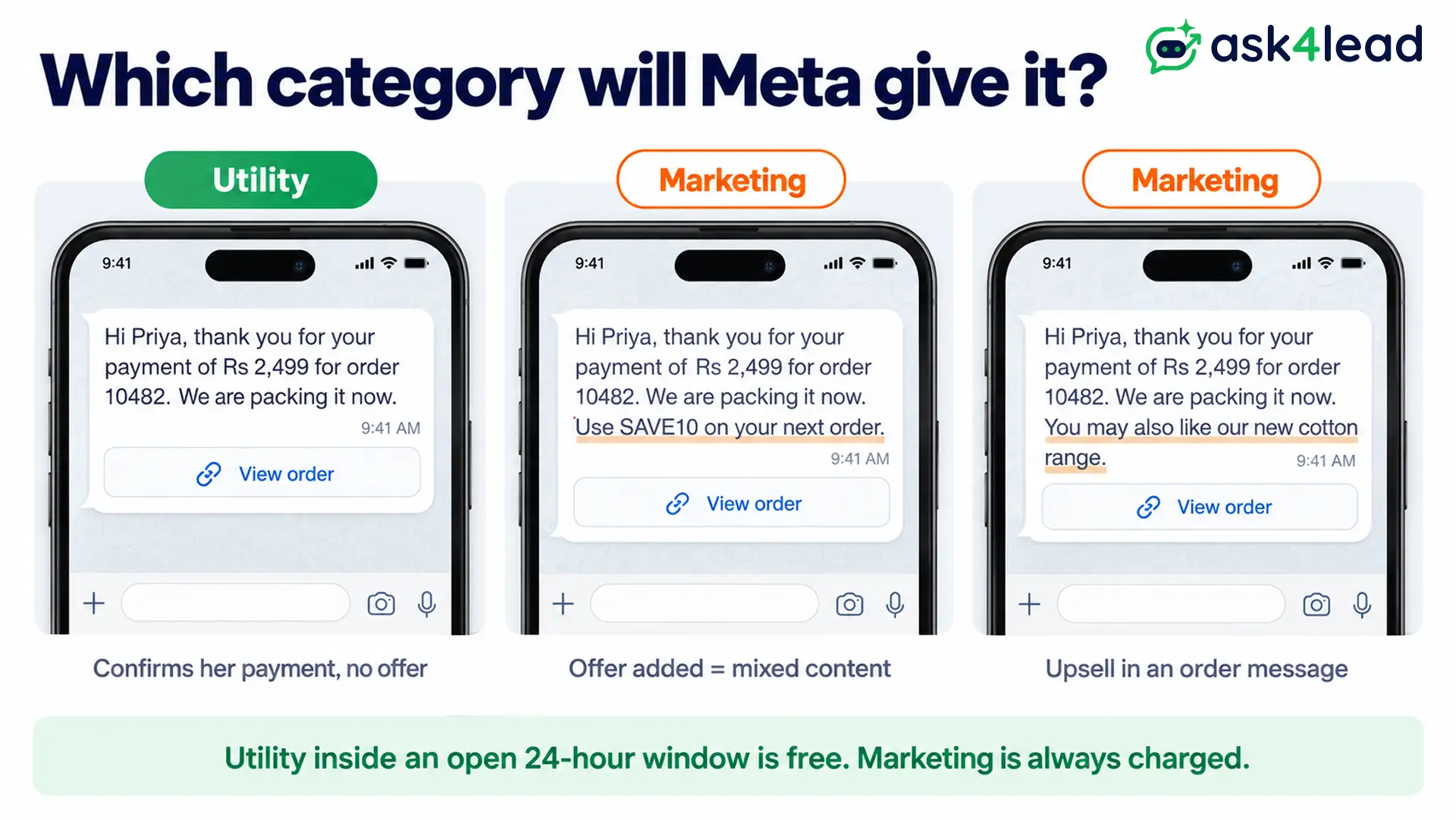
The category also decides the cost. Under Meta’s pricing rules, a utility template sent inside an open customer service window is free, while Meta charges for every marketing template. The 2026 WhatsApp API pricing guide lists the rates by country.
If Meta moves your template to marketing, it gives 1 day of notice, and then you have 60 days to appeal. Businesses that Meta already warned for misuse get no notice at all.
Headers and buttons for a payment done message
A payment done message needs 1 header at most and 1 button type. Meta’s component rules allow a PDF document header, up to 2 URL buttons, 1 phone button and 1 copy code button, and a URL button can end with 1 variable such as an order number.
- PDF header: suits invoices and fee receipts, because the customer keeps the file in the chat.
- URL button: suits “View order” or “Pay balance”, since each customer lands on their own page.
- Phone button: useful when payment questions need a call, for example on loans.
For example, an agency sends template 3 with a “Download receipt” link plus a “Need GST invoice” quick reply. It looks fine on the phone preview. Yet the client’s accountant reads WhatsApp on a laptop, and WhatsApp desktop cannot show a quick reply mixed with another button type. So for business clients, use URL buttons only.
Why payment confirmation templates get rejected
When Meta rejects a payment confirmation, the cause is usually the variables or a sensitive detail, not the confirmation itself. Meta’s template review page lists these causes:
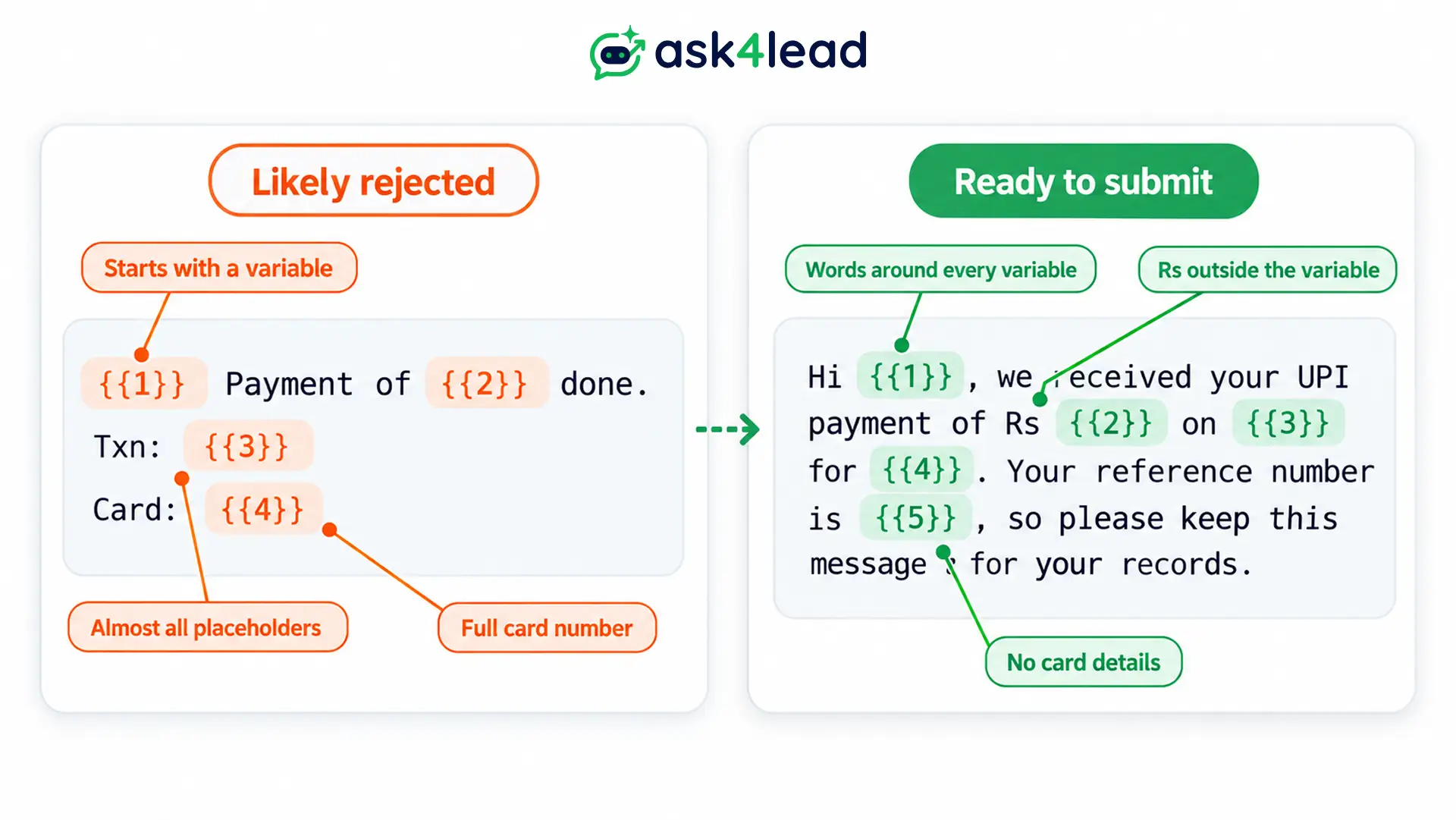
- A variable opens or closes the body, for instance “{{1}}, payment received” instead of “Hi {{1}}, we received”.
- Too many variables for the length of the message.
- Numbers skip ({{1}}, {{2}}, {{4}}), or the braces do not match.
- Special characters inside a variable, such as #, $ or %.
- A request for sensitive identifiers, such as a full card number. However, Meta accepts the last 4 digits.
- A duplicate of a template you already have.
Here is a before and after. The draft “{{1}} Payment of {{2}} done. Txn: {{3}} Card: {{4}}” starts with a variable, holds almost nothing but placeholders and shows a full card number. In contrast, template 1 carries the same details in full sentences, with no card details.
For more causes, read the guide to WhatsApp template rejection reasons. Then, if your receipt format changes, you can edit an approved template instead of starting again.
How to tell a real money received message from a fake one
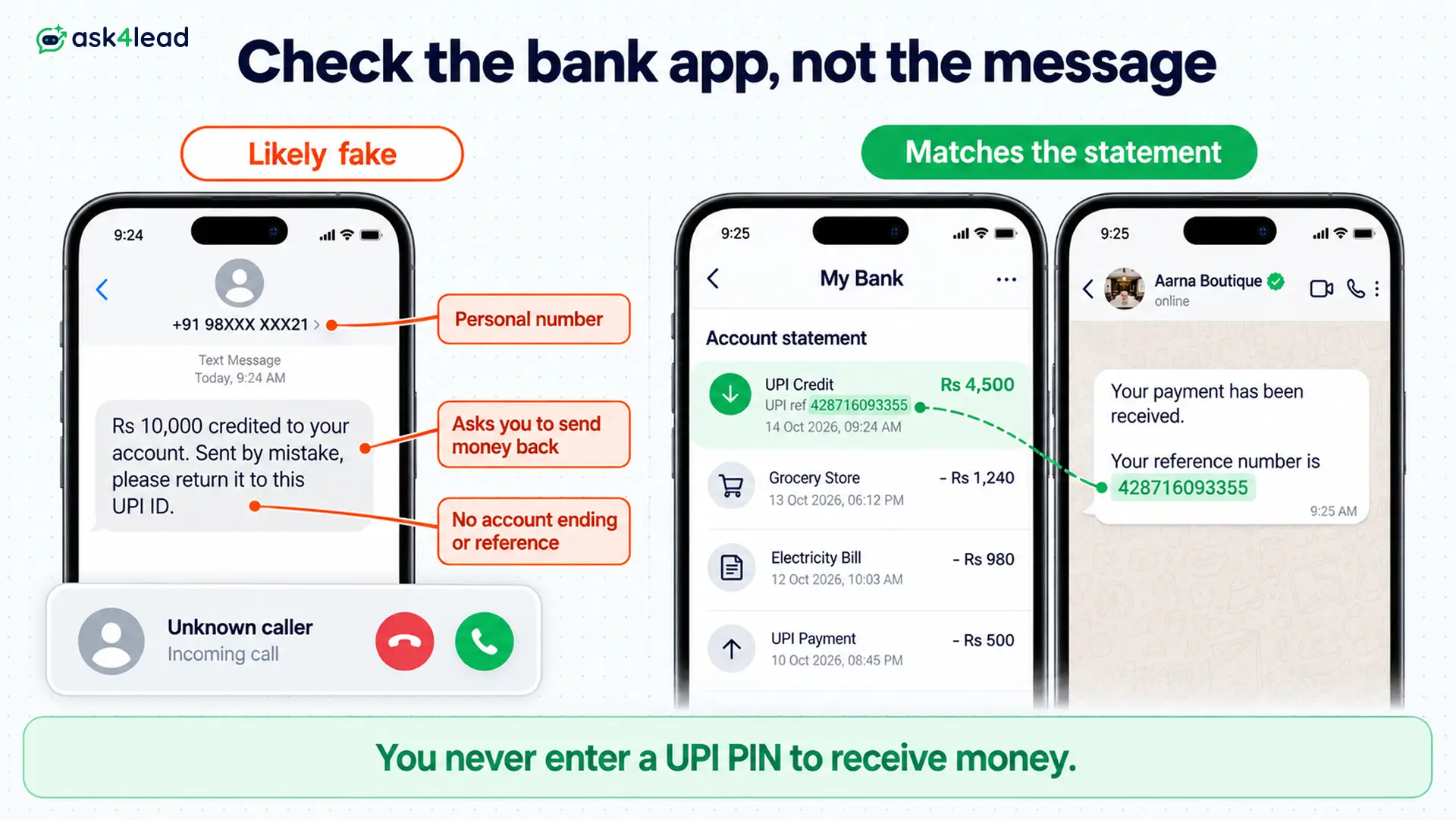
A money received message proves only that a message arrived; your bank account proves the money did. Scammers send fake “Rs 10,000 credited” texts, then call to say they paid you by mistake and ask you to send the money back.
So before you act on any credit alert, run these checks:
- Open your bank or UPI app yourself and look for the credit in the statement, instead of tapping a link in the message.
- Never enter your UPI PIN or scan a QR code to receive money. NPCI’s UPI safety guidance says the PIN is only for money that leaves your account, and QR codes are only for paying.
- Match the reference number in the message with the one on your statement.
- Report it fast if you already sent money back: use the National Cyber Crime Reporting Portal or call 1930.
If you send confirmations as a business, make yours easy to trust. First, always send from the same business number, ideally with a verified green tick. Then include the reference from the customer’s statement, and never ask for a PIN or an OTP (one-time password). At a shop counter, also confirm the payment on your own app or soundbox (the speaker that announces UPI payments), not on the customer’s phone.
When to send a payment confirmation message: a worked example
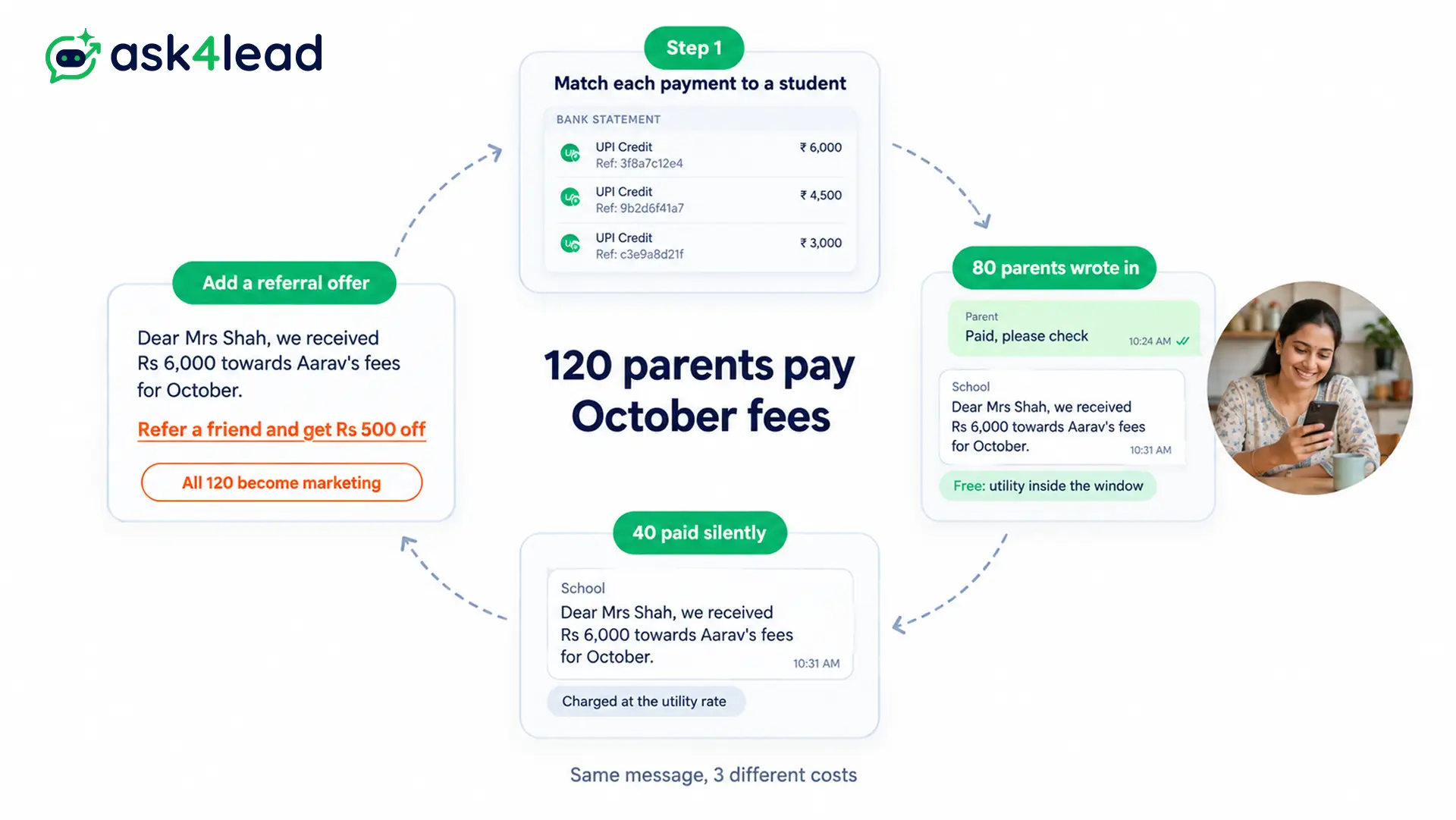
Take a coaching centre where 120 parents pay October fees by UPI. Of those, 80 parents also message “Paid, please check” on WhatsApp, while 40 pay without a word.
- Check the bank statement first, and then match each payment to a student by its reference number.
- Reply to the 80 parents who wrote in. Their message opened a 24-hour window, so template 4 goes free as utility, or you can type a normal reply.
- Send template 4 to the other 40. Because no window is open, Meta charges each of these at the utility rate.
- Keep it utility. If you add “Refer a friend and get Rs 500 off”, all 120 become marketing, so Meta charges for every one.
This plan does not apply to parents who never agreed to WhatsApp messages. For them, collect opt-in consent first, because blocks lower your WhatsApp quality rating. Also skip your template when a payment gateway already sends a receipt, unless yours adds the PDF.
Which money received message to set up first
Start with template 1 or 2, since one of them covers most of your payments. Then add the part payment and refund templates, because those two cases cause the most “did you get my money?” calls.
Before you submit, check that you have:
- The amount, date, purpose and reference in the body
- Fixed words around every variable, with sample values
- No offer, upsell or referral line
- 1 button type, and only the last 4 digits of any account
Once the customer has paid, a review request message is the natural next template.
Send every payment confirmation from one inbox
Typing each money received message from a personal phone stops working once payments arrive daily, and “did you get it?” chats then pile up. Ask4Lead, a humanized AI WhatsApp chatbot and CRM, keeps quotes, confirmations and replies together:
- Template builder: pick Utility, add a PDF header, map variables to CRM fields, and track Pending, Approved or Rejected.
- Quote Builder: send the quote in the chat before the customer pays, so the amount in your confirmation matches it.
- Shared team inbox: every payment question lands in one inbox, so any teammate can reply.
- Sales pipeline: move the deal to Closed Won once the money shows in your account.
Ask4Lead sells this software, and each feature named here is on its features pages.
Sign Up Free on Ask4Lead: 100 AI Credits Included
FAQs
1. How do I write a money received message?
Name the customer, the amount, what it paid for, the date and the reference number. Then add 1 line on what happens next.
2. What is a payment done message on WhatsApp?
It is a note confirming that a customer’s payment reached you. Businesses send it as an approved utility template.
3. Is a payment confirmation message free on WhatsApp?
It is free when you send a utility template inside an open 24-hour window. Outside the window, Meta charges the utility rate.
4. Can a money received message be fake?
Yes, so check the credit in your own bank app. You never need a UPI PIN to receive money.
5. Can I add a discount to a payment confirmation?
You can, but Meta then treats it as marketing. So send the offer as a separate template instead.
6. How do I reply when someone sends me money?
Confirm the amount and say thank you, for example “Received Rs 2,500, thanks!”. But first check that the credit shows in your bank app.
