
WhatsApp lead follow-up is the work of replying to a new enquiry, qualifying it and nudging it until it books or goes quiet. Most small businesses should split it: an AI agent sends the first reply and the nudges, and a human VA takes the warm conversations.
A VA (virtual assistant) is a remote person you pay to handle chats. To see how far software gets before a person steps in, read about automatic lead qualification.
The split works because each part of the job rewards a different strength. Software wins speed to lead at 3 am. A person wins the pricing talk.
Quick answer: Use an AI agent for the first reply and nudges, since it replies in seconds. Keep a human VA for quote negotiations, complaints and warm leads. At 300 leads a month, our model prices the hybrid near $709 and a full-time VA near $960.
Key takeaways
- Split WhatsApp lead follow-up into 4 jobs: first reply, qualifying, nudging and closing. Each job has a different best owner.
- Speed to lead matters, yet the popular “21 times” figure is weaker than it looks. A Harvard Business Review test of 2,241 firms found about 7 times.
- After 24 hours, API-connected follow-up is limited to approved templates. A VA in the free Business app is not bound by that clock.
- Ad leads that start a WhatsApp chat unlock up to 7 days of fee-free messaging for marketing, utility, authentication and service messages.
- A full-time human VA is on shift for 40 of 168 weekly hours, so run a 4-week split test before you commit.
What Is WhatsApp Lead Follow-Up?
WhatsApp lead follow-up is every message between a lead’s first enquiry and a booked call, a sale or a clear no. It covers the instant reply, the qualifying questions and the nudges that wake a silent lead.
The sender, human or software, always does the same 4 jobs.
The 4 jobs inside WhatsApp lead follow-up
| Job | What it involves | Best owner | Why |
| 1. First reply | Win speed to lead, at any hour | AI agent | No person sits on shift 168 hours |
| 2. Qualifying | Ask what they need, their budget and their deadline | AI agent, VA reviews | Answers are structured |
| 3. Nudging | Timed reminders and approved templates | AI agent sends, VA edits wording | Repetitive, but tone matters |
| 4. Closing | Pricing, objections and trust | Human VA or you | Judgment and rapport decide it |
Why speed to lead decides WhatsApp lead follow-up
Speed to lead measures how long a lead waits for your first answer. A test of 2,241 US firms found most firms slow:
- 37% replied within 1 hour.
- 16% replied between 1 and 24 hours.
- 24% took more than 24 hours.
- 23% never replied.
Firms that answered within the hour were close to 7 times as likely as slower firms to get a decision maker on the line.
However, you will also see “21 times more likely” quoted for speed to lead. Secondary summaries trace it to a 2007 analysis of a single vendor’s platform data, never peer reviewed, and many posts wrongly credit MIT. Treat it as direction, not proof.
The pain is real for anyone who works with their hands. A text arrives at 10 am, nobody checks the phone until lunch, and by 12:30 the lead already holds 2 other quotes. Our look at AI and lead conversion covers the same speed effect.
WhatsApp Lead Follow-Up With an AI Agent
An AI agent reads every incoming WhatsApp message, writes a full-sentence reply and takes actions such as logging the lead. In WhatsApp lead follow-up it handles the first reply, qualifying and nudges at any hour, but it knows only what you give it.
What an AI agent handles well
- Instant replies: Answers take seconds, so speed to lead no longer depends on who is free.
- Patience with split messages: Customers often send “hey”, then “are you free Saturday”, then “or Friday” in quick succession. A good agent waits a few seconds and answers the whole thought.
- Nudges that always go out: A timed follow-up sequence runs on a timer, so WhatsApp lead follow-up never depends on someone’s memory.
- Plain-English qualifying: In Ask4Lead, the AI Sales Assistant asks about the lead’s situation instead of sending a button menu, then suggests the next pipeline stage.
Where an AI agent goes wrong
- Invented offers: An architect reported that the AI built into Meta’s business tools asked whether to sell a “ribs package” at R99. An ungrounded agent guesses, so the AI Knowledge Profile answers only from your uploaded files and asks a question when they run out.
- Silent skips: A builder described a real booking that staff never saw: the message fit no rule, and no counter recorded the skip. Track skipped messages next to sent ones.
- Pricing mistakes: A bot cannot see site conditions or custom terms. Pricing questions and shaky answers stop at Human Approval for AI replies, where the customer sees nothing until a person approves.
- Quality damage: Blocks and reports lower your number’s WhatsApp quality rating, and a low rating can limit who you may message. Providers also document template pauses of 3 hours, then 6, then a disabled template.
WhatsApp Lead Follow-Up With a Human VA
A human VA is a remote assistant, usually paid by the hour, who answers chats and updates your CRM. In WhatsApp lead follow-up, a VA brings judgment and rapport, but works fixed hours, needs training and can leave without notice.
What a human VA handles well
- Tone and mood: A VA notices an angry lead or a hesitant buyer and changes approach mid-chat.
- Off-script questions: Someone who understands your business can improvise where a rule cannot.
- Side tasks: The same person sends a quote, updates the CRM and chases a payment.
- Hourly cost: Vendor pricing guides put offshore VAs at about $5 to $15 an hour, and agency placement adds 20% to 40%.
Where a human VA falls short
- Coverage: A 40-hour week covers 40 of 168 hours, or 24%. Leads that arrive at night wait until morning, so speed to lead drops.
- Fragility: An owner trained a chat assistant for 3 weeks, and the assistant stopped replying without notice. The training left too, and WhatsApp lead follow-up stopped with it.
- Consistency: Different VAs write in different voices. A phone passed between people leaves nobody owning a lead, which a shared inbox for several agents fixes.
WhatsApp Lead Follow-Up Rules From Meta
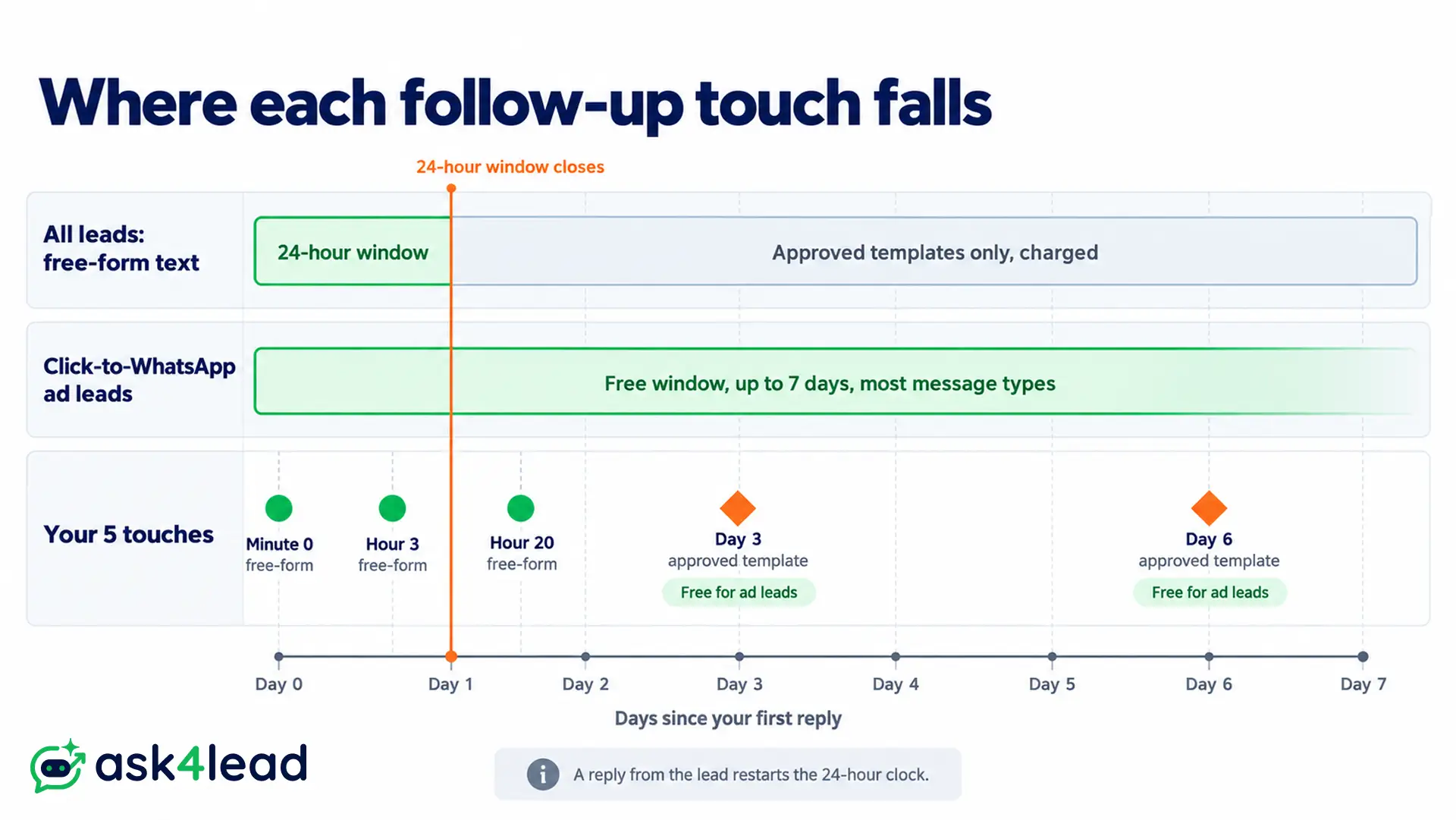
Meta’s rules shape any WhatsApp lead follow-up sent through the API. Free-form text is allowed only until 24 hours after the lead’s last message. After that, only pre-approved templates work, and every delivered marketing template is charged.
Your cadence has to fit around that clock.
The 24-hour clock and a 5-touch cadence
Each reply from the lead restarts the clock. Here is a starting cadence for WhatsApp lead follow-up, our own suggestion and not a Meta rule, that keeps the first 3 touches free-form:
- Minute 0: Reply and ask 1 qualifying question.
- Hour 3: Send a short free-form nudge if the lead is silent.
- Hour 20: Send the last free-form message before the window closes.
- Day 3: Send an approved template with a clear reason to reply.
- Day 6: Send a final template with an easy exit, then mark the lead “not interested.”
Then stop the sequence the moment the lead replies. Our 24-hour rule guide covers edge cases, and the guide to a rejected template helps if Meta declines your wording.
A VA typing in the free Business app does not face this clock, because the window is an API rule. That makes human follow-up feel more flexible, and it is why AI follow-up needs templates written in advance.
Free follow-up window for ad leads
If an ad lead opens the chat by tapping the click-to-WhatsApp ad and you answer inside 24 hours, Meta opens a fee-free window of up to 7 days. Marketing, utility, authentication and service messages, templates included, cost nothing inside it, according to Meta’s pricing documentation.
It applies to people on the Android or iOS app, not desktop or web. A fast reply opens that window, so speed to lead pays twice. For ad leads, pack your densest touches into that window, since even the Day 3 and Day 6 templates above can land inside it.
Using the Business app and an AI agent on 1 number
Coexistence keeps 1 number alive in the Business app while the API runs alongside it. Providers document that app messages stay free, API messages follow normal pricing and the app must be opened every 13 days. Compare both setups on the app versus API differences page first.
Avoid unofficial QR tools. An operator reported 2 personal numbers banned within 6 weeks at about 80 messages a day, and the ban risk of automation is well documented.
What WhatsApp Lead Follow-Up Costs by Setup
At 300 leads a month, our model puts an AI agent near $189, a full-time offshore VA near $960 and a hybrid near $709. Coverage differs more than cost. The VA covers 40 of the week’s 168 hours, while the AI agent covers every hour.
| Setup | Monthly cost | Cost per lead | Hours covered |
| Full-time offshore VA | $960 | $3.20 | 40 of 168 |
| Part-time VA, 20 hours | $520 | $1.73 | 20 of 168 |
| AI agent with oversight | $189 | $0.63 | 168 of 168 |
| AI agent plus part-time VA | $709 | $2.36 | 168, person for 20 |
Inputs behind the cost table
- VA rate: $6 an hour, inside the vendor range of $5 to $15.
- Platform fee: $150 a month, an assumption. Compare it with your vendor’s quote.
- Template fees: 2 marketing templates per lead at about $0.025 each, a US rate quoted by providers. India runs under ₹1.
- Oversight: 4 hours a month at $6.
- VA effort: 15 minutes per lead across 5 touches.
BSP markup and taxes come on top, so check every rate against Meta’s published rate card.
What the cost numbers tell you
Pay a VA only for follow-up minutes (75 hours, or $450, at 300 leads) and each lead costs about $1.50. The AI agent’s fixed cost is about $174, plus $0.05 per lead in template fees. The lines cross near 120 leads a month.
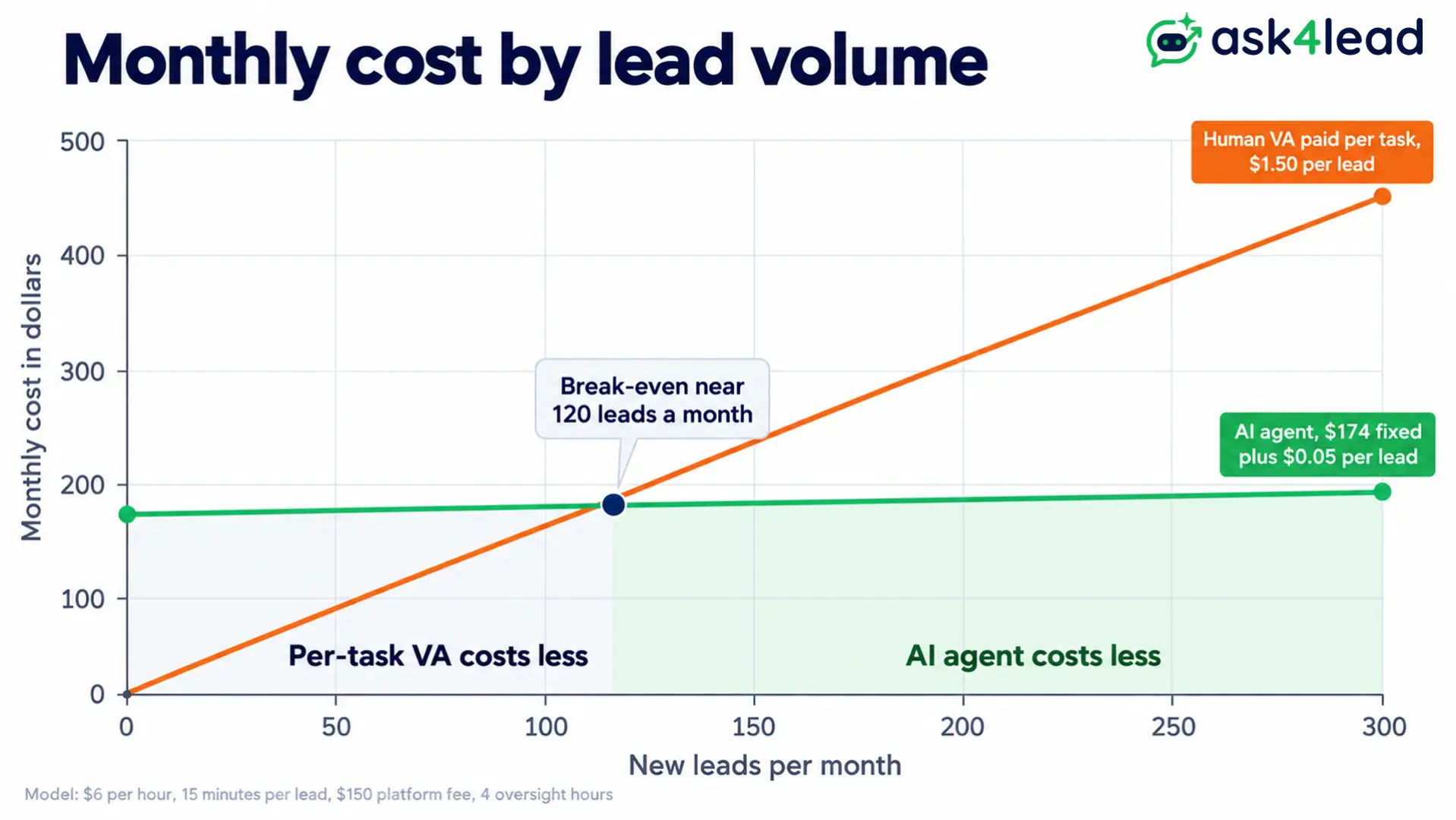
However, below that, a per-task VA or your own time makes WhatsApp lead follow-up cheaper. Above it, the AI agent wins on cost, and it wins night coverage at any volume. For the support side of this math, read our payback guide for support reps.
How to Divide WhatsApp Lead Follow-Up Between AI and a Human VA
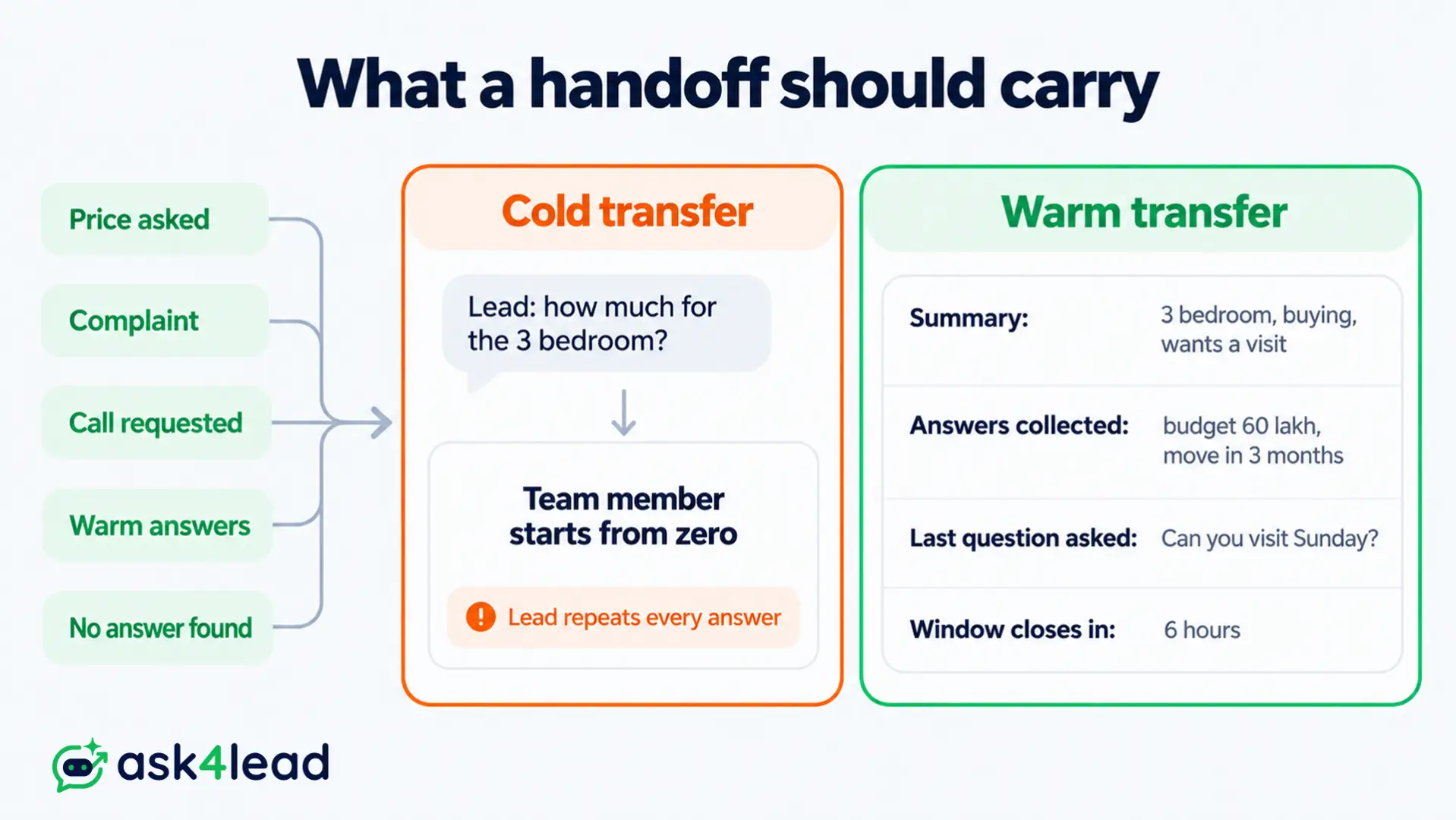
Let the AI agent own jobs 1 to 3 and give the human VA job 4, with written rules for the moment a chat changes hands. The handoff, not the AI, is where most follow-up breaks. A cold transfer makes the lead repeat everything.
The handoff contract for WhatsApp lead follow-up
Move a lead to a person when any of these happens:
- A price, a discount or custom terms come up.
- Tone turns frustrated, or a complaint appears.
- The lead asks for a call, a visit or a quote.
- Qualifying answers show a warm lead.
- The agent cannot find the answer in your knowledge files.
The person should receive a short summary, the answers collected, the last question asked and the deadline when the 24-hour window shuts. Expire any pending draft with that window, otherwise the queue fills with stale replies.
In Ask4Lead, the shared team inbox drops new chats into an Unassigned pool, lets a rep click “Assign to Me” and shows the full history after a transfer.
The Work Queue adds a “Stale No Recent Reply” bucket, so a quiet lead surfaces as a task for your VA.
Which owner fits which lead
| Lead type | First reply | Closing |
| Ad leads, low ticket, high volume | AI agent | VA after a warm signal |
| High ticket, relationship sale | AI agent qualifies | You or a senior person, within the hour |
| Repeat customers | VA or you | VA or you |
| Night and weekend enquiries | AI agent only | Next morning |
| Health or finance enquiries | AI agent with approval on every reply | Licensed person |
Run a 4-week split test
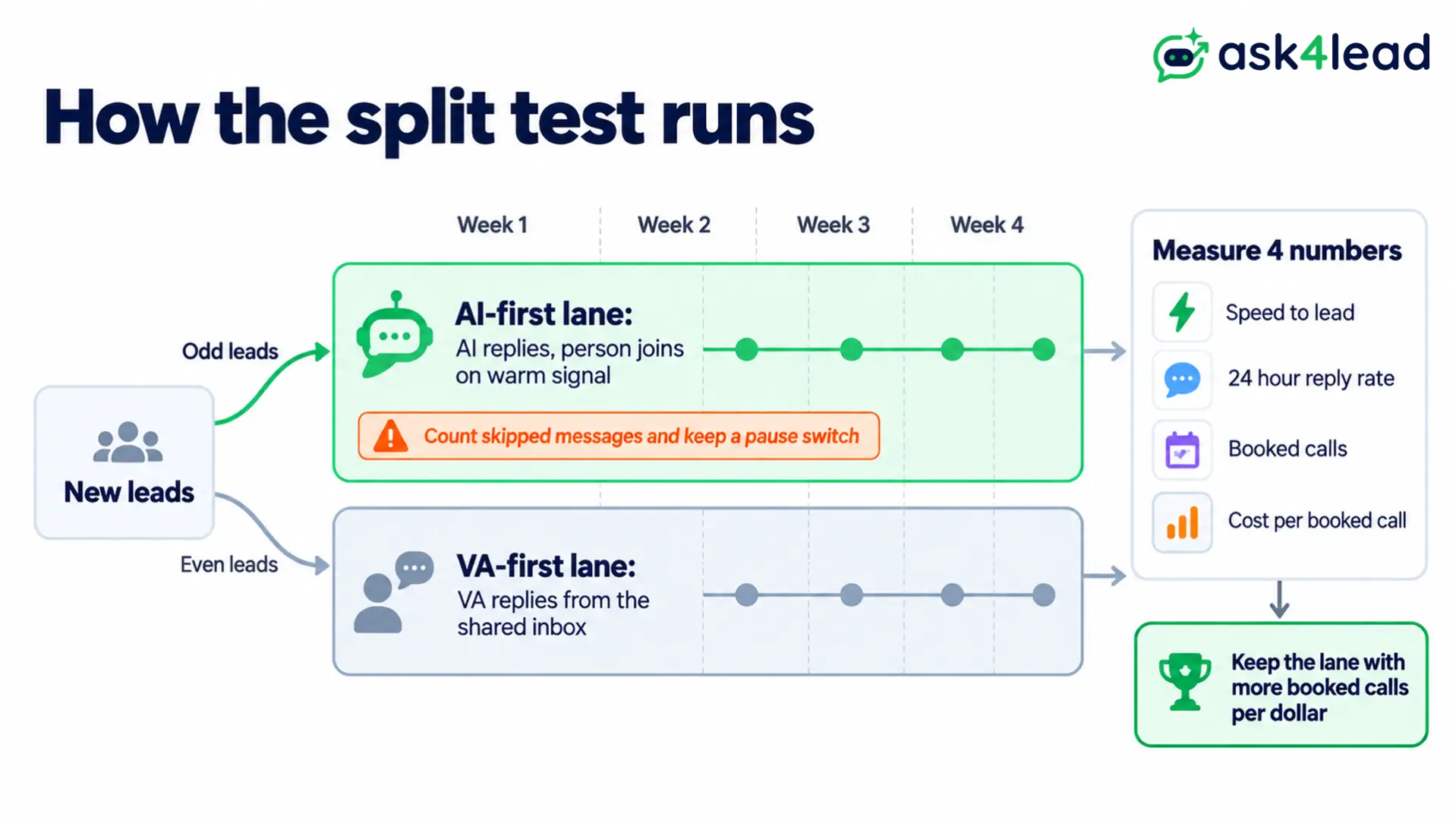
- Alternate new leads between an AI-first lane and a VA-first lane.
- Log 4 numbers: speed to lead, 24-hour reply rate, booked calls and cost per booked call.
- Count skips and failures along with sends, plus a pause switch reachable from your phone.
- Keep the lane that books more calls per dollar, then write handoff rules from the real chats.
Track the split on the AI Dashboard: deflection, qualification, handoffs and out-of-hours chats, all filterable by campaign. Our testing guide helps you check the agent before real leads arrive.
FAQs
1. Will an AI agent make a human VA unnecessary for WhatsApp lead follow-up?
Rarely. It replaces the repetitive jobs, but pricing talks, complaints and trust-building still need a person.
2. How many follow-ups should I send before marking a lead as not interested?
Start with 5 touches over 6 to 7 days and stop when the lead replies. Otherwise, extra messages raise block rates and hurt your quality rating.
3. Is AI allowed on WhatsApp for chasing leads?
Yes, for business use through the official API. Meta’s policy blocks general-purpose AI assistants, and every lead still needs opt-in consent.
4. Can my VA and the AI agent use the same number?
Yes, through coexistence or a shared inbox on the API. Providers note the Business app must be opened every 13 days.
5. What speed to lead should I aim for?
Aim for under 5 minutes, which an AI agent meets in seconds. A person can then follow within the hour on warm leads.
Conclusion: WhatsApp Lead Follow-Up
For most small businesses, the best WhatsApp lead follow-up is a hybrid: an AI agent for speed to lead and nudges, and a human VA for judgment. Below about 120 leads a month a per-task VA costs less, yet the coverage gap stays wide at any volume.
Your launch list:
- Handoff rules with 5 written triggers.
- Cadence built around the 24-hour clock and approved templates.
- Skipped-message count, plus a pause switch.
- Split test running for 4 weeks with 4 numbers logged.
Meta’s fees and rules keep changing, so review this setup every quarter.
Stop losing leads to a slow first reply
An ad lead left unanswered overnight is a click you already paid for. Ask4Lead covers the rest: a 9-stage Sales Pipeline for every lead, WhatsApp Campaigns that send approved templates, WhatsApp Templates to track Meta’s approval and WhatsApp Account Health for quality rating and sending limit.
