
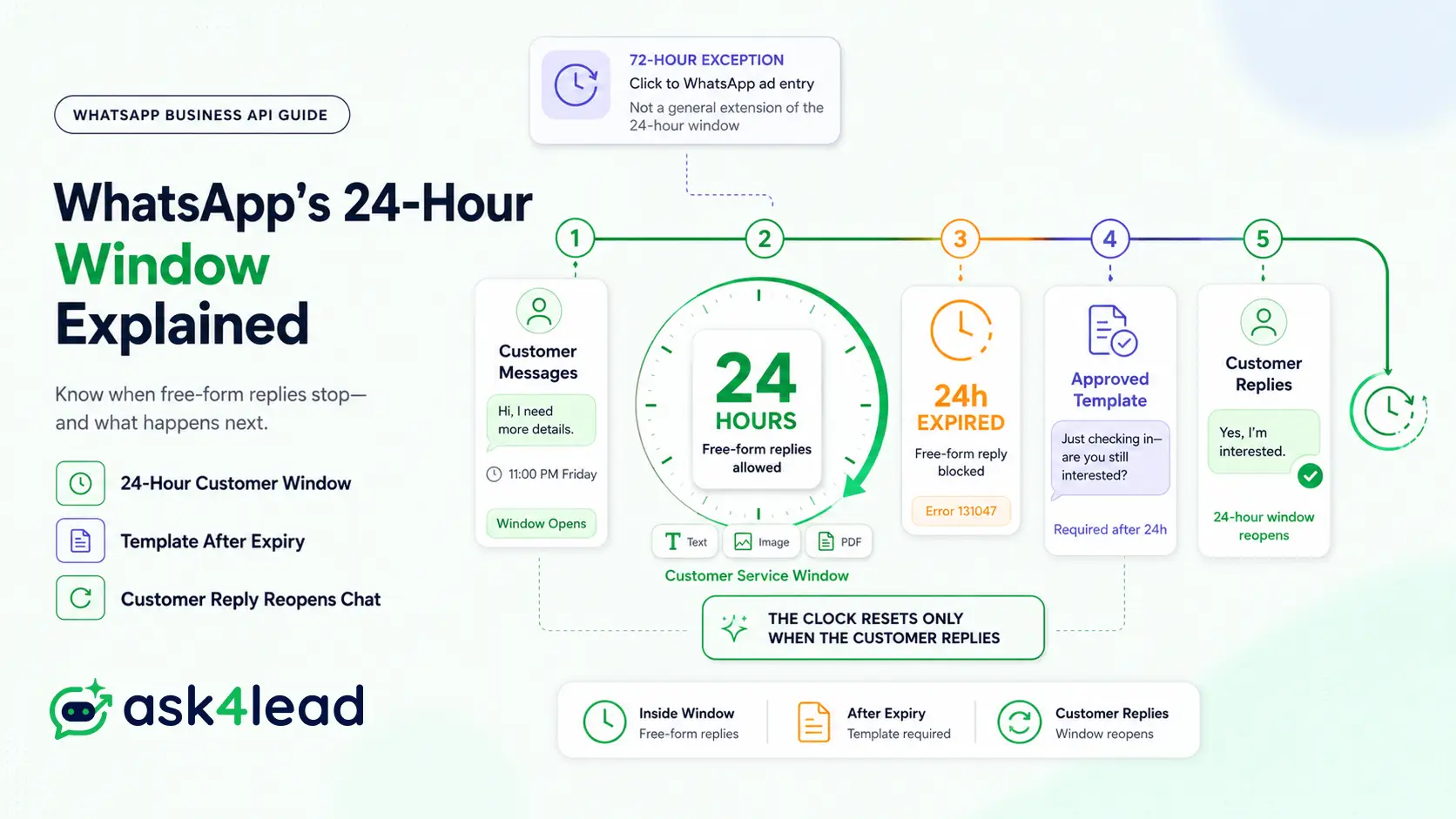
Quick answer: The WhatsApp Business API only allows free-form replies for 24 hours after a customer’s last message. After that, you can only send a pre-approved template, and only a real reply from the customer reopens normal chat. Ask4Lead’s integration handles this automatically, but the rule itself applies to the paid API, not the free WhatsApp Business App.
Key takeaways
- The window opens on the customer’s first message. It resets only when they reply, never when you do.
- A template doesn’t reopen the window by being sent. The customer has to respond to it.
- A separate 72-hour exception exists for Click to WhatsApp ads. Most articles get this wrong.
- Messaging limits changed in late 2025 and now apply at the Business Portfolio level, not per number.
- Most account restrictions come from opt-in and volume mistakes, not from the 24-hour rule itself.
A lead messages you at 11pm Friday. Your rep replies Monday morning. WhatsApp rejects the send outright. No warning banner. No grace period. Just a blocked message and a lead that’s gone quiet somewhere else.
This guide covers what Meta documents, the 2 exceptions almost nobody explains correctly, and the habits that keep experienced WhatsApp teams from losing leads to the clock.
What the WhatsApp 24-Hour Rule Actually Means
Meta calls this the customer service window in its own documentation. Most teams just call it the 24-hour rule.
It opens the moment a customer messages your business number. It only applies to numbers on the paid API, never the free consumer app.
1. The 3 Facts That Define the Window
- It opens on contact. The customer’s first inbound message starts the clock.
- It resets on reply, not delivery. Only a genuine new message from the customer restarts it. A template you send does not.
- It closes silently. No countdown, no warning. It simply expires 24 hours after their last message.
2. Why Button Taps Aren’t a Reliable Reset
Tapping a quick-reply button inside a message doesn’t reliably count as a fresh message in every implementation.
A genuine typed reply always does. Ask4Lead’s real-time conversation updates flag the difference automatically, so your team never guesses which action actually reset the clock.
How the Window Opens, Resets, and Closes
Most guides only explain the customer-initiated side. There’s a second mechanic worth understanding before you automate anything.
1. Customer-Initiated vs. Business-Initiated Windows
- Customer-initiated. The customer messages first. A 24-hour window opens immediately, no template required.
- Business-initiated. You send an approved template to a quiet customer, usually through a WhatsApp campaign. This also opens a window, but only if they reply to it.
- Reset on reply. Every new customer message restarts the 24-hour countdown, whether it’s message 1 or message 50.
- Expiry. Once 24 hours pass with no new reply, free-form sending is blocked again.
2. Why “Delivered” Doesn’t Mean “Reopened”
This is the single most-skipped detail in competing guides: sending a template is not the same as reopening the conversation.
The template only does its job once the customer taps back with an actual reply. A delivered-but-ignored template changes nothing.
What You Can Send Inside vs. Outside the Window
| Particulars | Inside the window | Outside the window |
| Free text, images, PDFs, voice notes | Allowed, unlimited | Blocked |
| Interactive buttons and lists | Allowed | Blocked |
| Pre-approved templates | Allowed but rarely needed | Required for any send |
| Who can start the exchange | Only the customer | Only the business, via template |
| Typical failure if ignored | Not applicable | Error 131047 |
What Error 131047 Actually Means
Try to force a normal reply after expiry and the API rejects it. Developers see this as error 131047 (“re-engagement message”) in their webhook logs almost every time.
That error is the system working as designed, not a bug worth routing around. Ask4Lead’s reports and analytics surface these failed sends automatically, so a blocked message doesn’t just disappear into a log file nobody checks.
The 3 Message Template Categories and What They Cost
Every approved template falls into 1 of 3 categories. The category decides both review strictness and price.
| Category | Typical use | Review strictness | Billing note |
| Utility | Order updates, appointment reminders, account alerts | Moderate, must stay transactional | Often free inside an open window |
| Authentication | OTPs and login codes | Loosest, narrow fixed format | Low flat per-message rate |
| Marketing | Promotions, win-back messages | Strictest, wording reviewed closely | Highest per-message rate |
How the 2025 Billing Shift Changes Your Strategy
Meta moved to per-template billing in 2025, replacing the older per-conversation model. Track spend through WhatsApp credits rather than guessing at month-end.
Sending 3 utility templates to reopen 1 stalled thread now costs 3 times, not once. A single well-timed template beats a scattershot sequence.
Keep wording strictly transactional if you want the utility rate. A status update that nudges toward a purchase gets reclassified as marketing, at the marketing price.
The 72-Hour Exception Most Articles Get Wrong
Search for “72-hour rule” and you’ll find it mentioned constantly with almost no real explanation. It’s not a longer version of the 24-hour window.
It’s a separate, narrower entry point tied to Meta’s own ad products.
1. What Actually Triggers the 72-Hour Window
When a customer opens a chat through a Click to WhatsApp ad or a Facebook Page’s WhatsApp button, Meta grants up to 72 hours for that first business reply.
It only applies to that specific entry path, mostly on mobile devices.
2. Why It Collapses Back to 24 Hours So Fast
The moment the customer replies once, it collapses straight back to the standard 24-hour rule.
Treat any “72-hour rule” claim outside this ad-entry context as unconfirmed. Confusing the two makes teams assume more slack than they actually have on ordinary conversations.
WhatsApp’s Messaging Limit Update Businesses Are Missing
A second change reshaped how the rule interacts with daily volume. Many published guides still describe the old system.
1. Unverified vs. Verified Portfolio Caps
- Limits now apply per Business Portfolio, not per phone number.
- Unverified portfolios cap around 250 new-contact template messages a day.
- Verified portfolios scale up to roughly 2,000 a day, tied to engagement quality.
A verified business badge is what unlocks that higher tier, so verification status and messaging limits are now the same conversation.
2. Why 6-Hour Quality Re-Evaluation Matters
Quality is re-evaluated roughly every 6 hours, not once daily. A bad morning can tighten your limits by afternoon.
A portfolio near its cap can’t fire re-engagement templates freely, even for windows that just expired. Full detail on the volume side lives in WhatsApp’s broadcast limit rules.
Why the Rule Quietly Kills Follow-Up and Lead Gen
A lead messages in. The reply comes late because the team is stretched thin. The window lapses.
Nobody deleted the chat. Nobody blocked the number. The lead just went quiet, and by the time someone remembers a template, that lead already replied to 3 competitors that answered faster.
1. Who Gets Hit Hardest
- Weekend and after-hours gaps. A Friday-night message with no coverage until Monday is functionally dead unless an automated note went out first. Ask4Lead’s guide on smart follow-ups that close deals while you sleep covers this exact gap.
- Recruiters and outbound-heavy roles, reaching dozens of people daily without time to wait for each reply.
- Lead-gen agencies handing off leads, where the client has to act inside the window or the lead cools on their end too.
- Teams manually scrolling chat history, since nothing on-screen flags which threads are about to expire.
2. The Fix Nobody Talks About
The fix isn’t fighting the rule. It’s making sure no human ever has to notice the countdown at all.
Ask4Lead’s AI agent qualifies leads without a human in the loop, closing this gap by replying inside the window automatically, every time, day or night.
What Experienced Teams Do That Meta’s Docs Don’t Mention
Meta’s documentation covers the mechanics well. It says almost nothing about the operating habits that make the rule manageable at scale.
1. The Onboarding-Reply Trick
Get a real reply during onboarding, not just a message sent. A customer who saves your number and replies even 1 word turns every future contact into a fresh window naturally.
That’s cheaper and more flexible than relying on templates later.
2. Why Over-Polished Copy Backfires on New Numbers
A message that reads too formal, sent from a number with little history, can pattern-match to the same signals Meta’s spam detection uses for scripted outreach.
Natural, slightly varied wording performs better on new numbers than 1 polished template blasted repeatedly. This is part of why a genuinely conversational Ask4Lead AI agent beats a static chatbot, since scripted menus read the same way every time.
3. Standing Trigger Templates for Recurring Threads
Agencies handing off leads, or support teams reopening the same type of stale conversation daily, do better with 1 pre-approved template built specifically for that reopen, kept ready as a reusable chat snippet.
Send it on a schedule. Don’t draft one under pressure after a window has already lapsed.
4. Watch the Quality Trend, Not Just Its Color
A rating sliding from green toward yellow, while still technically fine, is an earlier warning than waiting for it to flip. Check WhatsApp account health on a schedule, not only after a send fails.
5. Separate “Window Expired” From “Account Restricted”
These get conflated constantly. A closed window is normal and a template fixes it.
A quality-driven restriction is a different problem, usually caused by opt-in or volume issues, not by a window closing on its own.
Common Mistakes That Get Accounts Restricted
The 24-hour rule itself rarely causes a suspension. Routing around it in spammy-looking ways does, and audit logs usually show exactly where it went wrong.
1. The 5 Patterns That Trigger Review
- Forwarding an identical message to many new contacts at once. Even a handful of unrelated numbers getting the same unsolicited text reads as bulk spam.
- Messaging people who never opted in, then trying to keep it alive with templates.
- Running high volume on a brand-new number with no sending history.
- Mixing the personal app with API-style automation on the same number.
- Ignoring the quality rating until sends already start failing.
For volume-specific pacing, see how to send bulk WhatsApp messages without getting banned.
2. What to Do If You’re Already Restricted
Check whether the trigger was the 24-hour rule (a normal, fixable state) or a genuine quality issue first.
The exact recovery steps are covered in how to get unbanned from WhatsApp Business, and the underlying causes in will WhatsApp ban you for automating your business.
The Session-Window Recovery Framework
Most advice stops at “use a template.” A complete answer treats the window as a pipeline problem, not a messaging problem, and Ask4Lead was built around solving exactly this.
1. The 4-Step Framework
- Detect the countdown. Use a work queue that surfaces closing-soon threads instead of a manual scroll.
- Auto-reply before the window shuts. A note in the final hour costs nothing and keeps the door open.
- Route the close to a ready template. Keep a small library on standby through WhatsApp templates, not one drafted under pressure.
- Track every lead by pipeline stage, using automated lead follow-ups, not by chat thread.
2. How Ask4Lead Applies This Automatically
Ask4Lead’s AI sales assistant replies in plain English the moment a lead messages, so the window barely becomes a factor.
Every conversation also moves through a structured sales pipeline, managed from a shared team inbox, so a stalled thread surfaces by stage, not by luck.
WhatsApp Business App vs. Business API: Does the Rule Apply to Both
No. The customer service window is a rule of the paid Business Platform, not the free WhatsApp Business App most solo owners run from a phone.
| Paritculars | WhatsApp Business App | WhatsApp Business API |
| Cost | Free | Paid, usage-based |
| 24-hour rule applies | No | Yes |
| Team inbox, multiple agents | No | Yes |
| Automation and AI replies | No | Yes |
| Template required outside window | Not applicable | Yes |
The free app doesn’t scale past a handful of daily chats. Growing past a solo inbox usually calls for real user and role management, not just more chat volume on 1 phone.
FAQs
1. Does sending a template message reopen the 24-hour window?
No. A template doesn’t restart the clock by itself. Only a genuine reply from the customer reopens the free-form window.
2. How is the 72-hour rule different from the 24-hour rule?
The 72-hour period only applies to chats started through a Click to WhatsApp ad or Facebook Page button. It’s not a general extension of the standard window.
3. Why did my message fail with error 131047?
A free-form message was attempted after the window closed. The fix is switching that send to an approved template.
4. Can I message a lead outside the window just because they filled out a form?
Only with an approved template, and only with clear consent to be contacted on WhatsApp. A form fill alone doesn’t satisfy that requirement.
5. Do WhatsApp’s daily messaging limits affect the 24-hour rule?
Indirectly, yes. A portfolio near its cap may struggle to send re-engagement templates for expired windows, even with fully compliant content.
6. Does the 24-hour rule cost money either way?
Messages inside the window usually cost less for utility content. Messages outside it are billed per template by category, with marketing templates the most expensive.
Conclusion
The 24-hour rule isn’t going away, and no workaround makes it disappear.
What separates businesses that lose leads to it from ones that don’t is simple: treating WhatsApp as a pipeline instead of a scrolling chat list. Every thread tagged by stage. Every closing window flagged before it lapses.
Ask4Lead was built around exactly that gap. It replies to every lead in plain English the instant they message, hands your team full context instead of a bare name and number, and keeps WhatsApp lead generation moving so nothing silently expires.
Start free with 100 AI credits and let Ask4Lead handle the clock before it costs you another lead.
