
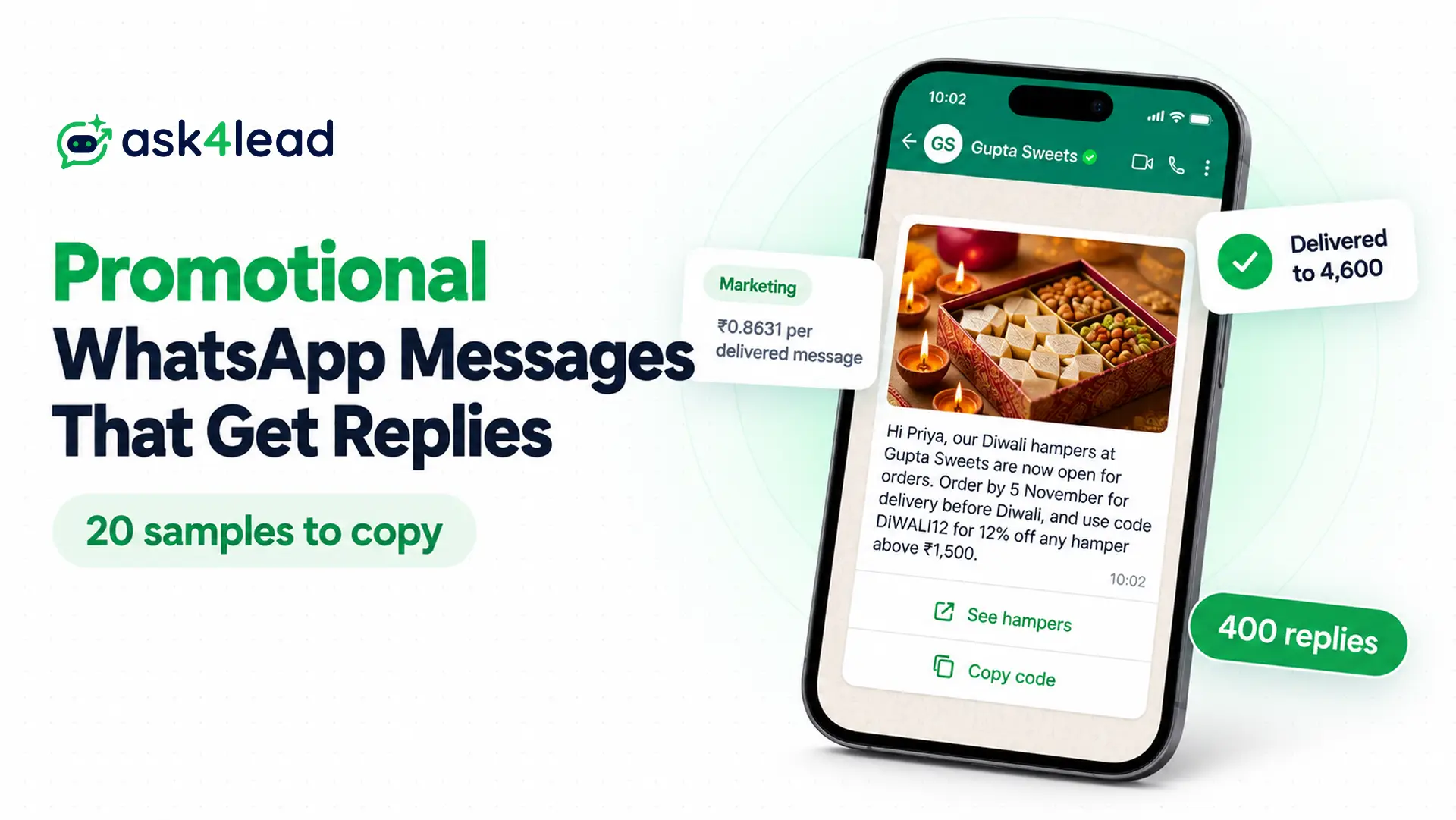
Promotional WhatsApp messages are offers, launches and sale alerts that a business sends to customers who agreed to hear from it. Below, you get 20 samples to copy for discounts, festivals, win-backs and local services, each with the buttons to add.
You also get the rules that decide whether your message arrives. Through the WhatsApp Business API, every promotion needs an approved marketing template. In India, Meta charges ₹0.8631 for each one it delivers.
What are promotional WhatsApp messages?
Promotional WhatsApp messages aim to drive a sale, a visit or a booking. Meta files them as marketing templates (pre-approved message formats), so three conditions apply: the customer opted in, Meta approved your template, and you pay for each delivered message.
Meta’s template categorization page lists awareness, sales, retargeting and customer relationships as marketing goals. In fact, its own sample opens with “{{Diwali}} is around the corner!”
The free WhatsApp Business app also has a paid Marketing messages tool in some countries, where you pay for each message delivered within five days. However, this guide focuses on the API, since the samples work there everywhere.
How to write a promotional WhatsApp message that gets a reply
A promotional WhatsApp message template has four parts: an optional header (text, image, video or PDF), the body, an optional footer, and buttons. Break one limit, and Meta rejects your template.
| Part | Limit on Meta’s components page |
| Text header | 60 characters, with 1 variable |
| Body | 1,024 characters |
| Footer | 60 characters, so keep it to one short line |
| Button label | 25 characters, such as “Shop the sale” |
| Copy code button | 1 per template, and the code holds 20 characters at most |
| URL buttons | 2 per template |
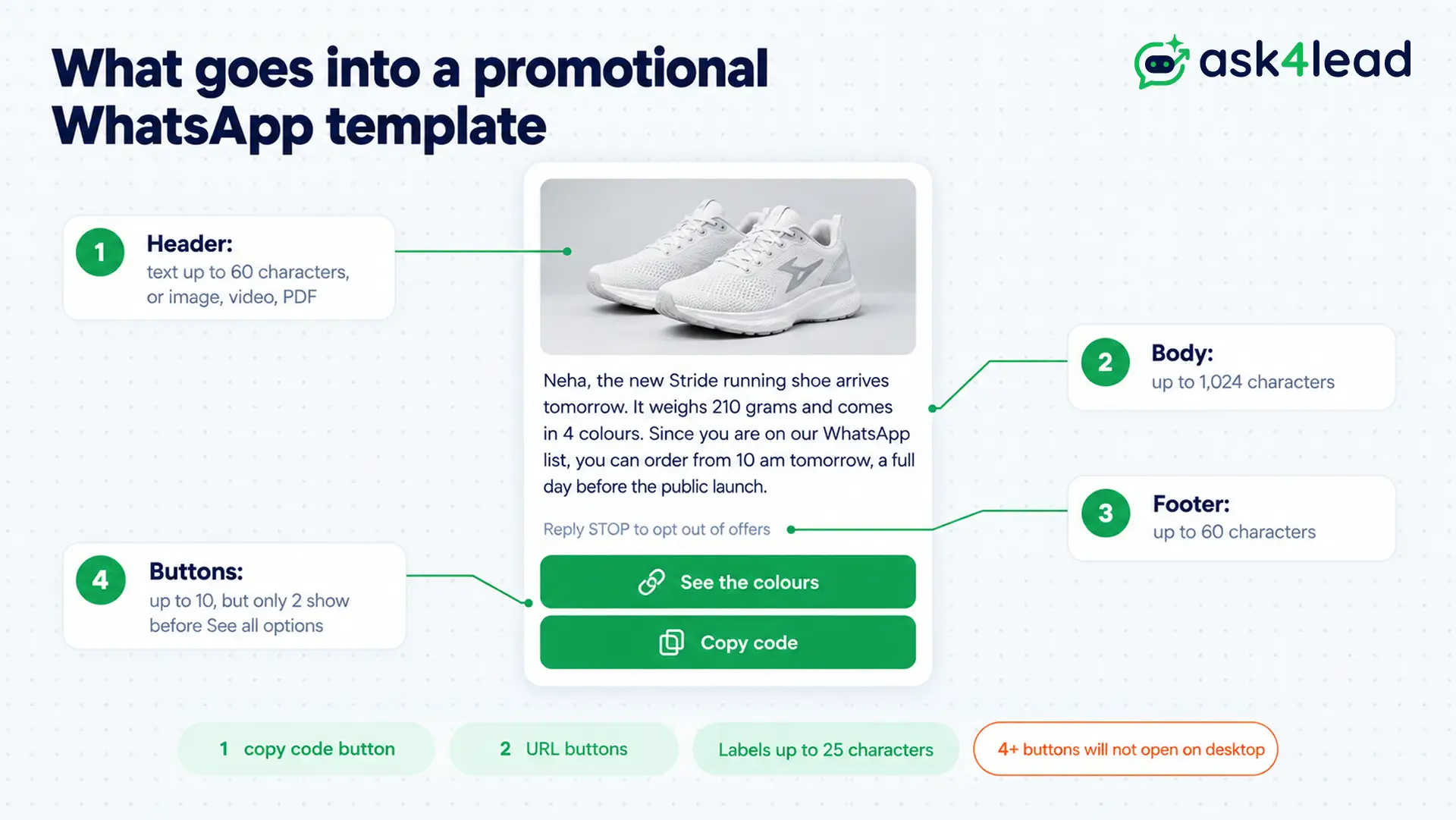
Meta’s components page also allows up to 10 buttons. Still, with more than 3, WhatsApp shows 2 and hides the rest behind “See all options”. So keep your promotional WhatsApp messages to 3 buttons or fewer.
For example, here is a typical sale message, then the same offer rewritten.
Before: HUGE SALE!!! Lowest prices ever on everything. Hurry, limited time only. Shop now!
After: Hi Neha, our end-of-season sale starts Friday at 10 am. Every summer kurta is 40% off, and sizes S to XXL are in stock. The prices return to normal on Sunday night.
The “before” version names no product, discount or deadline, while the “after” version says what, how much and until when.
Variables for a promotional WhatsApp message template
Use {{1}} for the first name, {{2}} for the business or product, {{3}} for the offer code and {{4}} for the end date. Keep fixed words around each one, because Meta rejects bodies that start or end with a variable.
Promotional WhatsApp messages for discounts and flash sales
Discount messages work when your offer, code and deadline fit on one phone screen. Also, put codes on a copy code button, so customers copy them with one tap.
1. Welcome offer for a new subscriber
Hi {{1}}, thanks for joining the {{2}} list on WhatsApp. Your first-order code takes 10% off anything on our site until {{3}}. Tap Copy code, then paste it at checkout.
Buttons: Copy code (WELCOME10), URL “Shop now”. Send it within a day of the opt-in, while the customer remembers you.
2. Flash sale with a countdown
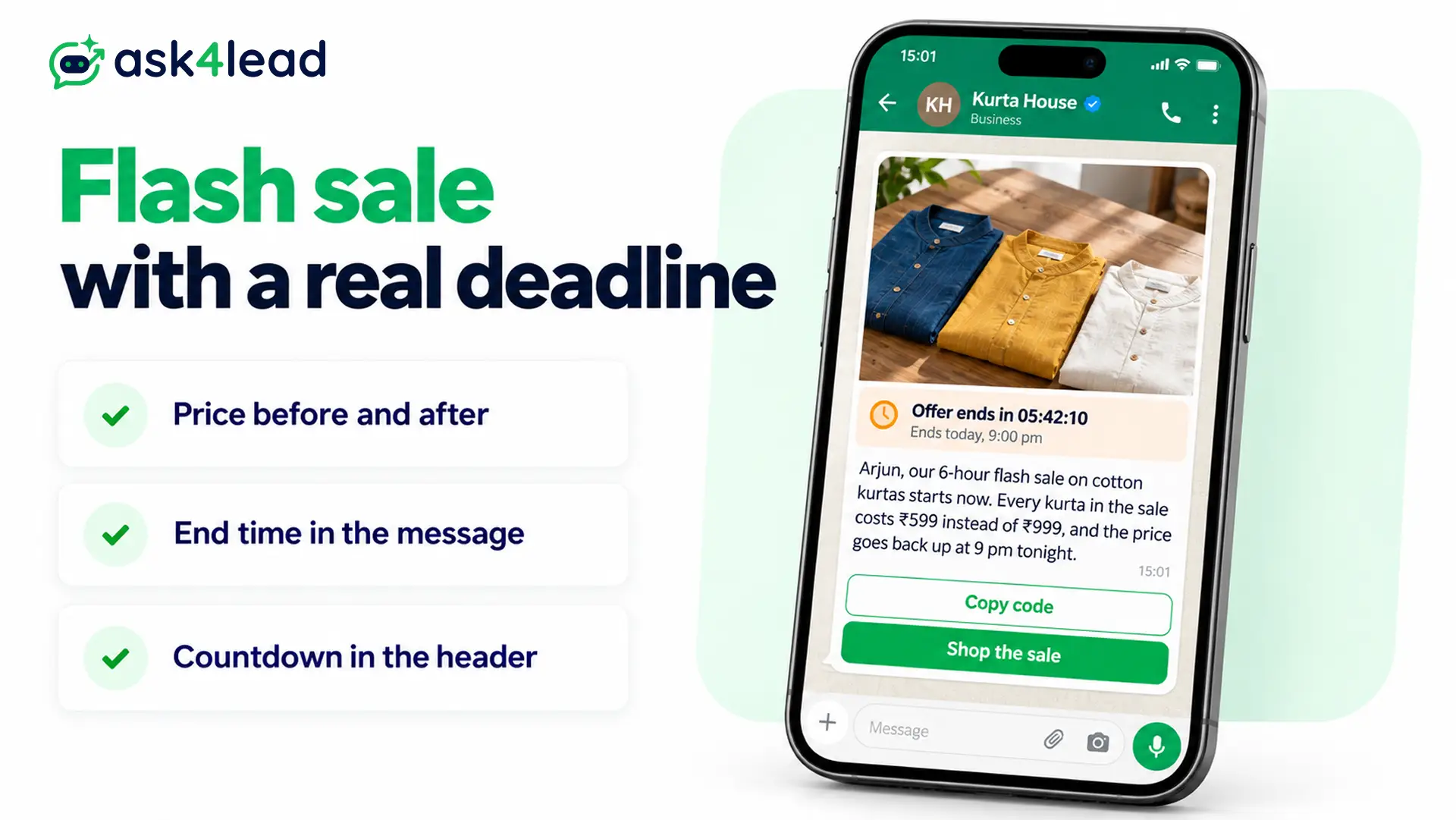
{{1}}, our 6-hour flash sale on cotton kurtas starts now. Every kurta in the sale costs ₹599 instead of ₹999, and the price goes back up at 9 pm tonight.
Format: Meta’s limited-time offer template, which adds an expiry time and countdown.
3. Weekend offer for a local shop
Hi {{1}}, this weekend at Sharma Electronics, Andheri, all mixer grinders are 15% off with free delivery within 5 km. The offer runs Saturday and Sunday, 10 am to 9 pm. Reply YES, and we will keep one aside for you.
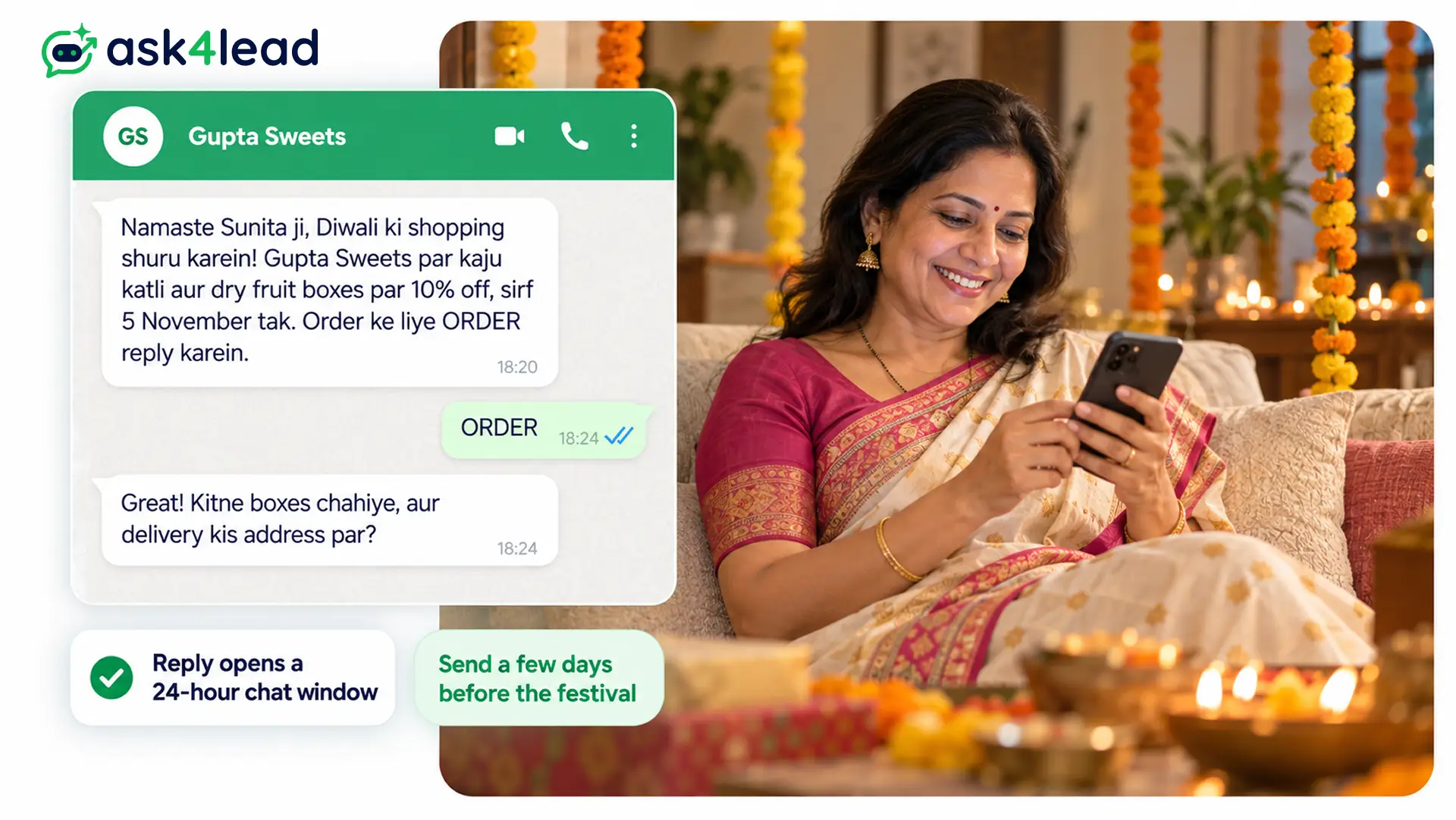
A reply opens a 24-hour customer service window, so you can then chat without a template.
4. Bundle offer with a free delivery threshold
Hi {{1}}, buy any 2 skincare products this week, and the third one is free. Delivery is free on orders above ₹499, and cash on delivery works across India.
Buttons: URL “Build my bundle”. Always name the threshold in rupees.
WhatsApp promotion messages for launches and restocks
A WhatsApp promotion message for a launch tells your existing customers about something new before the public hears. So early access gives subscribers a reason to stay, while an image header shows the product for you.
5. New product launch with early access
{{1}}, the new {{2}} running shoe arrives tomorrow. It weighs 210 grams and comes in 4 colours. Since you are on our WhatsApp list, you can order from 10 am tomorrow, a full day before the public launch.
Header: product image. Buttons: URL “See the colours”.
6. Back in stock alert
Good news, {{1}}: the {{2}} in size {{3}} is back in stock. We have only a few pairs, so reply HOLD, and we will keep one for you until 8 pm today.
Meta counts this as marketing even when the customer asked, because it recommends a product.
7. New collection carousel
Our winter collection is live, {{1}}. Swipe through the cards to see 6 jackets and 4 sweaters, each with its price and sizes.
Format: media card carousel, with up to 10 cards.
Festival and seasonal promotional WhatsApp messages
Festival promotional WhatsApp messages fill Indian inboxes every October and November. Therefore, send yours a few days early, name a delivery cut-off, and skip the festival day itself, when every other brand also writes.
8. Diwali gift hamper offer
Hi {{1}}, our Diwali hampers at {{2}} are now open for orders. Order by {{3}} for delivery before Diwali, and use code {{4}} for 12% off any hamper above ₹1,500.
Buttons: URL “See hampers”, Copy code.
9. Hinglish Diwali message for a sweet shop
Namaste {{1}} ji, Diwali ki shopping shuru karein! Gupta Sweets par kaju katli aur dry fruit boxes par 10% off, sirf {{2}} tak. Order ke liye ORDER reply karein.
Hinglish suits local shops and family customers, but not corporate buyers.
10. Wedding season booking offer
Hi {{1}}, Glow Studio now takes wedding season bookings. Book a bridal trial before {{2}}, and we take the trial fee off your final package. Only 4 weekend slots remain in November.
11. End-of-season sale with member early access
{{1}}, our end-of-season sale starts Friday with 40% off summer wear. Because you are a member, your access starts on Thursday at 6 pm.
Cart, win-back and loyalty promotional messages
These promotional WhatsApp messages go to people who already know you, so they tend to earn replies. However, Meta counts every one as marketing, including the cart reminder that many businesses file as utility.
12. Abandoned cart reminder
Hi {{1}}, you left the {{2}} in your cart. It is still there at the same price, and delivery is free if you order today.
Save the discount for a second reminder, so you do not train customers to abandon carts. The abandoned cart recovery guide covers timing.
13. Win-back offer after 90 days
Hi {{1}}, we miss you at {{2}}. Here is ₹150 off your next order above ₹799, valid for 7 days. If you would rather not get offers, tap Stop offers.
Buttons: Copy code, quick reply “Stop offers”. For a full sequence, see these win-back campaign examples.
14. Reward points expiry reminder
{{1}}, your {{2}} reward points expire on {{3}}. That is ₹{{4}} off your next bill at any of our stores.
A plain balance alert can pass as utility, but “use them on our new collection” makes it marketing.
15. Referral offer
Hi {{1}}, share your code {{2}} with a friend. When they place their first order, you both get ₹200 off.
Promotional WhatsApp messages for service businesses
Service businesses sell time slots, so your promotional WhatsApp messages should fill quiet hours and ask for a booking reply. Then your team confirms the slot in normal chat instead of another paid template.
16. Salon weekday offer
Hi {{1}}, Mirror Lane Salon has 20% off haircuts and spa services on weekday afternoons, Monday to Thursday, 12 pm to 4 pm, until {{2}}. Reply with a day and time, and we will confirm your slot.
17. Coaching institute admission offer
Hi {{1}}, admissions for our JEE 2027 weekend batch at {{2}} close on {{3}}. Students who enrol before then get the study material kit free. Tap below to book a free demo class.
18. Real estate site visit weekend
Hi {{1}}, we are holding open site visits at Riverstone Heights, Baner, this Saturday and Sunday. 2 BHK homes start at ₹78 lakh, and we offer free pickup from Baner Road. Reply VISIT, and pick a time.
19. Gym membership offer
Hi {{1}}, our 3-month membership at FitZone Kothrud costs ₹5,999 instead of ₹7,500 until {{2}}. It includes 2 personal training sessions and full access from 6 am to 10 pm.
20. Restaurant weekday lunch offer
Hi {{1}}, our weekday lunch thali at Spice Route is back at ₹249, Monday to Friday, 12 pm to 3 pm. Show this message at the counter, or reply TABLE to book for your group.
Is a promotional message marketing or utility on WhatsApp?
Any message with an offer, a recommendation or a nudge to buy is marketing, even inside an order update. According to Meta, utility must be non-promotional and tied to the user’s order or account. So an order update with a promo counts as marketing.
| Message | Category | Why |
| Order confirmed, no offer | Utility | Because it confirms a specific order and sells nothing |
| Order confirmed, plus 15% off an accessory | Marketing | Since the upsell makes it mixed content |
| Abandoned cart reminder | Marketing | Because Meta lists retargeting as marketing even when the user asked |
| Delivery delay apology with a credit | Marketing | Since Meta’s own retargeting examples include it |
| Reward points balance only | Utility, if it carries no nudge | Because it reports an account detail |
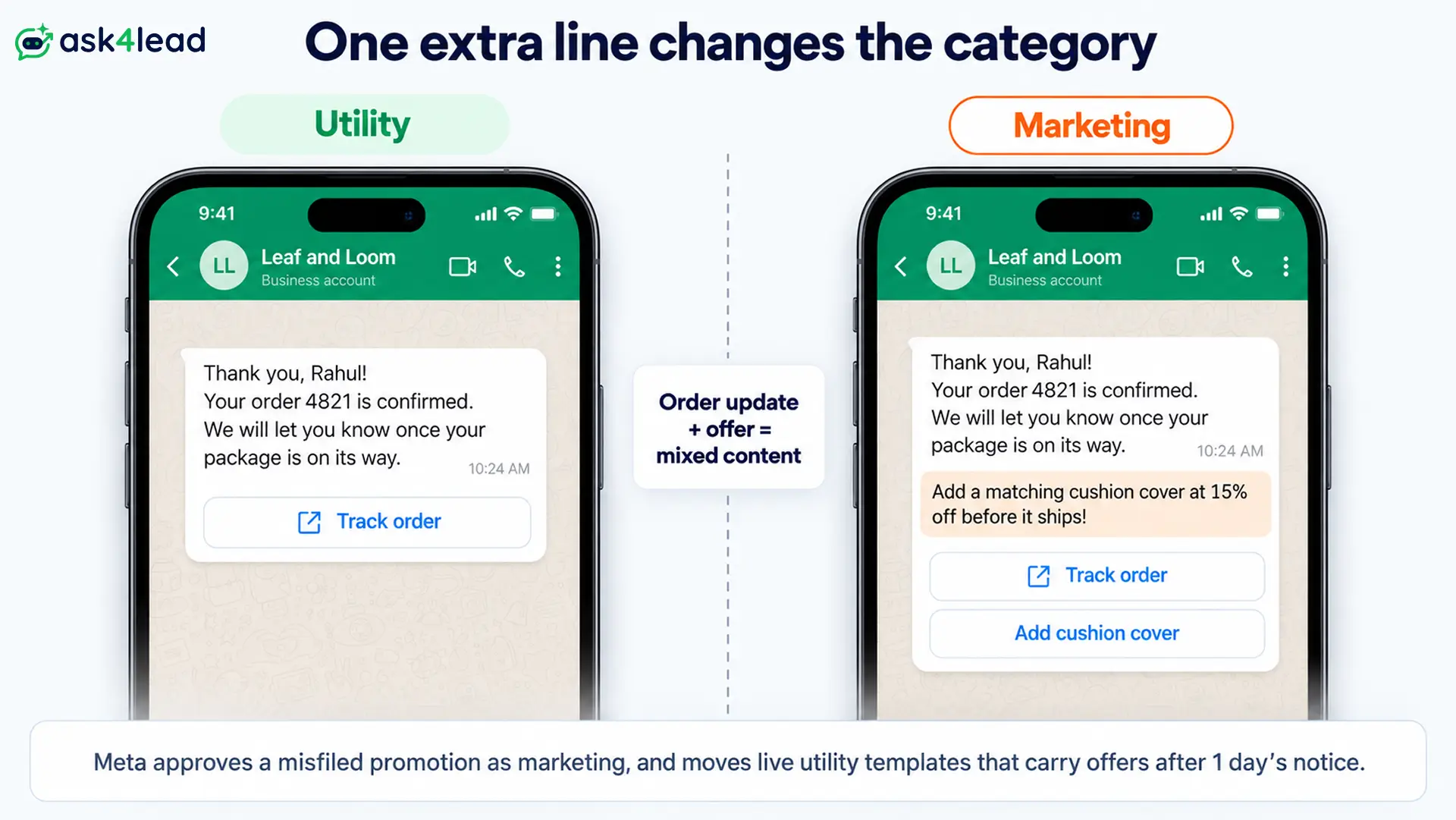
The label matters because Meta checks it. If you submit a promotion as utility, Meta approves it as marketing instead. Later, when a live utility template starts carrying offers, Meta moves it after one day’s notice. For other rejection causes, see these WhatsApp template rejection reasons.
What promotional WhatsApp messages cost in India
Meta charges ₹0.8631 for each marketing message it delivers to an Indian number, on its INR rate card from 1 October 2026. Because Meta bills on delivery, failed messages cost you nothing. However, your provider may add a fee and tax.
Here is a worked example. You send a Diwali offer to 5,000 opted-in customers, and 4,600 messages arrive.
4,600 delivered × ₹0.8631 = ₹3,970 in Meta charges
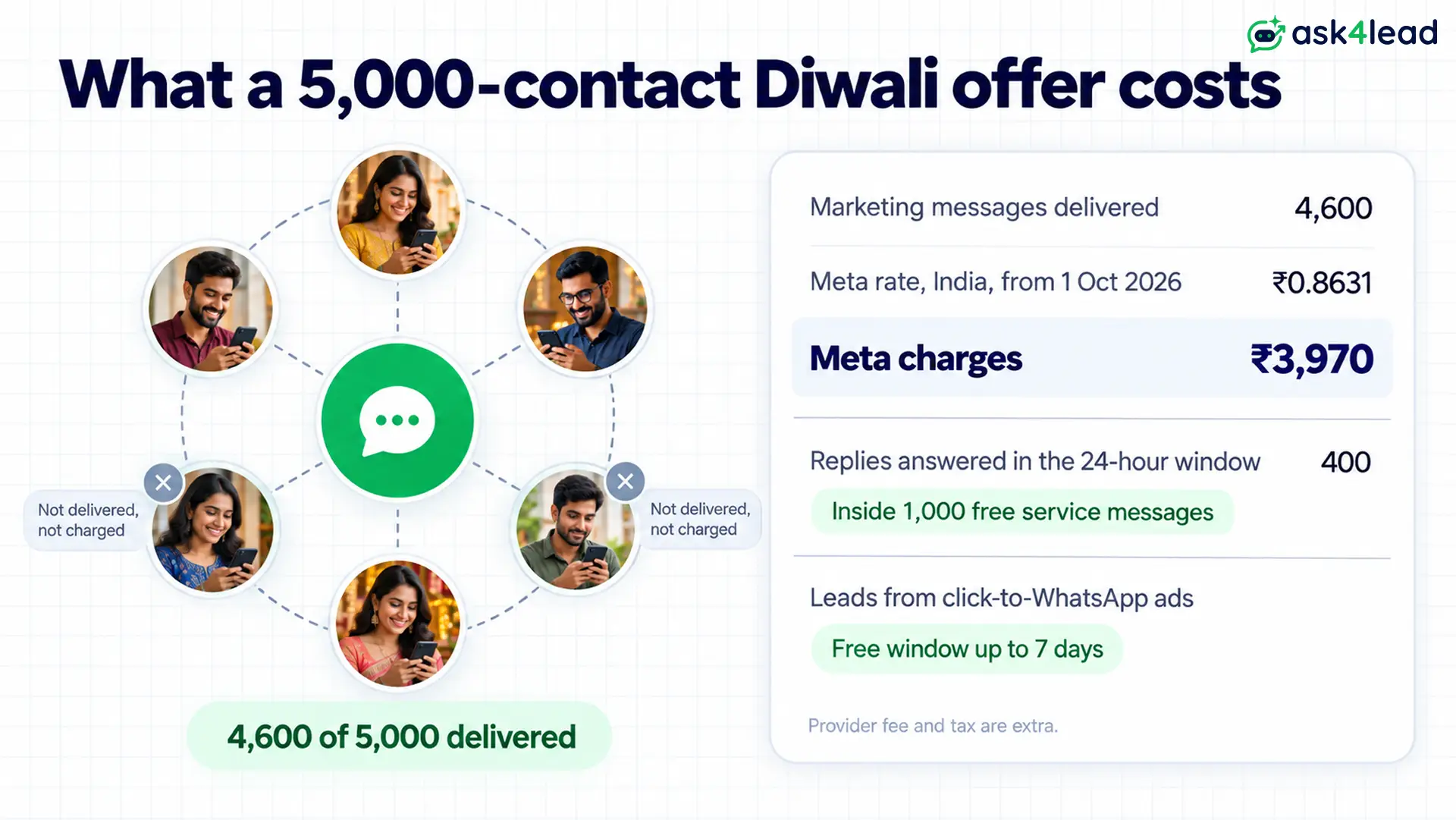
Next, 400 customers reply with questions. Each reply opens a 24-hour window, and your answers inside it count as service messages. Meta’s pricing page gives each number 1,000 free service messages a month, so those 400 answers usually cost nothing.
You can also cut the bill with ads. When a customer writes from a click-to-WhatsApp ad on their phone and you reply within 24 hours, Meta opens a free window of up to 7 days. Inside it, even promotional WhatsApp messages are free. For other countries, see the 2026 WhatsApp API pricing guide.
This cost model does not apply to US customers, since Meta currently delivers no marketing templates to US numbers.
Why promotional WhatsApp messages fail to arrive
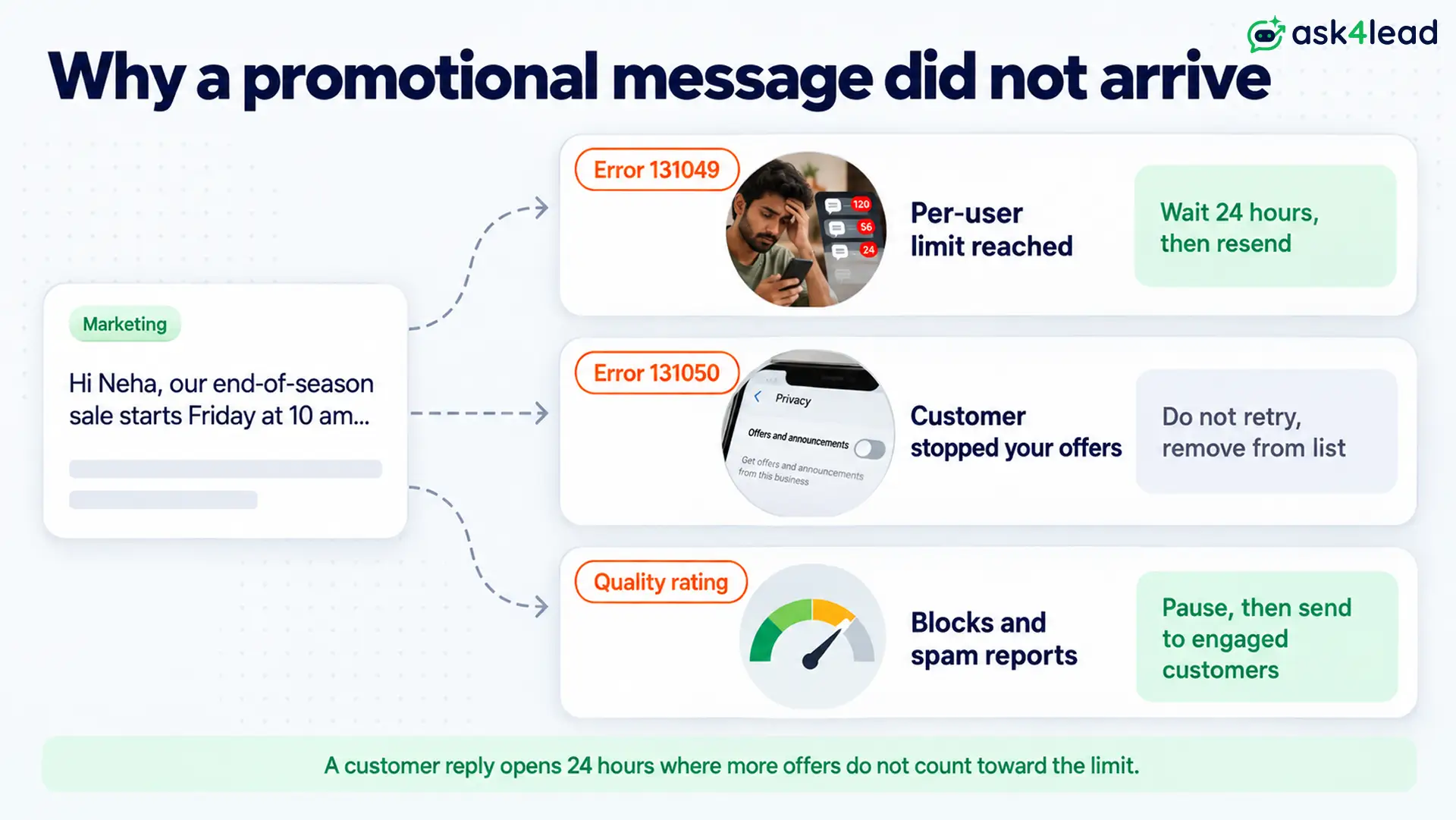
Most failed promotional WhatsApp messages hit one of three Meta controls: a per-user limit, the customer’s stop setting, or your quality rating. Each one returns a different error, so check the code before you resend, because a blind retry wastes your attempts.
- Error 131049, per-user limit: Meta caps how many marketing messages a person gets from all businesses, based on how often they read them. So wait at least 24 hours before you resend, as Meta’s per-user limits page advises.
- Error 131050, customer stopped offers: the customer used the Offers and announcements setting to stop your marketing messages. Do not retry, since they will never arrive.
- Quality rating drops: blocks and spam reports lower your WhatsApp quality rating, and then Meta can restrict your sending.
Meta’s marketing templates page adds that a “Not interested” tap can tighten that person’s limit. On the other hand, when a customer replies, your offers in the next 24 hours do not count toward it.
Take a retry example. A shop sends 2,000 sale messages at 10 am, and 300 fail with 131049. Resent at 2 pm, most fail again. Instead, the team waits until the next morning and drops every 131050 contact from future lists.
Which promotional WhatsApp message to send first
Start with promotional WhatsApp messages for people who already know you: the welcome offer, the cart reminder and the win-back offer. These earn replies, and replies keep your quality rating healthy before you try bigger festival campaigns.
Before you submit a template, check that you have:
- A clear opt-in record for every contact on the list
- The offer, the price or code, and the end date in the first three lines
- The marketing category selected, with 3 buttons at most
- A Stop offers button or line for customers who want fewer messages
Then, to scale up, read about sending bulk WhatsApp messages without a ban.
Run promotions without losing the replies
A sale message is only half the job, because replies arrive all at once, and slow answers turn into lost orders. Ask4Lead, a humanized AI WhatsApp chatbot and CRM, helps you handle both halves:
- WhatsApp Campaigns: filter contacts by tag, lead source or pipeline stage, pick an approved template, and schedule the send.
- Template builder: add image headers and buttons, preview the message on a phone, and track Pending, Approved or Rejected.
- AI Sales Assistant: answers the wave of replies from your own business knowledge and flags pricing questions for a person.
- Account health: shows your quality rating and messaging limit, so you can pause a campaign when the rating turns yellow.
Ask4Lead sells this software, and each feature named here is on its features pages.
Sign Up Free on Ask4Lead: 100 AI Credits Included
FAQs
1. How do I send promotional messages on WhatsApp?
Collect opt-ins, then submit your offer as a marketing template through the WhatsApp Business API. Once Meta approves it, you can send it to your list.
2. Can I send 1,000 promotional messages on WhatsApp for free?
No. Meta charges every delivered marketing message, except inside the free window that a click-to-WhatsApp ad opens.
3. How do customers turn off promotional messages on WhatsApp?
Customers can stop your offers through the Offers and announcements setting, or block your number. After that, your marketing templates to them fail with error 131050.
4. Should I use emojis in promotional WhatsApp messages?
One or two can help. However, a row of emojis pushes your offer below the fold.
