
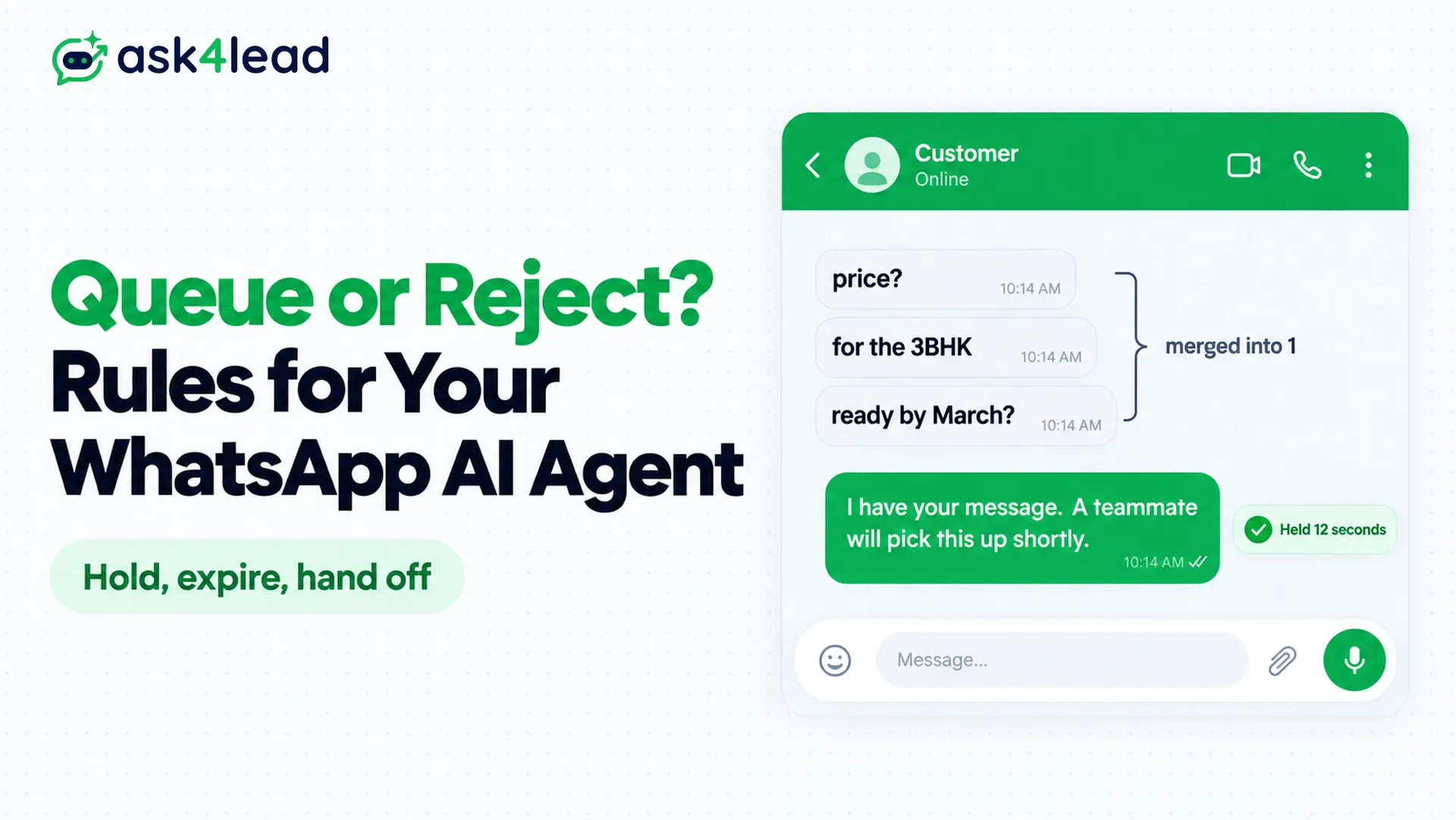
A WhatsApp AI agent rate limit is a cap on how fast your AI agent can take in, process or send WhatsApp messages. The cap comes from Meta, from your AI model provider, or from WhatsApp’s limit on messages to 1 customer in a short time.
Quick answer: At a WhatsApp AI agent rate limit, hold messages in a short queue with a hard expiry, such as 60 seconds. Merge a customer’s rapid messages into 1, send 1 holding reply, and move expired chats to a person. Never reject at the webhook, because Meta then retries for up to 7 days.
Key takeaways
- Small-business agents usually hit the AI model limit or the pair rate limit long before Meta’s 80 messages per second.
- A WhatsApp message queue without an expiry turns a rate limit into stale answers that arrive after the customer has left.
- Acknowledge every webhook with a 200 response first. Reject only after the message is stored.
- Watch the age of the oldest waiting message, not the length of the line.
What Is a WhatsApp AI Agent Rate Limit?
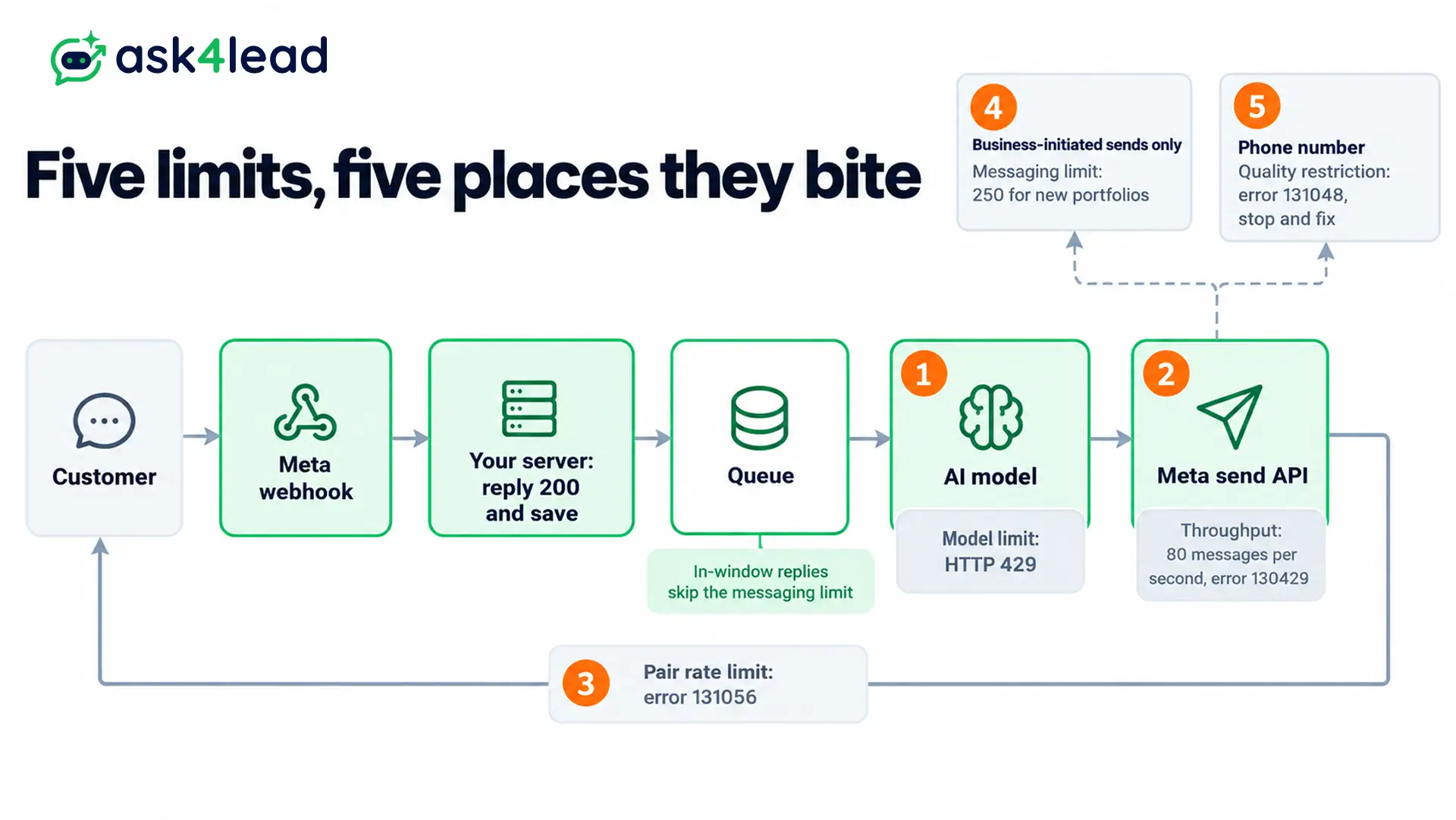
A WhatsApp AI agent rate limit is any ceiling that slows your agent’s replies. It has 5 sources, and each needs a different response.
Naming the source first tells you whether to queue, retry, slow down or stop, because the right move for a model limit is wrong for a quality restriction.
The 5 sources of a WhatsApp AI agent rate limit
| Source | Typical number | Error you see | Queue or reject |
| AI model provider | Set by your plan, in requests and tokens per minute | HTTP 429 from the provider | Queue briefly, obey Retry-After |
| Meta throughput | 80 messages per second per number, up to 1,000 on upgrade | 130429 | Queue and slow the whole line |
| Pair rate limit | Per customer. Meta publishes no number, and builders report about 1 message per 6 seconds | 131056 | Merge messages, space replies |
| Messaging limit | 250 business-initiated customers a day for new portfolios | Blocked sends outside the window | Not a cap on in-window replies |
| Quality restriction | Set by Meta after user reports | 131048 | Neither: stop and fix quality |
The numbers come from Meta’s throughput guide, Meta’s messaging limits page and Meta’s error code list.
Why the model binds first in a WhatsApp AI agent rate limit
At 80 messages per second, Meta’s default allows 4,800 messages a minute from 1 number. A small business rarely sends that many, so your AI model plan and the pair rate limit give out first.
A common mistake in builder communities is treating the 250 messaging limit as a cap on AI replies. It only counts business-initiated conversations outside the 24-hour customer service window, so replies to customers who wrote first are not part of it.
Queue or Reject at a WhatsApp AI Agent Rate Limit
Queueing keeps every message but adds delay, and a late answer can be worse than none. Rejecting protects your system and answers fast, but a refused message is a lost lead.
A WhatsApp AI agent rate limit forces a trade-off, so the right choice depends on how long a customer will wait.
1. The cost of an unbounded WhatsApp message queue
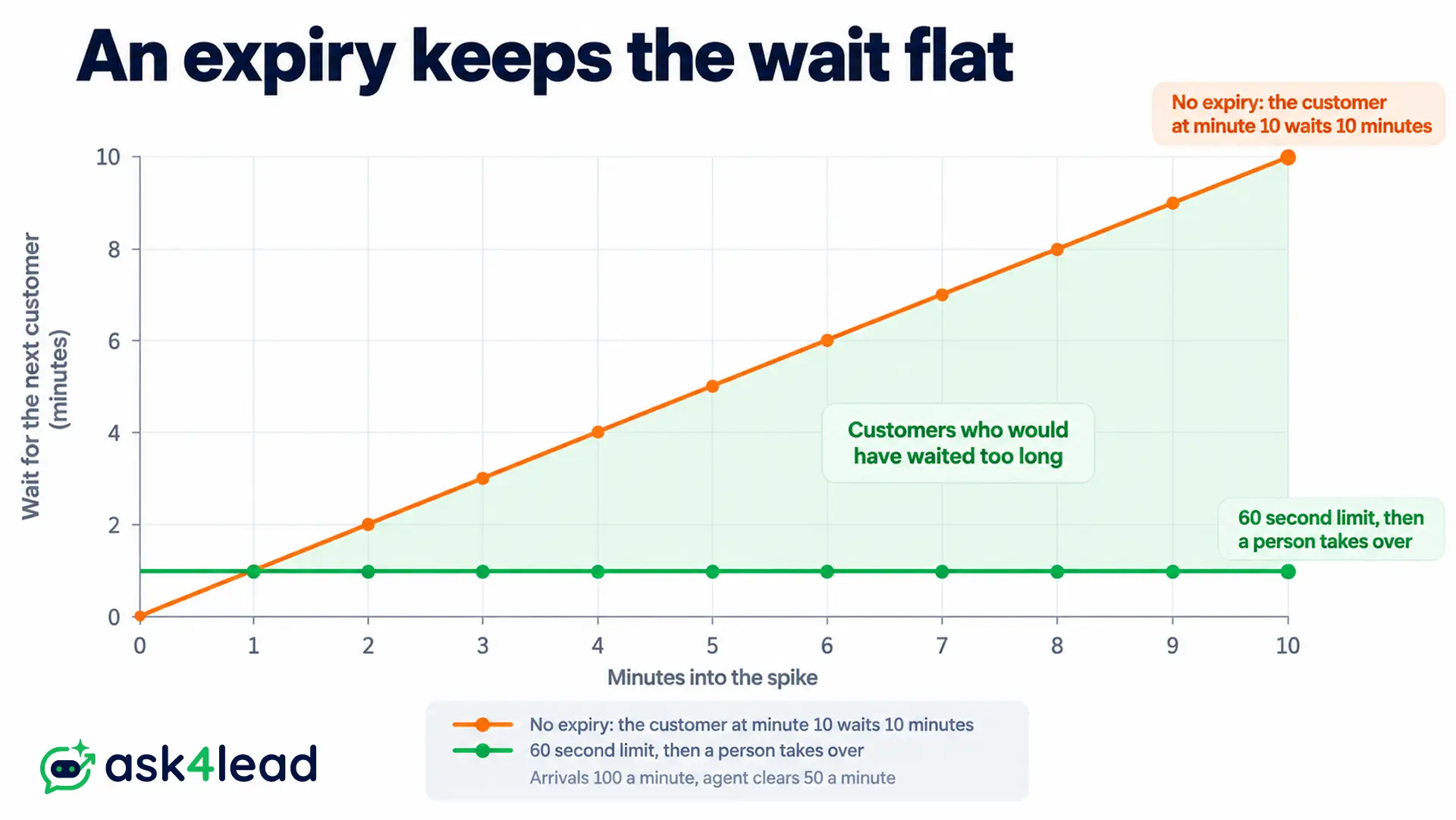
Without a cap, a WhatsApp message queue grows during a spike, and the wait grows with it. Suppose messages arrive at 100 a minute and your agent clears 50 a minute.
The backlog grows by 50 every minute, so after 10 minutes the next customer waits 10 minutes, long after they bought elsewhere.
2. The cost of rejecting at the door
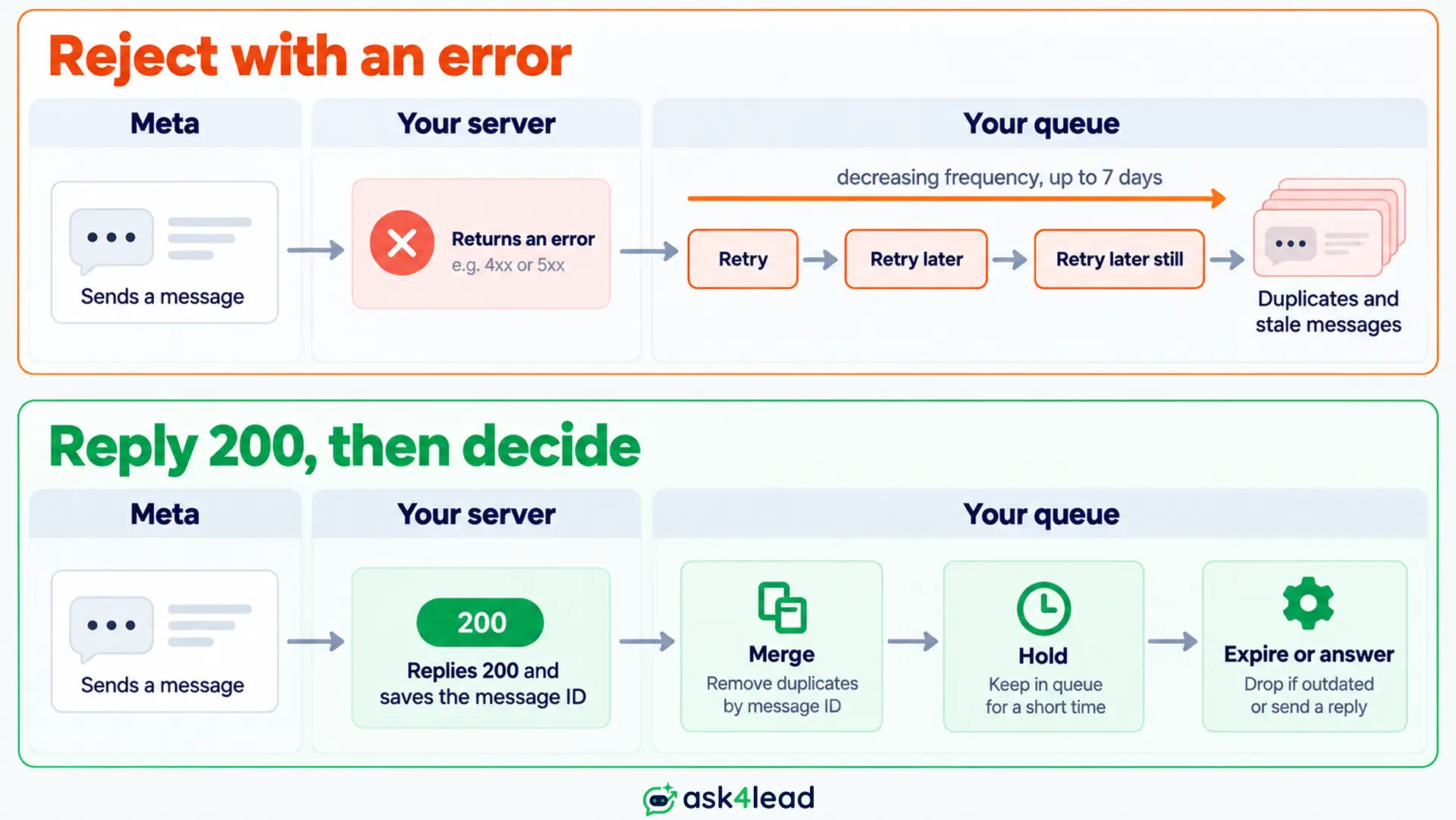
WhatsApp has no “try again later” for customers. If your webhook returns anything other than HTTP 200, Meta retries with decreasing frequency for up to 7 days, according to Meta’s webhook documentation. Those retries can also arrive as duplicates.
So an error response from your server rejects nothing. It schedules the same message to come back later, in a pile. The 7-day retry cliff is covered in our outage guide.
In practice, “reject” means skipping the AI for that message, not refusing the webhook.
3. WhatsApp message queue, reject and hybrid compared
Only the hybrid survives a real WhatsApp AI agent rate limit.
| Approach | What the customer sees | Main risk | Use it when |
| Queue with no expiry | Long silence, then a late reply | Stale answers, memory growth | Never for live chat |
| Reject and skip the AI | Silence | A lost lead | Never on its own |
| Short queue, expiry, human handoff | A brief wait, then a person | Needs staff coverage | Default for most agents |
The Hold, Expire, Hand Off Rule for a WhatsApp AI Agent Rate Limit
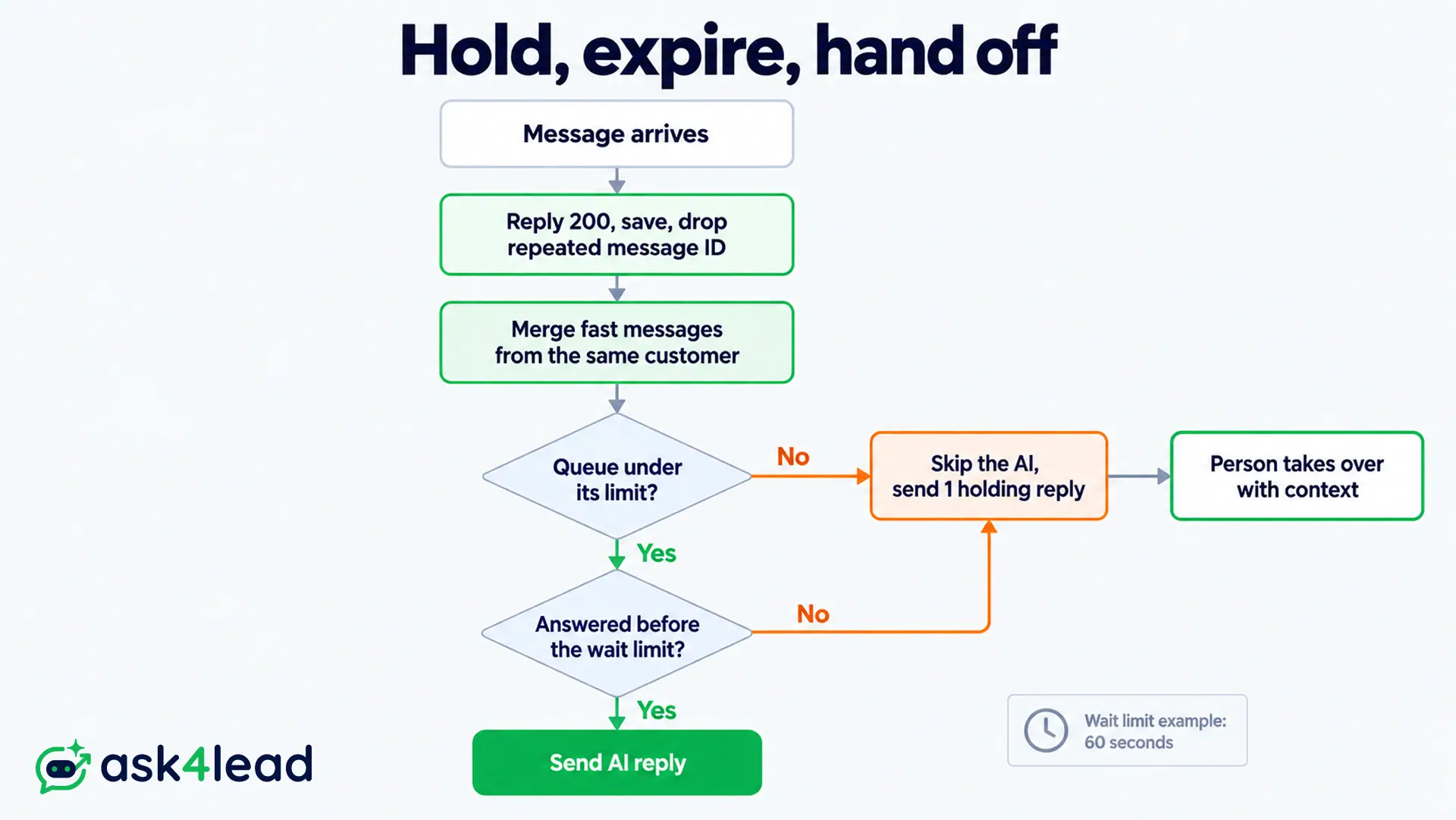
The Hold, Expire, Hand Off rule is a 4-step policy for a WhatsApp AI agent rate limit.
Acknowledge each message, hold it in a short queue, expire it at a fixed wait, and hand expired chats to a person. Replies stay fresh, and every lead stays visible to your team.
1. Acknowledge every webhook before you decide
- Respond fast: return 200, save the message and add it to the queue in well under a second.
- Save message IDs: a repeated ID is a retry or duplicate, so drop it.
- Decide afterwards: the WhatsApp message queue, not the webhook, chooses what happens next.
2. Merge fast messages from 1 customer
Customers often send 3 to 5 fragments in a row. Answering each one wastes AI calls and trips the pair rate limit. Builders commonly wait 5 seconds after the last fragment, with a 30 second maximum, then answer once.
Ask4Lead’s AI Sales Assistant can be switched off per conversation, so a team member can take over 1 chat without pausing the rest.
3. Set the maximum wait for a WhatsApp AI agent rate limit
The formula is simple: WhatsApp message queue limit = messages cleared per minute × longest wait in minutes.
Anything beyond that limit skips the AI and goes to a person.
| Agent clears per minute | Longest wait | Queue limit |
| 50 | 60 seconds | 50 messages |
| 20 | 2 minutes | 40 messages |
| 120 | 30 seconds | 60 messages |
A 60 to 120 second wait is a sensible start for live chat, based on builder practice rather than a Meta rule. The hard ceiling is 24 hours after the customer’s last message, because after that only approved templates can go out.
4. Expire, send 1 holding reply and hand off
When a WhatsApp AI agent rate limit pushes a message past its wait limit, do 2 things:
- Send 1 holding reply: a repeat every few seconds adds to the pair rate limit.
- Move the chat to a person: include the customer’s last message and what the agent understood.
How to Queue by Message Type
Not every message deserves the same wait. A WhatsApp message queue works best as separate lanes, each with its own limit.
Live chat waits least, order notices wait longer, and marketing sends wait longest and are the first to pause when something goes wrong.
Lanes and wait limits for a WhatsApp message queue
| Lane | Starting wait limit | At the limit |
| Live customer chat | 60 to 120 seconds | Holding reply, then a person |
| New lead from a click-to-WhatsApp ad | 5 minutes | Person replies and follows up |
| Order and booking notices (templates) | 1 hour | Retry with backoff, alert staff |
| Marketing broadcasts | Hours, sent slowly | Pause and reschedule |
| Delivery and read status events | No reply needed | Log only |
Priority rules when the WhatsApp message queue is full
Meta’s throughput applies per phone number, so a large broadcast and live chat share the same capacity. Cap broadcast speed so it never starves a customer who is waiting right now. A pair rate limit also punishes messaging 1 customer from 2 tools at once, such as an agent and a broadcast.
Then rank the waiting chats by intent, not arrival time:
- Buying and booking intent: price, demo and visit requests go first.
- Complaints and open deals: an unhappy customer or a paying one comes next.
- General questions: FAQs wait the longest, and repeats are dropped first.
Ask4Lead’s Work Queue already groups chats under “Needs Human Review” and “Stale No Recent Reply”, so staff see which handed-off chats to open first.
Retry and Backoff for Each WhatsApp AI Agent Rate Limit Error
Retry only errors that clear on their own. A throughput or pair error clears in seconds, but a quality restriction stays until you fix its cause. Retrying the wrong error burns quota and can lower your quality rating, so match the response to the code before you write the loop.
Error codes for a WhatsApp AI agent rate limit
| Code | Meaning | Do this |
| 130429 | Cloud API message throughput reached | Slow the whole queue, then retry with backoff |
| 131056 | Too many messages to the same customer (pair rate limit) | Pause that customer only and keep sending to others |
| 80007 | WhatsApp Business Account rate limit | Slow down account-wide and retry later |
| 4 | App API call limit | Reduce call frequency |
| 131049 | Per-customer marketing limit | Wait 24 hours or more |
| 131048 | Phone number quality restriction | Do not retry, review quality in WhatsApp Manager |
The pair rate limit surprises teams most, because it fires for 1 customer while everyone else is fine.
A 131048 failure often follows a restricted account, so check your status first.
A backoff schedule that does not make things worse
Wait 1, 2, 4 and 8 seconds, cap the delay at 60 seconds, add random jitter and stop after 5 tries. This pattern is common engineering practice, not a Meta rule.
For an AI model 429, honor the Retry-After header when the provider sends one.
A pair rate limit needs per-customer backoff, while 130429 needs backoff for the whole queue. Retrying hot adds load to a limit that is already full.
After the fifth failure, hand the chat to a person, and check why messages show as not delivered if the failures keep coming.
What the Customer Sees at a WhatsApp AI Agent Rate Limit
Customers never see your queue, only silence or a message. Silence reads as being ignored, while 1 honest holding reply buys time. Write it before launch, say it is an AI agent, and offer a person.
Holding replies that work
- Slow moment: “I have your message. Replies are slower than usual, and a teammate will pick this up shortly.”
- Price question: “I want to give you the right price, so I am passing this to a teammate who will reply here.”
- After expiry: “Sorry for the wait. A teammate now has your chat and will answer in this thread.”
Send each holding reply once per chat, because every extra message raises the pair rate limit risk. Use it only inside the 24-hour window. Outside it, use an approved template.
What a person needs when the chat arrives
The person who takes over should see the customer’s last message, what the agent understood and why the chat expired.
Ask4Lead’s Human Approval for AI Replies flags low-confidence drafts and pricing questions for review before they send. During a spike, that keeps a rushed AI from guessing at a price.
Monitoring a WhatsApp AI Agent Rate Limit and Planning Capacity
Watch the age of the oldest waiting message in your WhatsApp message queue, not the number of messages in line.
A short line of old messages hurts customers more than a long line that clears fast. Alert on wait time, expiries and error codes, and test the plan with a deliberate burst before customers create one.
5 numbers to alert on
- Oldest message age: alert at half your maximum wait, measured from webhook arrival, not from the AI call.
- Expiries per hour: a rising count means capacity is too small.
- 130429 and 131056 counts: 130429 is Meta throughput and 131056 is the pair rate limit, both separate from model limits.
- Model 429 count: this shows your AI plan is the bottleneck.
- Skipped messages: log any message that matched no rule instead of dropping it.
Ask4Lead’s WhatsApp Account Health shows your quality rating and current messaging limit, so a yellow rating gets noticed before it becomes a restriction.
Run a burst test before launch
A burst test shows how your WhatsApp AI agent rate limit behaves under load. Replay 100 messages in 1 minute from a test number, and record the oldest message age, the expiries and the holding replies sent.
Resize the WhatsApp message queue, then repeat.
Our WhatsApp AI agent testing guide covers the rest of the pre-launch checks.
Test broadcasts separately, because they share capacity with live chat. Ask4Lead’s WhatsApp Campaigns sends approved templates only, which keeps the marketing lane apart from conversations.
FAQs
1. Should a WhatsApp AI agent queue or reject messages when rate limited?
Keep a short WhatsApp message queue with an expiry, then hand the chat to a person. Never reject at the webhook, because Meta keeps retrying for up to 7 days.
2. What is the WhatsApp Cloud API rate limit?
The default WhatsApp AI agent rate limit from Meta is 80 messages per second per phone number, upgradable to 1,000.
3. Does the 250 messaging limit stop my AI replies?
No. It counts business-initiated conversations outside the 24-hour window, not replies to customers who wrote first. The WhatsApp broadcast limit guide explains the tiers.
4. How long should a customer wait for an AI reply?
For live chat, 60 to 120 seconds is a sensible start for a WhatsApp AI agent rate limit. Past that, send 1 holding reply and hand the chat to a person.
5. What is a pair rate limit on WhatsApp?
A pair rate limit caps how fast 1 business number can message 1 customer. It returns error 131056, and Meta publishes no exact figure.
Conclusion
A WhatsApp AI agent rate limit calls for a short queue, a fixed expiry and a person who takes over when time runs out. Choosing between queueing and rejecting misses that middle path.
Before you launch, check that you have:
- Every webhook acknowledged before any decision.
- A WhatsApp message queue sized from your real capacity.
- A holding reply and a handoff note written in advance.
- Backoff that stops after 5 tries, and no retries on 131048.
- An alert on the age of the oldest waiting message.
Meta’s limits and AI model plans change, so repeat the burst test after each change.
Keep leads moving when WhatsApp traffic spikes
A busy hour should not cost you a lead that wrote first. Ask4Lead gives your team 4 safety nets.
The Work Queue lists every chat that needs a person. Human Approval holds low-confidence and pricing drafts. Account Health shows your quality rating and messaging limit.
When your credit balance reaches zero, outbound messages pause instead of overspending. See how it fits together on our WhatsApp AI agent platform page.
