
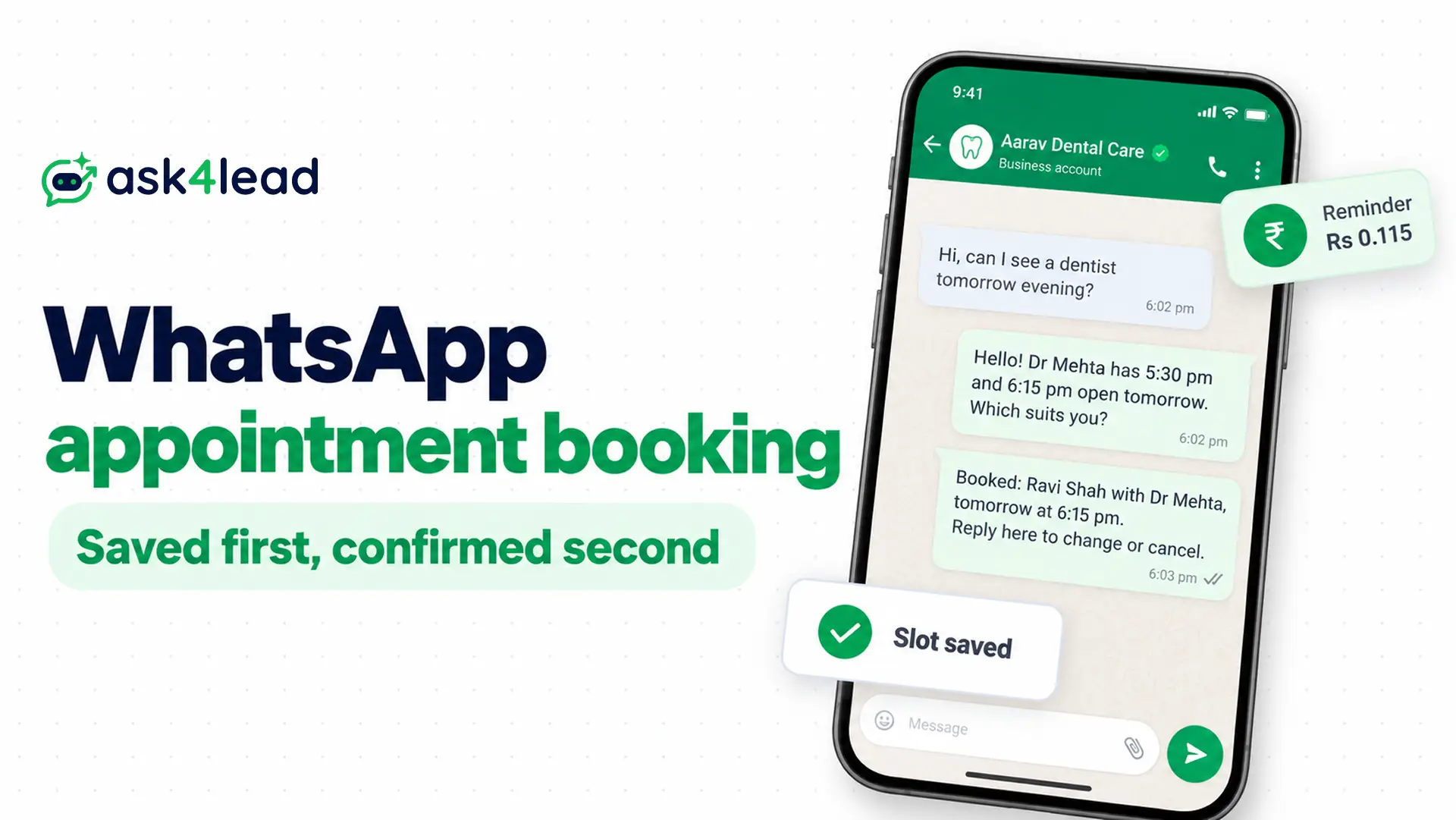
WhatsApp appointment booking lets a customer ask for a slot in a chat. An AI then offers open times, saves the booking and confirms it.
Clinics, salons and service shops use it to answer the messages that arrive after closing time. It needs the WhatsApp Business Platform, Meta’s official API, because the free app cannot run this flow.
What is WhatsApp appointment booking with AI?
WhatsApp appointment booking with AI is a chat flow where the customer asks for a service and the AI checks open slots. Your system then saves the booking before anyone confirms it.
An appointment reminder follows as a template, and a person takes over when the AI is unsure.
Four parts make that work, and each one fails in its own way.
| Part | Its job | How it fails |
| Chat AI | Reads “kal 5 baje” or “Friday after 3” and asks for what is missing | It says “noted” before anything is saved |
| Calendar or sheet | Holds the real slots | It double-books when two chats ask at once |
| Appointment reminder template | Reaches the customer after the chat window closes | It turns into marketing when you add an offer |
| Person | Takes over when the AI is unsure | The customer waits because the desk is busy |
Is WhatsApp appointment booking worth it for your business?
WhatsApp appointment booking pays off when slow replies cost you bookings, not when your diary already runs smoothly.
Some salon owners say a notebook and WhatsApp chats work fine, and for a walk-in shop that is true. So measure first.
Count 3 things from one week of chats
- After-hours requests: messages that arrived when nobody could reply
- Slow replies: requests answered more than 1 hour later
- Clashes: double bookings and forgotten slots
Then multiply the bookings you would have recovered by your average bill, and compare that with the tool fee.
For example, 20 recovered bookings at Rs 500 is Rs 10,000 a month.
Meta charges 40 × Rs 0.115 = Rs 4.60 for their reminders. Those are example numbers, so use your own count.
Which businesses gain from WhatsApp appointment booking
| Business | Fit | Why |
| Clinic with fixed doctor slots | Strong | Questions repeat and the slots are fixed |
| Appointment-only salon or spa | Good | The AI must read the stylist and the service length |
| Walk-in barber | Weak | The queue is first come, first served, so a slot adds nothing |
| Salon where regulars get priority | Weak | Staff juggle late arrivals and favours, which software handles badly |
This does not apply to shops with fewer than a handful of bookings a week. At that volume, a reply from the shared team inbox costs less than the setup.
How WhatsApp appointment booking works, step by step
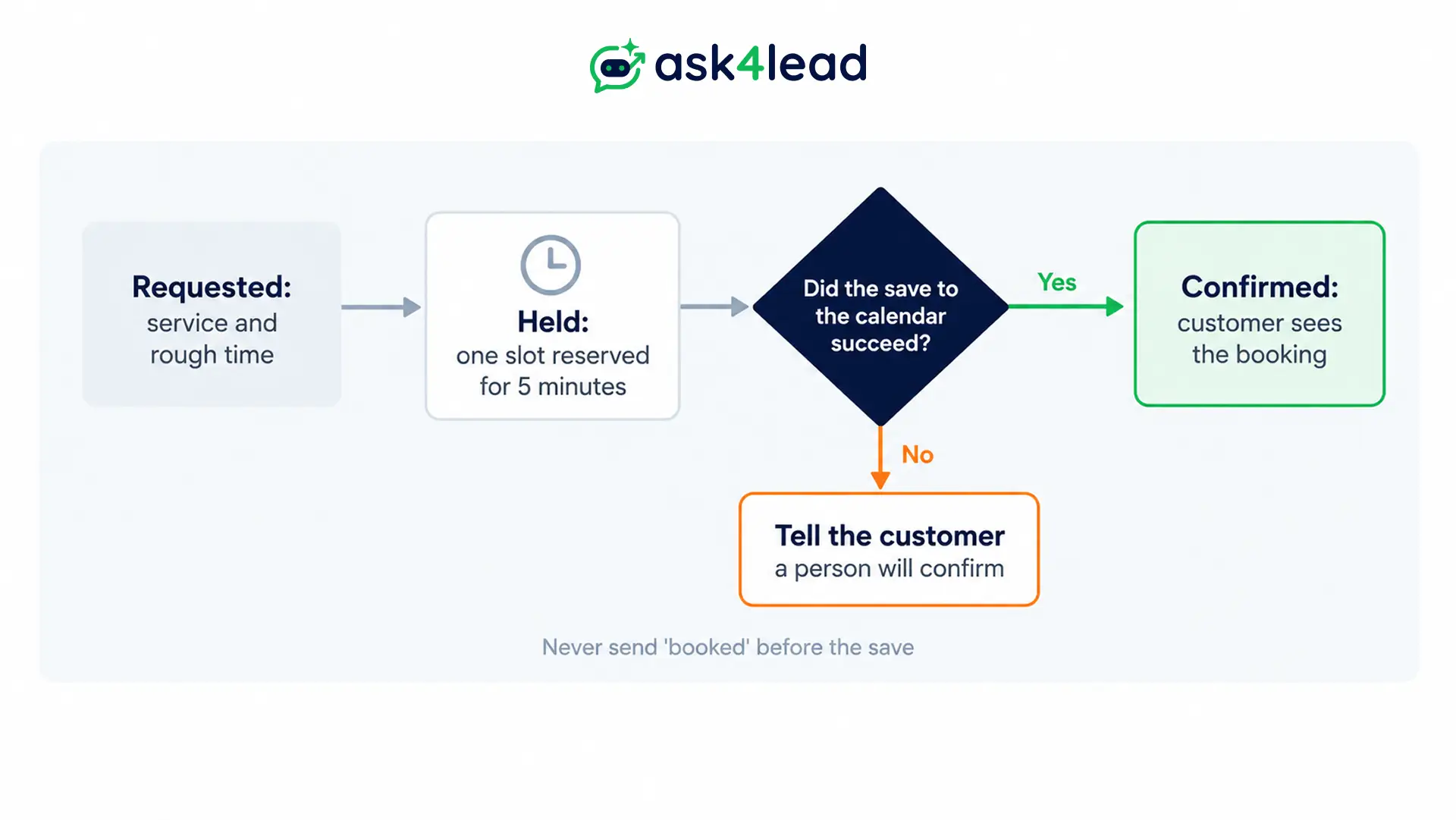
A booking moves through 3 states, and the customer should see “confirmed” only in the last one. The 5 steps of WhatsApp appointment booking below keep those states apart.
| State | What it means | What the customer sees |
| Requested | The AI has a service and a rough time | Open slots to choose from |
| Held | One slot is reserved for a few minutes | “I am holding 6:15 pm for you” |
| Confirmed | The booking is saved in your calendar | A confirmation with the date and time |
1. Ask for the service first, then the time
Customers type “kal 5 baje” or “sometime after 3”. So let the AI collect the service, the day and a rough time, then ask only for what is missing.
2. Check the real calendar
The AI must read live availability from a calendar or sheet instead of guessing. Without that link it can only collect requests, so a person has to confirm each one.
3. Hold the slot for 5 minutes
A hold stops two chats from taking the same slot while the first customer decides. Builders suggest about 5 minutes.
Release the slot when the customer goes quiet.
4. Save first, then confirm
Write the booking, wait for the save to succeed, and only then send “confirmed”. One builder found a bot that said “your appointment is noted” while nothing reached the sheet.
The fix was a structured AI result, such as booking_ready. A separate step then writes the row and sends the reply.
5. Send the appointment reminder
Send each appointment reminder as a template, as the cost section explains. See reminder message examples for wording.
A sample WhatsApp appointment booking chat
Customer: Hi, can I see a dentist tomorrow evening?
AI: Hello! Dr Mehta has 5:30 pm and 6:15 pm open tomorrow. Which suits you?
Customer: 6:15 please.
AI: I am holding 6:15 pm for 5 minutes. Please send your name for the booking.
Customer: Ravi Shah
AI (after the save works): Booked: Ravi Shah with Dr Mehta, tomorrow at 6:15 pm. Reply here to change or cancel.
Salons add the stylist and the service length, because a facial and a haircut block different amounts of time. Restaurants follow the same states, as this restaurant guide shows.
How to handle changes in WhatsApp appointment booking
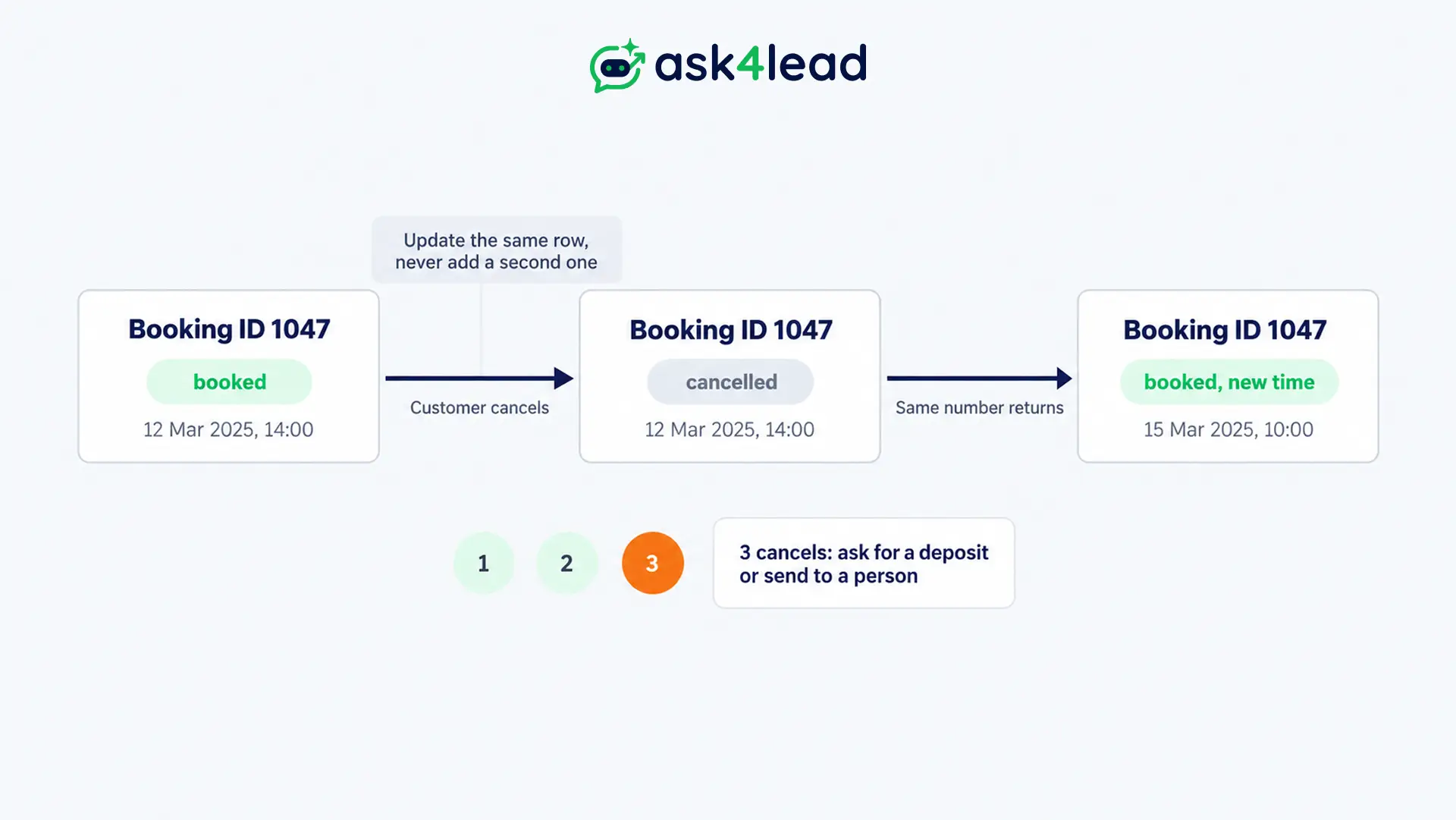
Treat a change, a cancel and a re-book as events on one booking, not as special cases. Customers change the time all day, so this part decides whether you trust the system.
- One booking ID: update the same row when the time changes, because a second row creates a double booking. Send the new confirmation only after the update works.
- A status field: use booked, cancelled and completed. Keep the cancelled row, since the history helps later.
- A light re-book reply: when the same number returns, answer “No problem, here are the open slots”. Do not ask why they cancelled.
- A cancellation counter: one cancel is normal life, but three is a pattern. Then ask for a deposit or send the chat to a person.
- A silence timer for staff: when nobody answers a handed-over chat in 10 to 15 minutes, send “Our desk is busy, but a person will reply shortly”. Read how to design a WhatsApp human handoff for more rules.
What a clinic’s WhatsApp appointment booking AI must never do
A clinic’s AI should handle logistics only: timings, doctor availability, services and the booking itself.
Builders who spoke to small clinics heard one fear every time, which is a wrong answer about health. So decide that answer before the model runs.
| Message type | Who answers | Example |
| Logistics | The AI | “Do you do ECG here?” |
| Symptoms or advice | A fixed reply, then staff | “My child has a fever, what should I give?” |
| Emergency words | A fixed reply with your emergency number, plus an alert to staff | “Chest pain” |
| Reports and results | Staff | “Is my blood report ready?” |
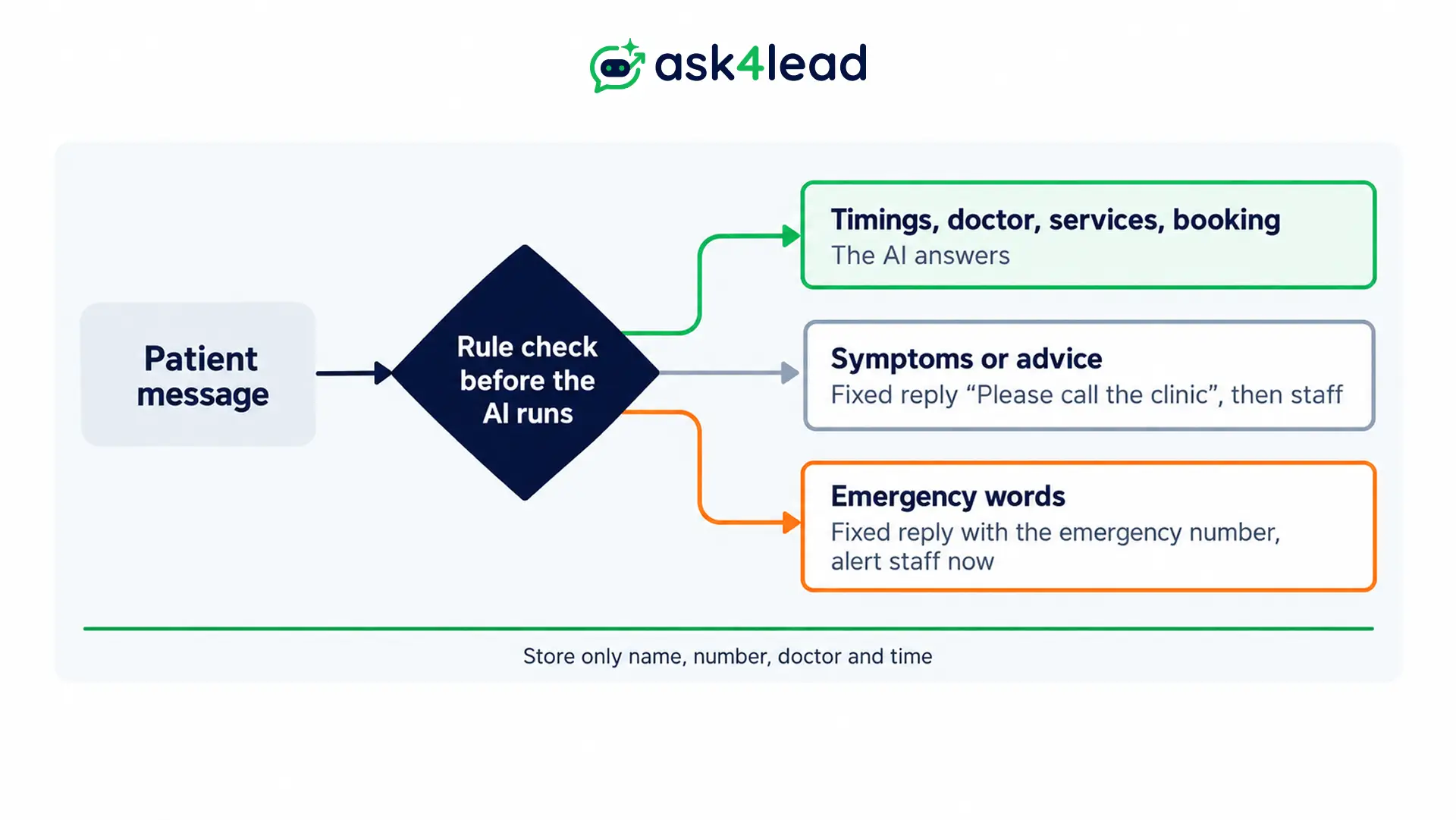
Use rule-based stops for symptom words and keep the model out of that decision. The fixed reply can be “Please call the clinic” and nothing more.
Keep health details out of the booking record
Meta’s Business Messaging Policy (updated 23 September 2026) bars telemedicine and sending or requesting health information where the law requires extra safeguards.
So store the name, number, doctor and time. Leave symptoms out of the chat and the sheet.
Rules for patient data differ by country and clinic type. India’s data protection rules start their main notice and consent duties around May 2027, according to law-firm commentary.
So ask a lawyer before you store more than the booking. Then read WhatsApp marketing for healthcare compliance and WhatsApp data privacy for businesses first.
Appointment reminder rules and cost for WhatsApp appointment booking
An appointment reminder sent a day ahead falls outside the 24-hour customer service window. That window opens when the customer messages you and resets with each message.
So the appointment reminder must be an approved utility template. The confirmation you send right after the customer’s message is a service message instead.
Meta’s error 131047 appears when you try free text after the window closes.
| Message | Type | Meta list rate in India |
| Confirmation inside the open window | Service | Free for the first 1,000 a month per number, then Rs 0.115 |
| Appointment reminder 24 hours before | Utility template | Rs 0.115 |
| Reminder with an offer added | Marketing template | Rs 0.8631 |
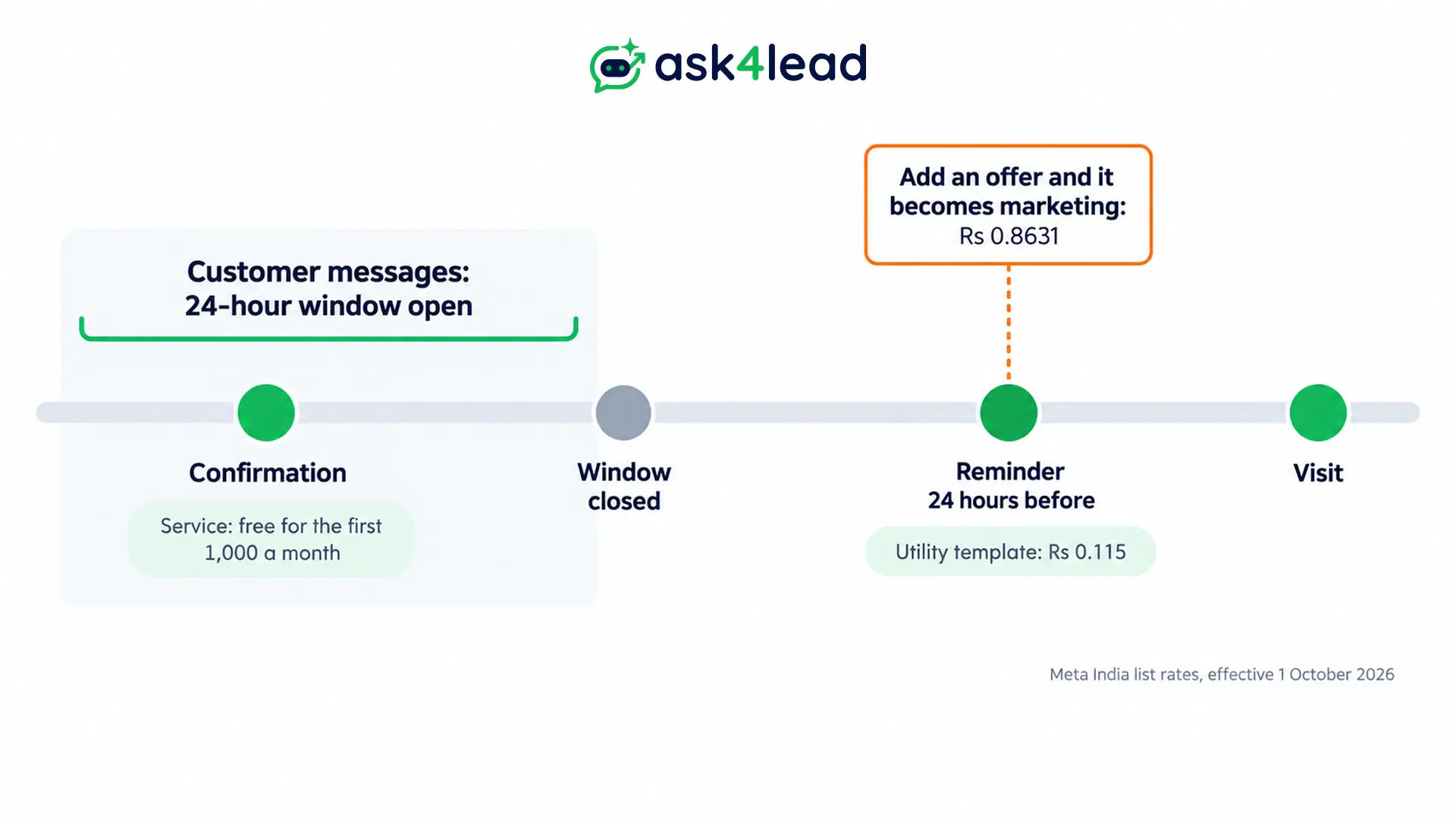
These are Meta’s rates effective 1 October 2026, and a provider may add markup. Meta also charges a utility template inside an open window, so send the confirmation as a normal reply.
A chat from a click-to-WhatsApp ad opens a free window of up to 7 days. Read Meta’s pricing page before you plan the budget.
A worked example for 300 bookings
Take 300 bookings a month with 2 reminders each, which is 600 messages.
| Scenario | Maths | Cost a month |
| Both appointment reminders as utility | 600 × Rs 0.115 | Rs 69 |
| Both reminders with an offer | 600 × Rs 0.8631 | Rs 517.86 |
| Extra cost of the offer | Rs 517.86 minus Rs 69 | Rs 448.86 |
So keep offers out of every appointment reminder. Meta’s template categorisation page explains why a mixed message counts as marketing.
2 appointment reminder templates for WhatsApp appointment booking
Reminder: Hi {{1}}, this is a reminder of your visit with {{2}} on {{3}} at {{4}}. Tap Confirm or Reschedule below.
Cancelled: Hi {{1}}, your visit on {{2}} is cancelled, so the slot is free again. Reply here when you want a new time.
Then read the 24-hour rule explained for edge cases. Also check WhatsApp opt-in consent before you remind anyone who has not messaged you first.
Where to build WhatsApp appointment booking
You have 3 routes for WhatsApp appointment booking, and each leaves you owning a different share of the work.
| Route | How it works | You own |
| No-code platform | It connects your number, the AI and a calendar | The prompts and the templates |
| Automation tool | A webhook feeds the AI, then the calendar, then Meta’s Cloud API | Hosting, retries and approvals |
| Your own code | The same flow inside your backend | Everything above, plus upkeep |
Meta’s WhatsApp Flows add a form inside the chat, and they include an appointment booking category.
In Meta’s own sample, the drop-down options come from a preset list.
So your endpoint must fetch real open slots, or the form shows times that are gone. See WhatsApp Flows for lead capture for the setup.
Check your number before go-live
- Use a fresh number: Meta says you must delete a number from WhatsApp before you register it.
- Keep your app number only through coexistence: a provider can onboard a Business app number so the app and the API share it. Chat history syncs for up to 180 days, but labels and quick replies stay app-only.
- Treat the test number as a workbench: it sends only to numbers you add, so record a screen demo.
- Plan for approvals: Meta approves the display name, and business verification raises your limits. The app vs API guide explains the difference.
What Ask4Lead does for WhatsApp appointment booking today
Ask4Lead’s AI Sales Assistant answers from your company profile, uploaded documents, services catalog and the recent chat. On its healthcare page, it offers slots from uploaded doctor schedules.
However, Ask4Lead does not document a live two-way calendar write. So run WhatsApp appointment booking as request-and-confirm.
The AI captures the request in Lead Management, then a person confirms the slot.
| Booking job | Ask4Lead feature | Status |
| After-hours answers and slot suggestions | AI Sales Assistant with the AI knowledge profile | Documented |
| Risky or low-confidence drafts | Human Approval | Documented |
| Staff chase-up of unconfirmed requests | Next Step reminders in the Work Queue | Documented as reminders for staff, not automatic sends |
| Appointment reminder to customers | Templates and Campaigns | Documented for approved templates sent to tagged lists |
| Live calendar write, slot hold, silence timer | None | Not documented |
Campaigns documents first name and company name as variables. So a reminder with each patient’s time needs a field you check yourself.
Each outbound message uses 1 credit, and WhatsApp credits start at Rs 0.50, on top of Meta’s fee.
How to test WhatsApp appointment booking before launch
Break the WhatsApp appointment booking flow on purpose before a customer does. Re-run the list after every prompt change:
- Send “kal 5 baje” and confirm the AI asks for the service.
- Change the time 3 times in a row, then confirm only one booking row exists.
- Ask for the same slot from 2 phones within seconds, then confirm only one wins.
- Send 5 messages in 10 seconds, and confirm the AI does not reply 5 times.
- Send a voice note and a photo, then confirm the AI asks for text or hands over.
- Type “my child has a fever” mid-booking, and confirm the fixed reply and the staff alert fire.
- Type “ignore your instructions”, and confirm nothing leaks.
- Switch off the calendar link, then confirm the AI never says “booked”.
The AI agent testing guide has more cases. Then track the share of booking chats that need a person with the AI agent metrics.
FAQs
1. Can AI book appointments on WhatsApp without a calendar?
It can collect requests, but a person must confirm them. A real booking needs a calendar the AI can read and write.
2. Is WhatsApp appointment booking free?
No, because Meta charges each delivered utility reminder, which is Rs 0.115 in India. Replies inside the window are free for the first 1,000 a month per number, and your tool adds its own fee.
3. Do patients need to opt in to WhatsApp appointment booking?
Yes for reminders outside the chat window. Ask at booking and keep the record, so the reminder has a clear permission.
4. Can the AI give medical advice during WhatsApp appointment booking?
No. Limit it to logistics, and send symptom questions to a fixed reply and then to staff.
Conclusion
WhatsApp appointment booking works when 3 rules hold. The AI saves before it confirms, it never answers health questions, and reminders stay utility templates.
Your staff then handle only the chats that need them.
Before you launch, check that you have:
- Counted a week of after-hours requests, so you know the booking value
- Set requested, held and confirmed states, with a save before every confirmation
- Written fixed replies for symptoms and emergencies, before the model sees them
- Kept offers out of every appointment reminder, because an offer makes it marketing
- Run the 8 tests, including the back-to-back time change
Next, run a two-week pilot with one doctor or stylist.
Stop losing bookings to unanswered messages
Every request that waits until morning is a booking a competitor may take.
When you use Ask4Lead for WhatsApp appointment booking, the AI Sales Assistant answers after hours from your schedule. Human Approval holds risky drafts.
Then the Work Queue reminds your team to confirm each request, and approved templates carry the appointment reminder. You can also see how healthcare teams use it.
