
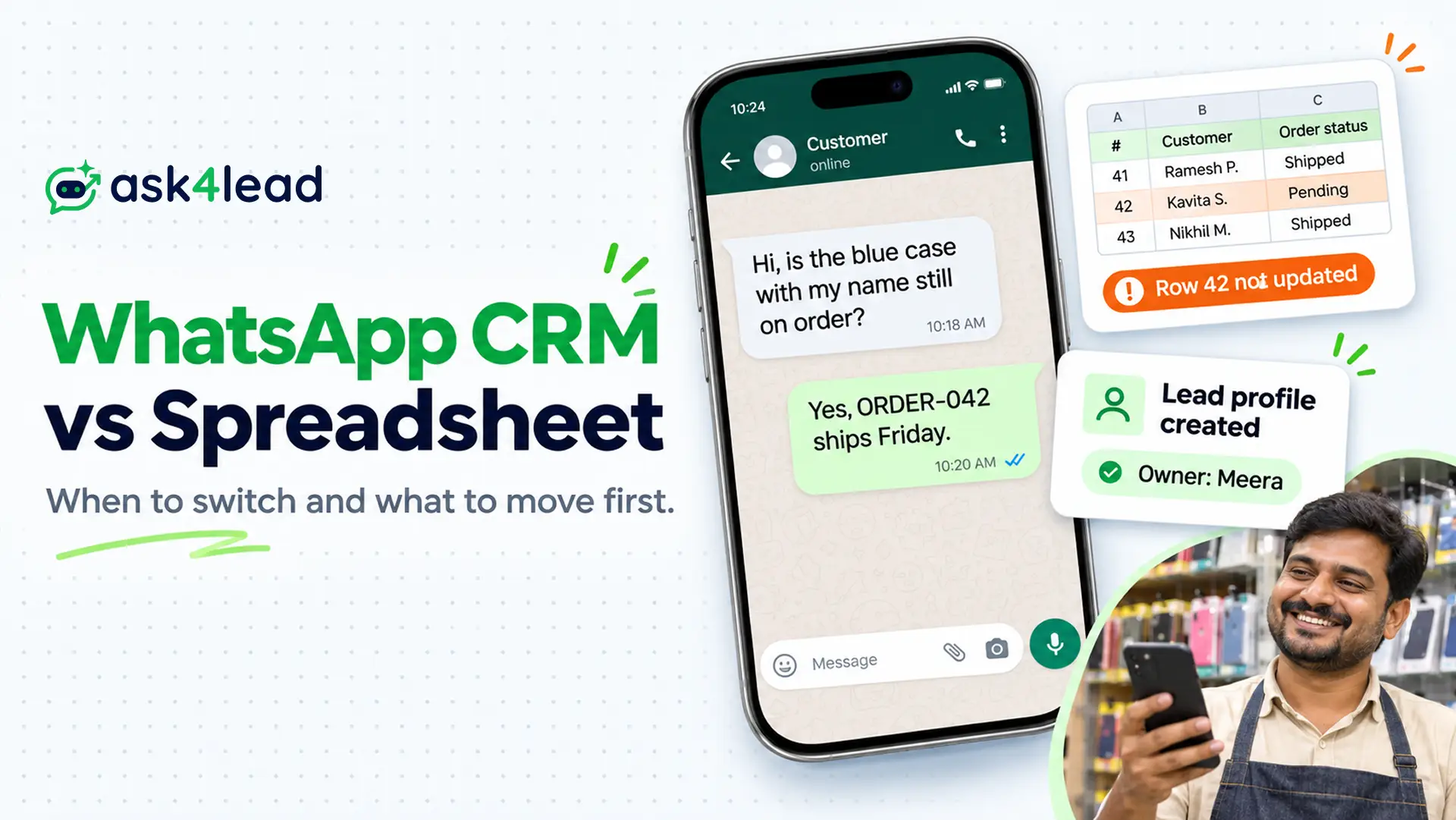
Switch from a spreadsheet to a WhatsApp CRM when several people answer one number or follow-ups depend on memory. Until then, a spreadsheet plus free WhatsApp Business app labels can work. The WhatsApp CRM vs spreadsheet decision depends on hand-offs, not company size.
A shared inbox for sales teams is the first thing a CRM adds. Below you get a 5-point switch test, a move order for week one, and a 4-week cutover plan.
What Is a WhatsApp CRM, and How Does It Compare With a Spreadsheet?
A WhatsApp CRM is software that keeps your WhatsApp chats and customer records in one place. It saves each chat on the customer’s profile, shows who owns it, and reminds your team of the next step. A spreadsheet only stores rows that people must update by hand.
CRM stands for customer relationship management. In short, it is a customer database that also tracks every conversation and task.
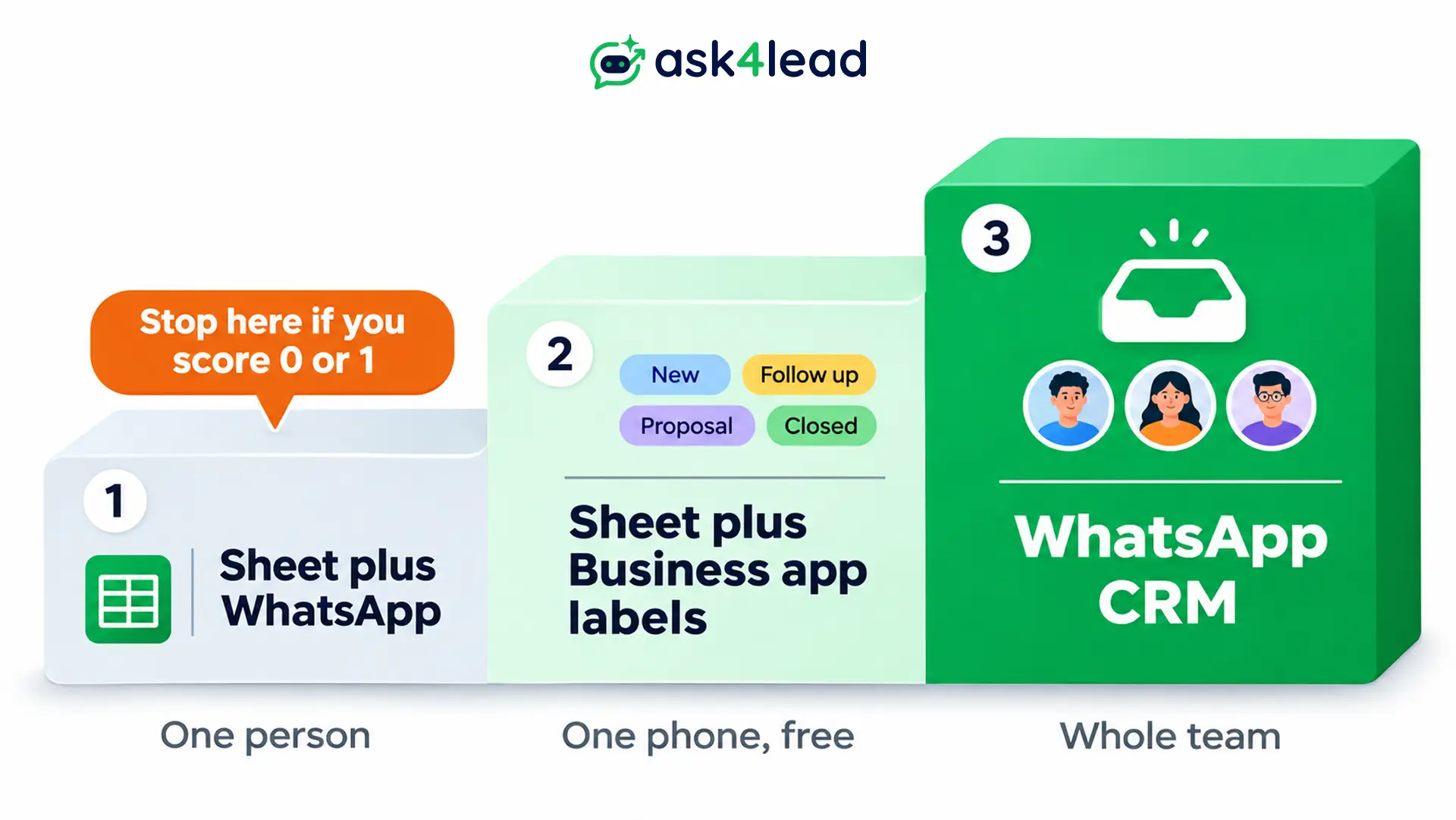
Most small businesses climb 3 steps, and each step is a fair place to stop:
- Step 1, sheet plus WhatsApp: you copy each enquiry into a row by hand.
- Step 2, sheet plus Business app labels: you tag chats inside the free app and keep the sheet short.
- Step 3, WhatsApp CRM: chats, records and reminders live in one tool that your whole team can open.
The 4 differences that matter most are these:
- Who sees the chats: a sheet plus the Business app gives you one phone and up to 4 linked devices. A CRM shows every teammate the thread.
- Reminders: you set them yourself on a sheet, but a CRM raises them for you.
- Chat history on the record: you copy it by hand, whereas a CRM saves it automatically.
- Monthly cost: the sheet is close to zero, while a CRM adds a licence plus Meta message fees.
So the WhatsApp CRM vs spreadsheet gap is about action, not storage. The guide to the WhatsApp Business app vs API explains why the free app and paid platform differ. A CRM needs the platform side.
When Should You Switch? The WhatsApp CRM vs Spreadsheet Test
In the WhatsApp CRM vs spreadsheet choice, switch when two or more of these are true.
Several people reply from one number, leads wait for an owner, or you scroll chats to find what you agreed. However, a sheet cannot nudge a person or show a teammate the conversation.
1. Count hand-offs, not staff
Lead count alone can mislead you in a WhatsApp CRM vs spreadsheet decision. One owner with 200 leads can cope with a sheet. In contrast, five reps with 40 leads cannot, because each lead changes hands.
Two reps then call the same customer, or a lead sits with someone who is away. Each hand-off adds a place where the context gets lost.
2. Take the 5-point WhatsApp CRM vs spreadsheet test
Give yourself 1 point for each yes. Because this test is our rule of thumb, treat it as a guide and not as an industry benchmark.
- More than one person replies from the same WhatsApp number.
- A lead went unanswered because nobody knew who owned it.
- You scroll old chats to learn what a returning customer agreed.
- Follow-ups depend on someone remembering, because no reminder fires.
- Managers want a count of open leads, and you build it by hand.
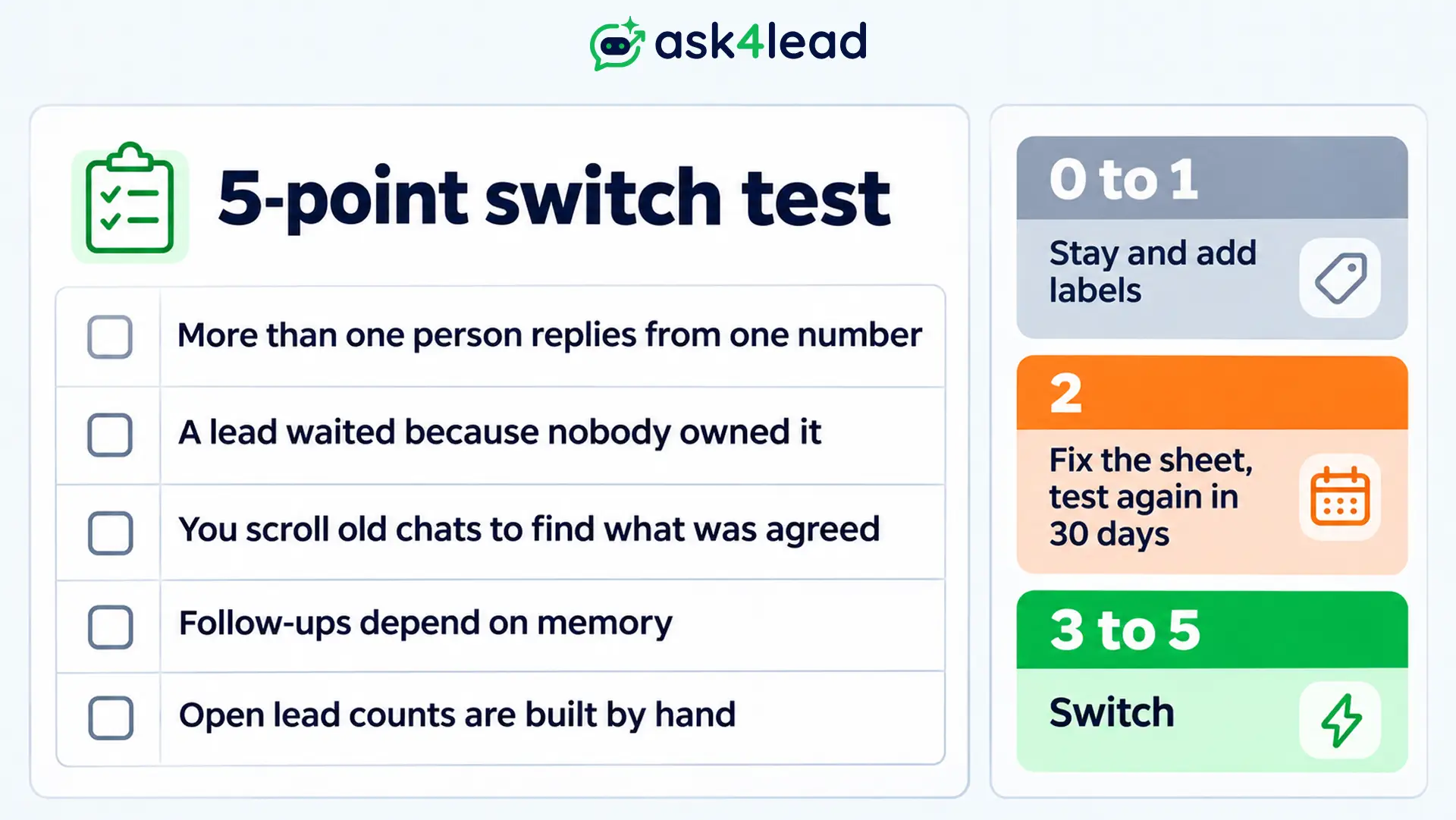
A score of 0 or 1 means you stay on the sheet and add labels. At 2 points, fix the sheet first, then test again in 30 days. Finally, a score of 3 or more means switch, because the fixes will cost more admin time than the tool.
3. Do the staff-hours maths
Time shows the cost better than frustration. For example, say 5 people each lose 2 hours a week copying and cleaning data. That is 10 staff-hours every week.
At an example rate of ₹250 an hour, that loss is ₹2,500 a week. That is about ₹10,000 a month. The WhatsApp CRM vs spreadsheet question then becomes a money question. Compare that figure with the licence plus Meta fees in the cost section below, and use your own hourly cost.
What Can You Fix in the Spreadsheet Before a WhatsApp CRM?
You can fix much of the WhatsApp CRM vs spreadsheet problem inside the sheet, without buying software. Track one row per order, label every chat, and keep only 6 fields. Do these first, because a CRM without these habits only moves the mess to a new place.
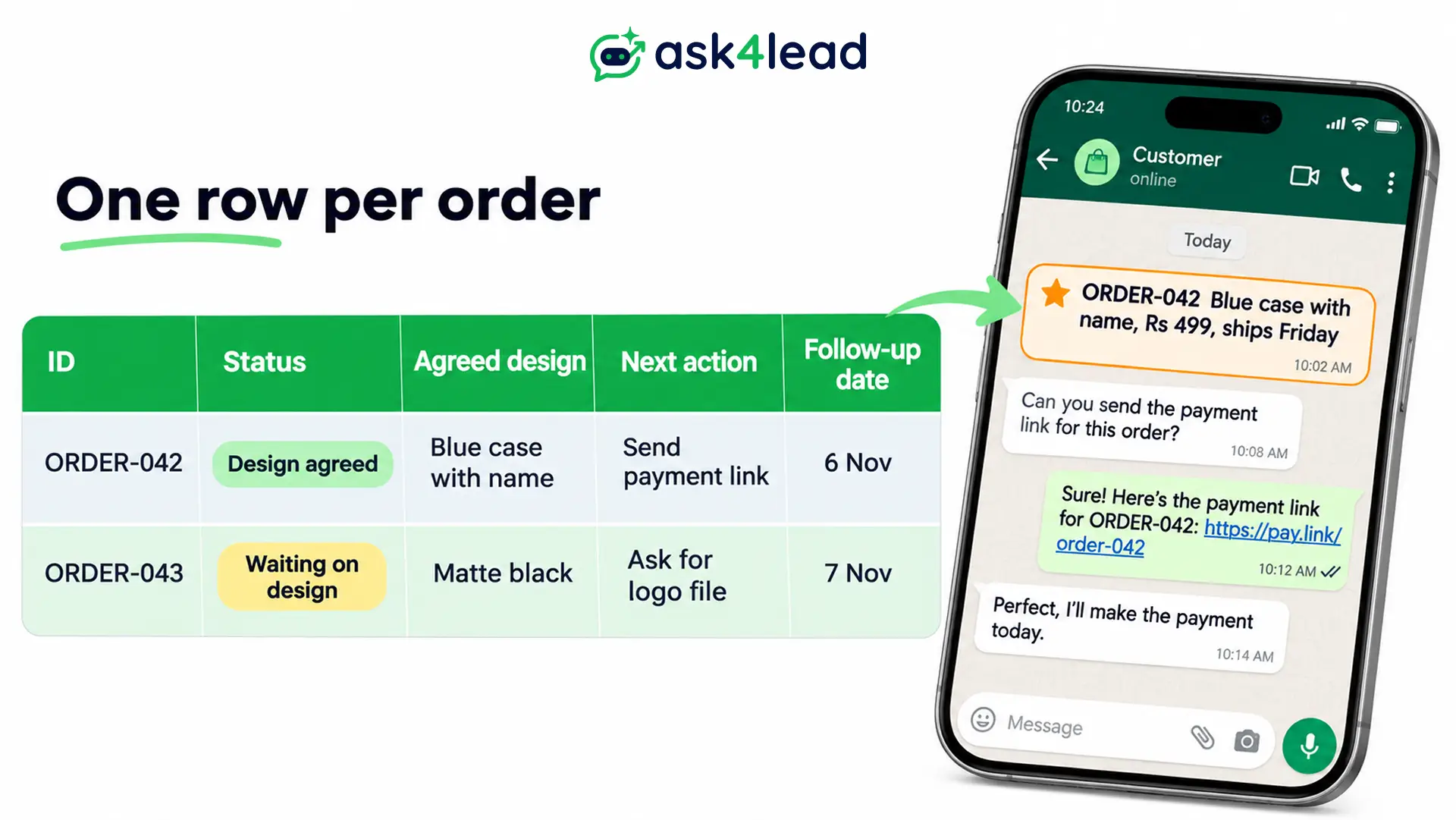
1. Use one row per order, not per customer
Shops and service firms often track by customer. As a result, a returning customer with 2 orders gets mixed up. Give every enquiry an ID such as ORDER-042. Then put it in the sheet row and at the start of the WhatsApp chat.
Now a search for the ID finds the right thread in seconds. Meanwhile, the sheet holds the outcome only, such as the agreed design, price and date. It does not hold the whole conversation.
2. Turn WhatsApp Business app labels into a pipeline
WhatsApp’s own blog describes labels as a way to organise contacts or chats so you can find them again. First, create 4 labels: new enquiry, agreed, follow up and paid. Then tag every chat the day it arrives.
That alone answers “who needs a follow-up today?” for a single phone. Labels are the missing middle step in the WhatsApp CRM vs spreadsheet debate.
3. Send a recap and star it
When a customer agrees to something, send one short message with the item, price and date. Then star it, because starred messages are easy to find later. Nobody scrolls through weeks of chat.
4. Keep 6 fields everyone trusts
Next, keep the sheet alive with 6 fields:
- Stage: where the lead stands today.
- Owner: one named person for each lead.
- Last contact: the date of the last reply.
- Next action: one sentence describing the next step.
- Next date: a date you can filter on.
- Reason stalled or lost: one line of notes.
Six trusted fields beat 60 stale ones. Also remember that every field must change what someone does next.
What to Move First in a WhatsApp CRM vs Spreadsheet Switch
Move live leads first, with one owner and one next action each. Recent customers come second, while dead rows and old chat transcripts stay behind. A CRM full of cold contacts hides the leads that need attention today, so start small.
- Move now: live leads with owner, stage and next date, plus order or enquiry IDs with the agreed outcome. Also include phone numbers with the country code.
- Move later: customers from the last 6 months, the tags you filter on, and old order history.
- Leave in the archive: rows with no reply for a year, duplicate and test rows, and free-text notes nobody reads.
Test with 20 records first
Import a small batch and check each field before the full file. Fix the sheet, not the new tool, because cleaning inside an unfamiliar CRM takes longer.
Also watch for two quiet errors. Phone numbers need the country code, such as +91. Meanwhile, dates written DD/MM can land as MM/DD. Nobody notices until a renewal report shows the wrong month. So spot-check 20 records instead of trusting the success message.
Do not treat an import as consent
In any WhatsApp CRM vs spreadsheet import, an uploaded contact has not agreed to hear from you. WhatsApp’s rules expect permission before you message people.
So message only contacts who opted in, and read the guide to WhatsApp opt-in consent before any campaign.
How to Connect a WhatsApp CRM Without Losing Your Chats
Once the WhatsApp CRM vs spreadsheet test says switch, you can connect a WhatsApp CRM in 3 ways. They differ in what happens to your phone app and old chats. Ask every vendor which way it uses before you pay. Therefore, the answer decides whether your team keeps the app.
- Official platform, number moved: the number registers with Meta’s platform and leaves the phone app. You gain templates, broadcasts and unlimited agents. Your chat history starts clean, though.
- Official platform with coexistence: the same number works in the app and the platform. This is Meta’s setup for that case.
- WhatsApp Web extension: a browser add-on sits on top of your phone’s chats. It is quick, but it skips Meta’s approved templates. Automation on unofficial routes also carries a ban risk.
What Meta says about coexistence
Meta’s coexistence documentation says the business can keep messaging one to one from the Business app. Sharing chat history is the business’s own choice.
However, only 1:1 chats from up to 180 days before onboarding can sync, and group chats cannot. The app also needs version 2.24.17 or higher, and new broadcast lists are disabled.
What Ask4Lead’s setup page says
Ask4Lead’s WhatsApp Business API integration page says the number must not be active on the app. It also says Meta does not transfer chat history, and it does not describe coexistence as an option.
So if you need to keep the app, ask the team first. For moves between providers, see how to migrate chat history and templates.
WhatsApp CRM vs Spreadsheet Cost in Licence, Fees and Staff Hours
A spreadsheet costs staff time, while a WhatsApp CRM costs a licence plus Meta’s message fees. The WhatsApp CRM vs spreadsheet cost comparison is hours lost against subscription plus setup.
Meta’s fees can stay low for one-to-one chats. Customer messages are free, and each number gets 1,000 free service messages a month.
For this WhatsApp CRM vs spreadsheet comparison, Meta’s pricing documentation sets out these rules from 1 October 2026:
- Customer messages to you: Meta does not charge for them.
- Service messages: 1,000 free per business phone number each month, and Meta charges from the 1,001st.
- Utility messages inside an open window: charged since 1 October 2026.
- Ad entry window: replies can stay free for up to 7 days after a click-to-WhatsApp ad.
- Billing moment: Meta charges on delivery, not on send.
For example, a shop that sends 400 service replies in a month pays Meta nothing for them. At 1,400 replies, however, it pays for 400. Check your country’s rate card. Then read the WhatsApp 24-hour rule to see which messages count as service. For a full breakdown, see WhatsApp Business API pricing in 2026.
How to Run the Spreadsheet to WhatsApp CRM Cutover in 4 Weeks
Pick a hard cutover date, clean the sheet before import, and make the sheet read-only that day. A clean WhatsApp CRM vs spreadsheet cutover needs one date. Running both systems for weeks splits your source of truth in two. A short parallel run is fine, but it needs an end date.
- Week 1, clean: remove duplicates, add country codes, and agree 4 to 6 stage names.
- Week 2, import and test: load 20 records, check them, then load the live leads.
- Week 3, run both: teammates use the CRM, and the sheet stays as a backup.
- Week 4, cut over: set the sheet to read-only on a named date. Archive it for at least 6 months.
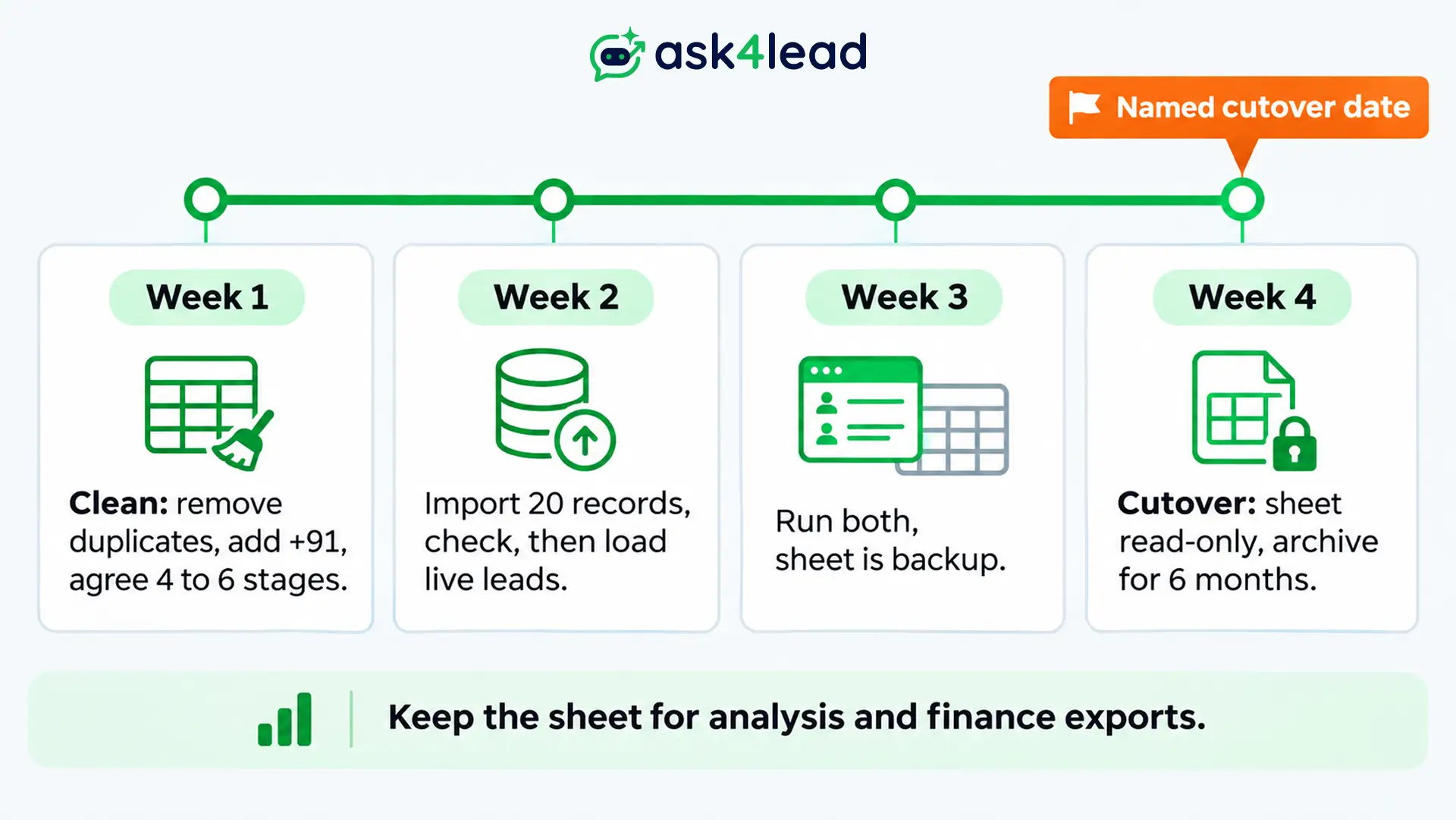
Also name one person who reviews overdue follow-ups each week. Meanwhile, keep the sheet for what it does well, such as one-off analysis or a finance export. The CRM then becomes the place where the live conversation and next action sit.
How Ask4Lead replaces each spreadsheet job
Ask4Lead is a humanized AI WhatsApp chatbot and CRM. In a WhatsApp CRM vs spreadsheet move, each feature below replaces one manual sheet job:
- Copy-paste entry: lead management creates a lead profile from the first message, so nobody retypes a number.
- Missing details: the AI Sales Assistant asks for the name and needs, then fills the record fields.
- Handoffs: the shared team inbox lets a teammate open the thread and see earlier messages.
- Forgotten follow-ups: the Work Queue lists follow-ups due, and overdue tasks turn red. It reminds reps and does not send for them.
- Hand-built totals: the 9-stage sales pipeline adds deal values per stage without formulas.
However, Ask4Lead’s feature pages describe CSV export, not CSV import. So ask the team how to bring your sheet across before you commit.
FAQs
1. Is WhatsApp a CRM tool?
No. WhatsApp is a messaging app, so it has no customer records, owners or reminders. A WhatsApp CRM adds those on top of your chats.
2. Can I use a spreadsheet as a WhatsApp CRM?
Yes, it works for one person. Google Sheets or Excel does the job with one row per order, 6 fields and Business app labels. Once several people reply from one number, a sheet cannot show chats or remind anyone.
3. When is a spreadsheet enough in the WhatsApp CRM vs spreadsheet choice?
A spreadsheet is enough when one person owns every lead and remembers every follow-up. If you score 0 or 1 on the switch test above, stay on the sheet.
4. What should I move first from a spreadsheet into a WhatsApp CRM?
Move live leads first, each with an owner, stage and next date. Then add customers from the last 6 months. Finally, leave dead rows and old transcripts in the archive.
5. Do I need the WhatsApp Business API for a CRM?
For templates, broadcasts and a shared team number, yes. A browser extension can work for small conversational use. However, it does not use Meta’s official platform.
Conclusion
The WhatsApp CRM vs spreadsheet choice depends on hand-offs. A sheet with labels works for one owner. However, a CRM wins once several people share one number and follow-ups must happen without anyone remembering.
Before you switch, check that you have:
- A switch test score of 3 or more.
- One row per order, with an ID in the chat.
- 6 fields and 4 to 6 stage names agreed.
- A 20-record import test and a named cutover date.
- Your vendor’s clear answer on your number and old chats.
Next, run the WhatsApp CRM vs spreadsheet test today and write the score down.
Stop copying WhatsApp chats into a sheet
If copying chats into rows slows your team, Ask4Lead builds the record while the chat happens. Every new message creates a lead profile that you can assign to one owner. The AI Sales Assistant then fills in the name and needs.
Every teammate sees the full thread in the shared team inbox. Meanwhile, the Work Queue lists what is due today, and the sales pipeline shows deal value per stage.
Read how the automated follow-ups feature works, then start free.
