
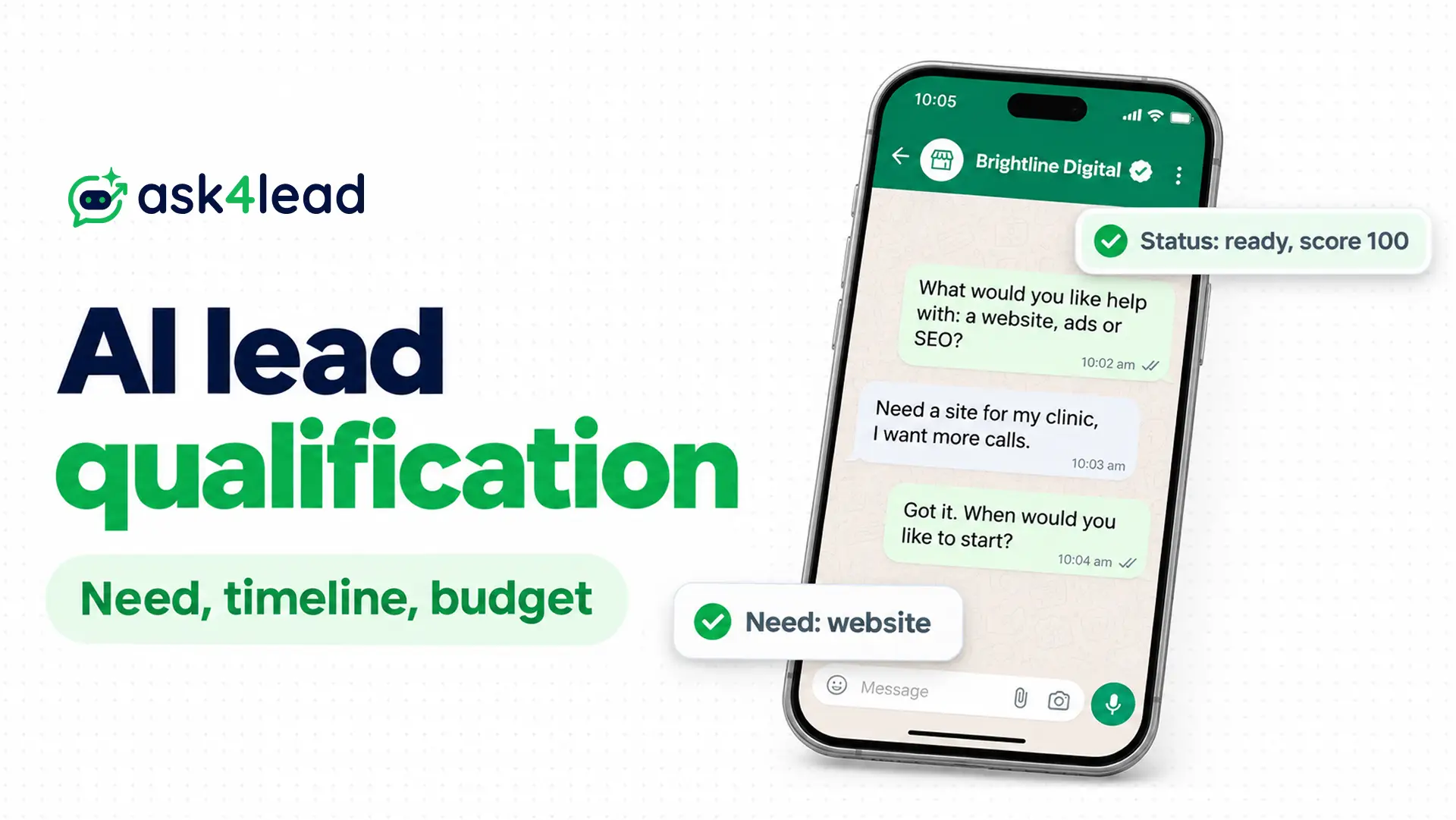
AI lead qualification is a short chat where an AI asks a new lead what they need, when they plan to buy and what they can spend. Then fixed rules decide if a salesperson should call, so the AI reads answers but never sets the status.
Below you get the fields, the questions, the lead scoring rules and the handoff note your rep reads first. If you only need to know whether a WhatsApp AI agent can qualify leads on its own, that has its own guide.
What is AI lead qualification by budget, timeline and need?
AI lead qualification by budget, timeline and need is a screening chat with 3 questions. The AI asks what the lead wants, when they plan to start and what range they can spend.
It saves each answer in a fixed field. Your rules then mark the lead as ready, nurture or needs more information.
Most tools run 4 jobs: enrich the lead, ask questions, score the answers and route the lead. This guide covers the last 3 for WhatsApp lead generation, because a chat gives you a phone number and little else to enrich.
The AI reads the reply and fills the fields. Fixed rules do the lead scoring, and a person closes the deal. Some tools score with a model trained on closed deals, but 3 answers are few enough to audit.
Microsoft’s Sales Qualification Agent documentation follows the same pattern. Its agent checks need first, then timeline, budget and authority, and it saves a reason for every lead it disqualifies.
Is AI lead qualification worth it for your lead volume?
AI lead qualification pays off when leads arrive faster than your team can screen them. Count 1 week of inbound chats first. If you reply in minutes and few calls end with “no budget”, you can wait.
An agency inbox is a typical case, because real briefs arrive mixed with spam and vendors.
This does not apply if you get a handful of leads a week or sell only by custom quote. Then reading each chat yourself costs less than the setup.
How to set up AI lead qualification, step by step
You can set up AI lead qualification on a WhatsApp AI agent in 5 steps: define sales-ready, fix the allowed answers, ask in order, map vague replies and let rules set the status.
1. Write down what a sales-ready lead means
For AI lead qualification, write 1 sentence each for need, timeline and budget, and get your sales owner to agree. Each sentence should match the Qualified stage of your sales pipeline. An agency could write:
- Need: the lead wants 1 of the 3 services you sell
- Timeline: the lead wants to start within 60 days
- Budget: the lead can spend at least Rs 40,000 a month
2. Fix the allowed answers for each field
Give every field a short list of allowed values, the way a WhatsApp Flow form offers fixed choices. The AI must pick from the list, so it cannot invent a fourth service or a new budget band.
| Field | Allowed values | Why this set |
| Need | Website, ads, SEO, other, unknown | Because named services stop the AI inventing more |
| Timeline | Within 30 days, 31 to 90 days, over 90 days, unknown | Since a bucket is easier to score than a date |
| Budget | Below your minimum, at or above your minimum, unknown | Because a band avoids asking for an exact number |
| Decision role (optional) | Decision-maker, influencer, unknown | Since the handoff note shows it but the score ignores it |
| Confidence | High, medium, low | Since it shows how sure the AI is about the other values |
Every field allows unknown. The AI should never guess a value just to fill a gap.
Ask4Lead’s Lead Management page says the AI extracts the name, budget and requirements from the chat and updates the lead’s fields.
3. Ask about need first and budget last
Need is the easiest question to answer and it builds trust, so ask it first. Timeline comes second. Ask budget last, because people dodge money questions early. Use a chat, not a button menu, so leads answer in their own words.
Here is the order in a chat:
- AI: “What would you like help with: a website, ads or SEO?”
- Lead: “Need a site for my clinic, I want more calls.”
- AI: “Got it. When would you like to start?”
- Lead: “Soon, maybe 3 weeks.”
- AI: “Thanks. Do you have a rough monthly range in mind? A range is fine.”
Send 1 question per message and stop at 3 core questions, plus 1 optional question about who decides. If a lead gives all 3 answers in 1 message, save them and skip those questions.
4. Turn vague replies into stored values
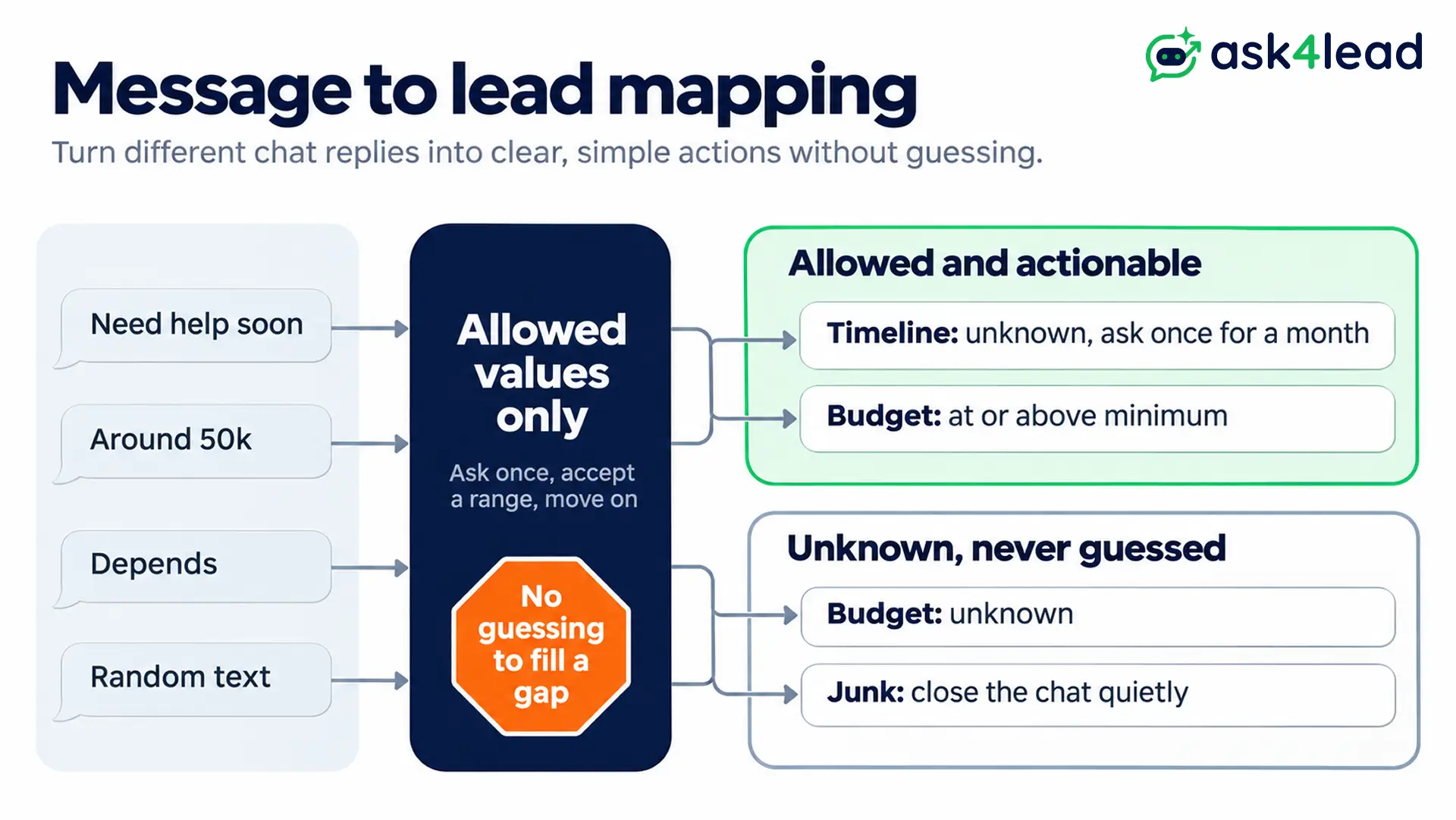
People answer loosely, so write your mapping before launch:
- “Need help soon”: timeline unknown, then ask once for a month
- “Around 50k”: budget at or above your minimum, if your minimum is Rs 40,000
- “Depends”: budget unknown, then move on
- Random text or ads: junk, so close the chat quietly
Bots rarely answer a project question, so asking need first filters spam. For web forms, add a budget dropdown with fixed tiers.
The rule is simple: ask once, accept a range, then move on.
Store the AI’s confidence next to the values. A low-confidence “at or above minimum” should never trigger a call, so send it to a review queue. An AI Knowledge Profile also keeps the AI inside your real services and prices.
5. Let fixed rules set the lead scoring status
The AI can explain why a lead looks good, but rules should do the arithmetic. If the AI sets its own lead scoring, it can talk itself into calling a weak lead ready.
This example table is a starting point, so tune your lead scoring on closed deals. Ask4Lead’s reports and analytics track pipeline revenue.
| Field | Points |
| Need | 40 if clear and matching a service, 15 if general, 0 if unknown |
| Timeline | 30 within 30 days, 20 for 31 to 90 days, 5 beyond that, 0 if unknown |
| Budget | 30 at or above your minimum, 0 below it or unknown |
Then apply 3 rules in this order:
- Gate first: if the need is outside your services, the status is “not a fit”, whatever the score.
- Unknown next: if any field is unknown, the status is “needs info”, so you never call on a guess.
- Score last: with all 3 answered, 70 or more is ready, 40 to 69 is nurture, and below 40 is not a fit.
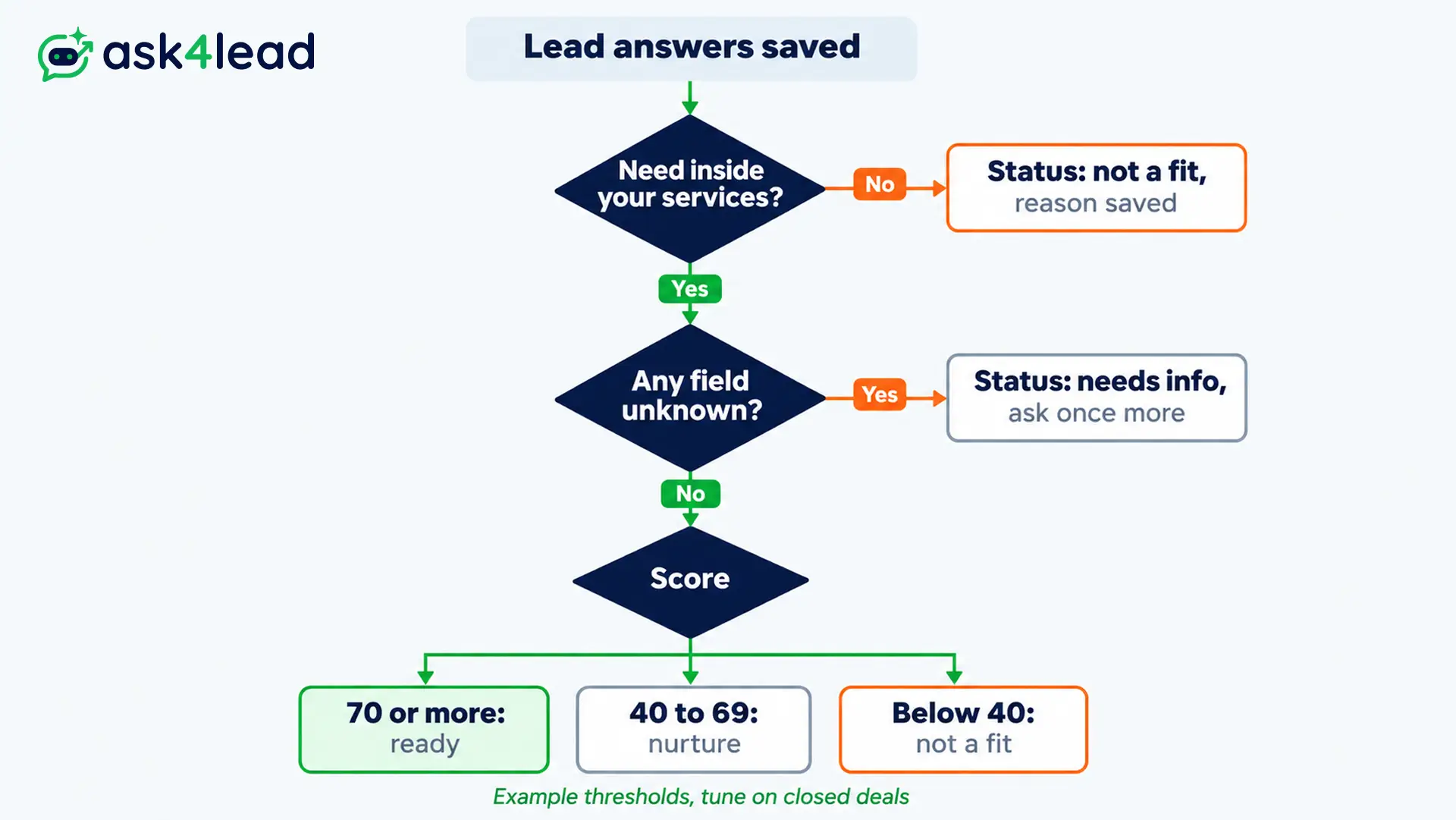
In the sample chat, need is clear (40), the start is within 30 days (30) and the range clears your minimum (30). That scores 100, so you hand the lead off.
A second lead wants SEO within 60 days but skips the budget, so the lead scoring gives 40 + 20 + 0 = 60. The status is still “needs info” because the budget is unknown, so the AI asks once more.
How AI lead qualification treats missing answers
AI lead qualification should treat a missing answer as unknown, never as a no. A lead who skipped the budget question differs from a lead whose budget is too low.
If you mix them up, your lead scoring either bins real buyers or floods sales with leads nobody screened.
Not a fit, not enough information or not ready yet
Use 4 statuses so each “ignore” has its own next move, and show the status in every handoff note:
| Status | What it means | Next move |
| Ready | Need fits, timeline and budget pass and confidence is high | Hand off now with a handoff note, because the lead is warm |
| Needs info | At least 1 answer is unknown | Ask once more, then park it for review |
| Not ready yet | Need fits, but the timeline is over 90 days | Snooze the chat to a date, since the lead is early |
| Not a fit | Need is outside your services or budget is below your minimum | Close politely, save the reason and offer a cheaper option if you have one |
Review your “not a fit” pile each week, since that is where wrongly rejected buyers hide.
Why a hot lead score needs an expiry date
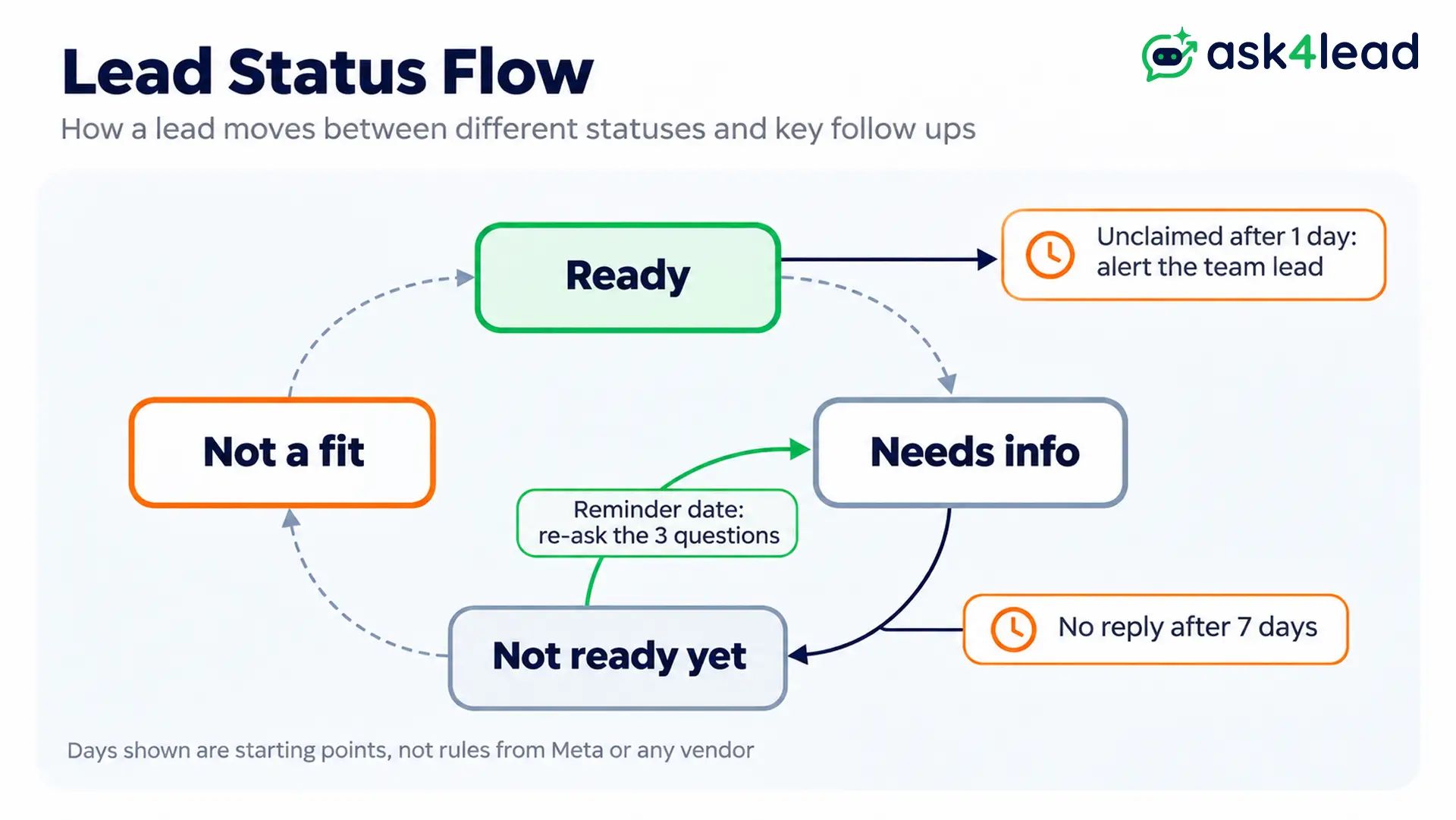
A lead marked ready 10 days ago is not ready today. A lead scoring result that nobody revisits goes stale, so give each status a shelf life. Start with these:
- Ready and unclaimed after 1 day: alert the team lead
- Needs info with no reply after 7 days: move to “not ready yet”
- Not ready yet: re-ask the 3 questions on the reminder date, with a Next Step reminder for your rep
What should a lead handoff note contain?
A lead handoff note is the last step of AI lead qualification: a short message a rep reads before the first call. It says who the lead is, what they need, when, how much, why they passed and what to do next.
Attach the full chat too, because a summary can drop a detail. A shared team inbox lets your reps open it. Limit the handoff note to 7 fields so it stays quick to read.
The 7 fields in a handoff note
| Field | Why it matters |
| Lead and contact | Since the rep needs a name and a number first |
| Need, timeline, budget band and role | Because these values tell the rep which service to open with and who else decides |
| Status, score and confidence | Since it shows why the lead passed |
| What is still unknown | Because it tells the rep what to ask first |
| Next step and chat link | Since the rep should not scroll for context |
A good handoff note reads: “Anita Rao, dental clinic. Need: website with booking. Timeline: within 30 days. Budget: at or above minimum. Role: unknown. Status: ready, score 100, confidence high. Next step: call today, chat attached.”
For the moment a chat moves to a person, read the guide to WhatsApp human handoff.
How to keep the handoff note channel trusted
Teams stop reading alerts that fire too often. Send only leads with status ready and confidence high to your team channel. Send medium-confidence leads to a review list that you clear each day.
If the AI cannot read a reply, route the chat to your team inbox, not a dead end.
What Ask4Lead documents for AI lead qualification
Ask4Lead sells this product, so check each point on its pages. The AI Sales Assistant page says each reply carries a confidence level and a suggested pipeline stage.
With human approval on, a low-confidence draft waits in the Work Queue for a person to edit and approve. Next Step reminders only prompt your rep.
Those pages do not describe a points table, a numeric cut-off or an expiry timer, so keep your lead scoring sheet in your own process.
AI lead qualification on WhatsApp: the 24-hour window and cost
On WhatsApp, AI lead qualification runs inside a 24-hour customer service window that opens when the lead messages you.
After it closes, Meta’s send-messages guide says you can only send pre-approved template messages.
How the 24-hour window shapes the questions
Ask all 3 questions in the first chat. The window resets each time the lead replies, but it closes after 24 hours of silence. A lead who goes quiet needs a template.
Send no more than 1 nudge, such as “Reply with a good month to start and we will pick it up.” See the 24-hour rule explained for the window.
What each message costs in India
Meta charges per delivered message, so AI lead qualification has a real cost. Since 1 October 2026, the first 1,000 service messages a month are free. These India rates come from Meta’s pricing page and its rate card, effective 1 October 2026:
| Message | Meta category | India rate |
| An AI reply inside the open window | Service | Free for the first 1,000 a month, then Rs 0.115 |
| A status update on an existing request | Utility | Rs 0.115 |
| A nudge to a silent lead, if Meta treats it as promotional | Marketing | Rs 0.8631 |
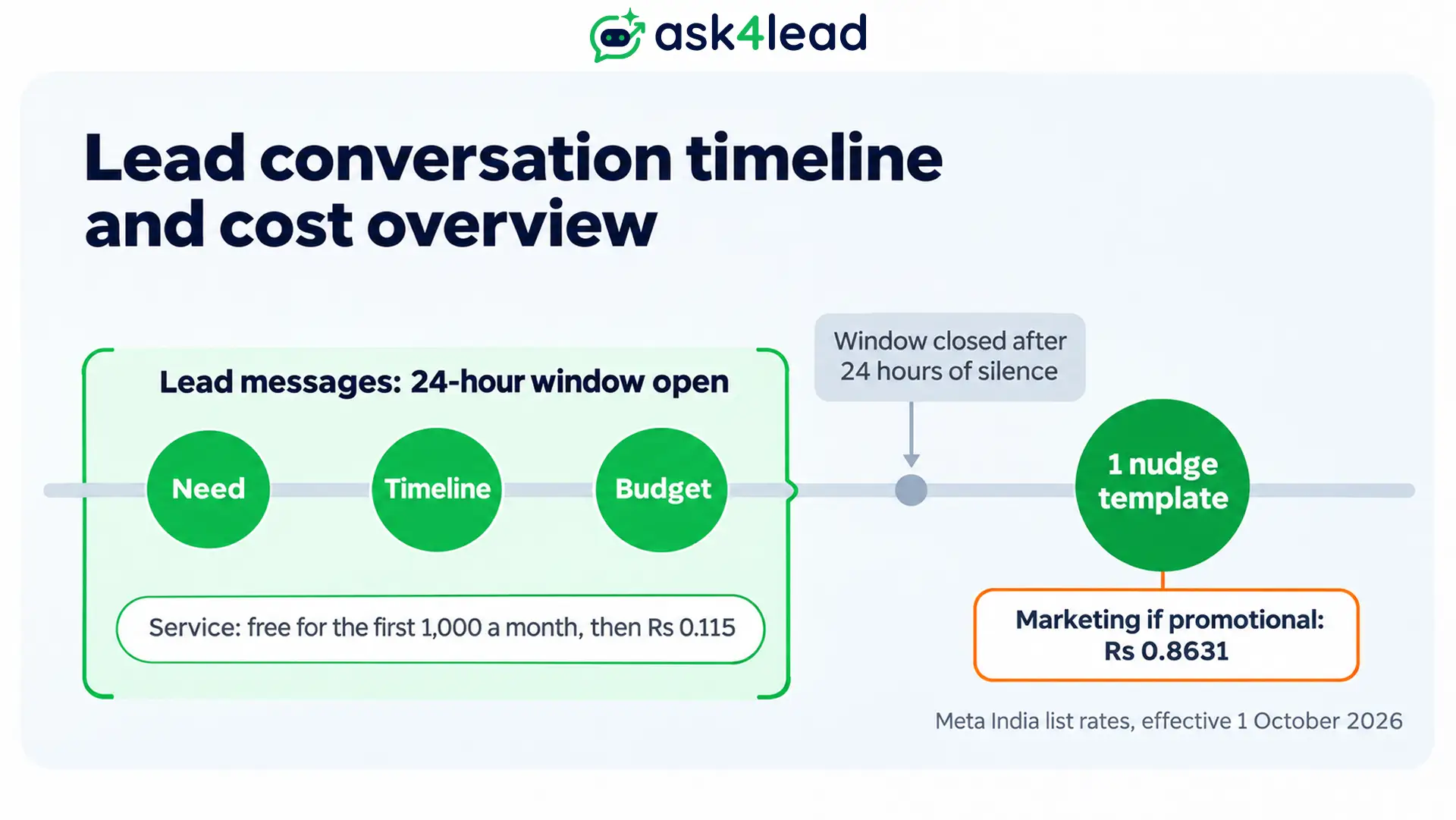
A 6-reply chat uses 6 service messages, so 150 new leads use 900 and stay free. Nudging 100 silent leads at the marketing rate costs Rs 86.31 (100 × 0.8631). Meta decides the category, so check it before you plan around the cheaper rate.
How to test AI lead qualification before launch
Test AI lead qualification and its lead scoring on 20 to 30 of your real past chats before it meets a live lead. Label each chat by hand, then compare the AI’s result.
| Test case | Correct result |
| A lead says “just exploring” | Need is unknown, so the status is needs info |
| A lead refuses to share a budget | Budget stays unknown, and the lead is never “not a fit” on that alone |
| A lead sends all 3 answers in 1 message | The AI saves all 3 values, and the score matches 3 separate replies |
| Spam or off-topic text arrives | Junk, so the chat closes and no alert goes out |
| A lead passes every rule | Handoff note lists the same values as the saved fields |
Each week, track the false ready rate, the missed ready rate and the share stuck in needs info. See AI agent metrics for the formulas and how to test a WhatsApp AI agent for the wider checks.
FAQs
1. Should AI lead qualification reject a lead who hides the budget?
No. Mark the budget as unknown and let a person review it, because a skipped answer is not a low budget.
2. Can the AI set the lead scoring itself?
It can suggest a score, but fixed rules should do the lead scoring and set the status.
3. Should AI lead qualification ask about authority?
Ask 1 optional question, such as who else decides. Show the answer in the handoff note but do not score it, because a researcher can still be a real buyer.
4. Does AI lead qualification work on WhatsApp?
Yes, on the WhatsApp Business Platform, within the 24-hour window.
Conclusion
AI lead qualification works when the AI reads, the rules decide and a person closes. Fix the fields, allow “unknown” everywhere, keep the status rule-based and send reps a short handoff note.
Before you launch AI lead qualification, check that you have:
- A written definition of sales-ready
- Allowed values with “unknown” in every field
- Lead scoring rules that set the status, not the AI
- A 7-field handoff note
- A test on 20 to 30 real chats
Stop sending reps leads with no clear need, timeline or budget
When your reps still open chats to find out what a lead wants, you lose the start of every call. Ask4Lead’s AI Sales Assistant asks in plain English, and the Sales Pipeline shows deal value in each stage.
See the industry playbooks for your sector.
