
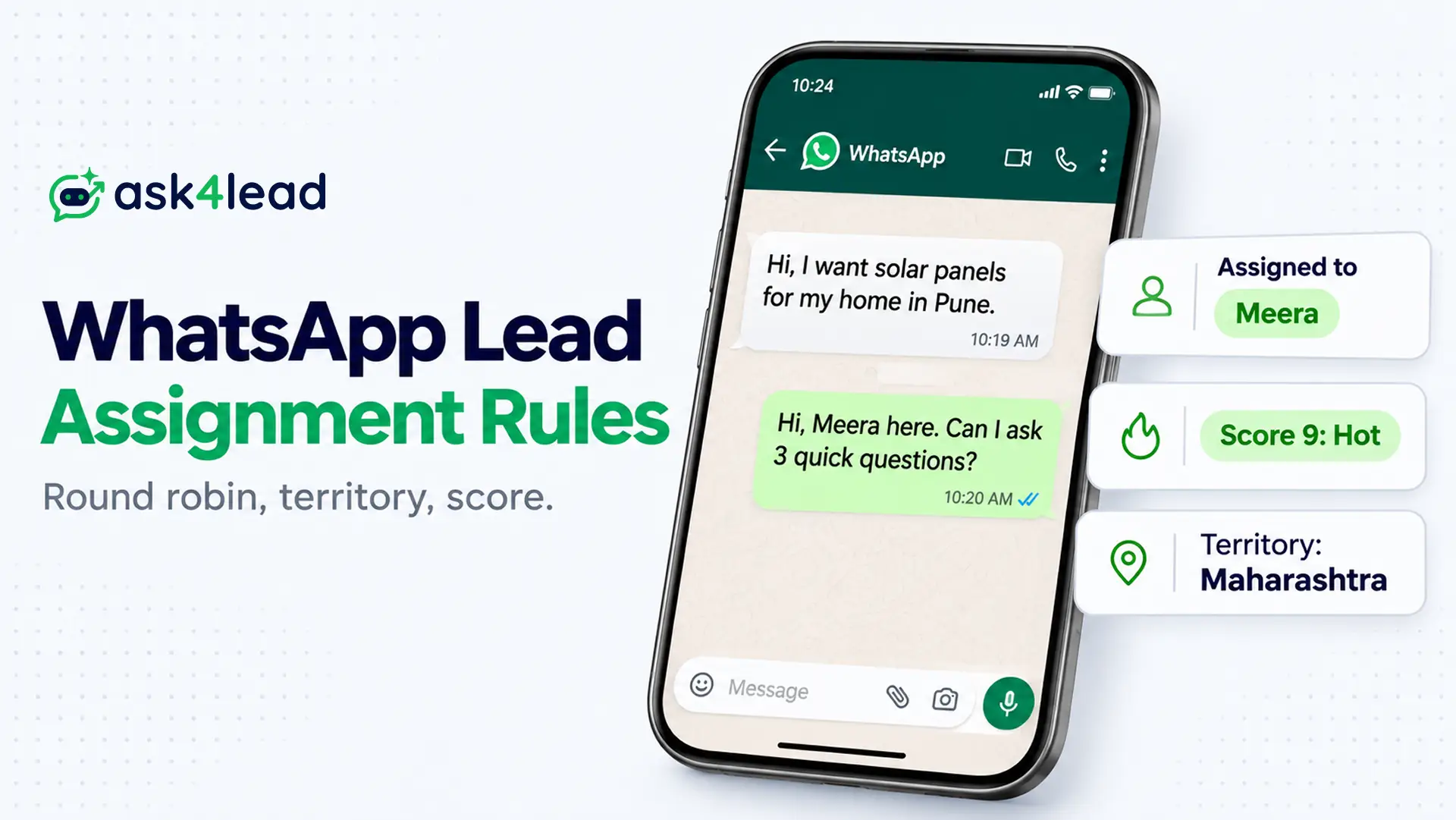
Two reps reply to the same lead while another lead waits all day. Good WhatsApp lead assignment prevents both, because each new chat gets one owner chosen by rule. The 3 main rules are round robin, territory and score.
A shared inbox for sales teams shows who owns a chat. Assignment rules decide it before anyone has to look.
Below you get a rule comparison, a territory table and a 9-point score. You also get a 5-layer rule order and a safe testing routine.
What Is WhatsApp Lead Assignment?
WhatsApp lead assignment gives every new chat one named owner, by rule instead of by hand. The rule checks facts about the lead, such as city, product or score. Then it picks a rep and records the choice.
Every WhatsApp lead assignment has 3 working parts:
- Trigger: a new chat arrives, often from a click-to-WhatsApp ad or a website button.
- Rule: a check on a fact, such as “state is Maharashtra” or “score is 7 or more”.
- Owner: one rep or one named queue, never “the team”.
Assignment is not the same as qualification. Qualification asks how good the lead is, while assignment decides who works it. Keep those two decisions apart in your setup.
Which WhatsApp Lead Assignment Rule Should You Use?
Pick the WhatsApp lead assignment rule that matches how your team is split. Use round robin when reps are equal, territory when they cover regions, and score when lead quality varies a lot. Most teams then add an owner check and a fallback queue.
| Rule | Use it when | Needs from the lead | Breaks when |
| Round robin | Reps are equal and leads look alike | Nothing | A rep is away or a lead is large |
| Territory | Reps cover cities, states or branches | City or pin code | Customers spell places differently |
| Score-based | A few leads carry most of the revenue | 3 or 4 answers in chat | Questions are too many or too vague |
| Existing owner | Buyers return often | A phone match in your records | The old owner left |
| Availability | Shifts, leave and time zones vary | Online status | Nobody updates status |
Stacking rules in WhatsApp lead assignment is normal. For example, you can split sales from support first, then route sales by city, then rotate inside each city. That layering is the real design work, and it is covered in the rule-order section below.
How Does Round Robin Work for WhatsApp Lead Assignment?
Round robin hands new leads to reps in turn. Lead 1 goes to Rep A, and lead 2 goes to Rep B. It is the simplest fair rule, though it needs reps with equal skills, hours and territory.
Pure rotation fails in 3 ways:
- Away reps: a lead lands on someone on leave and waits.
- Uneven deals: one rep draws the 3 biggest leads by chance.
- Pay effects: a sales-ops discussion noted that misrouted rotation hurts reps paid on volume.
So add an availability check and a weekly cap to your WhatsApp lead assignment rotation. The inbox then skips anyone who is away or full.
A round robin example for WhatsApp lead assignment
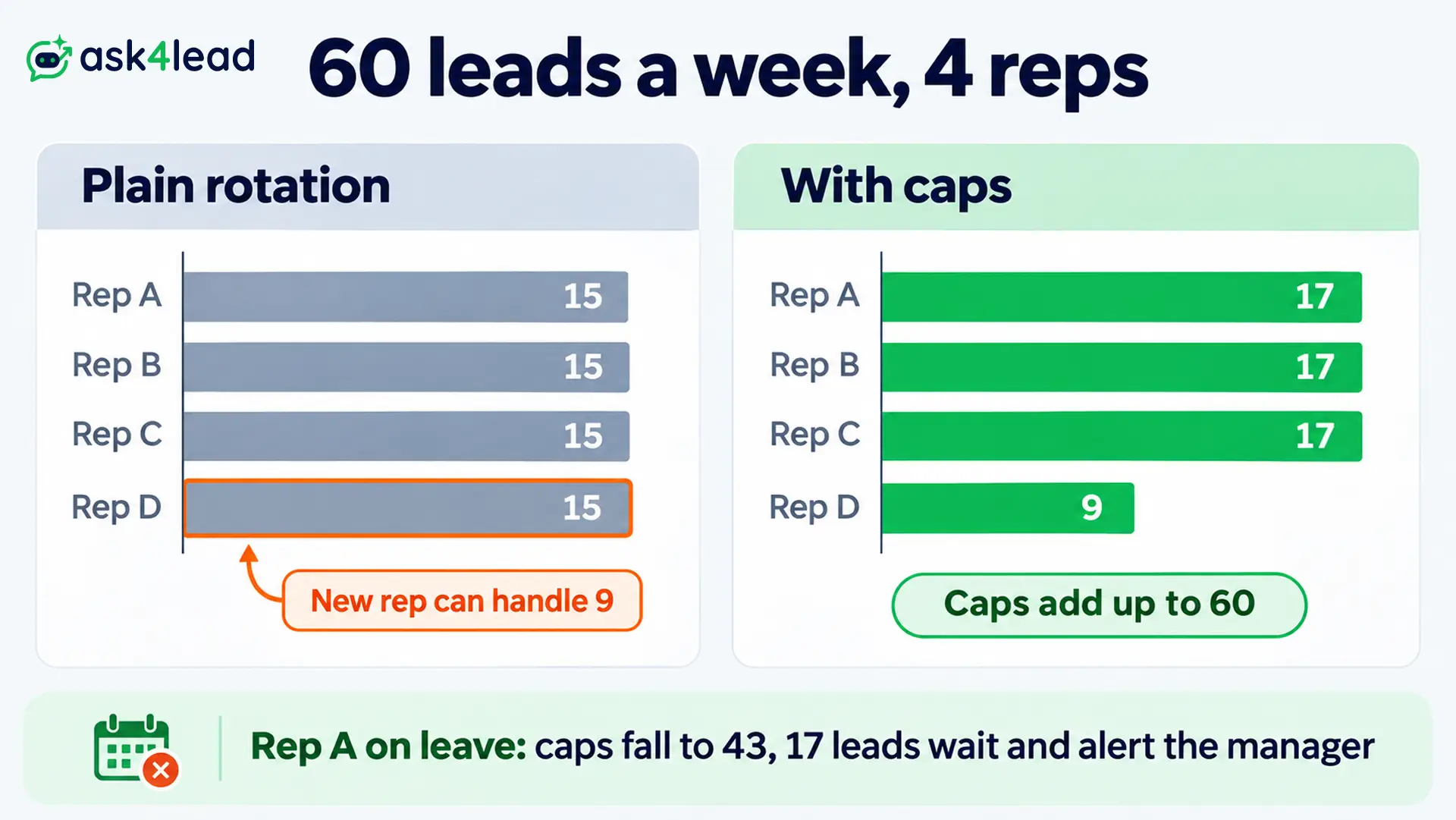
Say 60 leads arrive each week for 4 reps. Plain rotation gives each rep 15. Now suppose Rep D is new and can handle 9.
With caps of 17, 17, 17 and 9, the total is 60, so every lead has a home. If Rep A goes on leave, the caps fall to 43. Then 17 leads stay unassigned, and the system should alert a manager instead of dumping them on someone.
How Does Territory Work for WhatsApp Lead Assignment?
Territory assignment gives each lead to the rep who covers the lead’s place, such as a city, state or branch. It suits clinics, schools, real estate and field sales. The hard part is not the rule. It is learning the lead’s place from a chat.
A WhatsApp number tells you only the country. An Indian +91 number never reveals the state. So ask for the city or pin code in the first or second message, then route on the answer.
1. Use one lookup table, not many rules
One RevOps thread described 20 territories managed through 40 assignment rules. Every territory change meant editing several rules and retesting every combination. The fix people agreed on was one lookup table, with one row per territory.
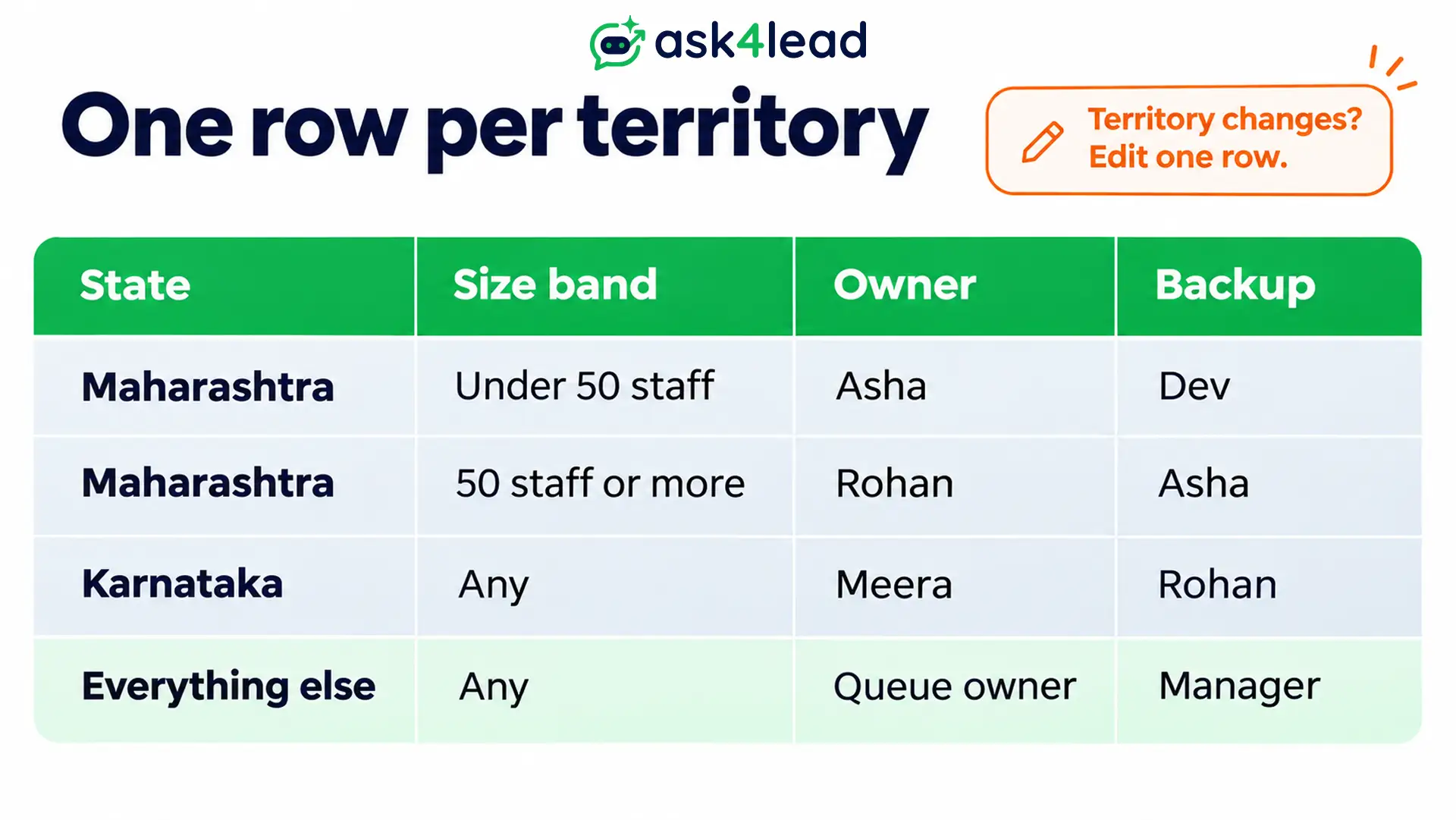
Here is a small version, keyed by state and company size:
| State | Size band | Owner | Backup |
| Maharashtra | Under 50 staff | Asha | Dev |
| Maharashtra | 50 staff or more | Rohan | Asha |
| Karnataka | Any | Meera | Rohan |
| Everything else | Any | Queue owner | Manager |
When a territory changes, you edit one row. To test it, run a sheet of 20 sample leads through the table and check each owner. Also keep routing logic apart from the territory map.
2. Clean the place names first
Customers write “Bangalore”, “Bengaluru” or a neighbourhood, and all three mean one area. Standardise the common spellings, and name a manual review owner for answers the rule cannot match.
3. Set the territory once
One team kept a “primary territory” field on each lead. They set it at the first assignment. Later, they reassigned only if the owner was blank or inactive. That stopped leads from bouncing every time a territory changed.
How Does Score-Based WhatsApp Lead Assignment Work?
Score-based assignment gives each answer points, adds them up and routes by the total. Hot leads go to your strongest closer at once. Warm leads enter a nurture path. Cold leads get an answer and no rep time. The score sorts leads and does not judge them.
Keep the questions to 3 or 4 so score-based WhatsApp lead assignment stays quick. Builders who tested long qualification chats report that people stop replying after that.
1. A 9-point score for a solar installer
A solar installer gets many bad leads: tenants, tiny electricity bills and people just browsing. Then a short score separates real buyers from browsers. These thresholds are examples, so set your own from past sales.
| Question | 3 points | 1 point | 0 points |
| Do you own the roof? | Yes | Joint owner | Tenant |
| Monthly electricity bill? | Above ₹3,000 | ₹1,000 to ₹3,000 | Under ₹1,000 |
| When do you want it? | This month | This quarter | Just looking |
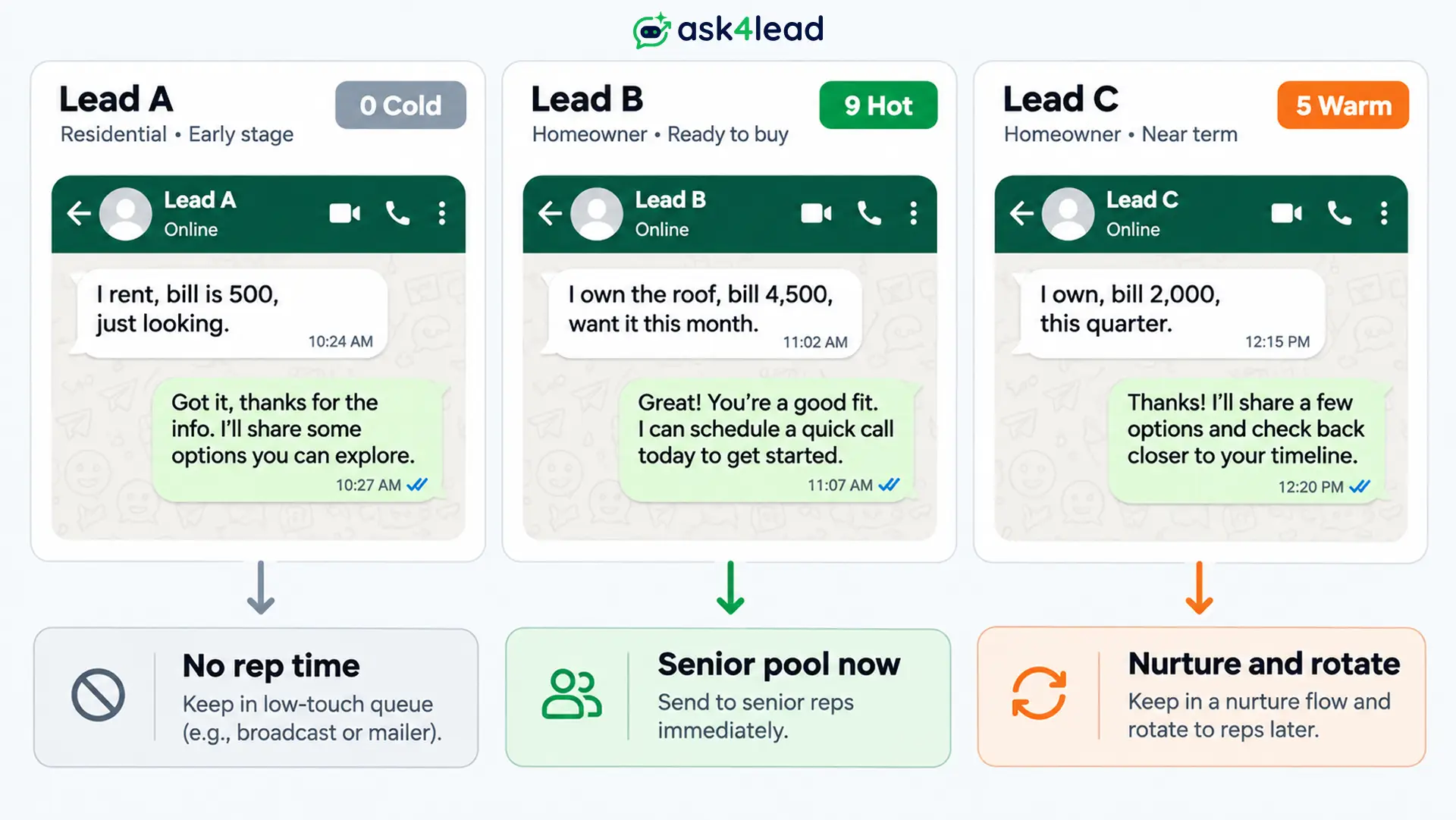
Score 7 to 9 is hot, 4 to 6 is warm and 0 to 3 is cold. Now take 3 sample leads from one week. Lead A rents, pays ₹500 and is curious, so the score is 0. Next, Lead B owns the roof, pays ₹4,500 and wants it this month, so the score is 9. Finally, Lead C owns the roof, pays ₹2,000 and wants it this quarter, so the score is 5.
2. What each score does
- Hot, 7 to 9: assign now to a senior rep and alert them.
- Warm, 4 to 6: rotate among reps, and queue a follow-up.
- Cold, 0 to 3: send a helpful reply and a campaign opt-in, with no rep time.
Now compare that result with plain rotation. If 12 of 60 weekly leads are hot, rotation may give one rep 5 and another 1. Scoring first sends 6 hot leads to each of 2 senior reps. The other 48 then rotate, 12 per rep.
3. Add override triggers
A score is a sort order, so let a few events beat it. Send the chat to a person at once in 3 cases. The lead asks for a quote or discount, asks for a human, or is misunderstood twice. Read the AI lead qualification guide to see when AI should stop and a person should start.
4. Keep a person in the loop for big deals
A builder thread debated letting AI score, qualify and message with no check. Their middle path was score, recommend, human approval, then message, at least for high-value leads. Another reply warned that scores built on a thin prompt look fine on dummy data. They then drift on real data. Feed the scorer your own past won and lost deals.
How to Order WhatsApp Lead Assignment Rules in 5 Layers
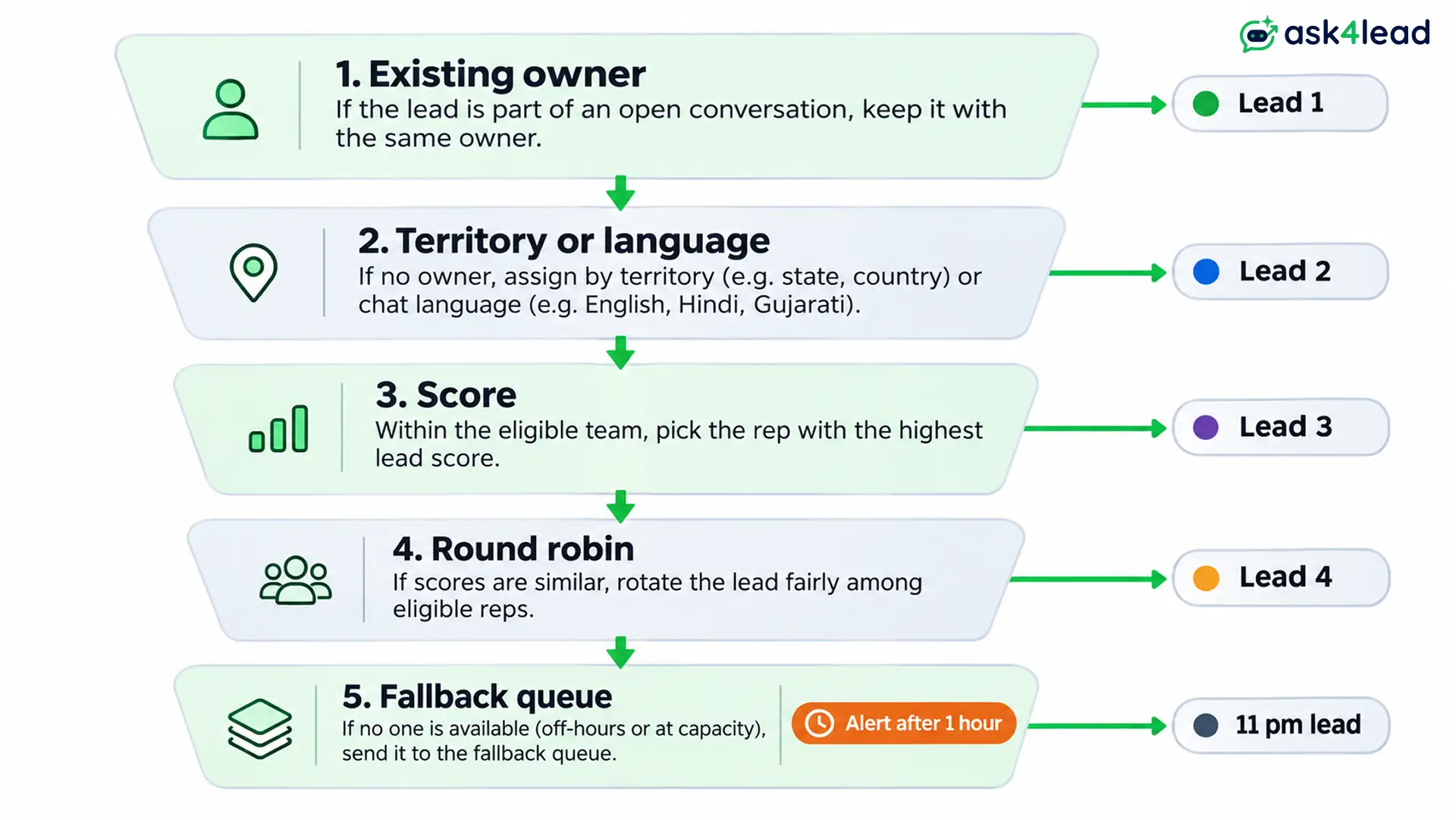
Order your WhatsApp lead assignment rules from the most specific to the most general. Check for an existing owner first, then territory, then score, then round robin. Then end with a fallback queue for everyone else. A lead takes the first layer it matches.
Several CRM tools work the same way. They test rules top to bottom and stop at the first match. Put a catch-all rule last, because it matches everything.
- Existing owner: if the phone number already belongs to a rep’s contact, send the chat to that rep.
- Territory or language: if the lead’s city or language matches a row, use that row’s owner.
- Score: if the score is hot, send it to the senior pool.
- Round robin: if nothing above matched, rotate among available reps.
- Fallback queue: if nobody is available, put the chat in one named queue with one named owner.
Keep each layer short and easy to explain. A rule that a manager cannot explain to a new hire is too complex.
A 4-lead walkthrough
Take 4 leads that arrive on one Monday:
- Lead 1 messages from a number already in the CRM. Layer 1 matches, so the old owner gets it.
- Lead 2 says the city is in Karnataka. No owner exists, but layer 2 matches the Karnataka row, so Meera gets it.
- Lead 3 is a new number with no city, but scores 9. Layer 3 sends it to the senior pool.
- Lead 4 is a new number with a low score and no city. Layer 4 rotates it to the next available rep.
A fifth lead arrives at 11 pm and no rep is online. Layer 5 holds it in the queue. The customer gets an automatic acknowledgement, and the queue owner takes over in the morning.
Dedupe by phone number before WhatsApp lead assignment runs
One public build used a fake email when a lead had none, so the same person appeared twice. Match on the phone number first, so one person never gets 2 owners.
How Ask4Lead handles WhatsApp lead assignment
Ask4Lead puts new WhatsApp chats in an Unassigned pool. A rep takes one with “Assign to Me”, or a manager assigns it. Its sales teams page also lists routing by product, region or round robin.
Meanwhile, the inbox feature page documents claiming and manager assignment, not full WhatsApp lead assignment rules. So test each rule with sample chats before you trust it, as in the steps above. These parts of Ask4Lead support the rest of the design:
- Scoring: the AI Sales Assistant scores leads hot, warm or cold from intent, budget and timeline.
- Ranked queue: the Work Queue sorts reps’ tasks by lead score and last activity.
- Restricted views: role management lets agents see only their own chats.
- Ownership trail: lead management keeps one owner per lead, and audit logs record who assigned what.
For the connection and role setup, read the guide to a WhatsApp shared inbox for multiple agents.
How to Test and Change WhatsApp Lead Assignment Safely
Change one rule at a time, test it with sample leads, then watch live results for a few days. WhatsApp lead assignment errors rarely crash anything. They send leads to a dead queue or an absent rep, and nobody notices for weeks.
Use this routine for any WhatsApp lead assignment change:
- Clone first: copy the rule set, then run 10 to 20 fake leads through the copy.
- Replay past leads: run last month’s leads through the new rules and compare the owners. One caveat: if a rule depends on data that arrives later, the replay will not match live traffic.
- Change one thing: a single edit is easy to undo when something goes wrong.
- Watch the first days: early traffic can look fine until volume and messy answers arrive.
- Audit each month: count new leads per rep and flag big gaps.
Alerts that catch quiet failures
Alert a manager when a lead stays unassigned for more than an hour. Also alert on reps who hold leads past your reply window, so you can reassign them.
Why reassignment does not reset the clock
The WhatsApp 24-hour rule lets you send free-form replies only within 24 hours of the customer’s last message. Meta’s pricing documentation ties that window to your business number, not to a rep.
So reassigning a chat does not extend it. A slow handoff can push the first reply outside the window, and then you need a template.
FAQs
1. Which WhatsApp lead assignment rule fits most teams?
No single rule wins for every team. Use round robin for equal reps, territory for regions and score when quality varies. Then stack them in the 5-layer order above.
2. Can I assign WhatsApp leads by location?
Yes. A WhatsApp number shows only the country, so ask for the city or pin code in chat. Then look it up in a territory table.
3. Is round robin fair for sales reps?
It is fair only when reps are equal. Add availability checks and weekly caps. Otherwise, a rep on leave or a rep with a huge deal skews the load.
4. What if a lead matches two rules?
State in writing which rule wins first. Most teams put existing owner first, then territory, then score, and then round robin.
5. How do I stop two reps replying to one lead?
Give each chat one owner and show it in the inbox. Also, let only the owner send customer-facing replies.
Conclusion
WhatsApp lead assignment works when every chat has one owner by rule. Round robin shares load, territory matches place, and score protects your top leads. Stacked in 5 layers, they leave no chat unowned.
Before you switch rules on, check that you have:
- A territory table with one row per territory and a backup owner.
- One 3 or 4 question score with example thresholds you set.
- Override triggers that send quote and human requests to a person.
- One fallback queue with one named owner.
- A test run of 20 sample leads and a monthly load audit.
Next, write the 5 layers on one page and test the first one.
Stop WhatsApp leads from landing on nobody
If WhatsApp chats reach your team faster than anyone can sort them, Ask4Lead gives each chat an owner. New chats enter the Unassigned pool, then reps claim them or managers assign them.
The AI Sales Assistant scores each lead hot, warm or cold and fills the lead record. Role-based views keep agents on their own chats, and the Work Queue ranks the next reply by lead score. Audit logs show who assigned each chat.
Read how the sales teams industry page puts this together, then start free.
