
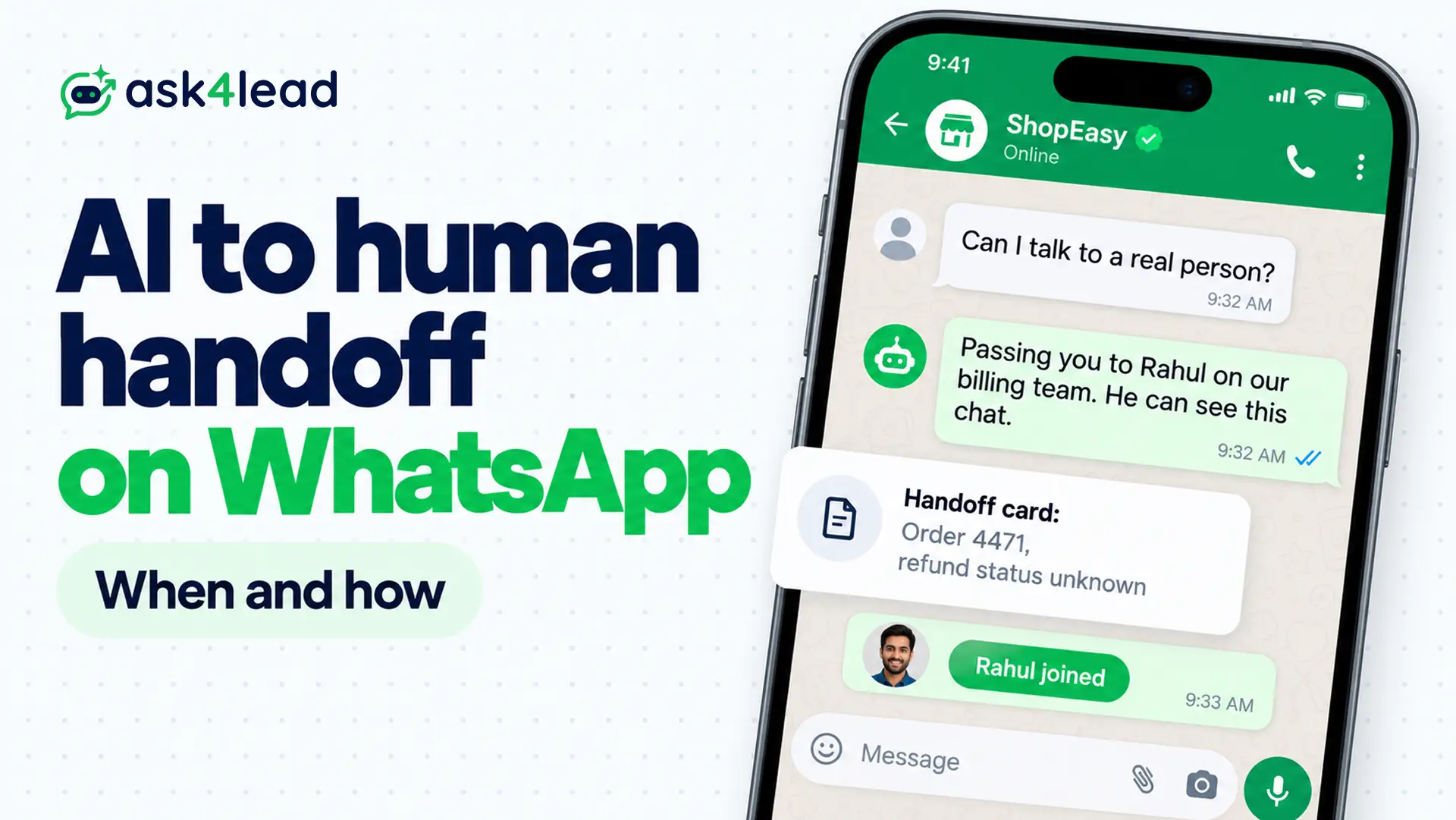
A WhatsApp human handoff is the switch from an AI agent to a staff member inside one chat. Hand off if the customer wants a person, if the next step moves money or edits a record, or after 2 failed attempts. Then pause the AI until the person releases the chat.
Below you get the triggers, the 6 states a chat moves through, the handoff card and the customer’s view. You also get the 24-hour window that blocks tomorrow’s reply, and what each reply costs in India.
When should a WhatsApp human handoff happen?
A WhatsApp human handoff should happen when a wrong reply costs more than a person’s time.
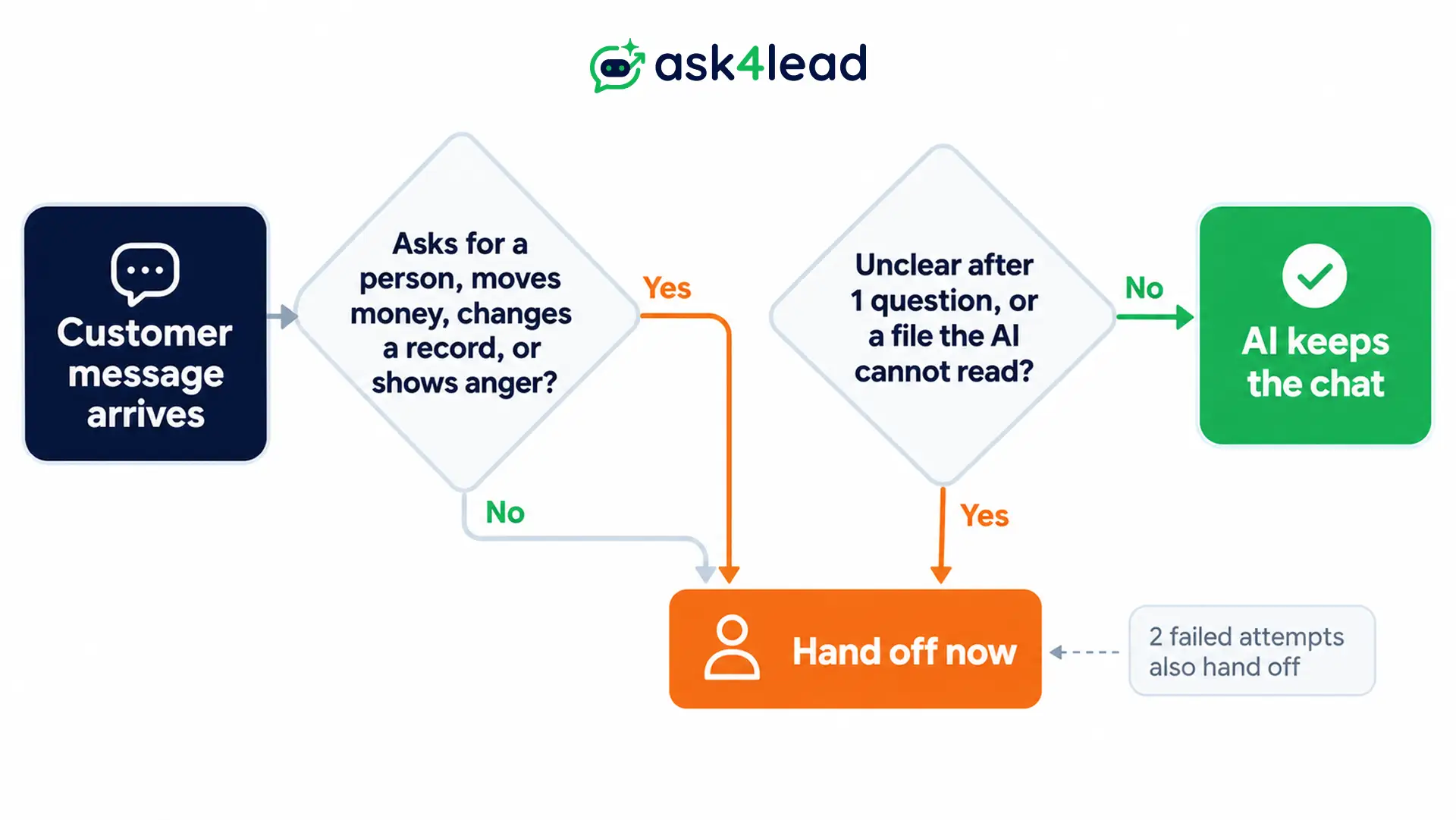
In practice, 3 signals matter: a request for a person, a next step with consequences, or an AI that has stopped making progress. A confidence score comes last, not first.
Hard triggers for a WhatsApp human handoff
Each row is a rule, not a judgement call. If the chat matches one, the AI stops.
| Trigger | Why a person must take it |
| Person requested | Because a menu loop after “Human please” loses the customer |
| Money moves | Since refunds, cancellations and disputes cost real cash |
| Record changes | Because a wrong address or booking edit is hard to undo |
| Frustration | Since “I have told you this 3 times” needs tone, not facts |
| Sensitive topic | Because legal, health and fraud cases carry rules the agent cannot weigh |
| 2 failures | Since the agent has nothing new to try |
| System error | Because a failed order lookup tempts the agent to guess |
Several builders who run WhatsApp agents report the same thing: confidence scores look fine in testing, then rate a wrong answer as certain.
So treat confidence as a backup signal. Consequence is the better test.
Soft triggers: ask once, then hand off
Some chats are unclear, not risky. For these, a WhatsApp human handoff can wait: unlike a button-menu chatbot, an agent can ask 1 clarifying question first, then pass the chat on if it stays unclear.
- Voice notes and images: the agent cannot read the file, so a person should.
- Mixed languages: the agent is unsure of the meaning.
- High-value leads: a large quote, or a buyer ready to talk to a salesperson.
Approval or full handoff
A handoff puts a person in the conversation. Approval keeps the AI as the writer, so it drafts and a person checks the draft first. Use approval for routine but sensitive replies such as prices, and a WhatsApp human handoff when the chat needs judgement.
In Ask4Lead, the Human Approval for AI Replies feature sends doubtful drafts and every price question to the Work Queue first. Nothing reaches the customer before someone signs it off. However, after 20 fine-looking drafts, reviewers start approving on autopilot.
How a WhatsApp human handoff works, state by state
Treat who owns each chat as a saved state, not as a sentence the bot says. The AI checks that state before every send, so a person who joins silences it.
Six states cover almost every WhatsApp human handoff, and each one needs a clear exit.
The 6 ownership states
| State | Replier | Next step |
| AI active | AI only | Trigger fires |
| Handoff requested | Nobody | Person accepts |
| Queued | Nobody yet | Staff accept, otherwise a timer alerts someone |
| Human active | Person only | Person resolves, then releases |
| Resolved | Nobody | When the customer writes again |
| AI resumed | AI only | New trigger fires |
Keep this state in a database or CRM, not inside the AI model. Then a restart or a repeated webhook cannot flip it back.
Pause the AI before you announce the handoff
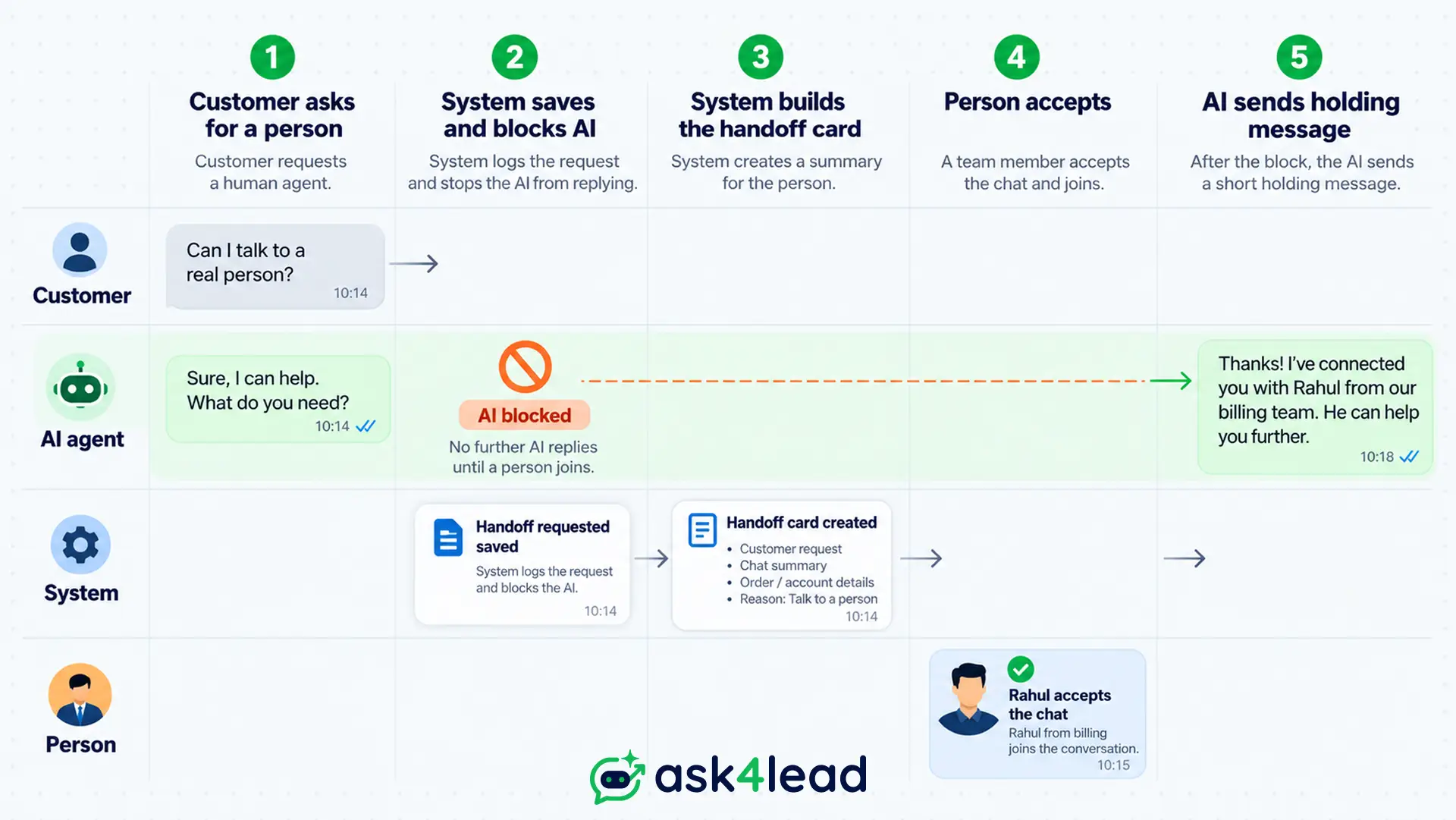
Order matters here. First save the state change so the AI is blocked, then build the handoff card and route the chat. Only then message the customer, because an early announcement lets the AI answer in the gap and gives the customer 2 voices.
Builder forums describe another failure: a bot says “connecting you to support” and then sits there for hours. A timer in the queued state prevents it. For a pause switch you can reach from your phone, see the WhatsApp outage guide.
In Ask4Lead, you can switch the AI Sales Assistant off per conversation, and a colleague can join any chat.
3 routes for a WhatsApp human handoff
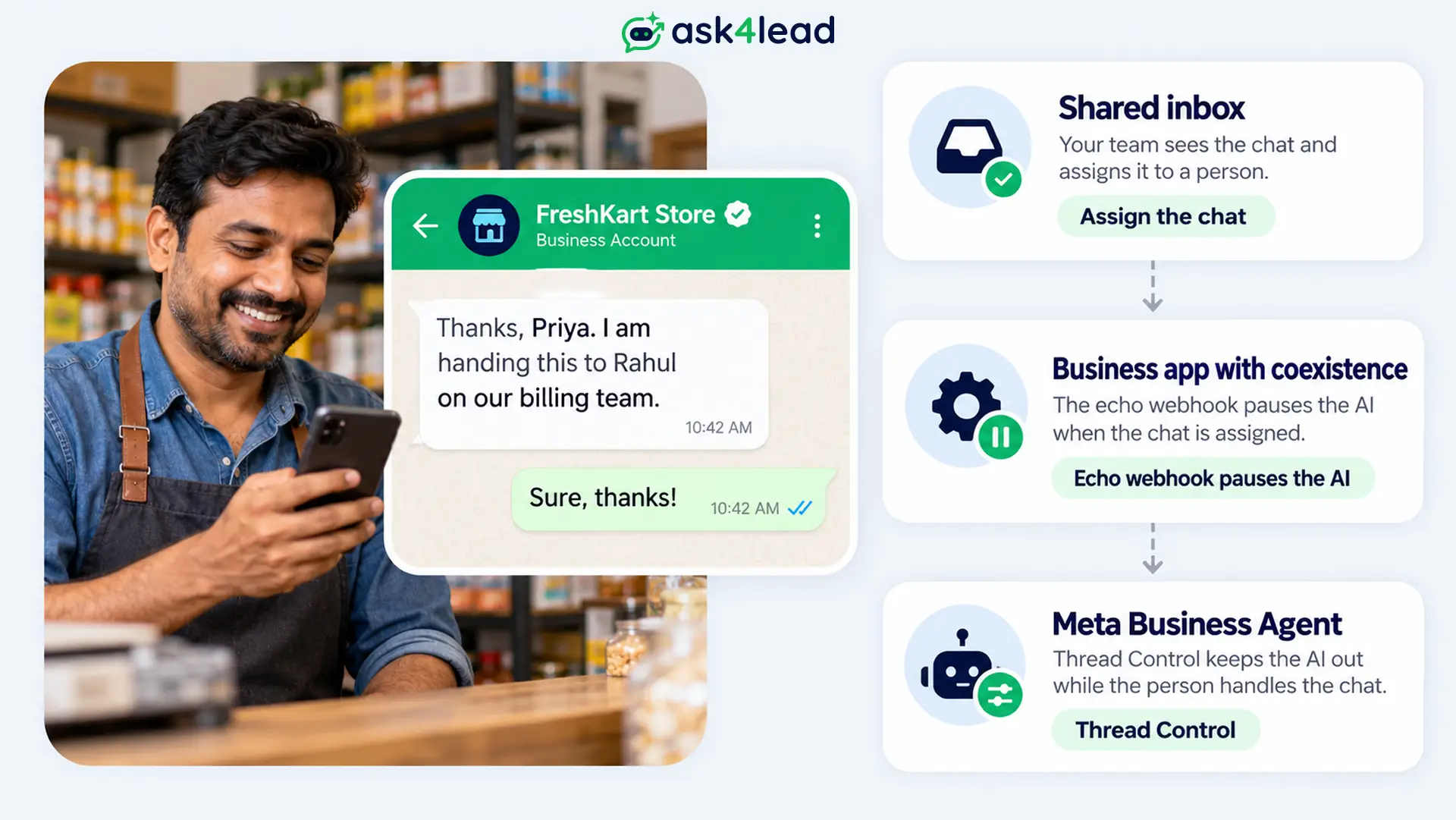
- Shared inbox through the API: assigning the chat flips its state, so the AI stops. Plain text replies need the 24-hour window to be open. The shared inbox guide compares the tools.
- WhatsApp Business app with coexistence: the same number works in the Business app and through the API together. The
smb_message_echoeswebhook reports each staff message, which is your signal to pause the AI. However, group chats do not sync and broadcast lists become read-only. - Meta Business Agent: the built-in agent from Meta begins a handoff on its own when it is unsure, spots a policy problem or hears a request for a human. You cannot configure those triggers. Your app steps in by sending a message, and Thread Control hands the chat back.
What the customer sees during a WhatsApp human handoff
Within seconds the customer needs 3 answers: is a person coming, what happens next, and when will the reply arrive? Say only what your system has confirmed. A WhatsApp human handoff that promises a person who is not online creates the stuck chat customers complain about most.
Sample handoff messages
Replace each [bracket] with your own value, and pair each message with a handoff card so the person is ready. Reps can save both as snippets, since Ask4Lead’s Chat Snippets paste a saved reply with the / command. Staff online:
Thanks, Priya. I am handing this to Rahul on our billing team. He can read our chat, so there is nothing to repeat. He usually replies within [15 minutes].
Staff offline:
Thanks, Priya. Our team is away until [9 am]. I have saved your order number and refund question, so nobody will ask you again. We will reply by [11 am]. If it is urgent, call [phone number].
Check availability before you promise
Most tools can tell you whether anyone is online, so use that signal. Then run this sequence:
- Check that someone is on shift.
- Offer the chat to the team and start a timer of [2 minutes].
- If nobody accepts, alert a second owner.
- Tell the customer the truth: nobody has picked it up yet, and when you will reply.
What a person needs on a WhatsApp human handoff card
A handoff card is a short note the person reads before saying hello. It holds the customer’s goal, the order or account, what the AI said, the exact status, and the next decision. Keep the full chat attached as well, because a summary can drop details.
Limit the handoff card to 5 fields so it stays fast to read.
| Field | Why it matters |
| Goal | Since a vague goal sends the person back to scroll |
| Identifier | Because summaries drop order IDs, so check this field before sending |
| AI promise | Since the person inherits whatever the AI said |
| System status | Because “sent”, “failed” and “unknown” mean different things |
| Decision | Since a card with no ask wastes the first minute |
For example, a good handoff card reads: Order 4471, refund attempted at 4:10 pm, outcome unknown, AI promised “arrives today”. The person should confirm or reissue it. Calling that refund “failed” could trigger a second one.
Ask4Lead updates a record in Lead Management after each conversation, with the customer’s problem, qualification details and a suggested pipeline stage. The AI Knowledge Profile also keeps the AI inside your uploaded facts, so each handoff card starts from facts.
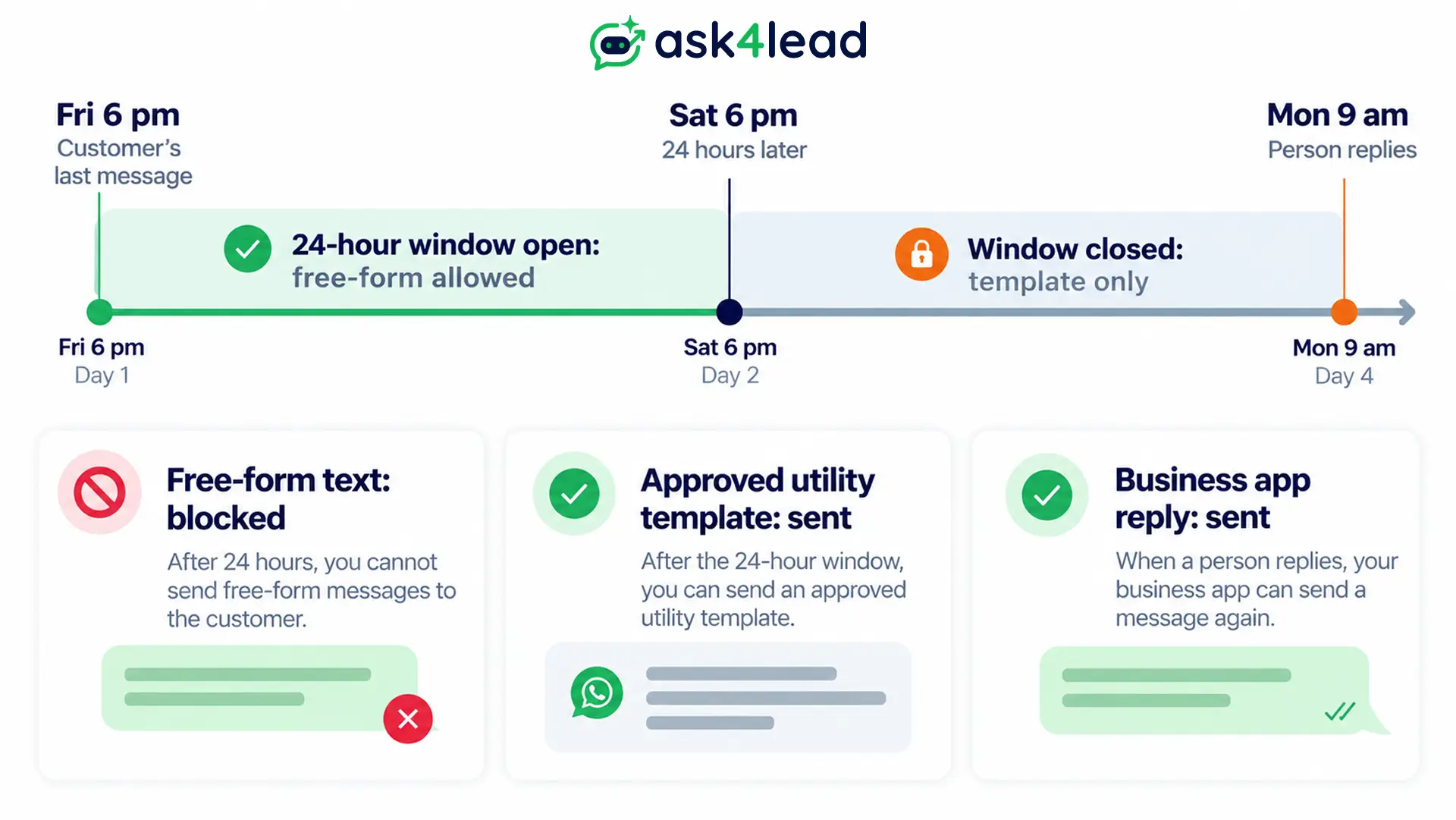
A late reply and the 24-hour window
Free text depends on the 24-hour window, which lasts until the clock runs out. Each customer message opens or restarts that clock, and once it runs out, staff must use an approved template.
So a chat queued on Friday evening and answered on Monday needs a template ready, and Meta’s pricing page states both rules.
What each reply costs in India
| Reply | After 24h | Category | India rate |
| Free-form text | No | Service | ₹0.115 |
| Utility template | Yes | Utility | ₹0.115 |
| Promo template | Yes | Marketing | ₹0.8631 |
| App reply | Yes | None | ₹0 |
| Agent reply | No | Business Agent | 4-5¢ |
Rates are per delivered message and follow Meta’s 1 October 2026 rate card. Service messages also include replies from a third-party AI, so staff and AI share one free tier:
- Free tier: 1,000 service messages monthly on each number.
- Example: a number that sends 6,000 free-form replies pays for 5,000 of them.
- Cost: 5,000 × ₹0.115 = ₹575.
A human reply costs the same ₹0.115 as an AI reply, because a WhatsApp human handoff changes who writes the message, not the rate.
Keep a follow-up template ready
Write 1 or 2 utility templates before launch, for chats that outlive the 24-hour window. Meta sets the category, not you, so a promotion inside the template can turn it into marketing. Sample:
Hi {{1}}, thanks for waiting. {{2}} from our team has your request about order {{3}} and will reply today. Reply here if anything changes.
For approval tips, see the guides on updating a template and the 24-hour rule.
Expire stale approval drafts
An approval that lands after the window has closed cannot be sent as free text. So tie each approval card to its window, show the time left, and drop any card whose 24-hour window has expired.
Where a WhatsApp human handoff breaks
Most failed handoffs break in 6 places, and each fix is a rule you can test before launch. The bot keeps talking, a queue goes unwatched, a menu loops, a skipped chat goes uncounted, the window closes, or the summary drops a detail.
| Failure | Fix |
| Double reply | Since both answer, block the AI at the request and check state before each send |
| Stuck chat | Because silence lasts hours, add a timer, a second owner and an honest message |
| Menu loop | Since asking once should work, honour the first clear request |
| Silent skip | Because nobody sees it, count skipped chats beside sent ones |
| Closed window | Since free-form fails beyond the 24-hour window, keep a template ready |
| Lost identifier | Because the person must re-ask, check the ID field on the handoff card before sending |
A 6-case handoff test
Run each case 10 times, because 1 clean run proves little. The AI agent testing checklist has the full 30-case list.
- Ask for a person in 5 different ways.
- Fail a refund mid-chat, then check that the handoff card says “outcome unknown”.
- Send a voice note and an image.
- Escalate at 6 pm with nobody free for 10 minutes.
- Reply 25 hours after the customer last wrote, a delay the 24-hour window cannot cover.
- Reply from the phone, then check that the AI stays quiet.
How to measure a WhatsApp human handoff
Measure whether a WhatsApp human handoff saves attention, not only how often it fires. Six numbers tell you most of it. A handoff rate near 0 can mean the agent refuses to escalate, so read it next to the others.
- Handoff rate by trigger: which hard rule fires most.
- Time to first human reply: from the request to the person’s message.
- Requests honoured: the share of “talk to a person” messages that reached one.
- Repeat contact: customers who write again about the same issue within 7 days.
- Card corrections: how often the person fixes the handoff card.
- Unchanged approvals: drafts sent without edits. A rate near 100% suggests a rubber stamp.
Ask4Lead’s AI Dashboard has a Handoffs metric that opens the threads where the AI struggled, plus a Low Confidence log.
To work out payback, read the cost model for AI agents against support reps. Not for you if your whole setup is a single phone with no AI.
FAQs
1. When should a WhatsApp human handoff happen?
Hand off in any of these cases:
- The customer requests a person.
- The step moves money or edits a record.
- The topic is legal or health related.
- The AI fails twice. Sales teams can read how AI qualification works without a human.
2. How do I stop the AI during a WhatsApp human handoff?
Save a “human active” state for that chat and make the AI check it before every send. With coexistence, pause the AI when the echo webhook reports a staff message.
3. Can I reply from my phone while the AI runs?
Yes, if the number uses coexistence. Messages from the Business app stay free and skip the 24-hour window, but your system must listen for them to pause the AI.
4. What if nobody is online during a WhatsApp human handoff?
Say so. Tell them the team is offline, confirm what you saved, give a reply time you can keep, and alert someone for the morning. The 24-hour window keeps running while you wait.
5. Does a WhatsApp human handoff cost extra?
No. A free-form human reply is a service message at ₹0.115 in India, the same rate as a third-party AI reply. Other message categories are priced in the 2026 pricing breakdown.
6. Does a WhatsApp human handoff reopen the 24-hour window?
No. Only a customer message opens or resets it, so a closed window means the person needs an approved template.
7. How many failed attempts should the AI get?
Many builders start at 2. This comes from builder habit, not Meta policy, so tune it against real chats.
Conclusion
A good WhatsApp human handoff is a saved state, a short handoff card and a fallback you have tested. Hand off on consequences, pause the AI first, and keep a template ready for the person who replies later than the 24-hour window allows.
Handoff launch checklist:
- A list of hard triggers that stop the AI
- A saved ownership state the AI checks before each send
- A handoff card with the identifier and an exact status
- A utility template for late replies beyond the 24-hour window
- A tested fallback for the hour nobody is online
Next, run the 6-case test on a real number, then add one trigger at a time.
Spare customers from retelling the problem
When a lead has to explain a problem twice, the sale slips away. Ask4Lead lets you switch the AI off for one chat, holds risky drafts for approval, and puts anything the AI cannot handle in the Work Queue. Each lead gets a record that works as a handoff card.
The shared team inbox then lets reps assign, transfer and add private notes, while the AI Dashboard shows which chats needed a person. For support teams, the customer support playbook shows the setup.
