
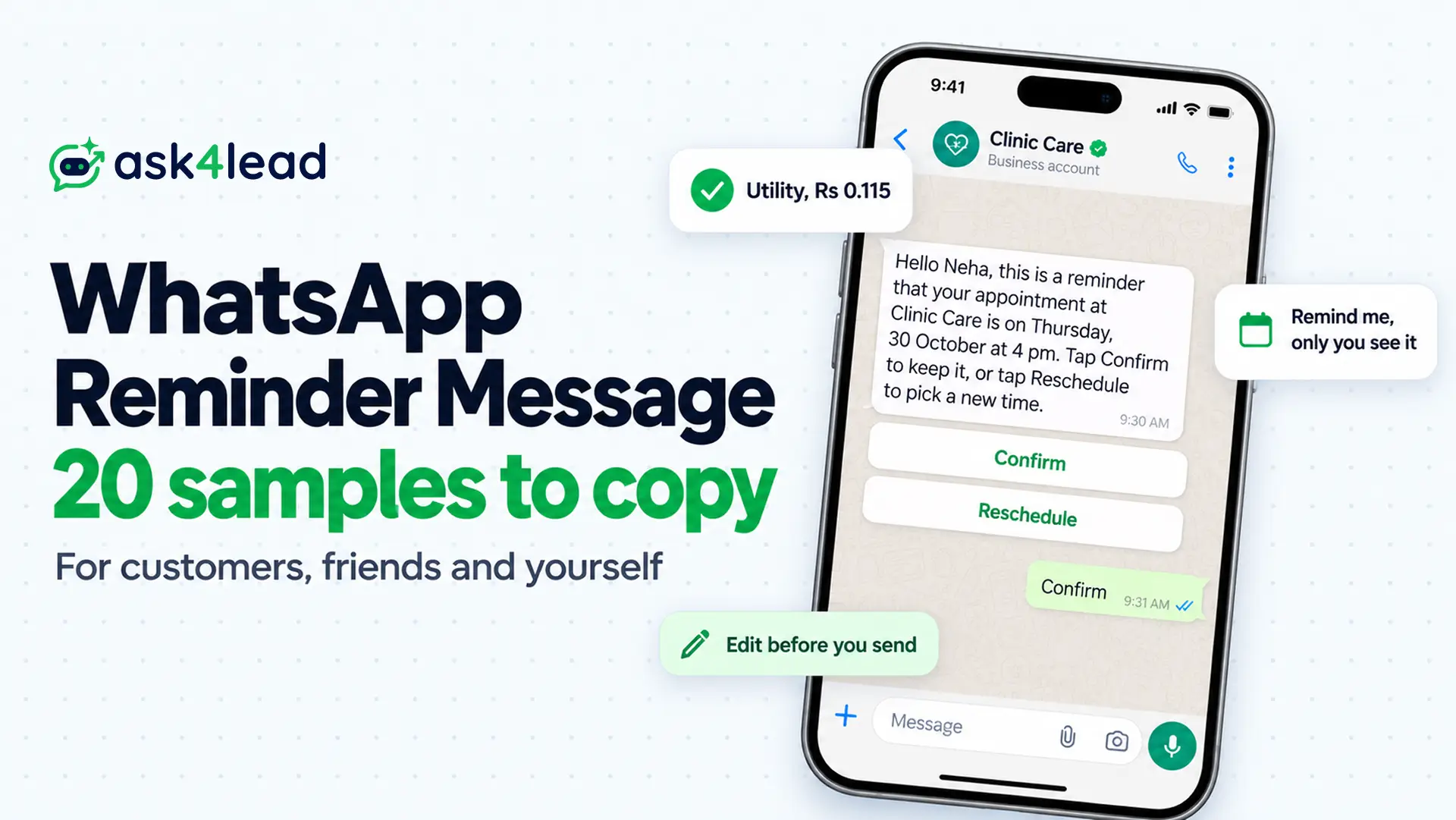
A WhatsApp reminder message is a short note that tells someone about a date, a payment or a task before it slips past. However, you can send one to a customer, to a friend or to yourself, and each route follows different rules.
Below you get 20 WhatsApp reminder message samples (6 personal and 14 for business), the steps for WhatsApp’s own Remind me tool, and then Meta’s rules for reminders that go to customers. If you run a clinic, school or shop, read the cost section, because one promotional line can make a reminder 7.5 times dearer.
Which WhatsApp reminder message do you need?
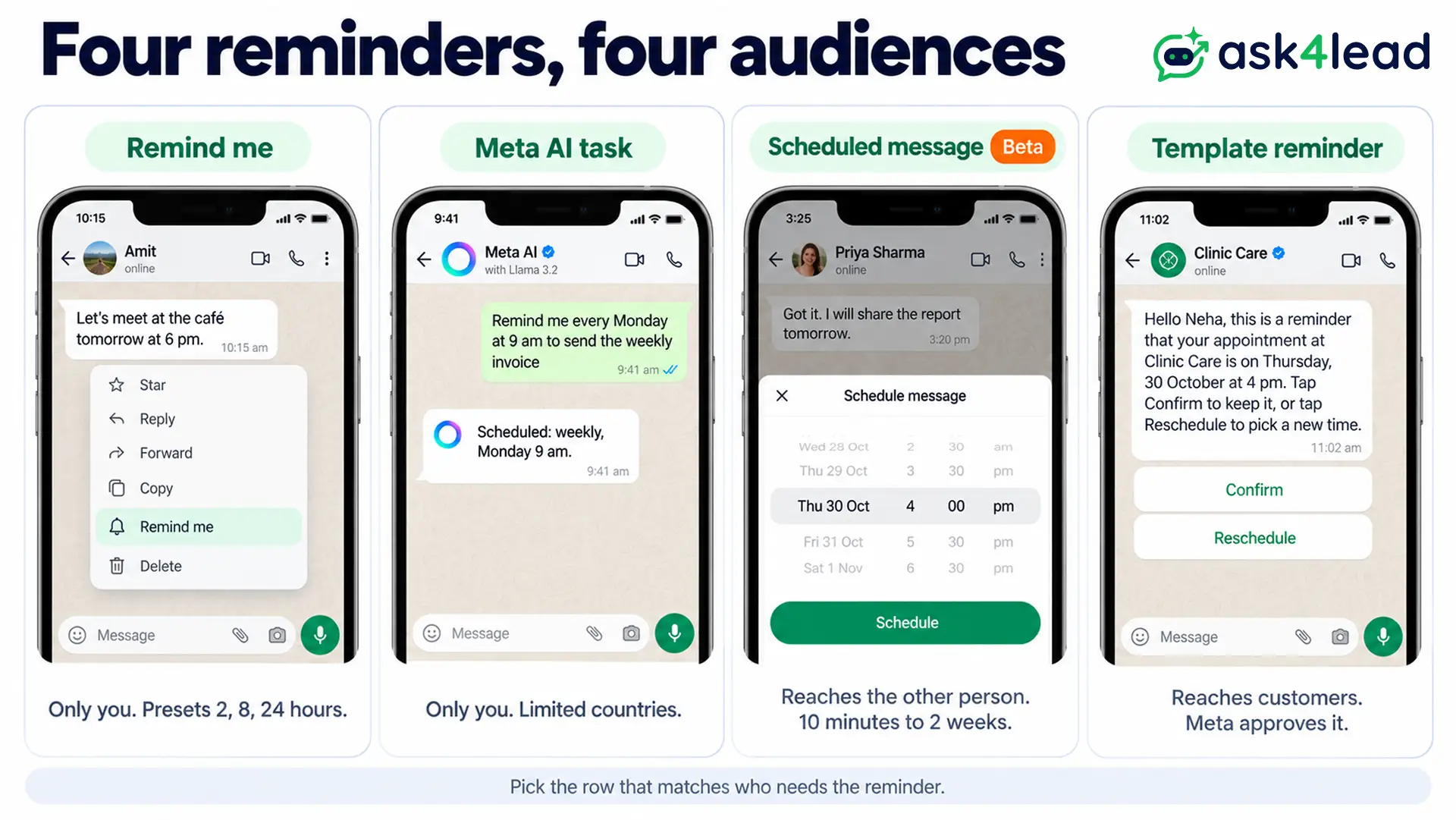
People who search for reminders WhatsApp mean one of four things, and the tools do not overlap.
Remind me nudges you about a message, Meta AI sends you scheduled tasks, a scheduled message reaches someone else later, and a template reminds your customers. So pick your row first.
| Tool | Who gets the reminder | Where it runs | Status on 26 October 2026 |
| Remind me | Only you | WhatsApp chat menu | Rolled out in 2025 |
| Meta AI scheduled task | Only you | Chat with Meta AI | Limited countries |
| Scheduled message | The other person | Any chat | Beta, select testers |
| Template reminder | Your customers | WhatsApp Business API | Live, Meta approves each template |
So a clinic cannot use Remind me to send a patient a WhatsApp reminder message, because the alert only reaches the person who set it. Customers need the last row.
How to set a reminder on a WhatsApp message
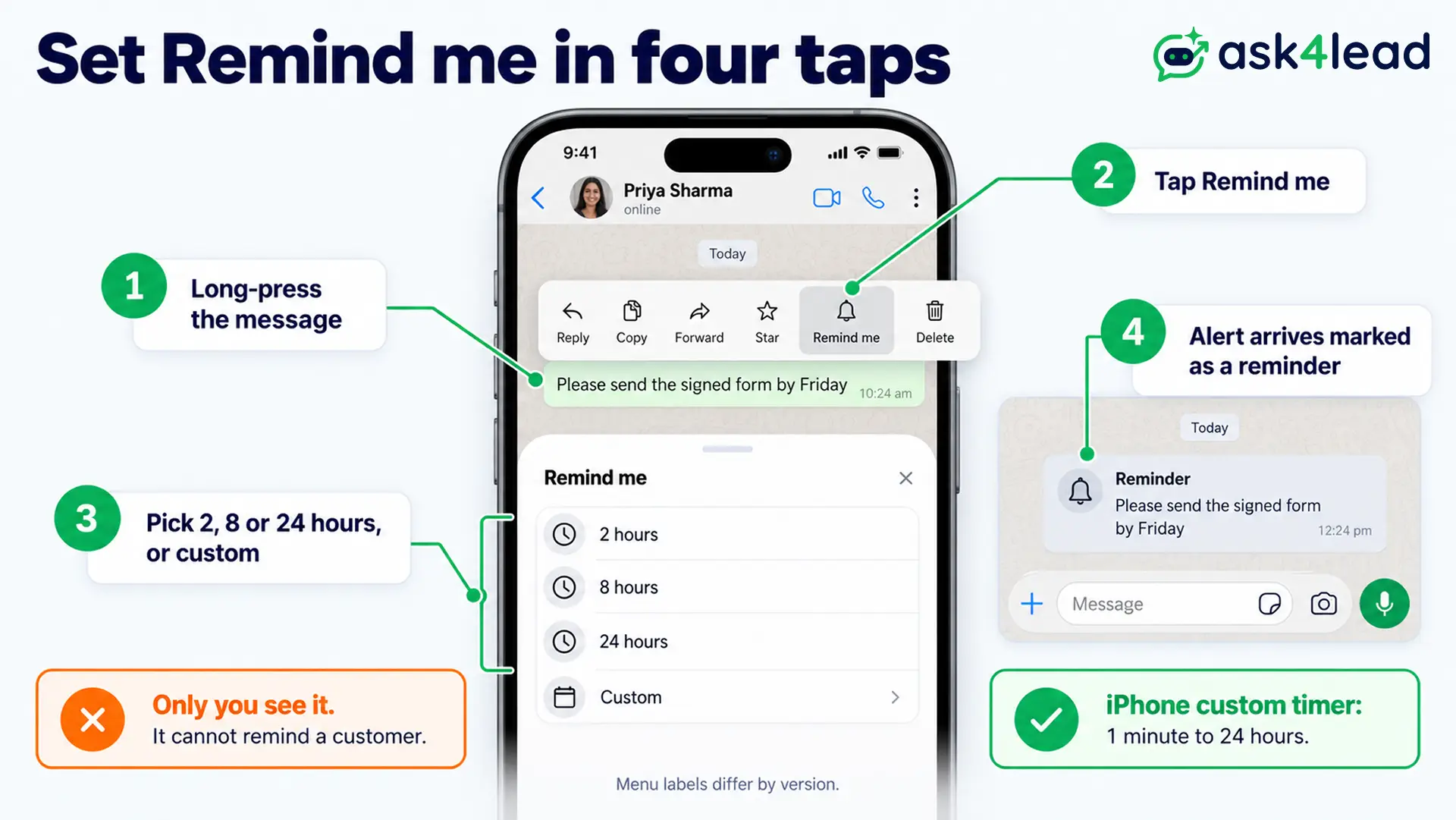
Long-press the message, tap Remind me, then pick a time. WhatsApp alerts you then, and nobody else in the chat sees it. Also, reports describe the tool for one-to-one chats and for groups.
- Long-press the message you want to come back to.
- Tap Remind me. Some versions show a bell icon in the top bar instead, so look there if the menu has no label.
- Choose 2 hours, 8 hours or 24 hours, or set a custom time.
- Wait for the alert, which arrives marked as a reminder.
9to5Mac’s report says iPhone custom timers run from 1 minute to 24 hours. For next week, use the Meta AI route below or your phone’s own reminder app. If you do not see Remind me, update WhatsApp first, because rollouts reach accounts in stages.
However, this does not apply to customers. The tool is private by design, so it cannot send a WhatsApp reminder message to the other person.
Set a repeating WhatsApp reminder message with Meta AI
Meta AI can send you one-time, daily, weekly or monthly reminders inside WhatsApp. You describe the task in the Meta AI chat, and it sends the notification when you asked. However, WhatsApp’s help page warns that Meta AI works only in limited countries.
- Open the chat with Meta AI and describe the task, such as “Remind me every Monday at 9 am to send the weekly invoice”.
- Tap send, and Meta AI creates the task.
- Check it later: tap Meta AI, then Scheduled.
- Change it by asking, for example “move my Monday reminder to 10 am”, or tap the task and choose Delete.
If Meta AI does not show up in your WhatsApp, use your phone’s built-in reminder app instead.
Schedule a WhatsApp reminder message to send later (beta)
WhatsApp is testing a send-later option. You hold the send button, pick a date and time, and the message goes out then. As of 26 October 2026 it is in beta, so most accounts cannot use it.
Engadget reports a minimum of 10 minutes ahead and a maximum of two weeks. It works in individual and group chats, and 9to5Mac adds that people who join a group later do not get the message.
However, neither report covers the WhatsApp Business app or the API. So plan every customer WhatsApp reminder message on templates, because a beta setting should never decide whether a patient gets a reminder.
How to write a polite WhatsApp reminder message
A good WhatsApp reminder message names the thing, the date and the one action you want, then gives a friendly way out. It never blames, and it lets the other person say “done” in one word. Escalate in three steps: a soft nudge, a clear ask and a dated final note.
- Friend or plan: Hi [Name], a quick reminder about [dinner] on [Saturday] at [8 pm] at [place]. Shall I book a table for [6]?
- Money owed: Hi [Name], a gentle reminder about the [₹1,200] from [the trip]. So send it by UPI to [UPI ID] whenever you are free. Thanks!
- Work deadline: Hi [Name], a reminder that [the report] is due [Friday, 5 pm]. Also tell me if you need anything from me before then.
- Second nudge: Hi [Name], I am following up on my message from [Monday]. Could you share [the document] by [Thursday noon]? Then I can send it on.
- Group: Reminder for everyone: [practice] is on [Sunday] at [7 am] at [ground]. Please reply Yes or No, so I can plan the team.
- Rent: Hi [Name], a reminder that [November] rent is due on [5 November]. Please send it to [UPI ID] and share the screenshot here.
So space the steps out. For example, ask on day 0, send the soft nudge on day 3, and send the dated note on day 7. After that, a phone call works better than a fourth message.
Does a customer WhatsApp reminder message need a template?
Yes, whenever the customer has not messaged you in the last 24 hours. Meta then requires an approved template, and the category sets the price.
Utility covers reminders about something the customer booked or owes, while Marketing covers anything that pushes a sale.
| Reminder | Category | Why |
| Appointment or class time | Utility | The customer booked it |
| Payment due date | Utility | Meta’s own utility example is a monthly payment reminder |
| Plan ends, renew with a discount | Marketing | Meta lists a renewal offer as a marketing example |
| Cart left behind | Marketing | It tries to persuade |
| Webinar the customer registered for | Likely utility | The customer asked for it |
Meta’s categorization page also says a template that mixes utility and marketing counts as marketing. So if an appointment reminder carries a “10% off your next visit” line, Meta bills and treats it as marketing.
What one offer line costs you
Do the arithmetic before you add that line. From 1 October 2026, India’s rate is ₹0.115 per delivered Utility message and ₹0.8631 per delivered Marketing message, before GST. A clinic that sends 200 patients two reminders each sends 400 messages. As Utility that costs 400 × ₹0.115 = ₹46.00, but as Marketing it costs 400 × ₹0.8631 = ₹345.24.
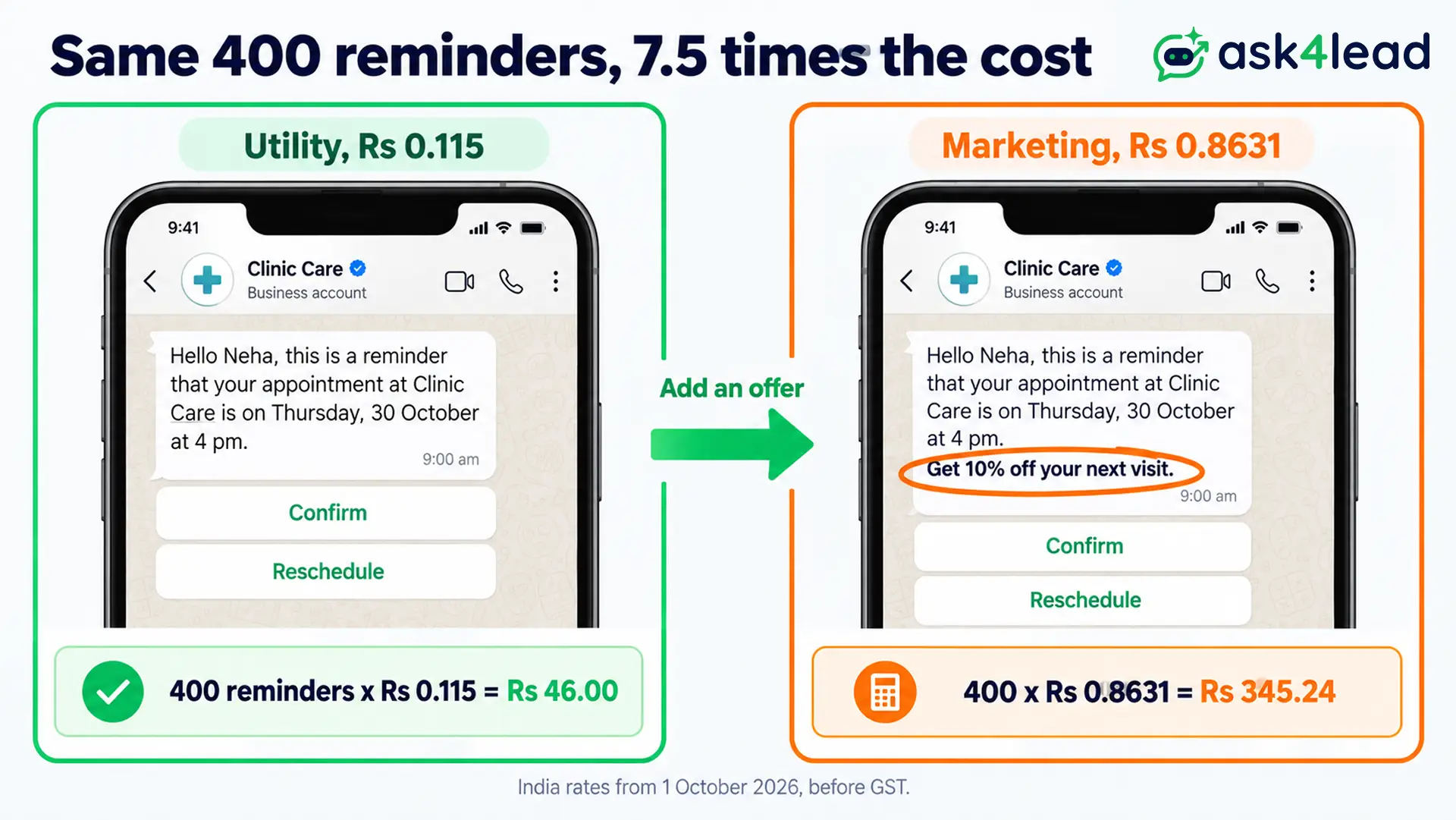
Also keep every WhatsApp reminder message template free of promotions, because Meta can recategorise a misfiled template. Meta’s pricing page holds the live rate card. If a customer wrote to you in the last 24 hours, you can type the reminder instead, and Meta gives each number 1,000 free service messages a month before it charges.
Get consent before the first reminder, using this WhatsApp opt-in guide. If Meta turns a reminder down, learn why Meta rejects a WhatsApp template. For the window rules, read the 24-hour rule explained.
14 WhatsApp reminder message samples for customers
Each WhatsApp reminder message below ends on fixed words, because Meta does not allow a template body to start or end with a variable. Replace every [bracket] before you send, or map it to a {{1}} variable when you build the template. Utility samples stay safe only while they stay free of offers.
Appointment reminders
- 1. One day before (Utility, buttons Confirm and Reschedule): Hello [Name], this is a reminder that your [appointment] at [Clinic Care] is on [Thursday, 30 October] at [4 pm]. Tap Confirm to keep it, or tap Reschedule to pick a new time.
- 2. Same day (Utility): Hi [Name], we expect you at [Clinic Care] today at [4 pm]. The address is [address], and parking is on [level 2]. Reply here if you are running late.
- 3. Missed visit (Utility, keep it about the booking): Hi [Name], we missed you at [4 pm] today. Tap Reschedule, and we will hold [Friday, 11 am] for you.
Payment reminders
- 4. Three days before (Utility, button Pay now): Dear [Name], a reminder that [₹2,500] for [November tuition] is due on [5 November]. You can pay by UPI to [UPI ID] or tap Pay now. If you paid already, please ignore this message.
- 5. Due today (Utility): Hi [Name], your payment of [₹2,500] for [invoice 1042] is due today. Tap Pay now to finish, and then reply here if you need help.
- 6. Overdue, polite (Utility): Hi [Name], we have not received [₹2,500] for [invoice 1042], which was due on [5 November]. Please pay by [8 November], or reply here if something went wrong.
For loan and card dues, stricter rules apply, so read the guides on an EMI bounce message and a credit card payment message first.
Event and renewal reminders
- 7. Webinar tomorrow (likely Utility): Hi [Name], you registered for [webinar title]. It starts tomorrow at [6 pm], and you can join here: [link].
- 8. Event day (likely Utility): Hi [Name], doors open today at [5 pm] at [venue]. Please show this chat at the entry.
- 9. Plain renewal notice (Utility): Hello [Name], your [plan] renews on [12 November] for [₹999] on the card ending [1234]. You do not need to do anything.
- 10. Renewal with an offer (Marketing, button Renew now): Hello [Name], your [plan] ends on [12 November]. Renew by [10 November] and save [10%].
For invitations that go beyond a reminder, copy from these WhatsApp event invitation messages.
Task and follow-up reminders
- 11. Documents pending (Utility): Hi [Name], we still need your [PAN copy] to finish your [account opening]. Please send a photo in this chat by [Friday], so we can move on.
- 12. Pickup ready (Utility): Hi [Name], your order [48213] is ready for pickup at [store] until [Saturday, 6 pm]. Please bring your order number.
- 13. Sales follow-up (typed reply inside the 24-hour window): Hi [Name], you asked about [the 2 BHK] on [Monday]. Would you like to visit on [Saturday]? Reply Yes, and I will book it.
- 14. Cart reminder (Marketing, button Complete order): Hi [Name], you left [item] in your cart. It is still in stock, and we saved it for [24 hours].
When to send each WhatsApp reminder message
Send each customer two or three reminders, not five. Each extra WhatsApp reminder message costs money and raises the chance that a customer blocks you, which can lower your quality rating. These timings are starting points, so compare them with your own no-show or late-payment rate.
| Reminder | First | Second | Last |
| Appointment | 1 day before | Same morning | After a no-show, once |
| Payment | 3 days before | On the due date | 3 days after, once |
| Event | 1 day before | 2 hours before | None |
| Renewal | 7 days before | 1 day before | None |
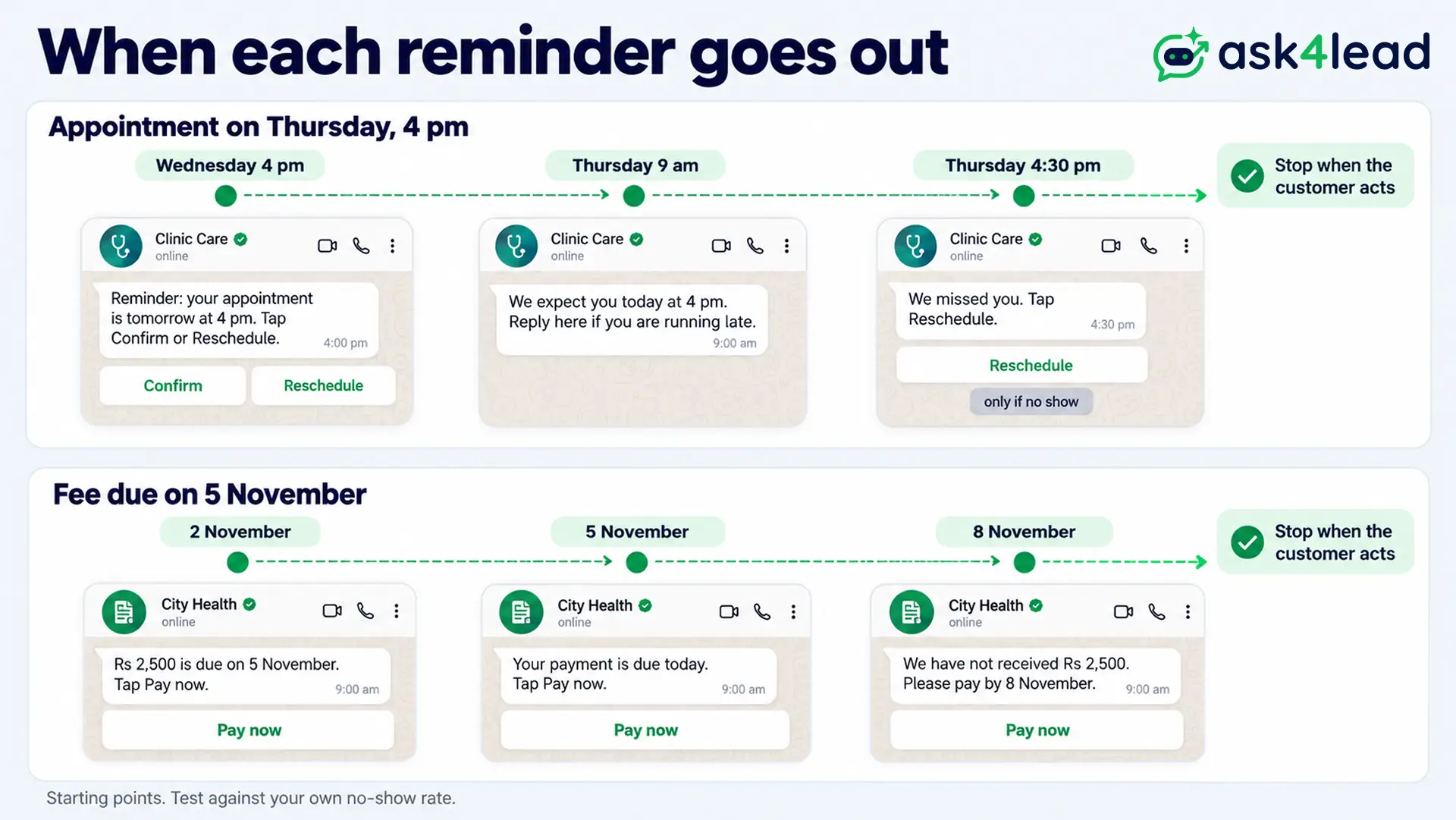
So stop the sequence the moment the customer acts. For example, a patient who taps Confirm does not need the same-morning message, so remove them from that send.
Send every WhatsApp reminder message from one shared inbox
Ask4Lead, a humanized AI WhatsApp chatbot + CRM, covers the customer side of a WhatsApp reminder message. First, build the message in WhatsApp Templates, where you pick Utility or Marketing, add quick reply or link buttons, and track Pending, Approved or Rejected.
Then send it with WhatsApp Campaigns, which lets you schedule a send for a date and time and filter contacts by tag or pipeline stage. Campaigns use approved templates only, so message opted-in customers.
Ask4Lead does not trigger reminders from a booking calendar. So tag each day’s patients, then schedule one campaign per group, or set a rep reminder for a one-off.
Meanwhile, for your own team, a Next Step is a reminder for the rep, not a message to the customer. Due and overdue tasks sit at the top of the Work Queue, and an overdue task turns red.
Also, snooze hides a chat until a date you choose, then returns it to the top of the agent’s Work Queue. Replies land in the shared team inbox.
FAQs
1. Can you set a reminder on WhatsApp?
Yes. Long-press a message, tap Remind me and pick a time. The alert reaches only you.
2. How do I remind someone politely on WhatsApp?
Name the thing, the date and one action, then give an easy way out, such as “ignore this if you have paid”. Space the follow-ups a few days apart.
3. How can I set up an automatic WhatsApp reminder message?
For yourself, ask Meta AI to schedule a task, where it is available. For customers, use an approved template sent through the WhatsApp Business API.
4. Why is the Remind me option not showing?
Rollouts reach accounts in stages, so update WhatsApp first. Also, a send-later option exists only in beta as of 26 October 2026, so do not expect it yet.
5. How much does a WhatsApp reminder message cost in India?
From 1 October 2026, it costs ₹0.115 for a Utility template and ₹0.8631 for a Marketing template, per delivered message, before GST. A typed reply inside the 24-hour window is a service message, and 1,000 a month are free.
Pick your reminder tool this week
Match the tool to the person you are reminding, then copy the WhatsApp reminder message that fits. Remind me and Meta AI cover you, a polite message covers friends, and an approved template covers customers.
Before you send your first customer WhatsApp reminder message, check that you have:
- Written opt-in from every customer on the list
- Kept offers out of any Utility reminder
- Replaced every [bracket] with real details
- Capped the sequence at two or three messages
- Stopped the sequence for customers who already acted
Stop chasing no-shows and late payers by hand
When reminders live in your phone’s notes, a missed one costs you a booking or a payment. Ask4Lead gives your team four tools for it.
WhatsApp Templates hold your approved reminders, WhatsApp Campaigns schedule them to tagged groups, Next Step keeps rep follow-ups in the Work Queue, and the shared team inbox catches every reply.
See how WhatsApp lead follow-up with an AI agent compares with a person.
