
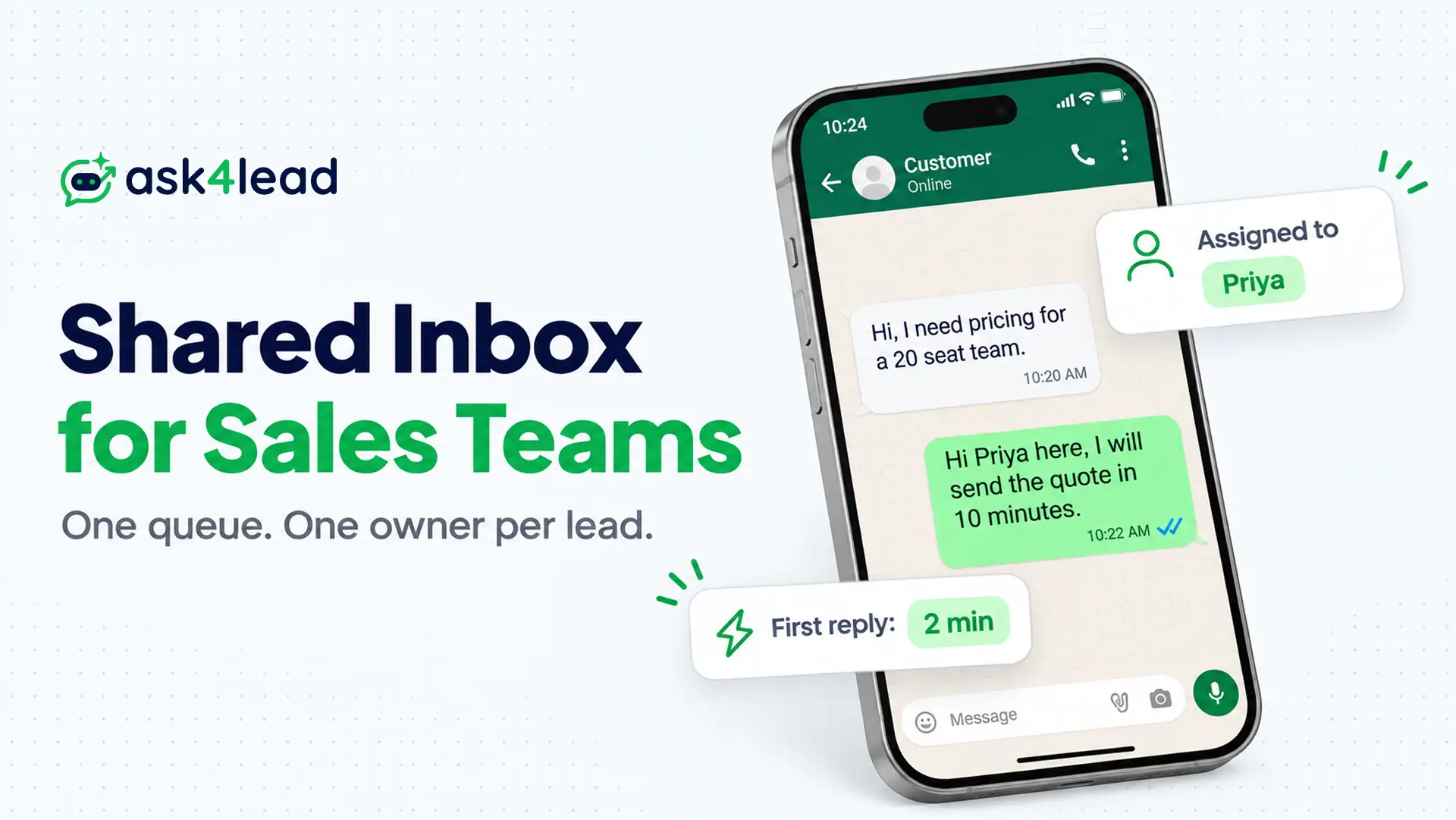
A shared inbox for sales puts leads from email and a WhatsApp shared team inbox into one queue. Each conversation gets one named owner.
To set one up, connect the channel, give each rep a login, split 4 roles and pick one assignment rule. It fails when nobody owns a thread, when the tool hits its ceiling, or when a rep goes on leave.
Below you get a 4-step setup, a role matrix and 4 assignment rules. You also get a worked 8-rep example, 7 failure tests and a 10-point checklist.
What Is a Shared Inbox for Sales Teams?
A shared inbox for sales teams is one queue where reps claim and answer inbound leads from one address or number. Each conversation shows an owner, a status and private notes. Reps log in with their own accounts, so the team knows who replied.
People often confuse it with 4 other tools, so here is where each one stops:
- Distribution list: it copies every email to all members, so 5 reps may answer the same lead.
- Outlook shared mailbox: it gives many people one mailbox, but it has no assignment, so ownership lives in memory.
- Shared inbox tool: it adds owner, notes, status and reports, though it does not track deals or forecasts.
- CRM: it tracks contacts, deal stages and forecasts, but it handles live replies poorly.
Most teams use both, because the inbox runs today’s chats while the CRM runs the pipeline.
When Does a Sales Team Need a Shared Inbox?
A sales team needs a shared inbox once 3 or more people answer the same address. It also needs one once a lead goes cold because nobody owned it. Below that, a folder rule can work, but above it, memory stops scaling.
Opinions on the exact line differ. For example, one email-tool vendor puts it at 3 people. One support agency in a Reddit thread said its clients break at 30 to 50 emails a day.
Tick every sign that is true today:
- Two reps replied to the same lead this month.
- A lead waited more than 1 day because the owner was out.
- Reps use personal inboxes or phones for lead conversations.
- Nobody can say how many leads wait for a reply right now.
- A rep left and took live threads with them.
- You cannot tell which rep carries the most volume.
If 2 or more apply, build a shared inbox for sales this week.
How to Set Up a Shared Inbox for Sales in 4 Steps
Setting up a shared inbox for sales takes 4 steps. First choose what goes in, then match the tool to your volume. Next give each rep a login and write 3 operating rules. Do them in that order, because tool limits decide how far your rules can go.
1. Choose which addresses and numbers go in
Start with sales@, demo@ and your WhatsApp sales number. Leave billing and hiring out, since they need different owners.
Then ask your reps to stop handing prospects a personal address. Every lead that skips the shared inbox is a lead only one person can see.
2. Match the tool to your volume
Each option has a hard limit, so check it before you commit. A limit you find after rollout costs you a migration.
- Google Collaborative Inbox: you can assign threads, mark them done and add labels. However, the group owner must turn on conversation history first.
- Outlook shared mailbox: you get shared access inside Outlook, but it allows 25 users at most. Also, you cannot encrypt mail sent from it.
- Email inbox tool: you get assignment, notes, live typing and reports, though you pay per seat.
- CRM inbox: it links each thread to the deal, but you pay CRM seat prices for every rep.
- WhatsApp inbox: it adds assignment and notes on a WhatsApp number, so it covers WhatsApp only, not email.
Microsoft states that beyond 25 users, people “might experience connection failures or duplicated messages”. That is a hard ceiling, not a tip.
3. Give every rep a personal login
Never share one Gmail password with the whole team. A shared login hides who replied, and it breaks the audit trail you need later.
Individual logins give you collision detection, internal notes and a visible history of who answered. They also let you switch off one rep, so you never change a password for everyone.
4. Write 3 operating rules
Put these on one page, then pin it in the inbox:
- Owner: every thread has exactly 1 named owner. Others add notes, but only the owner replies.
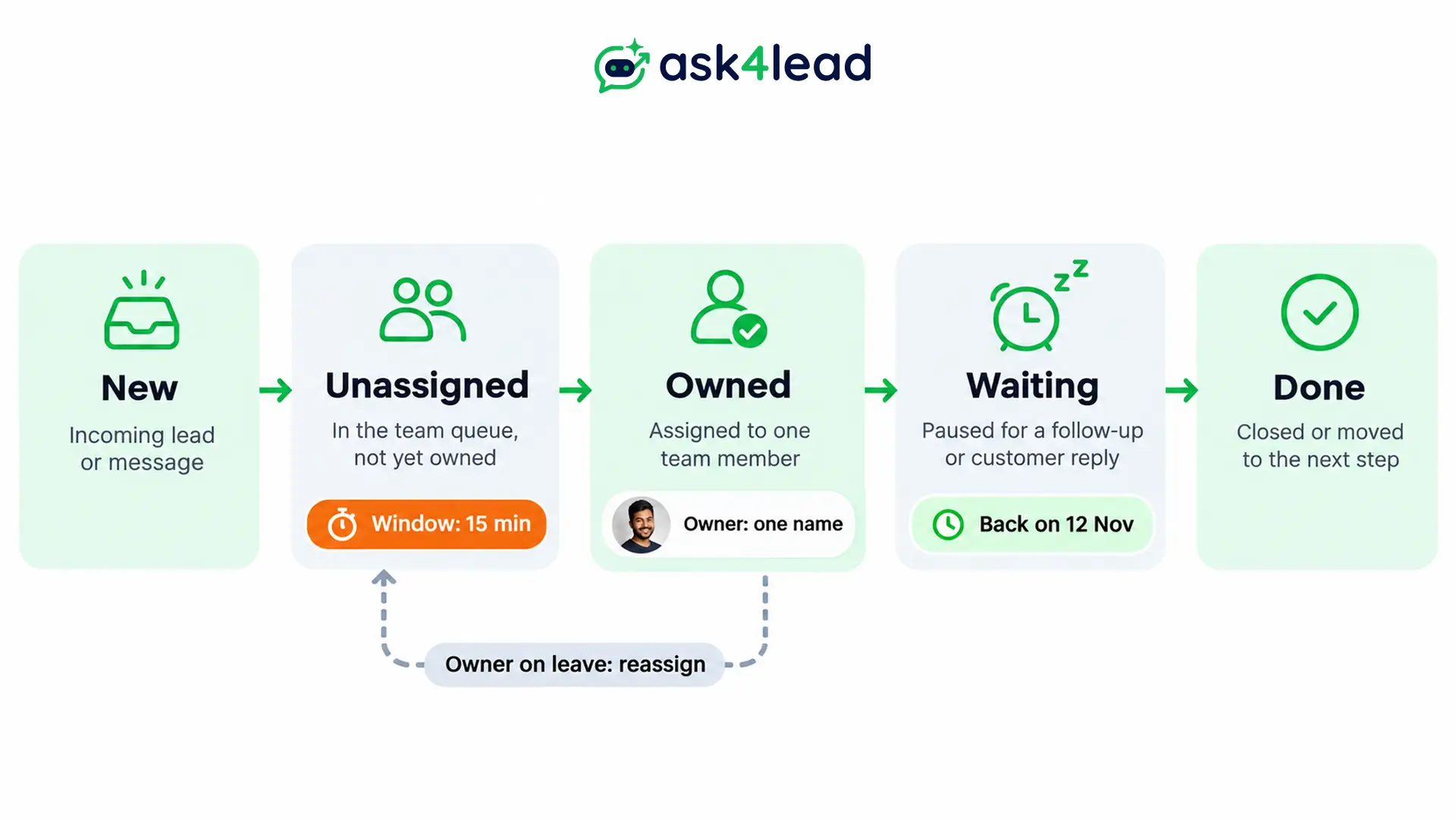
- Window: the first reply goes out within a fixed time. Start with 15 minutes in business hours, then adjust to your own data.
- Status: use new, owned, waiting and done. A read thread is not a handled thread.
Then add one daily review, where you filter for unassigned threads and for threads with no reply past your window.
Shared inbox for sales checklist
Copy this list into your rollout doc, and then tick each line before you invite the team.
- Channels: you chose the sales address and number, and personal inbox use stopped.
- Tool: you checked its hard limits against your headcount.
- Logins: each rep has one login, and nobody shares passwords.
- Roles: you set 4 roles and limited exports to admins.
- Owner rule: every thread has exactly 1 named owner.
- Window: you wrote down the first-reply time.
- Assignment: you chose one rule and named a fallback owner.
- Absence: you set a reassignment rule and named a backup.
- Review: someone checks unassigned and overdue threads daily.
- Monthly test: you run the 7 failure tests and log the results.
Which Roles Does a Shared Inbox for Sales Need?
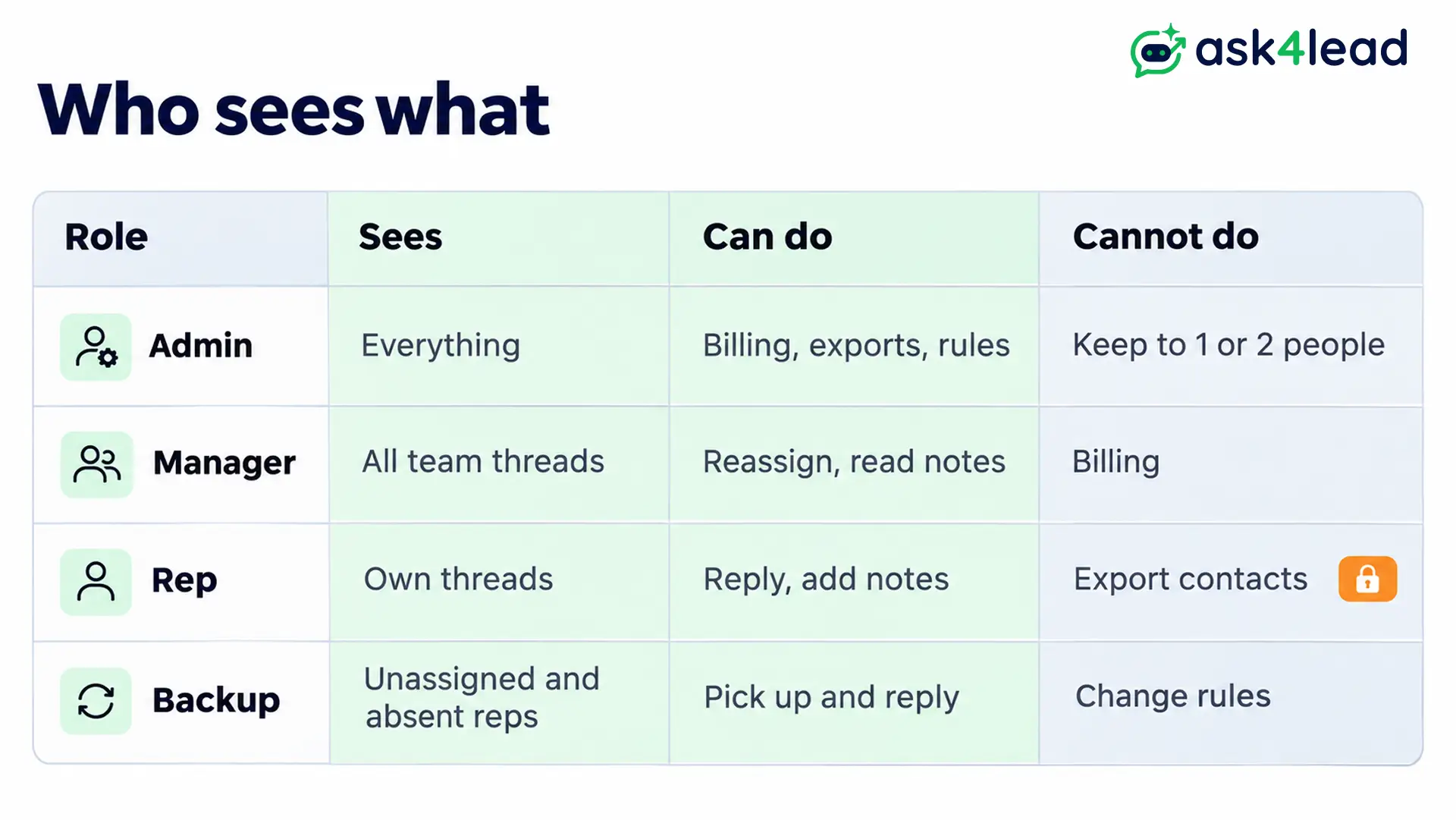
A shared inbox for sales needs 4 roles: admin, manager, rep and backup. Each role sees a different slice, so reps work their own leads and managers see the team. Only admins touch billing and exports. Clear roles also stop a leaving rep from copying your contact list.
| Role | Sees | Can do | Cannot do |
| Admin | Everything | Add users, set rules, manage billing and exports | Nothing; keep this to 1 or 2 people |
| Manager | All team threads | Reassign, read notes, review replies | Change billing or integrations |
| Rep | Own assigned threads | Reply, add notes, change status | Export contacts or delete threads |
| Backup | Unassigned queue and absent reps’ threads | Pick up and reply | Change rules or roles |
Why reps should see only their own threads
A sales-ops thread on Reddit described 15 reps routed by territory, with every chat open to everyone. The result was duplicate replies and a contact list any rep could copy. They fixed it with departments plus assignment rules, so each rep works only the chats that belong to them.
A second trap sits in the read mark. When one rep opens a chat by accident, it shows as read. Then the assigned rep never learns a new message arrived. Restricting views removes that accident for good.
How roles work in Ask4Lead
Ask4Lead’s user and role management has 3 roles: Agent, Manager and Admin. Agents see only their assigned conversations when you restrict them. Managers see team conversations and assign chats. Admins control billing, API settings and AI training data.
Agents cannot export the lead list as a CSV file. When someone leaves, you deactivate the account and keep the chat history. Then you bulk-reassign those chats to a new rep. The audit logs record who sent, assigned or approved each action.
How Should You Assign Conversations in a Shared Inbox for Sales?
Assign every new lead by one of 4 rules: claim, round robin, existing owner or capacity. Pick the simplest rule that fits, because each extra rule adds a way to fail. Teams under 5 reps usually do well with claim plus a daily review.
| Rule | How it works | Best for | Breaks when |
| Claim | A rep takes a thread from the unassigned queue | 2 to 5 reps | Everyone waits for someone else |
| Round robin | Leads rotate in turn | Equal reps and similar leads | A rep is away or a lead is bigger |
| Existing owner | The thread goes to the contact’s owner | Repeat buyers and named accounts | The owner field is stale |
| Capacity-weighted | Each rep has a weekly cap and an away switch | Mixed seniority, 8+ reps | Nobody updates the caps |
A worked example for 8 reps
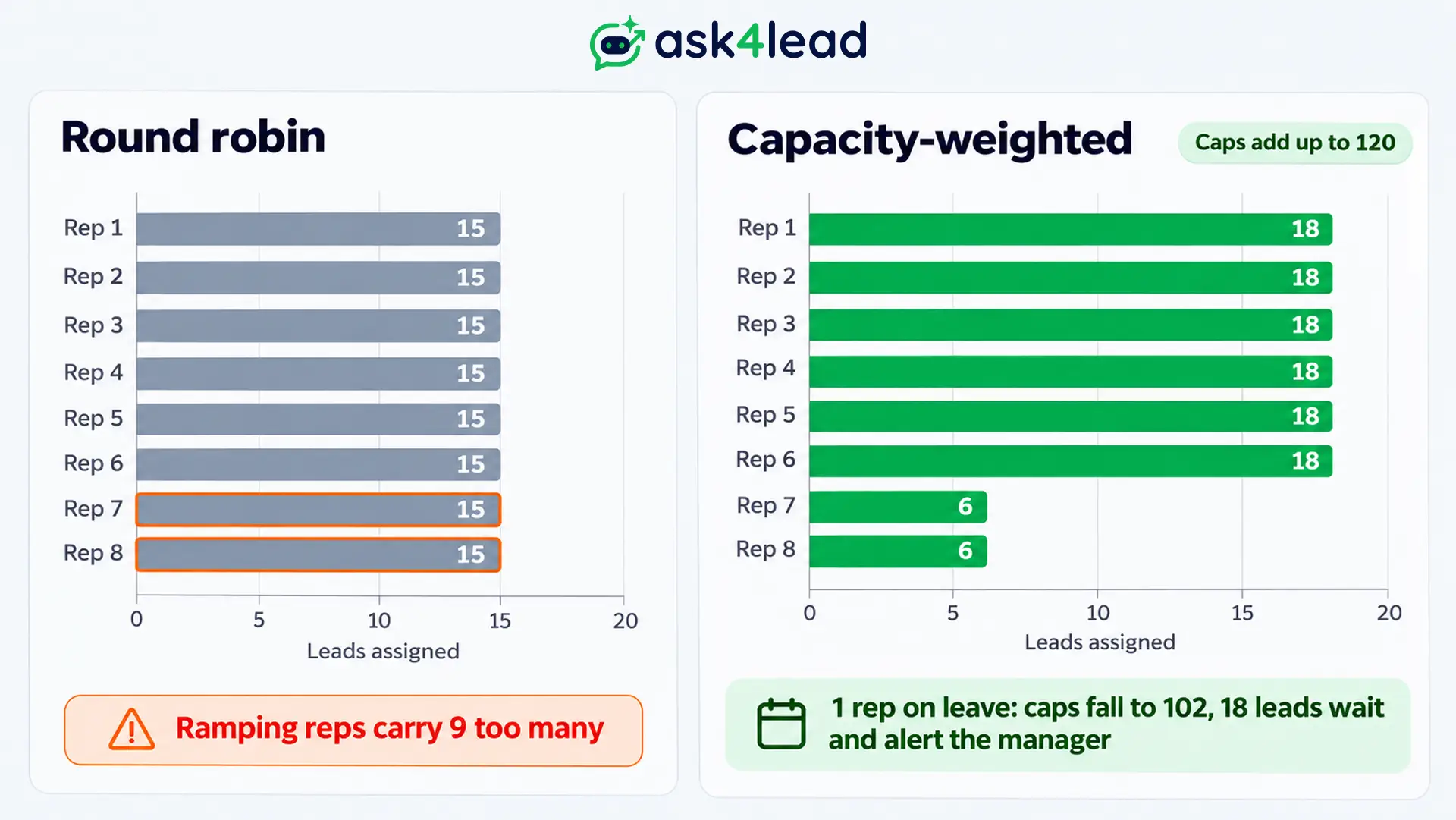
Say 120 leads arrive each week. You have 6 full reps and 2 reps still ramping up.
- Round robin: each rep gets 15 leads. A ramping rep with a 6-lead comfort level now carries 9 too many.
- Capacity-weighted: you set caps of 18 for each full rep and 6 for each ramping rep. The caps add up to 120, so the weekly volume fits exactly.
- One full rep on leave: the caps fall to 102, so 18 leads stay unassigned. The inbox should alert the manager instead of dropping them on someone.
Sales-ops threads repeat one more pattern. A home-built routing trigger worked for 5 reps, but it fell apart once capacity rules and out-of-office handling arrived. Meanwhile, one reply put the point at about 15 reps, where buying a routing tool beats building one.
What assignment looks like in Ask4Lead
On WhatsApp, new chats land in an Unassigned pool. A rep clicks “Assign to Me”, or a manager assigns the chat.
Ask4Lead’s feature page does not describe automatic round robin or capacity rules. So you should name a triage owner who assigns new chats and reviews the queue each morning.
When Does a Shared Inbox for Sales Fail?
A shared inbox for sales fails when ownership, coverage or capacity breaks, not when the software crashes. The 7 signs below each have a quick test. Run them monthly, because failures stay invisible until a lead goes cold.
- Read means handled: count threads read but unanswered for 4 hours. Then switch to status labels, since a read mark proves nothing.
- No owner: count unassigned threads older than your window. Then name 1 triage owner and review daily.
- Absent rep: list threads owned by someone on leave. Then reassign them and let the backup pick up.
- Tool ceiling: look for duplicate sends or connection errors. Outlook shared mailboxes top out at 25 users, so move up after that.
- Lost context: ask whether reps request repeated details. If so, keep notes in the thread and link the CRM record.
- Role creep: check for more than 2 admins or reps who can export. Then cut access and review it each quarter.
- Silent imbalance: compare each rep’s threads to the team average. If 1 rep carries far more, move to capacity weights.
A tool does not fix a messy process
One IT manager in a Reddit thread warned that teams often bolt old habits onto the new system. Then you pay for software but keep the same chaos.
So write the 3 operating rules first. After that, configure the tool to enforce them.
Does a Shared Inbox for Sales Work the Same on WhatsApp?
Mostly yes, but 2 differences matter here. WhatsApp leads expect replies in minutes, and the WhatsApp 24-hour rule limits free-form replies once the customer goes quiet. So an unassigned WhatsApp chat costs more than an unassigned email.
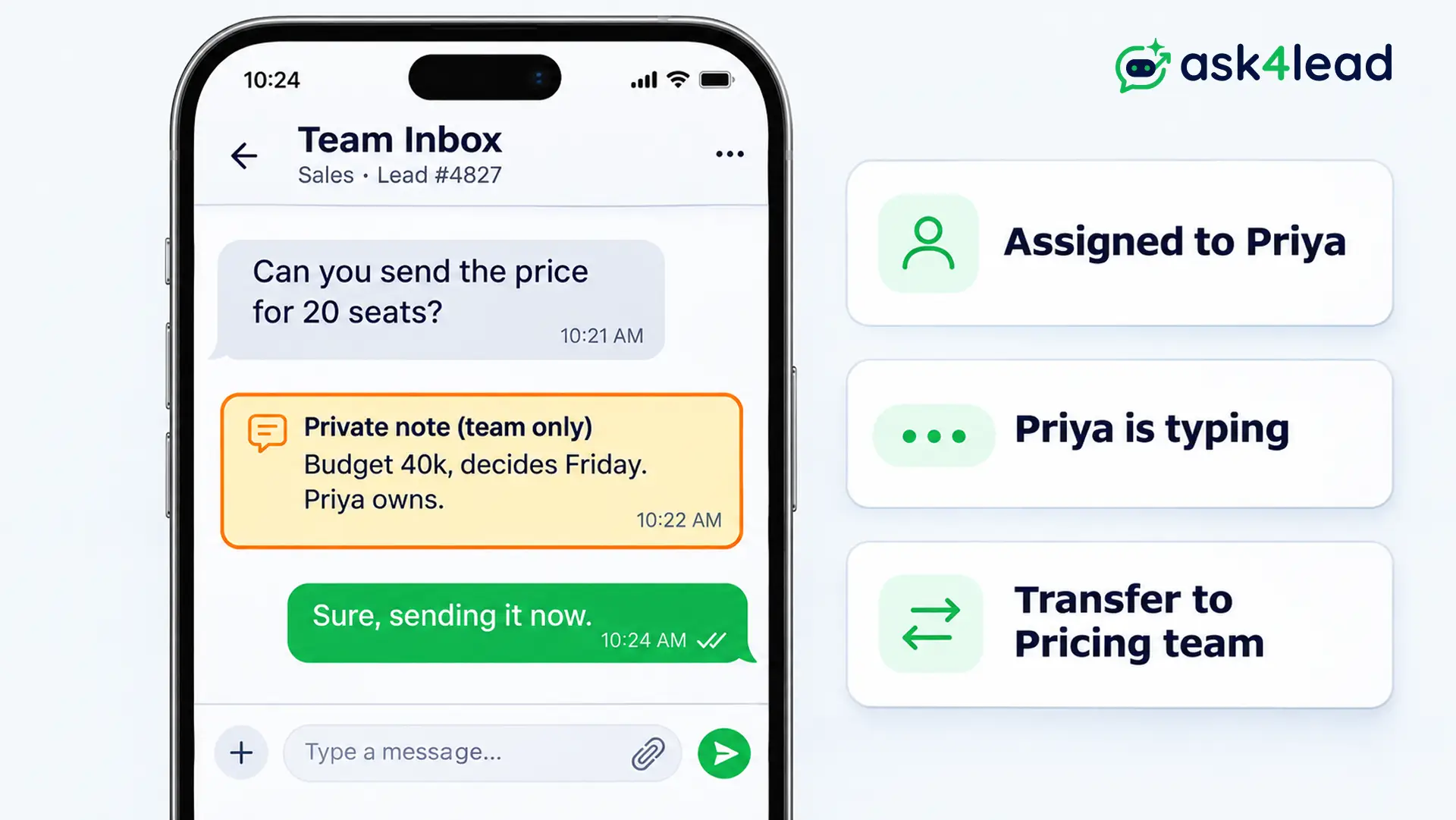
Ask4Lead sells the inbox described here, and it covers WhatsApp only. If your leads arrive by email, pick an email inbox tool from step 2. When they arrive on WhatsApp, the same roles and rules apply. These parts of Ask4Lead match them:
- Ownership: the shared inbox shows a typing indicator, so 2 reps do not answer at once.
- Notes: private yellow notes carry context the customer never sees.
- Handoffs: you transfer a chat to another department, and the new agent sees the history.
- Follow-ups: the Work Queue lists overdue next steps and stale chats. Snooze brings a paused chat back on the date you pick.
To connect one number to many reps, read the guide to a WhatsApp shared inbox for multiple agents. Read WhatsApp human handoff to see when an AI passes a chat to a person.
FAQs
1. What is a shared inbox for sales teams?
It is one queue where several reps answer inbound leads from a shared address or number. Also, each thread has an owner, a status and private notes.
2. How many reps need a shared inbox?
Vendor guides say 3 or more people. Still, if 2 reps have already double-replied to a lead, build one now.
3. Is a shared inbox a replacement for a CRM?
No, the inbox does not replace a CRM. The inbox runs live conversations, while the CRM tracks contacts and deal stages, so most teams use both.
4. Should reps reply from the shared address or their own?
Use the shared address while no rep owns the lead or when the team must stay visible. Reply from a personal address for one-to-one follow-up after handoff. Decide once and write it down.
5. Can I use a Google Group or an Outlook shared mailbox?
Yes, you can for a small team. Google’s Collaborative Inbox adds assignment and status, but Outlook’s shared mailbox has no assignment and tops out at 25 users.
6. Should I use round robin or claim?
Use claim for up to 5 reps. Then move to round robin or capacity weights once volume and rep mix make claiming slow.
Conclusion
A shared inbox for sales works when every lead has one owner and each role sees only what it needs. Its assignment rule must also cover absences. It breaks at the tool ceiling, at the read mark and at silent imbalance.
Before you launch, check that you have:
- 1 named owner for every thread.
- 4 roles with exports limited to admins.
- 1 assignment rule and a fallback owner.
- A first-reply window and a daily review.
- A monthly run of the 7 failure tests.
Next, put the 3 operating rules on one page, and then pick the tool that enforces them.
Stop WhatsApp leads from sitting in nobody’s queue
If leads reach your team on WhatsApp, Ask4Lead gives every chat an owner. Reps claim or receive chats with Assign to Me and department transfers.
Role-based access keeps agents on their own chats and blocks lead exports. The Work Queue and snooze keep follow-ups from slipping, and the audit log shows who did what.
Read how the sales teams industry page puts this together, then start free.
