
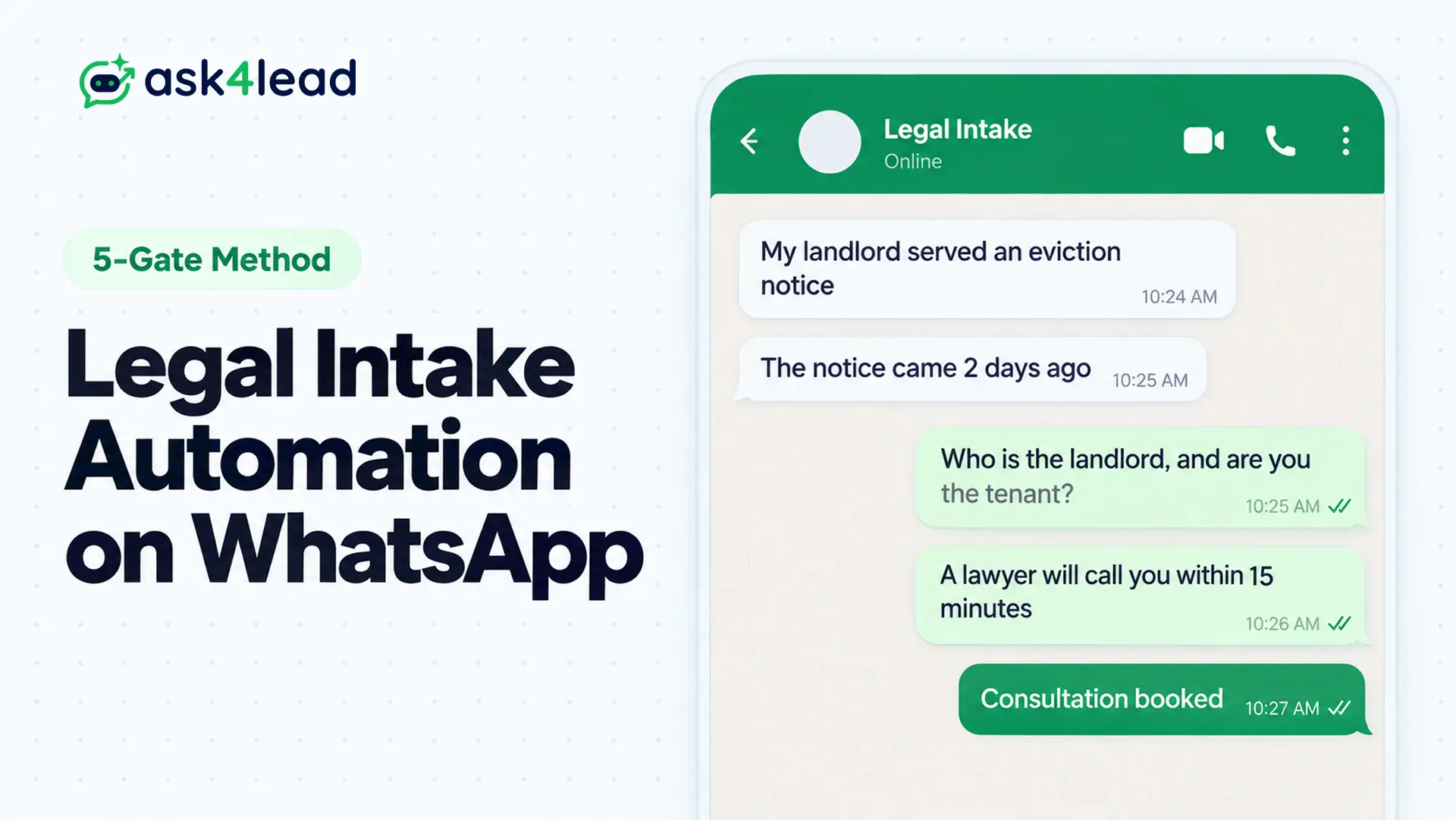
Legal intake automation is software that handles a law firm’s first contact with a prospective client. It asks screening questions, runs a conflict check and an urgency screen, and books a consultation, while a lawyer makes every decision about the case.
On WhatsApp, a WhatsApp AI agent for law firms runs this inside the chat the person already has open.
Quick answer: Ask for the parties’ names before the story, then run a conflict check against your client list. Collect the matter type, location and exact dates, and send any deadline inside 72 hours to a lawyer at once. The AI collects and schedules, and a person decides who becomes a client.
Key takeaways
- Order protects the firm: names and the conflict check come before facts, because Rule 1.18 limits what a firm should learn first.
- Collect, never judge: legal intake automation records facts and never rates a case, quotes a fee or states a deadline.
- Triage by deadline: 4 lanes decide who acts, and the red lane must reach a human in minutes.
- WhatsApp has its own rules: free text stops after 24 hours, and Meta charges after 1,000 service messages a month.
What Is Legal Intake Automation on WhatsApp?
Legal intake automation on WhatsApp is a chat flow that receives a prospective client’s first message and asks fixed screening questions. It passes a structured summary to the firm. The AI collects facts, flags urgency and books time, and never judges the case.
Intake covers everything between a stranger’s first message and a signed engagement letter, the contract that makes someone a client. Qualification is the narrower step inside it: deciding whether the matter fits the firm, passes the conflict check and deserves a lawyer’s time.
The flow is an AI agent, not a button-menu chatbot, so people explain the situation freely.
Legal intake automation qualifies a lead, not a case
Qualification checks fit: practice area, location, parties and deadline. Evaluation checks merits, value and strategy, which is advice, and only a lawyer gives it.
So when a prospect asks “do I have a case?”, a well-built flow says a lawyer will review the facts and moves on. AI qualification without a human holds up for the collecting steps only.
What legal intake automation records and what a lawyer decides
| Topic | The AI records | A lawyer decides |
| Parties | Names, roles, which side the prospective client is on | Whether the conflict check clears |
| Timing | Notice date, hearing date, when the problem began | Which limitation period applies |
| Money | The fee question, as asked | What to quote and what it covers |
| Fit | Practice area, city, language | Whether to accept the matter |
Where Legal Intake Automation on WhatsApp Fits, and Where It Does Not
Legal intake automation earns a place on WhatsApp only where prospective clients already use it. Lawyers report that clients in Brazil, Spain, the Middle East and many South Asian communities do. US lawyers describe the opposite, and some prospects treat an unknown WhatsApp number as a scam.
A 3-question channel test for legal intake automation
Look at your last 20 inquiries, then answer these:
- Channel: How many arrived by WhatsApp, or asked whether you use it?
- Documents: Do prospects send court papers and ID as phone photos instead of email attachments?
- Recognition: Would a stranger trust a message from your firm’s business number?
Answering yes to 2 of 3 justifies legal intake automation on WhatsApp next to your call line and website form. With fewer, keep it as a secondary door.
Inbound only: let the prospect start the chat
Give your site, Google profile and letterhead a wa.me link, so every chat starts with the prospect’s own message. That avoids cold outreach and leaves a clean record of opt-in consent.
The 5-Gate Qualification Ladder for Legal Intake Automation
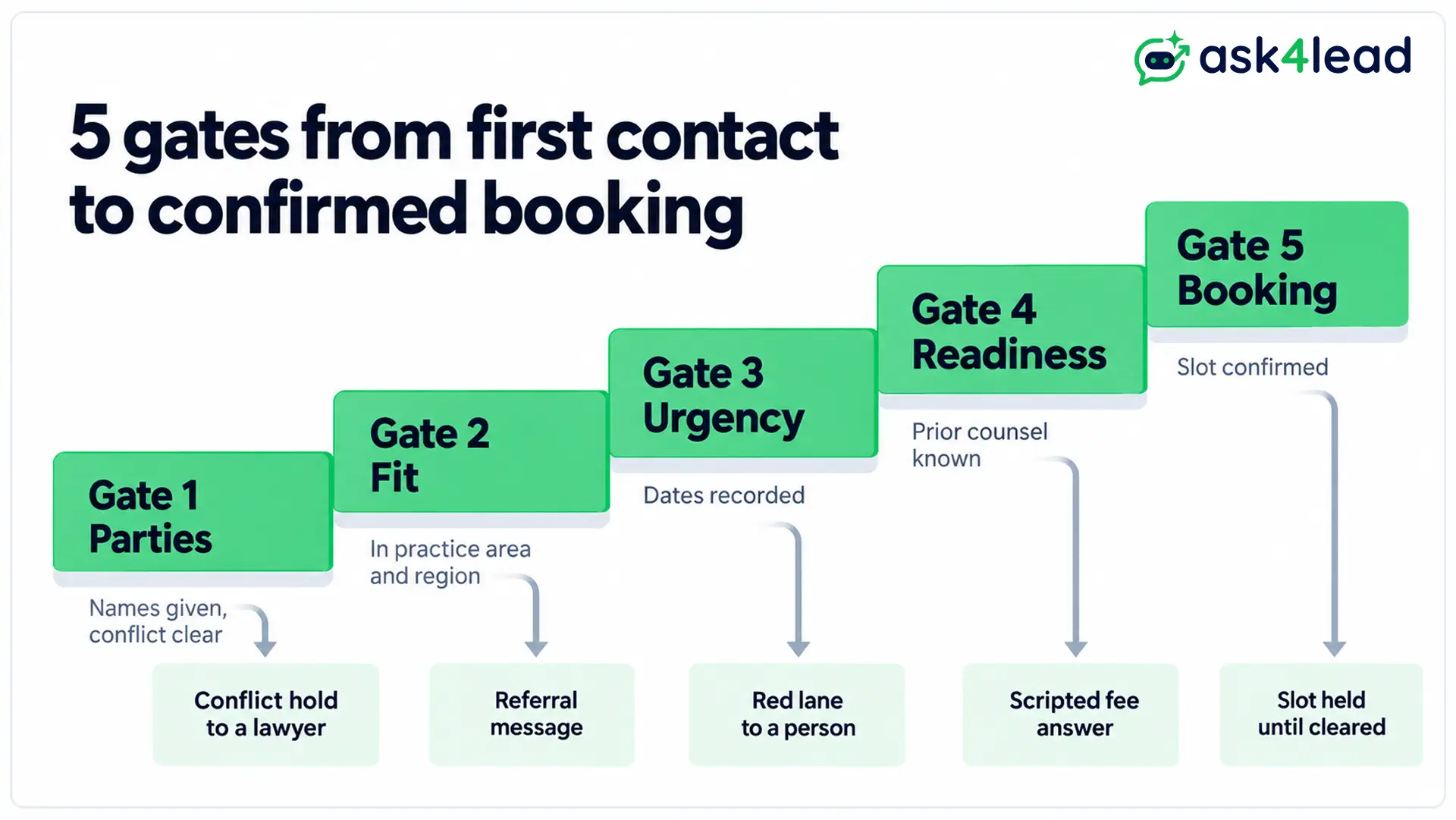
A 5-gate ladder asks for information in the order that protects the firm: parties, fit, urgency, readiness, then the booking. Each gate has 1 pass condition and 1 exit. A firm should not hold a prospect’s confidential story before it knows whether it can act.
Gate 1: Parties and conflict check
Ask for the full names of everyone involved, and which side the prospective client is on, before any facts. ABA Model Rule 1.18 expects a lawyer to avoid learning more disqualifying information than reasonably necessary to decide whether to act. A names-first gate builds that into legal intake automation by design.
Matching in a conflict check must be fuzzy, because company names arrive in many spellings. A published build flagged insurers as opposing parties and raised 47 false alarms. Limiting matching to individuals and businesses fixed it.
A person clears every conflict check flag. The AI never does.
The AI Sales Assistant pulls the answers it collects into the lead record. A person can then compare the parties against the client list there.
Gate 2: Fit
Ask for the practice area, the city or court, and the language the prospect prefers. Anything outside your practice gets a short referral message and no advice.
Load your accepted matters and service areas into the AI Knowledge Profile. The agent then answers only from those files. Where they say nothing, it asks for detail or passes the chat to staff.
Gate 3: Urgency
Ask for exact dates: the notice received, the hearing set, the day the problem began. A limitation period is the legal deadline for starting a case, and the AI must never state one. It records the date and tags the chat.
Add trigger words such as arrested, custody, eviction notice or restraining order, plus any deadline inside 72 hours. A chat that trips one skips straight to a person.
Gate 4: Readiness
Ask whether another lawyer is involved, which documents the prospective client holds and what outcome they want. Fee questions get a single scripted answer: in a published test, an agent improvised fee wording until the team scripted it.
Human approval holds replies the AI has low confidence in and flags pricing questions. Nothing reaches the prospect until a person signs it off.
Gate 5: Booking and confirmation
Offer 2 slots, confirm one, and state that the booking does not make the person a client. Book only after the conflict check is clear, and hold the slot while a flag is open.
Triage Lanes in Legal Intake Automation: Who Acts and How Fast
Triage lanes sort qualified inquiries by deadline and risk, so the right person acts at the right speed. Most firms need 4 lanes: red for danger or a near deadline, amber for lawyer review, green for booking and grey for referral out. Treat the targets below as starting points.
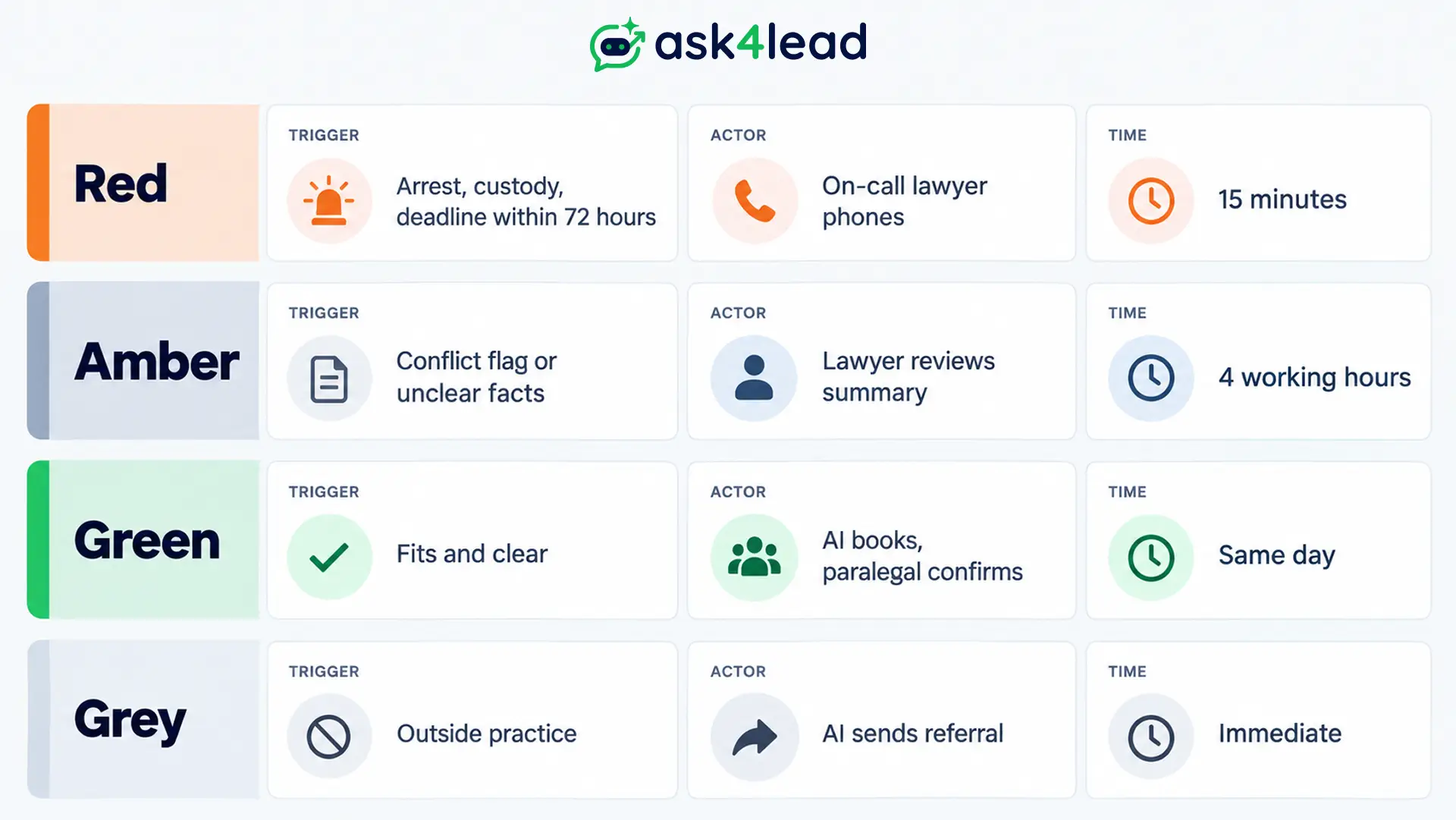
| Lane | Trigger | Who acts | Starting target |
| Red | Arrest, custody, safety risk, deadline within 72 hours | On-call lawyer phones the prospect | 15 minutes |
| Amber | Conflict check flag, high-value matter, unclear facts | Lawyer reviews the summary | 4 working hours |
| Green | Fits practice, conflict check clear, no near deadline | AI books, paralegal confirms | Same day |
| Grey | Outside practice or area | AI sends a referral message | Immediate |
The red lane works only if someone is genuinely on call, so test it first. The Work Queue lists chats needing human review first each morning, but somebody must still own the phone.
The handoff packet
Prospective clients dislike repeating themselves after a bot. Send the lawyer a packet with 6 fields:
- Parties: names and roles
- Matter: type and location
- Dates: notice, hearing and start
- Request: what they asked for
- Documents: mentioned or sent
- Transcript: the full chat
The lead record logs each message and status change in one timeline. The packet is a view of it, not a summary someone retypes.
Ethics and Data Rules That Shape Legal Intake Automation
A WhatsApp intake flow answers to 3 rule sets: duties owed to a prospective client, limits on legal advice by non-lawyers, and data protection law. None bans automated intake. Each changes the first message, the question order or where data lives.
Rules differ by state and country, so confirm with your bar’s ethics counsel.
Prospective-client duties begin at your first message
Under Rule 1.18, a person who consults a lawyer about forming a client relationship is a prospective client. The lawyer must protect what that person shares. Comment 2 says a consultation is likely when a lawyer invites information about a potential matter without clear warnings that limit the lawyer’s obligations.
So the first automated message needs those warnings:
I’m an AI assistant for [Firm]. I can’t give legal advice, and chatting with me doesn’t make you a client. Please don’t send confidential details until a lawyer confirms we can help.
The firm answers for the bot
Lawyers answer for non-lawyer assistants under Model Rule 5.3, and a chatbot is the newest assistant on the desk. ABA Formal Opinion 512 adds that boilerplate in an engagement letter is not informed consent for putting client information into a generative AI tool.
Ask your provider what it does with chat data, and test the flow before launch against past inquiries.
Where WhatsApp data goes
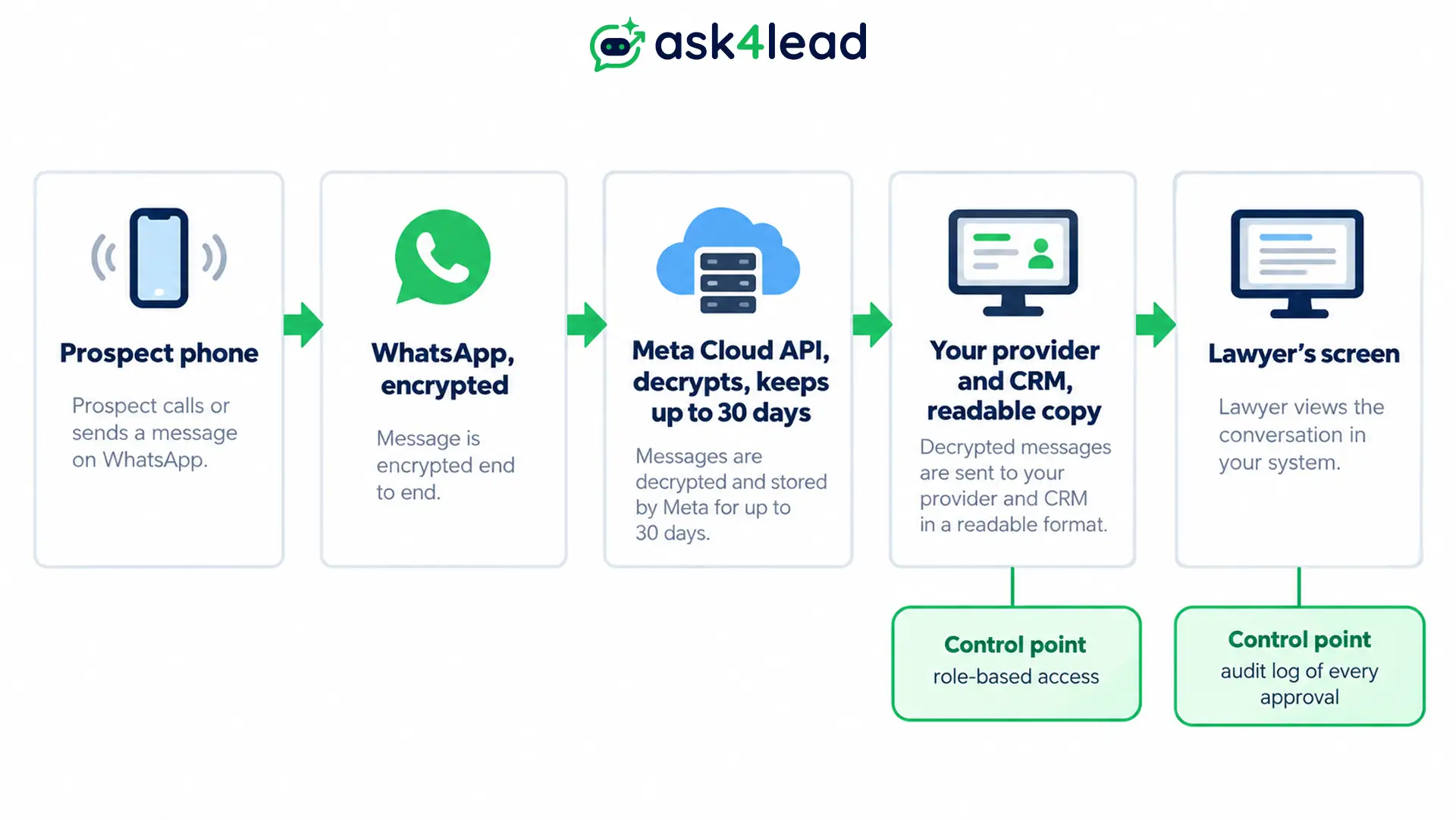
Messages travel encrypted from the prospect to Meta’s Cloud API, which decrypts them and forwards them to your provider. Per Meta’s data privacy documentation, Meta keeps messages for 30 days at most and acts as your data processor. The readable copy that matters lives in your CRM.
So control who opens it. With role-based access, an agent sees only the chats assigned to them, and audit logs record who approved or edited each reply. Your wider data privacy duties still apply.
India: advertising limits and the DPDP Act
Rule 36 of the Bar Council of India (BCI) rules bars advocates from soliciting work or advertising. In March 2025 the BCI reinforced that, including on social media, according to MediaNama’s report.
An agent that only answers inbound messages and never sends promotions stays on the safer side. Ask your state bar council about anything more.
The Digital Personal Data Protection (DPDP) Rules were notified in November 2025. Their consent-notice duties arrive about 18 months later, around May 2027, as law-firm commentary describes. Plan the first message to say what data you collect and why.
WhatsApp Rules That Break Legal Intake Automation Flows
Most intake flows break on 3 WhatsApp rules: the 24-hour window, follow-ups that need templates, and per-message billing. A firm can send free-text replies only while the prospect’s last message is under 24 hours old. After that, an approved template restarts the chat, and Meta bills delivered messages once a free tier runs out.
Why the 24-hour window blocks day-2 nudges
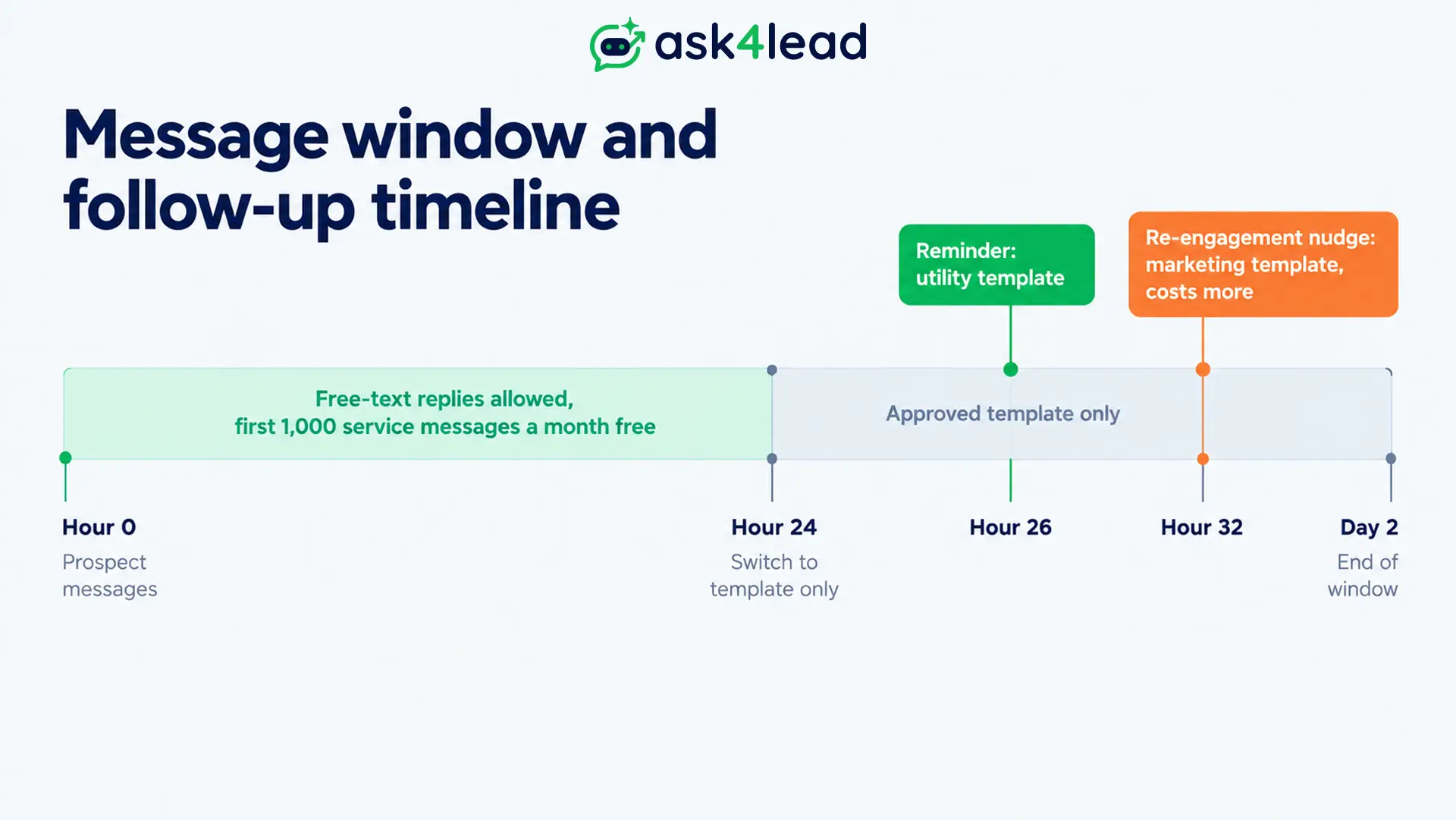
A prospect who goes quiet after Gate 3 cannot receive a free-text nudge on day 2. Only an approved template can reach them.
A reminder about a booked consultation is usually a utility template. A “still need a lawyer?” nudge reads as marketing, costs more and raises the solicitation questions above.
Use approved templates to see whether each one is Pending, Approved or Rejected, and let Next Step reminders tell a person when to phone instead. The 24-hour customer service window has its own guide.
What legal intake automation costs per month on WhatsApp
Meta waives charges on 1,000 service messages for every business number monthly, then bills each delivered message at a country rate, per Meta’s pricing page. If an intake uses about 10 firm replies, the free tier covers roughly 100 complete intakes a month.
| Intakes a month | Firm replies (10 each) | Beyond the free tier |
| 80 | 800 | 0 |
| 150 | 1,500 | 500 |
| 300 | 3,000 | 2,000 |
Multiply the last column by your country’s service rate on Meta’s rate card. On Ask4Lead, each AI reply also uses 1 credit at ₹0.50, so a 10-reply intake costs ₹5. Compare both against WhatsApp Business API costs in your market.
How to Measure Legal Intake Automation Without Fooling Yourself
Measure outcomes a lawyer cares about: inquiries, qualified inquiries, bookings, attended consultations, retained clients and minutes to a human. Chat counts alone mislead. Published results for legal intake automation are mostly vendor-reported, so run your own 30-day baseline before you trust anyone’s average.
| Metric | How to count it | What a weak number tells you |
| Qualified rate | Qualified ÷ all inquiries | Questions too strict, or the wrong audience |
| Conflict check hold rate | Holds ÷ qualified | Matching too loose or too tight |
| Red-lane response | Minutes from trigger to a person’s call | Nobody owns the phone |
| Show rate | Attended ÷ booked | Reminders or slots need work |
| Retained rate | Retained ÷ attended | The fit gate lets the wrong matters in |
| Skipped count | Messages that matched no rule | Silent failures hiding bookings |
After-hours volume is the number firms underestimate. A voice-agent report for an early-stage firm counted 176 of 571 calls, about 31%, outside office hours.
That is 1 vendor’s figure, so count your own for a month. The 9-stage pipeline shows where each prospect sits.
FAQs
1. Does legal intake automation on WhatsApp create an attorney-client relationship?
Not by itself in most places, but Rule 1.18 can still create duties to a prospective client. Open with a clear warning and confirm your state’s version.
2. Should the chatbot identify itself as software?
Yes, in the first message. Hiding it adds risk and gains nothing, because the handoff still depends on the prospective client’s trust.
3. What if the prospective client asks for a person?
Route them at once and give a call-back time. In a voice deployment, callers kept demanding a representative for 4 weeks until the flow was redesigned.
Conclusion
Legal intake automation on WhatsApp works when the question order, triage lanes and handoff are settled before the AI goes live. The AI collects facts, flags urgency and books time. Lawyers decide who becomes a client and what advice they give.
Confirm these 5 items before go-live:
- First message with an AI disclosure and a no-advice warning
- Names-first conflict check that a person clears
- Red lane with a named on-call person and a target time
- Templates approved for booked-consultation reminders
- 30-day baseline for qualified rate and red-lane response
Start with 1 practice area and 1 number, and widen only after the red lane passes a real test.
Start qualifying prospects on WhatsApp with Ask4Lead
Prospective clients who message after hours often hear back from another firm first, and an unscreened chat adds risk by morning. Ask4Lead gives your firm 4 things to run legal intake automation:
- Official setup: Meta Embedded Signup links your number to Meta’s official API with no coding.
- Shared screen: the shared team inbox gives lawyers one screen to assign chats and write internal notes the prospect cannot see.
- Proof it works: the AI Dashboard counts the leads the AI moved forward and lists answers it was unsure about.
- A healthy number: account health displays your rating colour and daily sending cap.
