
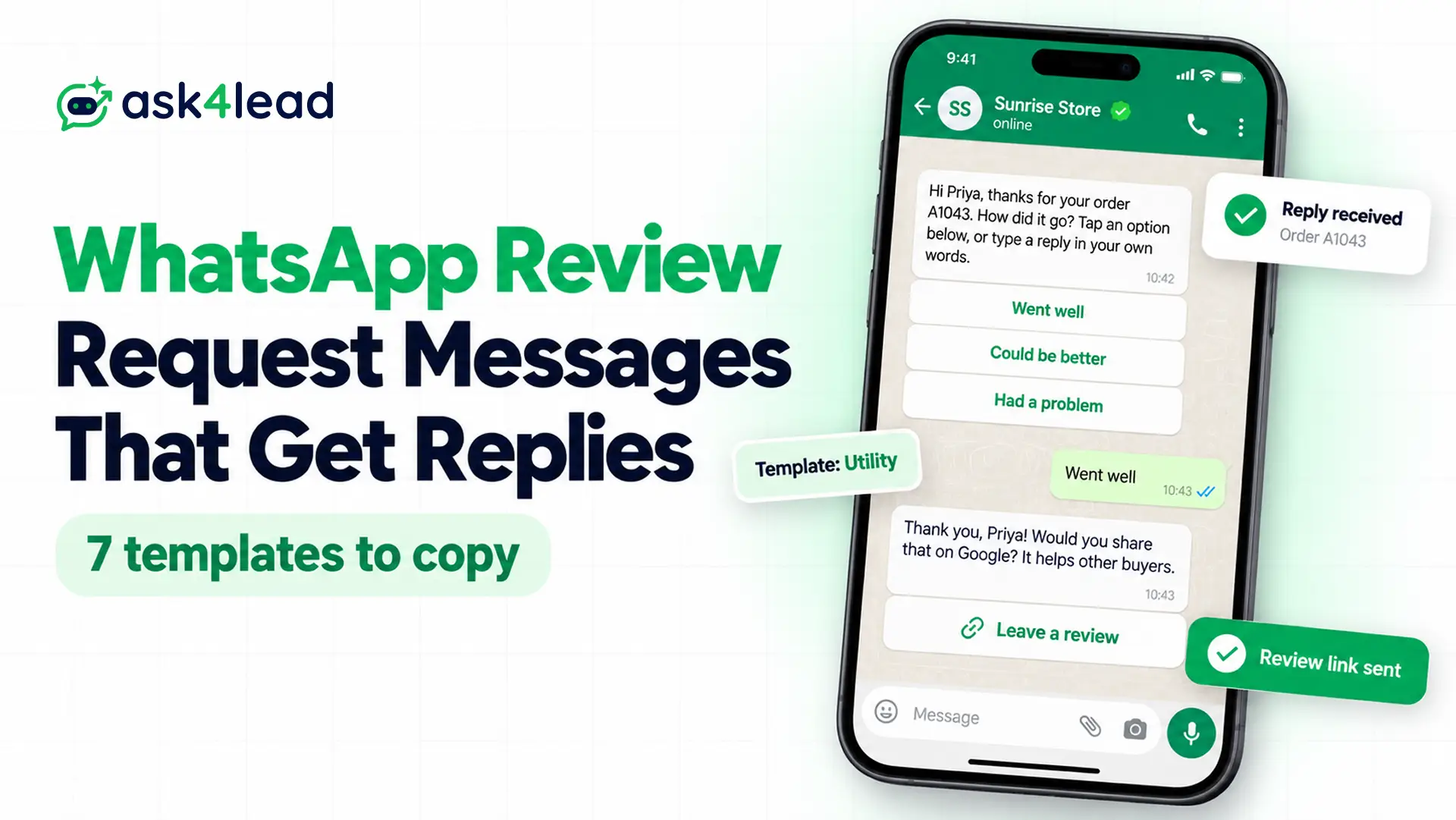
The quickest way to collect WhatsApp testimonials and Google reviews is a short message you send right after a specific order or visit, so the customer answers 1 question with a single tap. Below, you will find 7 review request messages to paste, and each one comes with its Meta template category, variables and buttons.
For the triggers and setup behind these messages, see the WhatsApp review collection automation guide.
7 review request messages for WhatsApp testimonials and reviews
Each review request message below names the order or visit, asks for 1 thing, and also keeps to 3 buttons or fewer.
A template message is a format Meta approves in advance. You need one when you write to a customer outside the 24-hour customer service window, and Meta also asks for a sample value for every variable.
1. Google review request after a delivered order
Hi {{1}}, your order {{2}} from {{3}} arrived recently. If you have a minute, would you share an honest review on Google? It helps other buyers decide.
Button (URL): Leave a review
Variables: first name, order number, store name. Category: utility is possible because it names an order and has no offer, but plan your budget for marketing.
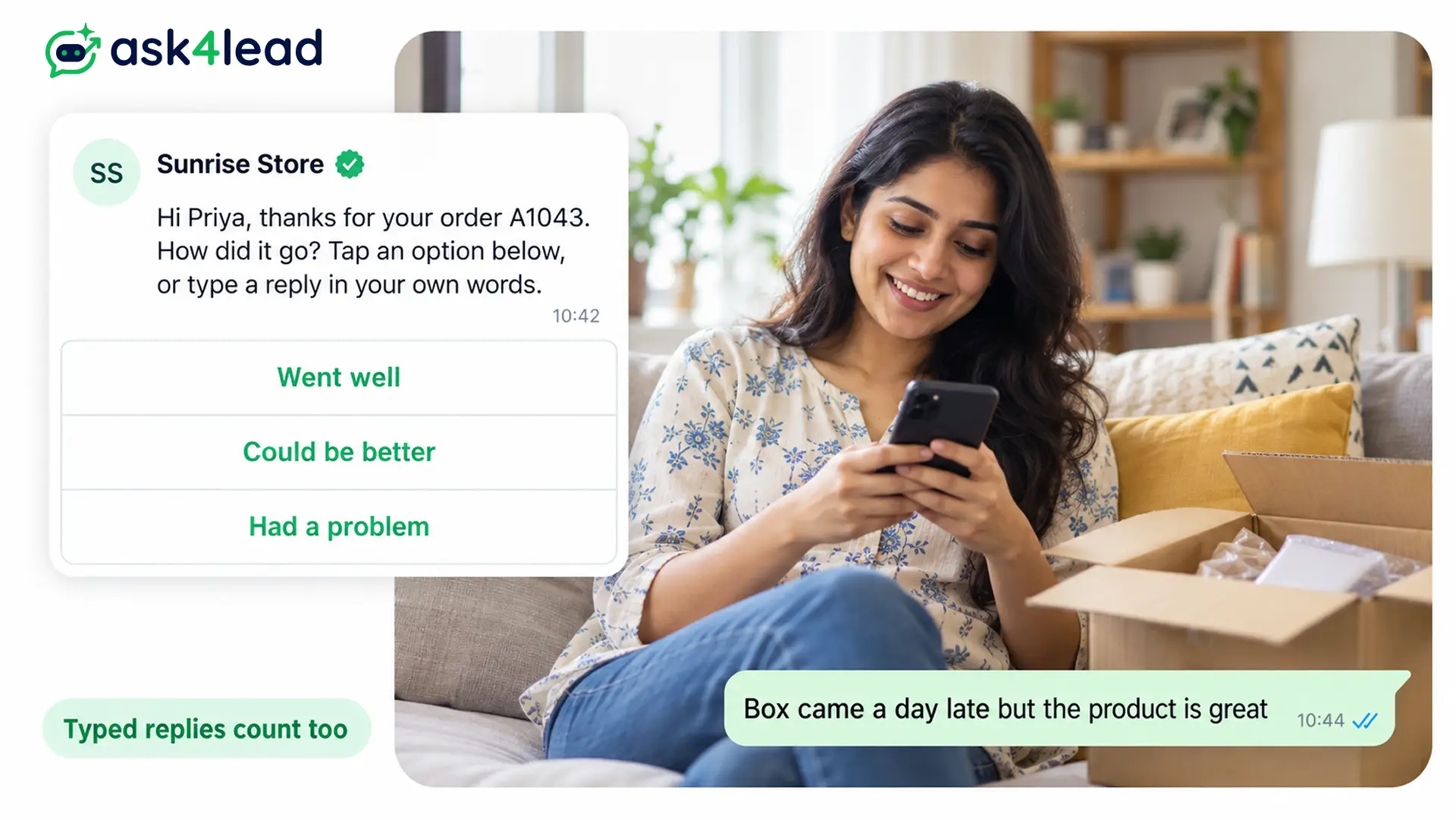
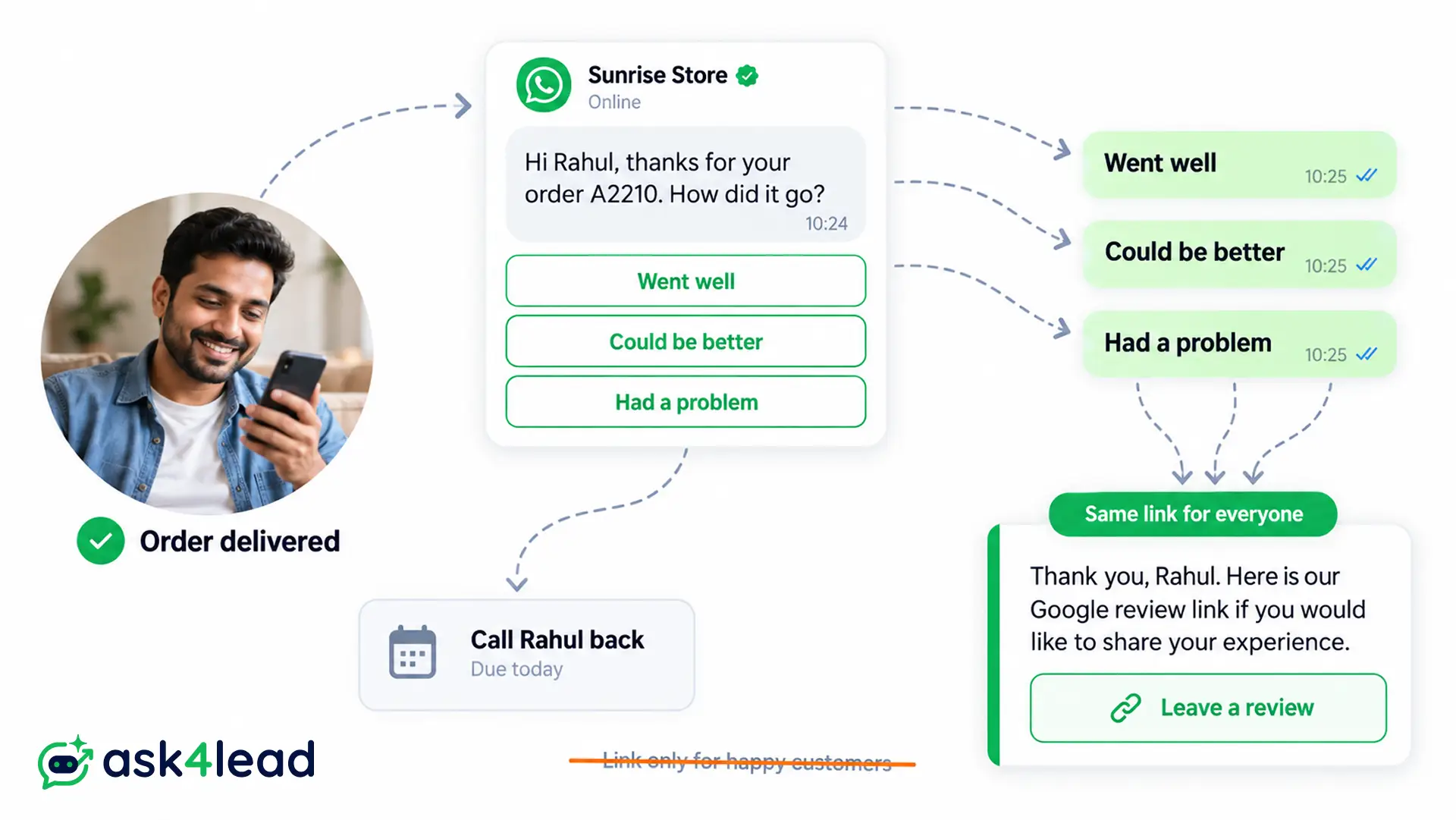
2. Private rating first, same Google review link for everyone
Hi {{1}}, thanks for your order {{2}}. How did it go? Tap an option below, or simply type a reply in your own words.
Quick replies: Went well | Could be better | Had a problem
Whatever the customer taps, send the same next reply: thanks, your Google review link, and an offer of a call when something went wrong. Sending the link only to “Went well” is review gating, which Google prohibits. Category: utility.
3. Service visit feedback for clinics, salons and repairs
Hi {{1}}, thank you for visiting {{2}} for your {{3}} appointment. How was your visit with us today? Reply with a number from 1 to 5, where 5 is excellent.
Variables: first name, branch, service. Category: utility. Because the customer types a number, you also avoid a 5-button template.
4. Request for WhatsApp testimonials in text, voice note or video
Hi {{1}}, you have been using {{2}} for a while now, so we would love to hear how it is going. Could you tell us in 2 or 3 lines what changed for you? A voice note or a short video works too.
Category: likely marketing, since the message does not name a single order.
5. Permission to publish the reply
Send this as a normal reply while the chat window is still open, so you do not need a template.
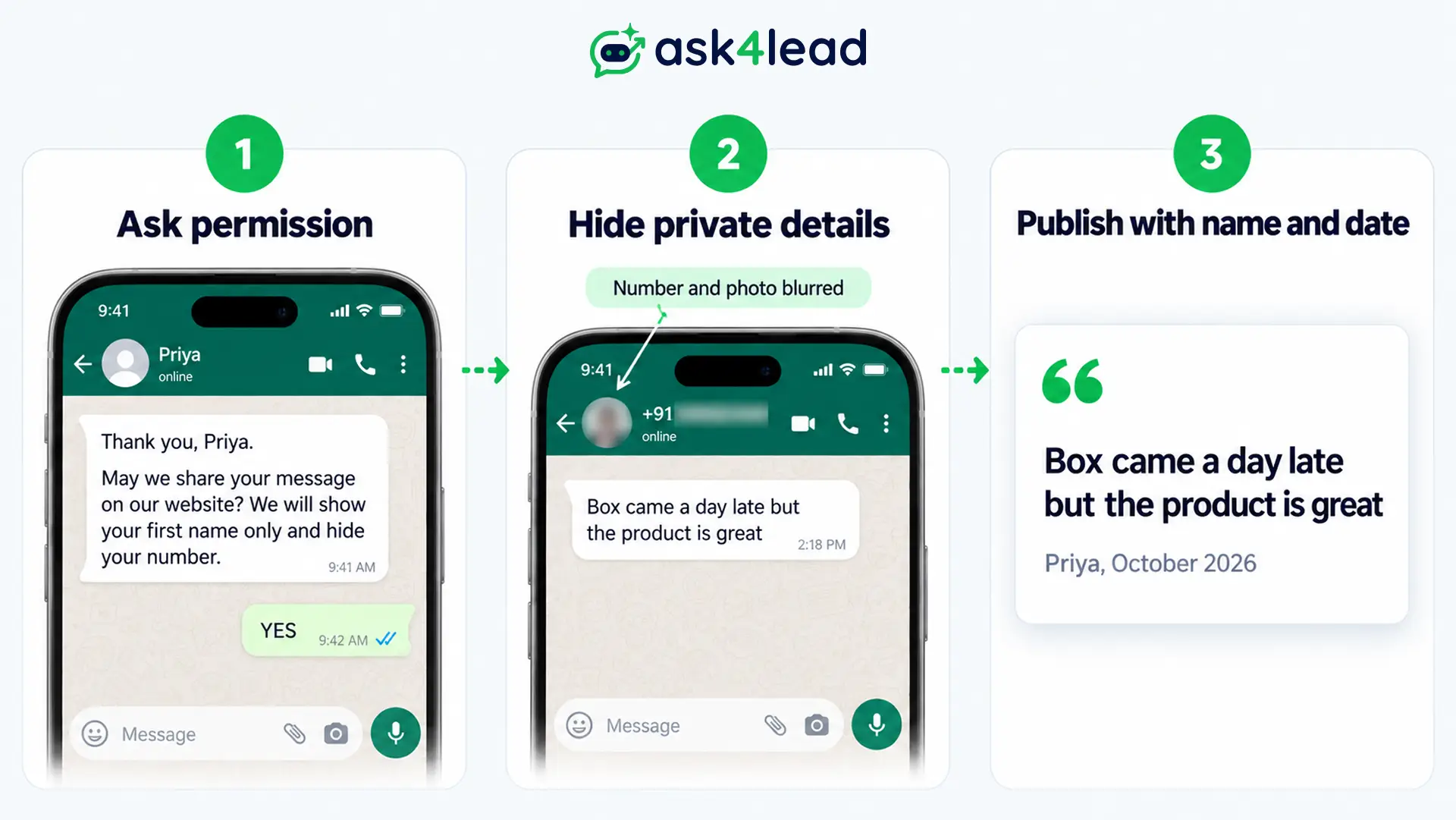
Thank you, Priya. May we share your message on our website and social pages? We will show your first name only and also hide your number. Reply YES to agree, or NO and we will keep it private.
6. One-question WhatsApp survey
Hi {{1}}, a quick question about your recent order {{2}}: how likely are you to recommend {{3}} to a friend? Reply with a number from 0 to 10.
Category: utility, but only because it names the order. In contrast, Meta says it will not approve a general survey as utility.
7. One reminder, then stop
Hi {{1}}, a gentle reminder about your order {{2}}. If you have a moment, your feedback helps us improve. You can reply here any time, and we will not ask again.
After that, stop. Repeated asks lead to blocks, and blocks then lower your WhatsApp quality rating.
Buttons and variables that fit Meta’s limits
Meta’s template component limits allow a 1,024-character body, up to 10 buttons, and quick reply labels of 25 characters.
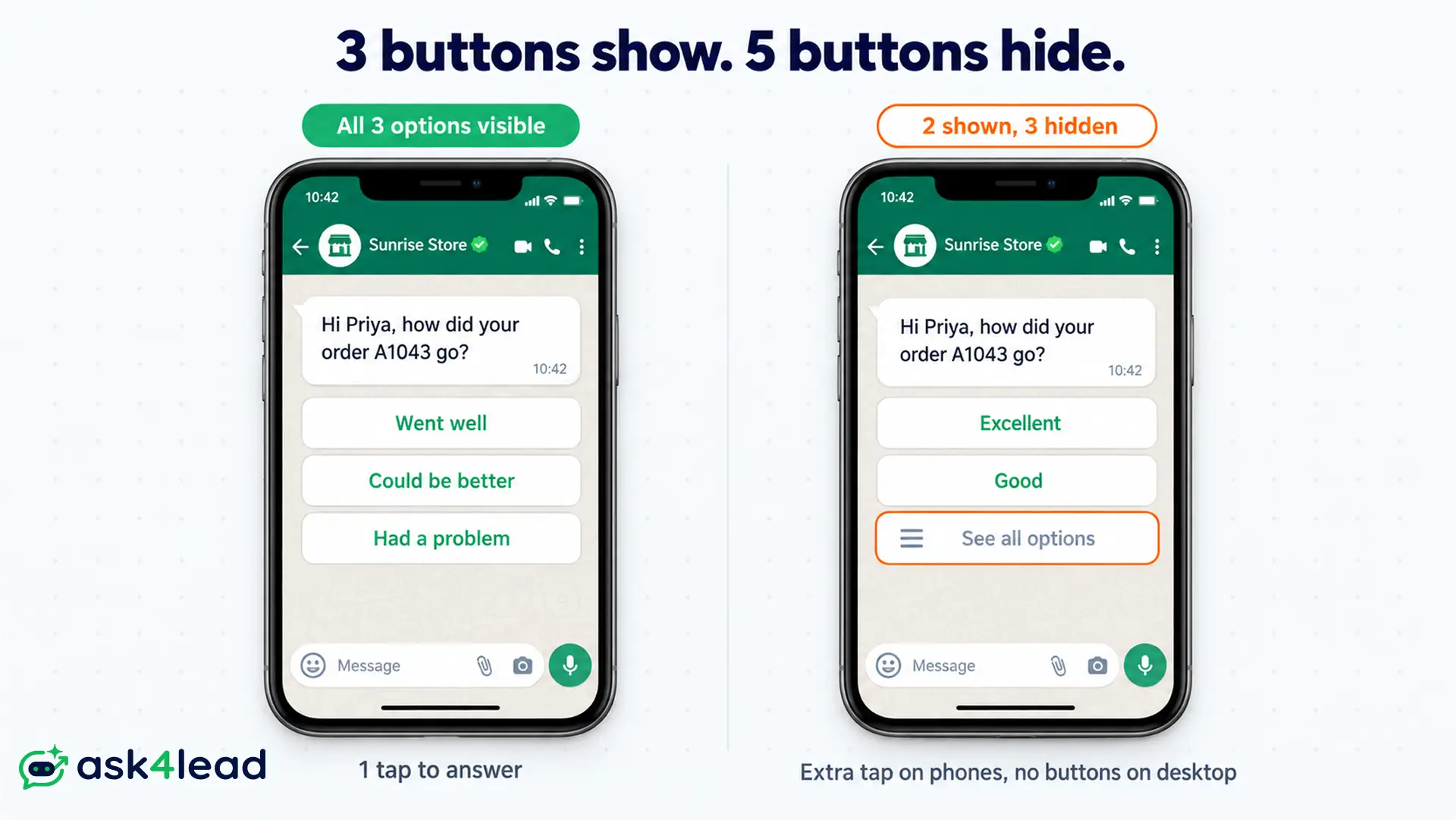
However, the limit that hurts review requests most is display. When a template has more than 3 buttons, WhatsApp shows 2 and hides the rest behind “See all options.” On top of that, WhatsApp desktop cannot show templates with 4 or more buttons.
For example, a 5-star rating template shows 2 stars on the phone and hides 3 behind an extra tap. Meanwhile, a customer on desktop sees no buttons at all. Template 2 (3 quick replies) and template 3 (a typed number) therefore avoid both problems.
| Element | Meta limit | For a review request |
| Body text | 1,024 characters | Keep it to 2 or 3 lines |
| Quick reply label | 25 characters | “Could be better” fits |
| All buttons | 10 | Stay at 3 so every option shows |
| Sample values | Required per variable | For example, Priya and A1043 |
Utility or marketing: how Meta files a review request
Meta’s template categorization page treats a feedback request as utility only when it names a specific order or chat and has no offer. In other words, a general request is marketing, and so is a utility message with an offer added. If Meta moves your template, it gives you 1 day of notice, and you then have 60 days to appeal.
Here is how that plays out:
| Message | Likely category | Why |
| “How was your order {{2}}?” | Utility | Because it names an order and has no offer |
| The same, plus “Use code THANKS10 next time” | Marketing | Because the offer makes it mixed content |
| “Tell us what you think of our brand” | Marketing | Because it names no order |
| Template 4 (testimonial request) | Marketing | Since it covers ongoing use, not 1 order |
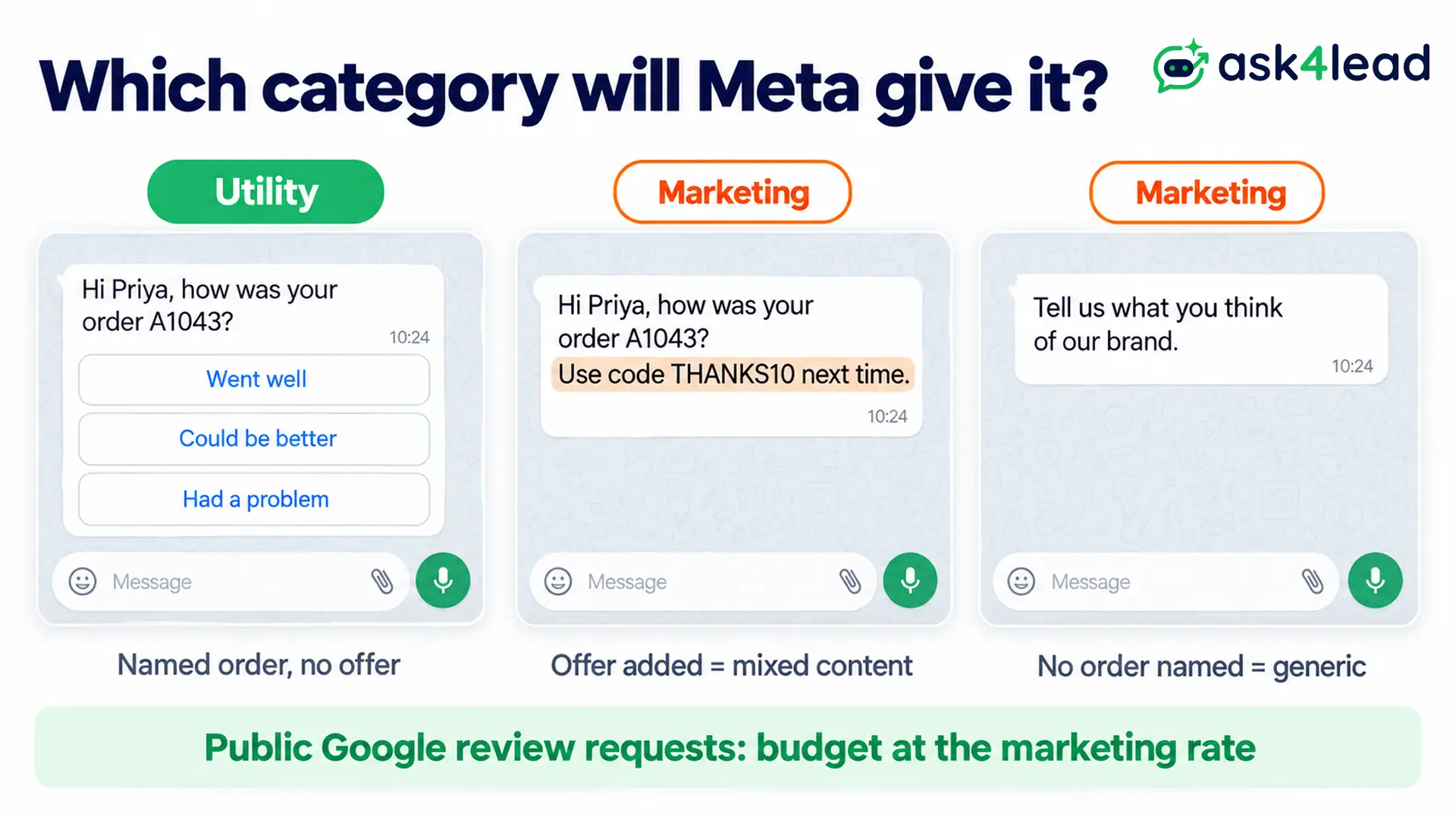
Meta’s page gives no example for a public Google review request. For that reason, budget at the marketing rate, which is higher than utility on Meta’s pricing page. The 2026 WhatsApp API pricing breakdown also lists rates by country.
Why review request templates get rejected
Most rejections come from formatting rather than from the request itself. Before you submit, check for these causes:
- A variable opens or closes the body. For instance, “{{1}}, how was your order?” fails, while “Hi {{1}}, how was your order?” passes.
- 2 variables sit side by side, so Meta sees no words between them.
- Sample values are missing, even for 1 variable.
- You submit a general survey as utility, or you add an offer to a utility template.
You can find the full list in why a WhatsApp template gets rejected. Then, if you need to reword an approved template, follow the steps to update a WhatsApp message template.
Rules for asking customers for reviews on WhatsApp
Google allows review requests. However, its Maps content policy bans reviews “paid for, directly or in kind” and also bans asking only happy customers. The same care keeps WhatsApp testimonials believable, too.
- No discount or gift for a Google review. Still, a thank-you offer for private feedback is fine as a separate marketing message.
- Send the same review link to every customer, whether they were happy or not.
- US sellers: the FTC reviews rule took effect on 21 October 2024. Under it, rewards cannot depend on a positive (or negative) review, and courts can fine businesses that break the rule on purpose (FTC guidance).
- Message only customers who opted in to WhatsApp messages, because messages to people who never agreed lead to blocks.
This does not apply to private feedback that never appears on Google or in your marketing. General information, not legal advice, so check Google’s and Meta’s current policies for your case.
How to post WhatsApp testimonials from a chat reply
A reply becomes one of your WhatsApp testimonials only after the customer agrees, so the order of these steps matters:
- First, ask permission with message 5, and keep the YES in the same chat as your record.
- Then screenshot the reply, and blur the phone number, profile photo and order details.
- Keep the customer’s words, so fix an obvious typo at most.
- Finally, post it with a first name and date, and label it if the customer got anything in return.
Business App or API for review requests
The free Business App has no templates or buttons, so you paste each message by hand. In contrast, the API sends approved templates to any opted-in customer, and the App vs API comparison covers the rest.
| Point | Business App | Business API |
| Buttons | None | Up to 10 per template |
| Reach | Broadcasts reach only people who saved your number | Any opted-in contact |
| Cost | Free | Meta charges per delivered template |
Which review request message to send first
Start with messages 2 and 5 to get your first WhatsApp testimonials and reviews. Once those run cleanly, add the survey and the testimonial request. After all, plain requests age well, while clever ones read as marketing.
Before you send, check that you have:
- A Google review link from your Business Profile
- 3 buttons or fewer per template
- No offer inside a utility template
- A saved YES for all WhatsApp testimonials you publish
Collect WhatsApp testimonials without copying messages by hand
Pasting messages one by one stops working once orders pass a handful a day. On top of that, replies get lost across personal phones. Ask4Lead therefore keeps the whole loop in one shared WhatsApp team inbox:
- Template builder: choose Utility or Marketing, link variables to CRM fields, add quick replies, and then track approval status.
- WhatsApp Campaigns: send an approved template to contacts at a pipeline stage such as Closed Won.
- AI Sales Assistant: answers in plain English when customers type “the delivery was late” instead of tapping a button.
- Next Step reminders: a rep gets a Work Queue task so an unhappy customer gets a call back.
Ask4Lead sells this software, and each feature named here is on its features pages.
Sign Up Free on Ask4Lead: 100 AI Credits Included
FAQs
1. Can I ask for a Google review on WhatsApp?
Yes, as long as you ask every customer and offer nothing in return. In fact, Google lists WhatsApp as a share option for its review link.
2. How do I get my Google review link?
In your Business Profile, choose Read reviews, then Get more reviews, and copy the link (Google’s steps). To add a chat button there too, see WhatsApp on Google Business Profile.
3. Is a review request utility or marketing?
It is utility when it names a specific order or visit and has no offer. Otherwise, Meta files it as marketing.
4. Can I offer a discount for a review?
Not for a Google review. Instead, you can thank customers for private feedback with an offer, sent as a separate marketing message.
5. Can I post WhatsApp testimonials as chat screenshots?
Yes, as long as the customer agrees, their number and photo stay hidden, and their words stay the same.
6. How many review reminders should I send?
Send 1 at most, and then stop asking about that order.
