
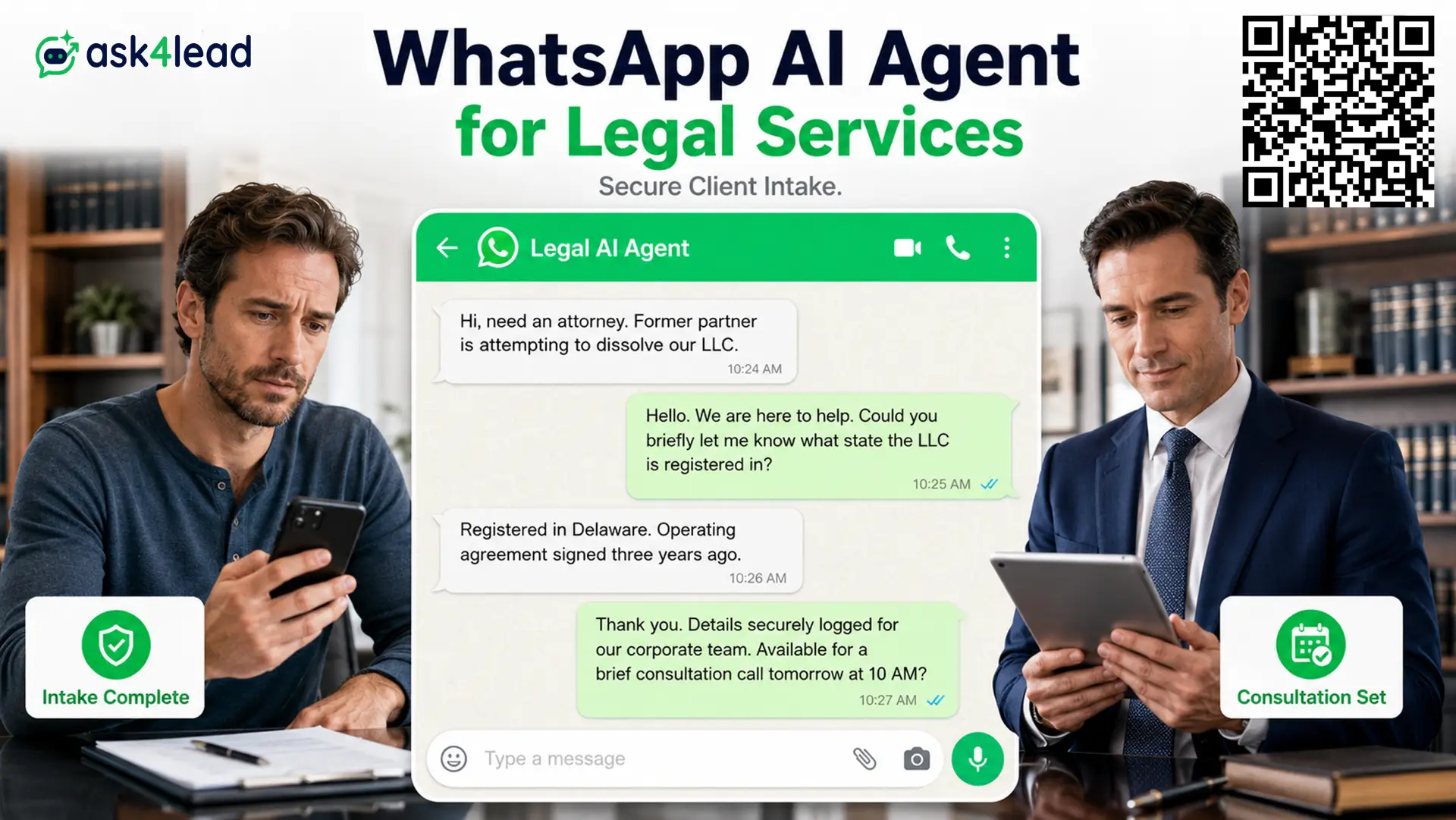
A WhatsApp AI agent for legal services answers a prospective client in seconds, runs structured intake, flags a possible conflict, and books the consultation.
It never gives legal advice. Ask4Lead delivers this as a humanized AI WhatsApp chatbot and CRM.
Most firms still take intake by phone, in office hours only. The client who waits more than a few minutes messages the next firm on the list.
This page covers what a WhatsApp AI agent for legal services handles, where the ethics line sits, how to keep your number safe, and what the WhatsApp Business API costs a firm.
Why law firms lose the client in the first 10 minutes
A person looking for a lawyer is usually in distress and messaging 3 or 4 firms at once. Speed of reply, not reputation, often decides who gets the call.
Intake leaks at predictable points:
- Evening and weekend messages that sit unread until Monday
- A receptionist on 3 calls who cannot reach a 4th line
- Web forms that promise a reply “within 24 hours”
- Voicemail a distressed caller will not leave
- Referrals a partner reads days later on personal WhatsApp
The research on lead response time is blunt: reply odds fall sharply after the first 5 to 10 minutes. An AI agent that replies instantly removes that gap.
What a WhatsApp AI agent for legal services does, and does not do
The agent owns the administrative first contact only. It gathers facts, checks urgency, screens for conflicts, and books time. It does not judge the case.
| The agent does | The agent never does |
| Capture matter type, jurisdiction, key dates | Say whether the client has a case |
| Screen the opposing party against your client list | Quote a fee it cannot honor |
| Book, confirm, and remind consultations | Give an opinion on strategy or outcome |
| Route urgent chats to a named attorney | Answer outside your approved scripts |
1. Structured intake before a file is opened
Every prospect answers the same questions: practice area, opposing party, dates, deadlines, and referral source.
The answers land as one clean summary in your shared team inbox, not a thread a paralegal has to rebuild.
2. Conflict check before the consultation is booked
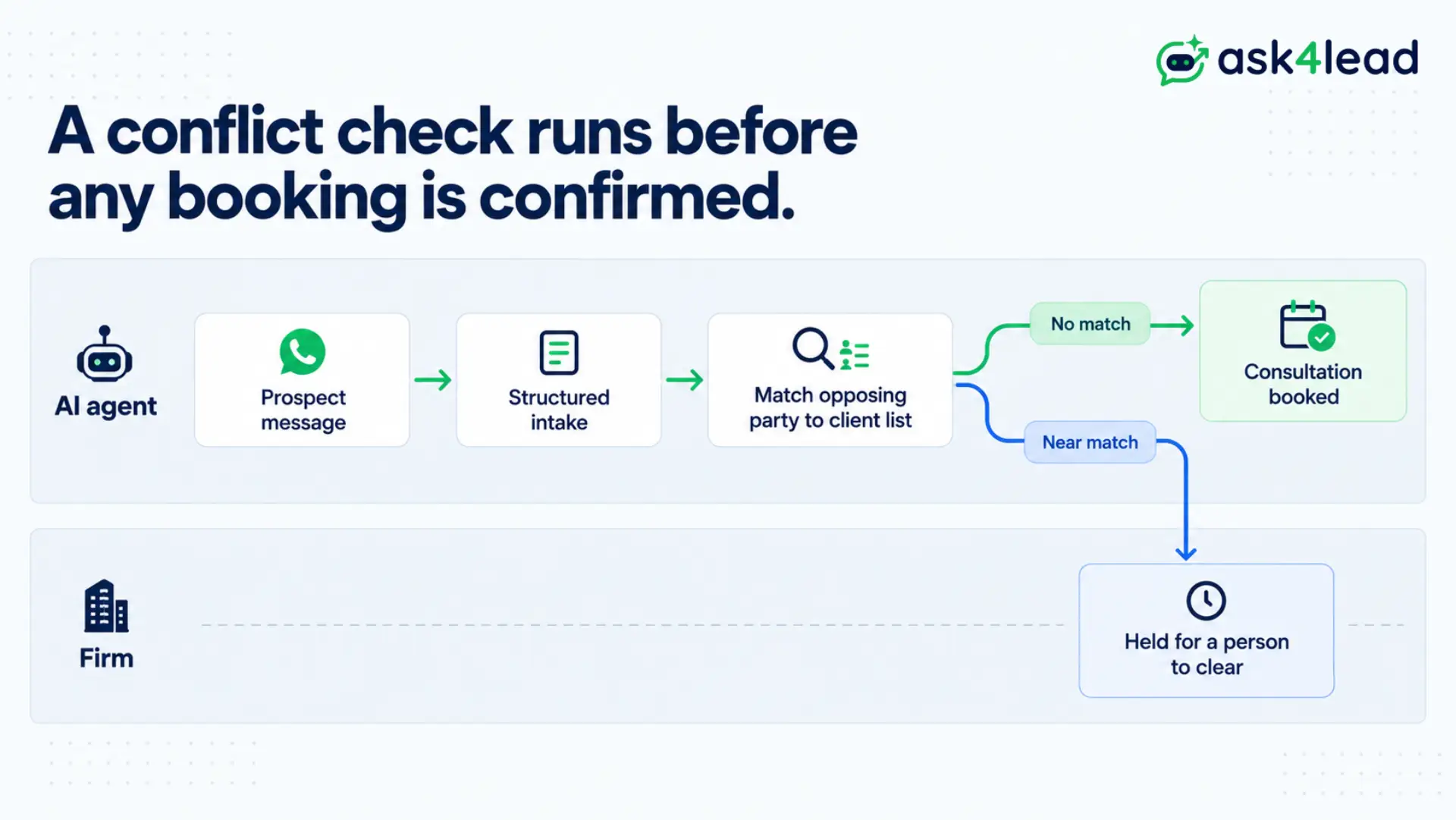
A firm cannot act against an existing client. Booking a consult before that check is a professional risk, not a technical one.
Ask4Lead matches the opposing party name against your client list. Any near match holds the booking for a person to clear.
3. Voice notes and document collection
Clients send voice notes and photos of court papers constantly. The agent transcribes the audio and accepts the images.
It also chases missing documents like ID and signed engagement letters on a schedule.
4. After-hours and multilingual cover
The agent works evenings, weekends, and holidays. It replies in the language the client writes in, so a multilingual city stops handing intake to whoever staffed the desk.
The one rule: no legal advice, ever
Unauthorized-practice rules, including ABA Model Rule 5.5, cover tools a firm deploys. A bot that answers “what are my chances” has crossed into advice it cannot give.
1. Where information ends and advice begins
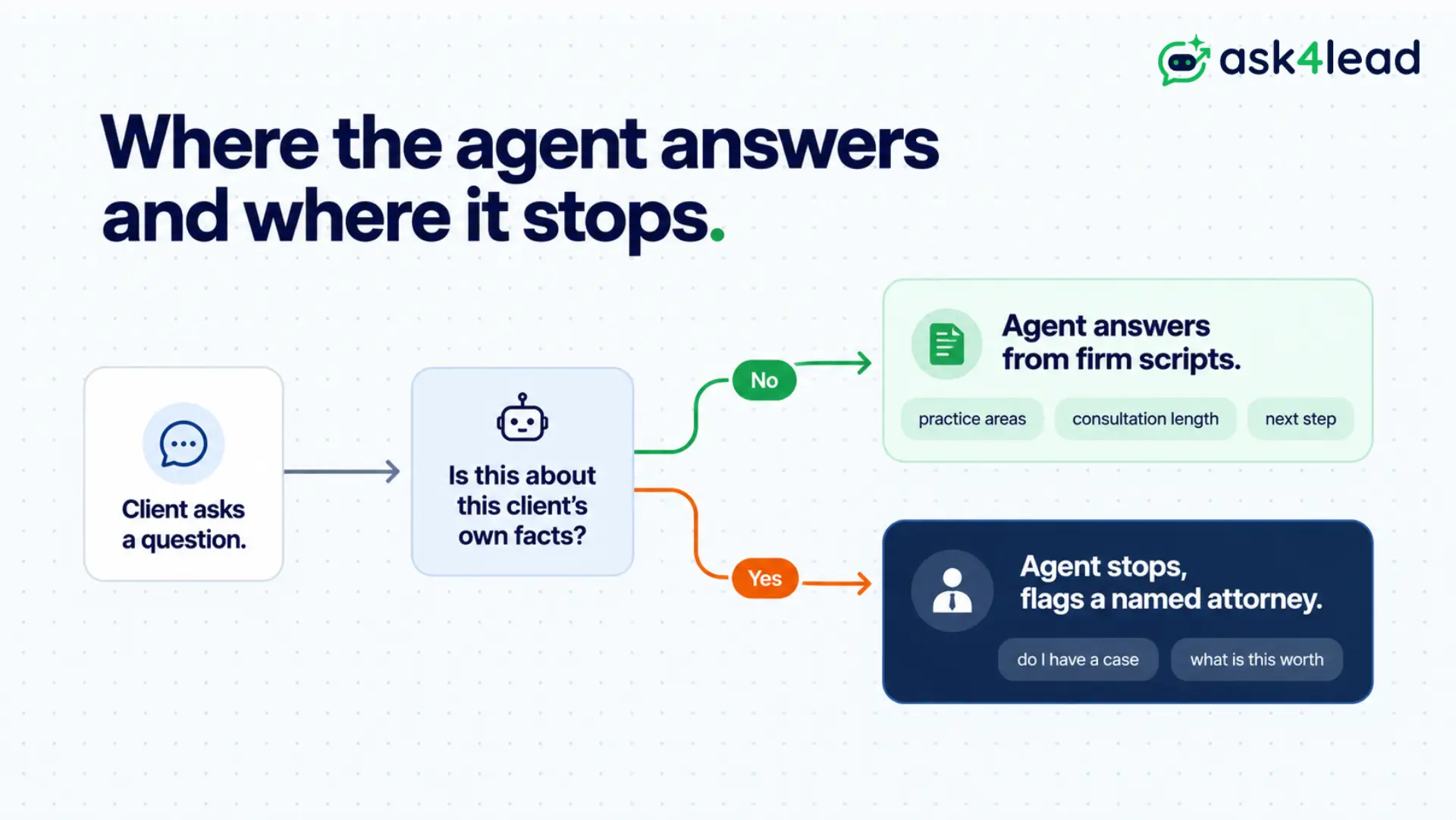
The split is clear once you draw it:
- Safe: “we handle construction disputes,” “the attorney confirms limitation periods,” “a first consult is 30 minutes”
- Refused: “do I have a case,” “what is this worth,” “should I settle,” anything applied to the client’s own facts
On a refused question, the agent stops and flags a human. Regulators are already testing this in UPL enforcement and ABA ethics guidance.
2. Your firm owns what the bot says
In Moffatt v. Air Canada, a tribunal made a company pay for wrong information its chatbot gave a customer.
A law firm is no different. If your agent states a fee, a deadline, or a policy it cannot back, that is the firm speaking.
Keep it off anything uncertain and approve sensitive replies before they send. The tribunal decision is short and worth reading.
3. Ground the AI in your own knowledge
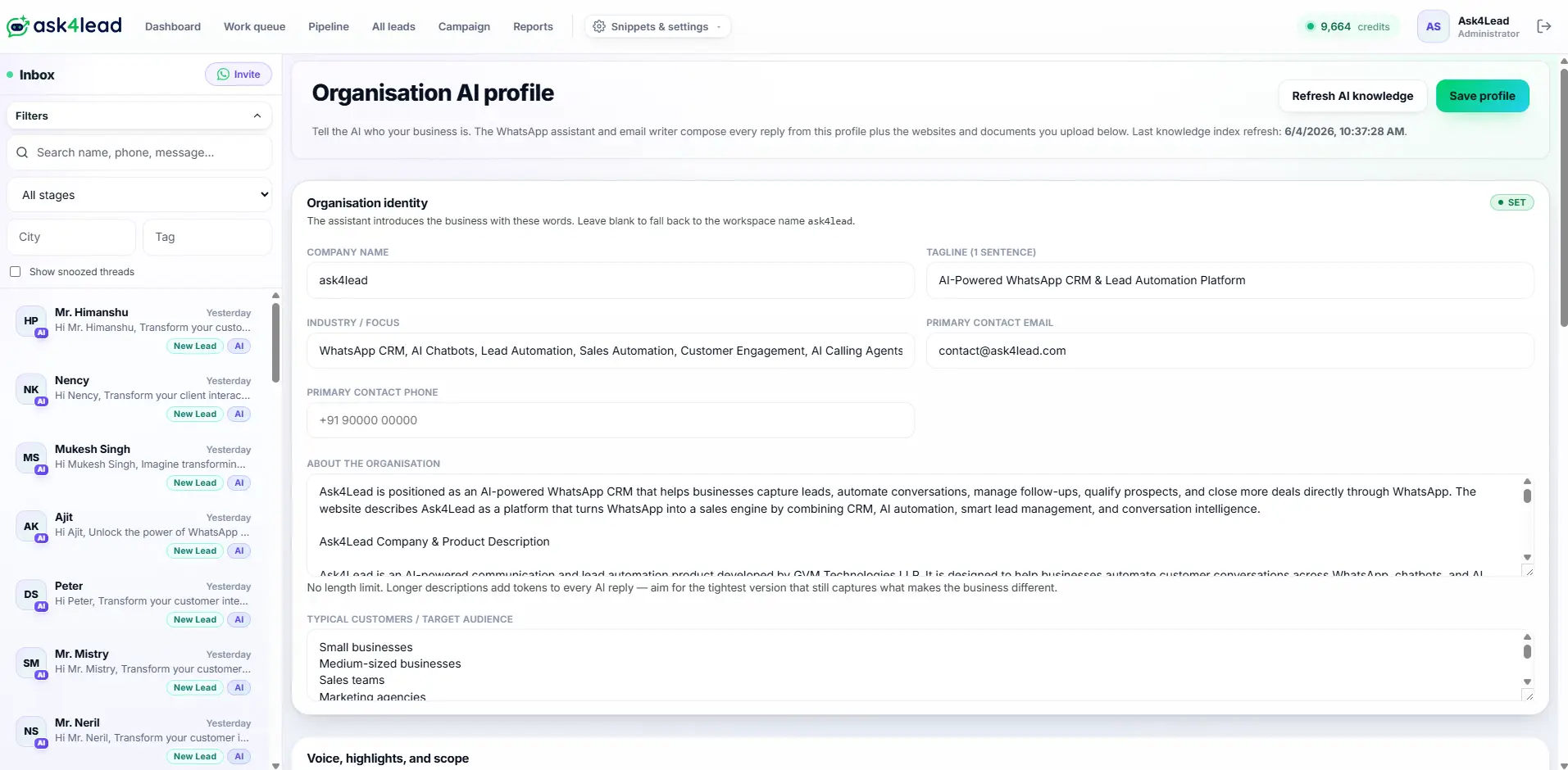
Public legal chatbots invent statutes and cite the wrong court.
The agent should run only on an AI Knowledge Profile built from your practice areas, fee ranges, and intake scripts, with the open internet switched off.
Keeping your firm’s WhatsApp number alive
A WhatsApp AI agent for legal services only stays useful while the firm’s number stays healthy. WhatsApp scores every business number for quality, and blocks or spam reports pull that score down.
For a firm, one bad campaign does not cost one conversation. It can take the whole channel offline.
| Risk to the number | Control that contains it |
| Prospects reporting unwanted messages | Agent replies only to people who message first |
| Quality rating dropping to yellow or red | Account health checks pause bulk sends |
| Free-form messages after the 24-hour window | Switch to pre-approved templates |
| A client typing “arrested” or “emergency” | Instant handoff to an attorney’s phone |
What the WhatsApp Business API costs a firm
There is no license fee for the WhatsApp Business API. Meta bills per message, by category and country.
From October 2026, service replies inside the 24-hour window are billed too, which changes the math for long intake threads.
| Message type | Who starts it | Rough cost |
| Client-initiated service chat | The client | Cheapest, some still free |
| Utility, such as reminders and status | The firm | Low, per country rate |
| Marketing, such as re-engagement | The firm | Highest, plus provider markup |
Rates run from about USD 0.01 in India to USD 0.025 in the United States, listed on Meta’s WhatsApp pricing page. Design the agent to answer inbound rather than broadcast, and message credits last far longer.
Handling intake volume without adding headcount
Personal injury, immigration, and mass-tort teams take hundreds of inquiries a day. A shared personal phone cannot track that safely.
1. One shared inbox, role-scoped access
Partners, associates, and paralegals see the same chats with full context.
Role controls give paralegals intake access without matter discussions, and audit logs keep every message on the record.
2. A 9-stage intake pipeline
Each inquiry moves from New Lead to Consultation Booked to Retainer Signed on a visual pipeline.
Nothing sits unassigned, and a partner sees where every prospect stands at a glance.
3. The silent-skip failure and the kill switch
The failure that hurts is not a wrong answer. It is a booking that never reaches staff because it matched no rule and nothing counted it.
Ask4Lead shows a skipped count beside the sent count, a daily work queue, and a switch to pause the AI in one tap.
Rolling it out at your firm
The work is mostly policy, not engineering. You decide what the agent may say, when it stops, and who it escalates to.
- Get the official WhatsApp Business API through a provider, not the consumer app.
- Set the hard boundary: administrative intake only, no legal advice.
- Load practice areas, fee ranges, and intake questionnaires into the Knowledge Profile.
- Set escalation words such as “arrested,” “emergency,” or any deadline inside 48 hours.
- Connect your client list so the conflict flag runs before every booking.
- Approve opt-in reminder templates for court dates and status updates.
- Test on past inquiries, then go live with the kill switch in reach.
Ask4Lead runs this same intake model across other regulated industries, so the compliance patterns are already built.
Turn legal intake into signed retainers
Speed brings the client in. The ethics line decides whether you keep them and stay out of trouble.
A WhatsApp AI agent for legal services closes the response gap, keeps a clean record, and stays on the administrative side. Your lawyers keep the judgment; this is legal client intake automation built for how firms actually work.
Start your firm’s WhatsApp AI intake with Ask4Lead
Ask4Lead is a humanized AI WhatsApp chatbot and CRM with human approval, conflict flagging, and a 9-stage pipeline built in.
Start free with 100 AI credits, no card required.
Sign Up for Free · Message the team on WhatsApp
FAQs
1. Can a WhatsApp AI agent give legal advice to prospective clients?
No. It collects names, matter type, dates, and urgency, then books a consultation. Any question asking for an opinion on a specific situation is refused and routed to an attorney.
2. Is client data on WhatsApp confidential enough for a law firm?
The official API encrypts messages in transit and a dedicated workspace isolates the data. Privilege and confidentiality duties still sit with the firm, so confirm suitability with your ethics counsel first.
3. How does the AI handle a conflict of interest?
It fuzzy-matches the opposing party name from intake against your client list. Any close match holds the booking and flags the chat for a person to clear before the firm proceeds.
4. What does a firm pay to run this?
Two costs: the platform fee for the AI and CRM, and Meta’s per-message charges of roughly USD 0.01 to USD 0.025 by country and category. Client-started chats are the cheapest.
5. What stops the firm’s number from being banned?
The agent replies only to people who message first, sends outbound only to opted-in contacts through approved templates, and pauses bulk sends if the quality rating drops.
6. Can the AI chase documents from existing clients?
Yes. It sends scheduled reminders for ID, engagement letters, or court paperwork, and accepts document photos in the chat, removing a repeat task from paralegals.