
A WhatsApp opt-in is a customer’s clear, recorded permission for a named business to message them on WhatsApp.
You need it before any outbound message, because what legally counts as consent is strict and Meta cuts your sending limits when you get it wrong.
This guide covers the placements that collect the most opt-ins on your website and social profiles, wording you can copy, and the delivery traps that decide whether those opt-ins are worth anything.
Quick answer: Put a specific permission step where people already want to hear from you: your chat widget, checkout, Click-to-WhatsApp ads, and social bios. Name your business, say what you send and how often, then reply within minutes so the opt-in becomes a conversation.
Key takeaways
- An opt-in is explicit permission from a named person, required before any marketing message.
- Meta never sees the opt-in. It reacts to block rate, spam-report rate, and quality rating, so consent quality beats volume.
- Highest-converting placements sit at high intent: checkout, chat widget, post-purchase, Click-to-WhatsApp ads.
- Inviting people who already know you (email, SMS, LinkedIn) builds a cleaner list than cold outreach.
- Collecting the opt-in is half the job. Delivery caps, carrier filtering, and list decay decide if messages land.
What a WhatsApp opt-in is and what Meta actually checks
An opt-in is an active yes: the person gives their number and agrees, in the same step, to hear from a business they can name.
1. What makes consent valid
Valid consent needs 3 things, per Meta’s opt-in rules and the WhatsApp Business Messaging Policy:
- Your business name is visible.
- WhatsApp is named as the channel, not bundled as “SMS or WhatsApp or email”.
- The message types are listed: orders, offers, reminders, support.
Since late 2024, you can collect this on any channel you own, including a web form or a phone call.
2. Why Meta never sees your opt-in
Meta does not read, store, or approve the moment someone agreed. It only sees what happens after you message: blocks, spam reports, and how it scores your message quality, which sets your quality rating.
So the goal is not to pass a Meta check. It is to message only people who are glad to hear from you. You keep a timestamped record for a legal dispute, not for Meta.
3. Single opt-in versus double opt-in
| Type | What it is | Use it when |
| Single | One action: tick, tap, or inbound message | Most businesses |
| Double | A confirmation reply on top | Frequent promo broadcasts, to screen out weak intent and avoid a policy strike |
Why most businesses collect too few opt-ins
The problem is rarely traffic. It is how the ask is built and what happens next.
1. The 5 reasons opt-in rates stay low
- Hidden: the ask sits in the footer or a thank-you page nobody sees.
- Vague: “Get updates on WhatsApp” gives no reason to say yes.
- Backwards: teams cold-message strangers first, get reported, and never build a list.
- Slow: the widget opens, nothing replies for hours, the person leaves.
- Unfamiliar: many people block unknown numbers on sight.
2. The permission-to-recognition gap
A checkbox tick is legal consent. But if your first message lands 3 weeks later with no context, the person forgets opting in and reports it.
Close the gap: reply within minutes, from a profile with your logo and verified name, referencing what they just did. Conversational lead capture does this while intent is still warm.
Website placements ranked by how well they convert
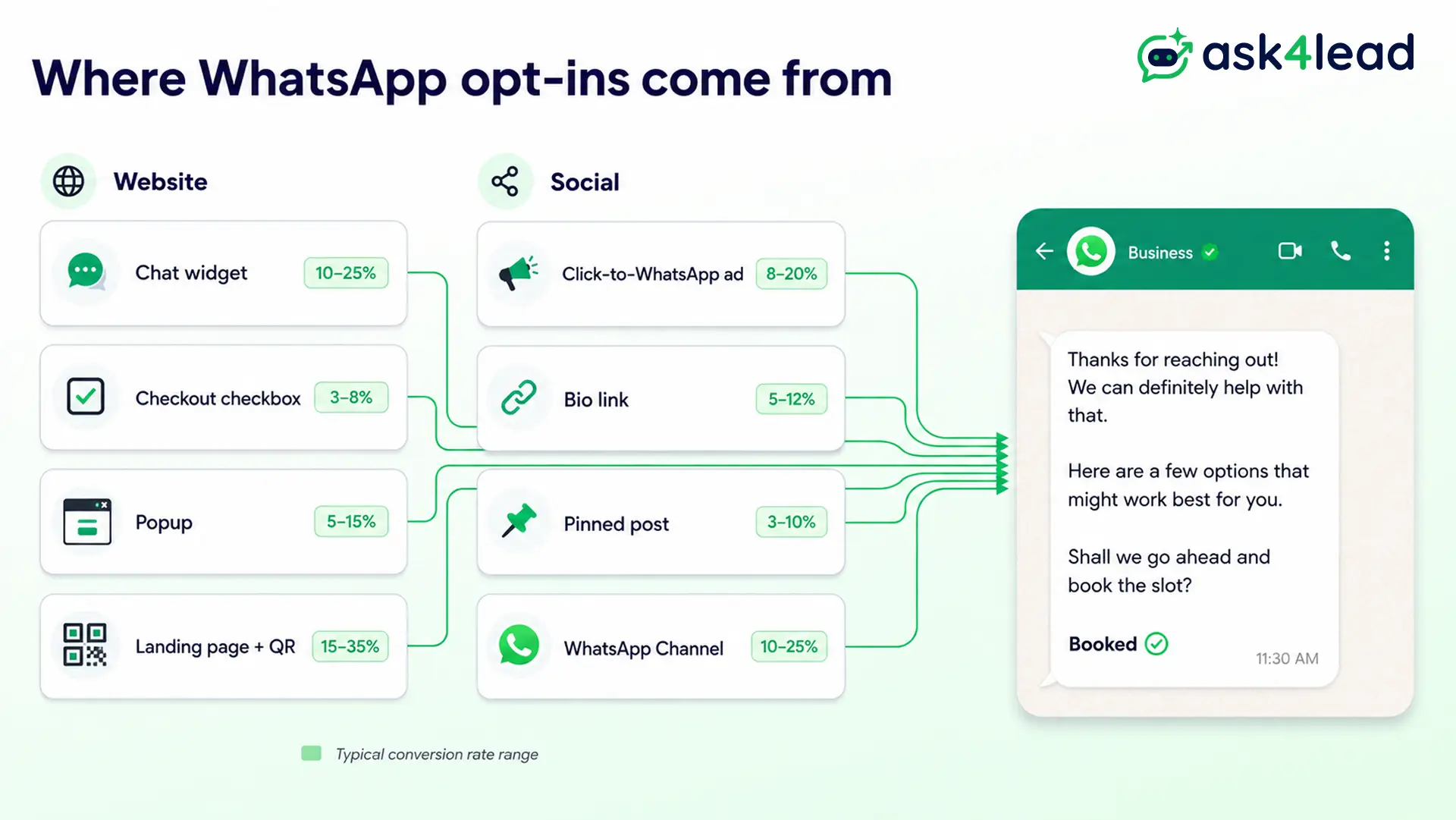
Your site visitors already have intent. Put the opt-in where that intent peaks.
| Placement | Why it works | Opt-in rate range |
| Chat widget | Inbound message is itself consent | 30 to 60% of opens |
| Checkout checkbox | The person just paid and trusts you | 20 to 45% of orders |
| Exit or scroll popup | Needs a lead magnet to convert | 1 to 5% of views |
| Opt-in landing page | Explains the value before asking | Varies by traffic source |
| On-site or packaging QR | Works on physical touchpoints | Varies by placement |
1. Chat widget with a consent line
Add a line under the button: “Message us on WhatsApp. By starting a chat you agree to receive replies and updates from [Business].”
This doubles as support and list building, and it feeds straight into follow-up.
2. Checkout and form checkboxes
On any form that already collects a phone number, add an unticked box: “Send my order updates and offers on WhatsApp.”
Checkout converts best, and it powers abandoned-cart flows later.
3. Popups with a lead magnet
A popup earns an opt-in only when it trades something concrete: a discount code, a stock alert, a guide sent on WhatsApp.
Keep it to a single field and state the value in the headline. A plain “subscribe” popup converts in low single digits.
4. Landing pages and QR codes
Build a single page whose only job is to explain your WhatsApp updates and let people opt in. Link it from email signatures, invoices, and packaging.
Set up the click-to-chat link or QR code with the right starter text, and add a WhatsApp Flows form to capture preferences in the same step.
Social media tactics that turn followers into opt-ins
Social gives you reach. WhatsApp gives you a direct line. Convert one into the other without messaging anyone who did not ask.
1. Click-to-WhatsApp ads and the retargeting loop
Click-to-WhatsApp ads open a chat when someone taps “Send Message”, and the first inbound message is the opt-in.
The quiet advantage: when you retarget later, they see a prior chat with you, which lifts trust and lowers blocks. Check the Facebook Page connection first, or the Click-to-WhatsApp ad fails with no error.
2. Bio links, story stickers, and pinned posts
- Put your opt-in landing page in your Instagram and LinkedIn bio, not the raw number.
- Use the Stories link sticker with a specific line: “Tap to get [thing] on WhatsApp.”
- Pin a post that trades a price list, checklist, or early access for the opt-in.
The same content-for-permission trade works in WhatsApp Status updates once people have opted in.
3. Turn a WhatsApp Channel into a two-way list
A WhatsApp Channel is a one-way broadcast people follow with no number exchange, so it is a low-friction first step.
Brands with an existing following grow a Channel fast, then invite active followers into a two-way opt-in. Know the difference between a Channel and a broadcast list first.
Flip the funnel: invite people who already know you
The cleanest list comes from inviting warm contacts, not chasing strangers.
1. The 3-touch opt-in path
- Reach out where they expect you: a marketing email, an SMS, a LinkedIn note, a post-purchase message.
- Give a reason to move: faster answers, a live person, order tracking, a WhatsApp-only deal.
- Send them to a click-to-chat link or opt-in page that records consent with a timestamp.
The people who move are self-selected, so reply rates stay high and reports stay near zero.
2. When invited opt-ins beat paid ads
- Use invites when your email list is warm or your sales team already has permission-based contact. It costs nothing.
- Use paid ads when you need new audiences.
- Never import a general customer list as consent. Ask those customers first.
See how WhatsApp compares with email for reply and conversion numbers.
Opt-in wording that gets a yes
1. The 4-part value-exchange rule
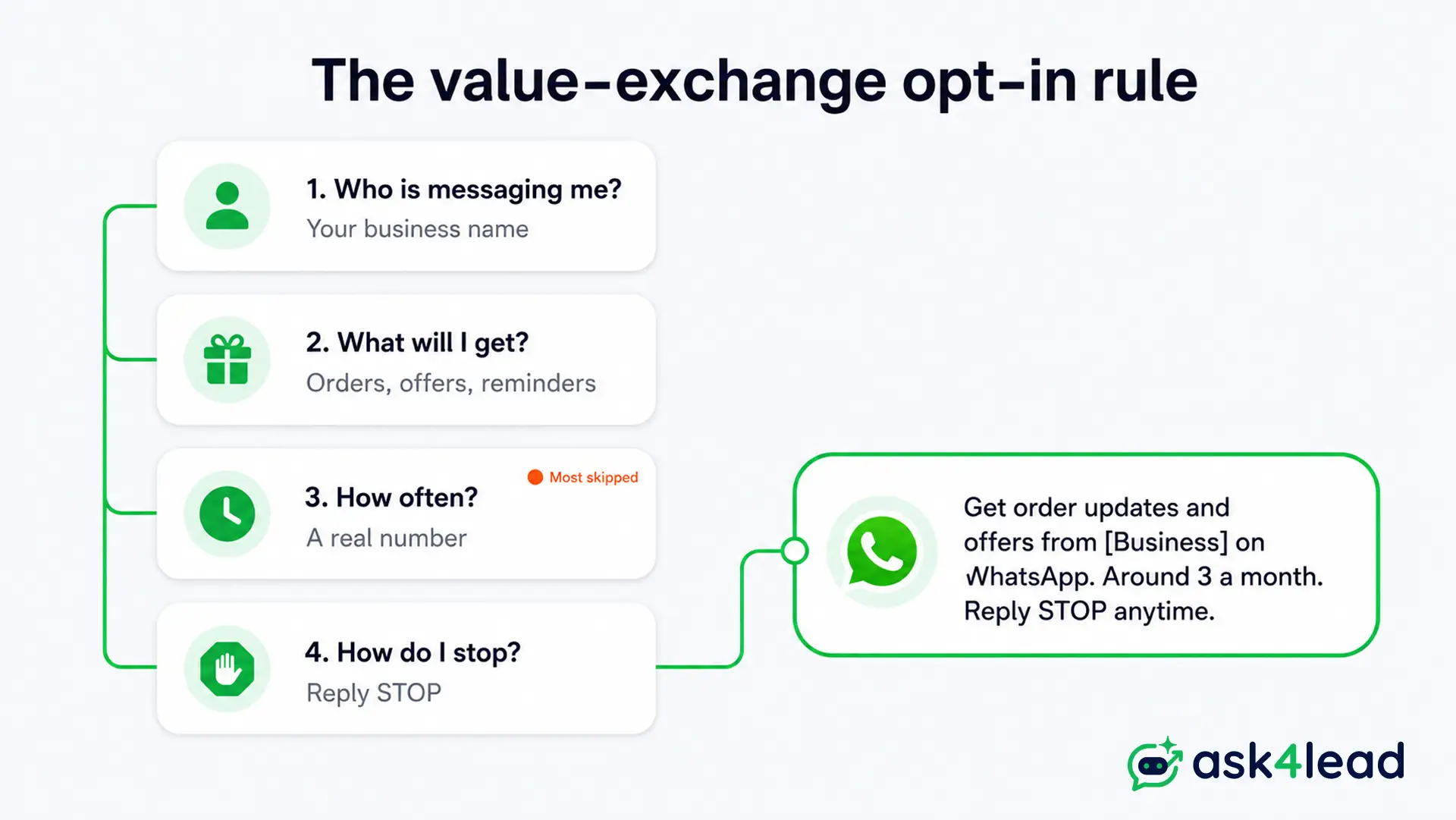
Every opt-in ask should answer 4 questions before the person decides:
- Who is messaging me? (business name)
- What will I get? (orders, offers, reminders)
- How often? (a rough frequency)
- How do I stop? (reply STOP)
Cover all 4 and opt-in rates rise while opt-outs fall. Skip the frequency line and people unsubscribe later feeling misled.
2. Copy-ready opt-in lines by channel
| Placement | Wording |
| Checkout checkbox | “Send my order updates and offers from [Business] on WhatsApp. Around 2 to 4 a month. Reply STOP anytime.” |
| Chat widget | “Message us on WhatsApp and we reply here. You also get service updates from [Business]. Reply STOP to opt out.” |
| Click-to-WhatsApp ad | “Hi [Business], I saw your ad and want to know more.” |
| Email or SMS invite | “Prefer WhatsApp? Get order tracking and support from [Business]. Tap to opt in: [link]” |
| Packaging QR | “Scan for care tips and reorder reminders from [Business] on WhatsApp.” |
3. How wide to scope the consent
- “Updates and offers from [Business]” lets you promote a different product later.
- “Updates about your order” does not.
- Word it for the widest honest use at the start.
If a lead messages you first, that opens the 24-hour service window for free-form replies.
After the opt-in: why your messages still may not land
Collecting consent is the visible half. The half nobody writes about is why opted-in messages still fail.
1. The delivery cap opted-in lists hit
Meta limits how many marketing template messages a person receives across all businesses in a rolling window.
A contact can be fully opted in and still not get your promo, because they are capped or have ignored recent marketing. The fix is fewer, more useful messages, not more sends.
2. The quality-rating spiral
- Weak opt-ins lead to blocks and reports.
- That drops your rating from green to yellow to red.
- That lowers your daily messaging limit, so even good messages queue or fail.
Delivery also varies by market, since local carriers filter differently. Warm a new number safely by spacing out early sends.
3. Keep the list warm
- Every 6 to 12 months, message inactive contacts: “Still want updates from [Business]? Reply YES to stay subscribed.”
- Suppress anyone who has not opened or replied in that window.
- Never re-import contacts who opted out.
Measure and fix opt-in performance by channel
Most guides stop at “add these placements”. The teams that keep growing measure each source and cut what fails.
1. The opt-in rate scorecard
For each source, divide opt-ins by eligible visitors or clicks, then compare to a directional range:
| Channel | Divide by | Range |
| Checkout checkbox | Completed orders | 20 to 45% |
| Chat widget | Widget opens | 30 to 60% |
| Popup | Popup views | 1 to 5% |
| Click-to-WhatsApp ad | Ad clicks | 10 to 40% |
| Email or SMS invite | Clicks | 15 to 50% |
Use the ranges to spot outliers, not as targets.
2. Mistakes that drag the numbers down
- Messaging people who never opted in, which drops your rating in the first batch.
- Uploading a purchased or scraped list, which is banned outright.
- Running the API on unofficial tools or burner SIMs, which usually fails by 1,000 messages.
- Skipping the public privacy policy URL that Meta Embedded Signup requires.
- Not logging consent, so you cannot defend a send under GDPR record-keeping or India’s DPDP Act.
3. Fix a channel that underperforms
- Popup below 1%: weak offer or wrong timing. Test a real lead magnet and a longer delay.
- Ad clicks not becoming messages: check the Page connection, shorten the pre-fill.
- Widget opens without replies: your response is too slow. An AI chatbot that actually converses answers in seconds, and replies trained on your own catalogue stay accurate.
- High opt-outs after send: the wording over-promised. Add a real frequency.
Watch your account health as volume grows.
FAQs
1. Do I need an opt-in to reply to someone who messages me first?
No. An inbound message opens a 24-hour window for free-form replies. You still need a recorded opt-in for marketing or template messages after it closes.
2. Does a website form checkbox count as valid consent?
Yes, if it is unticked by default, names your business, names WhatsApp, and lists the message types. Keep the record with a timestamp.
3. Can I import my existing customer phone list?
Only contacts who agreed to be messaged on WhatsApp. A general, purchased, or scraped list is not consent and will hurt your number.
4. Why are my messages not delivering when people opted in?
Meta’s messaging limits cap marketing template messages per person across all businesses, and low engagement or carrier filtering holds the rest back. Send fewer, more useful messages.
5. How many opt-ins do I need before a campaign?
No minimum. Start with a small engaged segment, keep early volume low, and grow as your quality rating holds.
6. What is a good WhatsApp opt-in conversion rate?
Checkout and chat widgets can pass 30%. Cold popups sit in low single digits. Compare each channel to its own history.
Conclusion: turn opt-ins into revenue
More opt-ins come from a specific ask at a moment of intent, not from asking more often. Put a consent line on your widget, a checkbox at checkout, and an offer in your bios, then reply fast and keep your frequency promise.
The businesses that earn real revenue treat the opt-in as the start of a relationship.
That means automated follow-ups for people who opted in but did not buy, opt-in-based campaigns at the cadence you set, and a shared team inbox so every consent record sits in one place.
Turn your next opt-in into a booked conversation
Ask4Lead is a humanized AI WhatsApp chatbot and CRM by GVM Technologies LLP.
When an opt-in arrives from your widget, an ad, or a QR code, Ask4Lead replies in plain English in seconds, logs the consent with a timestamp, asks what the person needs, and hands your team a lead with full context.
Start free with 100 AI credits and watch more opt-ins turn into customers.
