
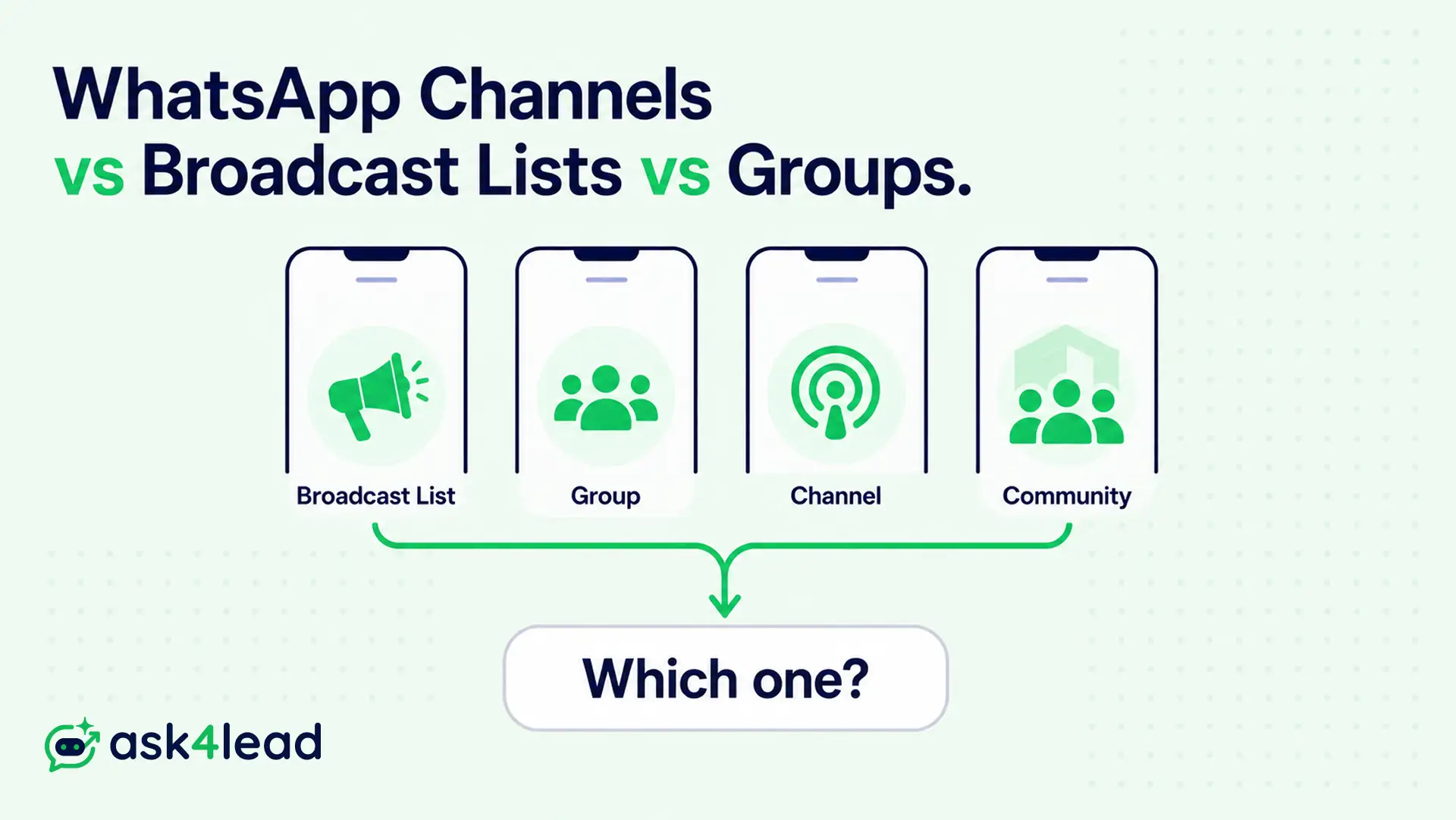
WhatsApp gives a business 4 ways to message many people at once: Broadcast Lists, Groups, Channels, and Communities. Each one is built for a different job, and using the wrong one is why campaigns quietly stall.
Quick answer: Match the format to the direction of the message. Broadcast Lists and Channels are one-directional, Groups are interactive, and Communities bundle many Groups under one admin feed. Once you need opt-in marketing at scale, none of the 4 is enough on its own.
| Your goal | Use this | Why it fits |
| Private update to saved customers | Broadcast List | Lands as a normal chat, replies stay 1-to-1 |
| Discussion, cohort, support pod | Group | Everyone can post and reply |
| Public news, product drops, reach | Channel | Unlimited followers, zero reply load |
| Many private groups, one feed | Community | Admin-only posts, members stay private |
| Opt-in marketing at scale | WhatsApp Business API | Templates, automation, tracking, no 256 cap |
Key takeaways
- Broadcast Lists reach only contacts who saved your number, so a large share of sends fail with no error.
- On the WhatsApp Business app, free marketing broadcasts are now a paid, credit-metered feature.
- Groups drive replies but expose phone numbers and turn noisy past a few hundred active members.
- Channels build reach but give you no contact list, no replies, and posts that vanish after 30 days.
- A Community announcement group fixes the “save my number” problem and stays private. Most guides skip it.
WhatsApp Broadcast Lists: private, but they fail silently
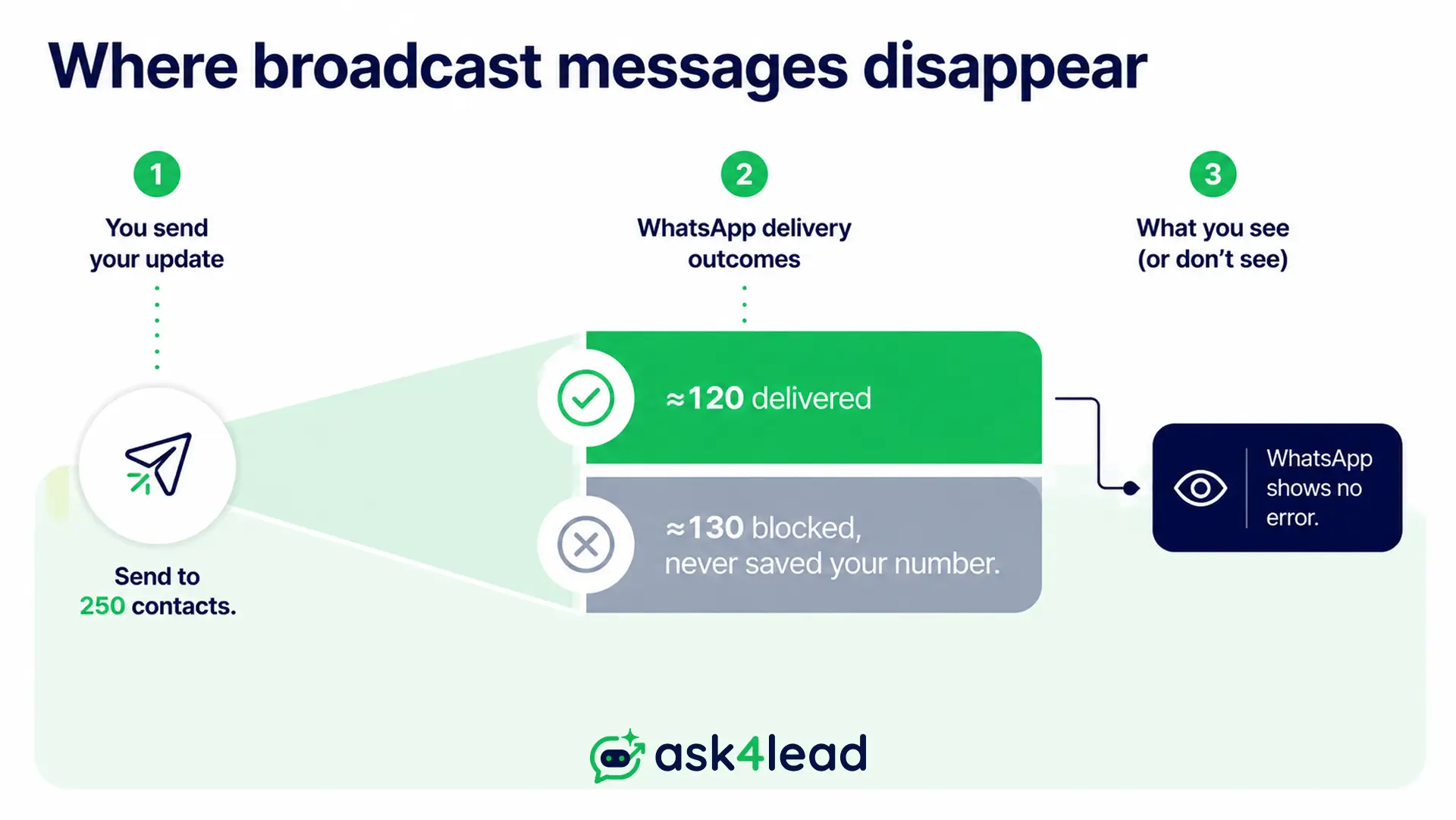
A Broadcast List sends a single message to up to 256 saved contacts, and each person gets it as a normal private chat. Replies come back to you alone, and on personal WhatsApp it is free.
The trap is delivery. A Broadcast List reaches someone only if they saved your number, and WhatsApp shows no warning when it does not.
How a Broadcast List works
- Unlimited lists, each capped at 256 contacts.
- The message is copied into each private thread, so it looks direct.
- Replies open a normal 1-to-1 chat, which is hard to track by hand.
- No delivery report for the list, only per-chat ticks.
If your messages keep failing to deliver, the unsaved-number rule is almost always why.
The 2026 change: broadcasts are now paid on the Business app
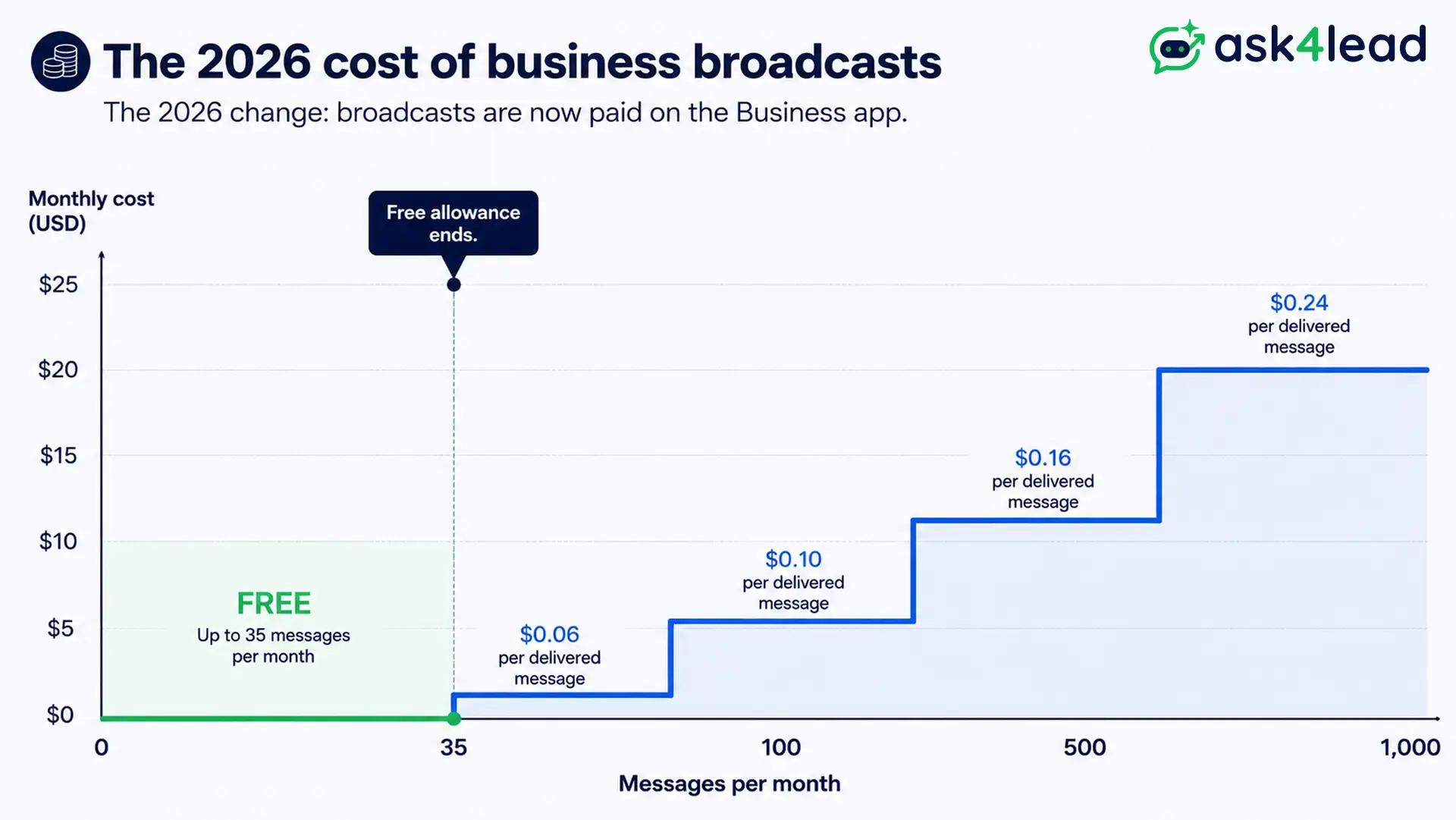
WhatsApp is pushing volume senders off the free app. Free marketing broadcasts on the WhatsApp Business app are being replaced by a metered “Business Broadcast” system that varies by country.
- A small free allowance, near 35 messages a month in some regions.
- A charge per delivered message after that.
- Up to about 500 opted-in contacts per send.
WhatsApp sets out the billing on its help page for ads and business broadcasts, part of a wider paid push for businesses.
Warning: Do not answer the new cost with a bulk-sender script on your own number. It runs for a week, then the number is banned with no appeal. More on automation and bans.
WhatsApp Groups: two-way, and they get loud fast
A Group is a shared room for up to 1,024 people. Everyone can post, reply, and see each other’s names and numbers by default.
Admins can restrict posting to admins only, but the member list still stays visible to all.
When a Group earns its place
- A coaching batch or course cohort that asks questions.
- A small wholesale or VIP buyer circle.
- An internal team or a project pod.
- A local interest group where peer replies are the point.
What a Group costs you
- Phone numbers are exposed to strangers by default.
- Every reply pings everyone, so members mute the Group and reach drops.
- Moderation is manual, and spam creeps in as the Group grows.
- School and clinic admins reject Groups because anyone who reacts becomes visible to all.
Tip: Want a Group’s reach without the noise? Set it to admin-only and route questions to a 1-to-1 chat, for example a click-to-WhatsApp ad link.
WhatsApp Channels: reach without a contact list
A Channel is a one-way public feed in the “Updates” tab. Anyone can follow, followers stay invisible to each other and to you, and posts disappear after 30 days.
Followers cannot reply. They can only react with an emoji or vote in a poll.
What Channels do well
- No follower limit, so a Channel scales without a ceiling.
- A slot in WhatsApp’s public directory, so new people find you by search.
- Full follower privacy, which lowers the bar to follow.
- Zero inbound load, because replies are off by design.
WhatsApp explains the format on its About WhatsApp Channels page.
What Channels cannot do
- You cannot see, export, or message followers individually.
- Notifications are muted by default, so real reach stays low.
- It is a publishing surface, not a customer list.
To convert a Channel audience, send followers to a signup link or a lead-capture chatbot so they start a real conversation.
WhatsApp Communities: the private middle ground most guides skip
A Community links related Groups and adds a single Announcement group on top. Admins pick exactly who joins.
In the Announcement group, only admins post, and members cannot see each other’s numbers or DM each other. It works like a Broadcast List that does not need members to save your number.
Communities fit organizations with a private, named audience:
- A school messaging parents, with each class as its own sub-group.
- A residents’ association or an apartment block.
- A multi-branch business grouping customers by location.
Two practical notes rarely mentioned elsewhere:
- You cannot create a Community from the WhatsApp Business app. Build it on personal WhatsApp, then add your business number as an admin.
- Size caps differ by source. Older guides say 50 sub-groups and 5,000 members; newer guidance says roughly 2,000 total. Check the Help Center for your account.
The Android Police Communities guide and this Broadcast List vs announcement group breakdown cover setup in detail.
Side-by-side: Broadcast List vs. Group vs. Channel vs. Community
Read the table by 2 rows first: “members see each other” and “recipient saves your number.” Those rule out the wrong tool faster than audience size.
| Criterion | Broadcast List | Group | Channel | Community |
| Direction | One-way, private | Two-way, open | One-way, public | One-way announcements |
| Audience size | 256 per list | 1,024 | Unlimited | 2,000 to 5,000 (varies) |
| Recipient saves your number? | Required | Not required | Not required | Not required |
| Members see each other? | No | Yes, with numbers | No | No |
| Replies | Private to you | Public to all | None | None in Announcement group |
| Found by strangers? | No | Via invite link | Yes, directory | No |
| You see the member list? | Yes | Yes | No | Yes |
| Free for business in 2026? | Paid on Business app | Yes | Yes | Yes |
| Best job | Offers to known customers | Peer discussion | Public reach | Organizing private groups |
For a Groups-only vs Communities-only view, Guiding Tech compares both in depth.
How to choose in 60 seconds
Answer in order. Stop at the first “yes.”
- Do members need to talk to each other? Yes points to a Group. Several audiences that each need a room means a Community.
- Is the audience public, and their identity does not matter? Yes points to a Channel.
- Is it a private, named audience under a couple of thousand people? Yes points to a Community announcement group.
- Is it opt-in marketing to a growing list, with automation and tracking? No built-in tool fits. Move to the API.
Key point: Most businesses force every job into a Broadcast List. It is the weakest option for anything past a small, engaged contact list.
When all 4 fall short: the WhatsApp Business API
The built-in tools break the moment you need opt-in marketing at volume, contact people who never saved your number, automate replies, or run a team from one inbox.
The WhatsApp Business API covers all 4, in exchange for setup and per-message pricing.
What the API adds
- Opt-in broadcasts with pre-approved templates, plus delivery, read, and click tracking.
- Automated replies inside the 24-hour reply window, even at midnight.
- A shared team inbox so agents work the same threads with full context.
- A protected quality rating, since sending is opt-in and rate-managed.
How Ask4Lead turns broadcasts into booked leads
Ask4Lead is a humanized AI WhatsApp chatbot and CRM on the official API. It solves the part broadcasts cannot: what happens after someone replies.
- It runs opt-in broadcast campaigns with real send tracking.
- When a customer replies, the WhatsApp AI agent answers in plain English, not a button menu.
- It qualifies the lead and hands your rep the problem, need, and urgency, so the first call is warm.
- You keep control with approval-before-send and one-click takeover.
- You can schedule campaigns to land at the right local hour.
Tip: Before you migrate, get proper opt-in. Broadcasts to a non-consented list get reported, and reports cut your sending limits fast.
Mistakes that quietly kill WhatsApp campaigns
Seen again and again in small-business and support threads:
- Broadcast List as a mailing list. It only reaches saved contacts, so a big share never arrives. A Community announcement group or an API broadcast fixes it.
- Group as an announcement channel. Members drown in replies, mute the Group, and reach disappears.
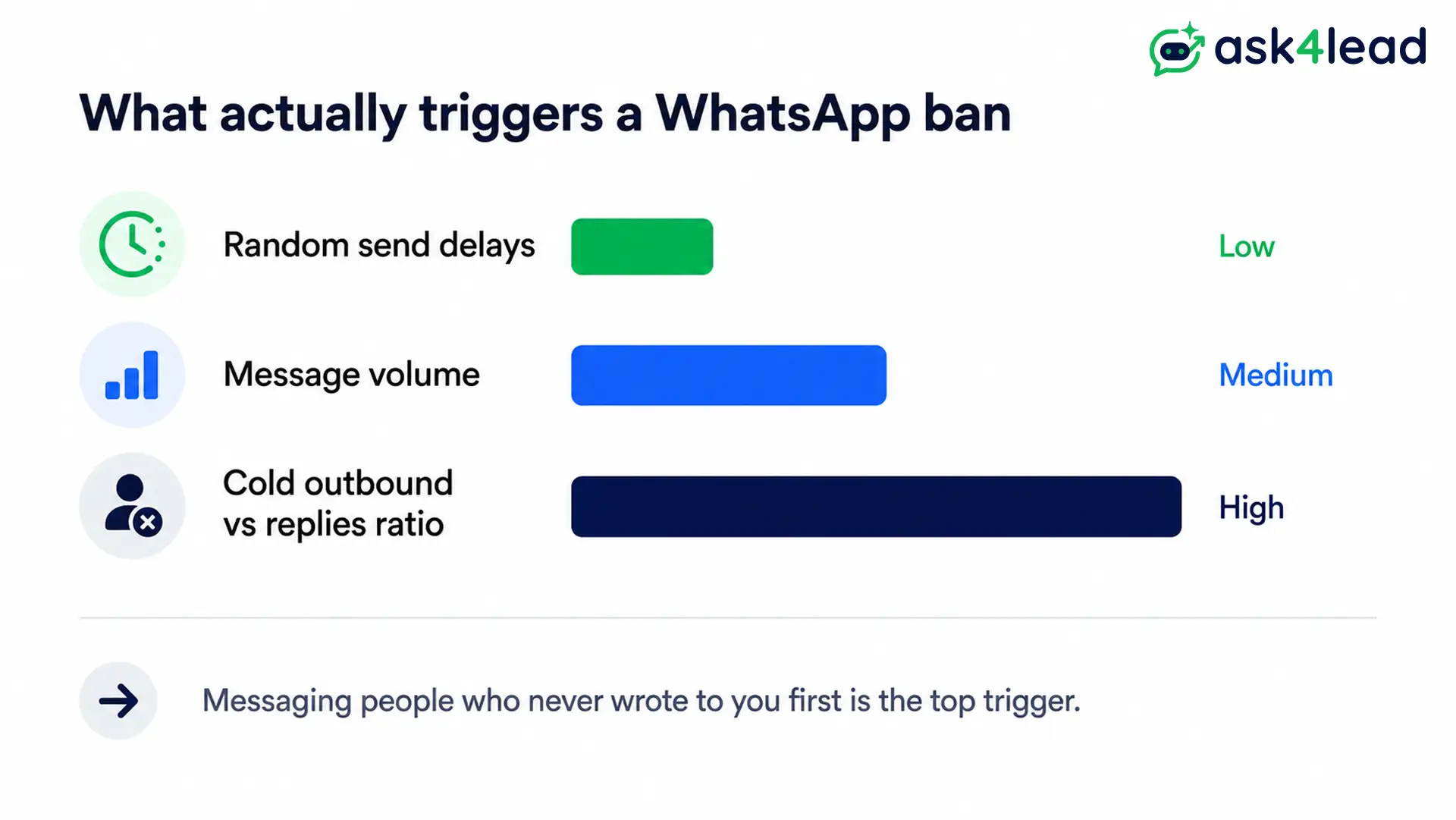
- Unofficial bulk sender for scale. Practitioners report the top ban signal is the ratio of cold outbound to inbound replies, not delay randomness. Bans hit at 2 to 6 weeks, or right after 2 to 3 reports.
- Whole business on one free feature. WhatsApp changes broadcast rules with little notice. Build a real marketing plan before a change forces the move.
The quietest loss is context. A rep gets a name and number from a broadcast reply with no idea what the person wants, so the call opens cold.
Sending at volume without a ban is half the job. Capturing why each person replied is what turns a broadcast into qualified leads, and it is the exact gap Ask4Lead is built to close.
FAQs
1. Is a WhatsApp Channel the same as a Broadcast List?
No. A Channel is a public feed anyone can follow, with no replies and anonymous followers. A Broadcast List is a private message to up to 256 people who saved your number, and they can reply 1-to-1.
2. Did WhatsApp remove Broadcast Lists in 2026?
Not fully. Free Broadcast Lists still work on personal WhatsApp. On the Business app, free marketing broadcasts became a paid, credit-metered Business Broadcast feature, rolling out by region.
3. What is the difference between a WhatsApp Community and a Group?
A Group is a single room for up to 1,024 people. A Community links several Groups under one umbrella and adds an admin-only Announcement group, with a total cap that varies by source and region.
4. Which option is best for sending offers to customers?
For a short list of existing customers, a Broadcast List is simplest. For a larger opted-in audience, an API broadcast through a tool like Ask4Lead tracks delivery and routes every reply into your pipeline.
5. How many people can a WhatsApp Channel reach?
There is no follower limit. The trade-off is that you cannot see, export, or directly message followers, so a Channel builds awareness but never a contact list.
6. Can I use Channels and Broadcast Lists together?
Yes, and many businesses do. Use a Channel for public reach, convert followers into saved contacts through a signup flow, then message those contacts privately.
The bottom line
There is no single winner. Broadcast Lists suit private updates to known customers, Groups suit peer conversation, Channels suit public reach, and Communities suit organizing many private groups.
Run the 60-second test. If the answer keeps landing outside all 4, or the paid Business Broadcast no longer adds up, that is your signal to move to the API.
At that point, start free with Ask4Lead. You get 100 AI credits on signup and opt-in broadcast campaigns on the official API. Its AI agent qualifies every reply before it reaches your team, so no lead goes cold while you sleep.
