
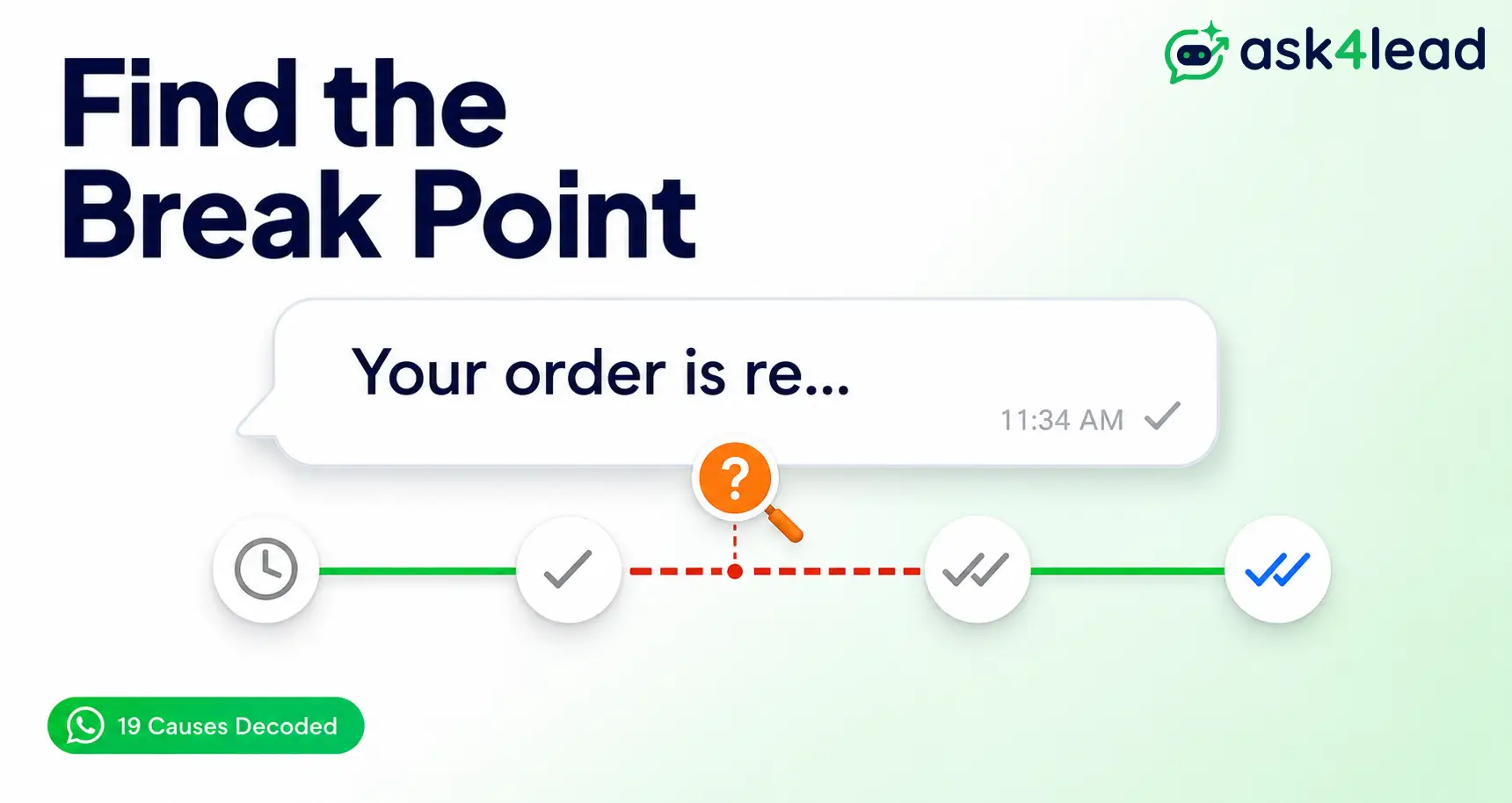
WhatsApp messages fail to deliver for 1 of 4 reasons: a connection or app problem, a blocked or non-opted-in recipient, something about the message itself, or, for a business number, a rejected template or a messaging limit.
If you sell over WhatsApp, that last group matters most, since a business delivery failure is a lost lead.
Ask4Lead’s WhatsApp Business API integration catches these failures before a customer ever notices. Below is every real cause, personal and business, plus 3 that almost no other guide covers.
Key takeaways
- A grey tick that never turns blue means the message reached WhatsApp’s server, not that it failed.
- “Delivered” and “notified” are different things; a message can arrive while your phone stays silent.
- Personal delivery problems are almost always connection or app-setting issues, fixable in under 5 minutes.
- Business failures come from a different list: template rejection, opt-in status, quality rating, and messaging limits.
- WhatsApp holds an undelivered message for up to 30 days before dropping it.
What “Not Delivered” Actually Means on WhatsApp
“Not delivered” is a specific technical state, not a catch-all label. It means WhatsApp’s server accepted your message but hasn’t confirmed the recipient’s phone got it yet.
That’s different from a message that failed outright. It’s also different from one that delivered fine but was simply never opened.
The 5 Status Signals WhatsApp Uses, and Where Each One Breaks
Every message moves through a short chain of checkpoints. The icon tells you exactly which link in that chain broke:
- Clock icon: the message hasn’t left your phone yet.
- 1 grey tick: it reached WhatsApp’s server, not the recipient’s phone.
- 2 grey ticks: it reached the recipient’s phone. Delivered, even if unread.
- 2 blue ticks: the recipient opened the chat (unless read receipts are off).
- Red exclamation mark: an outright failure, usually a bad number, a block, or a rejected template.

Delivered and Notified Are Not the Same Thing
This is the mix-up behind most “it’s not delivering” reports that turn out to be nothing. WhatsApp can hand a message to the recipient’s phone, earning a real 2 grey ticks, while the phone itself never makes a sound.
A few settings cause this silently:
- Do Not Disturb or an active Focus mode on the recipient’s phone.
- A disabled background-refresh setting for WhatsApp specifically.
- An Apple Watch set to mirror phone notifications, which can absorb the alert entirely.
10 Everyday Causes When Your Personal WhatsApp Won’t Deliver
Personal-account problems split into 3 groups: your side, their side, or what you’re sending.
1. Causes Tied to Your Phone, Network, or App Version
- Weak or dropped internet. Produces the classic “stuck on 1 tick” pattern.
- An outdated app version. WhatsApp regularly patches delivery bugs.
- Background restrictions. Battery savers or Focus modes stop WhatsApp from syncing.
- Low device storage. WhatsApp can silently stop syncing when storage runs low.
2. Causes Tied to the Recipient’s Account or Settings
- They’ve blocked you. The tick count freezes at 1 and never advances.
- Their number is no longer active. A changed number acts identically to a block.
- They’ve been offline a long stretch. WhatsApp’s own documentation confirms undelivered messages are held for up to 30 days before dropping.
3. Causes Tied to What You’re Sending, or Where You’re Sending From
- The file is too large. Media past WhatsApp’s size cap won’t leave your phone at all.
- A firewall is blocking WhatsApp. Locked-down office Wi-Fi that filters
whatsapp.netlooks exactly like a phone problem. - A VPN or a location mismatch. Fraud checks compare your number’s country to your connection’s; a mismatch can quietly block delivery.
How to Fix Personal WhatsApp Delivery Failures, Step by Step
Work through these in order. Most issues clear at step 1 or 2.
The 2-Minute Checklist to Run First
- Toggle airplane mode on, wait 10 seconds, then off.
- Confirm you have a working connection by loading any other app.
- Check your app store for a pending WhatsApp update.
- Check whether WhatsApp itself is down before blaming your phone.
Deeper Fixes When Quick Restarts Don’t Work
- Clear WhatsApp’s cache (Android) without clearing chat data.
- Switch off any VPN and disable “Limit IP Address Tracking.”
- On office or hotel Wi-Fi, switch to mobile data to test.
- Reset network settings if only WhatsApp is affected.
- Back up your chats, then uninstall and reinstall as a last resort.
- A trick worth knowing: install WhatsApp Business briefly under the same number, then switch back. It forces a full session reset that a plain reinstall doesn’t.
3 Hidden Causes Almost No Other Guide Covers
These 3 explain most of the “only this contact” reports, and none show up in WhatsApp’s own help pages.
1. A Linked Device or WhatsApp Web Session Is Quietly Holding Your Messages
If WhatsApp Web, Desktop, or another linked phone is open in the background, some messages route through that session first. Close every device you’re not using, then resend.
2. A Corrupted Backup After Switching Phones
An old iCloud or Google Drive backup can carry a corrupted chat database onto a new phone. Messages then get stuck exactly at the point of the switch, while new ones send fine.
Back up your chats fresh on the old phone right before restoring. Don’t trust an automatic backup that’s already days old.
3. Your Phone Says “Delivered” Somewhere Else, Just Not Where You’re Looking
WhatsApp Web, a tablet, and your phone can each show a slightly different tick state for a few seconds while they sync. Check another linked device before assuming a message failed; it usually hasn’t.
Why WhatsApp Business Messages Fail Differently (And Cost More)
A personal failure is an inconvenience. A business failure means a customer who messaged you never got your reply.
A business number runs on WhatsApp’s Business Platform, which enforces rules a personal account never has to follow.
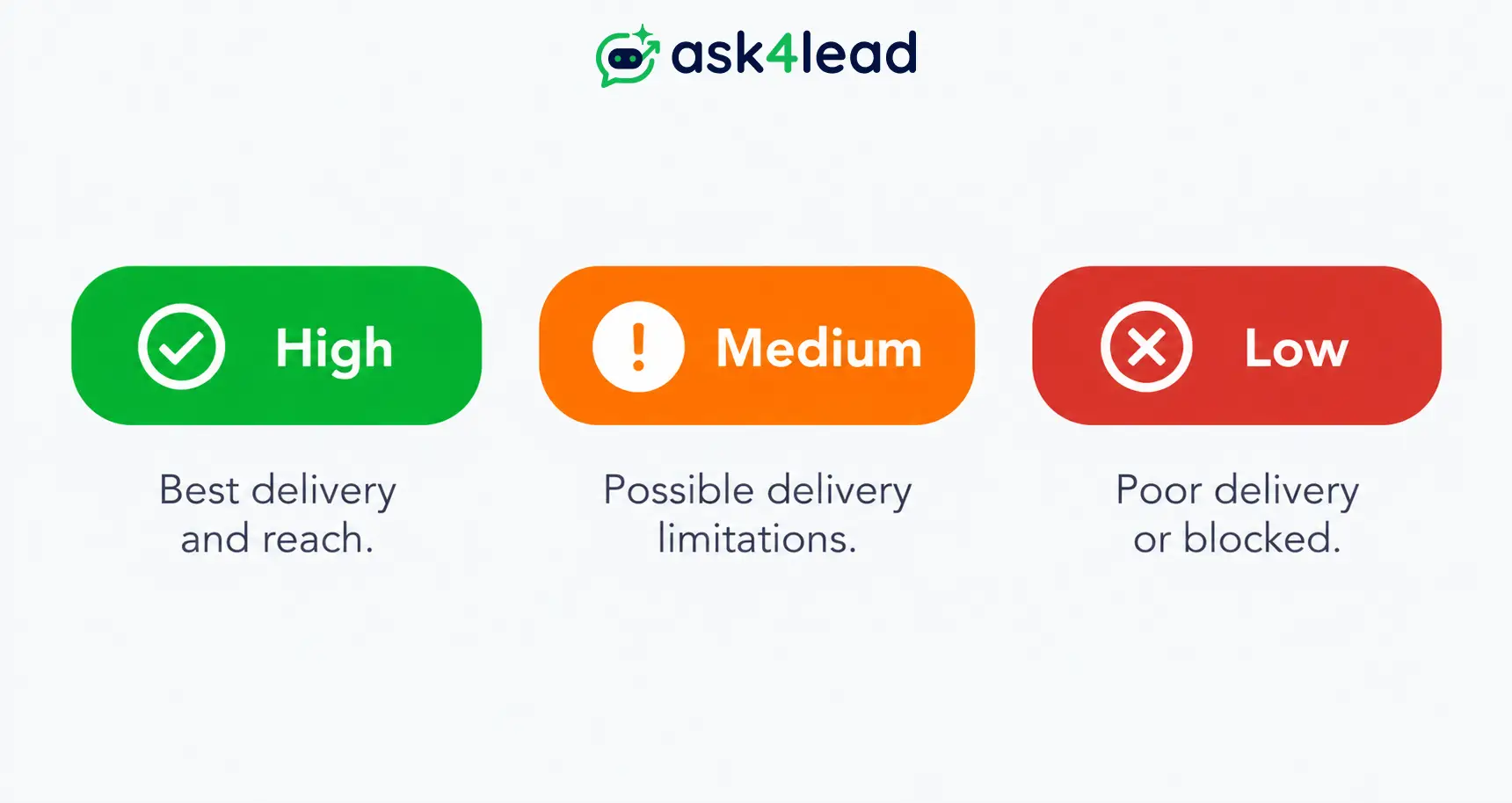
| Symptom | Personal WhatsApp cause | WhatsApp Business/API cause |
| 1 grey tick, stuck for hours | Weak connection, phone off | Contact hasn’t opted in, or the 24-hour window closed |
| Fails instantly with an error | Number not on WhatsApp, you’re blocked | Template rejected, or number restricted |
| Delivers to everyone except 1 contact | That contact blocked you or is inactive | That contact’s opt-in status or a delivery flag |
| Works fine, then stops overnight | Storage full, update pending | Daily messaging-tier or broadcast limit reached |
1. The Message Template Was Rejected, Edited, or Never Approved
Every marketing message sent outside an active conversation needs a Meta-approved template. Rejection almost always traces back to 1 of 3 things:
- Promotional wording that reads as spam.
- A template edited after it was already approved.
- An account-level block, like an incomplete business verification.
Roughly half of rejection complaints are that third cause, not the wording itself, which is why rewriting a template alone rarely fixes anything. Our template rejection guide breaks down each level, and Ask4Lead’s pre-approved templates catch these issues before a template goes live.
2. The 24-Hour Session Window Closed Before You Replied
Meta gives businesses a free-form reply window that opens the moment a customer messages first.
- Inside the window: any free-form reply goes through normally.
- Outside the window: only a pre-approved template gets delivered.
- The reset rule: the window restarts only when the customer replies, never when you send something.
Trying a standard message outside the window returns a specific rejection code, error 131047, not a silent failure. Our 24-hour rule explainer also covers the 72-hour exception for click-to-WhatsApp ads.
3. You’ve Hit Your Messaging Tier or Broadcast Limit
The 2 WhatsApp business tools handle limits very differently:
- Business App (free): caps a single broadcast list at 256 contacts, and recipients must have saved your number first.
- Business API: starts on a rolling 24-hour messaging tier that expands as trust and quality improve.
| Messaging tier (API) | Unique customers per rolling 24 hours | How you move up |
| Tier 1 (new numbers) | Around 250 | Consistent quality rating over time |
| Tier 2 | Around 1,000 | Sustained “High” or “Medium” rating |
| Tier 3 | Around 10,000 | Continued good standing at volume |
| Tier 4 | Unlimited | Long-term compliance track record |
Sending past your tier doesn’t just fail the overflow messages; it can flag your account for review. Our broadcast limit breakdown covers what actually earns an upgrade.
4. The Contact Never Opted In, or Opted Out Silently
Meta requires clear consent before a business can message someone outside a conversation they started.
- Valid opt-in: a website form, a click-to-WhatsApp ad reply, or an explicit “yes” to a consent message.
- Not valid: a purchased list, a scraped number, or silence after a single unanswered message.
A contact who opted out via a keyword you missed will show every later campaign message as undelivered, with no error explaining why. Our opt-in and consent guide ranks the 7 real-world collection methods by conversion, and Ask4Lead’s opt-in campaign tools keep every send tied to a documented record.
5. Your Number’s Quality Rating Has Dropped
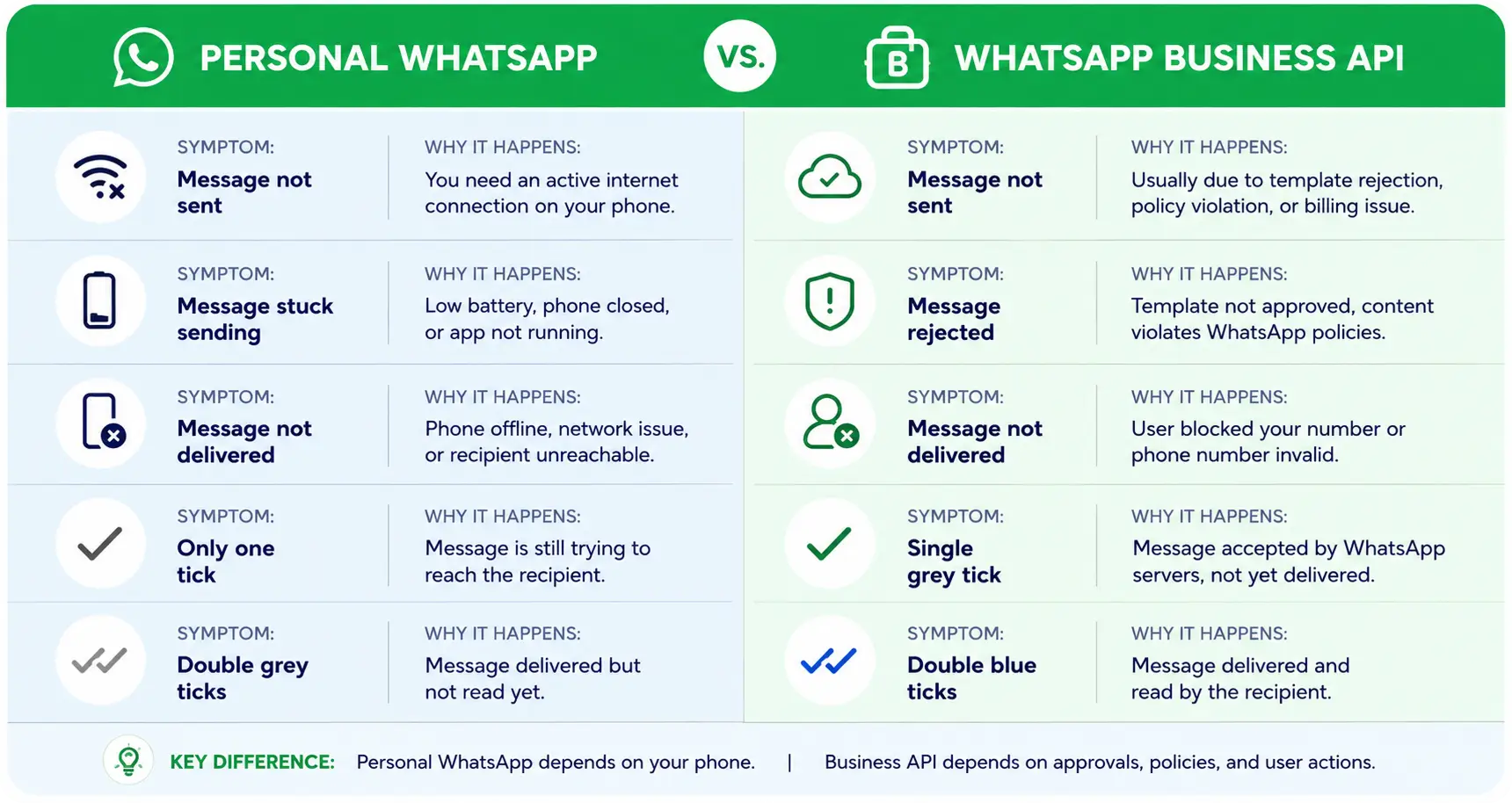
Meta tracks replies, blocks, and reports per number, not send volume. It assigns a rolling rating:
| Quality rating | What it means | Impact on delivery |
| Green (High) | Recipients engage more than they complain | Full tier access, fastest growth |
| Yellow (Medium) | Engagement is mixed | Tier growth slows or freezes |
| Red (Low) | Blocks and reports outweigh engagement | Sending paused, tier drops |
A single poorly targeted broadcast can drop a healthy number to restricted within hours.
The effect compounds, too: messaging limits pool across a business’s whole number portfolio, so 1 damaged number throttles the others.
Our quality rating breakdown covers the full protection framework.
6. You’re Sending Through an Unofficial or Gray-Market Tool
A few signs give this away fast:
- A browser extension is automating your personal WhatsApp account.
- You’re using a “bulk sender” app that isn’t a listed Meta partner.
- Messages send in bursts with no template approval step at all.
Each one violates WhatsApp’s terms and gets flagged, banned, or throttled without warning, often mid-campaign. This is the single most preventable cause on this list. See will WhatsApp ban you for automating your business for what actually triggers a ban, and how to get unbanned if it’s already happened.
How to Stop Business Delivery Failures Before They Cost You a Lead
Fixing 1 failed message is reactive. Preventing the next 100 takes 2 habits.
1. Build Compliance Into Your Templates and Opt-In Flow Before You Scale
3 habits protect delivery before a failure ever happens:
- Review every template against Meta’s promotional-content guidelines before it goes live.
- Keep a documented opt-in record for every contact you message.
- Retire templates the moment engagement drops, instead of waiting for a rejection notice.
Meta has also tightened marketing-template delivery in some regions over the past year, so check your template’s category first if delivery suddenly narrows for a specific segment.
2. Track Delivery Status With Real Data, Not Guesswork
Guessing which messages failed, and why, doesn’t scale past a handful of chats. A real-time delivery analytics dashboard shows exactly which messages failed and to whom.
A rejected template gets caught in minutes this way, not at the end of a quiet week.
3. Where Ask4Lead Fits: Catching Failures Before a Lead Goes Cold
Ask4Lead is a humanized AI WhatsApp chatbot and CRM. It pairs verified business messaging with a shared team inbox, so a failed delivery surfaces as a flagged conversation, not a silent gap.
Built-in account health monitoring keeps your quality rating high enough that your tier never becomes the bottleneck. See the full feature set if undelivered messages are quietly costing you leads.
Sign Up Free: 100 AI Credits Included
The 3-Question WhatsApp Delivery Diagnostic
Run these 3 questions before touching a single setting:
- Is it every contact, or just 1? Just 1 means the problem sits with that contact. Everyone means it sits with your phone or account.
- Personal number, or a WhatsApp Business API number? Personal points to connection and device causes. Business API points to templates, opt-in, and tiers.
- Did it work yesterday and break today, or has it never worked? A sudden break often means an audit-logged account change. Never working usually means a setup step was missed.
FAQs on WhatsApp Message Delivery
1. What does 1 grey tick that never becomes 2 ticks mean?
Your message reached WhatsApp’s server but hasn’t reached the recipient’s device yet. WhatsApp keeps retrying automatically for up to 30 days.
2. Can someone block you on WhatsApp without you knowing?
Yes. WhatsApp never announces a block. The tell is a message stuck on 1 tick with no change to their “last seen” status.
3. How long does WhatsApp try to deliver a message before giving up?
Up to 30 days, per WhatsApp’s own documentation. After that window, the message drops from the server entirely.
4. Why do WhatsApp Business template messages get rejected?
Usually spam-like wording, formatting that doesn’t match the approval, or an account-level block. Only the first cause improves by rewriting the template.
5. What’s the difference between “not sent” and “not delivered”?
“Not sent” (a red exclamation mark) never left WhatsApp’s server. “Not delivered” (1 grey tick) left the server but hasn’t reached the device.
6. Why did my message deliver but I never got a notification?
Delivery and notification are separate systems. Do Not Disturb or a disabled background refresh can suppress the alert while the message arrives fine.
7. Does file size affect whether a WhatsApp message delivers?
Yes. Media past WhatsApp’s size limit fails silently instead of showing a clear error, which is often mistaken for a connection issue.
Conclusion: Don’t Let a Delivery Failure Decide Your Next Sale
Most personal delivery problems fix themselves inside a 2-minute checklist. Business failures need closer attention, since a single rejected template can quietly cost a real customer.
Run the 3-question diagnostic above and work through the matching section. If business-side failures keep costing you leads, message our team on WhatsApp or explore how Ask4Lead’s sales pipeline keeps every conversation accounted for.
