
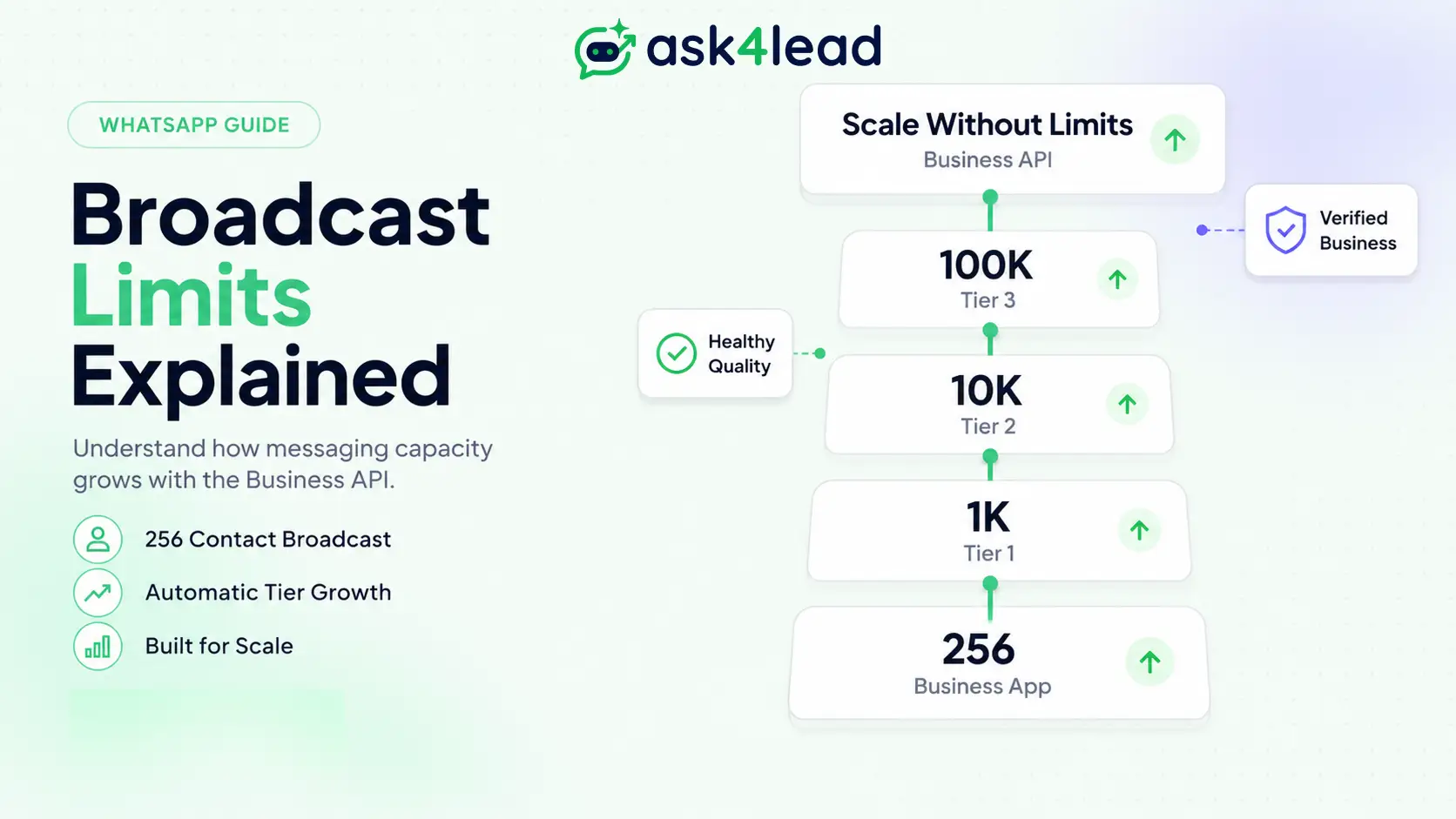
A WhatsApp broadcast lets you send the same message to many people at once, without putting them in a group. It is one of the simplest ways to reach your customers. The catch is that WhatsApp limits how many people you can message, and the rules change depending on which version of WhatsApp your business uses.
There are two versions:
- The free WhatsApp Business App you download on your phone.
- The WhatsApp Business API (also called the Business Platform), used by larger senders through a provider.
Each one has a very different broadcast limit. Mixing them up is exactly why some businesses reach far fewer people than they expected, and why others get their number blocked. This guide explains and shows how to reach more people safely.
Key Takeaways:
- WhatsApp Business App: 256 contacts per broadcast list, and only people who saved your number receive it.
- WhatsApp Business Platform (API): no 256 cap. You can message from 250 up to unlimited people per 24 hours, depending on your tier (your sending level).
- Limits rise with your quality rating, not with tricks or payments.
- Bans come from spam reports and blocks, not from volume alone.
What is the WhatsApp broadcast limit?
The WhatsApp broadcast limit is the maximum number of people you can message at once. On the free WhatsApp Business App it is 256 contacts per broadcast list. On the WhatsApp Business Platform (API) there is no list cap, but daily messaging tiers control how many unique users you can reach in 24 hours.
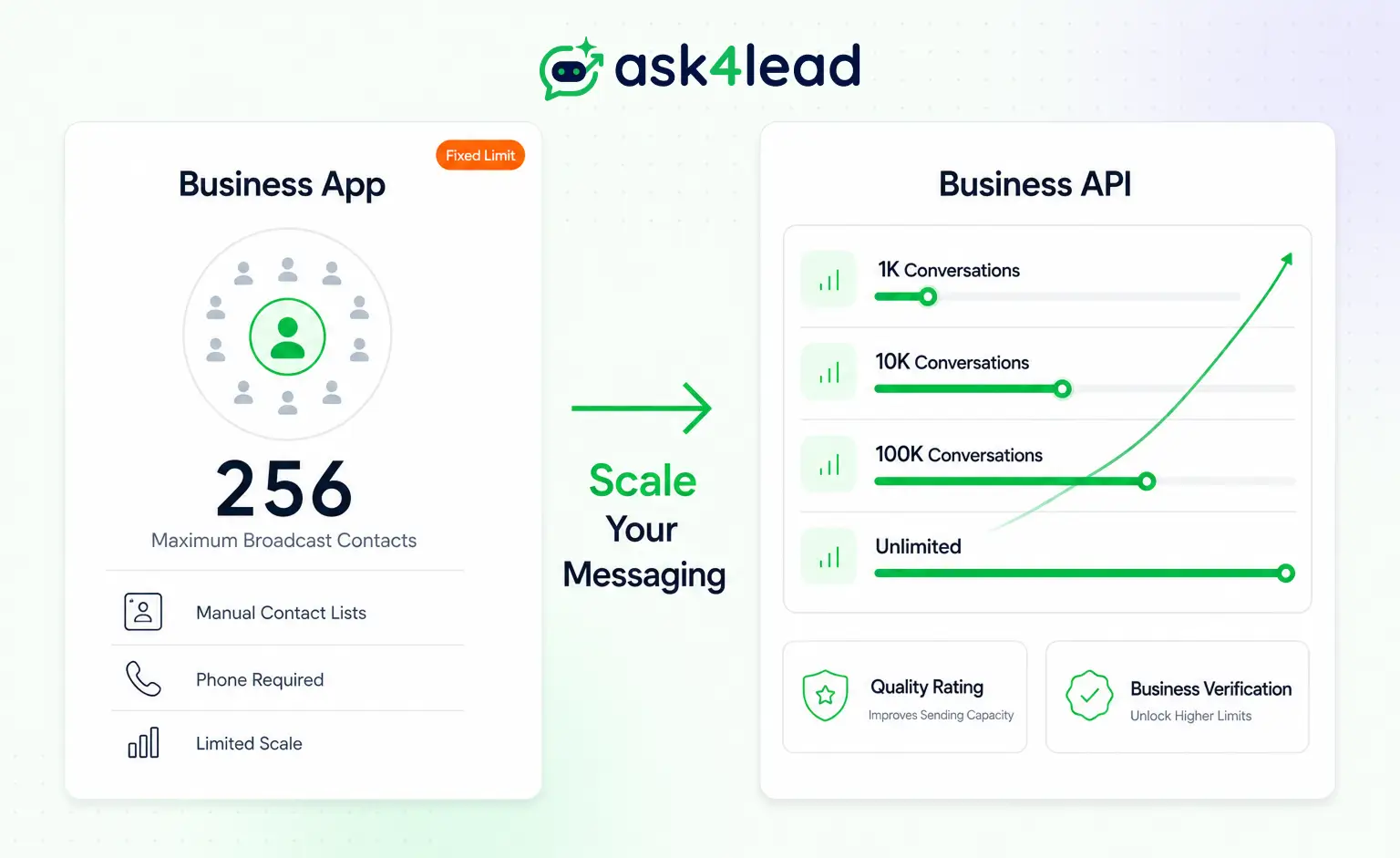
Two products, two completely different rule sets:
- Business App: broadcast lists capped at 256, reaching only people who saved your number.
- Business Platform (API): daily limits that grow as you build trust, for people who opted in (agreed to hear from you).
Most confusion online comes from mixing these two up. Sort out which one you use and the rules get simple.
The hidden reality: your broadcast reaches fewer people than you think
On the WhatsApp Business App, a contact only receives your broadcast if they have saved your number in their phone. If they messaged you once but never saved you, your broadcast never lands.
This is the rule that quietly wastes most broadcasts:
- A customer messages you, and you reply.
- They never save your number.
- You add them to a broadcast list of 256.
- Your broadcast skips everyone who did not save you.
You think you reached 256 people. You may have reached 40. Broadcast lists were built for people who already know you, not for marketing to people who barely know your business.
WhatsApp Business App broadcast limits
The WhatsApp Business App allows up to 256 recipients per broadcast list. You can create multiple lists, but each is capped at 256, and there is no reliable way to raise that number inside the app.
Key rules of the app, per WhatsApp’s own broadcast rules:
- 256 recipients per broadcast list.
- Multiple lists allowed, each still capped at 256.
- Recipients must have saved your number to receive the message.
- Replies arrive as private one-to-one chats, not a group.
- No fixed daily cap, but heavy sending to people who did not opt in triggers blocks and reports.
Who it suits: a small shop messaging regulars, a coaching class updating parents, a salon confirming appointments. If your list is bigger than 256 or made of leads who never saved you, you have already outgrown the app.
Why does WhatsApp cap broadcasts at all?
WhatsApp protects the inbox. Its entire value is that a message feels personal, not like a promotional dump. Limits and quality ratings exist to keep spam out and trust in.
That reframes the whole topic. The limit is not an obstacle to beat. It is a signal of how much WhatsApp trusts your number, and that trust is something you earn.
WhatsApp Business API messaging limits (the tiers)
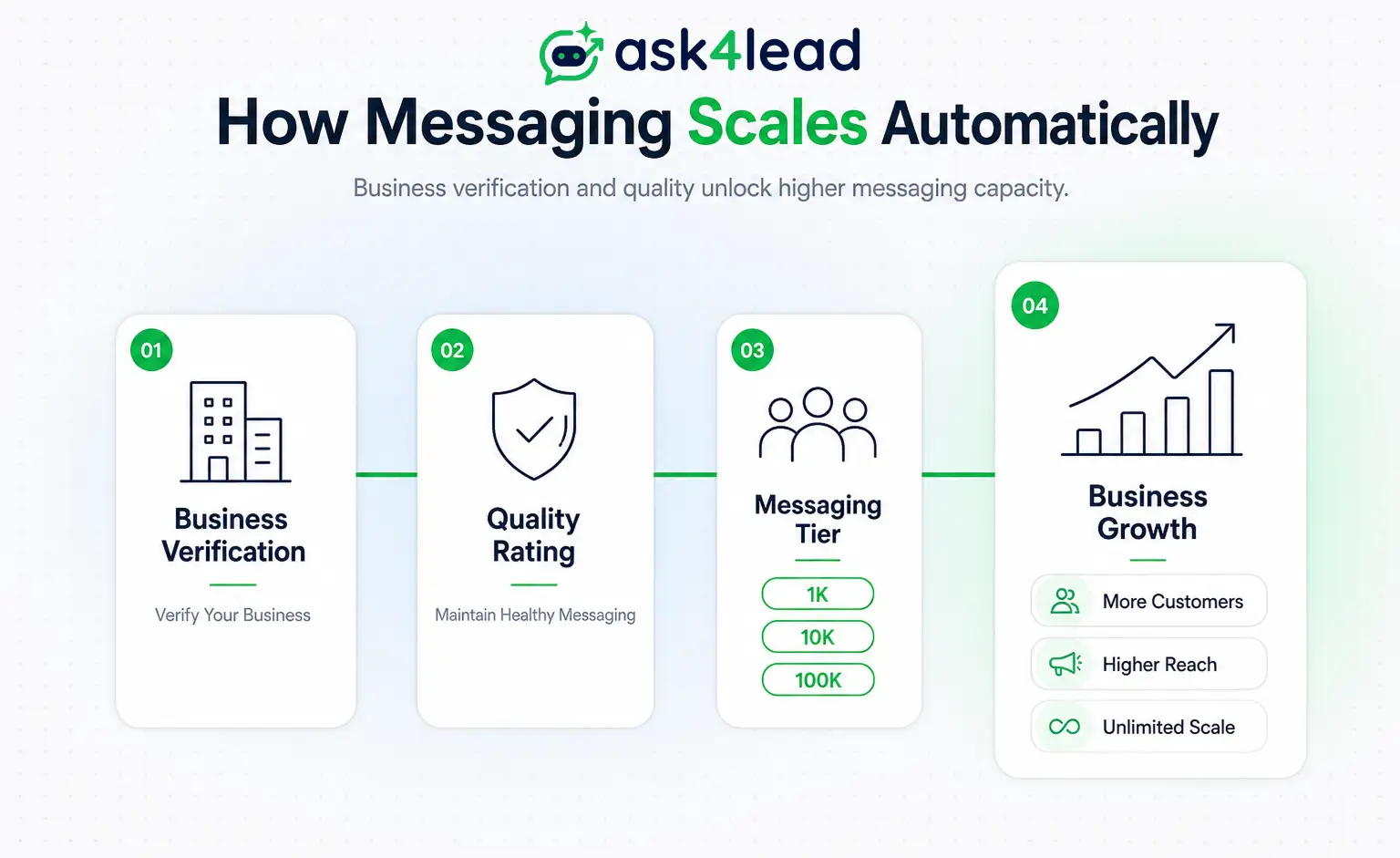
The WhatsApp Business Platform replaces broadcast lists with messaging tiers, which are simply sending levels. Once your business is verified (Meta confirms it is a real business), you start at 1,000 unique customers per 24 hours and move up automatically as your quality stays high.
| Tier | Unique customers per 24 hours | How you reach it |
| Unverified | 250 | Before business verification |
| Tier 1 | 1,000 | Complete Meta business verification |
| Tier 2 | 10,000 | Scale with a good quality rating |
| Tier 3 | 100,000 | Scale with a good quality rating |
| Tier 4 | Unlimited | Consistent high quality at volume |
What the tiers actually mean, per Meta’s official messaging limits:
- You send pre-approved message templates (message formats WhatsApp checks in advance) to people who opted in, not to a saved-contact list.
- Upgrades are automatic. WhatsApp raises your limit when, within any 7 days, you message about twice your current tier and your quality rating (WhatsApp’s score for your number) stays Medium or High.
- Even inside your tier, Meta caps how many marketing templates one user receives, so no list gets bombarded.
This is where a purpose-built platform earns its place. Ask4Lead runs on the official API, manages your opt-ins and template approvals, and keeps every send inside your current tier, so you are not tracking any of it by hand.
Because the API charges you per conversation (a 24-hour chat window with one customer), plan your volume against your [WhatsApp credits](/feature/whatsapp-credits/) before a big send.
What actually gets your number limited or banned
Volume alone rarely triggers a ban. What hurts you is a low quality rating, driven by users blocking you or reporting your messages as spam. A low rating can freeze your tier or restrict the number.
The real risk factors, in order:
- Messaging people who never opted in.
- Sending pushy promotions with no value.
- High block and report rates in a short window.
- Ignoring your quality rating until it turns red.
Meta also watches how fast you scale. A brand-new number that blasts thousands on day one looks nothing like organic growth, and it draws scrutiny under WhatsApp’s Business Messaging Policy. Warm a new number up gradually instead of going all-in on the first campaign.
Your quality rating (High, Medium, Low) is the score Meta trusts. Protecting it matters more than any single limit. Ask4Lead surfaces your WhatsApp account health in real time, so you catch a falling rating before it costs you the number, and a shrinking sales pipeline later.
How to actually increase your WhatsApp broadcast limit
You cannot buy or trick a higher limit. You raise it by earning trust, the same way Meta measures it.
The honest path:
- Move from the app to the WhatsApp Business API once you outgrow 256.
- Complete Meta business verification, where Meta confirms your business is genuine, to unlock Tier 1 at 1,000 messages a day.
- Collect real opt-ins with a name and a clear reason to message.
- Send useful, well-written WhatsApp template messages, not spam.
- Watch your quality rating and slow down the moment it dips.
- Let volume and quality compound, and Meta lifts your tier for you.
If that sounds like a lot to manage, it is the exact workflow Ask4Lead automates for you: connecting your WhatsApp account in a few clicks, collecting opt-ins, getting your templates approved, and tracking your tier, all in one place.
Broadcast list vs group vs API broadcast
| Method | Reach | Best for | The catch |
| Broadcast list (App) | 256, saved numbers only | staying in touch with regulars | limited, no real analytics |
| Group | up to 1,024 members | community chat | everyone sees each other, wrong for marketing |
| API broadcast | tiered up to unlimited | scaling opt-in campaigns | needs verification and quality |
For most growing businesses, the API broadcast is the only one that scales without turning customers off.
What happens after you hit send (the part most guides skip)
A broadcast is only half the job. The moment it goes out, replies start coming in, and that is where most businesses lose the lead. A one-way blast with no plan for responses wastes the reach you worked to earn.
This is Ask4Lead’s core difference. Instead of a button menu, its humanized AI sales assistant answers every reply in plain English, asks the right follow-up, and qualifies the lead before a human steps in.
- Every reply gets a fast, human-sounding answer, day or night.
- Hot leads land in a shared team inbox with full context, not just a name and number.
- Reps see exactly what needs them today instead of scrolling through chats.
- Reports and analytics show which broadcast actually drove replies and revenue.
Reach gets people to raise their hand. What you do next decides whether they buy.
Send more without risking your number
Ready to broadcast at scale the safe way? Ask4Lead runs opt-in WhatsApp campaigns on the official API, tracks your quality rating in real time, and replies to every response with a humanized AI agent, not a button menu. Start free with 100 AI credits and send your next broadcast without gambling your number.
FAQs
1. How many people can I broadcast to on WhatsApp?
On the Business App, 256 per broadcast list, and only those who saved your number. On the API, from 250 up to unlimited per 24 hours, based on your tier.
2. How do I increase my WhatsApp broadcast limit?
Move to the API, verify your business, message only opted-in users, and keep your quality rating high. Upgrades then happen automatically.
3. Will I get banned for broadcasting?
Not for volume alone. Bans follow spam reports, blocks, and a low quality rating. Send only to people who opted in.
4. Is there a daily WhatsApp broadcast limit?
The app has no fixed daily cap but punishes spammy sending. The API limits unique users per 24 hours by tier.
5. What is the difference between a broadcast list and the API?
A broadcast list is capped at 256 and needs saved numbers. The API scales to unlimited using opt-in template messages.
6. What is the easiest way to send WhatsApp broadcasts at scale?
Use an official API platform that manages opt-ins, templates, and quality for you. Ask4Lead does this and answers replies with a humanized AI agent, so broadcasts become real conversations.
The bottom line
The WhatsApp broadcast limit is not one number. It is a system that rewards permission and quality over raw reach. The free app caps you at 256 and only reaches people who saved you.
The Business Platform removes that ceiling, but only for businesses that earn trust with clean opt-ins and a high rating.
Chase the shortcut and you lose the number. Build it right and the limit stops being your problem.
Start with real opt-ins, protect your quality rating, and let Meta raise the ceiling for you. For the next step, read our guide on sending bulk WhatsApp messages without getting banned and our WhatsApp marketing strategies.
