
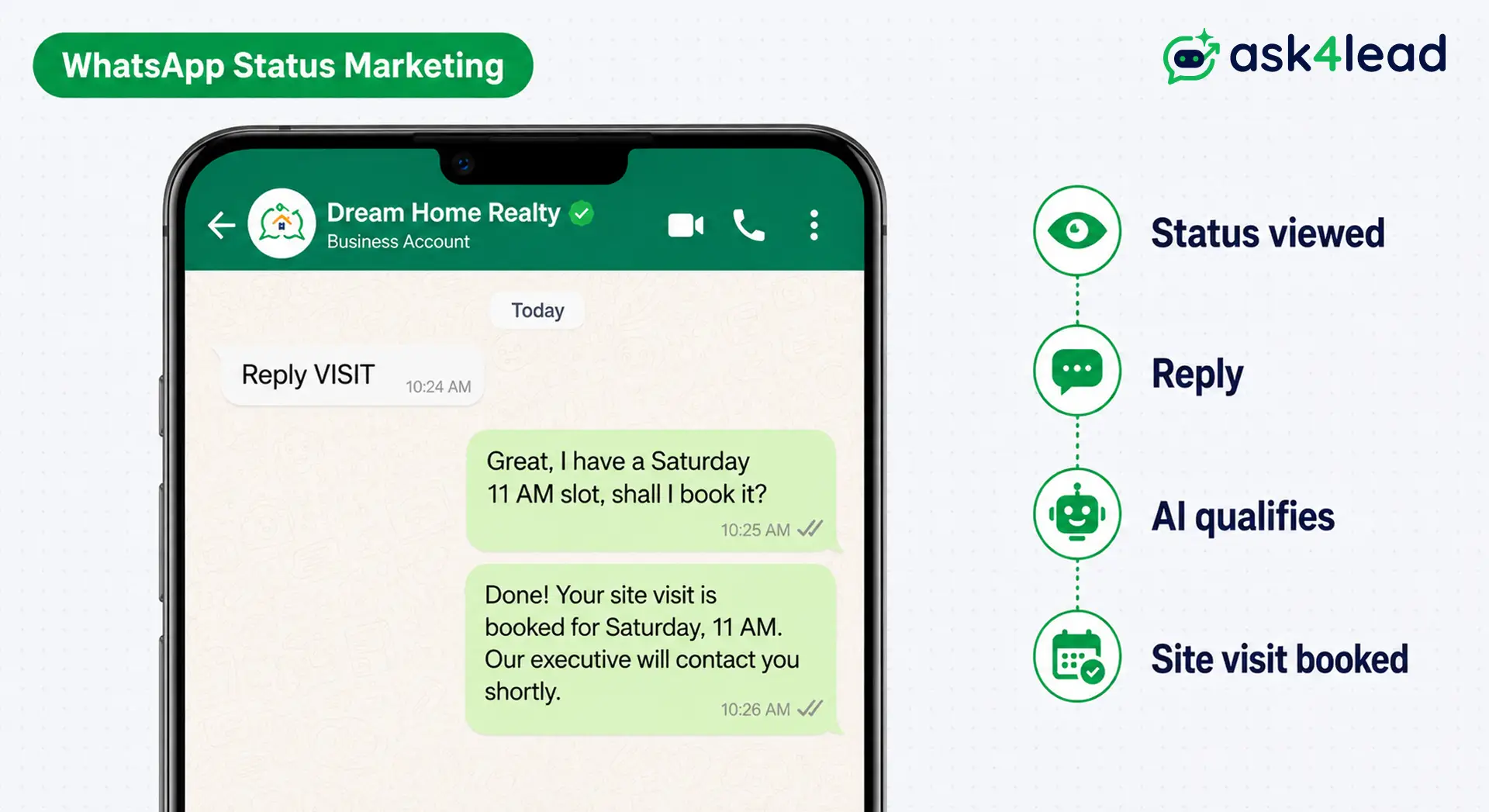
WhatsApp Status marketing is using WhatsApp Status, the photo, video, and text updates in the Updates tab that vanish after 24 hours, to share offers, proof, and reminders with people who saved your number.
It is free, and a viewer is a tap away from replying to you. It is a warm-audience channel, so it works inside a wider WhatsApp marketing strategy, not as a replacement for cold outreach.
Quick answer: Post 3 to 4 organic Status updates a week to stay in front of saved contacts (customers, enquiries, walk-ins). Always end a Status with a reply prompt like “Reply BOOK”, because a reply opens a free 24-hour chat window. Use paid WhatsApp Status Ads in Meta Ads Manager only when you need to reach people who never saved your number.
Key takeaways
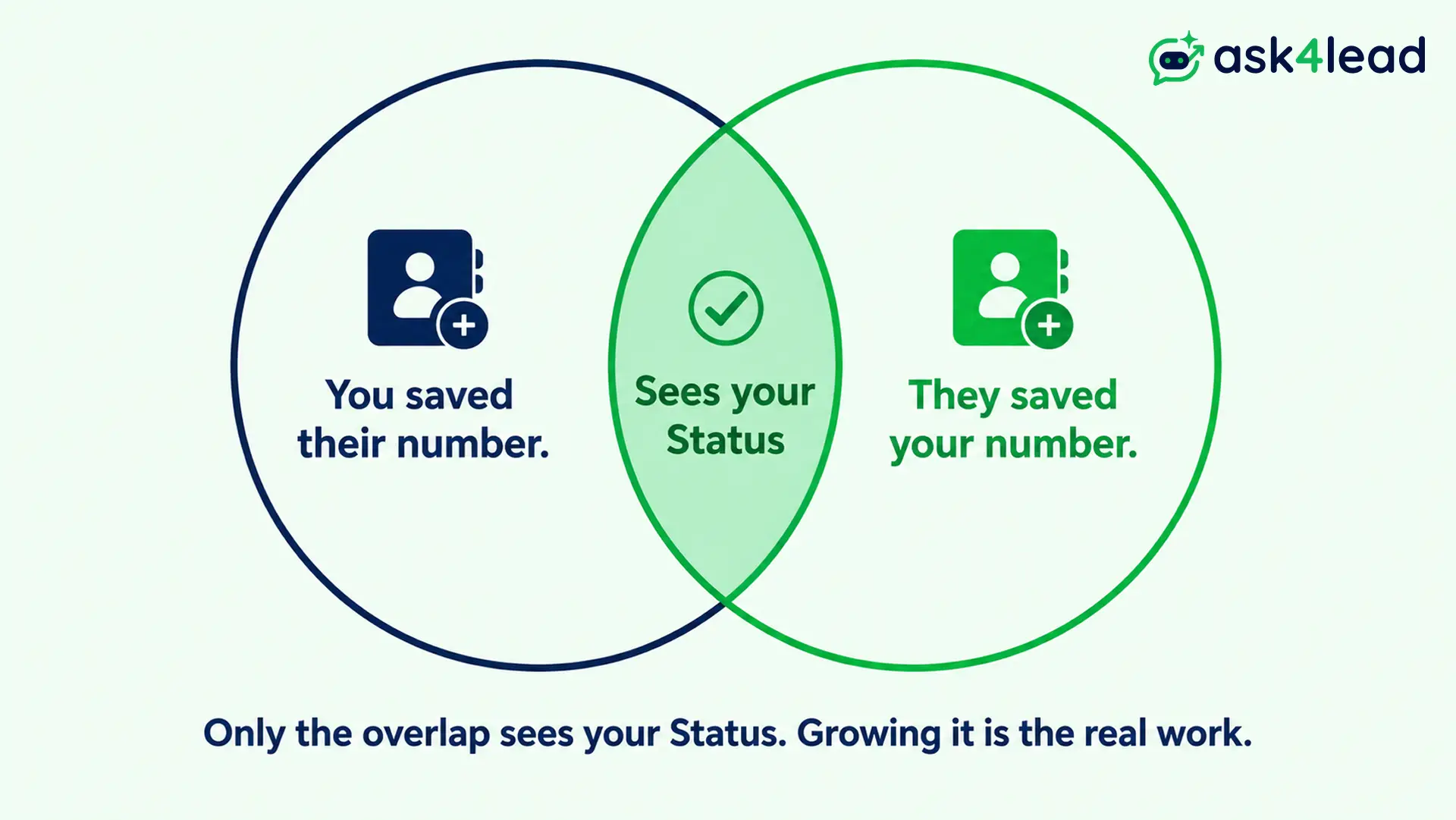
- Status marketing works on warm contacts only. Both people must have each other’s number saved for a Status to show.
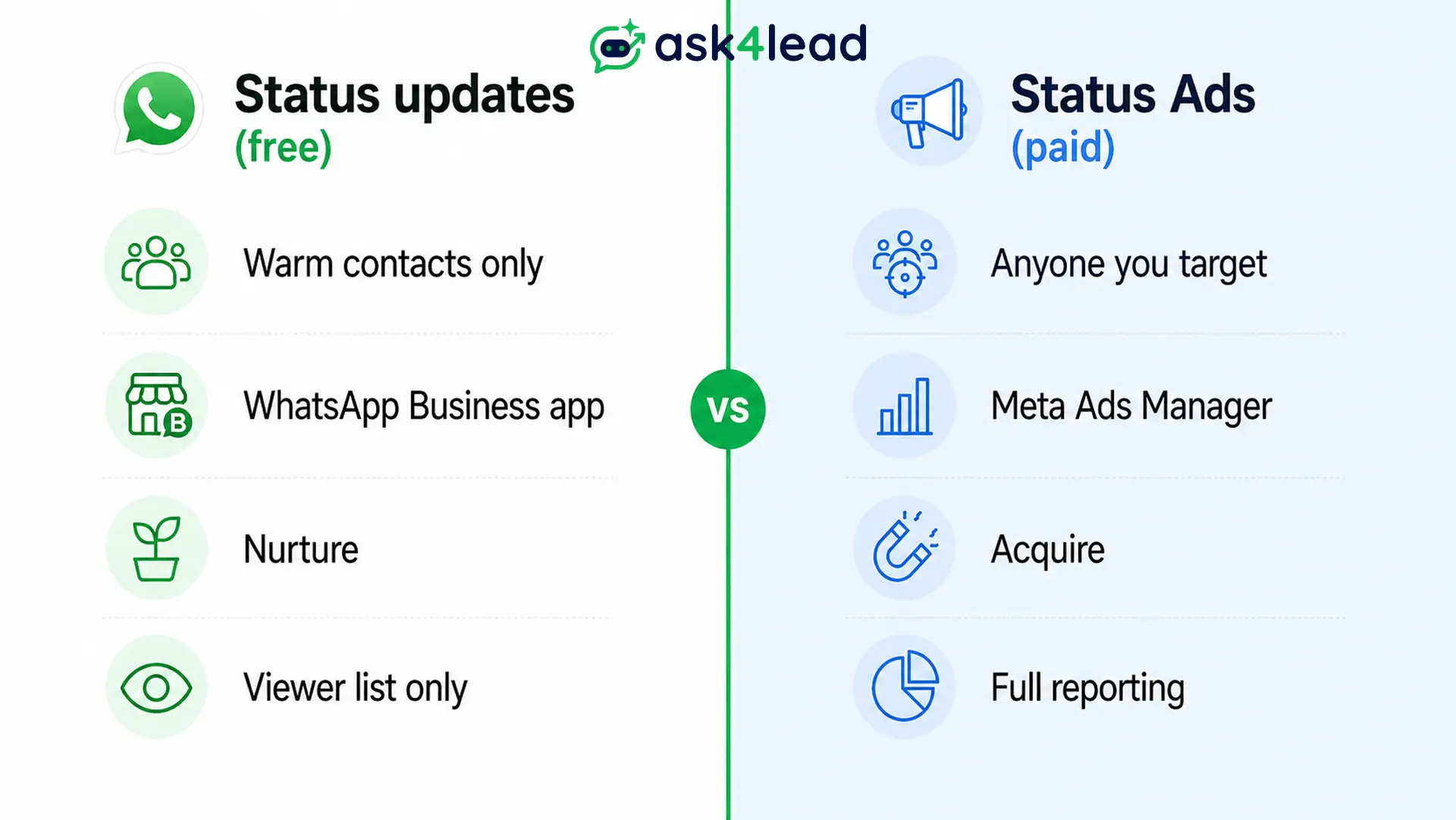
- Free Status and paid Status Ads are different products. Status updates nurture; Status Ads, run in Meta Ads Manager, acquire.
- Post 3 to 4 times a week, mixing proof and tips with offers, roughly 3 helpful posts per 1 promotional post.
- Every Status needs a verb: reply, tap, book, ask. A reply reopens the 24-hour messaging window.
- Status has no analytics beyond a viewer list. You track results by what happens in the chat afterwards.
- Growing reach by adding unknown numbers is the fastest way to a ban. Keep Status to an opted-in audience.
- The sale happens in the reply, not the Status. A missed or slow reply wastes the view.
What WhatsApp Status marketing is, and the 3 things people confuse it with
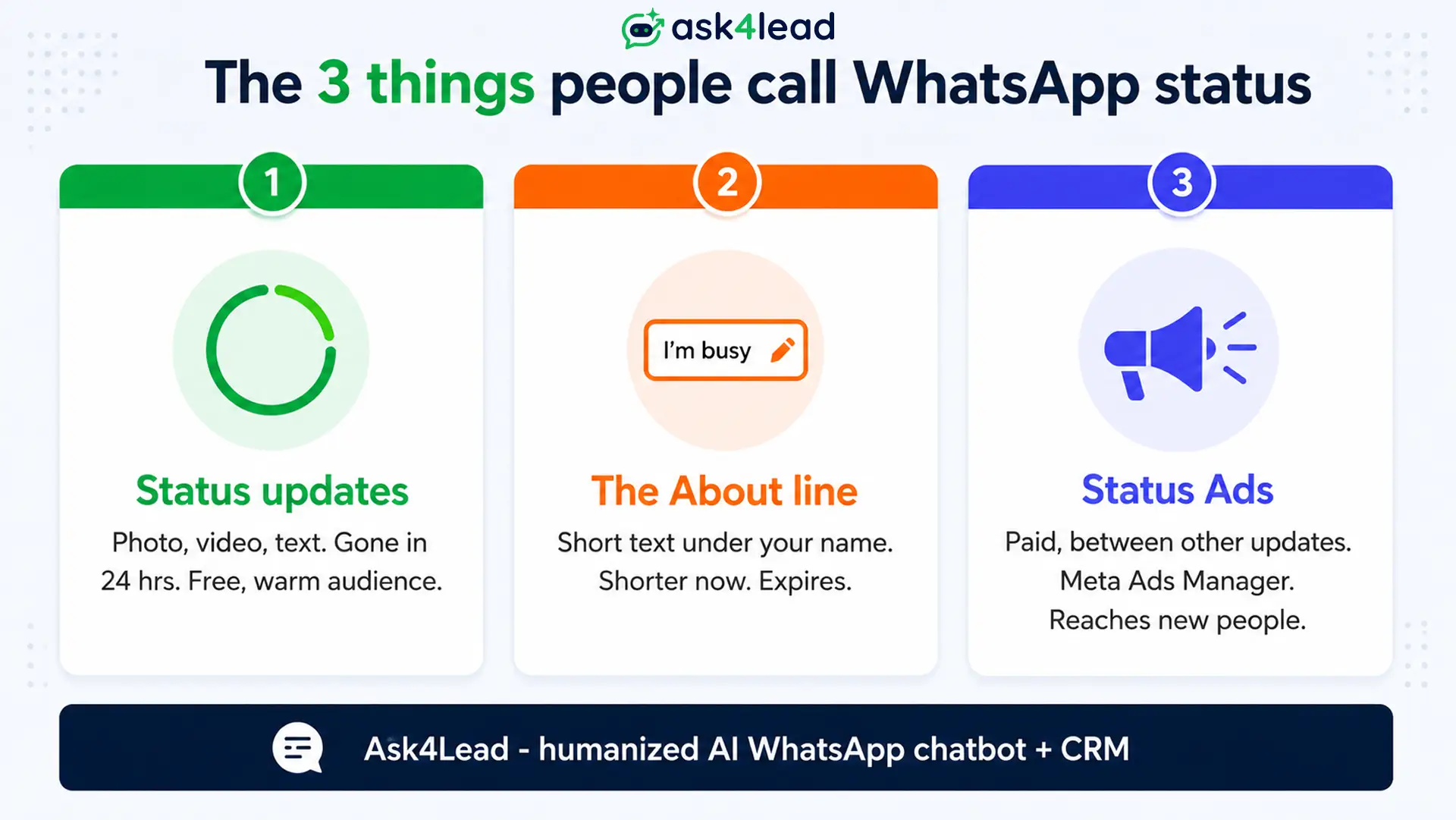
WhatsApp Status marketing means promoting your business through Status, WhatsApp’s version of Stories.
Businesses use it for flash sales, testimonials, behind-the-scenes clips, and daily tips. The catch is that “status” points to 3 separate features, and mixing them up wastes budget.
Status updates vs the About line vs Status Ads
These are 3 features with 3 different jobs:
| Feature | What it is | Marketing job |
| Status updates | Full-screen photo, video, or text in the Updates tab, gone in 24 hours | Your main free channel |
| The “About” line | Short text under your name, for example “Open 9 to 6” | Weak now; WhatsApp shortened it and made it expire |
| WhatsApp Status Ads | Paid ads Meta places between other people’s Status updates | A separate paid product in Meta Ads Manager |
When a customer says “I saw it on your status,” they almost always mean a Status update, not an ad.
Why Status posting lives in the WhatsApp Business app, not the API
You post Status from the free WhatsApp Business app. You do not need the WhatsApp Business API, which is Meta’s interface for messaging at scale.
This matters because moving a number fully onto the API can disable Status posting, which is why owners fear that automating WhatsApp means losing Status.
A coexistence setup runs the app and the API on the same number, so automation and Status live together.
Who WhatsApp Status marketing works for
Status marketing pays off when you already have saved contacts and a reason to reach them often. Businesses that sell once and never again get little from it.
The Businesses with repeat buyers, appointments, or long decision cycles get the most.
Businesses that get the most from Status
- Repeat-purchase sellers: bakeries, salons, boutiques, grocery, supplement brands
- Appointment businesses: clinics, tutors, coaches, repair services
- High-consideration local sales: real estate, interiors, cars, events
- Anyone who collects numbers naturally: through billing, enquiries, or click-to-chat links and QR codes
When Status is the wrong channel
- You have very few saved contacts and need new customers this week.
- Your audience will not save an unknown business number, so they never see the Status.
- You need campaign reporting. Status gives you a viewer list and nothing else.
- You expect Status to close sales on its own. It supports the sale; the reply closes it.
A pattern shows up across small-business forums: owners lean on Status because it feels free and personal, then give up when views stay flat. The views were always capped by how many people saved their number.
What to post on WhatsApp Status as a business
Post content a viewer would happily watch from a friend: specific, useful, and human. Status rewards a real photo of a real product and punishes stiff, ad-shaped graphics. Keep visuals vertical at 1080 by 1920 pixels and videos under 30 seconds.
1. 7 Status content types that pull replies
- Product in use, filmed on a phone, not a studio shot
- 1 customer result as a 2-line story (“Priya booked Monday, closed Thursday”)
- A real limited-time offer with an end time and “Reply YES to book”
- Behind the scenes: packing orders, a delivery run, setup
- A poll or this-or-that question that invites a tap
- Your most-asked question, answered in 1 Status
- A countdown, 1 Status per day, for a launch, sale, or restock
2. How often to post, and the best times
| Goal | Frequency | Sequence |
| Stay top of mind | 3 to 4 a week | Tip, result, restock, weekend nudge |
| Push 1 offer | 1 to 2 a day for 3 to 5 days | Teaser, live, “24 hours left”, last call |
| Launch | 2 a day for launch week | Sneak peek, launch, first orders, review |
| Quiet week | 1 minimum | A small update so viewers keep checking |
Most audiences check Status around lunch and again in the evening. Skipping a whole week is worse than a plain post, because people stop opening the tab.
3. A copy-ready 1-week Status plan
| Day | Post |
| Monday | A quick tip customers actually ask about |
| Tuesday | 1 customer result, told as a short story |
| Wednesday | A poll (“Which do you want next, A or B?”) |
| Thursday | Offer goes live, with a clear reply prompt |
| Friday | “24 hours left” reminder on the offer |
| Saturday | A behind-the-scenes clip |
| Sunday | Answer the question you got most that week |
4. WhatsApp Status ad copy samples
Keep the text short, name the offer, and tell the viewer what to send back:
- “20% off all cakes till Sunday 8 PM. Reply CAKE to order.”
- “2 flats left in the Whitefield project. Reply VISIT for a weekend site tour.”
- “New batch starts 15th. Reply DEMO for a free trial class.”
A reply to any of these opens a 24-hour window where you can answer freely. Ask4Lead’s AI Sales Assistant picks up that reply in seconds, answers the obvious questions, and captures what the person wants before a rep opens the chat.
The Status limits and risks most guides skip
Status has 4 quiet limits that catch new marketers: a saved-number ceiling, no analytics, a fragile About line, and a ban risk if you treat it like a bulk tool.
Knowing them upfront saves months of guessing why reach is low.
1. The saved-number ceiling on your reach
For a person to see your Status, they need your number saved and you need theirs saved. If only one side has saved the other, the Status does not show.
That is why a Status audience grows slowly. Prompting customers to save your number, with a small incentive, is a core growth task, not an afterthought.
2. There is no Status analytics dashboard
You can see who viewed each Status. You cannot see taps, replies tied to a post, or reach over time.
So you measure Status by what happens next in the chat. A shared inbox for multiple agents keeps every reply in one place, and Ask4Lead tags each one so you can tell a browser from a buyer without reading every thread.
3. The About line is no longer a marketing slot
The profile “About” line used to be a handy always-on spot for hours or a tagline. WhatsApp has changed it repeatedly, and it now holds fewer characters and expires.
Keep your offer, hours, and links in your business profile fields and catalog instead, where they stay put.
4. How growing Status reach can get your number banned
Status itself is low risk. The risk is the behaviour around it: adding hundreds of unknown numbers so they can see your Status, then messaging them.
That reads as spam to WhatsApp’s automated systems, and even legitimate businesses have lost numbers with no appeal. Keep Status to opted-in contacts, watch your number quality rating, and read how bulk sends get numbers banned before you scale.
5. Why paid “status shoutout networks” waste your budget
A cottage industry offers to post your ad to 50 or more strangers’ Status for a small fee. The views are real people, but the wrong people.
They did not choose to hear from you, they will not save your number, and the reach is gone in 24 hours. That budget does more on a targeted Status Ad or a proper WhatsApp lead generation campaign.
WhatsApp Status updates vs WhatsApp Status Ads
Free Status updates and paid WhatsApp Status Ads share a screen but solve different problems. Updates nurture people who already know you.
Status Ads buy attention from people who do not.
1. What WhatsApp Status Ads are and how they work
WhatsApp Status Ads are full-screen image or video ads shown between the Status updates a user is already watching. Meta rolled them out from 2025 and widened availability through 2026.
You build them in Meta Ads Manager, pick an awareness or WhatsApp objective, then select WhatsApp Status as the placement.
A tap opens a chat with your business or your website. They are close cousins of click-to-WhatsApp ads and use the same billing.
2. Organic Status vs paid Status Ads, side by side
| Factor | Status updates (organic) | Status Ads (paid) |
| Cost | Free | Auction pricing (CPM or CPC) |
| Who sees it | Only mutual saved contacts | Any WhatsApp user you target |
| Set up in | WhatsApp Business app | Meta Ads Manager, verified business |
| Best for | Warming a known audience | Reaching new people |
| Result | A reply in an existing chat | A new chat or site visit |
| Reporting | Viewer list only | Full campaign data |
3. How to choose, or run both together
- Under 500 saved contacts and you need customers now: start with Status Ads or click-to-WhatsApp ads.
- A contact base that grows from real customers: post Status updates consistently.
- Budget plus an audience: run Status Ads to acquire, Status updates to nurture, and a CRM to catch every reply.
How to set up WhatsApp Status marketing, step by step
Setting up Status marketing takes an afternoon. The work is choosing what to post, making replies easy, and answering fast.
1. Build your saved-contact base first
- Switch to the WhatsApp Business app and complete your profile, catalog, and hours.
- Give people a reason to save your number: a line on the bill, a counter QR code, a link in your bio.
- Collect opt-in and consent properly so you can send broadcasts later without risk.
2. Post, prompt a reply, answer within minutes
- Plan a week of Status from the content types above and batch-shoot the visuals.
- End every Status with a prompt: “Reply PRICE”, “Reply BOOK”, “Tap to chat”.
- Answer within minutes, because a Status viewer’s intent fades fast.
Slow replies are where most Status leads die. Ask4Lead can send smart follow-ups so a viewer who asked “price?” at 9 PM still gets a real answer.
3. Turn Status replies into tracked, qualified leads
- Route every reply into a single workspace instead of personal phones.
- Let AI qualify the reply for need, budget, and timeline.
- Push the lead into a pipeline stage so no follow-up slips.
This is the gap Status leaves open. Ask4Lead, a humanized AI WhatsApp chatbot and CRM, catches each Status reply, holds the opening conversation in plain English, keeps you in control with one-click takeover, and hands your rep a full-context lead.
It is how you turn WhatsApp into a sales machine instead of a missed-call log.
FAQs
1. How do I advertise my business on WhatsApp Status?
Post free Status updates from the WhatsApp Business app to contacts who saved your number, or run paid WhatsApp Status Ads in Meta Ads Manager to reach new people. Most businesses do both.
2. What should I write on a WhatsApp Status ad for my business?
Keep it to 1 line: name the offer, add an end time, and tell the viewer what to send back. Example: “20% off till Sunday, reply SHOP to order.”
3. Can you earn money from WhatsApp Status?
Not directly, since WhatsApp does not pay for Status. Businesses earn from it by driving replies, bookings, and repeat orders from people who already know them.
4. Do customers need to save my number to see my Status?
Yes. Status shows only when both people have each other’s number saved. Growing that saved-contact list is the main lever for Status reach.
5. How often should a business post on WhatsApp Status?
3 to 4 times a week to stay visible, rising to 1 to 2 a day during a promotion or launch. Posting nothing for a week is the bigger mistake.
6. Is WhatsApp Status marketing against WhatsApp’s rules?
Posting to opted-in contacts is fine. Adding large numbers of unknown contacts to grow reach, then messaging them, is what triggers spam detection and bans.
Conclusion: Status gets the view, the conversation gets the sale
WhatsApp Status marketing is a nurture channel that keeps you visible to people who chose to save your number. Post 3 to 4 times a week, always add a reply prompt, and keep the audience opted in.
Use Status Ads separately to reach new people, and lean on Status where email marketing would land slower and colder.
The channel only pays off if those replies get answered. That is where small teams lose out: replies scatter across personal phones, follow-ups slip, and owners cannot see what staff sent.
Ask4Lead catches every WhatsApp Status reply in a single shared inbox, qualifies it with AI, keeps you in control, and moves each lead through a 9-stage pipeline.
