
Quick answer: There are three ways to send bulk messages on WhatsApp in 2026 the standard Broadcast List (256 contacts, free), the native Marketing Messages feature (500 contacts, free, no number-saving required), and the WhatsApp Business API (scales to unlimited, requires opt-in consent and Meta-approved templates). Using unofficial tools gets accounts permanently banned. Here’s the full breakdown.
Key Takeways: How to Send Bulk Messages on WhatsApp in 2026
- Under 256 contacts, everyone has saved your number: Use the standard Broadcast List inside WhatsApp Business App. Free, instant, zero setup.
- Up to 500 contacts, contacts may not have saved your number: Use WhatsApp’s native Marketing Messages feature. Free, no BSP required, 7,000 messages per 30 days.
- 500+ contacts, need scheduling, analytics, CRM, and automation: Use the WhatsApp Business API through a Meta-authorized BSP. Requires approved templates, opt-in consent, and a BSP/CRM platform.
- Never use unofficial bulk-sender tools. Permanent account bans are not recoverable no appeal, no number rescue.
- The broadcast is only half the work. WhatsApp averages a 45% response rate. If you send to 500 people, 225 will reply. How fast you respond to those 225 conversations and how well you qualify them determines whether the campaign generates revenue or just delivery receipts.
- Respond within 5 minutes. Leads contacted in under 5 minutes convert 21x more than those reached after 30 minutes. The only way to hit that window at scale is with a shared inbox and an AI layer that handles the first reply automatically.
What Are WhatsApp Bulk Messages?
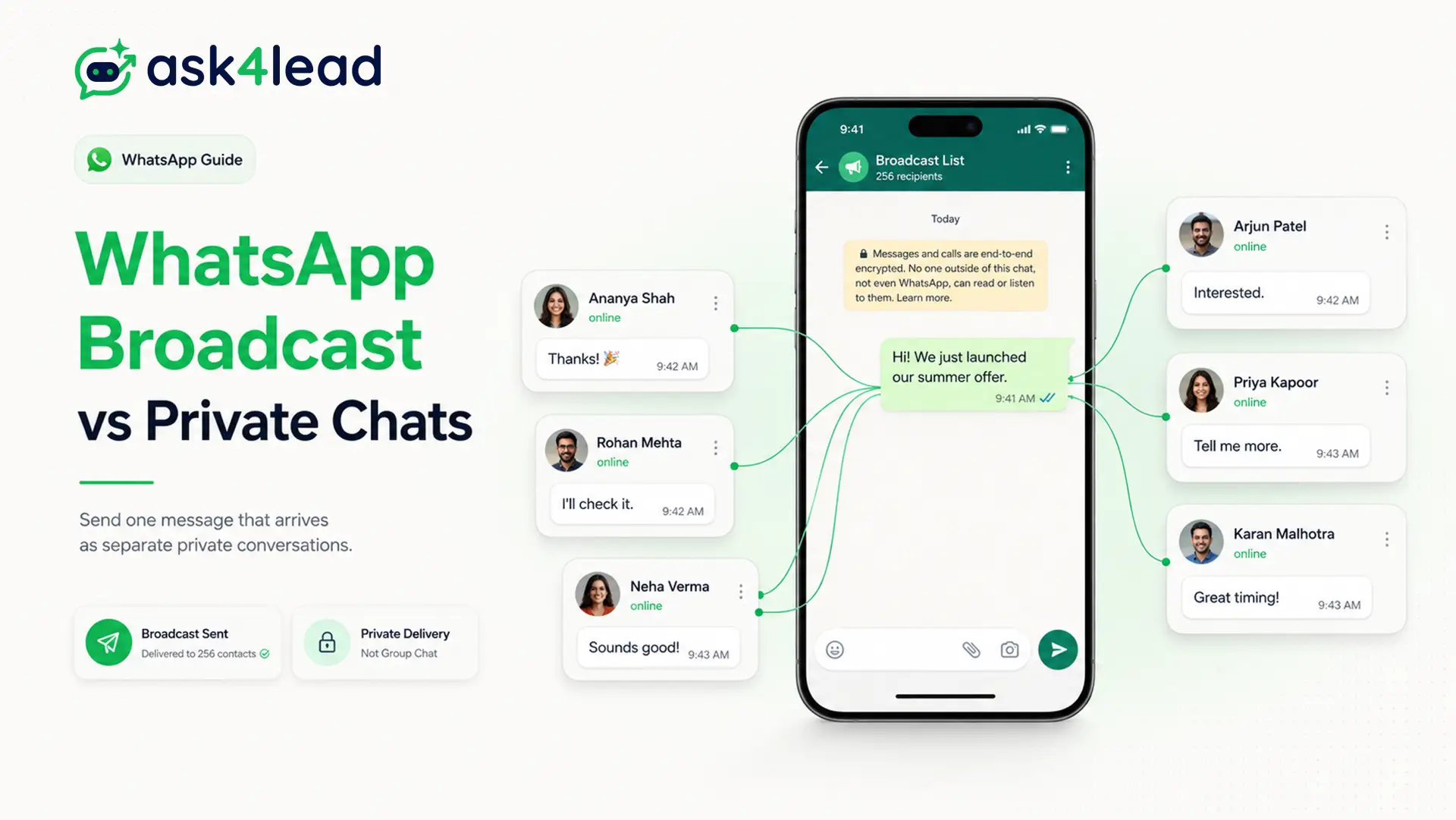
A WhatsApp bulk message is a single message sent simultaneously to a large group of contacts through a broadcast mechanism. Each recipient receives it as a private, individual conversation they see no other recipients and cannot see each other’s replies.
Businesses use bulk WhatsApp messaging for:
- Product launches and promotional campaigns
- Appointment reminders and payment alerts
- Lead reactivation and win-back sequences
- Order updates and delivery notifications
- Policy changes and customer announcements
- Event invitations and early-access offers
WhatsApp bulk messaging is different from a WhatsApp group chat in a group, everyone sees everyone else’s messages. In a broadcast, each contact gets a private thread. This is what makes bulk WhatsApp messages feel personal and why engagement rates are so much higher than email newsletters.
There are three distinct methods to send bulk messages on WhatsApp in 2026. Most guides only explain two of them and miss the one that removes the “must have your number saved” restriction entirely.
Why WhatsApp Beats Every Other Channel for Bulk Outreach (2026 Data)
Before choosing how to send bulk messages on WhatsApp, it helps to understand why the channel outperforms alternatives by a significant margin:
| Metric | WhatsApp Business | SMS | |
| Open Rate | 95–98% | 20–25% | 82–90% |
| Click-Through Rate | 45–60% | 2–6% | 19–36% |
| Response Rate | ~45% | <5% | ~19% |
| Time to Open | Under 5 minutes | Hours to days | 3–5 minutes |
| Conversion Rate | 10–60% (flow-based) | 2–5% | 7–10% |
Three statistics that change how you should think about WhatsApp bulk messaging:
- Responding to a WhatsApp lead within 5 minutes makes them 21x more likely to convert than waiting 30 minutes (source: Lead Hero AI research, 2026). Most businesses still average 4+ hours on manual WhatsApp.
- Businesses that respond within 5 minutes see a 391% increase in conversion rates compared to those that respond after an hour.
- 284 million businesses now have active WhatsApp Business accounts a 42% increase from 2025. If you are not doing bulk outreach on WhatsApp, your competitors likely already are.
The channel performance advantage is real. The difference between businesses that win and those that lose on WhatsApp is not the broadcast it is what happens to the replies in the first 5 minutes after delivery.
3 Methods Compared: Broadcast List vs. Marketing Messages vs. Business API
Most competitor guides compare only two options the WhatsApp Business App broadcast and the Business API. There is a third option that Meta added natively to the Business App that almost nobody is writing about. Here is the complete picture:
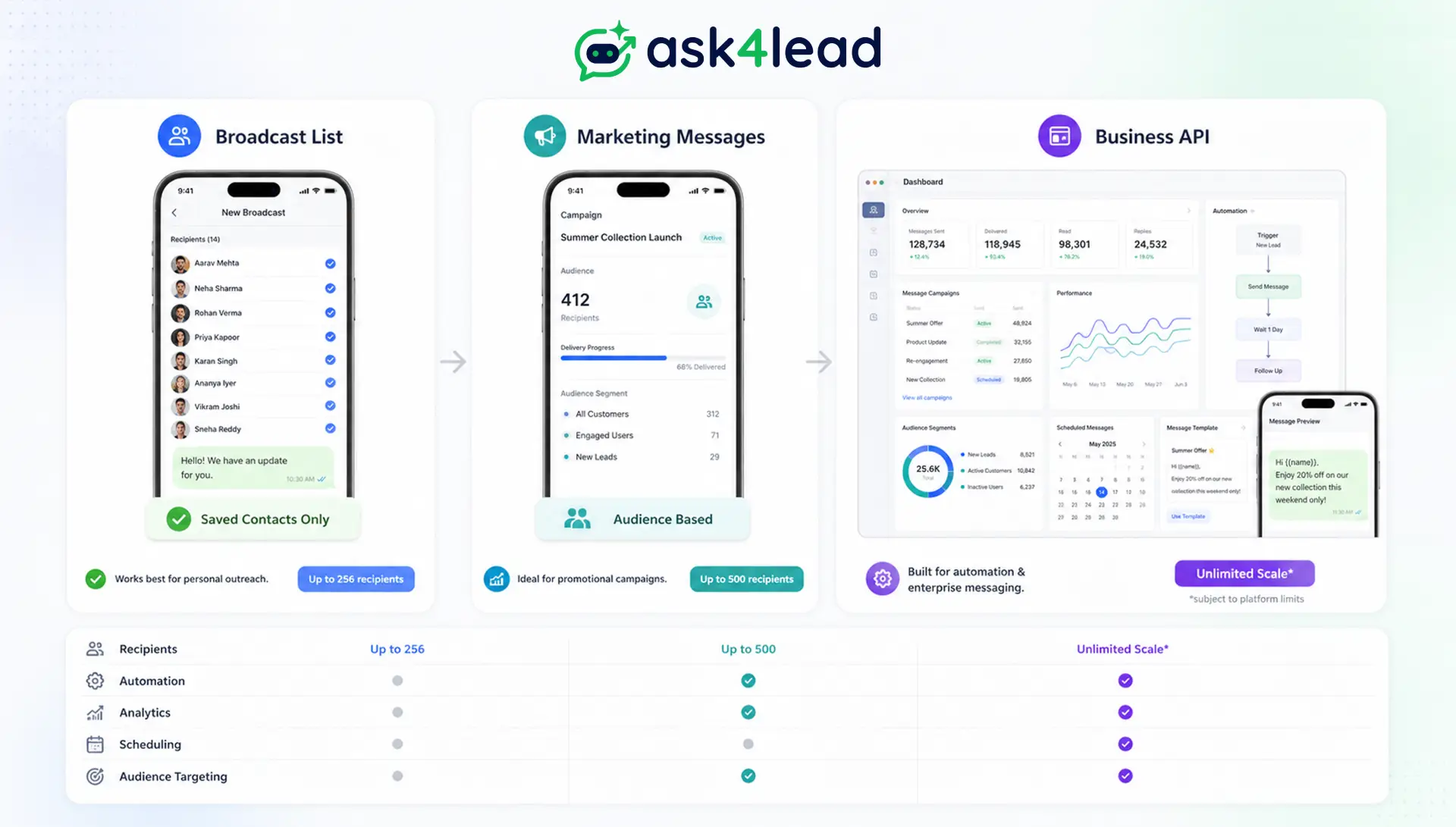
| Feature | Broadcast List | Marketing Messages | WhatsApp Business API |
| Contacts per send | Max 256 | Max 500 | 250 → Unlimited (tiered) |
| Recipient must save your number? | Yes ❌ | No ✅ | No ✅ |
| Meta template approval required? | No | No | Yes |
| Explicit opt-in required? | Implied (saved contact) | Yes | Yes |
| Personalization (name, variable fields) | Manual only | Limited | Full dynamic variables |
| Scheduling capability | No | No | Yes |
| Delivery & read analytics | None | Basic | Full (sent, delivered, read, replied) |
| CRM integration | No | No | Yes |
| Automated follow-ups on replies | No | No | Yes (with a WhatsApp CRM) |
| Monthly cost | Free | Free (inside WhatsApp Business App) | Per-conversation fee + BSP/CRM plan |
| Ban risk | High if spam-reported | Medium | Low when compliant |
| Best for | Small teams, existing saved contacts | Growing businesses, lists up to 500 | Scale, automation, revenue tracking |
The key insight: The Marketing Messages feature is what most guides miss completely. It sits inside the free WhatsApp Business App, raises your ceiling to 500 contacts, and removes the “must have your number saved” requirement without needing any API setup or BSP.
Method 1: How to Send Bulk Messages via WhatsApp Broadcast List (256 Contacts)
The Broadcast List is the free built-in option inside the WhatsApp Business App. It sends to up to 256 contacts who have your number saved.
Step-by-Step: Creating a Broadcast List
- Open the WhatsApp Business App on your phone.
- Go to the Chats tab and tap the three-dot menu (⋮) in the top right corner.
- Tap “New Broadcast.”
- Tap the “+” icon and select up to 256 contacts. Only contacts who have saved your number will receive the message others are silently excluded.
- Tap “Done,” then compose your message.
- Press send. Each recipient gets your message as a private 1-to-1 conversation.
Broadcast List Limitations You Need to Know
- Recipients who haven’t saved your number never receive the message with zero notification to you
- No scheduling messages send immediately or you wait
- No delivery analytics inside the WhatsApp app
- High spam-report rate from unqualified recipients can trigger account restriction
- No CRM integration every reply is a manual conversation
When to use it: Quick updates to existing customers who have your number saved. Not for new lead outreach.
Method 2: WhatsApp Marketing Messages 500 Contacts, No Number-Saving Required (Most Guides Miss This)
Meta added a native Marketing Messages feature inside the WhatsApp Business App. Most competitor articles have not covered it yet. Here is what it does:
- Send to up to 500 contacts per message double the broadcast list ceiling
- Recipients do not need to have saved your number
- Monthly cap: 7,000 messages per 30-day period, with 250 messages allowed in your first 24 hours of using the feature
- Contacts must have opted in through WhatsApp’s marketing opt-in flow
- Available inside the Campaigns section of the WhatsApp Business App no BSP, no API setup
1. Is There a Free Way to Send Bulk WhatsApp Messages to More Than 256 Contacts?
Yes, and most businesses do not know it exists.
The native Marketing Messages feature inside the WhatsApp Business App doubles the ceiling to 500 contacts per send, removes the “must have your number saved” restriction, and costs nothing.
No BSP signup, no API setup, no monthly fee. The only requirements are an opted-in contact list and a WhatsApp Business App account.
2. Marketing Messages vs. Broadcast List: The Critical Difference
The Broadcast List has been around since WhatsApp launched. The Marketing Messages feature is newer.
If you are still telling your team “you can only broadcast to 256 contacts” or “they must have saved your number” that advice was accurate for the old broadcast list. It is not accurate for Marketing Messages.
When to use it: If your opted-in list is between 257 and 500 contacts and you are not ready to set up a WhatsApp Business API integration. For anything above 500 contacts, you need the API.
3. What “Frequency Capping” Means for Your Campaigns
Meta limits how many marketing messages any single WhatsApp user can receive across all businesses per day roughly 2 marketing messages per user per day from all senders combined.
This is a cross-business limit, not a per-sender limit. Your high-quality, relevant messages are prioritized over low-quality ones from other senders when Meta applies this cap.
Method 3: How to Send Bulk WhatsApp Messages via Business API (Step-by-Step)
The WhatsApp Business API is the right tool when your contact list exceeds 500 people, when you need CRM integration and automation, or when you want to turn a broadcast into a lead conversion system.
Step 1: Connect Your Number via a Meta-Authorized BSP
You access the WhatsApp Business API through a Business Solution Provider (BSP) a Meta-authorized company that manages the API connection. Your BSP handles webhooks, message routing, and Meta compliance on your behalf.
The connection takes one business day when you have:
- A Meta Business Manager account
- A phone number not already registered on WhatsApp
- Business verification documents (registration certificate or equivalent)
Step 2: Import Your Contact List in the Right Format
Upload a CSV file with phone numbers in international format: country code + area code + number, no spaces, no special characters, no leading zeros.
- India:
919876543210 - UK:
447911123456 - UAE:
971501234567
Tag contacts during import. Tags like “Real Estate Inquiry,” “Cold Lead,” “Healthcare – Clinic Inquiry,” or “Past Customer” let you target specific audience segments. Irrelevant bulk messages sent to un-segmented lists generate the spam reports that cause account restrictions.
Step 3: Create and Submit a Message Template for Meta Approval
All outbound API messages require Meta-approved templates. Templates are:
- Categorized as marketing, utility, or authentication
- Reviewed by Meta typically approved within 24 hours
- Rejected if they are purely promotional with no clear value to the recipient
What gets rejected: “Check out our sale: [Link]”
What gets approved: “Hi {{1}}, your quote for {{2}} is ready. Here are the details: {{3}}”
The difference is specificity. A message that references something the recipient asked about is utility. A message that references only what you want to sell is spam.
Step 4: Add Dynamic Personalization Variables
Templates use placeholder variables mapped to your contact list fields at send time. Map {{1}} to first name, {{2}} to property address or product name, {{3}} to a personalized link.
A campaign of 2,000 contacts sends 2,000 uniquely personalized messages in one operation. Personalization reduces spam report rates significantly contacts are far less likely to report a message that references their specific enquiry.
Step 5: Schedule the Campaign and Manage Replies
Set your send time and date. Messages deliver at the throughput rate your current tier supports. Replies land as individual conversations in your team’s shared inbox not a group chat. Monitor delivery rate, read rate, and your quality rating in the Meta Business Manager and your BSP dashboard.
Critical: If your quality rating drops to yellow, pause the campaign before it hits red. A red rating means Meta restricts your sending fix the audience or template quality before resuming.
WhatsApp Business API Messaging Limits in 2026: What Actually Changed
Most competitor guides are still quoting outdated numbers. Here is the current reality, sourced directly from Meta’s developer documentation:
1. Portfolio-Level Limits Not Per Phone Number
- Since late 2025, WhatsApp Business API limits apply at the business portfolio level.
- All phone numbers within your Meta Business Manager account share one aggregate daily messaging capacity.
- Running three WhatsApp numbers under one business manager means they pool their limits, not multiply them.
2. Current Tier Structure (2026)
| Tier | Unique Contacts / 24 Hours | Requirement to Progress |
| Unverified | 250 | Default for all new portfolios |
| Tier 1 | 1,000 | Complete Meta Business Verification + green quality rating |
| Tier 2 | 10,000 | Consistent volume at Tier 1 + sustained green quality rating |
| Tier 3 | 100,000 | Consistent volume at Tier 2 + sustained green quality rating |
| Unlimited | No cap | Sustained Tier 3 performance with no blocks or spam reports |
3. The 6-Hour Re-evaluation Rule (Most Guides Get This Wrong)
- Meta re-evaluates tier eligibility every 6 hours not every 24–48 hours as older articles state.
- A business demonstrating consistent volume and quality can progress through tiers faster.
- A quality drop also triggers a faster response in the other direction which is why real-time quality monitoring matters.
4. The US Marketing Exception (April 2025 Onwards)
- Since April 2025, Meta has paused delivery of marketing template messages to US (+1) phone numbers through the WhatsApp Business API.
- Utility and authentication templates still deliver to US numbers.
- If your primary audience is US-based, plan around this restriction until Meta lifts it.
5. Portfolio Pacing for Large Campaigns
- For high-volume sends, Meta may implement portfolio pacing delivering your campaign in batches.
- If early batches generate high negative feedback (spam reports, blocks), Meta pauses subsequent batches automatically.
- This is not a ban; it is a circuit breaker. Review your quality rating, adjust the audience or template, then resume.
How to Send Bulk WhatsApp Messages Without Getting Banned
WhatsApp’s spam detection runs on quality signals, not on volume alone. A business sending 50,000 compliant messages to opted-in contacts operates without restriction. A business sending 300 messages to cold contacts who report them as spam gets flagged.
The Rules That Actually Protect Your Account
- Only message opted-in contacts. “Opted in” means the person explicitly agreed to receive WhatsApp messages from your business not just that they sent you a message once or filled out a web form. Document your opt-in source for every contact you import.
- Use Meta-approved templates for all outbound campaigns. Off-template outbound messages through the API are not permitted for marketing. Attempting them gets flagged automatically.
- Monitor your quality rating at least weekly. Green = good. Yellow = caution pause new campaigns and investigate before continuing. Red = Meta has already restricted your account. Check via WhatsApp Manager or your BSP dashboard.
- Warm up new numbers gradually. Start at 50–100 contacts per day for the first 7–10 days on any new WhatsApp Business API number. Jumping to the 250-contact daily limit immediately on a new number raises spam signals.
- Always include a clear opt-out mechanism. The most effective: a specific reply keyword like “STOP” that your system tracks and auto-removes from future campaigns. Continuing to message opted-out contacts is the fastest route to an account ban.
- Never use unofficial bulk-sender software, Chrome extensions, or WhatsApp blasting tools. These are detectable by WhatsApp’s automated systems. Account bans from unofficial tools are permanent no appeal process, no number recovery.
What Happens to Your WhatsApp Quality Rating When Contacts Mark Your Messages as Spam?
WhatsApp has not published an exact spam rate cutoff. Based on patterns observed across the industry, a block or spam-report rate above 0.3–0.5% of your send volume in a 24-hour window starts triggering quality rating drops.
If you send to 1,000 contacts and 5 report your message as spam, that is 0.5%. Your quality rating changes to yellow first a warning you can still act on.
If the rate continues, it drops to red and Meta restricts your outbound sending. This is why audience segmentation and message relevance matter more than volume management or clever copywriting.
The Problem Nobody Talks About: What Happens After You Send
Most bulk WhatsApp guides stop at “how to send.” The part that actually determines whether your campaign generates revenue is what happens in the first 5 minutes after delivery.
Your lead enquires about a property on WhatsApp at 9pm. Your broadcast goes out at 10am the next day. They read it within 3 minutes 95-98% open rate means most of your contacts do. They reply.
That reply sits unread in a WhatsApp chat until someone on your team opens it. By the time a rep responds, it is been 4 hours. The lead has already visited two competitor sites and scheduled a call with one of them.
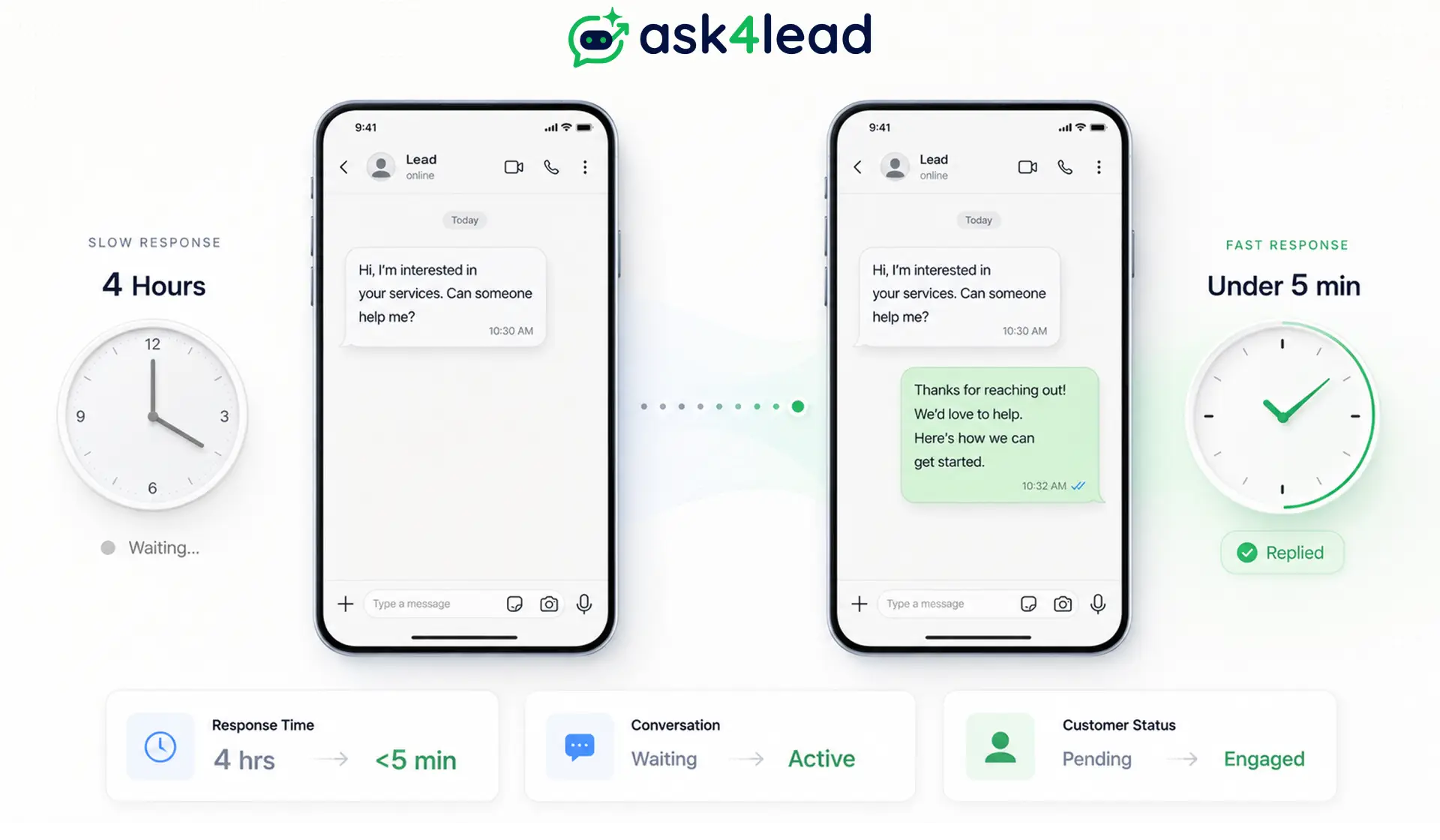
That is not a broadcast problem. That is a reply-handling problem and it is the gap that most businesses using WhatsApp bulk messaging are currently losing revenue to.
How Fast Do You Need to Reply to WhatsApp Leads for the Best Conversion Rate?
- Responding within 5 minutes makes a lead 21x more likely to convert than waiting 30 minutes
- Responding within 5 minutes increases conversion rates by 391% compared to responding after an hour
- Most Indian businesses on WhatsApp average 4+ hours to respond to an inbound message
- When you send to 500 contacts and 45% respond (the average WhatsApp response rate), you have 225 simultaneous conversations that need management within minutes of delivery
The broadcast is the easy part. The 225 replies arriving in 10 minutes that is where the revenue either gets captured or gets lost.
How ask4lead Handles the Full Bulk Messaging Workflow
ask4lead is a WhatsApp CRM built on the official WhatsApp Business API. It handles both sides of the bulk messaging equation the campaign itself and every reply that comes back.
Here is how each feature connects to the bulk messaging workflow:
1. Campaign Broadcasting
- WhatsApp Campaigns: Upload contacts, select a Meta-approved template, and schedule broadcasts with full tracking. Delivery, read, and reply rates visible in real time. No separate BSP dashboard needed everything is in one place.
- WhatsApp Templates: Sync your Meta-approved templates instantly. Manage template status, reuse templates across campaigns and individual chats, and create new submissions without leaving ask4lead.
- Cloud Integration: Connect your existing WhatsApp Business number via Meta Embedded Signup. ask4lead handles all webhooks automatically no developer configuration required.
2. How Do You Qualify WhatsApp Leads Automatically When They Reply to a Broadcast?
- Shared Team Inbox: Every reply from your broadcast campaign lands in one shared inbox. All team members see all conversations with full message history. No lead falls through the cracks because it landed in someone’s personal phone.
- AI Sales Assistant: The AI reads every inbound reply and responds using your company’s actual knowledge base, product catalog, and pricing. A healthcare lead asking about appointment availability gets a real answer in under 60 seconds not “someone will get back to you.”
- Lead Management: Every WhatsApp reply that meets your qualification criteria becomes a structured lead automatically assigned a stage, owner, deal value, and next step. The campaign does not end when messages are delivered; it ends when each lead is either converted or closed.
3. Pipeline Progression and Follow-Up
- 9-Stage Sales Pipeline: Campaign-generated leads move through a visual Kanban pipeline. Real estate leads go from “Enquiry” to “Site Visit Scheduled” to “Negotiation” to “Closed.” Healthcare leads move from “Appointment Request” to “Confirmed” to “Follow-up Required.” Each stage is visible to the whole team.
- Smart Follow-Ups: Set a follow-up date on any lead. ask4lead alerts the assigned rep when it is due. Campaign leads that didn’t convert today automatically get a follow-up sequence without manual scheduling.
- Snooze Conversations: A lead says “not right now, check back in 3 weeks”? Snooze the conversation until the right date. It reappears automatically in the rep’s Work Queue no sticky notes, no missed callbacks.
- Work Queue: Every rep sees a daily prioritized list of pending AI approvals, overdue follow-ups, and scheduled campaign replies. Nothing gets buried under 200 new messages.
4. Which WhatsApp CRM Handles Bulk Campaigns and Reply Management in One Place?
- Account Health Monitor: Track your WhatsApp quality rating and messaging tier in real time. ask4lead sends alerts before issues affect delivery so you never find out your quality rating dropped to red only after a campaign fails.
- Reports and Analytics: View campaign delivery rates, reply rates, lead conversion by source, and team response times. Filter by date range and export to CSV. See which campaign segments convert and which don’t.
- Live Dashboard: Real-time view of your pipeline health, lead sources, team leaderboard, and WhatsApp account status. Know within minutes if a campaign is generating replies or sitting unread.
5. Send the Campaign. Handle Every Reply. Close the Deal.
- Most teams use one tool to blast messages and another to manage replies and leads fall between the two.
- ask4lead combines WhatsApp campaign broadcasting with AI reply handling, shared inbox, and a 9-stage sales pipeline in one workspace.
- Your broadcast goes out, replies are qualified in under 60 seconds, and hot leads hit your rep’s screen before the contact even considers a competitor.
What a Bulk Campaign Looks Like Inside a Real Business
Here is the full flow for a real estate agency running a WhatsApp bulk campaign not a theoretical walkthrough:
The CRM has 680 contacts tagged “Interested – 2BHK – Mumbai – Budget 80L.”
The campaign manager filters for this segment in ask4lead and selects the approved template: “Hi {{1}}, we have 3 new 2BHK listings in {{2}} within your budget. Floor plans and pricing here: {{3}}. Want to schedule a site visit this week?”
The campaign schedules for 10:30am Tuesday. 680 personalized messages go out. By 11am:
- 612 delivered (90% delivery rate)
- 589 read (96% open rate within 30 minutes)
- 274 replied (45% response rate)
The AI Sales Assistant reads each reply and categorizes it:
- 88 contacts: “Yes, send me details / interested in a visit” → tagged as Hot Lead, assigned to senior agent, follow-up call scheduled within 2 hours
- 112 contacts: Asking specific questions (“Is parking included?” / “Which floor?”) → AI answers from the property data sheet, moves them to Warm Lead stage
- 51 contacts: “Not right now” → snoozed 3 weeks, auto-reactivated when the next listing drops
- 23 contacts: Asked to be removed → opt-out processed, contacts removed from all future campaigns
The sales team receives 88 hot leads with conversation history already attached. They are not starting from scratch they know what each person asked about, what the AI answered, and what the next step is. By end of day, 34 site visits are booked.
That is what a bulk WhatsApp campaign looks like when the reply side is handled. Compare it to the same campaign run without a shared inbox or AI layer: 274 replies hitting one WhatsApp Business phone, a team of 3 manually responding throughout the day, most hot leads cooling to warm by the time anyone gets back to them.
WhatsApp Bulk Messaging: Key Terms, Concepts, and Related Topics
People searching for bulk WhatsApp messaging information in 2026 are often asking about related concepts and tools. Here is a quick-reference guide to the most common ones:
1. WhatsApp Marketing Automation
WhatsApp marketing automation refers to rule-based or AI-driven workflows that send WhatsApp messages automatically based on triggers a lead fills out a form, a payment is overdue, an appointment is 24 hours away.
The WhatsApp Business API enables automation; the personal WhatsApp app does not.
2. Conversational Commerce on WhatsApp
Conversational commerce is the practice of completing a sales transaction inside a WhatsApp conversation product recommendation, quote, payment link, and confirmation all handled in one chat thread.
WhatsApp’s 95-98% open rate and 45% response rate make it the highest-converting conversational commerce channel available in 2026.
3. WhatsApp CRM (WhatsApp Customer Relationship Management)
A WhatsApp CRM is a platform that sits on top of the WhatsApp Business API to organize conversations, track leads, assign ownership, and run campaigns all from a single interface.
Unlike using the WhatsApp Business App directly, a CRM converts every WhatsApp conversation into a structured lead record with pipeline stage, owner, deal value, and activity history.
4. Click-to-WhatsApp Ads
Click-to-WhatsApp ads are Meta ads (Facebook or Instagram) that open a WhatsApp conversation directly when clicked bypassing forms and landing pages.
They generate leads at 50–70% lower cost than traditional web forms, according to 2026 benchmarks, because the barrier to starting a conversation is lower than filling out a form.
5. WhatsApp Opt-In
A WhatsApp opt-in is explicit consent from a contact to receive messages from your business on WhatsApp. Opt-ins can be collected via web forms, Click-to-WhatsApp ads, in-app prompts, or QR codes. Without documented opt-in, any outbound campaign regardless of quality violates WhatsApp’s Terms of Service and risks account suspension.
6. Message Delivery Rate vs. Open Rate
On WhatsApp, message delivery rate measures what percentage of sent messages successfully reach the recipient’s phone.
Open rate (also called read rate) measures what percentage of delivered messages were actually opened.
Both metrics are available in the WhatsApp Business API; neither is available in the personal WhatsApp app or the basic Business App’s broadcast feature.
7. WhatsApp Template Message
A WhatsApp template message (also called an HSM: Highly Structured Message) is a pre-approved outbound message format required for all business-initiated conversations through the WhatsApp Business API.
Templates must be submitted to Meta and approved before use.
They can include text, dynamic variables, images, videos, documents, and interactive buttons (call-to-action or quick reply).
8. Lead Nurturing via WhatsApp
Lead nurturing via WhatsApp is the practice of using a structured sequence of WhatsApp messages to move a lead from initial interest to purchase each message adding value, answering a question, or removing an objection.
Unlike email nurturing sequences (15–25% open rate), WhatsApp nurturing runs on 95-98% open rates, meaning almost every message in the sequence actually gets read.
FAQs
1. Is sending bulk WhatsApp messages legal?
Yes, when you use Meta’s official WhatsApp Business API or the native Marketing Messages feature, and have collected explicit opt-in consent from recipients. Sending unsolicited bulk messages through unofficial tools violates WhatsApp’s Terms of Service and results in permanent account bans with no appeal.
2. How many contacts can I message at once on WhatsApp?
- Broadcast List: 256 contacts per list (recipients must have saved your number)
- Marketing Messages: 500 contacts per send, 7,000 per 30 days (no number-saving required)
- WhatsApp Business API: 250/day (unverified) scaling to unlimited (Tier 3+, green quality)
3. What is the WhatsApp Business API messaging limit in 2026?
New unverified business portfolios start at 250 unique contacts per 24 hours. Meta re-evaluates tier eligibility every 6 hours (not 24–48 hours as older guides state). Verified businesses with green quality ratings scale: Tier 1 (1,000/day) → Tier 2 (10,000/day) → Tier 3 (100,000/day) → Unlimited. Limits apply at the portfolio level shared across all phone numbers in your Meta Business Manager.
4. Can I send bulk WhatsApp messages without saving numbers?
Yes, with two methods. The WhatsApp Business API reaches opted-in contacts regardless of whether they have saved your number. The native Marketing Messages feature inside the WhatsApp Business App does the same. The standard Broadcast List only delivers to contacts who have saved your number making it impractical for new lead outreach.
5. What is the best WhatsApp bulk message sender for businesses?
For small businesses with lists under 500, the free Marketing Messages feature inside the WhatsApp Business App is the starting point. For businesses needing CRM integration, AI reply handling, scheduled campaigns, automated follow-ups, and pipeline tracking, a WhatsApp CRM platform like ask4lead that runs on the official API is the right tool. The campaign itself takes minutes to set up the difference is what happens to the 40–50% of contacts who reply.
6. How do I send bulk WhatsApp messages without getting banned?
- Use the official WhatsApp Business API through a Meta-authorized BSP
- Send only to opted-in contacts with documented consent
- Use Meta-approved templates for all outbound campaigns
- Warm up new numbers: start at 50–100 contacts/day for the first week
- Monitor quality rating weekly pause campaigns when it hits yellow
- Include a clear opt-out mechanism in every campaign
- Never use unofficial bulk-sender software, extensions, or blasting tools
7. What happens when contacts reply to a bulk WhatsApp message?
Each reply arrives as a separate private 1-to-1 conversation not a group chat. If you send to 500 contacts and 45% reply (the WhatsApp average response rate), you have 225 individual conversations arriving simultaneously. Without a shared inbox or AI layer, most of these replies go unanswered for hours and that 4-hour delay is where most WhatsApp campaign revenue gets lost.
8. Does slow WhatsApp response time hurt lead conversion?
Yes, severely. Research shows responding within 5 minutes makes a lead 21x more likely to convert than waiting 30 minutes. A 391% increase in conversion rate separates businesses that respond in under 5 minutes from those that respond after an hour. Most businesses on manual WhatsApp average 4+ hours which means the opportunity to win the lead closes before they respond.
9. How do I increase my WhatsApp Business API messaging tier?
- Complete Meta Business Verification (moves you from 250 to Tier 1 at 1,000/day)
- Maintain a green quality rating consistently
- Send at a significant percentage of your current tier capacity regularly (Meta needs to see you using the limit, not sitting at 10% of it)
- Avoid spam reports keep your block rate below 0.3–0.5%
- Meta re-evaluates every 6 hours, so tier progression happens faster than most guides suggest
