
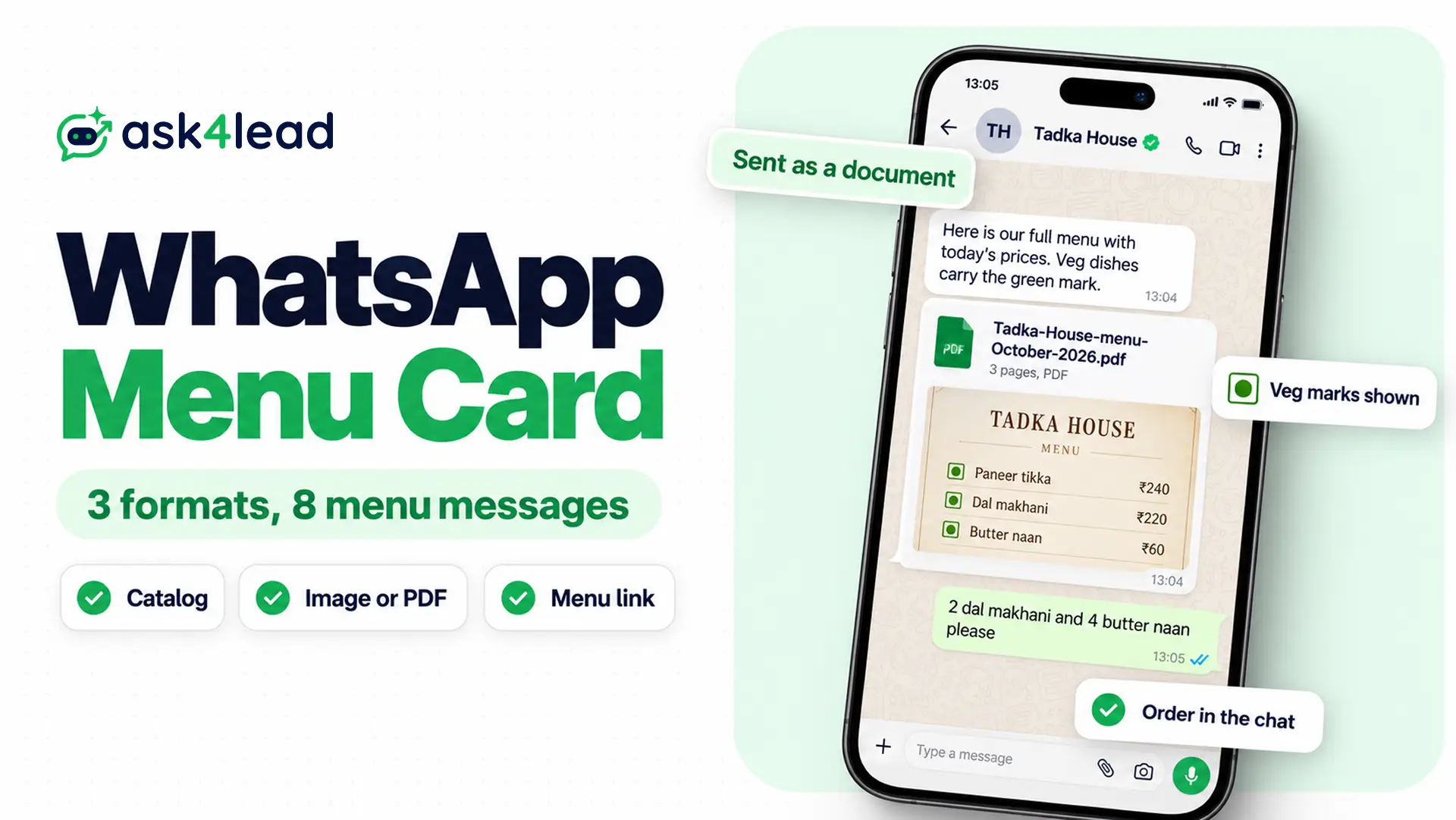
A WhatsApp menu card is your restaurant’s menu in a form customers can open inside WhatsApp. It can be a catalog, an image or PDF, or a link to a web menu. So pick the format by how often your prices change, then send it with a ready WhatsApp menu message.
Below, you get the three formats, a design spec, 8 paste-ready menu messages and the Meta and FSSAI rules. Most of it works in the free WhatsApp Business app. However, some of it needs the WhatsApp Business API, Meta’s paid version for sending at scale.
What is a WhatsApp menu card?
A WhatsApp menu card is any version of your restaurant menu on WhatsApp that a customer can read without leaving the chat.
It comes in three formats, and each one fails in a different place. So the right choice depends on your kitchen, not on looks.
| Format | Suits | Weak spot |
| Catalog in the Business app | A stable menu that rarely changes | Because you edit every price by hand |
| Image or PDF menu card | A designed menu that matches your print card | Since customers cannot tap a dish to order |
| Link to a web menu | Prices that change every day | Because it opens a browser, some people never return |
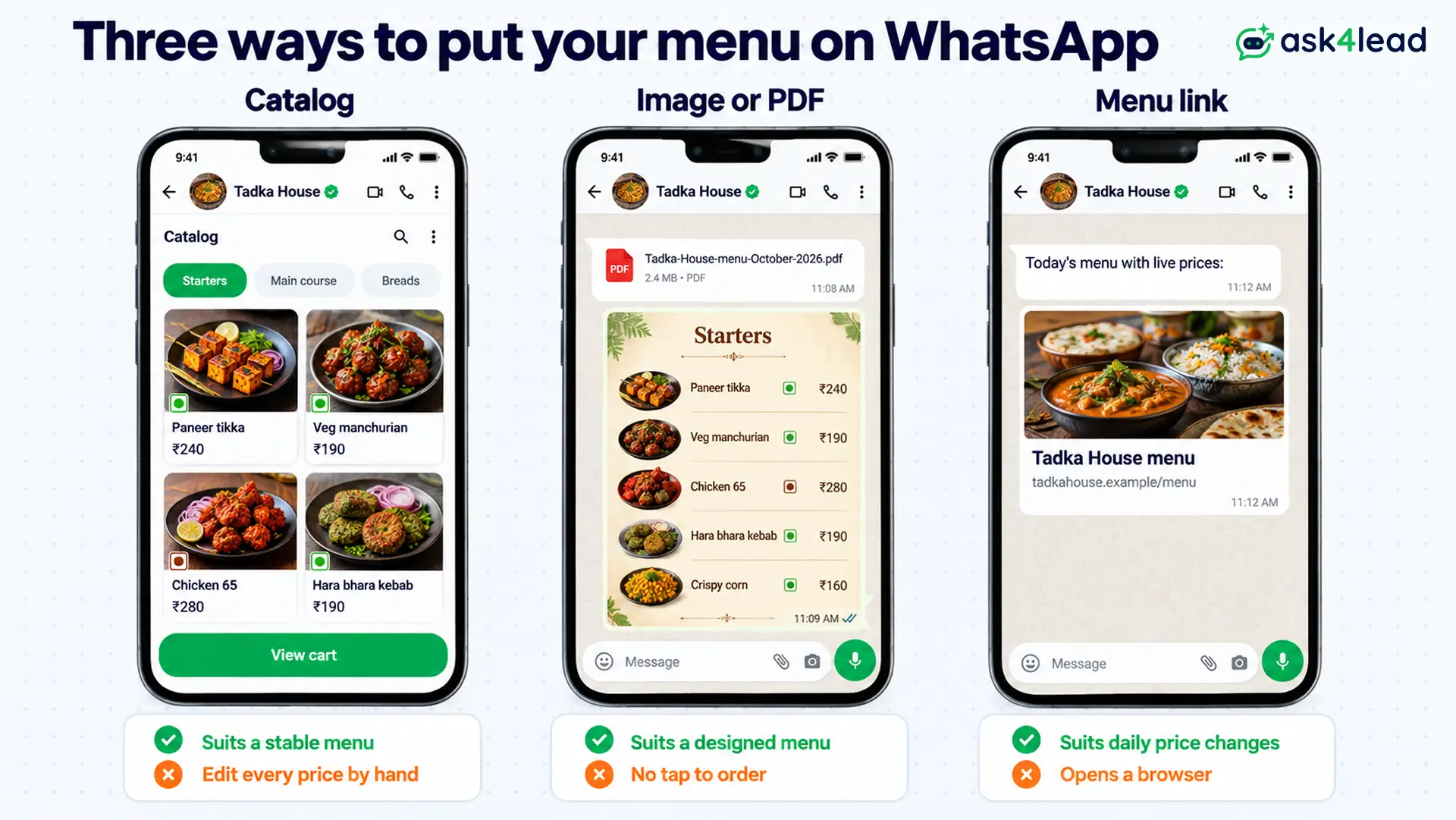
Because the catalog lives inside WhatsApp, customers can add dishes to a cart and send them as one message. WhatsApp’s Business app features page also describes this cart for catalog items.
Which WhatsApp menu card format fits your restaurant?
Your WhatsApp menu card format depends on two questions. First, how often do your prices move? Second, do you take orders in the chat?
So answer those first, and the choice usually makes itself.
Use the catalog when your menu is stable
The catalog suits you if you run a café or cloud kitchen with a fixed menu. Group dishes into collections such as Starters, Mains and Desserts, so the list reads like a menu.
However, WhatsApp reviews each new item before customers can see it. So a lunch special you add at noon may miss lunch. The WhatsApp catalog guide covers the setup steps, item limits and rejection fixes.
Use an image or PDF when the design matters
An image menu card copies the look of your printed card. It also works for a large menu, because one PDF can hold every section.
On the other hand, WhatsApp compresses photos, so small prices turn blurry. Instead, send your menu as a document, and name the file clearly, for example “Tadka-House-menu-October-2026.pdf”.
Use a link when prices change daily
When you change a web menu once, everyone sees the new price. You can then share it in the chat, in your profile and in a click-to-chat link on Instagram.
However, this advice does not apply to drinks if you sell alcohol. In that case, keep them off WhatsApp entirely (see the Meta rules below).
How to design a WhatsApp menu card image people can read
A WhatsApp food menu image fails when your customer has to zoom to read a price. So design it for a phone screen first and a printer second.
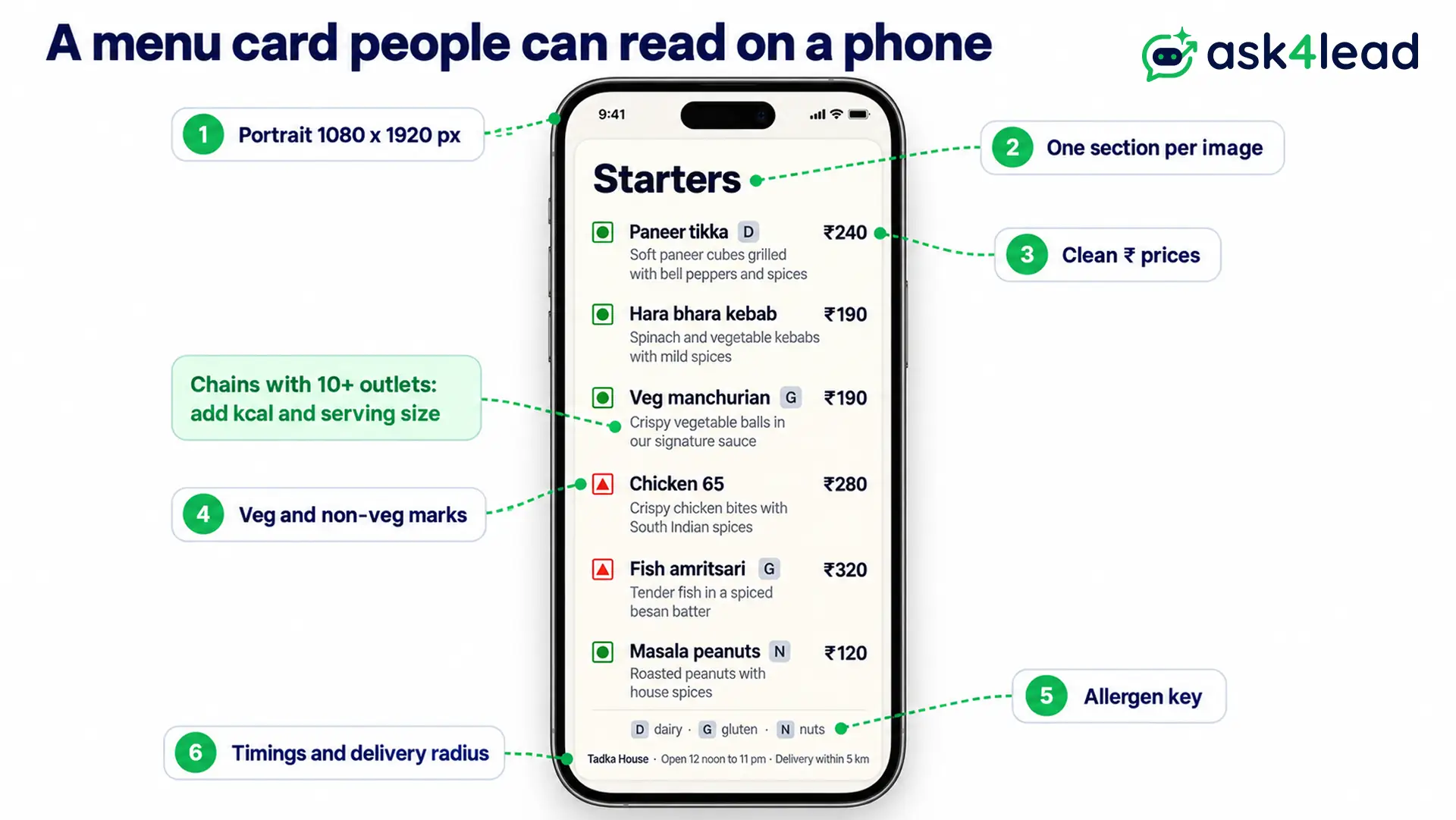
Use this spec for every image version of your WhatsApp menu card:
- Size: 1080 x 1920 pixels in portrait, because that matches a phone screen
- One section per image: starters on one card and mains on the next, so text stays large
- Price format: “₹180”, since decimals and “Rs.” only add clutter
- Veg and non-veg marks: the green or brown symbol beside every dish, as on your print menu
- Allergens: a short symbol key for nuts, gluten and dairy, so guests can check quickly
- Contact line: your outlet name, timings and delivery radius at the bottom
Those marks are not decoration, though. Under FSSAI’s Labelling and Display Regulations, 2020 (regulation 9), every food service establishment must show allergen details and a veg or non-veg logo. These go against items on its menu cards or boards.
Also, chains with a Central Licence or 10 or more outlets must show calories and the serving size. In addition, they must print the line “An average active adult requires 2,000 kcal energy per day, however, calorie needs may vary”. Therefore, keep your WhatsApp copy identical to the printed card.
8 WhatsApp menu messages you can copy
A WhatsApp menu message is the text that delivers your menu card. The first four work in the free Business app. In contrast, samples 5 to 8 need the API or a team inbox.
Replace the words in square brackets with your own details.
1. Greeting message that sends your WhatsApp menu card
The Business app sends a greeting automatically when a new customer starts a chat.
Hi, welcome to [Tadka House]. Tap our catalog to see today’s menu with prices, or reply MENU for the full PDF. We deliver within [5 km] from [12 noon to 11 pm].
2. Quick reply that shares your WhatsApp menu card
Quick replies store messages that you send with a shortcut such as /menu. According to Meta’s help page, a quick reply can include images and videos. So attach your menu card image to it.
Here is our full menu with today’s prices. Veg dishes carry the green mark. Send us the dish names and quantities, and we will confirm the total and delivery time.
3. Away message with your WhatsApp menu card
An away message replies automatically outside your business hours, so a late customer still gets the menu.
Thanks for messaging [Tadka House]. Our kitchen has closed for the night and opens again at [12 noon]. Meanwhile, here is our menu so you can plan your order: [menu link]. Reply with your order, and we will confirm it when we open.
4. Today’s special for Status
Post the day’s special on WhatsApp Status each morning, with the dish photo. Status costs nothing per view, unlike a template sent to each customer.
Today’s special at [Tadka House]: [sarson ka saag with makki roti], [₹210]. Available from [12 noon] until we run out. Reply SAAG to order.
5. Text menu reply inside the open chat
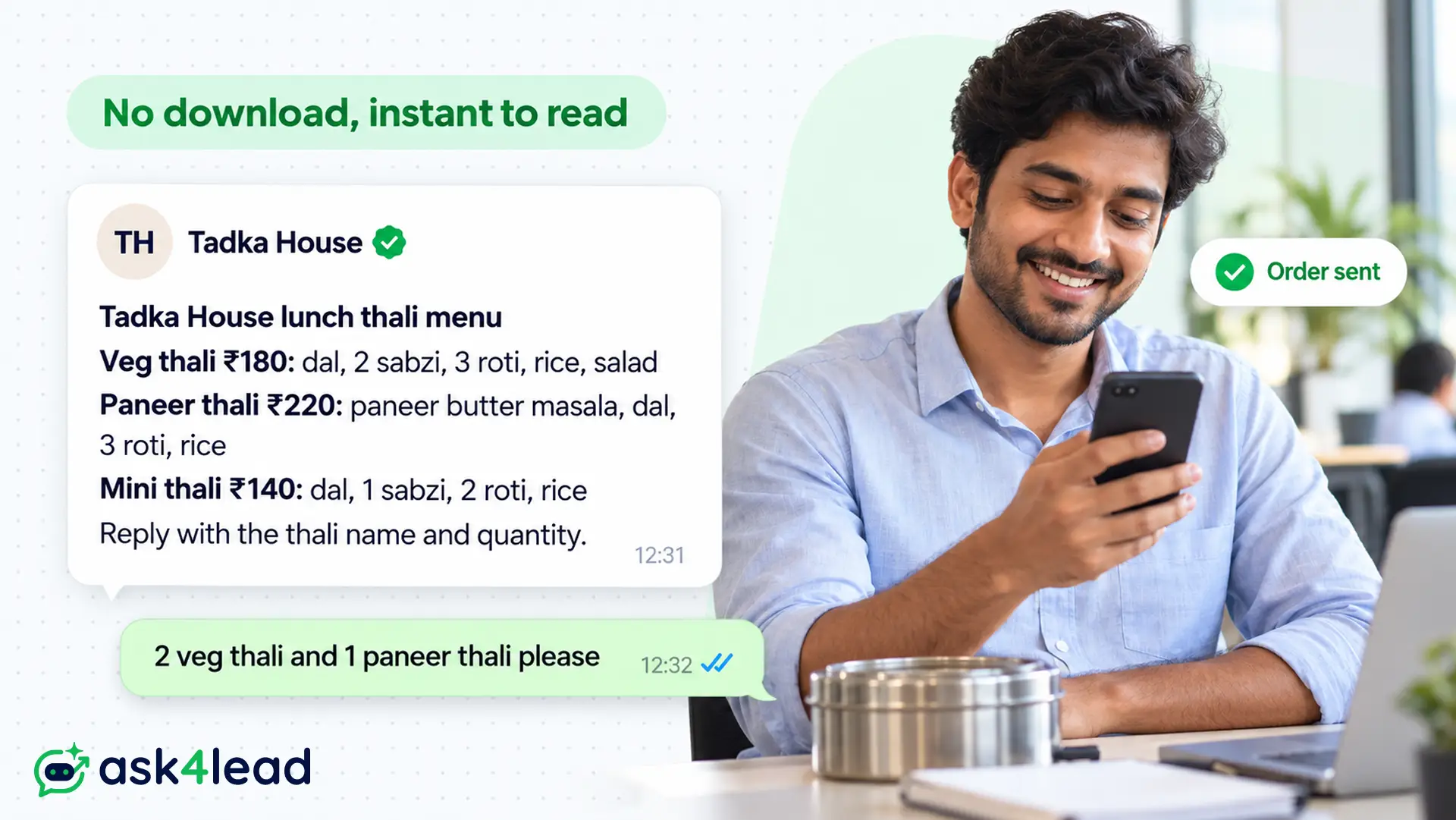
A short text menu loads instantly, and customers can search the chat for it later. Also, WhatsApp turns words between asterisks into bold text.
*[Tadka House] lunch thali menu* *Veg thali* [₹180]: dal, 2 sabzi, 3 roti, rice, salad *Paneer thali* [₹220]: paneer butter masala, dal, 3 roti, rice *Mini thali* [₹140]: dal, 1 sabzi, 2 roti, rice Reply with the thali name and quantity.
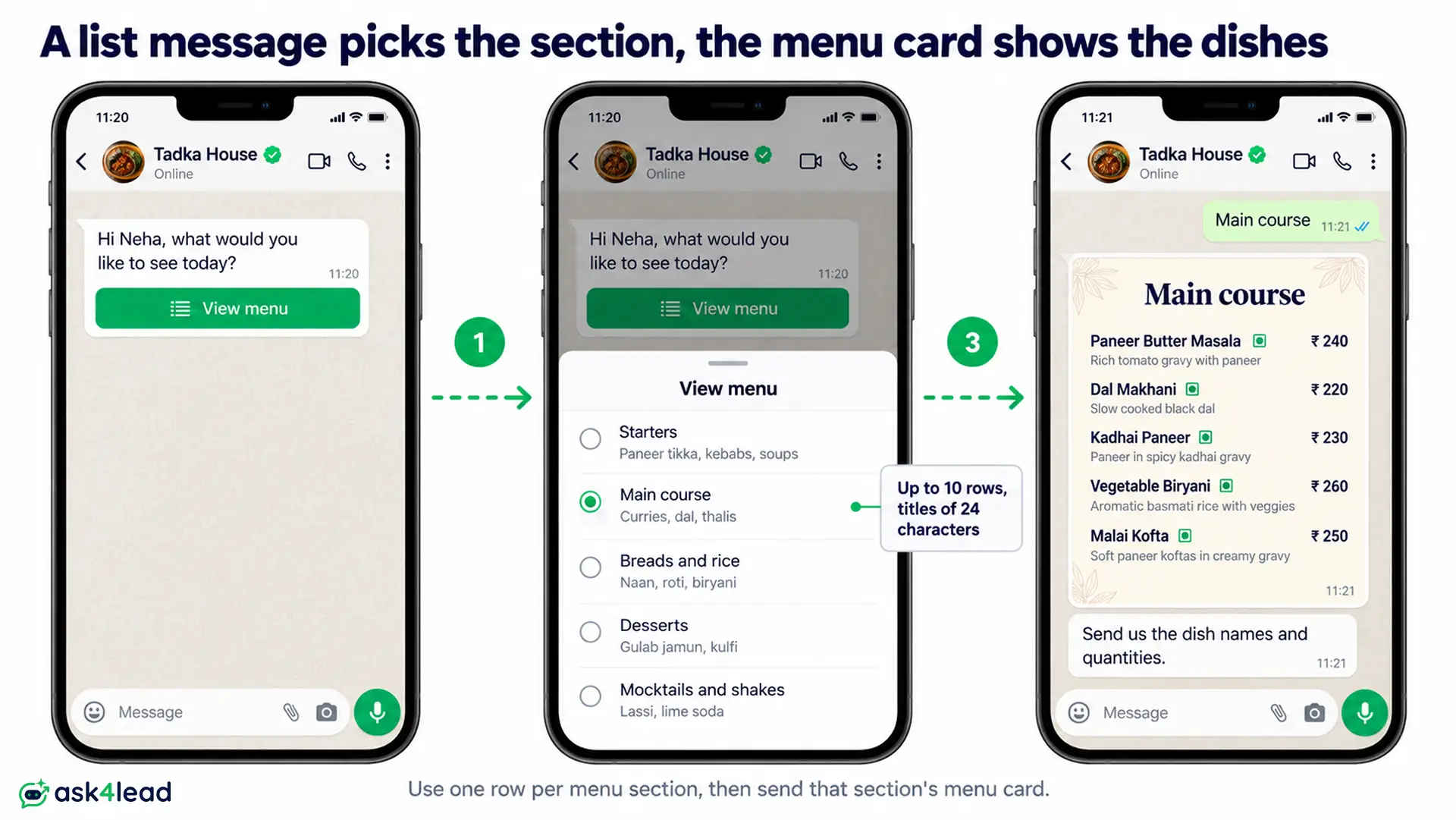
6. Interactive list menu on the API
On the API, an interactive list message shows a “View menu” button that opens a scrollable list. Meta’s list message rules allow up to 10 rows in total, with row titles of 24 characters at most.
As a result, the list works as a category picker, not the full menu. So use one row per section and send the matching menu card when someone taps.
Hi [Neha], what would you like to see today?
Button: View menu · Rows: Starters · Main course · Breads and rice · Desserts · Mocktails and shakes
7. New menu launch template with a PDF
To message customers who have not written to you in the last 24 hours, the API requires an approved template. This one is a marketing template, so send it only to customers who opted in.
Hi {{1}}, our new winter menu is now live at Tadka House from {{2}}. It adds 6 new dishes, including {{3}}. Open the menu above and reply with your order, or tap below to book a table.
Header: PDF document · Buttons: Book a table · Stop offers
8. Dish unavailable message
When a dish runs out, an honest swap keeps the order alive.
Sorry [Neha], we have run out of [paneer tikka] today. Our [hara bhara kebab] ([₹190], veg) is similar and ready in [20 minutes]. Shall we swap it in?
After checkout, see these order notification templates, and for offer wording, these promotional WhatsApp messages.
Meta and FSSAI rules for a WhatsApp menu card
A WhatsApp menu card answers to Meta’s policy and to food law. Breaking either costs you a rejected template, a restricted number or an FSSAI notice.
What Meta bans from your menu
WhatsApp’s Business Messaging Policy lists alcohol and tobacco as restricted goods, and catalogs must follow the Meta Commerce Policy. Moreover, you may not message about these regulated items from the Business app at all.
Meta allows alcohol messaging on the API only in listed countries, and India is not on that list. So a bar in India can put its food and mocktails on a WhatsApp menu card. Meanwhile, beer, wine and hookah stay on the printed card.
Which category your menu message falls into
Meta prices each message by its category, so the category decides your bill.
| Menu message | Category | Why |
| Menu sent after a customer asks | Service (no template) | Because it answers inside the 24-hour window |
| New menu or offer sent unprompted | Marketing template | Since it promotes your food |
| Order confirmation with dishes and total | Utility template | Because it updates an order the customer placed |
The 24-hour window is the time after a customer’s last message when you can reply freely. This 24-hour rule guide explains how it opens and closes.
3. Common reasons Meta rejects a menu template
So check your template against these causes before you submit it:
- An offer inside a utility template: Meta’s template categorization treats any promotion as marketing
- A variable at the start or end: keep fixed text around each {{1}}
- No sample values: reviewers need examples such as “Saturday 25 October”
- Alcohol or tobacco in the text or the PDF: the policy applies to the attachment too
If a template still fails, this guide to a rejected WhatsApp template matches each reason to a fix.
Two worked examples: what WhatsApp menu messages cost
These numbers use Meta’s India rates from 1 October 2026, before GST. A service or utility message costs ₹0.115, and a marketing message costs ₹0.8631.
Worked example: replying with your WhatsApp menu card
Suppose 1,600 customers ask for your WhatsApp menu card in a month. You reply with a PDF inside the open chat. Meta’s pricing page gives each business number 1,000 free service messages a month.
- Free replies: the first 1,000
- Charged replies: 600 × ₹0.115 = ₹69 a month
- Same replies as marketing templates: 1,600 × ₹0.8631 = ₹1,380.96 a month
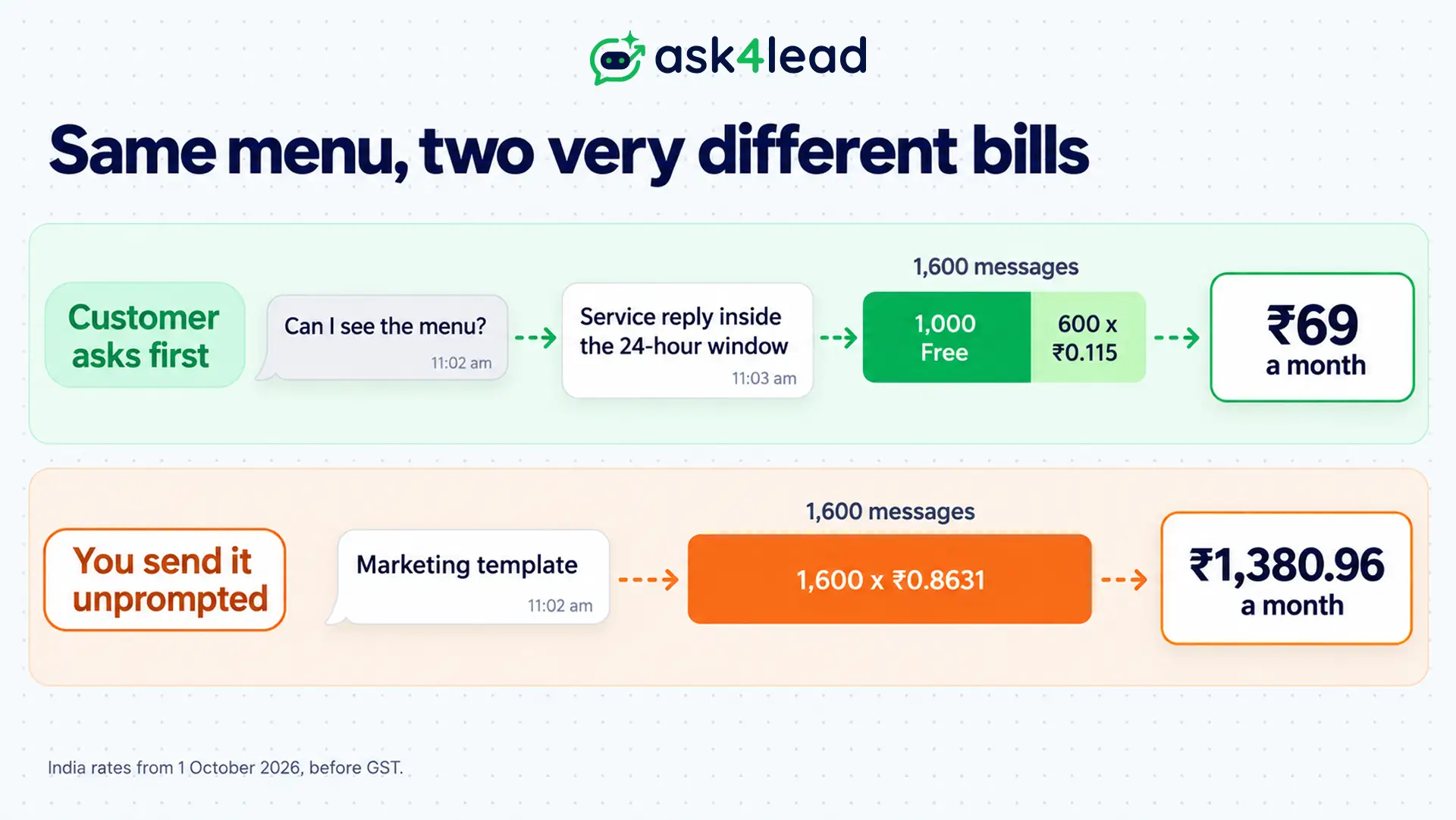
So reply inside the window whenever the customer writes first.
Worked example: a weekly special
Now suppose you send a weekly special to 2,000 opted-in customers as a marketing template.
- Per week: 2,000 × ₹0.8631 = ₹1,726.20
- Per month (4 weeks): ₹6,904.80
In contrast, a daily Status post reaches people who saved your number, with no per-message charge. Therefore, you can keep paid templates for launches and use Status for daily specials. The WhatsApp API pricing guide covers volume tiers and other markets.
How to keep your WhatsApp menu card up to date
A stale WhatsApp menu card costs you at the counter, because the customer expects the price they saw.
Give the menu one owner and one day
First, pick one person and one weekday for menu edits. Then update the catalog, the image, the PDF and the link in the same sitting.
Also, put the month in every file name and delete old Status posts and PDFs from your quick replies.
Let the AI answer from the current menu
Customers keep asking you whether a dish is Jain, spicy or nut-free. Ask4Lead’s AI Knowledge Profile answers those questions from the menu PDF you upload, instead of guessing.
When a dish runs out, its Services Catalog lets you hide the item, so the AI stops offering it. A price change there also reaches every reply at once.
This setup suits you if you take orders in chat. However, if you sell only through delivery apps, a menu card image is usually enough.
FAQs
1. How do I make a WhatsApp menu card for free?
Use the catalog in the free WhatsApp Business app. Alternatively, design an image or PDF menu and send it as a document, which costs nothing.
2. What size should a WhatsApp menu card image be?
Design it at 1080 x 1920 pixels, portrait, with one menu section per image. That keeps prices readable without zooming.
3. Can customers order from a WhatsApp menu card?
Yes. From a catalog, they send dishes as one cart message. From an image or PDF, they type their order in the chat.
4. Is sending a WhatsApp menu card free?
It is free in the Business app. On the API, replies inside the 24-hour window use the 1,000 free service messages each month. However, Meta charges unprompted menu templates at the marketing rate.
5. Can a bar share its drinks menu on WhatsApp?
Not in India. WhatsApp’s policy limits alcohol messaging to listed countries, and India is not one of them. So share only food and soft drinks.
Conclusion
A good WhatsApp menu card matches your printed menu and loads fast on a phone. It also reaches customers through a message they expect. So pick the format your kitchen can keep current, then let each WhatsApp menu message do the sending.
Before you share your next WhatsApp menu card, check that it has:
- The format that fits your prices: catalog, image or PDF, or link
- Veg and non-veg marks and allergens, matching the printed card
- No alcohol or tobacco, in the text or the PDF
- A menu message for each moment: greeting, quick reply, away message
- The month in the file name, so old copies are easy to spot
Next, plan the messages that follow an order, such as the confirmation and the delivery update.
Turn menu requests into orders without retyping prices
At lunch, menu requests pile up, and staff paste old prices from memory. So Ask4Lead covers the steps you control:
- Saved replies: send the menu link with a chat snippet by typing a forward slash
- Approved templates: track each WhatsApp template from Pending to Approved or Rejected
- One inbox: let several staff answer orders from the same number
- Campaigns: send your approved menu launch template to opted-in customers through WhatsApp Campaigns
For a full restaurant setup, see the WhatsApp AI agent for restaurants.
