
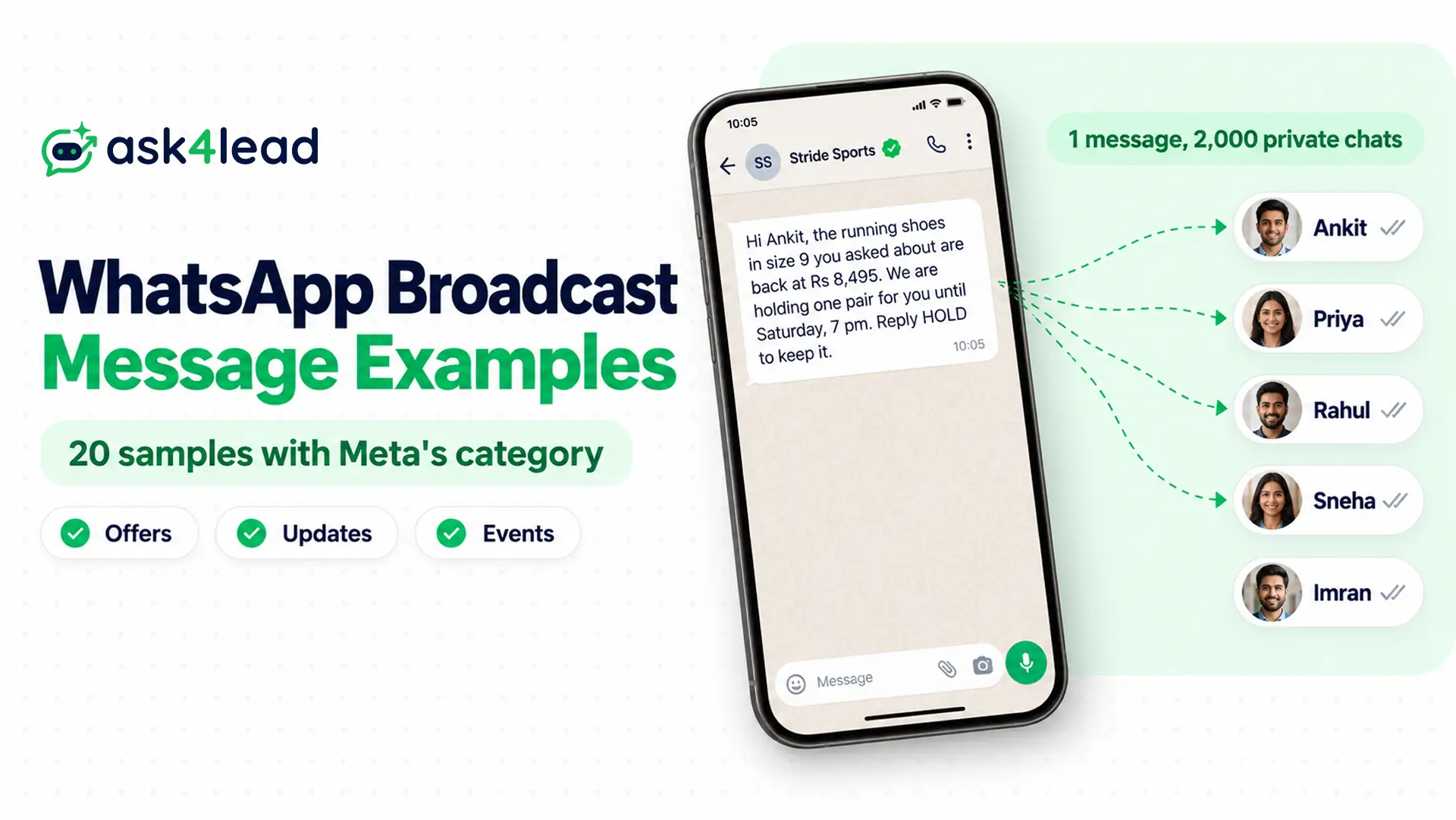
An example of a WhatsApp broadcast message is one short text sent to many customers at once, which each person receives as a private chat. Below are 20 WhatsApp broadcast message examples for offers, updates, events and personal notices, each marked with the Meta category it will likely get.
First, though, check how you send it. A broadcast list reaches only people who saved your number, and the WhatsApp broadcast limit caps each list at 256 contacts.
What is a WhatsApp broadcast message?
A WhatsApp broadcast message is one message delivered to many people as separate one-to-one chats. For example, a WhatsApp broadcast message about a sale lands in each customer’s own chat, and replies come back only to you.
However, the tool you send it from decides who receives it and what you pay. In practice, there are three ways to send one.
| Way to send | Who receives it | Limit | Cost |
| Broadcast list (WhatsApp or WhatsApp Business app) | Only contacts who saved your number | 256 contacts per list; some countries now cap personal accounts at 35 free broadcast messages a month | Free |
| Business broadcasts (WhatsApp Business app) | Customers you pick from contacts or imported lists, with opt-in | Rolling out in limited countries | Paid per message, priced by the recipient’s country code |
| API campaign (WhatsApp Business Platform) | Any opted-in number, saved or not | 250 unique people a day at first, 2,000 after business verification, then higher | Per delivered template, priced by category |
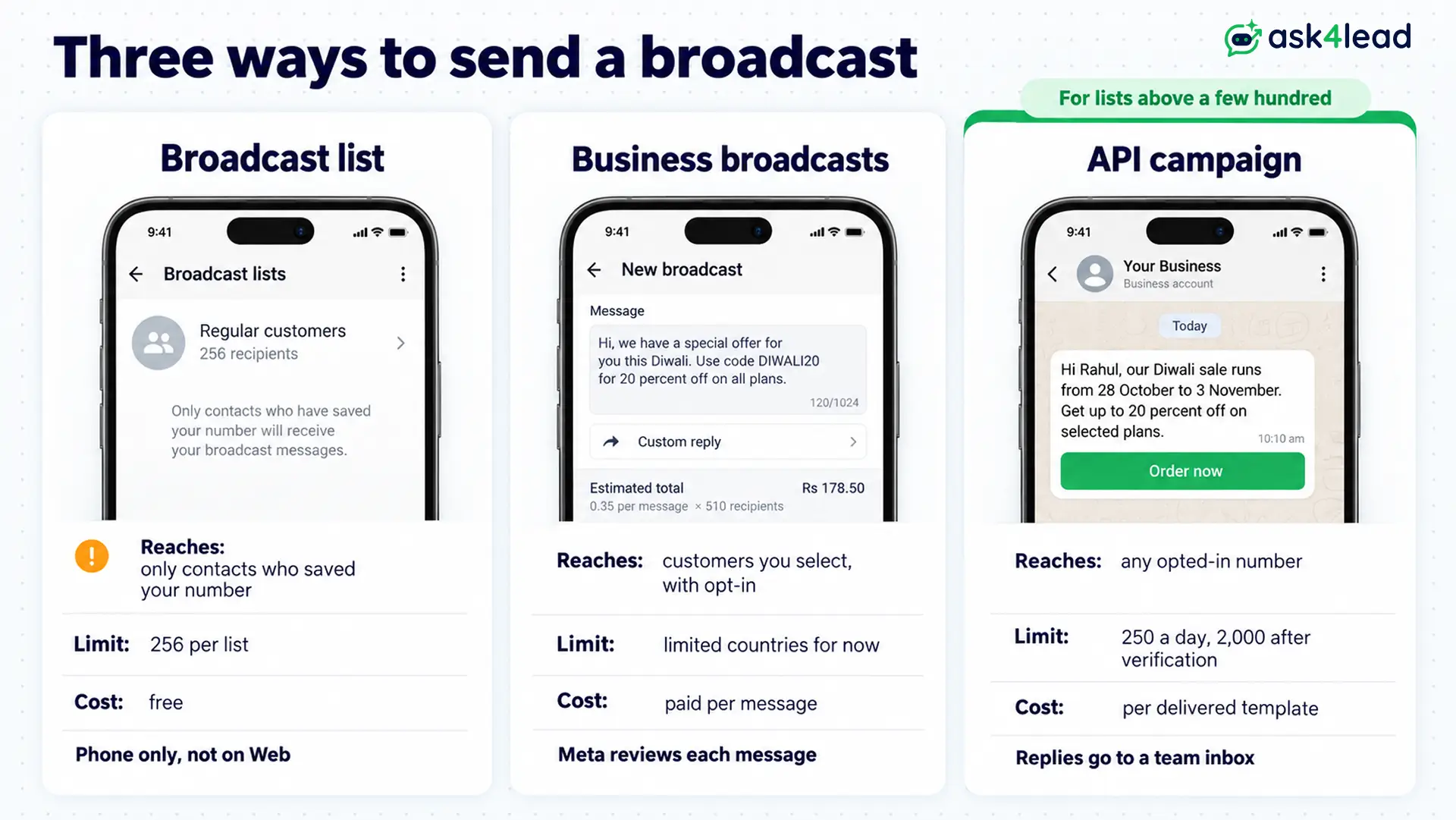
Also, WhatsApp’s broadcast lists help page says lists do not work on Windows, Mac or Web, so you build them on your phone.
A tailor with 80 regulars can stay on a broadcast list. Past a few hundred contacts, however, the saved-number rule quietly drops part of every send. This comparison of channels, broadcast lists and groups shows the trade-offs.
How to write a WhatsApp broadcast message people answer
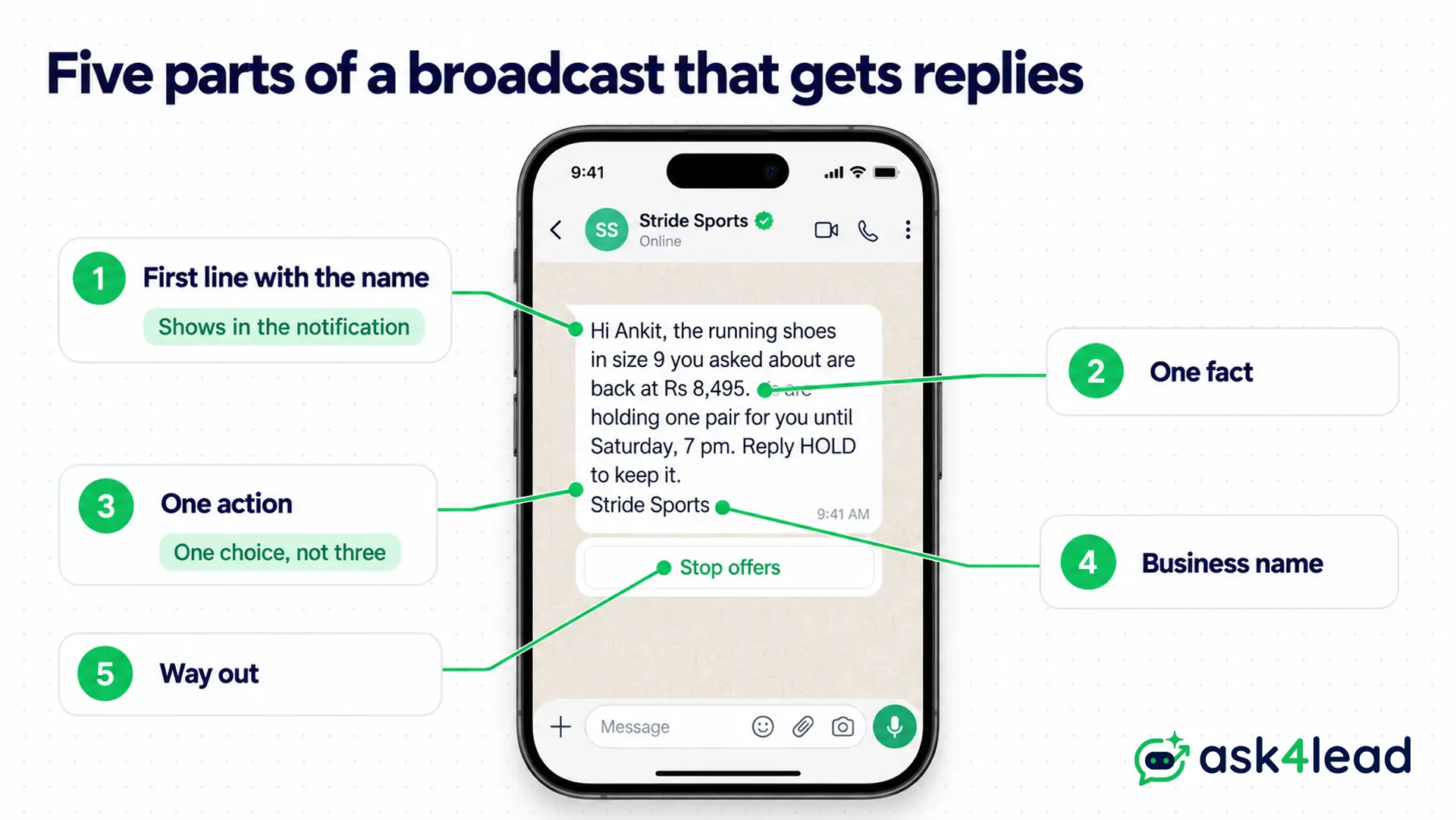
Every example of a WhatsApp broadcast message below fits on one phone screen and asks for one thing. So each one follows the same five parts:
- First line with the name, such as “Hi Rahul, your size is back”, because it shows in the notification
- One fact, such as “back at Rs 8,495”, so the reader knows what changed
- One action, such as “Reply HOLD”, since two choices usually get none
- Your business name, so the message is not mistaken for spam
- A way out, such as a Stop offers button, because WhatsApp requires you to honour opt-outs
On the API, a WhatsApp broadcast template uses numbered variables, which your system fills for each person:
| Variable | What it holds | Example value |
| {{1}} | First name | Priya |
| {{2}} | Business or product | Meera Boutique |
| {{3}} | The fact or offer | 20% off sweet boxes |
| {{4}} | Date or deadline | 3 November |
Keep fixed words around each variable, because Meta rejects a body that starts or ends with one. Also, hold the send when a name is blank, or “Hi Priya” becomes “Hi ,”.
WhatsApp broadcast message examples for offers and launches
Each example of a WhatsApp broadcast message in this section sells something, so Meta files it as a marketing template. Therefore every person must have opted in to your WhatsApp messages first.
1. New collection announcement (marketing)
Hi [Priya], our winter kurta collection is in store from today, in sizes S to XXL. Reply SEE and we will send photos of all [6] new designs here. [Meera Boutique]
Buttons: Show me · Stop offers
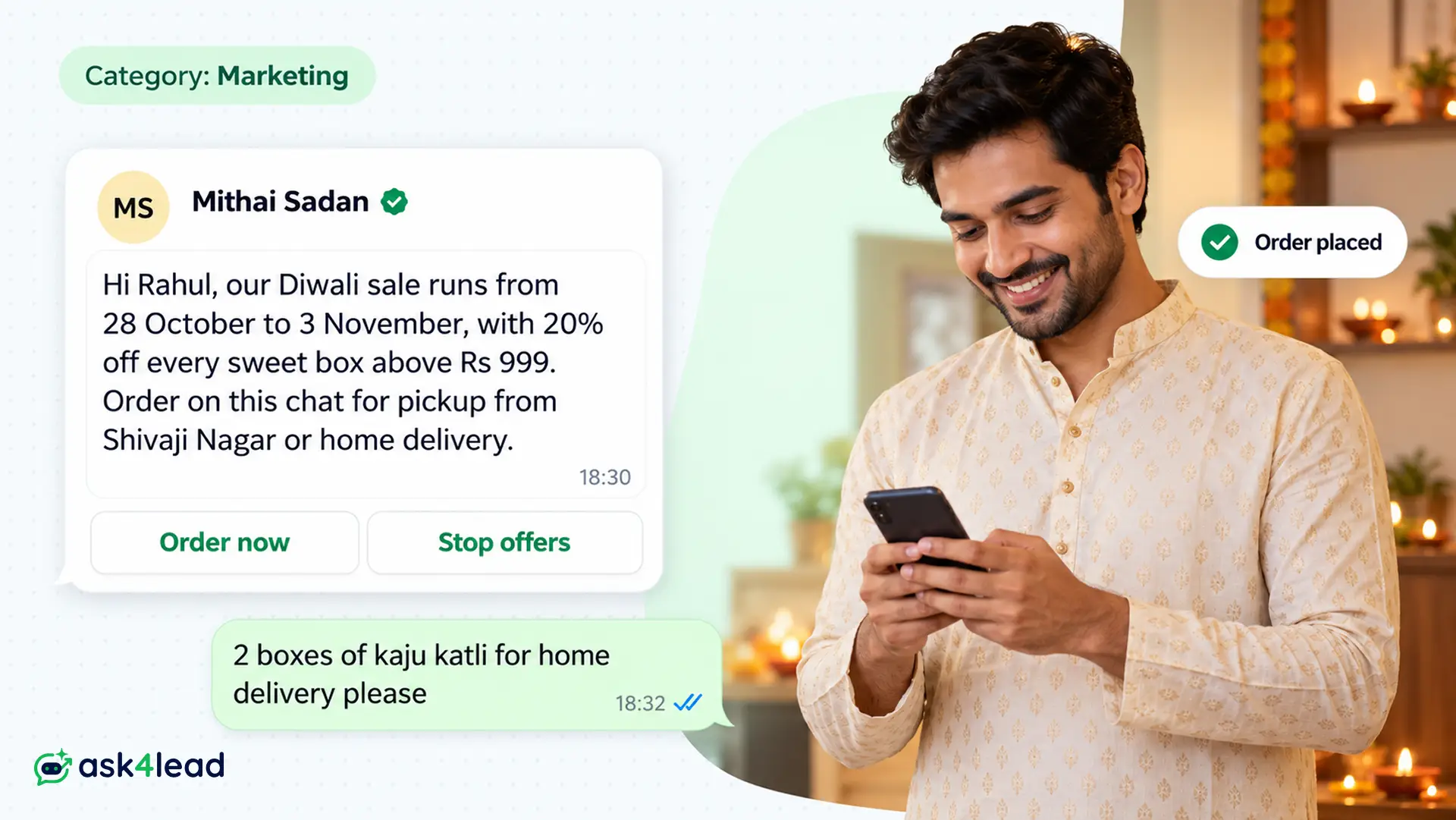
2. Diwali sale broadcast (marketing)
Hi [Rahul], our Diwali sale runs from [28 October] to [3 November], with 20% off every sweet box above Rs [999]. Order on this chat for pickup from [Shivaji Nagar] or home delivery.
Buttons: Order now · Stop offers
3. Back-in-stock alert (marketing)
Hi [Ankit], the [running shoes in size 9] you asked about are back at Rs [8,495]. We are holding one pair for you until [Saturday, 7 pm]. Reply HOLD to keep it. [Stride Sports]
Although the customer asked, Meta still treats this follow-up as marketing.
4. Early access for repeat customers (marketing)
Hi [Sneha], as one of our regular customers, you get first pick of the new [cotton saree] range on [Friday], one day before everyone else. Tap below to see the range.
Button: View catalogue
5. New service launch (marketing)
Hi [Imran], [CarePlus Clinic] now collects blood samples from home in [Kothrud], from Rs [199] per visit. Reply BOOK and we will share this week’s open slots.
For more offer formats, see these promotional WhatsApp messages. In addition, these WhatsApp marketing message examples sort samples by Meta’s five marketing goals.
WhatsApp broadcast message examples for updates
Not every WhatsApp broadcast message sells, so the example you pick decides Meta’s category. An update about the customer’s own plan, or an outage, can pass as utility, while a general notice to your whole list usually counts as marketing.
6. Holiday closure and timings (marketing)
Hi [Name], [Sharma Electronics] will stay closed on [1 November] for Diwali and reopen on [2 November] at 10 am. Orders placed here on the holiday will ship on [3 November].
Because this notice is not tied to one order, expect the marketing category.
7. Price change for subscribers (utility)
Hi [Name], from [1 December], your monthly tiffin plan changes from Rs [3,200] to Rs [3,450] because of higher vegetable costs. Your current month stays at the old price. Reply HELP with any questions.
8. Service outage notice (utility)
Hi [Name], UPI payments at our [Andheri] store are down because of a bank server issue. Card and cash payments work as usual. We will message you here once UPI is back.
Meta lists system outages and operational disruption as essential updates in its template categorization rules. So sample 8 stays utility although nobody asked for it.
9. Shop or office move (marketing)
Hi [Name], [FitZone Gym] has moved to [2nd floor, Orchid Mall, Baner] from [10 November]. Your membership, locker and batch timings stay the same. Reply MAP for directions.
WhatsApp broadcast message examples for events and win-backs
Each example here asks the reader to decide something, so the WhatsApp broadcast message ends with one reply word. For more invitation formats, see this guide to the WhatsApp event invitation message.
10. Workshop invitation (marketing)
Hi [Name], we are running a free [Instagram for small shops] workshop at our [Viman Nagar] office on [Saturday, 9 November] at 11 am. We have [30] seats. Reply JOIN to save yours.
11. Reminder for registered guests (utility)
Hi [Name], see you tomorrow at 11 am for the workshop at [Viman Nagar]. Please bring your phone with your shop’s Instagram open. Reply CANCEL if you can no longer come.
12. Win-back offer (marketing)
Hi [Name], it has been [3 months] since your last haircut with us. Book any weekday slot before [30 November] and get a free hair spa with it. Reply BOOK to see times.
13. Festival greeting with no offer (marketing)
Hi [Name], the whole team at [Patel Opticals] wishes you and your family a bright and safe Diwali. Thank you for trusting us with your eyes this year.
Greetings build relationships, so Meta files them as marketing even without a discount.
14. Feedback after a stay (utility)
Hi [Name], thank you for staying at [Hotel Sea Breeze] last week. How was your stay? Tap a rating below.
Buttons: Great · Okay · Poor
However, add a discount to sample 14, and it becomes marketing.
Industry WhatsApp broadcast message examples
In each industry example below, one WhatsApp broadcast message can fill a week of site visits, demo classes or appointments.
15. Real estate new listing (marketing)
Hi [Name], a [2 BHK] in [Wakad] just listed at Rs [78 lakh], RERA no. [P52100012345]. You asked about 2 BHKs under Rs 80 lakh, so you hear first. Reply VISIT to book a site visit.
16. Coaching batch launch (marketing)
Hi [Name], the new [JEE 2028] weekend batch at [Bright Minds Academy] starts on [16 November], Saturday and Sunday, 8 am to 12 pm. Reply DEMO to book a free first class for [Aarav].
17. Clinic health camp (marketing)
Hi [Name], [CarePlus Clinic] is holding a free diabetes check camp on [Sunday, 17 November], from 9 am to 1 pm. Tests are free for the first [100] people. Reply SLOT to pick a time.
Personal WhatsApp broadcast message examples
Use this kind of example on personal WhatsApp or a small Business app list, where a WhatsApp broadcast message reaches only people who saved your number.
18. Housing society notice
Dear residents, water supply in [Wing B] will be off on [Thursday] from 10 am to 4 pm for tank cleaning. Please store water tonight. [Society Office]
19. New number announcement
Hi, this is [Ravi Mehta]. I have moved to a new number, so please save it and delete [the old one ending 4410]. My WhatsApp and UPI now use this number too.
This example hides a trap, though. Sent as a WhatsApp broadcast message from the new number, it reaches nobody, because nobody has saved that number yet. So send it from the old number instead.
20. Housewarming invitation
Hi, we have moved into our new home and would love to see you at the housewarming puja on [Sunday, 10 November] at 11 am. Address: [Flat 702, Lake View, Hadapsar]. Please reply by [6 November].
What a WhatsApp broadcast message costs: two worked examples
Category and limits decide the cost. For example, the same WhatsApp broadcast message can cost about 7.5 times more as marketing than as utility.
Worked example: one WhatsApp broadcast message to 2,000 customers
Since 1 October 2026, Meta’s WhatsApp pricing page lists India at Rs 0.8631 per marketing message and Rs 0.115 per utility one.
- Diwali sale (sample 2) as marketing: 2,000 × Rs 0.8631 = Rs 1,726.20
- Outage notice (sample 8) as utility: 2,000 × Rs 0.115 = Rs 230
- Difference: Rs 1,496.20 per send, before GST
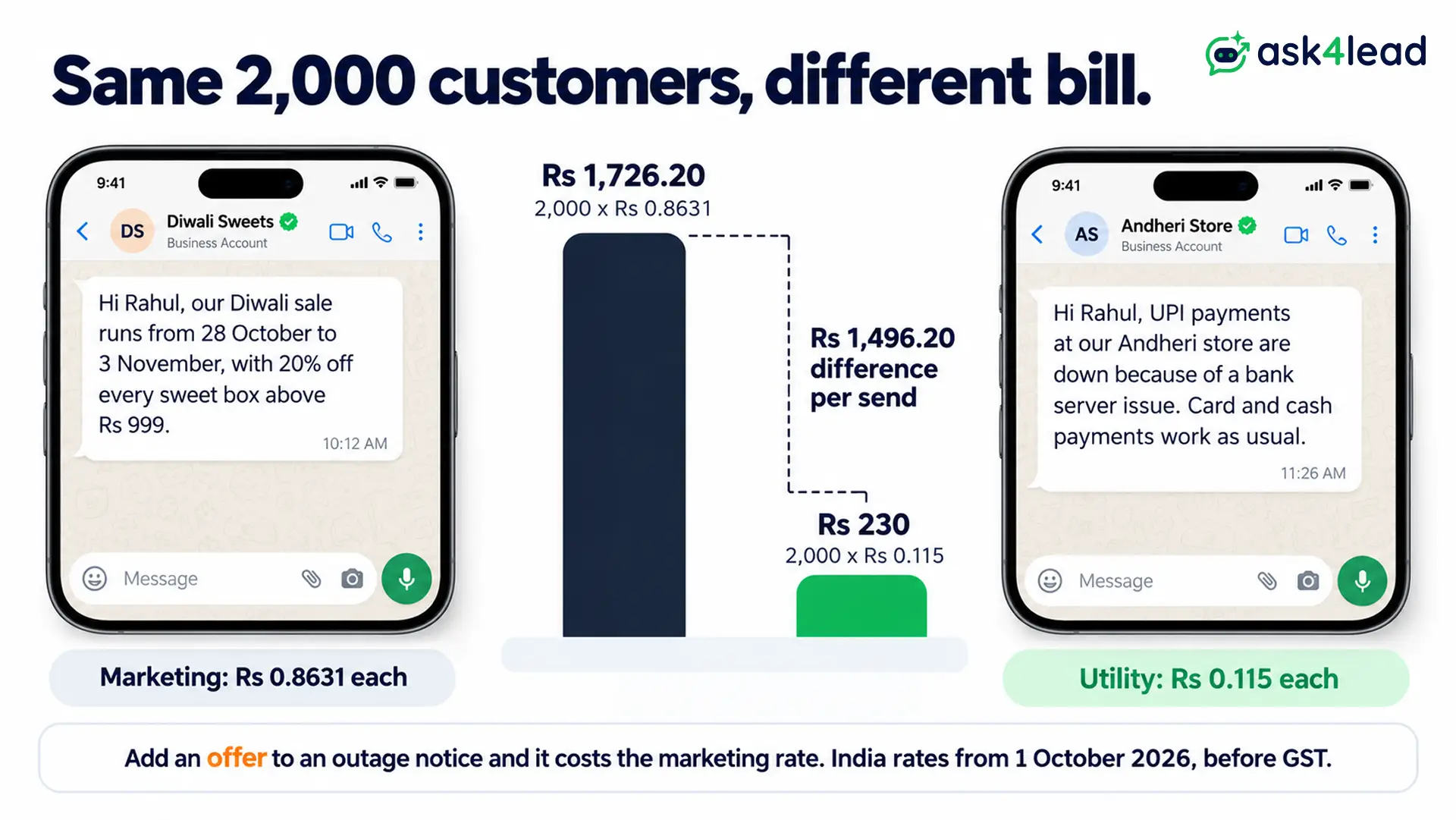
For example, a shop that adds “10% off” to sample 8 turns a cheap WhatsApp broadcast message into a marketing one. This WhatsApp Business API pricing guide covers the other rates.
Worked example: how long a WhatsApp broadcast message takes to reach 2,000 contacts
Meta’s messaging limits cap how many unique people a business portfolio reaches outside open chats in 24 hours.
- New portfolio, limit 250: 2,000 ÷ 250 = 8 days to reach everyone
- After business verification, limit 2,000: 1 day
- Next step, 10,000: Meta raises it within 6 hours once you use half your limit in 7 days with high quality
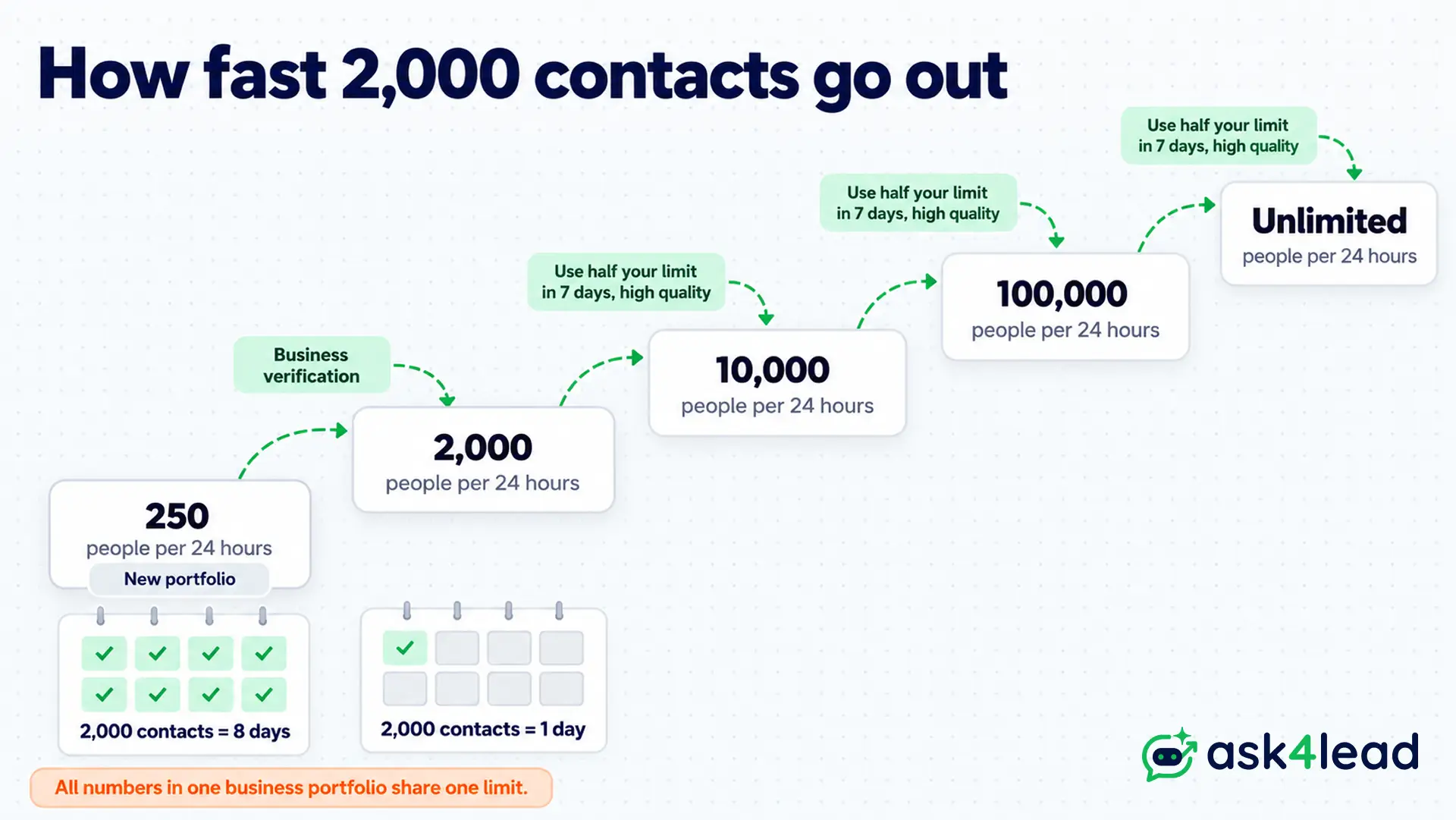
Also, all numbers in one portfolio share that limit, so a second number adds no capacity.
Why a WhatsApp broadcast message fails or gets blocked
Most failed broadcasts hit one of five walls, and each one costs money, reach or the number itself.
1. The contact never saved your number
A broadcast list skips anyone who has not saved you, and WhatsApp shows no error. If your WhatsApp messages are not delivered, check this first.
2. The customer hit Meta’s marketing limit
Meta caps how many marketing messages one person gets from all businesses, and the send fails with error 131049. So wait at least 24 hours before you retry, as Meta’s per-user limits page advises.
3. The customer stopped your offers
Error 131050 means the person turned off your offers. Therefore remove them from future marketing lists, because a retry will never arrive.
4. Meta rejected the template
For example, a WhatsApp broadcast message that starts with {{1}} gets rejected, because Meta wants fixed text before the first variable. Too many variables in a short body and threatening wording fail too, as this guide to a rejected WhatsApp template shows.
5. Blocks pulled down your quality rating
Every block and spam report counts against your WhatsApp quality rating. As a result, Meta can hold your limit or restrict the number.
How to handle replies to a WhatsApp broadcast message
For example, a WhatsApp broadcast message to 2,000 people can bring dozens of replies within an hour. Each reply opens a 24-hour customer service window, so a slow answer wastes the send.
Route replies to one owner
A shared team inbox for WhatsApp lets one person claim each chat. As a result, two staff never answer the same customer twice.
Answer repeat questions from your own documents
“What is the price?” and “Is it in stock?” arrive again and again. Instead of typing each answer, Ask4Lead’s AI Knowledge Profile answers them only from the documents you upload, such as your price list.
However, a shop with 60 regulars on a broadcast list can still answer each reply by hand.
FAQs
1. What is an example of a WhatsApp broadcast message?
“Hi Rahul, our Diwali sale runs from 28 October to 3 November, with 20% off every sweet box above Rs 999.” It names the reader, states one fact and asks for one action.
2. How do I send a WhatsApp broadcast to more than 256 people?
Use several broadcast lists, business broadcasts where available, or an API campaign. Only the API reaches people who have not saved your number.
3. Why did some people not get my WhatsApp broadcast message?
On a broadcast list, they did not save your number. On the API, check the error code, such as 131049 for Meta’s marketing limit.
4. Can people see who else received my broadcast?
No. Each person gets a private chat, and replies come back only to you.
5. Is a WhatsApp broadcast message free?
Broadcast lists are free. Business broadcasts and API templates are paid per message, for example Rs 0.8631 per marketing template in India.
Conclusion
Every example of a WhatsApp broadcast message on this page names one person, states one fact and asks for one action. In addition, it goes out through a tool that reaches your list, in the cheapest category that honestly fits.
Before you send your next broadcast, check that it has:
- A first line worth opening, with the reader’s name
- One action only, such as Reply YES or one button
- The right category, with no offer inside a utility message
- Opted-in recipients, plus a way to stop offers
- A send size within your messaging limit, so nothing queues for days
Next, test two of these samples on a small group first.
Send broadcasts that reach everyone and get answered
Broadcast lists miss anyone who has not saved your number, and replies then scatter across staff phones. So Ask4Lead covers the parts you control:
- Filtered campaigns: pick an audience by tag, lead source or pipeline stage in WhatsApp campaigns, then send now or schedule
- Template tracking: watch each WhatsApp template move from Pending to Approved or Rejected
- Personalised variables: fill each customer’s first name from your CRM records
- One inbox for replies: assign every answer to one teammate
