
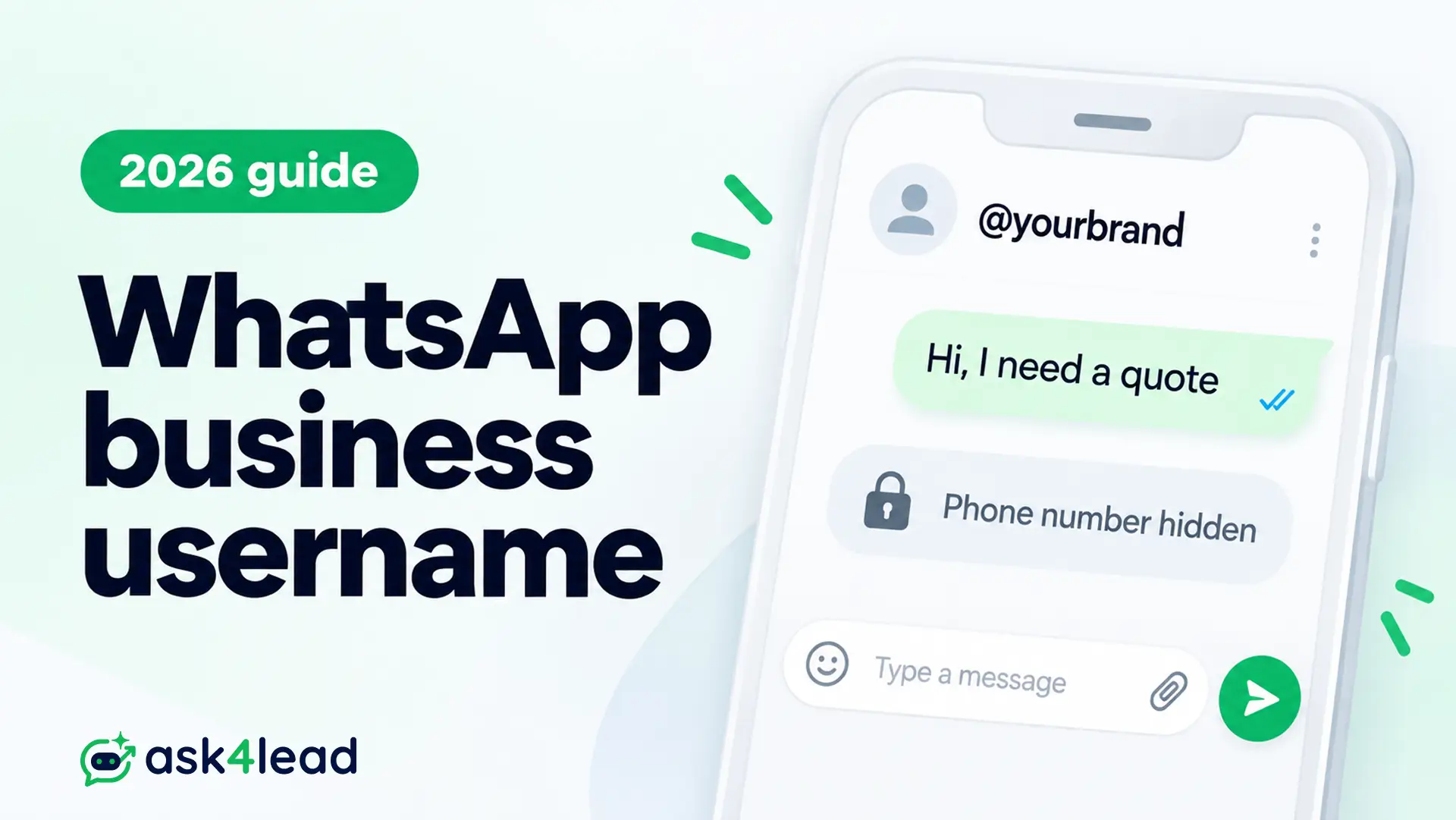
A WhatsApp business username is an optional @handle, such as @yourbrand, that lets customers message your business without needing your phone number.
It sits beside your number, and customers who adopt WhatsApp usernames can hide their own numbers from you. Meta opened reservations on June 29, 2026, as WhatsApp’s 2026 terms changes already signalled.
The risk is not the handle. It is the customer who arrives with no phone number in your CRM.
Quick answer: Reserve your WhatsApp business username, store a BSUID (business-scoped user ID) beside every phone number, and keep marketing consent separate from identity.
Key takeaways
- WhatsApp usernames are not searchable, so customers must type your handle exactly.
- A customer with a username and no recent chat reaches you as a BSUID, not a number.
- Numbers you already hold, with opt-in, keep working after customers adopt WhatsApp usernames.
- India’s launch has been on hold since July 1, 2026.
What a WhatsApp business username is and how it works
A WhatsApp business username is a unique handle tied to 1 business number in WhatsApp Manager. Customers who type it exactly can start a chat without your number. It adds a public brand name and leaves your phone identity intact.
WhatsApp business username, phone number and display name compared
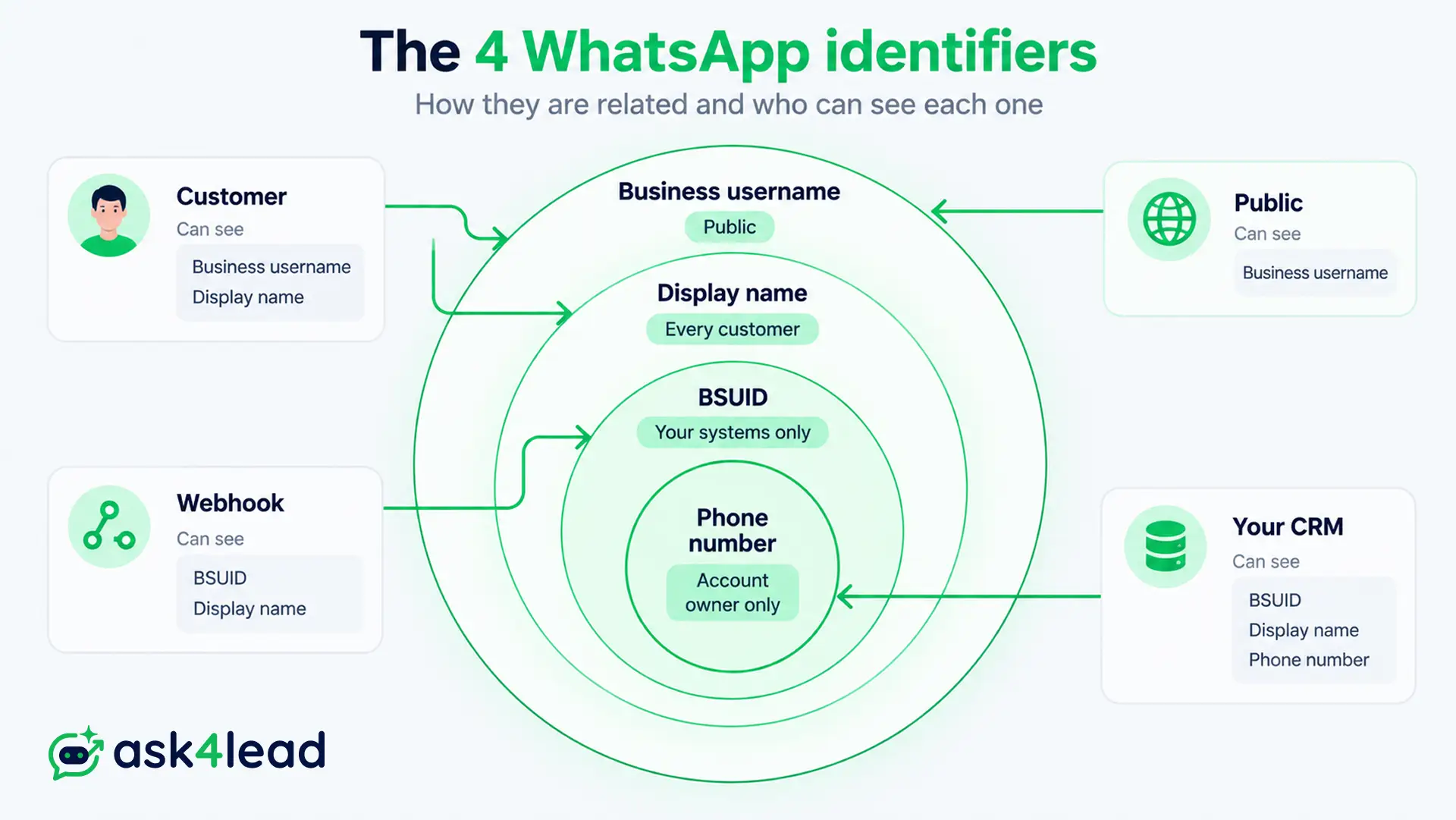
Many owners struggle because 4 identifiers get merged into 1 idea. Your CRM must treat them as 4 separate fields.
| Identifier | Who sees it | What it does |
| Phone number | Your business profile | Account identity, calls, OTP messages |
| Display name | Every customer | The name shown in chats, reviewed by Meta |
| Business username | The public | Starts a chat when typed as @handle |
| BSUID | Your systems only | Stable ID for 1 customer in 1 business portfolio |
Display names need Meta approval, so see why a display name gets rejected before you print anything.
Format rules for a WhatsApp business username
Meta’s business-scoped user ID documentation sets the rules:
- 3 to 35 characters: English letters, digits, periods and underscores.
- At least 1 letter, no leading or trailing period, no double periods.
- Cannot start with “www” or end with a domain such as “.com”.
- Letters are not case-sensitive, but periods and underscores make handles different.
- Each handle is unique across WhatsApp and maps to 1 business number.
You can change a handle at any time. Infobip’s username documentation notes the old one is held 60 days for you to reclaim, which is your rebrand safety net.
Where WhatsApp business usernames stand in September 2026
Reservations for a WhatsApp business username opened on June 29, 2026, and Meta’s API has accepted messages addressed to a BSUID since July. Customer adoption is arriving in country waves. India is the exception, with a government hold since July 1, 2026.
Rollout timeline for businesses and customers
| Date | Milestone |
| Early April 2026 | BSUIDs appear in webhooks, Contact Book switches on |
| June 29, 2026 | Business username reservations open |
| July 2026 | API accepts sending to a BSUID |
| July 7 and July 20, 2026 | Reported waves of customers get WhatsApp usernames, starting with Algeria, Azerbaijan, Ghana, Libya and Nepal |
Expect a trickle. The option arrives through a server flag, so 2 staff on the same phone model can see different settings.
Test from a fresh account in your country before you announce a handle.
India on hold: what Indian businesses should do
India’s IT ministry (MeitY) told WhatsApp not to launch WhatsApp usernames until consultations end. Medianama’s report on the notice says it cited phishing, impersonation and “digital arrest” scams.
India TV News reports Meta agreed to wait. We found no launch date at the time of writing.
For Indian businesses, that means:
- Keep your phone number and QR code as the main call to action.
- Do not print a handle on packaging or hoardings until launch is confirmed.
- Still build BSUID-ready records, because overseas customers may arrive as BSUIDs.
What your systems see when customers message your WhatsApp business username
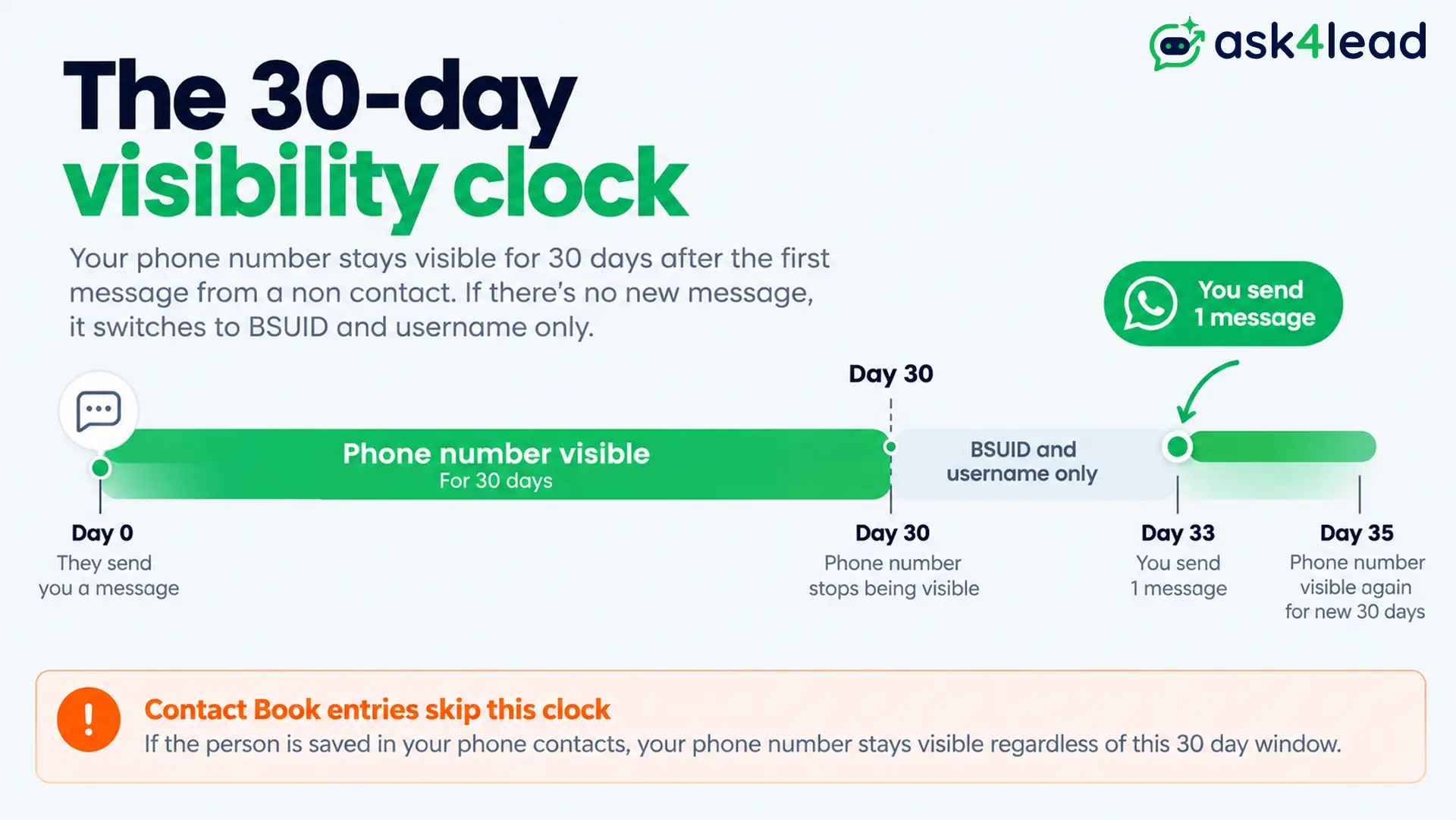
When a customer adopts WhatsApp usernames and has no chat with you in the last 30 days, your webhooks carry a BSUID and username but no phone number. Chat once and the number returns for 30 days.
Phone number visibility, case by case
| Situation | You receive |
| Customer has no username | Phone number and BSUID |
| You messaged or called them in the last 30 days | Phone number and BSUID |
| They messaged or called you in the last 30 days | Phone number and BSUID |
| They are in your Contact Book | Phone number and BSUID |
| Username customer, no history with you | BSUID and username only |
That rule decides whether your CRM, ad follow-ups and calls keep working. It runs per business number, so a chat with your sales number does not reveal the customer to your support number.
A BSUID (business-scoped user ID) looks like US.13491208655302741918. It is unique to 1 customer and 1 business portfolio, so every other brand sees a different BSUID. It survives a username change and changes only with the customer’s phone number.
The 3-Key Contact Record
A CRM, HubSpot setup or customer data platform keyed only on phone numbers creates a duplicate lead when a returning username customer arrives. Store 3 identifiers on every WhatsApp lead:
- Phone number: for calls and other channels, only with consent. It may be missing.
- Username: show it to your team, but never key on it, because customers can change it.
- BSUID: the stable key for inbound WhatsApp chats.
Microsoft’s Azure messaging guidance warns that the sender field can arrive empty, so code that formats it as a phone number will break.
Ask4Lead’s AI Sales Assistant covers the missing-number case in conversation. It can be set up to ask a BSUID-only customer for a name and best number, then pass the lead to your team with full context.
Keeping phone numbers visible
- Message known numbers regularly. Any send to a customer’s number restarts the 30-day window and fills the Contact Book.
- Leave the Contact Book on unless your legal team needs it off, because switching it off deletes the stored mappings, and re-enabling does not restore them.
- Ask directly. A request contact info button works in templates, and inside the 24-hour window it can go as an interactive message with no template.
- Collect numbers in a form. WhatsApp Flows for lead capture can request the number inside the chat.
The Contact Book only stores interactions after April 2026. Older customers you have not messaged since are not covered.
How to reserve your WhatsApp business username
To reserve a WhatsApp business username, open WhatsApp Manager or Meta Business Suite, go to Account tools, then Phone numbers, and open Username for your number.
Your business must be Meta-verified or eligible. Handles matching assets you own are reserved for you.
1. Which handles Meta holds for you
Meta reserves handles that match your verified assets:
- Your WhatsApp display name
- Your Official Business Account name
- Your Meta Verified name
- Your connected Facebook Page
- Your Instagram Business handle
Community chatter treats handles like rare number plates. Reservation follows verified assets, so grabbing a big brand’s name to resell is a weak bet. Handles that match no verified asset go first-come, first-served.
Your real exposure is an unlinked Page or Instagram account, or a stalled verification, covered in Meta Business verification rejected.
2. Reservation steps
- Confirm your Meta Business verification status.
- Link your Facebook Page and Instagram Business account.
- Open WhatsApp Manager, then Account tools, then Phone numbers.
- Enter your handle in Username and check it against the rules above.
- Reserve it, then record it in your brand guidelines.
Each business number needs its own handle, so sales and support numbers reserve 1 each.
Ask4Lead’s WhatsApp Business API integration connects your number through Meta’s Embedded Signup, so the account you reserve on is the one your CRM reads.
3. Lookalike audit for your WhatsApp business username
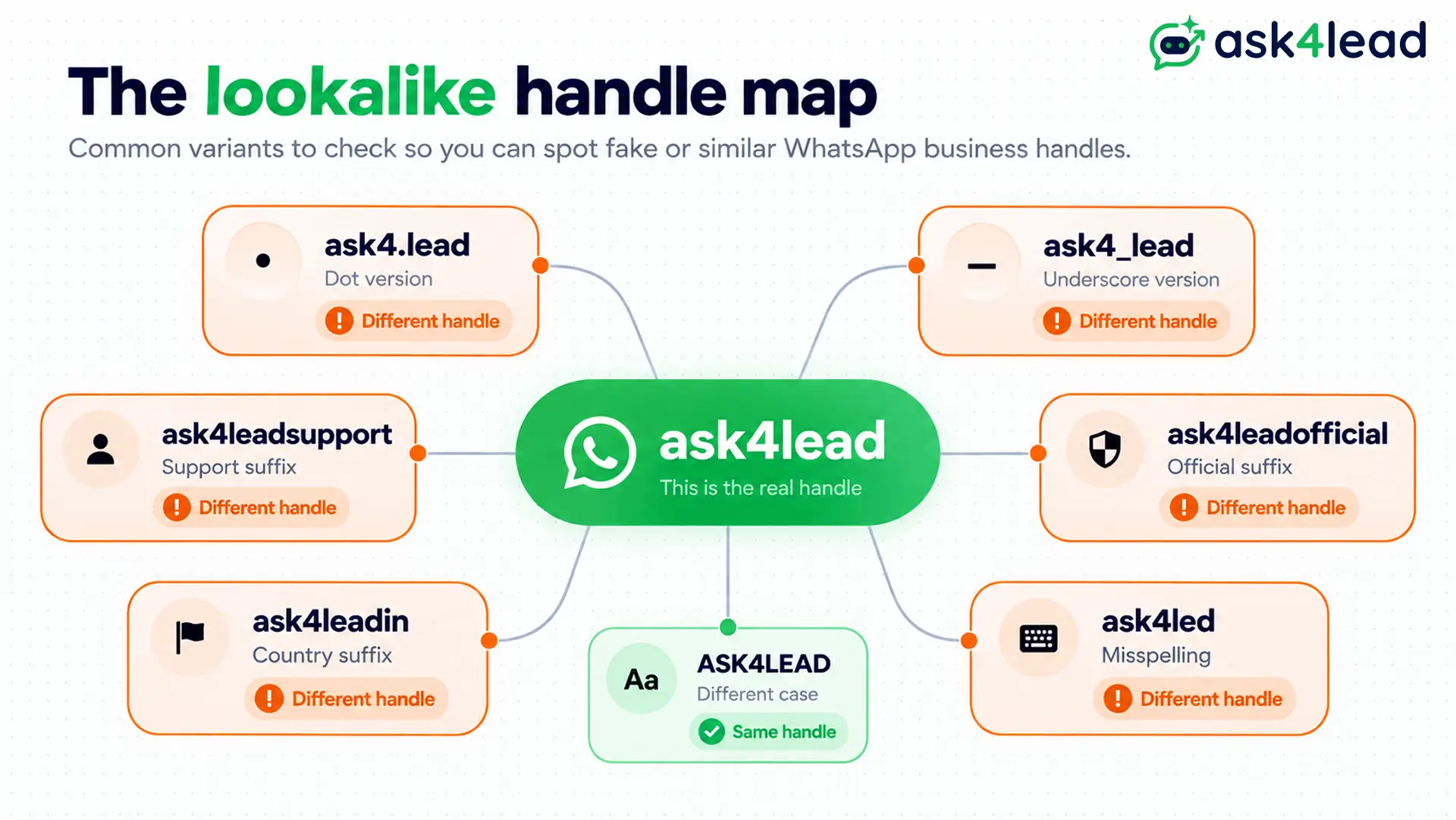
Scammers do not need your exact handle. Search these 6 variants before you commit, and screenshot any that exist:
- Your handle with a period, then with an underscore
- Your handle plus
.supportor_support - Your handle plus
official - Your handle plus your country code
- Your handle plus
offersordeals - Common misspellings of your brand
How a WhatsApp business username changes your marketing
A WhatsApp business username changes how customers reach you and what your systems receive, not the consent rules. WhatsApp usernames suit ads, bios and print, while phone numbers still power calls and campaigns. The weak point is the first message.
1. Why marketers want a WhatsApp business username
- Lower friction: customers can message a brand without exposing their own number.
- Memorable reach: a clean handle fits Instagram bios, emails and signage better than a long number.
- Trust: your verified profile number stays visible beside the handle.
- Protection: Meta reserves handles that match verified brand assets, which limits impersonation.
2. Lead forms and consent
A username is not consent, and WhatsApp usernames change nothing here. A customer who messages first has opened a conversation, not agreed to promotions.
- Ask for a phone number on forms, not a username.
- Add a separate, explicit opt-in tick box, as WhatsApp opt-in consent explains.
- Store the wording and timestamp of every opt-in.
- Use these tactics to collect more WhatsApp opt-ins from forms and social.
3. Click-to-WhatsApp ads and calling leads
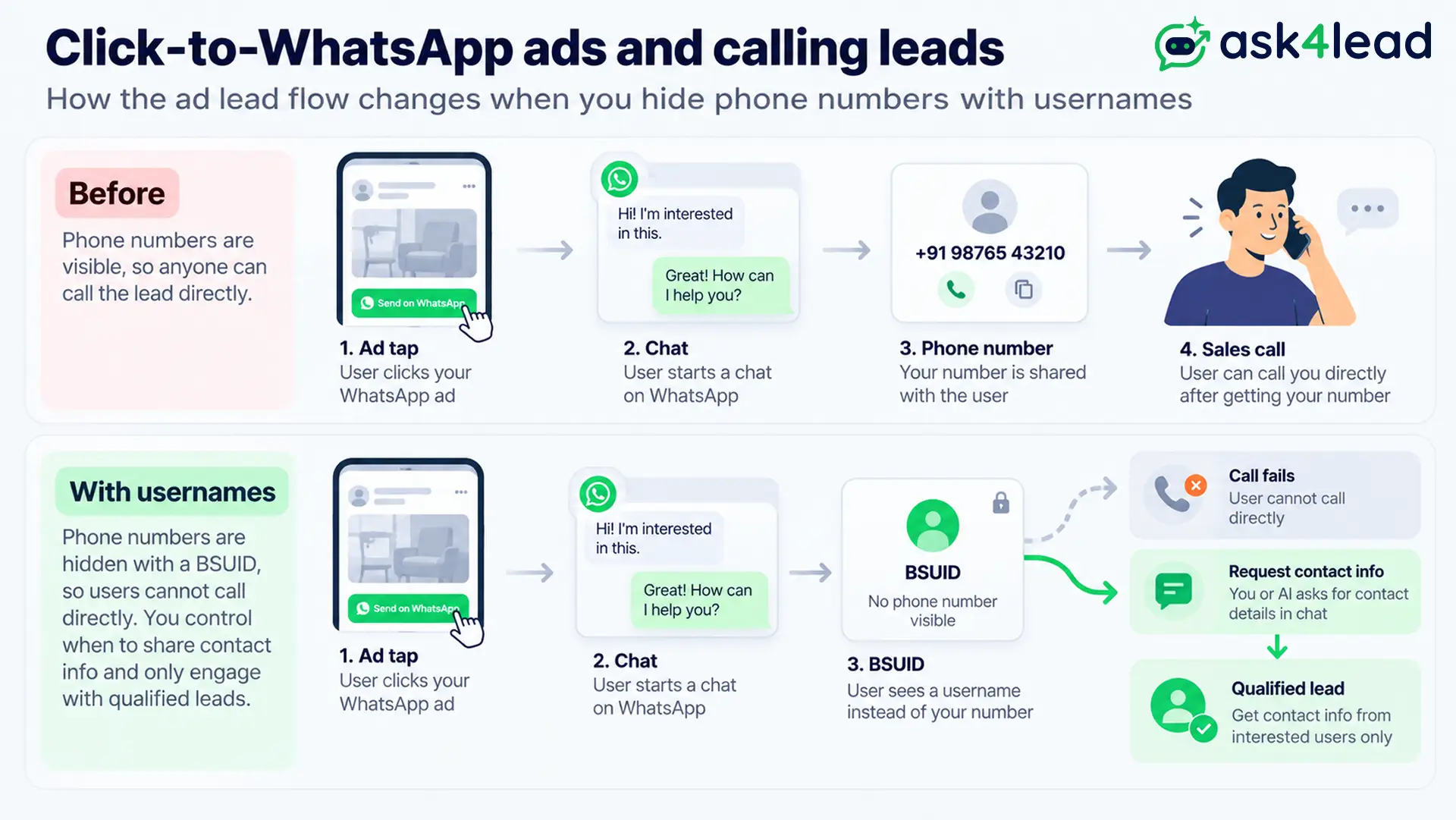
Meta requires advertisers to support BSUIDs. Any customer arriving from Click-to-WhatsApp ads may have a username and no visible number.
That hurts agencies that phone leads within minutes, because a BSUID cannot be dialled. 3 fixes:
- Make the first automated reply ask for a number.
- Send a request contact info button before any callback.
- Qualify the lead in chat and skip the call.
Ask4Lead’s automated lead follow-ups keep the conversation moving inside WhatsApp, so a missing number stops blocking the sale.
4. QR codes, print and bio links
- Existing click-to-chat links and QR codes to your number keep working.
- Add your WhatsApp business username next to the QR code once WhatsApp usernames are live in your country.
- Keep the number on posters, because older customers trust numbers more than handles.
- Keep the WhatsApp button on your Google Business Profile.
Treat the handle as a memory aid and the QR code as the conversion tool.
5. Campaigns to existing phone lists
Marketing templates sent to numbers you hold, with opt-in, continue to work. Authentication templates still need a number.
Providers disagree on how username adopters treat outreach to a stored number, so test 1 small segment first.
Watch your quality rating, because per-message pricing from October 1 makes weak lists expensive. Ask4Lead’s WhatsApp campaigns send to opted-in contacts only.
Impersonation, spam and myths
A WhatsApp business username creates 2 risks: lookalike accounts that copy your brand, and the belief that hidden numbers loosen consent rules. Meta bars impersonation, but enforcement is not instant.
| Myth | Reality |
| Customers can search for my handle | No, they must type it exactly |
| WhatsApp usernames replace phone numbers | A number is still required to open an account |
| Hidden numbers make bulk sending safer | Reports and missing consent still trigger bans |
| Someone can take my brand’s handle | Matching assets are reserved for their owner |
| Switching off the Contact Book improves privacy | It deletes the mappings that keep numbers visible |
Your defences:
- Earn the green tick so customers can spot the real chat.
- Never let an agent move a customer to a personal handle.
- Follow the rules in bulk messaging without bans.
- Know the difference between restricted and banned numbers.
Ask4Lead’s WhatsApp account health view shows quality and limits, so a flag does not surprise you mid-campaign.
A 30-day WhatsApp business username plan
Most businesses need 3 things this month: a reserved handle, records that survive a missing number, and consent that does not depend on identity.
The table sorts the work by setup.
Plan by business type
| Business type | Priority actions |
| API users with a CRM | Store BSUID and username, key inbound chats on BSUID |
| Click-to-WhatsApp advertisers | Confirm BSUID-only chats work, add a contact request step |
| WhatsApp Business App users | Check Settings for a username option, keep saving numbers with consent |
| Agencies managing clients | Audit each client’s CRM key, then reserve handles per brand |
Not sure which setup you have? Compare the WhatsApp Business App and the API.
Week-by-week actions
- Week 1: reserve your handle and ask your provider whether it stores BSUIDs.
- Week 2: change your lead record to hold phone number, username and BSUID.
- Week 3: test a chat from an account with no history and check for duplicate leads.
- Week 4: review opt-in wording on every form, then add the handle to bios.
Where Ask4Lead fits
Ask4Lead is an AI WhatsApp chatbot and CRM that holds real conversations, not button menus.
It helps where WhatsApp usernames hurt most:
- The shared team inbox keeps every agent on 1 handle with full chat history.
- Human approval for AI replies protects your brand voice on the official handle.
FAQs
1. Can customers search for my WhatsApp business username?
No. There is no directory for WhatsApp usernames, and a handle either matches or it does not. Publish yours wherever customers look.
2. Will a customer’s phone number ever show again?
Yes. Any chat or call in the last 30 days, or a Contact Book entry, brings the number back. A request contact info button also asks for it.
3. Is a WhatsApp business username free?
Meta’s documentation lists no reservation fee. Per-message pricing from October 1 is separate.
4. Can I change my handle later?
Yes. The old handle is held 60 days for you to reclaim, but printed materials still need updating.
Conclusion
A WhatsApp business username gives you a memorable front door. The harder work happens behind it, where your records must recognise a customer without a phone number.
Reserve your handle, store 3 identifiers per lead, and keep consent separate from identity. Then check India’s status before you print WhatsApp usernames anywhere.
Ready to handle username chats without losing leads?
Sign up free and get 100 AI credits to connect your number and let Ask4Lead’s AI hold the conversation, ask for the missing details and hand your team a qualified lead.
