
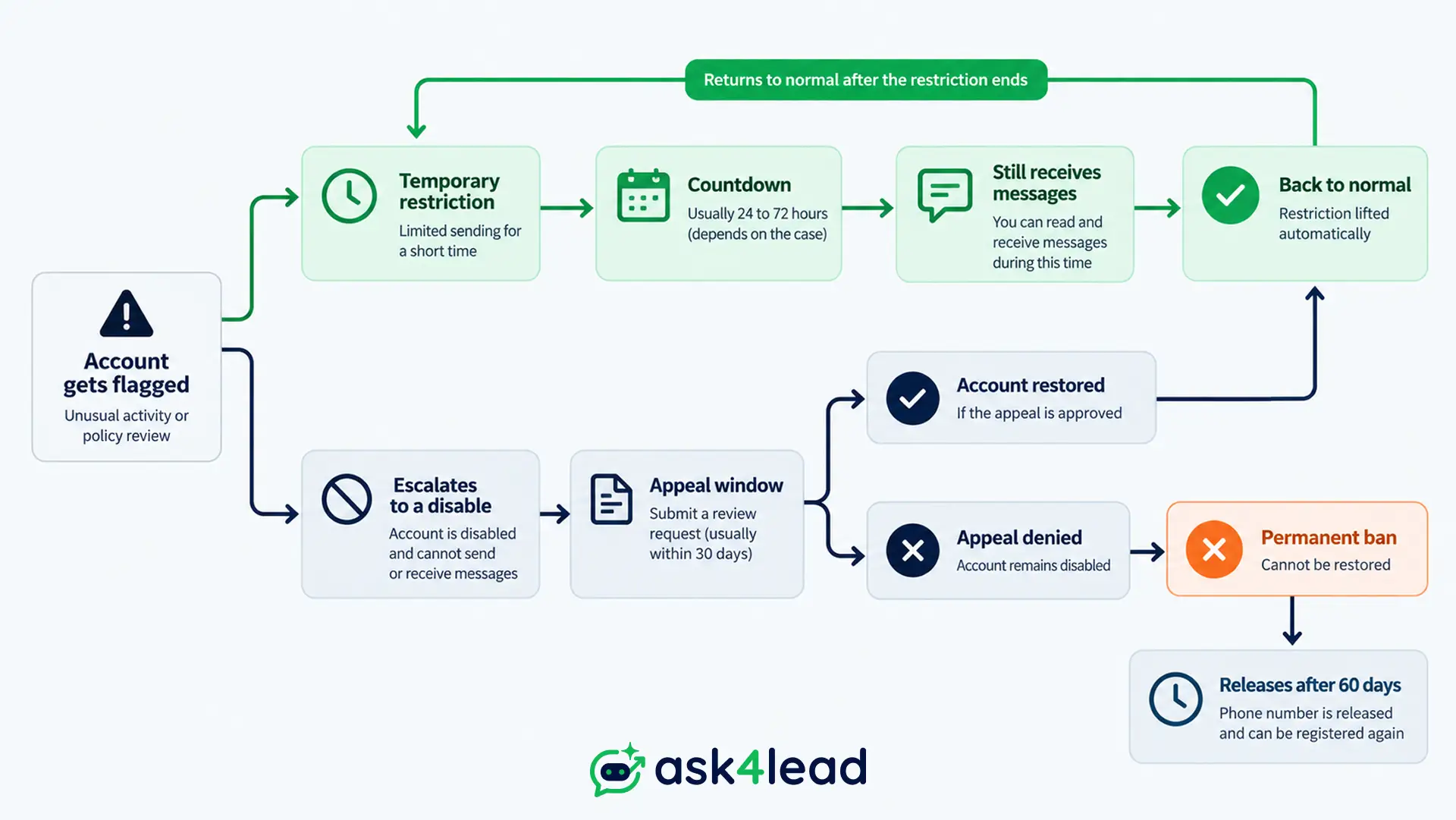
“WhatsApp Business restricted” and “WhatsApp Business banned” are not the same problem. A restriction is a timer: it lifts on its own within hours or days.
A ban, which WhatsApp calls “disabled,” is a decision: it stays off until a review reverses it, or forever.
Confusing the two costs money. Treat a real ban like a timer and leads pile up unanswered while WhatsApp Account Health status sits ignored.
Quick answer
- Restricted = temporary. Usually still receives messages and replies to existing contacts. Lifts on a timer: commonly 6 hours, 24 hours, or 7 days.
- Banned / disabled = the account, or on the WhatsApp Business Platform, 1 phone number’s sending, is shut off with no timer. Only a review brings it back.
- Fastest test: open a chat with someone new. A restriction blocks that 1 action with a countdown. A ban blocks the whole app with “This account can no longer use WhatsApp.”
Key takeaways
- A restriction is automated and reverses on its own; a ban needs a review.
- Messaging your way through either one is what turns a short restriction into a real ban.
- The repeat-restriction “loop” (restored, then flagged again in minutes) is real, not a glitch you imagined.
- A banned account and number are typically released for fresh registration around 60 days later. Chat history never returns.
- Every root cause traces back to 1 thing: messaging people who never clearly agreed to hear from the business.
What “Restricted” Actually Means on WhatsApp Business
The exact wording WhatsApp shows you, and what still works
A restriction is a temporary limit on 1 specific action: almost always starting a chat with someone who hasn’t saved your number.
Windows run 6 hours, 24 hours, or 7 days, depending on the trigger and whether it’s a repeat.
The in-app message names the limit directly: “You can’t message new clients for 7 days.”
During a restriction, you can typically still:
- Receive incoming messages from anyone
- Reply inside conversations already open
- Use WhatsApp Web or desktop for existing chats
- Send messages inside the 24-hour customer service window once a customer has messaged you
You typically can’t:
- Message a number that has never messaged you first
- Add new contacts to a group or broadcast and message them right away
- Open a fresh session with a template message outside that window
The restriction loop nobody explains
An account gets restored, then flagged again within minutes of the next login or the next message to an unsaved number. WhatsApp has never published what re-triggers this.
What broke the loop, reported consistently:
- Stopped messaging anyone who hadn’t saved the business number first
- Stopped relinking WhatsApp Web or a new device from a different network every few days
A device change right after a flag reads as a second signal, not a fresh start.
What “Banned” (Account Disabled) Actually Means
Temporary disable vs the final, unappealable kind
A ban, WhatsApp’s own interface calls it “disabled,” removes app access entirely, with no countdown. The screen states the account “can no longer use WhatsApp.”
2 versions exist:
- Appealable: a “Request review” button still shows
- Final: that button is gone
Even a “final” disable is commonly followed, around 60 days later, by the account and number releasing for fresh registration. Chat history, and every lead trapped inside it, does not come back.
That’s why keeping lead data outside the WhatsApp app itself matters before the day WhatsApp goes dark, not after.
The broadcast-only ban nobody talks about
A narrower penalty most guides skip: WhatsApp can permanently disable just the broadcast feature while the rest of the account keeps working.
This shows up most in accounts that added many people to a group or broadcast list at once, even years ago, for a reason like an event.
WhatsApp Support confirms this restriction is permanent, unappealable, and separate from the account itself, which stays open for one-to-one messaging.
If broadcasts stopped but everything else works, this is likely what happened. Switching to opt-in based campaigns through the official platform is the only reliable fix.
The Business Platform version: number bans, WABA disables, and portfolio-wide shutdowns
Send through the WhatsApp Business Platform, the official API accessed through a BSP (a Meta-approved Business Solution Provider) or Meta’s own Cloud API, and a ban looks different again. Meta can:
- Pause a single phone number’s sending ability
- Drop that number’s messaging tier
- Disable the entire WhatsApp Business Account (WABA) inside Meta Business Manager
- In the most severe cases, disable the whole Business Portfolio, taking every WABA under it offline at once
That fourth outcome is the one most guides underplay: 1 bad WABA can take down every other WABA sharing its Business Portfolio, even ones that never violated anything.
Agencies running multiple clients under 1 portfolio carry this risk by default. Isolated, multi-tenant workspaces that keep each client’s connection genuinely separate are the practical defense against it.
Restricted vs Banned at a Glance
A restricted account and a WhatsApp Business account banned outright differ on almost every point that matters: duration, what still works, and how you get out.
Side-by-side comparison table
| What you’re checking | Restricted | Banned / Disabled |
| Duration | Fixed window, commonly 6 hours to 7 days | Indefinite, until reversed, or permanent |
| Receive messages | Usually yes | No |
| Message existing contacts | Usually yes | No |
| Message new contacts | No, this is the block itself | No |
| Appeal needed | Usually none, lifts on its own | “Request review,” if it still shows |
| What follows | Full access returns automatically | Restored, or released after roughly 60 days |
| Typical trigger | A spam report, a new device login, a burst of first-contact messages | Repeated restrictions, a serious violation, a portfolio-wide issue |
| Business Platform (API) equivalent | Quality rating drops, messaging tier shrinks | Number’s sending paused, or the whole WABA disabled |
The 30-second self-check: which one are you dealing with
- Open a chat with a number already in your history. Sends? You’re restricted, not banned.
- Read the exact wording. A countdown, or “can’t message new clients for X days,” is a restriction. “Can no longer use WhatsApp” is a ban.
- Look for a “Request review” button. Present with no countdown means banned but appealable. Absent means the ban is final.
- On the Business Platform, check quality rating in Meta Business Manager. A drop, or a “Restricted” number status, is the API-side version.
Why WhatsApp Restricts or Bans Business Accounts
WhatsApp doesn’t publish the exact thresholds that get a WhatsApp Business account restricted or banned. The causes reported again and again cluster into a small number of patterns.
| Trigger | What usually happens |
| Messaging people who haven’t opted in | Restriction first, a ban if it repeats |
| New device, VPN, or shared network login | Restriction, especially right after a prior flag |
| Low quality rating held over time | Messaging tier drops, then a number-level ban |
| A rejected or spammy template | Template disabled, quality rating drops |
| Account compromised by someone else | Restriction or ban, often with spam groups you didn’t create |
| A Commerce Policy violation | Ban, sometimes with no restriction warning first |
1. Messaging strangers who haven’t opted in
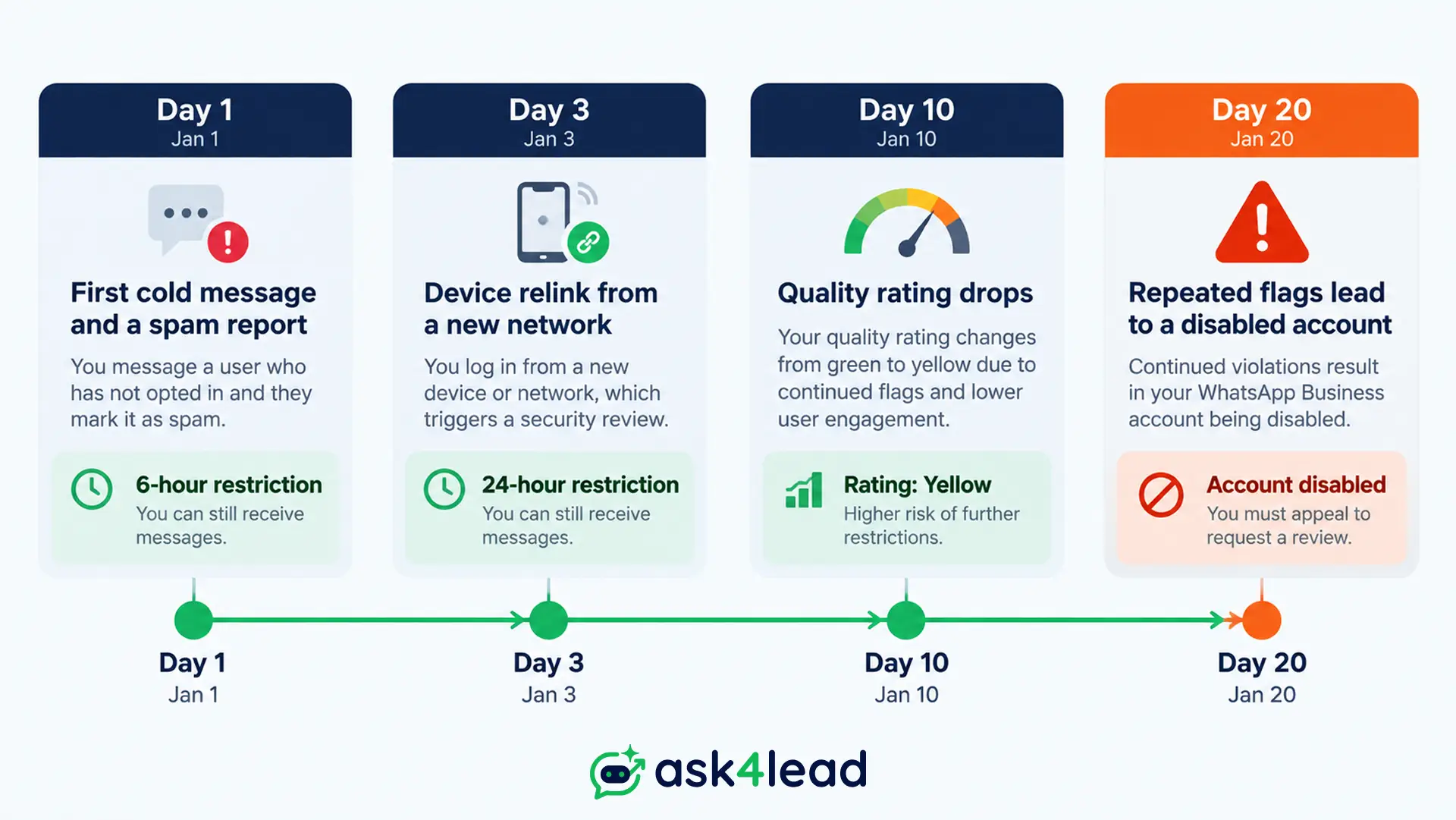
The single most common trigger: a first or forwarded message to someone who’s never messaged the business and never agreed to hear from it. A handful in 1 day can flag an account.
Meta’s own policy is explicit: a customer reaching out once isn’t consent to message them again later.
2. New devices, VPNs, and shared networks
Linking a new phone, reinstalling the app, or using WhatsApp Web from a hotel, café, or VPN shows up repeatedly in restriction reports, especially right after a prior flag.
WhatsApp appears to treat a sudden device or IP change as a fresh signal worth re-checking.
3. Low quality ratings, rejected templates, and a hacked account
On the Business Platform, spam-marked templates or a low quality rating held over time throttle, then pause, that number’s sending.
Separately, a compromised account, hacked by someone else to create spam groups, gets flagged through no fault of the real owner.
A specific pattern surfaced across independent reports in September 2026: older iPhones on outdated software had accounts hijacked with no click needed, then used to spam contacts and create groups, triggering a real restriction.
If chats or groups appear that you didn’t create, treat it as a security issue first. Check audit logs for who actually sent what.
What to Do If Your Account Is Restricted
Step-by-step: what actually speeds it up
- Stop messaging anyone not already in your chat history until the countdown ends.
- Check time remaining by opening a chat with an unfamiliar number, the pop-up shows the hours left.
- If “Request a review” appears, use it once, describing your use case in a sentence or 2.
- Once access returns, save every existing customer as a real contact before messaging again.
- Rebuild outreach around scheduled, opted-in messages, not a burst of first-contact messages the moment it lifts.
Why fighting the timer backfires
These actions are most associated with a restriction turning into a real ban:
- Forcing a message through
- Switching SIM cards
- Opening a second account under the same business
WhatsApp treats a rapid retry after a flag as more suspicious, not less. It’s a timer: working against it only resets it.
What to Do If Your Account Is Banned
A WhatsApp Business account banned outright needs a different response than a restriction: you’re appealing a decision, not waiting out a clock.
1. Requesting a review the right way
Open the app, or WhatsApp’s own account restriction and ban help page, and look for “Request a review.”
Submit 1 factual appeal covering:
- What the business does
- Why the flagged messaging pattern happened
- Confirmation you’ll only message opted-in contacts going forward
Short, specific appeals report faster, more consistent outcomes than resubmitting generic text. For the full recovery playbook, see our complete WhatsApp Business ban recovery guide.
If the review comes back unchanged with no appeal left, the account and number typically release for re-registration around the 60-day mark. Tell existing leads through another channel, don’t promise a date you can’t guarantee.
2. The Business Platform escalation path
On the WhatsApp Business Platform through a BSP, recovery runs through Meta Business Manager’s Direct Support, not the consumer app. Open a case with your Business Verification details attached.
If a tech provider manages the account, ask them to escalate through their own partner manager channel. Some report meaningfully faster responses than a solo ticket.
Rethinking your provider after this? See switching your WhatsApp Business Solution Provider and migrating chat history and templates without starting from zero.
3. Never pay for a “guaranteed” unban
Every credible report of a paid service claiming it can get a WhatsApp Business account unbanned ends with the business losing money, the number, or both.
There’s no verified back channel around WhatsApp’s own review process. Anyone claiming otherwise is selling something that doesn’t exist.
How to Avoid It Happening Again
The prevention checklist that covers both states
- Never message a number that hasn’t messaged you first or opted in through a form, ad, or QR code.
- Keep every outbound campaign inside opted-in lists, not a manually forwarded contact list.
- Stay on 1 device and network for WhatsApp Web; avoid relinking from public WiFi or a VPN.
- Read our guide to sending bulk WhatsApp messages without getting banned before your next broadcast, not after the flag.
- Running scripts or automation? Check whether automation itself puts you at risk before scaling it.
Watch quality rating like a credit score
Most businesses check quality rating only after it drops. Meta Business Manager shows it in real time.
A slow decline over weeks is a far easier fix than a number that’s already paused. Treat a drop from green to yellow like a late payment notice: fix the cause immediately.
FAQs
1. How long does a WhatsApp Business restriction actually last?
Most reported windows run 6 hours, 24 hours, or 7 days, shown as a countdown when you try to message someone new. Repeated flags trigger the longer windows.
2. Can a banned WhatsApp Business account be recovered?
Yes, if “Request a review” is still available. Submit 1 honest, specific appeal. With no review option left, the account typically releases for re-registration around 60 days later, though chat history doesn’t carry over.
3. Why does my account get restricted again right after WhatsApp restores it?
The same behavior that caused the first flag usually continues: messaging unsaved numbers, or relinking devices from new networks. Breaking the cycle means stopping both, and letting the account sit idle a full day before testing it again.
4. Will a new phone number stop the same ban from happening again?
Not by itself. The same pattern under the same business identity gets flagged just as fast, since Meta can associate a device, business, or payment method across numbers.
5. Does WhatsApp explain why an account was restricted or banned?
Rarely in specific terms. The notice usually references a general Terms of Service violation without naming the exact message or report that triggered it.
6. How is a ban different on the WhatsApp Business Platform (API) than on the free app?
On the free app, a ban locks the whole account. On the Business Platform, Meta can instead pause 1 number’s sending, lower its messaging tier, or disable the entire WABA, sometimes without touching app access at all.
Conclusion
A restriction is a timer. A ban is a decision.
Treating 1 like the other wastes hours, or weeks, while real customers message a WhatsApp Business number that can’t answer them.
The fix for most cases traces back to 1 habit: never message anyone who hasn’t clearly opted in, and watch account health before it drops instead of after.
That’s the exact gap Ask4Lead closes for WhatsApp-first sales teams:
- A humanized AI assistant that only replies inside conversations customers actually start
- Human approval before any AI message goes out
- Account health tracking that catches a quality rating slide days before it becomes a paused number
If a restriction or ban has already cost you a week of leads, don’t rebuild the same fragile setup that caused it.
