
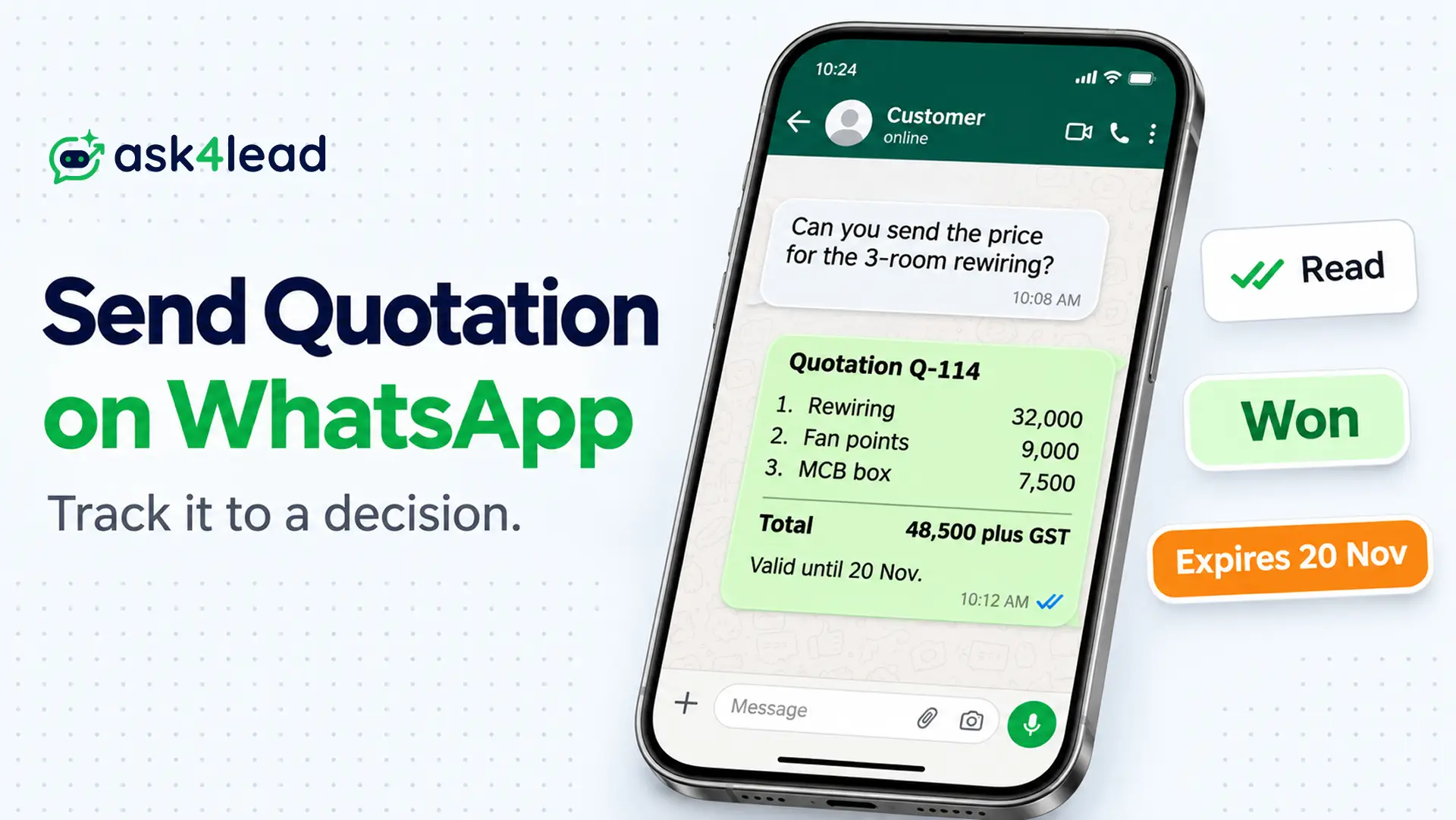
To send quotation on WhatsApp, write a short message with the total and an expiry date. Then attach the file and set your follow-up date before you press send.
After that, track the quotation to a decision. Every quotation ends as won, lost or expired, and you record which one.
Below you get a message to copy, a follow-up schedule and a tracking sheet. If your team prices inside the chat, Ask4Lead Quotes builds each quotation from your catalog.
What Is a WhatsApp Quotation, and What Counts as a Decision?
A WhatsApp quotation is a written price offer for a described job. It stays valid until a set date, and you deliver it in a chat.
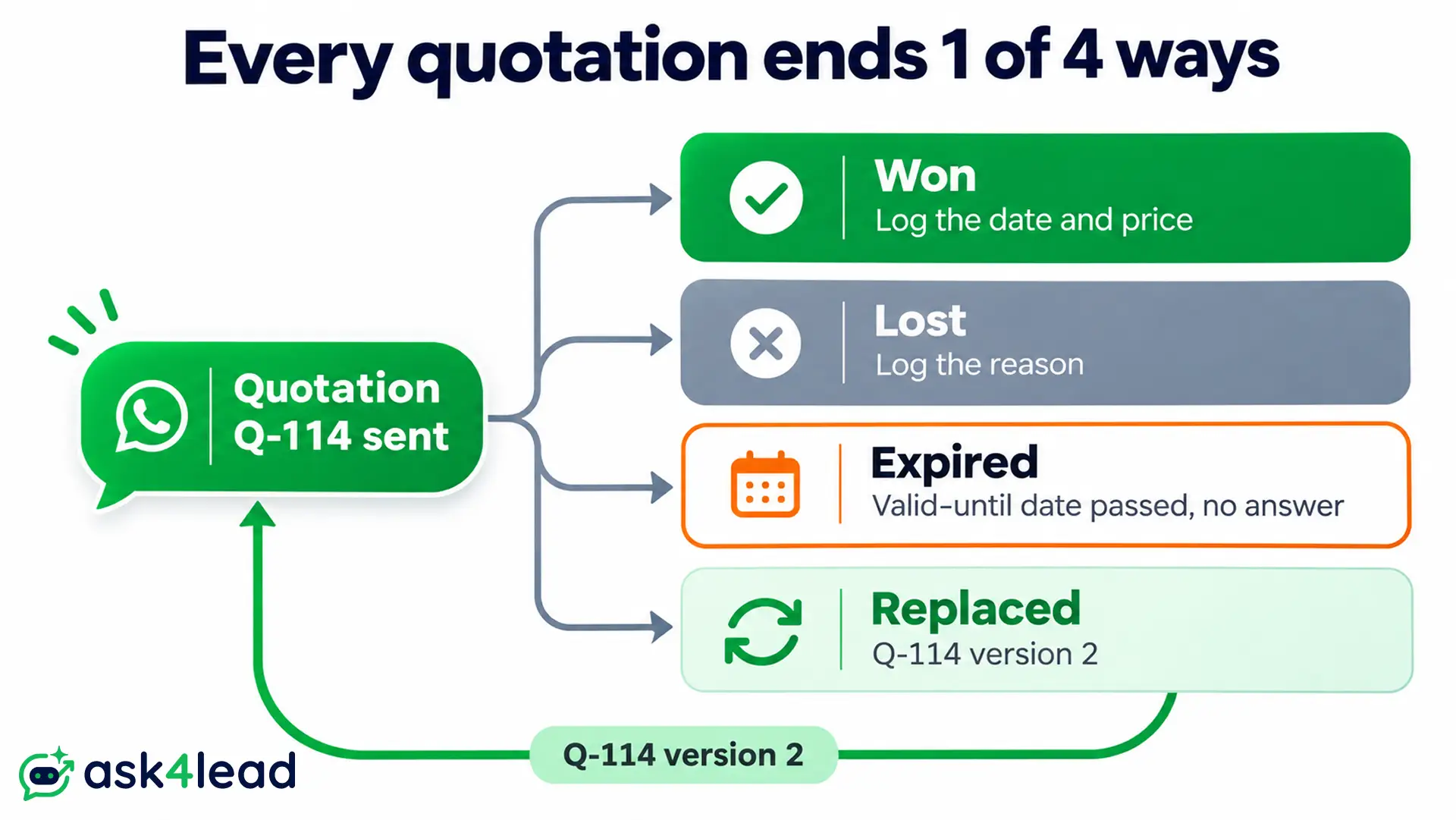
Every offer ends in a decision: won, lost, expired or replaced. Because most guides stop at sending, many quotations never reach one.
| Decision | What it means | What you record |
| Won | Customer says yes in writing. | Date, final price and start date. |
| Lost | Customer says no or picks another supplier. | Reason, in 1 line. |
| Expired | Valid-until date passes with no answer. | Date, and whether you sent a close-out message. |
| Replaced | You send a revised WhatsApp quotation. | New number, so the old one closes. |
A quiet WhatsApp quotation is rarely a no. Most customers are busy, and then nobody follows up. So treat silence as expired, not lost, until you have asked once.
How to Send Quotation on WhatsApp in 5 Steps
To send quotation on WhatsApp, follow 5 steps. Confirm the scope, number every line, write the message, pick a format and set the follow-up date. Do the last step before you press send, because you rarely pick a date afterwards.
1. Confirm the scope in the chat first
Ask 3 things before you price: what the customer needs, how many and by when. A WhatsApp quotation built on a guess comes back as a string of change requests.
2. Number every line item
Customers reply in fragments, such as “remove the third”. So number each line, and number the quotation too. Then “drop item 3” points to exactly 1 line.
3. Put the total and the expiry date in the message
The message shows on the lock screen, and a customer may forward it without opening the file. So when you send quotation on WhatsApp, put the total and valid-until date in the message. Then repeat them in the file.
4. Choose a format to send quotation on WhatsApp
Each format trades formality against speed and tracking:
| Format | Good for | What you can track |
| PDF file | Buyers who need a file for approval, since it archives easily. | Only the read tick, because an opened file shows nothing. |
| Link to a page | Quotations that change, because the link always shows the latest version. | Opens, but only when your tool logs them. |
| Text in the chat | Jobs with 1 to 3 items, since it needs no file at all. | The read tick, so you also watch for a reply. |
Ask4Lead sends the third kind. Its quote builder pulls prices from your Services Catalog, so nobody types a price from memory.
5. Set the follow-up date before you send
Choose the next touch while the WhatsApp quotation is still in your hands. In Ask4Lead, add a Next Step with the note “Send revised pricing”. It then appears in your Work Queue on the day.
What to Write When You Send Quotation on WhatsApp
When you send quotation on WhatsApp, write 3 things above the file. Name what it covers. Add the total with the expiry date. Then ask one question the customer can answer in a word. Keep the message under 60 words, so it reads in one glance.
A message to copy when you send quotation on WhatsApp
This example uses an invented electrical contractor in Ahmedabad:
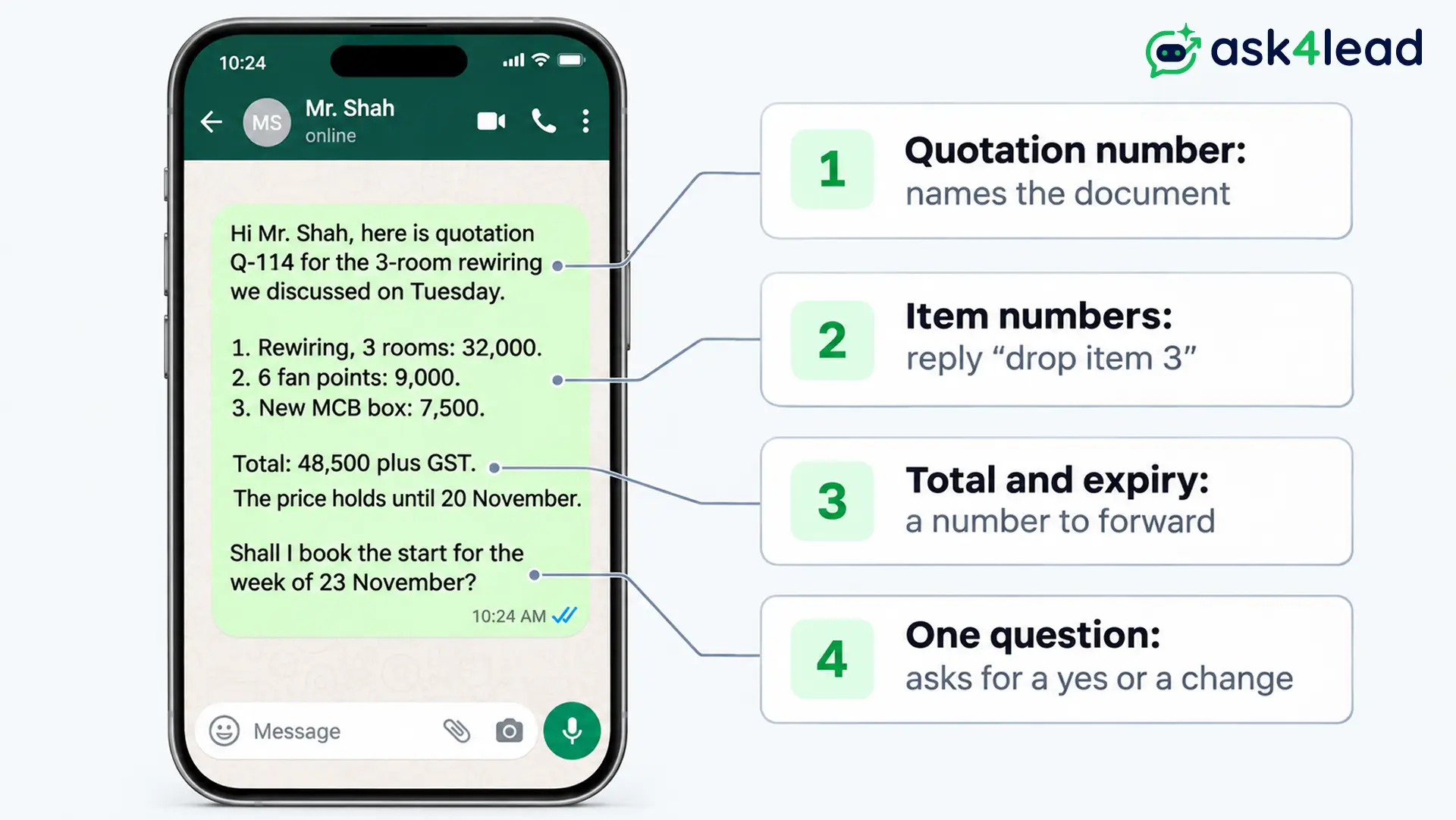
Hi Mr. Shah, here is quotation Q-114 for the 3-room rewiring we discussed on Tuesday.
- Rewiring, 3 rooms: ₹32,000
- 6 fan points: ₹9,000
- New MCB box: ₹7,500
Total: ₹48,500 plus GST. The price holds until 20 November.
Shall I book the start for the week of 23 November?
Each part has a job:
- Quotation number: it lets the customer find the document later.
- Item numbers: they let the customer reply “drop item 3”.
- Total and expiry: they give the customer a number to forward and a reason to answer.
- One question: it asks for a yes or a change, not “let me know.”
A message for a revised WhatsApp quotation
Send a new number each time the price or scope changes. For example:
Hi Mr. Shah, here is Q-114 version 2, which replaces version 1. I removed item 3 as you asked. The new total is ₹41,000 plus GST, valid until 20 November. Does this one work?
Which Signals Show the Customer Read Your WhatsApp Quotation?
After you send quotation on WhatsApp, 3 signals appear: delivered, read and a reply. A fourth, an opened link, exists only when your quotation is a page that logs visits. None of them means yes, so use each one to choose your next question.
| Signal | What it tells you | What it cannot tell you |
| 2 grey ticks | The phone received the message. | Whether anyone looked at it. |
| 2 blue ticks | The customer read your message. | Whether the file opened, because customers can switch read receipts off. |
| Link opened | Someone opened the page. | Who opened it, or what they thought. |
| Reply | The customer engaged. | Whether the answer is yes. |
Treat read and silent differently from unread. Unread after 2 days is normal. Read 3 days ago and silent means the customer is not ready. So ask a different question.
Ask4Lead sends text, so the read tick is your only open signal, and its Quotes page documents no “viewed” event.
How to Follow Up After You Send Quotation on WhatsApp
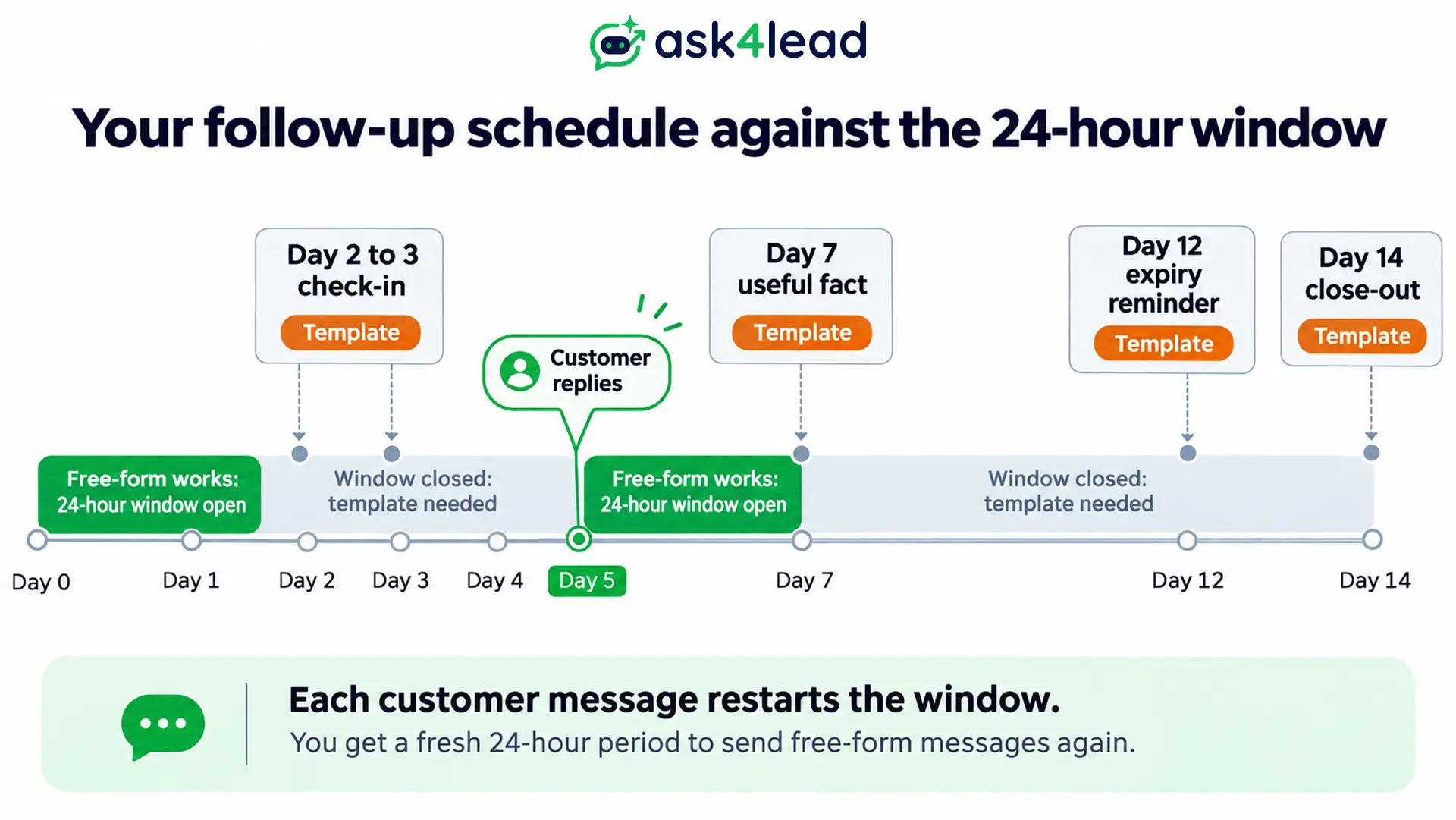
Meta allows free-form messages only while a 24-hour customer service window stays open. Every customer message restarts that window. After that, a follow-up needs an approved template, and Meta charges for each delivered template. So your follow-up schedule also decides your costs.
1. A follow-up schedule that fits the window
| When | What to send | Window |
| Day 0 | The quotation | Usually open, since the customer just asked, so free-form works. |
| Day 2 to 3 | A short check-in, such as “Did it reach you?” | Usually closed, so use a template. |
| Day 7 | One useful fact, such as stock or a free slot | Closed, so use a template. |
| 2 days before expiry | “This price ends on 20 November.” | Closed, so use a template. |
| Day 14 | “Shall I close this quotation?” | Closed, so use a template. |
If the customer replies at any point, free-form messages work again for 24 hours. For a large quotation, call on day 3 instead. A call opens a conversation that a third text will not. The follow up reminders guide covers wording by situation.
2. What each quiet customer needs from you
| Likely reason | Sign | Question to send |
| Busy | The message stays unread. | “Did the quotation reach you? Is anything unclear?” |
| Comparing prices | The customer reads it, then goes silent. | “Is the price the sticking point? I can adjust the scope.” |
| Needs approval | The customer said “I will show my partner.” | “Shall I check back on Friday, once your partner has seen it?” |
| Chose someone else | Silence continues past the expiry date. | “The price ended yesterday. Shall I close this quotation?” |
That last message works because it gives an easy no. Both a yes and a no beat silence, since each one closes the quotation.
3. Template category and cost for WhatsApp quotation follow-ups
Meta’s template categorisation guide treats messages that promote offers or retarget customers as marketing, even when the customer asked. So assume a quotation nudge counts as marketing, and check the category Meta assigns.
Meanwhile, Meta’s pricing page gives each number 1,000 free service messages a month, which covers your free-form replies. It charges every delivered template. Only message customers who gave WhatsApp opt-in consent.
In Ask4Lead, a Next Step only reminds your rep and sends nothing. To send an approved template to many quiet customers, build it in WhatsApp Templates. Then run it through WhatsApp Campaigns.
How to Handle Replies, Revisions and Acceptance
After you send quotation on WhatsApp, a customer replies in 3 shapes: yes, a change, or “I need to check”. Each needs a different move. All 3 also end with a status change in your records, because a chat message alone does not count.
1. Give each revision its own number and version
Give every price or scope change a new version number, and write “replaces version 1” in the message. Otherwise, a customer who scrolls back 3 days can accept the old total.
Never agree a new price by chat alone. A discount typed from memory leaves no record, so it causes the dispute at invoice time. In Ask4Lead, managers can restrict which agents offer custom discounts. Meanwhile, the AI flags pricing questions for a human before it promises a figure.
2. Turn “OK” into a written acceptance
Answer a yes with a written confirmation, then change the status to won:
Thank you, Mr. Shah. To confirm: Q-114 version 2 costs ₹41,000 plus GST. We start on 23 November, after an advance of ₹20,500.
That message closes the gap between a chat reply and an order. Keep the chat as evidence. For large amounts, ask for a signature or a purchase order, and check the wording with your adviser.
3. When not to send quotation on WhatsApp
Large companies and tenders often require email or a portal. Send the quotation there, then use WhatsApp only as a nudge, such as “I emailed the quotation 10 minutes ago”.
How to Track Every WhatsApp Quotation to a Decision
Once you send quotation on WhatsApp, track it in 1 sheet. Give each quotation 1 row, a status, a next date and a closing reason. Then review it for 15 minutes every Monday.
A WhatsApp quotation with no next date and no decision is the leak. The sheet exists to expose each one.
1. Use these columns
- A to C: quotation number, customer and value, so each row names the job.
- D to F: sent date, status and last contact, so age stays visible.
- G: next follow-up date, because every open row needs one.
- H and I: decision date and reason, so closed rows teach you something.
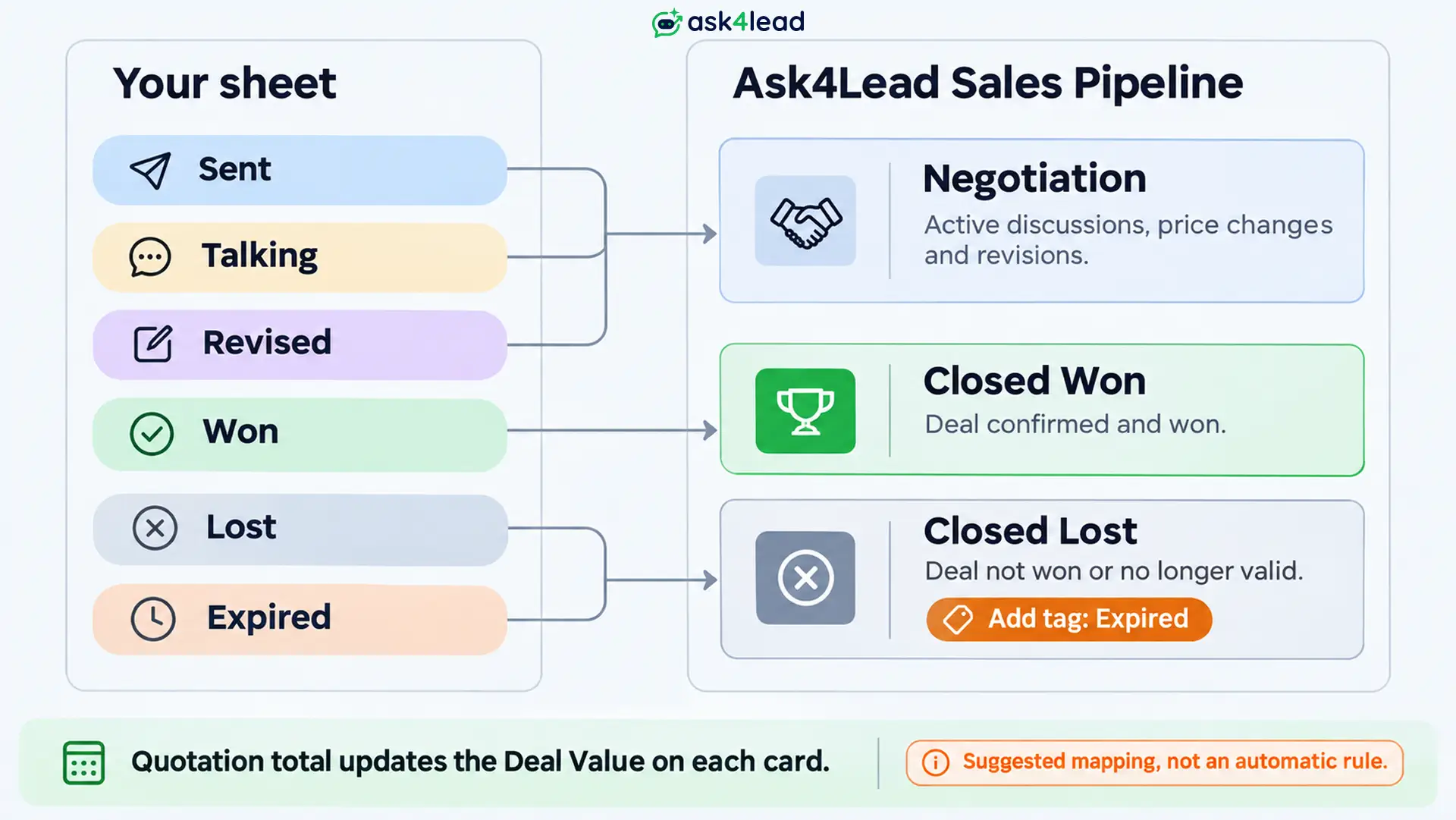
Use 6 statuses: Sent, Talking, Revised, Won, Lost and Expired.
2. Add 2 formulas
J2: =IF(H2="",TODAY()-D2,H2-D2)
K2: =IF(OR(E2="Won",E2="Lost",E2="Expired"),"Closed",IF(G2<=TODAY(),"Chase today","Wait"))
Column J shows age, or the days to decision once a decision date exists. Then K tells you whom to chase. Sort by value, so the big ones never slip.
3. See a worked example
I made up the 6 WhatsApp quotations below to show the logic.
| Quotation | Value | Days | Status | What column K says |
| Q-109 | ₹18,000 | 2 | Sent | Wait, since the first check-in falls on day 3. |
| Q-110 | ₹41,000 | 4 | Talking | Chase today, because the next date has passed. |
| Q-107 | ₹95,000 | 9 | Sent | Chase today, and ask the price question. |
| Q-105 | ₹27,500 | 15 | Expired | Closed, so log the reason as “no reply”. |
| Q-103 | ₹60,000 | 6 | Won | Closed, so log the decision date. |
| Q-102 | ₹33,000 | 11 | Lost | Closed, so log “cheaper offer”. |
Chase Q-107 and Q-110 first, since together they carry ₹1,36,000.
4. Read 3 numbers each month
- Days to decision: average the gap between sent date and decision date on won quotations. Set your first follow-up near that number. A shop that decides in 1 day gains nothing from a day-7 nudge. Work that takes 10 days needs one.
- Win rate: divide won by all closed quotations. For example, 9 won out of 25 closed (9 won, 6 lost, 10 expired) gives 36 wins per 100 quotations.
- Expired share: divide expired by closed. Here that gives 40 expired per 100, which points to a follow-up gap and not to price.
5. Mirror the statuses in your CRM
When a sheet stops being enough, a CRM keeps the same logic beside the chat. WhatsApp CRM versus a spreadsheet shows the switch point.
In Ask4Lead, the total of each WhatsApp quotation updates the Deal Value in the lead record. So the Sales Pipeline shows value per stage. Move the card to Negotiation after you send.
Then move it to Closed Won on a yes or Closed Lost with the reason. The pipeline has no Expired stage, so mark expired quotations Closed Lost and add a tag.
FAQs
1. How soon should I send quotation on WhatsApp after the customer asks?
Within 24 hours, and the same day if you can. A fast quotation usually beats a slow one, and an open chat allows free-form messages.
2. Is it valid to send quotation on WhatsApp?
The customer’s written yes matters more than the channel, so keep the chat as evidence. For large amounts, add a signature.
3. Should I send quotation on WhatsApp as a PDF or text?
Send text or a link for simple jobs, and a PDF when the buyer needs a file for approval.
4. How many times should I follow up after I send quotation on WhatsApp?
Use 3 to 4 touches: day 2 to 3, day 7, 2 days before expiry and a close-out. Then log it as expired.
5. Does Ask4Lead send a WhatsApp quotation as a PDF or show when it opens?
It does neither. Instead, it sends formatted text from your Services Catalog, so the read tick is your signal. Its Quotes page documents no accept button, so log a customer’s yes by hand.
Conclusion
To send quotation on WhatsApp well, send a numbered message with a total and an expiry date. Then follow up on a schedule that fits the 24-hour window. Close every WhatsApp quotation as won, lost or expired. A quiet one is not lost until you ask.
Before you send quotation on WhatsApp again, check that you have:
- Numbered items and a quotation number.
- A total and an expiry date in the message.
- Your follow-up date in a sheet or CRM.
- 1 template ready for day 2 to 3 and 1 for the close-out.
- A 15-minute review booked for Monday.
Next, open last month’s quotations and mark each one won, lost or expired.
Stop letting quotations go quiet
If quotations still vanish after you send quotation on WhatsApp, Ask4Lead closes the gaps. The Quotes tab builds each offer from your catalog, and the deal value lands in the pipeline.
Meanwhile, Next Steps and the Work Queue bring every quiet quotation back on the right day. Then reports and analytics show where deals drop off.
