
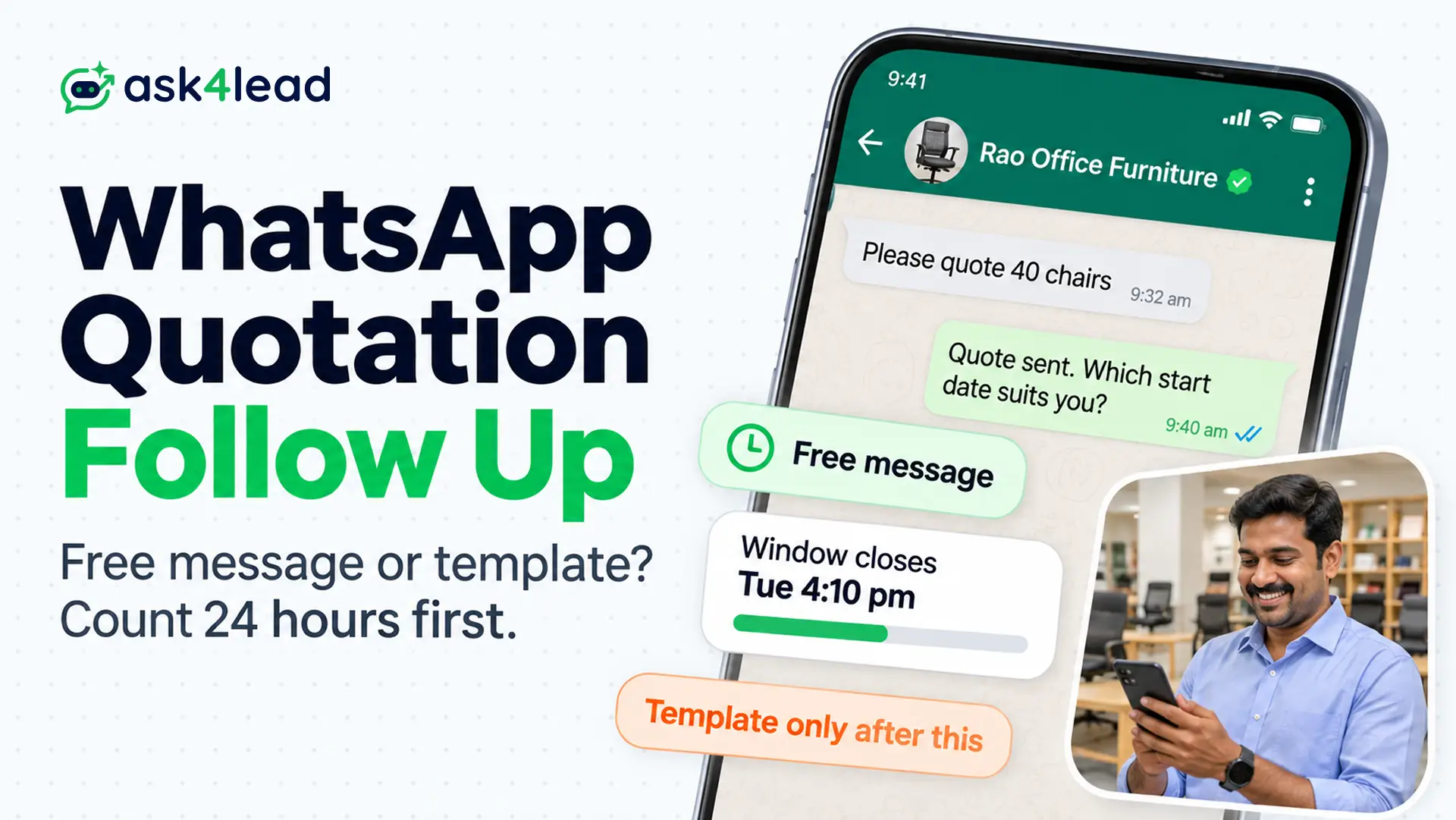
A WhatsApp quotation follow up is a message you send after a customer has your quote and goes quiet. Meta’s rules decide what you may send and what it costs. Inside the 24-hour window, any free message works. However, after it closes, only an approved template goes through.
Below, you can compare both routes. Finally, you can copy 3 messages.
Quick answer: For a WhatsApp quotation follow up, count 24 hours from the customer’s last message, not from your quote. Inside that 24-hour window, send a free message. After it, send an approved template and expect Meta to class it as marketing. Plan 3 touches at most, and stop on any reply, opt-out or error 131050.
Key takeaways
- Every WhatsApp quotation follow up runs on a 24-hour clock that starts at the customer’s last message. Sending a quote or a template does not restart it.
- A free message costs nothing for the first 1,000 service messages per number each month. Marketing templates cost ₹0.8631 each in India.
- Meta sets the template category, so write a sales nudge as marketing and treat utility as a bonus.
- Stop on any reply, any opt-out request and error 131050.
What Is a WhatsApp Quotation Follow Up?
A WhatsApp quotation follow up is any message you send about a quote the customer has not answered.
It looks like a simple nudge, but the WhatsApp Business Platform treats it as one of two things. Inside the 24-hour window it is a service message. Outside the 24-hour window, however, it is a template.
Three Meta rules shape each one:
- The window rule: free-form messages work only while a customer service window is open.
- The category rule: a template is utility or marketing, and Meta sets the label.
- The consent and limit rule: you need opt-in, and each person receives only so many marketing templates.
These rules apply to the WhatsApp Business API. The phone-based WhatsApp Business app has no template rule. For the quote itself, see the send quotation guide.
How to Time a WhatsApp Quotation Follow Up Against the Clock
Time every WhatsApp quotation follow up from the customer’s last message.
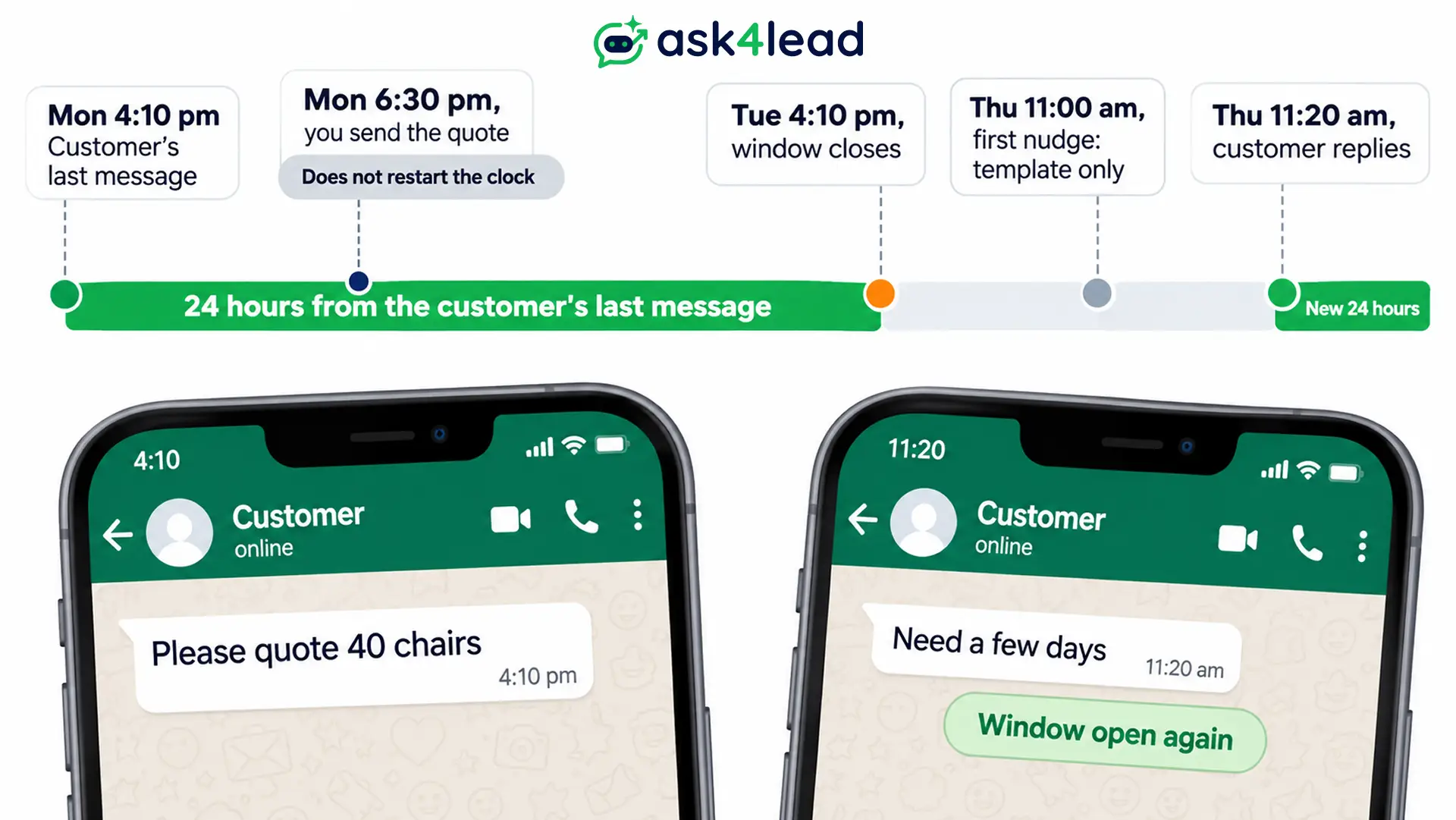
Meta opens a 24-hour customer service window when a customer messages or calls you, and each new message resets it. Neither a quote nor a template you send resets it.
Count the 24 hours in one worked example
Take a customer who writes at 4:10 pm on Monday and asks for a quote for 40 chairs. Then you send it at 6:30 pm. The window still closes at 4:10 pm on Tuesday.
| When | What happens | What you may send |
| Mon 4:10 pm | The customer asks for a quote | A free message |
| Mon 6:30 pm | You send the quote | A free message |
| Tue 4:10 pm | The window closes | A template only |
| Thu 11:00 am | You send the first nudge | A template only |
| Thu 11:20 am | The customer replies | A free message for 24 hours |
Most guides suggest a first nudge 2 to 3 days after the quote. By then the 24-hour window has closed. So your first follow up is a template unless the customer writes in between.
Customers from ads get up to 7 days
A customer who reaches you through a Click to WhatsApp ad opens a customer service window. If you reply inside it, Meta opens a free entry point window that can last up to 7 days. Inside it, Meta does not charge for marketing, utility or service messages.
Older guides say 72 hours, but Meta’s pricing page now says up to 7 days. Also, the rule covers customers on the Android or iOS app.
End the quote with a question only the customer can answer
Only a customer message reopens the 24-hour window. So end the quote with one easy question. Try “Which start date suits you?” or “Can I check back on Thursday?”
As a result, a yes turns your WhatsApp quotation follow up into a date the customer agreed to. Ask before you send the quote, not after.
Free Message vs Template for a WhatsApp Quotation Follow Up
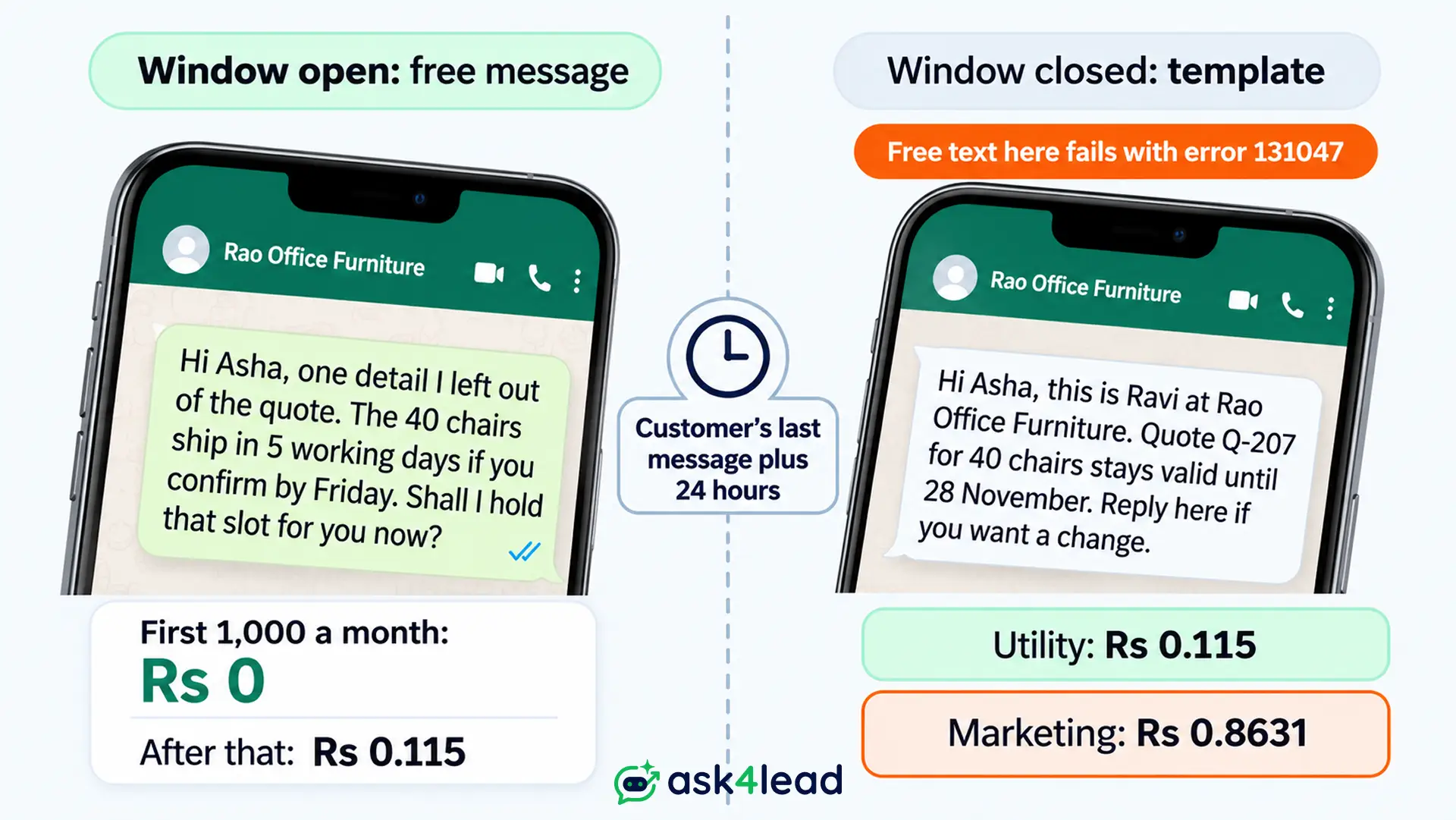
A free message and a template differ on what you may send, what Meta charges and how Meta limits them. Use a free message whenever the 24-hour window is open. Reach for a template only after it closes.
The table shows India prices from Meta’s rate card, before tax or any provider fee.
| Question | Free message (24-hour window open) | Template (24-hour window closed) |
| What you can send | Text, files, photos and buttons | Only an approved template |
| Meta fee in India | Free for the first 1,000 a month, then ₹0.115 | ₹0.115 as utility, ₹0.8631 as marketing |
| Category | Service | Utility or marketing, set by Meta |
| Per-person limit | None | Marketing templates are capped |
| Failure code | 131047 once the 24-hour window shuts | 131049, 131050 or 130472 |
| Main use | Answering, revising and closing | Reaching a silent customer |
What a free message can do
Inside the 24-hour window, your WhatsApp quotation follow up can be a revised quote, a photo or a question. Meta bills these as service messages. The first 1,000 on each number each month are free, and later ones cost ₹0.115 in India.
A customer reply to your template also opens a 24-hour window. So one answered template moves the rest of the chat to service messages.
What a template costs
At ₹0.8631, a marketing template costs less than one rupee. Say 40 quotes go quiet and each gets 2 nudges. That is 80 messages, or ₹69.05 as marketing and ₹9.20 as utility.
So price rarely decides the route. The category rules and the delivery limits do.
How to Pick the Template Category for a WhatsApp Quotation Follow Up
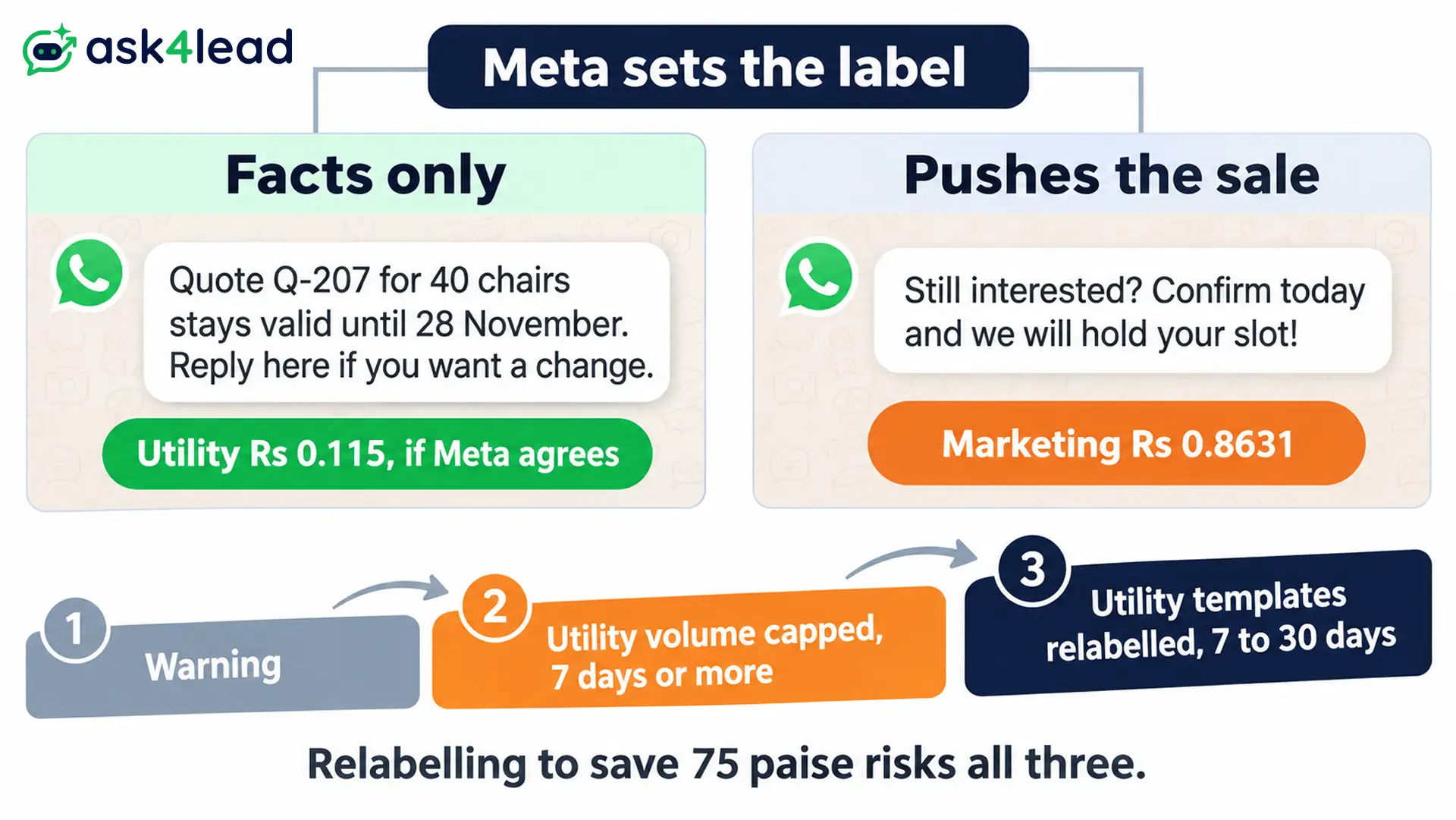
Meta sets the category of every template, not you. A template counts as utility only when it is non-promotional and tied to the customer’s own order or request. Any nudge that tries to win the sale reads as marketing, so plan for the marketing rate.
Meta’s template categorization guide lists retargeting as marketing, even when the customer asked for the message. Retargeting means a call to action sent to someone who already engaged with you.
Word a quote template so it can stay utility
Keep the text to facts about the quote: its number, its end date and how to ask for a change. Leave out discounts, urgency and phrases like “still interested”. Mixed content counts as marketing, so one promotional line changes the label for the whole message template.
If Meta disagrees with your choice, it approves the template as marketing instead of rejecting it. A rejected template is a different problem, covered in the template rejected guide.
Do not disguise a nudge to save 75 paise
The gap between the two prices is about 75 paise a message. Meta can recategorise an approved template with 1 day of notice. After a warning, it recategorises with no notice.
Repeat misuse brings stricter caps on your account. First, Meta limits utility volume for at least 7 days. Then it treats all your utility templates as marketing for 7 days, or 30 for repeat cases. So the saving is not worth the risk.
Consent, Limits and Stop Rules for a WhatsApp Quotation Follow Up
Meta requires opt-in before you message anyone, and it limits how many marketing templates each person receives. So every WhatsApp quotation follow up needs 3 checks before it goes. Check that consent is on record, that no limit or opt-out error applies, and that no reply is waiting.
Put the consent line in your quote request
Meta’s opt-in page says the customer must clearly agree, and the text must name your business. A website form, a phone call or a signed page all work.
Add one line to your quote form: “[Business name] will send your quote and follow up on WhatsApp. Reply STOP to opt out.” Then read the WhatsApp opt-in consent guide for wording by channel.
Read each Meta error as an instruction
| Code | What Meta reports | What to do |
| 131047 | More than 24 hours since the customer last replied | Send a template instead |
| 131049 | Not delivered, because the person reached the marketing limit | Wait 24 hours, then retry once |
| 131050 | The customer stopped marketing messages from you | Never retry |
| 130472 | The customer sits in a Meta test group for marketing messages | Reach them another way and ask them to write first |
Two small details help you avoid failed sends. A marketing template sent inside an open window does not count toward the per-person limit. So a customer who answers lets you say more.
Also, WhatsApp does not currently deliver marketing templates to US phone numbers, so email or call those customers. Meta explains both on its per-person limits page.
Stop on any of these
- A reply on any channel, including a phone call.
- An opt-out request, on or off WhatsApp, as Meta’s Business Messaging Policy requires.
- Error 131050, or a tap on Stop in WhatsApp’s Offers and announcements setting.
- The close-out message, once it has gone out.
These stop rules matter more than the number of touches in a WhatsApp quotation follow up. The follow up reminders guide shows how to revisit a quiet customer later.
What to Write in a WhatsApp Quotation Follow Up
Give every WhatsApp quotation follow up one new fact or one easy question, and never send “just checking in” alone. The 3 messages below match the 3 routes: a free message, an informational template and a close-out. Edit the names, numbers and dates.
Free message when the customer wrote today
First, use this while the 24-hour window is open, and add something the quote lacked.
Hi Asha, one detail I left out of the quote. The 40 chairs ship in 5 working days if you confirm by Friday. Shall I hold that slot for you now?
Also, say you hold a slot only if you do. Invented urgency costs you the customer’s trust.
Template when the 24-hour window has closed
Write the facts and a way out. Here {{1}} is the name and {{2}} the sender. Then {{3}} is your business, {{4}} the quote number, {{5}} the item and {{6}} the end date.
Hi {{1}}, this is {{2}} at {{3}}. Quote {{4}} for {{5}} stays valid until {{6}}. Reply here if you want a change. To end messages about it, reply STOP.
Submit it as utility, but budget for the marketing rate. Meta decides.
Close-out message with an easy no
The last touch should be easy to answer. Offer three buttons instead of asking for a written no.
Hi {{1}}, I have not heard back on quote {{4}}, so I will close it on {{6}}. Tap a button to tell me what you prefer.
Add three quick reply buttons: Keep it open, Change something and Close it. Meta says a tap on a quick reply button sends you a message at once. So each tap arrives as a reply.
Also, do not guess why the customer went quiet, such as “this must be over budget”. Guesses read as pressure and often cost you the reply.
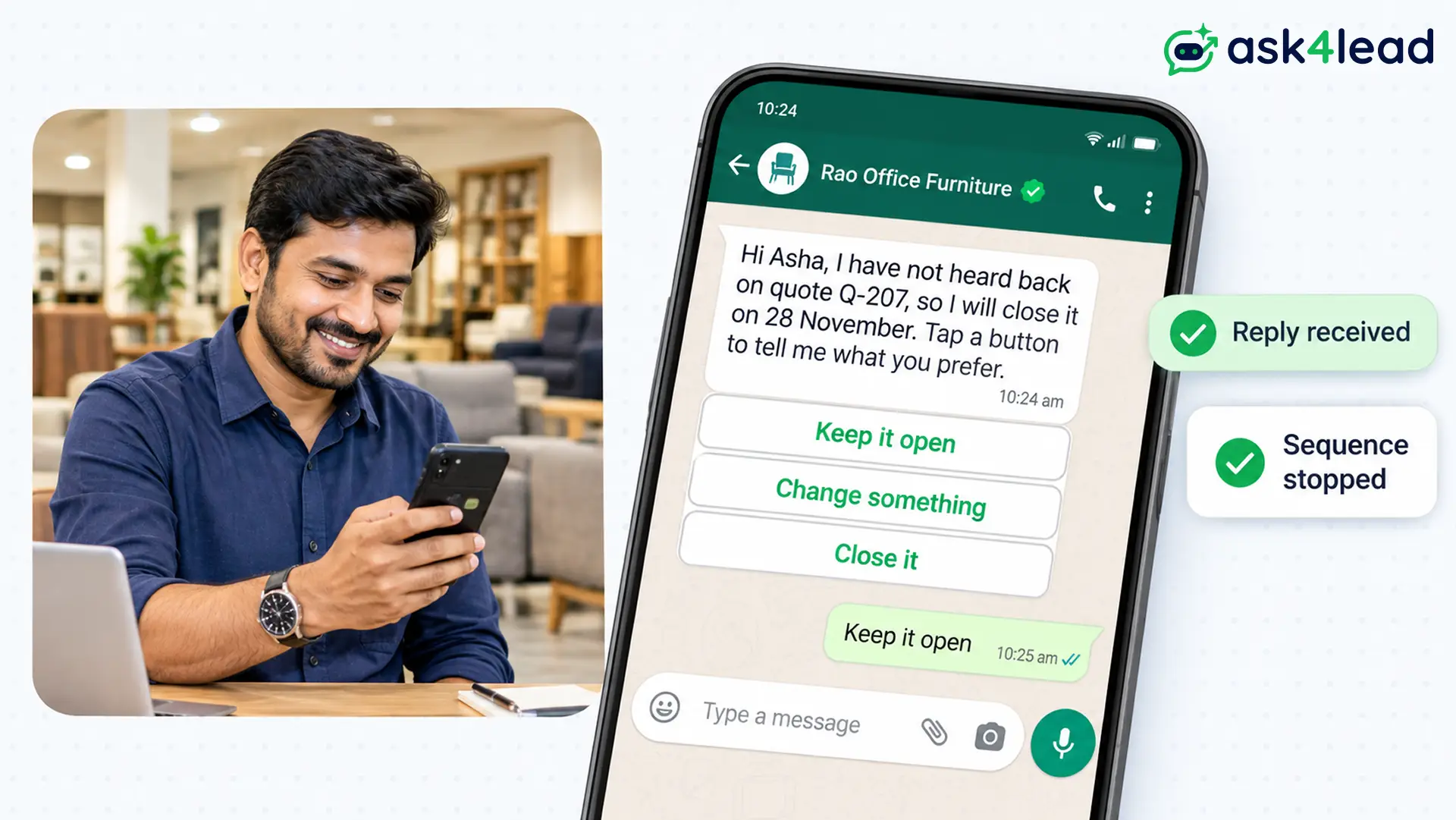
Plan 3 touches at most: a free message or template nudge, the informational template, then the close-out. That is our rule of thumb, not a Meta limit.
Run Your WhatsApp Quotation Follow Up in Ask4Lead
Ask4Lead supports each rule, with two limits stated plainly. A Next Step reminds your rep and sends nothing to the customer. The feature pages also document no countdown, so write the exact time the 24-hour window closes into the note.
- Build the quote: Quotes builds it from your catalogue inside the chat and sends it on WhatsApp.
- Set the date and route: a Next Step holds one note and one date per lead. Write “window closes Tue 4:10 pm, template if silent”.
- Build the template: WhatsApp Templates adds quick reply buttons and shows Pending, Approved or Rejected status.
- Send to quiet leads: WhatsApp Campaigns sends approved templates to leads filtered by tag or pipeline stage. The pages document no automatic stop on reply, so move a lead that replied to another stage first.
- Watch your rating: Account Health shows your quality rating and messaging limit after each batch.
FAQs
1. How long should I wait before a WhatsApp quotation follow up?
Most guides suggest 2 to 3 days. Meta’s only timing rule is the 24-hour window, so first check 24 hours from the customer’s last message.
2. Can I send a WhatsApp quotation follow up after 24 hours?
Yes, but only as an approved template. The customer’s reply then opens a new window, and free messages work again.
3. Is a quotation follow up a marketing or utility template?
Assume marketing. Meta sets the category and counts sales calls to action as marketing. Facts-only wording can stay utility, but Meta may recategorise it.
4. How many follow ups should I send before I stop?
Plan 3 at most, as our rule of thumb. Stop sooner on any reply, opt-out or error 131050.
5. Do I need consent for a WhatsApp quotation follow up?
Yes. Meta requires opt-in that names your business. Your quote request form can carry that consent line.
Conclusion
A WhatsApp quotation follow up works when you respect the clock and the label. Count 24 hours from the customer’s last message. Then send a free message or a template to match, and stop at the first reply, opt-out or error 131050.
Before you send the next nudge, check that you have:
- The customer’s last message time, so you know the route.
- Opt-in on record with your business name.
- An approved template, worded as facts.
- One new fact or one easy question in the message.
- A stop rule for replies and opt-outs.
Next, open your oldest unanswered quote and write down when the customer last wrote.
Stop losing quotes to silence
If your WhatsApp quotation follow up still lives in personal chats, Ask4Lead gathers it in one place. The Work Queue ranks due follow ups by urgency. A snoozed chat returns on the day you pick.
Meanwhile, the AI Sales Assistant drafts replies, and human approval lets you edit them before they go out.
