
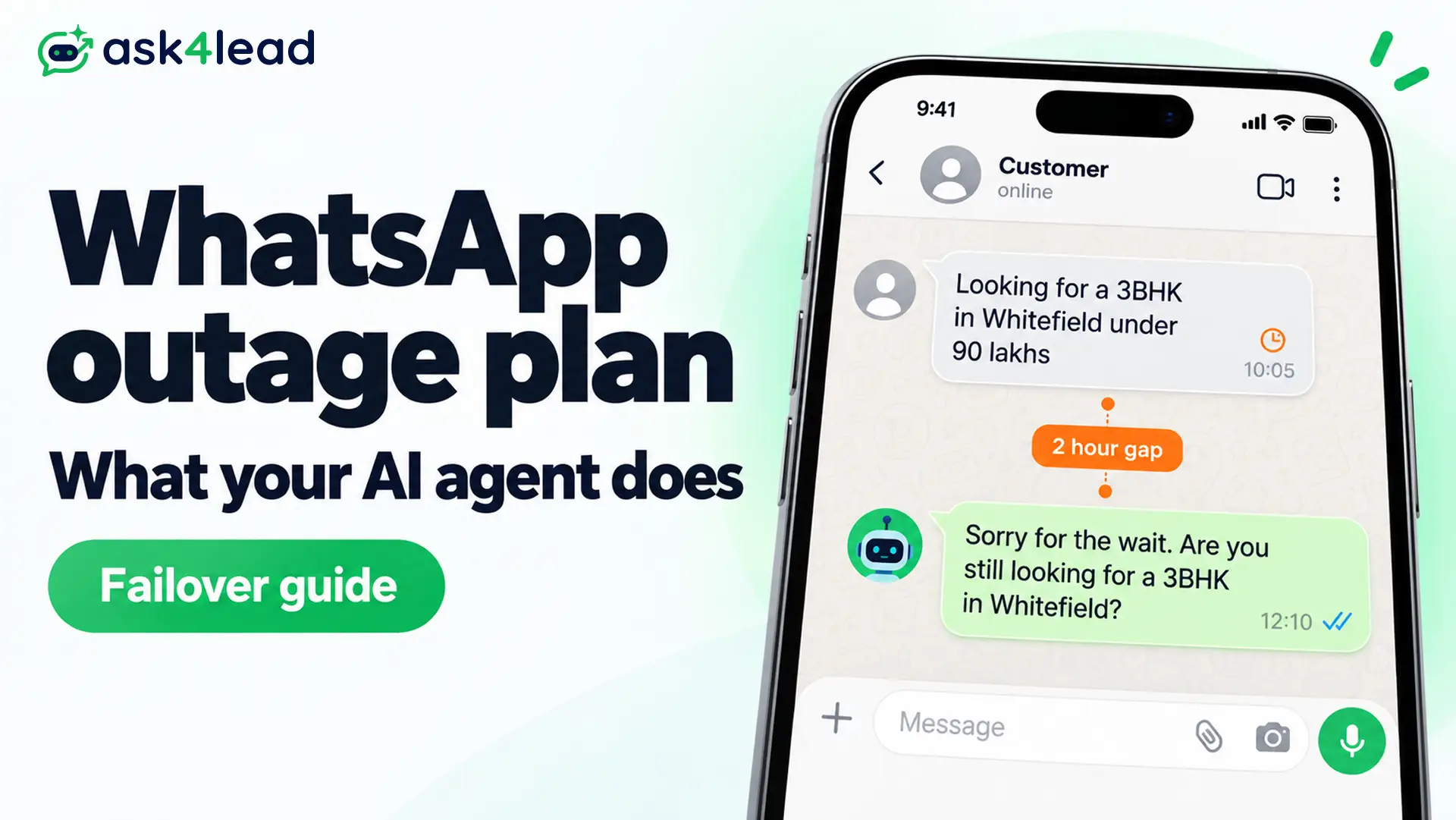
A WhatsApp outage is a period when Meta’s servers fail to send or receive messages for some or all users. During one, your WhatsApp AI agent stops replying too, because every message passes through Meta.
This guide shows how to check WhatsApp down status in 60 seconds, what your agent does during a WhatsApp outage, and how to keep every lead safe.
Quick answer
- Whole platform down: with WhatsApp down for everyone, nothing sends or receives. Post a notice elsewhere and clear the backlog by priority after recovery.
- Only your number fails: the cause is an account restriction or ban, an expired token, or a paused template (a pre-approved message). That fix is yours, not Meta’s.
- Text works, files fail: this is a partial WhatsApp down event. Send a text fallback instead of retrying attachments.
Key takeaways
- Many stoppages that look like a WhatsApp outage are account, token, or template problems.
- After a Meta outage, Meta retries your webhooks for 7 days, then drops them with no replay.
- The first hour after recovery is where leads get lost, doubled, or flagged.
- Meta’s own Business Agent shares the same failure point as any third-party WhatsApp AI agent.
- Your lead data and a second contact route must exist before the next Meta outage.
How to Check WhatsApp Down Status Right Now
Check Meta’s status page, then an independent tracker, then a second number. If all 3 confirm the WhatsApp down reports, the outage is real. If only your number fails, the fault sits in your account or setup.
Outage sources and what each one misses
| Source | Best for | Blind spot |
| Meta’s WhatsApp Business Platform status page | Cloud API health. It showed 100.00% uptime over the prior 31 days at our 30 Sep 2026 check | Never shows a fault on your single number |
| Downdetector | WhatsApp down reports by country within minutes | Also spikes on phone or network faults |
| StatusGator’s WhatsApp history | Past WhatsApp down incidents: 10 from Nov 2025 to Aug 2026, averaging about 3.5 hours | Counts WhatsApp Web incidents too |
| A second test number | Shows whether the fault is global or yours | Needs a spare number |
Status pages can lag behind real disruption, so trust WhatsApp down reports only after 2 sources agree.
A 4-question test to separate a WhatsApp outage from your own fault
- Are Instagram and Facebook also slow or failing?
- Does a status page or tracker show WhatsApp down right now?
- Can a second number on the same account send a test message?
- Did a token, template, webhook URL, or billing setting change recently?
If the fault is only on your phone, these delivery fixes for personal WhatsApp apply.
What Causes a WhatsApp Outage
Most Meta outage events start inside its own infrastructure, often after a configuration change, not an attack. Partial outages, where texts work but media fails, also happen. Meta rarely names the cause quickly.
Configuration and network failures
The 4 October 2021 WhatsApp down event lasted roughly 6 hours, with Facebook and Instagram gone too. Facebook said a maintenance command meant to assess backbone capacity disconnected its data centers, per TechCrunch’s 2021 report.
Meta had no quick fallback for itself that day. Your agent has none during a Meta outage either.
Partial outages and false account flags
2 faults hit at once in August 2026:
- Media failure: photos, videos, and stickers stalled while text kept working, per the August 2026 media outage reports.
- Account lock-outs: around 8pm IST on 3 August, accounts in India were put under review for 24 hours.
- Meta’s admission: a WhatsApp spokesperson said its automated systems sometimes flag legitimate accounts by mistake.
If a false flag hits your business number, follow the recovery guide to file a review.
Recent WhatsApp outage dates and what failed
| Date | What failed | Length and cause |
| 4 Oct 2021 | All Meta apps | About 6 hours, backbone configuration error |
| 27 Feb 2026 | WhatsApp Web | 11h 59m, the longest in StatusGator’s window |
| 12 Jun 2026 | Meta apps and the WhatsApp Business Platform | Recovery began within a couple of hours, per The Next Web |
| 3 to 4 Aug 2026 | Media sharing plus 24-hour reviews | 2 days of reports, no cause given |
What Happens to a WhatsApp AI Agent During a WhatsApp Outage
It stops. A WhatsApp AI agent is software that sends and receives through Meta’s servers, so a Meta outage pauses it. Nothing in your settings needs fixing, but each outage type breaks the agent differently.
1. Why every WhatsApp AI agent shares Meta’s uptime
Meta sits on both legs of every conversation:
Customer phone -> Meta servers -> webhook -> your AI agent
Your AI agent -> Meta servers -> customer phone
A webhook is an automatic alert Meta sends to your software when a customer writes. No vendor can route around Meta, so a new platform does not change this.
Switching providers even adds a short window where inbound messages can drop.
2. What happens to messages in each direction
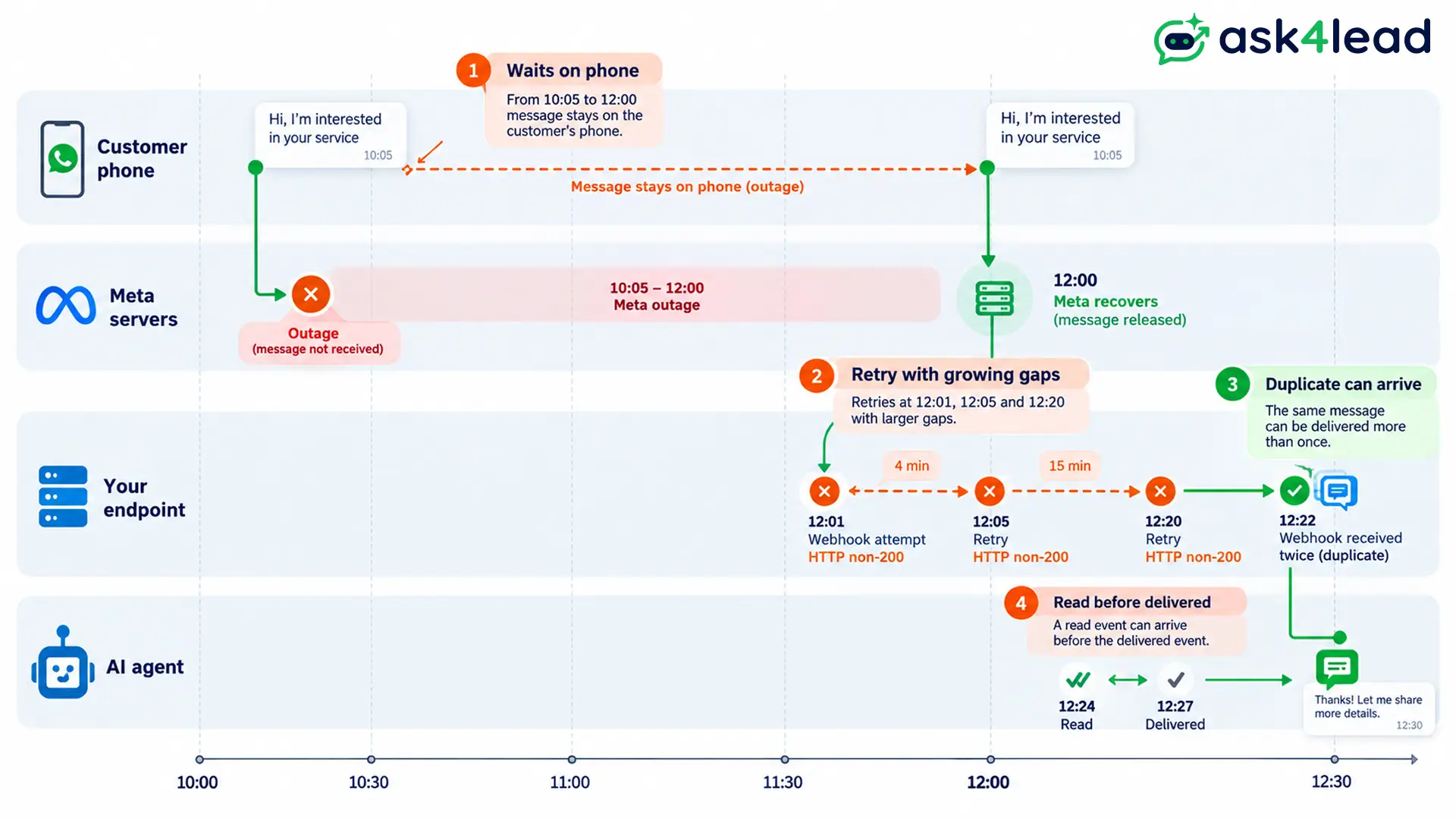
- Your agent’s replies: the send request fails or times out, so nothing reaches the customer.
- Customer messages: these usually wait on the customer’s phone until the connection returns. Meta does not publish how it queues messages internally.
- Alerts to your software: if your endpoint does not answer HTTP 200 (the standard “OK” reply), Meta keeps retrying, per Meta’s webhook documentation.
3. Partial outages break a WhatsApp AI agent silently
A media-only outage is the dangerous kind. The agent’s text goes through, the brochure PDF fails, and the agent logs the reply as done.
Owners running workflow tools report the same trap: the tool shows “success” because Meta accepted the request, while the customer never received it.
Give your WhatsApp AI agent a rule: when a file send fails, send a text with a link and flag the chat for a person.
The 4 Layers Where a WhatsApp AI Agent Stops Working
A WhatsApp agent stops at 4 layers: Meta’s platform, your WhatsApp account, your own setup, and Meta’s rules, including its prohibited content rules. Only layer 1 is a true WhatsApp outage. Sorting the fault into the right layer decides how fast you recover.
| Layer | Example | Who fixes it | Warning sign |
| 1. Meta platform | 12 Jun 2026 Meta outage | Meta | Instagram and Facebook fail too |
| 2. Your account | Restriction or ban | You, then a Meta appeal | Only your number fails |
| 3. Your setup | Expired token, dead webhook | You | Dashboards look green, nothing delivers |
| 4. Meta’s rules | Jan 2026 AI policy, Oct 2026 pricing | You adapt | An announcement comes first |
Account blocks last longer than any outage
A Meta outage ends by itself. A ban does not, and owners in API communities report 4 recurring pains:
- A restriction on 1 number spreading across the whole business portfolio (Meta’s grouping of your business assets).
- Permanent bans with no human at Meta to appeal to.
- An owner was told a burst of 15 to 20 replies, released together after a weak connection, may have looked like spam.
- Linked Instagram and Facebook accounts falling together.
In September 2026, Malaysia’s regulator met Meta over hacked and blocked WhatsApp accounts.
Ask your provider whether it has a direct escalation contact at Meta. That contact affects appeals, not uptime.
Ask4Lead’s WhatsApp Account Health shows your quality rating (green, yellow, or red) and restriction alerts in the dashboard. You can tell a restricted number from a real outage in seconds, before leads pile up.
Keep your quality rating high. Unofficial linked-device tools raise ban risk, as automation ban risk explains.
Silent failures inside your own setup
These look like a WhatsApp outage while every dashboard stays green:
- Temporary access token: the default token expires without warning. Create a permanent one through a system user in Meta Business Manager, Meta’s business admin tool.
- Webhook setup: the verify token must match exactly, even a trailing space. Workflow tools like n8n listen on the test URL only while the editor is open.
- Reclassified template: an approved template can be re-reviewed weeks later. See why templates get rejected.
- Locked account: error 131031 means the business account is locked. Check its status in Meta Business Manager.
Rule and price changes work like a slow outage
Since 15 January 2026, Meta bars general-purpose AI assistants from the Business API. Support, sales, and booking bots stay allowed, and Brazil’s competition regulator ordered that policy suspended locally.
Cost is the second change. See our per-message charges explainer.
Meta’s own Business Agent is not a backup for a WhatsApp AI agent
| Setup | Works in a Meta outage | Where lead data lives | Ban risk |
| Meta Business Agent | No | Inside the WhatsApp Business app | Meta’s rules apply |
| Third-party agent on the official API | No | Your own CRM | Same rules apply |
| Unofficial linked-device tool | No | Depends on the tool | Highest, owners report bans |
The WhatsApp Help Center notes that turning on Business Agent may limit features such as broadcast lists. It also keeps your chats in the same Meta account that can fail or be blocked.
What Happens After a WhatsApp Outage Ends
After a WhatsApp down event, recovery brings a burst: retried webhooks, queued customer messages, and impatient follow-ups. They arrive out of order and sometimes twice. Your agent must avoid double replies, stale answers, and a send spike that looks like spam.
Duplicates, missing order, and the 7-day retry cliff
- At-least-once delivery: the same event can arrive twice, as Hookdeck’s WhatsApp webhook guide explains.
- No ordering: a “read” update can arrive before “delivered”.
- Fast 200: return HTTP 200 immediately, then process the message.
- No replay: once Meta gives up, it offers no way to fetch missed events.
Track each message’s unique ID and ignore repeats.
4 limits that start ticking after a WhatsApp outage
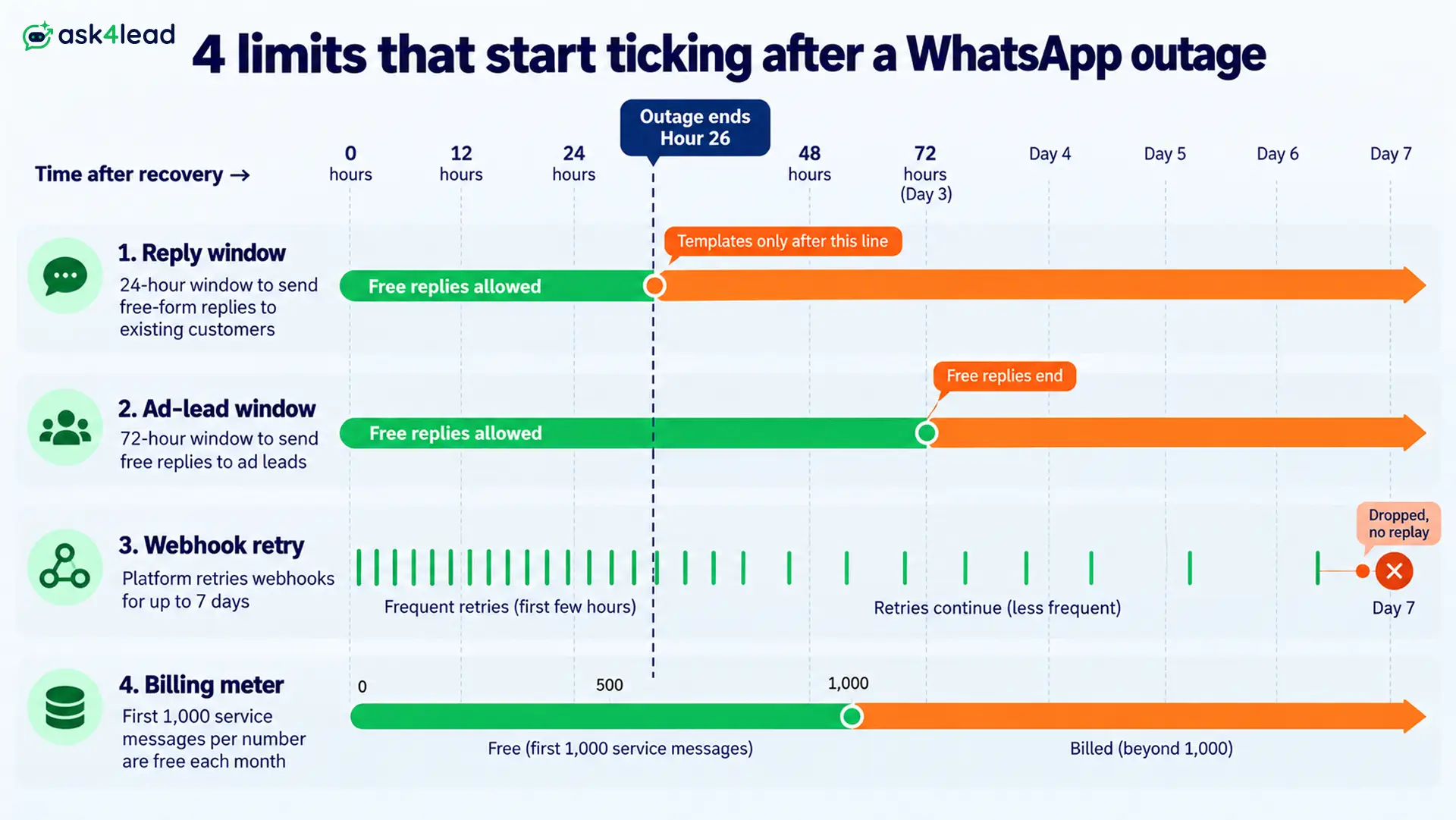
| Limit | Length | What happens at zero |
| Reply window | 24 hours from the customer’s last message | Only approved templates can go out |
| Ad-lead free window | 72 hours after a chat starts from a click-to-WhatsApp ad | Replies stop being free |
| Webhook retry | 7 days | Events are dropped permanently |
| Free service messages | 1,000 per number each month from 1 Oct 2026 | Each extra message is billed |
A 2-hour Meta outage rarely closes the reply window. A 26-hour one closes it for every older chat.
Learn the 24-hour rule and keep approved template messages ready. Meta’s service message pricing update sets the billing rules.
Pace the catch-up with a human in the loop
Do not let your WhatsApp AI agent answer 200 chats in 1 minute. Reply to the oldest hot leads first and spread sends over time.
Stale context also breeds wrong answers. A lead who asked about a 4pm site visit at 10am should not get “Sure, we’re open now” at 1pm.
Ask4Lead’s human approval for AI replies lets your team check the first wave before it sends. One-click takeover moves a tricky chat to a person.
WhatsApp Outage Failover Plan in 5 Steps
A workable business continuity plan for the next Meta outage has 5 steps: own your lead data, add a second contact route, alert on 3 conditions, pre-write the notice, and rank the backlog by intent. A 2-person team can finish all 5 in a week.
1. Own your lead data outside WhatsApp
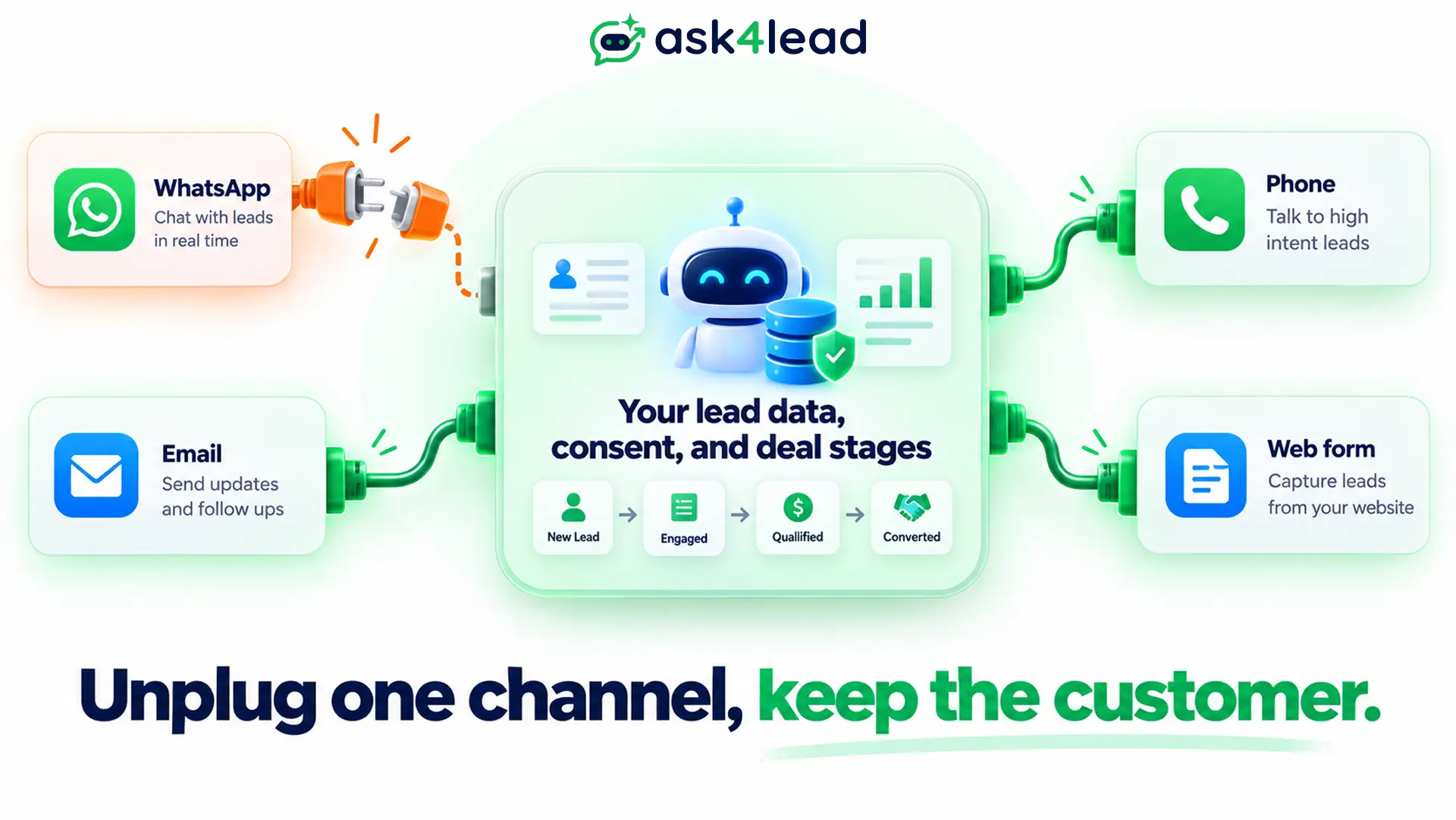
Treat WhatsApp as one channel, not the product. Your customer list, consent records, and deal stages belong in a system you control.
Ask4Lead’s 9-stage sales pipeline keeps every lead’s stage and notes in the CRM. An outage pauses chats without erasing where each deal stood.
Export the lead list weekly as your own copy.
2. Add a second contact route
- Web form and phone line: for urgent leads who cannot wait.
- Email: Ask4Lead’s AI email campaigns can carry an outage notice to opted-in contacts.
- SMS or RCS: useful as a holding message. Owners report SMS leads convert below WhatsApp, and RCS coverage varies by country.
Ask4Lead’s agent also runs on Meta, so a Meta outage reaches it too, and email is its second route. Compare both in WhatsApp vs email marketing. Only message contacts with valid opt-in consent.
3. Alert on 3 conditions, not just errors
- Immediate rejection: the send call fails at once (bad token, invalid number, policy block).
- Failed status: Meta’s delivery status returns “failed”.
- Silent pending: a message was accepted but no status arrived within 15 to 30 minutes.
Also check template status weekly.
4. Pre-write the WhatsApp outage notice
Write both messages now and give them to your team and your WhatsApp AI agent as saved replies.
Web banner and email: “WhatsApp is having an outage on Meta’s side. Your message is saved, and a person will reply by [time]. For urgent help, call [number].”
First WhatsApp reply after recovery: “Sorry for the wait. Are you still looking for [your earlier request]?”
The second message confirms instead of assuming, which avoids stale answers. Then set 3 escalation thresholds:
- 15 minutes down: send the notice through your second route.
- 60 minutes down: phone your hot leads.
- 24 hours down: switch every older chat to approved templates.
5. Rank the backlog by intent, not arrival time
| Priority | Lead type | Action |
| 1 | Hot lead, inside 24 hours | Call or reply first |
| 2 | Hot lead, outside 24 hours | Send an approved template |
| 3 | Warm lead | Automated follow-up |
| 4 | Support question | Split across the team |
Ask4Lead’s Work Queue lists which leads need a person today. Automated lead follow-ups re-engage warm leads that went quiet.
The shared team inbox lets several people split the backlog without double replies.
5 Mistakes That Turn a Short WhatsApp Outage Into Lost Leads
- Reading a green Meta status page as “my number is fine”. A restriction on 1 number never appears there.
- Broadcasting an apology to your full list. A sudden blast can raise blocks and reports.
- Re-linking or restarting your number in a panic. A device change right after a flag reads as a second risk signal.
- Never rehearsing. Switch off your test webhook for 10 minutes to mimic a Meta outage and watch what breaks.
- Treating each Meta outage as a one-off. Log the start, end, and leads affected to see your real risk.
FAQs
1. Is there a WhatsApp outage right now?
Open Meta’s Business Platform status page and Downdetector, then test a second number. If both show WhatsApp down reports and the test fails, it is a WhatsApp outage.
2. Why is WhatsApp down today?
It is either a Meta fault or a local one. Run the 4-question test above, then check your connection, app version, and account status.
3. Will my customers’ messages be lost during a WhatsApp outage?
Usually not. During a WhatsApp outage, customer messages typically wait on their phones, and your webhook alerts are retried for 7 days.
4. How long does a WhatsApp outage last?
Most WhatsApp down events last a few hours. StatusGator’s 10 incidents from Nov 2025 to Aug 2026 averaged about 3.5 hours, and the longest reached 11h 59m.
5. Can a WhatsApp AI agent work without Meta?
No. Any agent on WhatsApp runs through Meta’s servers. You reduce the damage with owned data, a second route, and early alerts.
6. Should I move customers to Telegram or RCS?
Not as a replacement. Most customers already use WhatsApp, and RCS coverage varies. Treat them as backup routes.
Conclusion
A WhatsApp outage is the rarest way your WhatsApp AI agent stops, and it usually ends within hours. Account blocks, expired tokens, and rule changes cost more.
Set up 3 things this week: a weekly lead export, a second contact route, and the 3 delivery alerts. Then test them before the next WhatsApp outage.
Keep every lead safe in the next Meta outage
Ask4Lead is a humanized AI WhatsApp chatbot and CRM built for owners who cannot afford silent gaps:
- Account Health alerts warn you before a yellow rating turns into a restriction.
- Human approval lets your team check AI replies after an outage.
- A 9-stage pipeline and Work Queue show which leads need you first.
