
Quick answer: A WhatsApp display name rejected by Meta means the name on your WhatsApp Business API number failed review. Usually Meta cannot match the name to your website or legal documents, or it uses generic or Meta-related words. Fix the mismatch, then resubmit once.
Key takeaways
- Most WhatsApp display name rejected cases are matching failures between the name, website and legal business name.
- A declined name rarely stops messaging, but customers see a bare phone number.
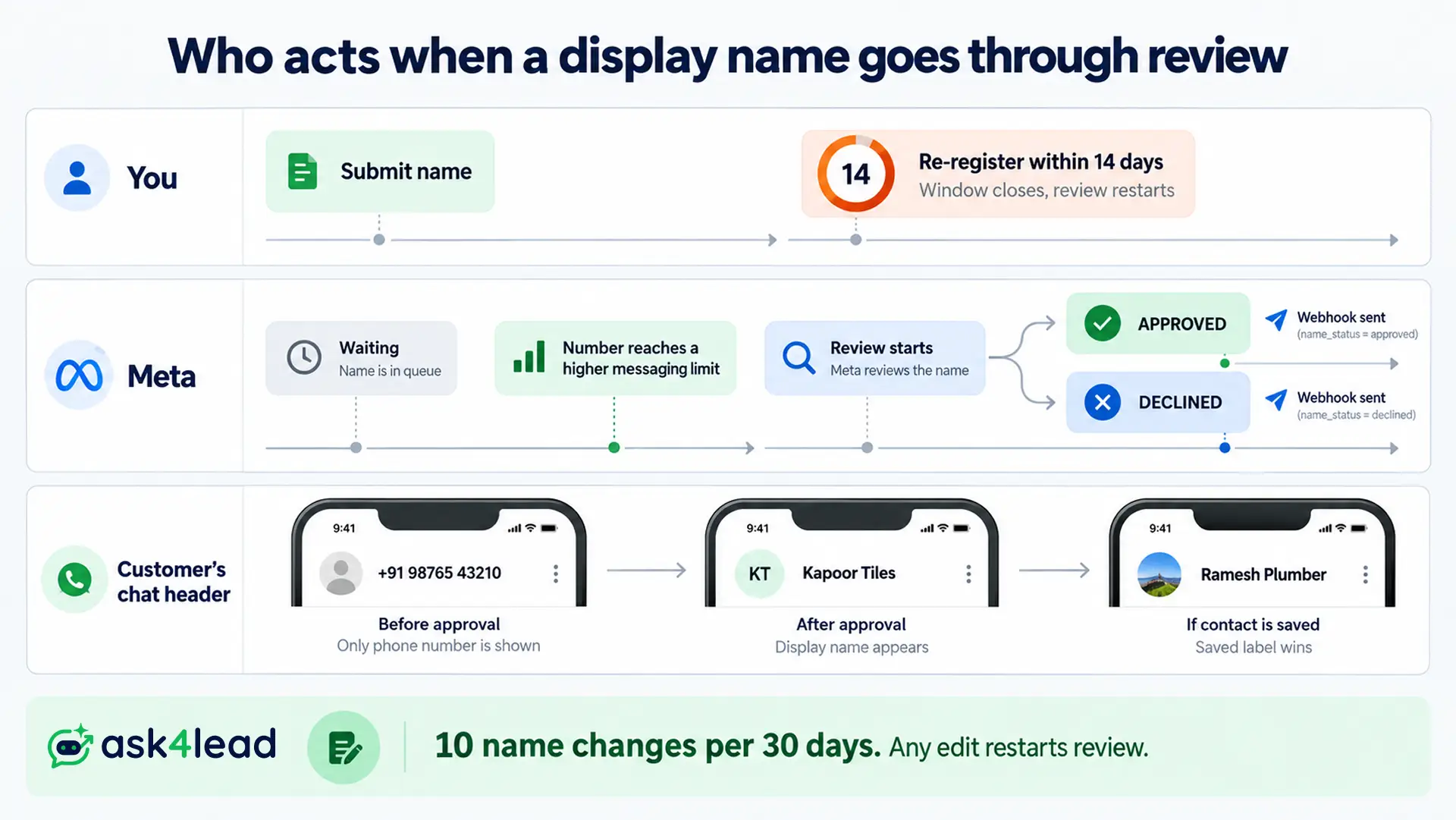
- Meta starts review when a number reaches a higher messaging limit, so “not reviewed yet” is not a rejection.
- File a display name appeal only with new evidence, because providers report the appeal cap locks changes for 7 to 60 days.
A WhatsApp Business display name is the brand name customers see instead of a phone number.
Meta reviews it for API numbers, the version of WhatsApp for companies that message at scale. The free WhatsApp Business App has a separate setup.
What a WhatsApp display name rejected status means
A WhatsApp display name rejected status means Meta reviewed the name and marked it DECLINED. Your number is not banned.
Customers see your phone number instead of your brand on the chat screen until you fix the name or win an appeal.
The 3 name statuses in WhatsApp Manager
Meta’s display name documentation defines 3 statuses for a WhatsApp Business display name. Read the name_status field, since verified_name is only the text under review.
| Status | What it means | Your move |
| APPROVED | The name passed review | After a change, re-register the number within 14 days |
| PENDING_REVIEW | A decision is waiting | Wait. Editing restarts the review |
| DECLINED | The name was rejected | Fix the cause, then resubmit once or file a display name appeal |
WhatsApp display name rejected vs pending vs hidden
4 different problems look like a WhatsApp display name rejected notice from the customer’s side. Sort yours first.
| What you see | Real cause |
| DECLINED in WhatsApp Manager | A naming or setup problem, covered below |
| “Review not started” | The number has not reached a higher messaging limit |
| APPROVED, but a number still shows | Visibility rules or a saved contact label |
| Messages fail to send | A restricted account or delivery fault, not the name |
An approved name can still stay hidden for 2 reasons:
- A customer who saved your number sees their own contact label, and it wins over your name.
- Provider 360dialog states the name shows only after approval, business verification and 2,000 delivered messages in 30 days.
Why a WhatsApp display name rejected notice happens: 4 causes
A rejected WhatsApp Business display name fails 1 of 4 checks against your public records: setup, proof, wording or relationship.
Fix them from the bottom rung up, because a higher rung cannot pass while a lower one fails.
Rung 1  Setup          Verified business, linked website, matching Page
Rung 2  Proof          Name visible on website and legal documents
Rung 3  Wording        No generic, promo, role or Meta-like words
Rung 4  Relationship   Agency, parent or brand link stated publicly
1. Setup gaps that fail the review before wording matters
An unfinished setup is the most common cause of a WhatsApp display name rejected decision, according to Fufa’s provider guide.
Meta reads your whole portfolio, not only the typed name.
Check 4 things:
- Meta business verification is complete, and if not, see why verification gets rejected
- The website is linked inside the Meta Business Portfolio
- The Facebook Page name matches the requested name
- The legal name in the portfolio matches your registration documents
2. A name Meta cannot find on your website or documents
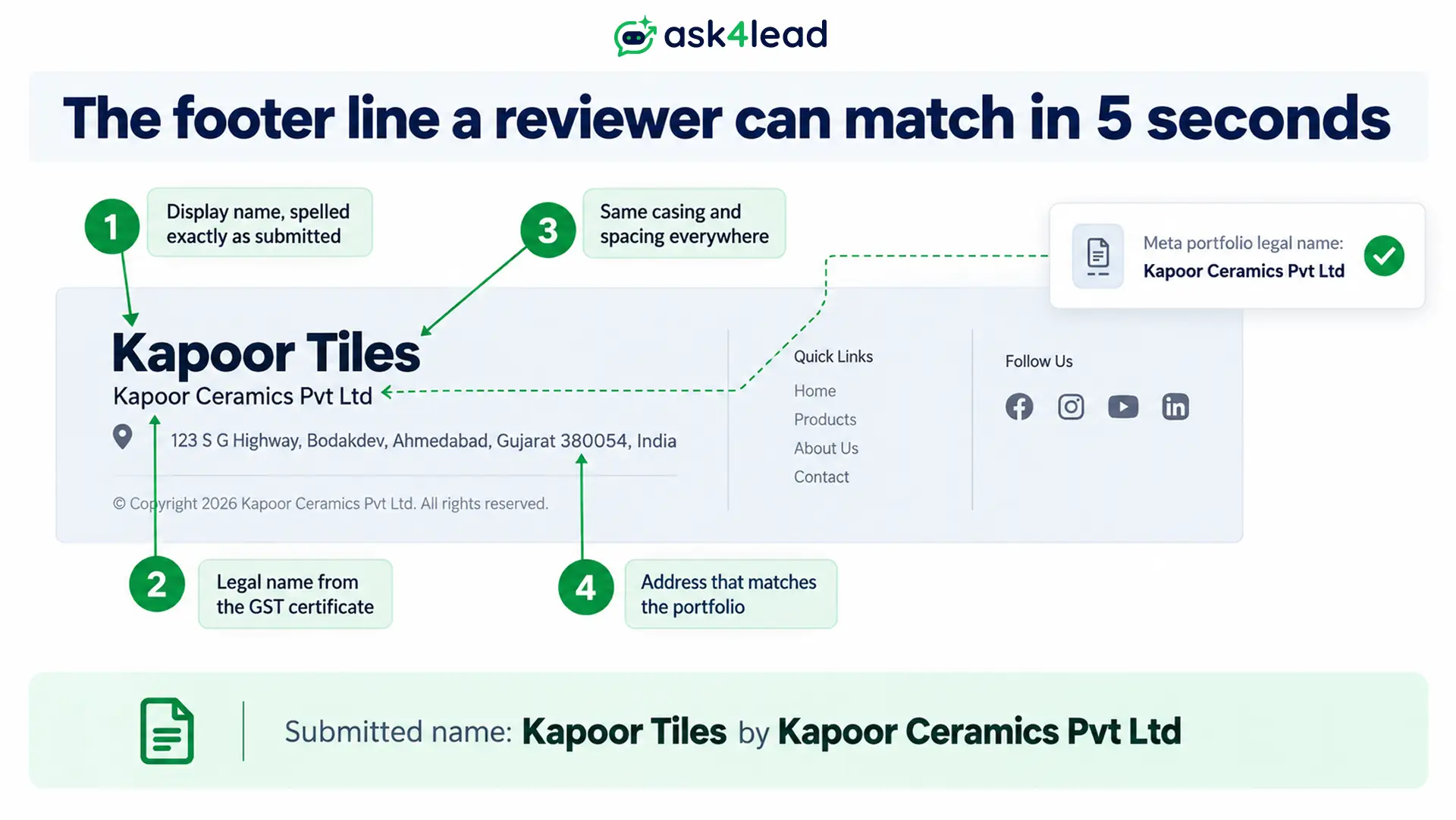
The display name guidelines want the name to be consistent with your website, marketing or verified legal name.
Example: a clinic registered as “Sunrise Health Services LLP” that trades as “SmileCare Dental” stays declined until the website shows both names.
Show your WhatsApp Business display name exactly where a reviewer will look:
- The website footer, beside the legal name
- The About page, the contact page and invoices
- The Facebook Page, with identical spelling, spacing and capitals, since “BrandName” and “Brand Name” count as different names
- The website’s language, so an Arabic site needs an Arabic name
No website yet? An owner with only Booking.com and Google Maps listings kept getting declined.
A single page showing the name and legal entity fixes that, and a Google Business Profile linked to WhatsApp adds a second public source.
3. Wording that the display name guidelines refuse
Meta’s display name guidelines and provider summaries refuse these patterns:
- A generic term (“Fashion”) or generic location (“London”)
- “Official” or “Verified”, which imply endorsed status
- Meta apps such as “WhatsApp”, “Facebook” or “Messenger”
- Promotional words such as “Best”, “Cheap” or “No.1”
- A website, email address, emoji or special character
- Restricted goods, such as a “Guns department” suffix
Owners describe a WhatsApp display name rejected decision as word-based.
A Tech Provider reports a customer’s name containing “doc” being refused, and another owner waited 7 to 8 days with “Labs” added.
Message templates face a similar wording check, so see why templates get rejected.
4. A missing link between the business and the name
Meta wants each name tied to a business it can identify. Agencies, resellers and holding companies fail here most often.
- Agency with client numbers: each client needs its own business portfolio, or a name that states the relationship, such as “Client by Agency”.
- Several brands in 1 portfolio: owners report that “Brand | Location” variants pass, while unrelated brands do not.
- Parent company: hiding the parent removes the proof reviewers look for, so list it in the website footer.
Agencies can keep each client’s chats, leads and team apart with Ask4Lead’s multi-tenant CRM workspaces, while each client name stays in that client’s own portfolio.
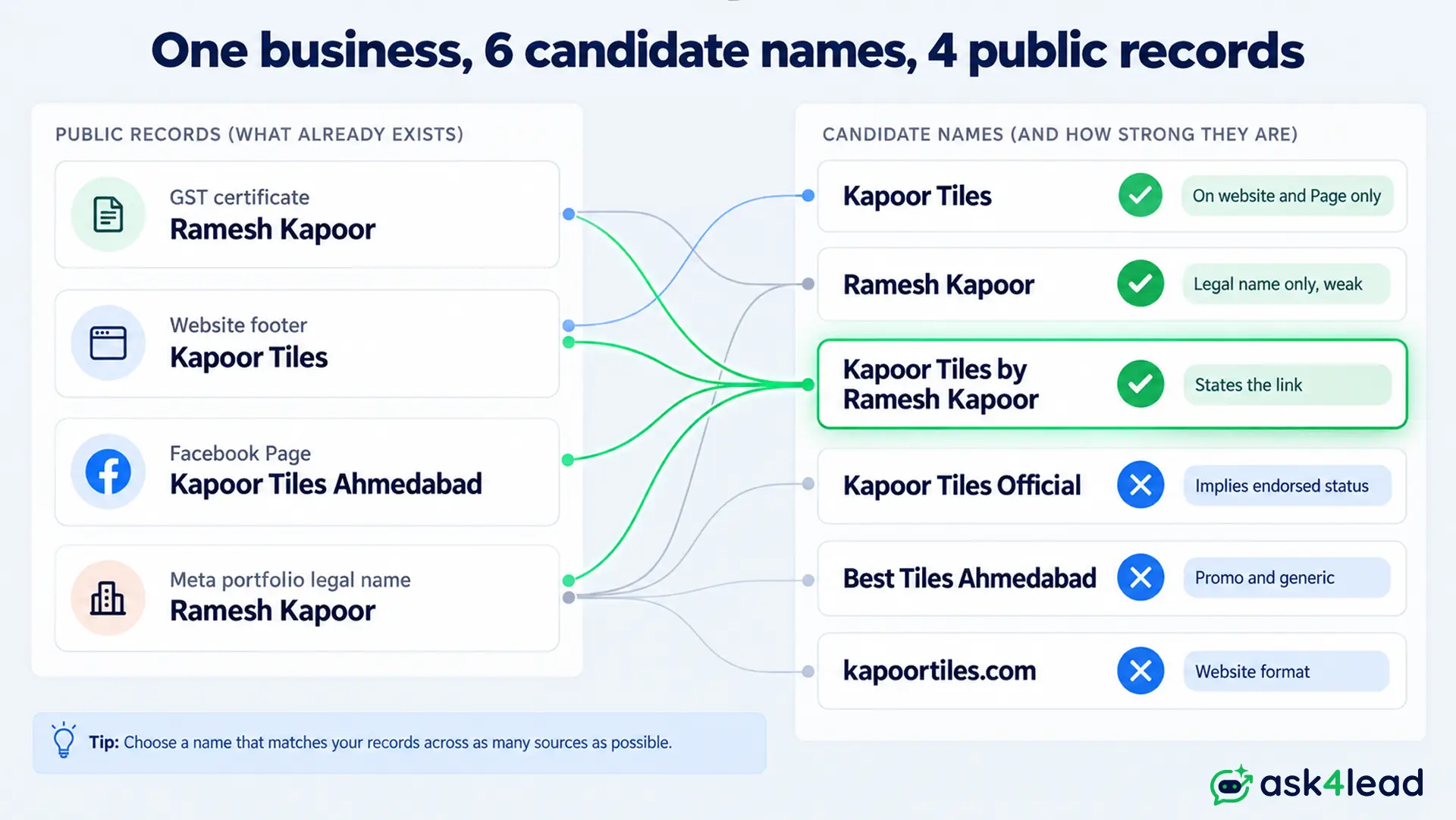
WhatsApp display name rejected examples: what Meta refuses and accepts
Refused names break the display name guidelines: they lack an external source, sound generic or use banned formats.
Accepted names state the business and, when the trade name differs from the legal name, the link between them.
Names the display name guidelines refuse and accept
| Submitted name | Result | Why |
| Digital Delight | Refused | Not found on external sources |
| Ice-creams | Refused | Generic term |
| SunnyDayFlorist.com | Refused | Website format |
| Delight Ice-creams by Fresh Dairy | Accepted | Parent company stated |
| Tim Cook Florist | Accepted | Personal name plus the trade |
| Li’l Cupcakes Mexico | Accepted | Brand plus region |
The same provider list refuses plain “Delight Ice-creams” when no parent company appears.
Providers also disagree on abbreviations, so use one only when your website already does.
The “Brand by Legal Name” formula and when to use it
Use “Brand by Legal Name” when your WhatsApp Business display name differs from the legal name in your documents.
It gives the reviewer the missing link at a glance.
| Situation | Declined name | Approved pattern |
| Indian proprietorship, GST legal name is the owner’s | “Autocraftninja” | “Autocraftninja by Owner Name” |
| Generic first word plus “Group” | “Orange Group” | “Product Brand by Orange Group” |
| Agency running a client number | “Client Name” | “Client Name by Agency Name” |
The first row comes from a real case. Meta verified the business under the proprietor’s name, so the brand looked unrelated until the display name carried both.
How to fix a WhatsApp display name rejected by Meta in 6 steps
To fix a WhatsApp display name rejected by Meta, follow 6 steps: confirm the status, finish verification, pick a name your website shows, add footer proof, remove banned wording and resubmit once.
Resubmitting unchanged after a WhatsApp display name rejected notice only repeats the rejection.
The 6 steps inside WhatsApp Manager
- Read the status. In WhatsApp Manager, open Phone numbers and confirm DECLINED, not PENDING_REVIEW.
- Check verification. Finish business verification and confirm the portfolio’s website.
- Choose the name from your website. Copy its exact spelling, spacing and capitals, since the display name guidelines demand consistency.
- Add footer proof. Spur’s guide suggests showing the legal name, display name and address together.
- Strip banned wording. Remove anything the display name guidelines ban, and add a contact email and website to the phone number profile.
- Submit once. Open the Profile tab, choose Display name, then Edit, and wait for the webhook.
Ask4Lead connects numbers through Meta’s Embedded Signup, so a name entered there faces this same review. Run steps 1 to 5 before you click connect.
The 14-day re-register step after approval
After your WhatsApp Business display name is approved, you have 14 days to re-register the number. If the window expires, you must submit the name for review again.
- Re-registering before approval does nothing
- Through the API, the call is a POST to the number’s
/registerendpoint with your PIN
Warning: Meta allows 10 display name changes per 30 days, and any edit after a review starts triggers a new review.
Ask4Lead’s WhatsApp Account Health view shows the quality rating that shapes the limit triggering name review.
How to file a display name appeal that Meta can approve
A display name appeal works only when the name already follows the display name guidelines and was still declined.
Choose “Appeal display name rejection” as the request type, and attach proof that your public pages carry the same name.
Where to file a display name appeal and what to send
Open Meta Direct Support after checking the display name guidelines. Through a provider, contact its support before any display name appeal, since some cases only a provider can escalate.
Every strong display name appeal includes 3 pieces of evidence:
- The exact rejected name and the phone number
- A registration or GST certificate showing the legal name
- The website and Facebook Page URLs where the name appears
Sample display name appeal: “We are appealing the rejection of ‘SmileCare Dental’. It is the trading name of Sunrise Health Services LLP, shown in our website footer at [URL]. Our registration certificate is attached.”
Display name appeal limits, escalation and when to stop
Provider reports say hitting the cap locks name changes for 7 to 60 days. Meta does not publish the number, and replies usually come within about 24 hours.
- Zipchat’s guide suggests a second request through “WaBiz: Escalation Support”
- After a WhatsApp display name rejected twice on the same grounds, stop: the mismatch is still there
- If your provider stalls, see how to switch providers
WhatsApp display name rejected again and again: what owners report
Most stuck cases fall into 3 groups: review that has not started, resubmissions with no new evidence, or a slow queue.
Meta says approval takes a few minutes to several working days, so anything longer needs a check.
1. “Review not started” is not a WhatsApp display name rejected status
Meta says review of a WhatsApp Business display name begins when a number reaches a higher messaging limit. Use these thresholds:
- Under 2 days: normal. Do not edit the name.
- 3 to 14 days: recheck verification, the website link and the footer proof.
- Over 14 days: contact Developer Support with the WABA ID, phone number ID, name, URL and screenshots of the matching text.
Owners report 12 days with no reply, and 9 weeks for 1 name against 2 weeks for another.
Real conversations move the limit. Ask4Lead’s WhatsApp templates let you start compliant chats, and a healthy quality rating lifts the limit.
2. Why a WhatsApp display name rejected result keeps returning
Owners delete the number, add a new one and submit the same name. It is rejected again, because the decision follows the name and portfolio evidence, not the phone number.
- Change something real before each resubmission or display name appeal
- Space attempts at least 48 hours apart
- Expect a name approved for months to be flagged after an edit or policy recheck
3. Community tricks tested against the display name guidelines
| Trick owners share | Verdict |
| Add “Support” to the name, then remove it later | Mixed. “Li’l Cupcakes Customer Support” passes, but the trick cannot rescue a name with no proof, and removing it triggers a new review |
| Send 5 to 7 messages to jump-start review | Only real conversations help. Junk messages hurt the quality rating |
Check policy violations beyond spam before a display name appeal or any trick, because a flagged name can escalate.
After approval: protect the name and turn chats into leads
An approved WhatsApp Business display name stays safe when you avoid casual edits and keep to the display name guidelines.
Then the name does its job: customers recognise the sender and reply.
Protect it with the 2 habits below.
- Change the name only when the business itself changes
- Do not chase the badge, since an approved name is not the green tick
A recognised name fixes the first impression, not the wait for an answer.
Ask4Lead’s AI Sales Assistant replies to each new chat right away in plain English, asks what the customer needs and qualifies them.
Leads then land in lead management with the full conversation attached.
FAQs
1. Why is my WhatsApp display name rejected again after I fixed it?
Usually the name still does not match your website or legal documents, or the resubmission carries no new evidence. Each WhatsApp display name rejected result repeats until the match is fixed, so fix it before any display name appeal.
2. How long does a WhatsApp Business display name take to approve after I resubmit?
Meta says a few minutes to several working days. Provider guides quote 24 to 72 hours, so contact Developer Support if a WhatsApp display name rejected or pending status has not moved after 2 weeks.
3. Can my WhatsApp Business display name differ from my legal business name?
Yes. The display name guidelines allow it when your website shows the link, such as “Brand by Legal Name”. A brand that appears nowhere on your website or documents fails.
4. Can I send messages while my WhatsApp Business display name is declined?
Usually yes, because Meta ties review to messaging-limit growth, not to sending. Some providers say growth stalls until approval.
Conclusion: fix the match, then let conversations start
A WhatsApp display name rejected once is rarely a naming failure. Your website, Page, documents and requested WhatsApp Business display name must match, with no wording the display name guidelines ban.
Fix the lowest failing rung, submit once, and file a display name appeal only with new evidence. Meanwhile, get your number connected and answering.
Get your number live with a name that passes
Connect your WhatsApp Business API number through Ask4Lead and start with 100 free AI credits, even while a name is under review.
