
Meta Business Agent is Meta’s own AI that answers customer messages on WhatsApp, Messenger and Instagram. A third-party WhatsApp AI agent does the same job. Another company builds it, so you choose its model, channels and rules.
Meta’s agent fits 1 number and simple questions. However, a third-party AI agent fits when answers live in your own systems. Neither is cheaper by default, so below you see where each one wins.
What is Meta Business Agent?
Meta Business Agent is an AI agent that Meta hosts and runs. It reads your business information, replies in the customer’s language and hands the chat to you when it cannot help.
On 3 June 2026, Meta launched it globally and said more than 1 million businesses already use it.
The 2 versions of Meta Business Agent
Most comparisons blur the 2 versions, but the cost, limits and rules differ for each.
| Version | Where it runs | What it costs |
| App version | Tools tab of the WhatsApp Business app | Free to start, but Meta says paid plans are coming |
| Platform version | WhatsApp Business Platform (the API), through a partner | $2.00 per 1 million tokens since 1 August 2026 |
The app version learns from your past chats, Facebook Page and website. Meta offers it to eligible businesses in select markets. In India, Meta launched it in May 2026 as Business AI, in all native Indian languages.
While it handles a chat, it pauses some app automations, such as away messages, as Meta’s help page explains. For paid plans, see our guide to Meta One plans.
The Platform version adds knowledge files, instructions, connectors to your own APIs and a test mode. It also runs only on the API.
What a third-party AI agent means
A third-party AI agent is an AI that a vendor or your developer connects to your API number. You pay the AI provider for the model and Meta for delivery.
Meta’s pricing page treats these replies as service messages that a person or a third-party AI sends. Do not confuse them with agents that people connect to personal chats under WhatsApp’s separate Agent Terms. Those chats are not end-to-end encrypted, so this guide skips them.
How do Meta Business Agent and a third-party AI agent compare?
Meta Business Agent wins on setup speed and Meta channels. However, a third-party AI agent wins on systems, other channels and model choice. This table covers the differences you feel every day.
| Question | Meta Business Agent | Third-party AI agent |
| Setup | Minutes in the app, but the API route needs a developer | Vendor onboarding, then your knowledge and rules |
| Channels | WhatsApp, Messenger and Instagram | WhatsApp, plus whatever the vendor adds |
| Your systems | None in the app, while the Platform calls your APIs | Depends on the vendor’s integrations |
| AI model | Meta picks it, and English gives the strongest quality | Often your choice, depending on the vendor |
| Handoff | Meta sets the triggers on the API | You usually set your own |
| Cost per reply | 1 token charge, so about 4 to 5 US cents | AI fee plus Meta’s service rate |
| Free allowance | None, because Meta bills every agent reply | 1,000 service messages per number each month |
| Who can use it | 7 verticals are excluded on the API | WhatsApp’s general rules apply |
When Meta Business Agent is the better fit
- A simple setup: your customers write on WhatsApp, Messenger or Instagram, and 1 configuration covers all 3.
- Catalog and FAQ questions: hours, prices and bookings need no live lookup.
- No developer: you want an agent live today without an integration project.
This does not apply if answers depend on live stock or an order status. The app version documents no connector to read those.
When a third-party AI agent is the better fit
- Answers in your systems: order status and quotes need a lookup, and often a write-back.
- Other channels: your website chat or SMS need the same assistant.
- Control: you want your own rules, approvals and records, plus an export if you switch tools.
How much does Meta Business Agent cost?
Meta Business Agent costs $2.00 per 1 million tokens on the API. A typical reply uses 20,000 to 25,000 tokens, or about 4 to 5 US cents. That single charge covers both the AI and the delivery.
What Meta charges for each kind of reply
Meta’s pricing page puts each message in 1 category, so you never pay twice for the same reply.
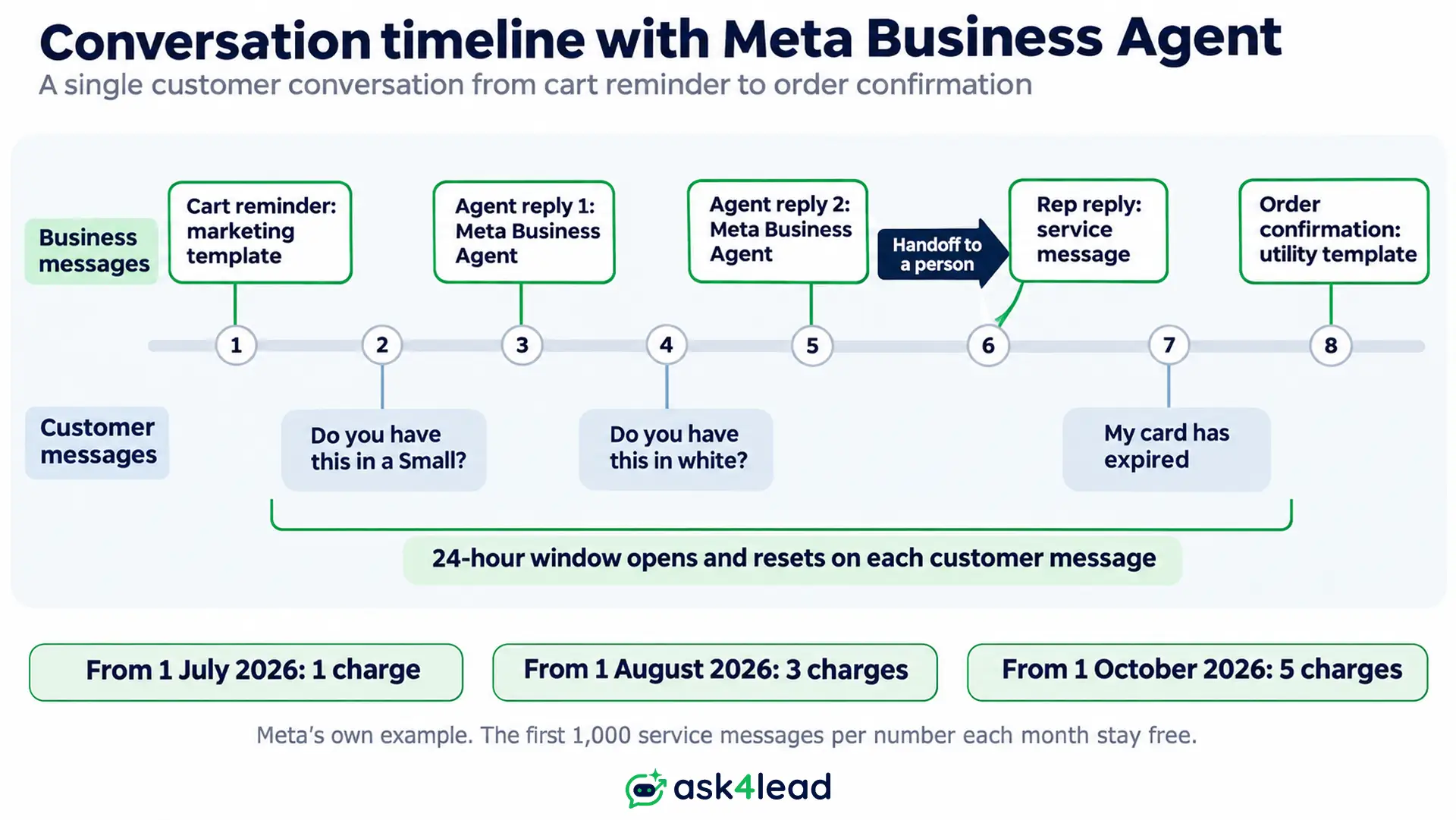
- Agent reply: a token charge since 1 August 2026. Meta still charges it inside the free entry point window. That window lasts up to 7 days after a Click-to-WhatsApp ad chat.
- Human or third-party AI reply: a service message, charged since 1 October 2026 at the utility rate. There are no volume tiers.
- Free tier: the first 1,000 service messages per number each month, with no rollover. The agent, however, gets no free tier.
- Payment method: Meta does not deliver agent replies without one in Billing Hub. You can still test on an allowlist first.
For every rate, read WhatsApp Business API pricing in 2026.
Meta’s cost example for 1,000 replies
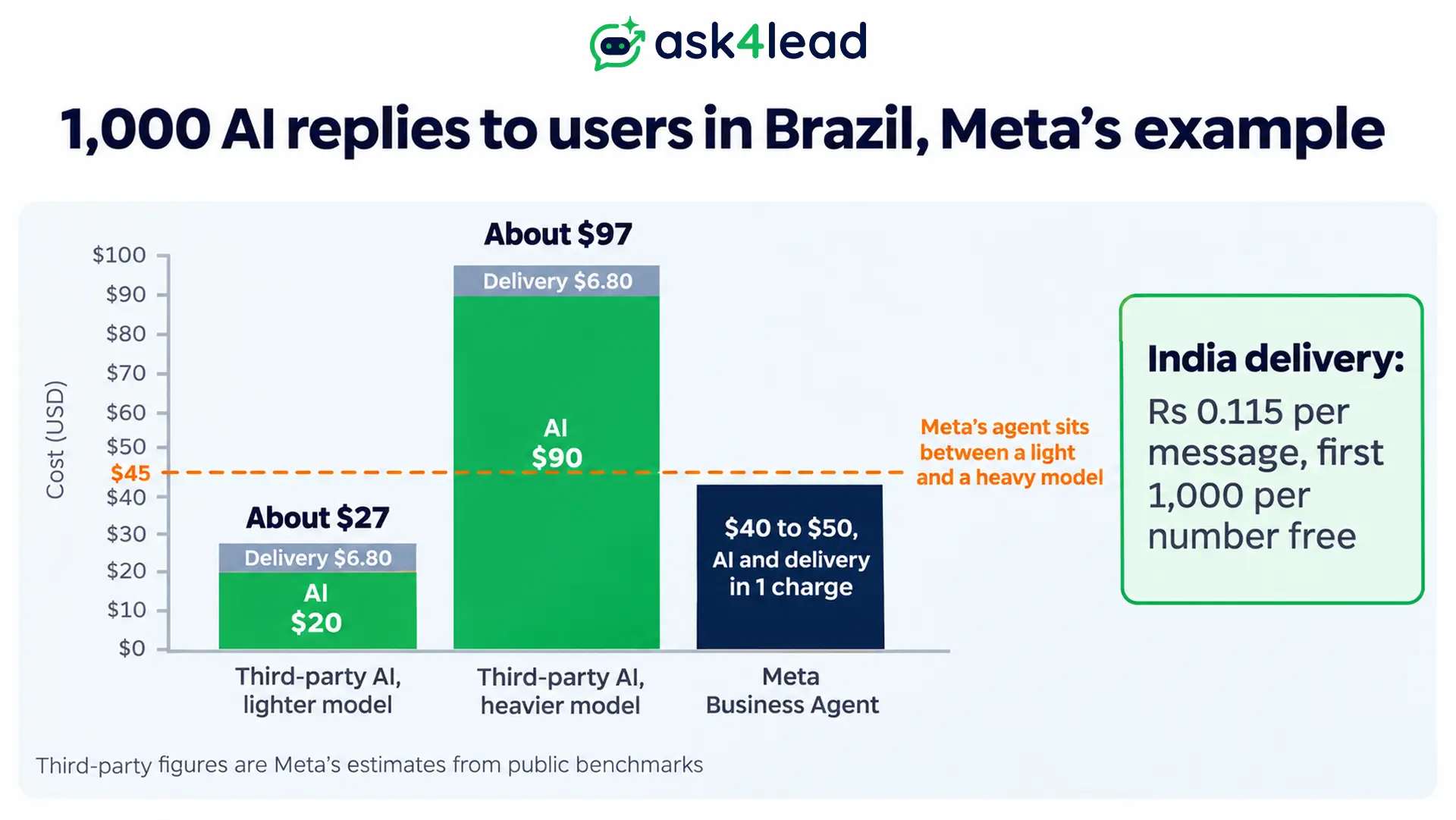
That same Meta page gives this comparison for replies to users in Brazil. Its third-party figures come from public benchmarks, so treat them as a range, not a quote.
| Setup | AI cost per reply | Delivery per reply | 1,000 replies |
| Third-party AI, lighter model | About 2 cents | 0.68 cents | About $27 |
| Third-party AI, heavier model | About 9 cents | 0.68 cents | About $97 |
| Meta Business Agent | 4 to 5 cents in total | Included | $40 to $50 |
So Meta’s agent beats a heavy model but loses to a light one. Still, the model you choose decides the winner.
What the difference looks like in India
Delivery costs far less in India than in Brazil. Meta’s India rate card lists service and utility messages at Rs 0.115 each. The first 1,000 per number each month cost nothing.
Meta also invoices an India business in rupees, using its US rate and the daily exchange rate. Assume Rs 90 to the dollar. Then 4 to 5 cents is about Rs 3.60 to Rs 4.50 per agent reply.
Check your own numbers with these 2 lines:
- Third-party cost per reply: AI fee, plus platform fee, plus Rs 0.115.
- Meta cost per reply: about Rs 3.60 to Rs 4.50.
Because Rs 0.115 is small, the AI fee and platform fee decide the result, not Meta’s message rate. Also see the cost model for an AI agent against a human rep.
Who can use Meta Business Agent?
On the API, the agent works only on a number that passes Meta’s eligibility check. The app version reaches eligible businesses in select markets, so your Tools tab may not show it yet. Also, owners report that it appears on some pages but not on others.
Meta lists 6 conditions for an API number:
- Vertical: every vertical except finance, government, health, alcohol, gambling, over-the-counter drugs and matrimony services.
- Account type: a WhatsApp Business Platform account, not the consumer app.
- Standing: neither the account nor its business is restricted or banned.
- Country: the business sits in an authorised country, but the overview names none.
- Trust: the business meets Meta’s verification requirements.
- One AI: no other AI agent already runs on that number.
An excluded vertical is not a free pass. A third-party AI agent in finance or health still follows WhatsApp’s policies and your local law.
How do handoff and the team inbox work with Meta Business Agent?
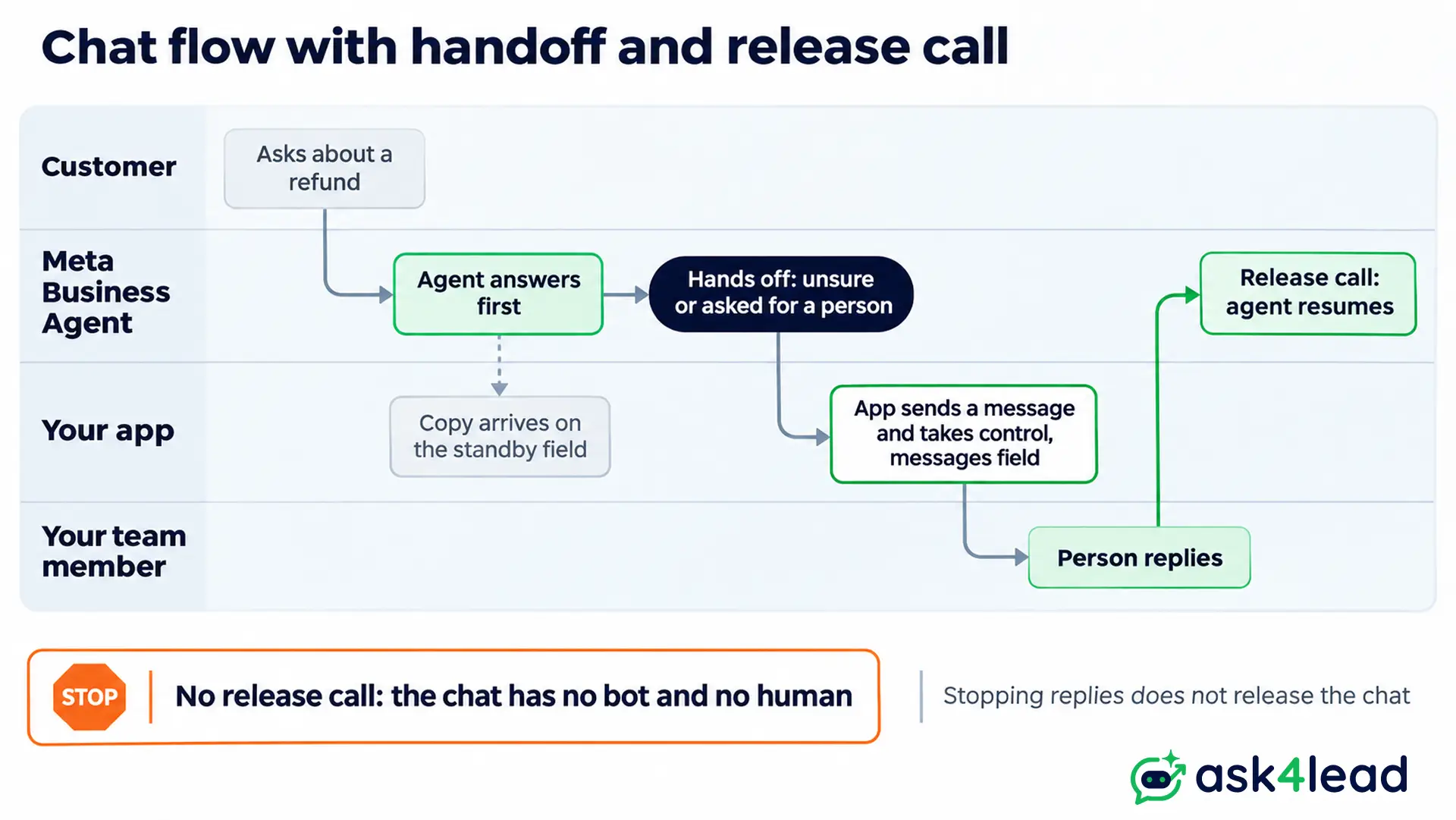
When the agent is on, it answers first and your app waits in standby. You still receive every customer message and a copy of each agent reply. Your app takes over by sending a message.
How Meta Business Agent decides to hand off
On the API, the agent hands off on its own. It does so when it is unsure, sees a policy problem or hears a request for a person. You cannot change those triggers, but you can write your own handoff message.
In the app, however, you flag topics the agent must pass to you. For your side of the handoff, see AI-to-human handoff.
The release step that strands chats
Your app keeps control until you call the release action. Stopping replies does not hand the chat back, as Meta’s setup guide says.
If nobody releases it, the chat sits with no bot and no human. So name 1 person or rule that releases each chat, for example when the lead is resolved.
One AI agent for each number
Meta’s eligibility rule blocks the agent on a number that already runs another AI agent. Some vendor pages say you can run both on 1 number, but Meta’s page does not confirm that.
The safe setup is 1 AI per number, with your team inbox as the standby app. Builders also report that a number linked through coexistence can fail the check, so call the Eligibility endpoint first. See the shared inbox for multiple agents for how coexistence works.
Will Meta Business Agent replace third-party AI agents?
Nothing on Meta’s pages says Meta Business Agent will replace third-party AI agents. Meta says the Platform works alongside its Business Platform. Its pricing page also names third-party AI as a normal source of service messages.
What Meta Business Agent does not do
- It cannot start a chat: non-template messages only respond, so reminders and campaigns need approved templates from your own tool. See our guide to abandoned cart recovery.
- It skips some files: it reads text, images and enabled voice notes, but not video or documents.
- It needs your APIs for live data: Meta documents connectors only for the Platform, not the app.
Why the “Meta will ban outside AI” claim misleads
Meta’s rule that took effect in January 2026 targets general-purpose AI assistants, not agents that serve your own customers. Read WhatsApp’s AI rules for the exact wording.
Some people also say Meta priced service messages to push its own agent. The rate card does not show motive, so your arithmetic matters more.
How to choose between Meta Business Agent and a third-party AI agent
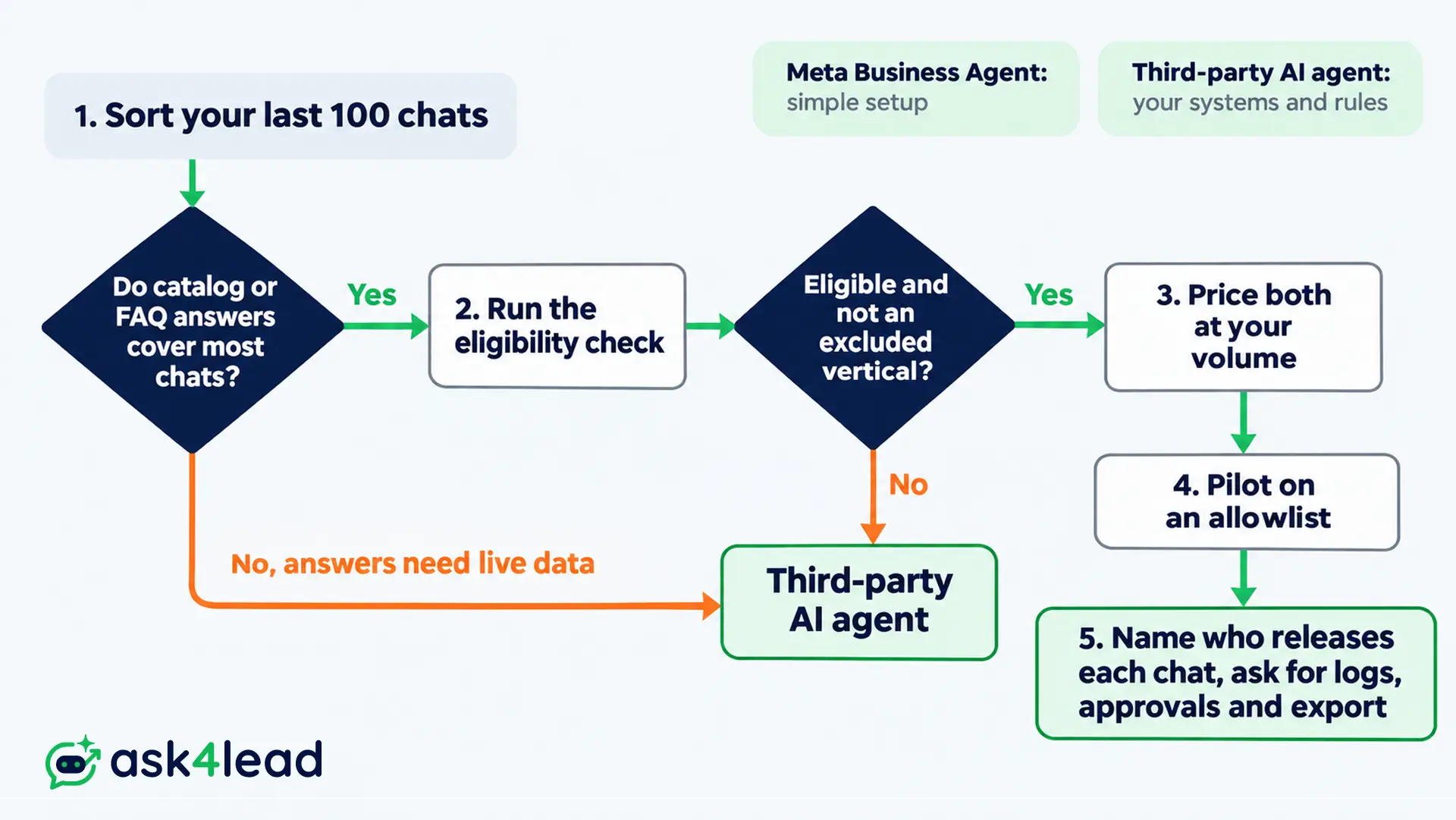
You can choose in 5 steps, using your own chats instead of a vendor’s sales page.
1. Sort your last 100 chats
First, count the chats a catalog or FAQ can answer. Then count the chats that need a live lookup, such as an order, a balance or a slot.
2. Check eligibility and your vertical
Run Meta’s Eligibility call for each API number, or open the Tools tab of the app. If your vertical is on the excluded list, the choice is made.
3. Price both at your volume
Multiply your monthly replies by 4 to 5 cents for Meta. Then add your AI fee, platform fee and Meta’s service rate for the other side.
4. Pilot on a small audience
Meta lets you run the Platform agent for an allowlist of numbers before you add a payment method. Test for 1 week, then count wrong answers and handoffs with the AI agent metrics and testing guide.
5. Ask for the paper trail
Before you rely on any agent, ask 3 things:
- Logs: what the agent said and did in each chat.
- Approvals: which actions need a person first, such as a refund or a price.
- Export: how you take your chats and records with you.
Where does Ask4Lead fit?
Ask4Lead sells a third-party AI agent, so read this section with that in mind. Each point answers 1 gap from the sections above.
- Answers from your own documents: the Tenant AI Profile uses your PDFs and website. It adds a tone guide and “do not say” rules.
- A person before risky replies: Human Approval for AI replies holds low-confidence drafts and pricing questions.
- A record, not a transcript: Lead Management stores the customer’s need and the stage the AI suggests.
- Numbers you can inspect: the AI Dashboard shows deflection, a low-confidence log and token use. Audit logs show who approved what.
Ask4Lead connects through Meta’s official WhatsApp Business API integration.
It does not answer Instagram or Messenger chats, because its AI conversations run on WhatsApp. Its pages also describe no Shopify connector and no Meta thread control.
FAQs
1. Is Meta Business Agent free?
In the WhatsApp Business app it is free to start, and Meta says paid plans are coming. On the API, Meta has charged per token since 1 August 2026. That costs about 4 to 5 US cents a reply.
2. Can I run Meta Business Agent and my own AI agent on 1 number?
Meta’s eligibility rule blocks the agent on a number that already runs another AI agent. Keep your team inbox as the standby app, or use a separate number for each AI.
3. Which businesses cannot use Meta Business Agent?
On the API, Meta excludes finance, government, health, alcohol, gambling, over-the-counter drugs and matrimony services.
4. Does Meta Business Agent work in India?
The app version launched in India in May 2026 as Business AI, in native Indian languages. For the API, Meta checks each number, so run its Eligibility call.
5. Does Meta Business Agent replace a WhatsApp chatbot?
No. It only replies inside an open window, so campaigns and reminders still need templates sent by another tool. See how the 24-hour rule works.
Conclusion
Meta Business Agent suits a simple setup on Meta’s apps. However, a third-party AI agent suits answers in your systems, channels beyond Meta and rules you set. Price both at your own volume before you decide.
Before you choose, check that you have:
- 100 real chats, sorted by what they need
- Eligibility results, pass or fail, for each number
- A cost per reply for both options
- One named person who releases each chat
- A written list of logs, approvals and export
Stop losing leads to a bot that cannot see your data
When customers ask about stock, quotes or order status, a generic reply costs you the sale. Ask4Lead answers from your own documents and holds risky drafts for approval. It also saves each need as a lead record and logs every action.
See the WhatsApp vs WhatsApp Business app vs API guide before you move a number.
