
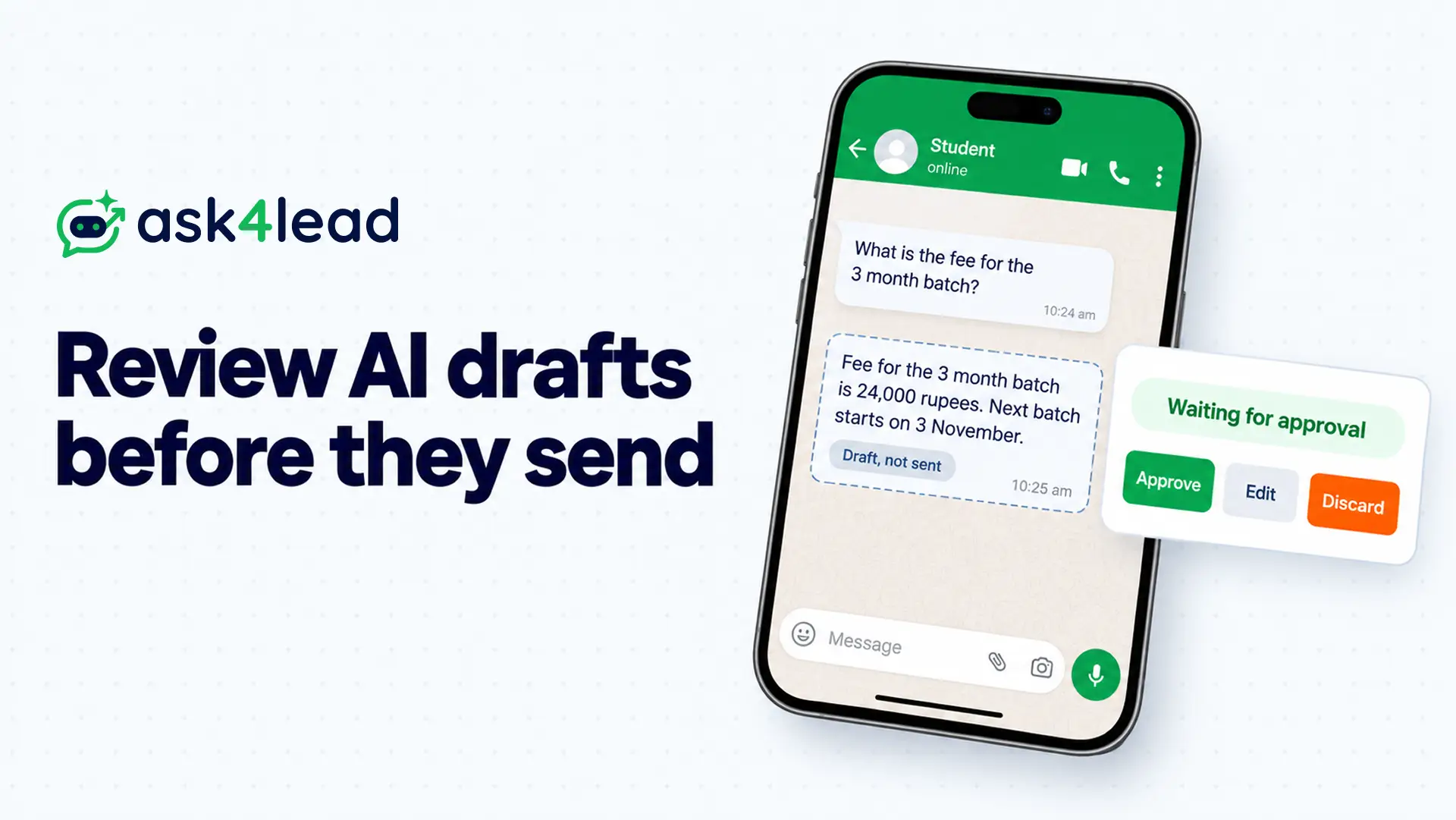
AI draft approval means an AI writes the reply, but a person decides whether it sends. The customer sees nothing until someone approves.
Ask4Lead’s Human Approval runs AI draft approval inside a queue for this reason. So you get the AI’s speed and your team’s judgment.
Below you get a 6-step approval workflow, a clock for WhatsApp’s 24-hour window, a rubber-stamp test and a time-cost table.
What is AI draft approval?
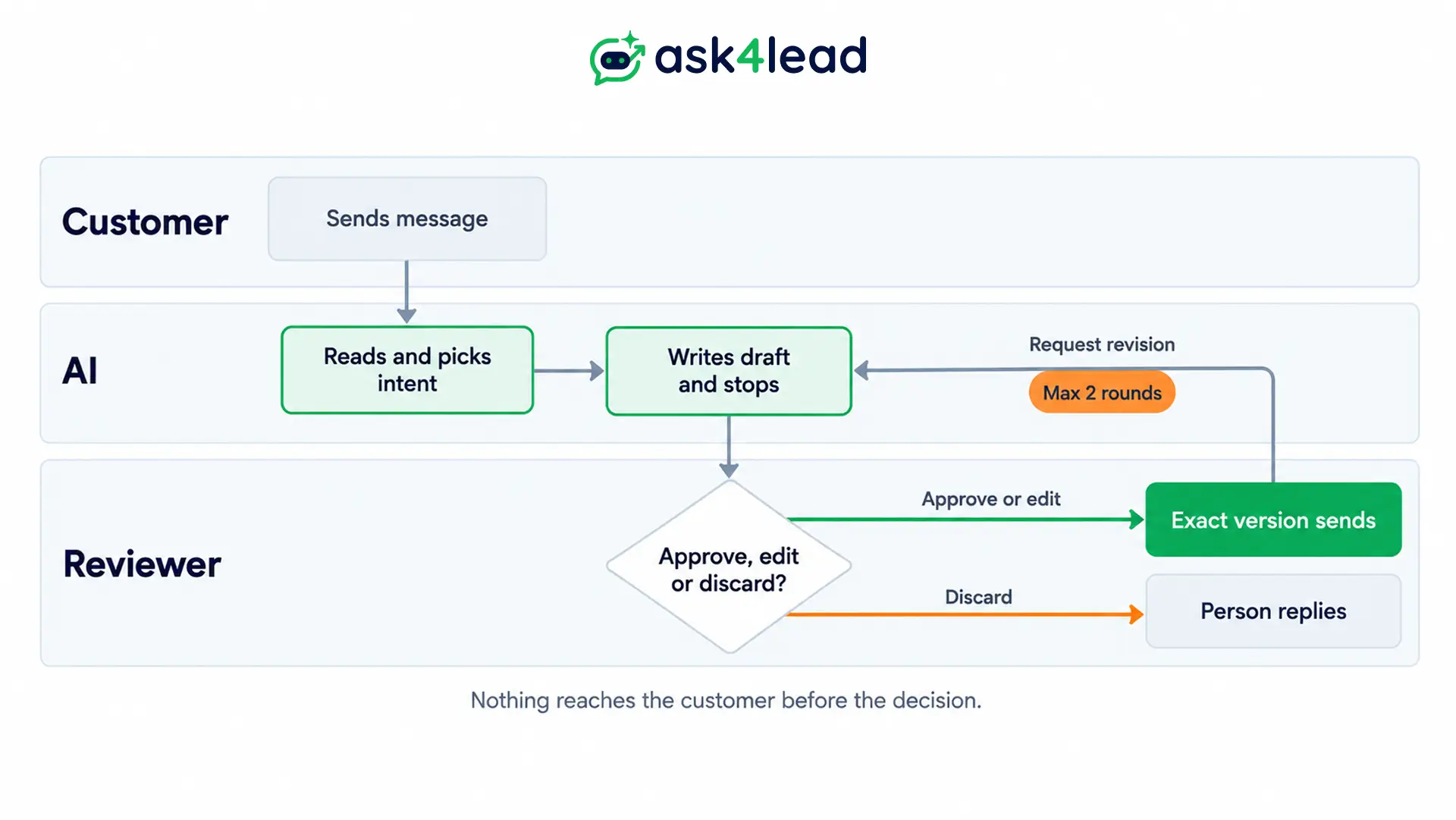
AI draft approval is a rule that keeps the send button behind a human decision. First, the AI reads the message and writes a draft. Then a named person approves, edits or discards it, and only the approved version reaches the customer.
Teams call this “human in the loop”. In practice it is an approval workflow: draft, queue, review, send. The 3 setups below differ in who holds the send button.
| Setup | Who sends | Main risk |
| Draft only | The person types the final reply | Slow, because the AI only suggests |
| AI draft approval | The system sends the exact approved version | Reviewer fatigue as volume grows |
| Auto-send | The AI sends on its own | One wrong reply reaches a customer |
However, AI draft approval must control the send action itself. A chat ping that says “draft ready” while the tool can still send is only a notification. Also, builders who run these flows in production often make draft-only a hard rule, not a setting.
In fact, most wrong replies are not rude. They are confident and slightly off, such as a price that changed last week or a visit slot nobody confirmed. A button bot cannot make that mistake, but an AI agent that writes free text can.
This does not apply if every reply is a fixed template with no AI-written text. Templates need 1 review when you create them.
Why AI draft approval needs a clock on WhatsApp
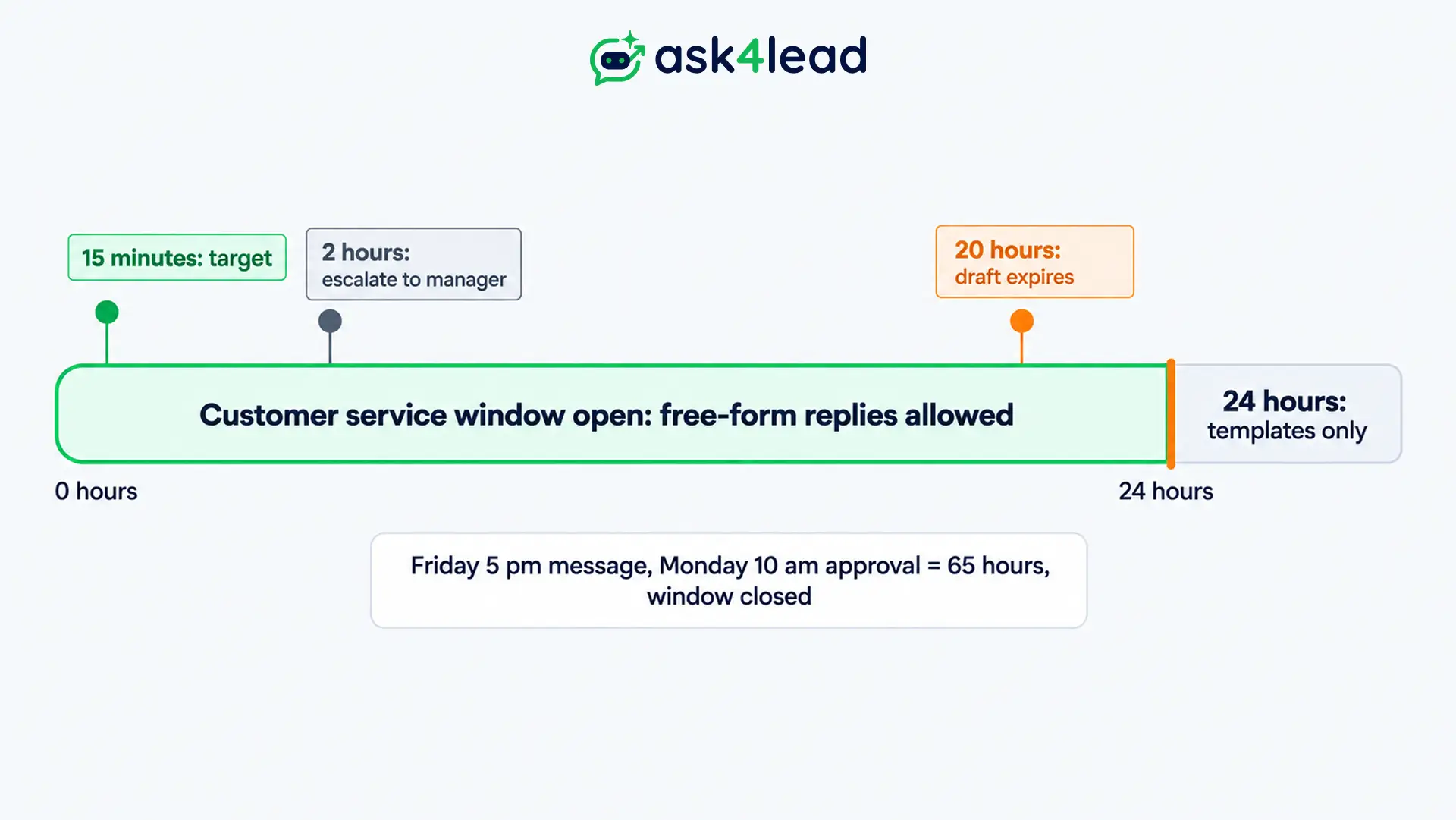
On WhatsApp, a waiting draft is a ticking clock. Meta’s customer service window runs for 24 hours after each customer message, and free-form replies work only inside it. So slow AI draft approval can make an approved draft impossible to send.
Meta’s messaging documentation says that when the window closes, you can only send pre-approved template messages. Try a free-form send after that and Meta returns error 131047, a sign that the customer’s last reply is over 24 hours old. The 24-hour rule explained walks through how the window opens and resets.
For example, a coaching institute’s lead writes at 5 pm on Friday, and the only reviewer returns at 10 am on Monday. That gap is 65 hours, so the draft is useless. This is an illustration, not a client result.
| When the reviewer approves | What happens |
| Inside 24 hours of the last customer message | The free-form reply sends |
| After 24 hours | Only an approved template can go out |
| After a new customer message | The window resets, but the draft may answer an older question |
The last row is easy to miss. A customer who sends 3 messages while a draft waits has changed the question. So the reviewer should read the newest message before approving, not only the one the AI answered. If the question changed, discard the draft and hand the chat to a human.
Where to run your AI draft approval workflow
You can run an AI draft approval workflow in email, a chat app, a status list or your inbox. So pick the place your reviewer already checks every hour. A channel nobody opens turns approval into a delay, and delay costs you the lead.
| Place | Works well for | Watch out for |
| Email “send and wait” | 1 reviewer, low volume | Revision loops scatter across threads and the audit trail thins |
| Chat buttons | Fast tap-to-approve | No queue view of what is still pending |
| Status list | Long waits and a clear record | 2 flows to keep in sync, and Microsoft’s Power Automate times out pending approvals after 30 days |
| Inbox queue | WhatsApp teams, since the draft sits beside the chat | It ties approval to that tool |
n8n’s human-in-the-loop documentation lists 9 approval channels, including Slack, Gmail, Telegram, Microsoft Teams and WhatsApp Business Cloud. So the tooling is not the hard part. Queue design is.
Also, builders who share their flows report a pattern. Email works at low volume, but once revisions start looping, a dedicated approve and revise view with real status tracking pays off quickly. However, treat that as community experience, not a measured result.
For a WhatsApp team, the inbox queue is the simplest fit. The reviewer sees the chat and the draft together, and the Work Queue keeps pending drafts in 1 list.
AI draft approval in 6 steps
AI draft approval works in 6 steps: hold every draft, show the reviewer 5 facts, offer 3 outcomes, set 3 timers, log why people edit, and relax rules by risk lane. Skip the timers and your reviewer will approve drafts the customer can no longer receive.
1. Start AI draft approval with a pending queue
Give each draft a status: Pending, Approved, Discarded, Expired or Sent. Then your approval workflow can tell where every draft stands, and a retried trigger cannot send the same reply twice.
Approval must apply to the exact text the reviewer saw. So if anyone edits an approved draft, reset it to Pending.
2. Show the reviewer 5 things
If the reviewer sees only the draft, they must redo the AI’s thinking. That is slow, so they start skimming. Give them the 5 items below on 1 screen of your approval workflow.
| Show this | Why the reviewer needs it |
| The customer’s latest messages | Catches a changed question |
| The intent the AI chose | Shows if it misread the request |
| The draft | The text that will send |
| The facts it used | Lets the reviewer check a price or policy fast |
| What the AI must not do | Keeps the red lines in view |
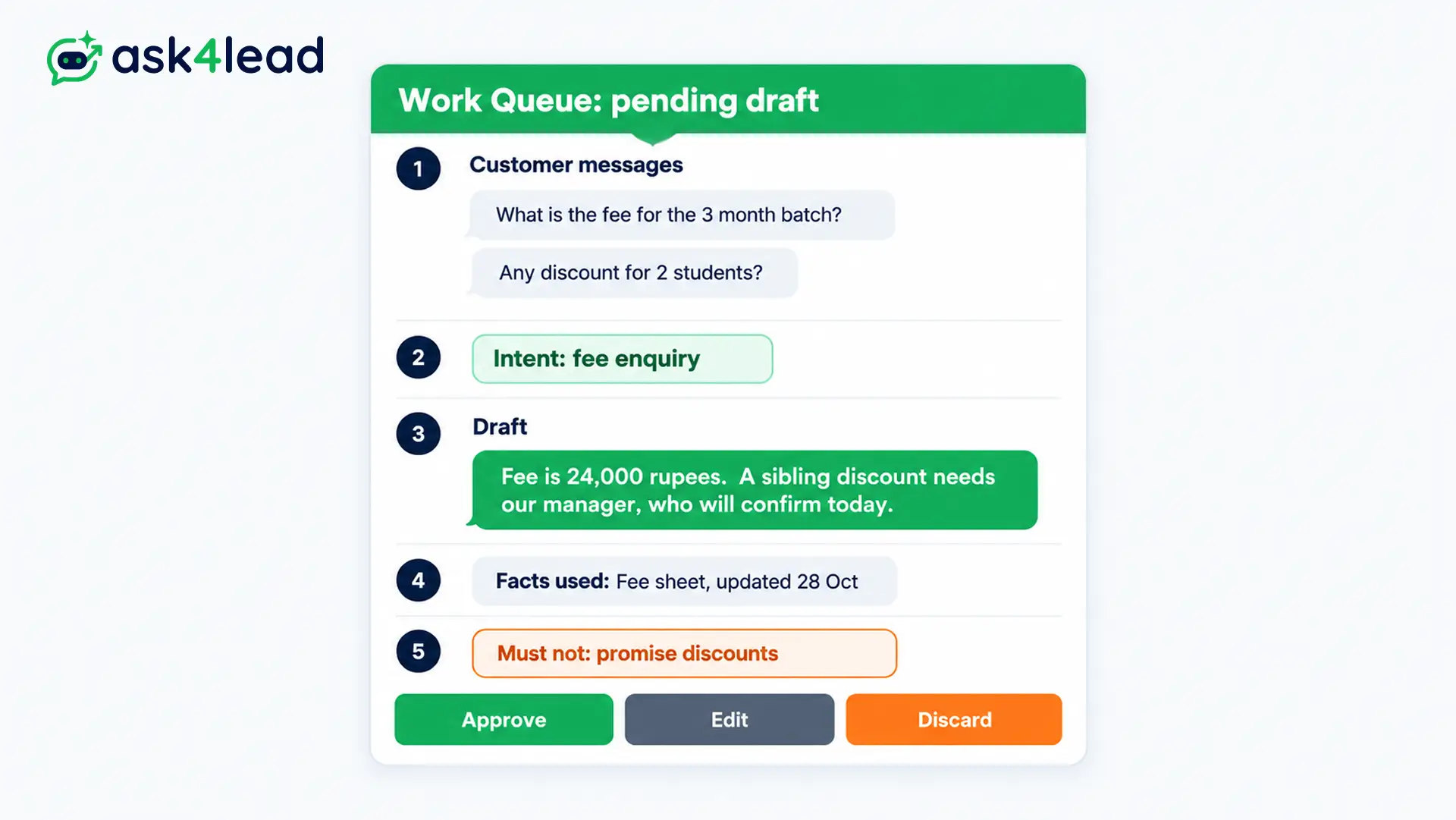
The red lines come from your AI training files, where you write rules such as “no refund promises”.
3. Offer 3 outcomes, not 2
An approval workflow with only an approve button pushes reviewers toward approving. So offer 3 outcomes: approve, edit then send, and discard to take over.
Some builders add a fourth, “request revision”. The reviewer’s note goes to a separate revision agent, and the new draft returns to the same queue.
Never send a revision automatically, because a revised draft is a new draft. Also cap the loop at 2 rounds, then let a person write it.
4. Set 3 timers for every draft
Timers keep your approval workflow from outliving the window. Treat these 3 as defaults, then shift them to match your shift pattern.
- Target: 15 minutes during working hours. Fast replies win leads, as the AI agent versus human VA comparison shows.
- Escalate: at 2 hours, alert a manager. n8n’s own guidance suggests 2 to 4 hours for operational approvals.
- Expire: at 20 hours, mark the draft Expired. A person then sends an approved template. A timeout is never consent, so never auto-approve.
Meanwhile, you can send a fixed, pre-approved acknowledgement such as “Thanks, a team member will reply by 10 am”. That text is not AI-written, so it needs no review.
5. Log why people edit
Every edit in your approval workflow tells you what the AI got wrong. Tag each one with a single reason: wrong intent, wrong tone, missing policy, invented fact, or too confident.
After 2 weeks, the counts show your next fix. A pile of “missing policy” tags means a file is missing from the AI’s knowledge. Audit Logs record which agent approved or edited a message, so the who and when are already there.
6. Relax AI draft approval by risk lane
Do not relax approval for the whole inbox at once. Instead, sort topics into 3 lanes, then move 1 lane at a time.
| Lane | Examples | Rule |
| Always a person | Refunds, legal, medical, money, anything you cannot undo | Never auto-send |
| Earn trust first | Prices, quotes, bookings, first replies to new leads | Approve each draft by hand |
| Candidate for auto-send | Opening hours, address, order status from your own system | Spot-check drafts the AI marks unsure |
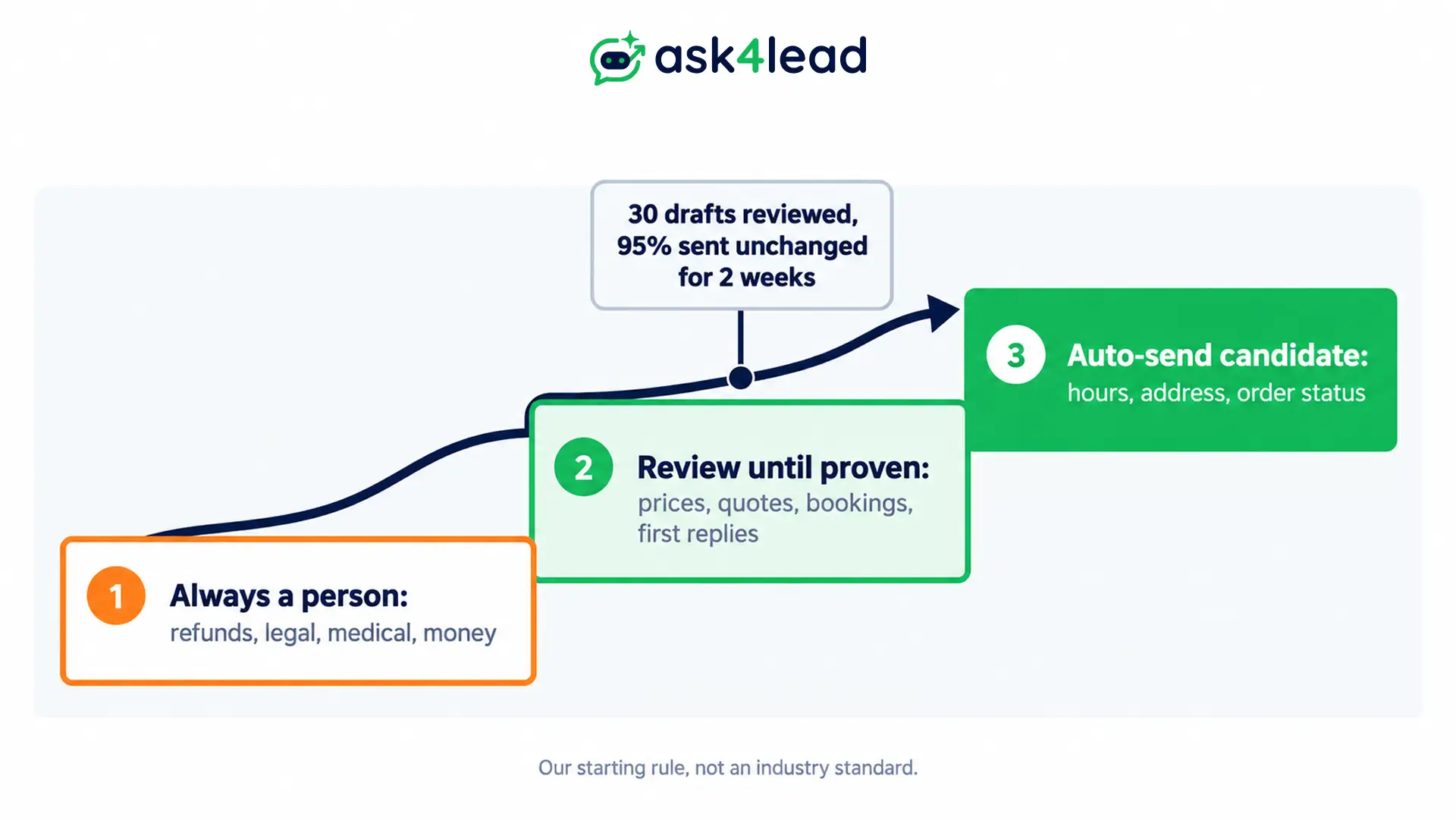
Here is a starting rule, which is our suggestion and not an industry standard. Move a lane down only after you have reviewed 30 or more drafts and sent 95% of them unchanged for 2 weeks.
No source we found sets a universal threshold. For first replies to new leads, read whether an AI agent can qualify leads without a human before you loosen that lane.
How to stop an AI draft approval workflow becoming a rubber stamp
A rubber stamp forms when a reviewer approves out of habit. It grows with volume, because the model is usually right and the reviewer’s attention drifts. Fix it by narrowing what the reviewer decides, then testing whether they still catch mistakes.
Many reviewers fail at “is this good?” because that question has no edge. So replace it with 3 yes or no questions:
- Fact: Does this state a price, date or policy without a source?
- Promise: Does it commit you to a discount, slot or deadline?
- Stakes: Does it touch money, health or anything you cannot undo?
Then show drafts with a “yes” first, and let the clean ones wait in a batch. Community builders describe this bright-line approach as the way to catch the 1 bad draft in 30.
Then test your reviewer. Once a week, plant 1 deliberately wrong draft, such as an invented price, in the queue.
Route it to an internal test number so it can never reach a customer. If nobody catches it, shorten the batch or add a second reviewer through a shared inbox for several agents.
Testing AI draft approval before real customers
Test AI draft approval with a dry run that shows every message and job your approval workflow would create, not only the record it would change. A date change can be fine while the message promises a slot nobody confirmed.
For every test case, read 3 previews side by side:
- The record change: which field moves from what value to what value.
- The exact message: the full text and the recipient, with every variable filled in.
- Queued jobs: any follow-up that would fire tomorrow. This is the one people miss.
Then add 3 no-send cases and label each with its reason: already replied, customer withdrew, or waiting for missing details. A plain “nothing sent” does not tell you if the workflow decided well or just failed.
Finally, try the forbidden action. Instruct your tool to send a draft that nobody approved.
A rule in the prompt is only a suggestion, so confirm the tool itself refuses. The AI agent testing guide covers a wider test set.
What AI draft approval costs in reviewer time
AI draft approval costs reviewer minutes, so size your approval workflow to your volume. The table below assumes 20 seconds per draft. Replace that figure after you time your first 50 drafts, because it varies by team and by draft length.
| Drafts a day | Reviewer time per day |
| 50 | About 17 minutes |
| 100 | About 33 minutes |
| 200 | About 67 minutes |
At 50 drafts, 1 person can do this between calls. At 200, the queue becomes a job, so move low-risk lanes down using step 6. Also compare that time with hiring, using the AI agent versus support rep cost model.
How Ask4Lead handles AI draft approval
Ask4Lead’s Human Approval holds each AI draft in the Work Queue until an agent approves, edits or discards it. The customer sees nothing until then. You can review every reply or only low-confidence ones, and switch approval on or off per conversation.
- Pricing flags: the AI flags complex pricing questions for a manager.
- Roles: user and role settings can limit approval to managers.
- Proof: each approval action logs the agent’s name.
- Weak spots: the AI Dashboard lists low-confidence answers, so you see where drafts need the most edits.
A note on bias: Ask4Lead is our own product, so judge this section accordingly. The feature page does not describe expiry timers or sending feedback back to the AI. So set the clock from step 4 yourself, and revise drafts by editing them.
FAQs
1. Should AI draft approval cover every message?
Start with every message, then relax by lane. A new workflow has no track record, so earn each exception with data.
2. How fast should a reviewer approve a WhatsApp draft?
Aim for 15 minutes in working hours. The hard limit is the 24-hour window, so expire drafts before it closes.
3. What happens if nobody approves a draft?
Mark it Expired and log it. A person then sends a template if the customer still needs an answer.
4. Can the AI revise a draft after feedback?
Some builds can, using a separate revision agent. The new draft must return to approval, and you should cap the loop at 2 rounds.
5. Is email a good place to approve drafts?
It works at low volume. Once revisions loop, a queue with statuses is easier to track.
6. Does approval make AI replies compliant on WhatsApp?
No. Meta’s rules on opt-in, the 24-hour window and a path to a person still apply. The AI rules guide covers them.
Conclusion
AI draft approval keeps a person in charge of every send. A good AI draft approval workflow also protects the 24-hour window and stays honest about reviewer fatigue.
Before you go live, check that you have:
- Held every draft as Pending until a person decides
- Shown the reviewer 5 facts on 1 screen
- Set 15-minute, 2-hour and 20-hour timers
- Logged the reason for every edit
- Planted 1 wrong draft to test the reviewer
Next, review your edit tags after 2 weeks. They show which lane can move down first.
Stop letting AI replies reach customers unchecked
Slow or wrong replies cost you leads, because customers move on. Ask4Lead drafts replies from your own files and holds them in the Work Queue until an agent approves.
Complex pricing questions get flagged for a manager, and Audit Logs show who approved what. Meanwhile, the AI Sales Assistant keeps writing drafts in plain English.
