
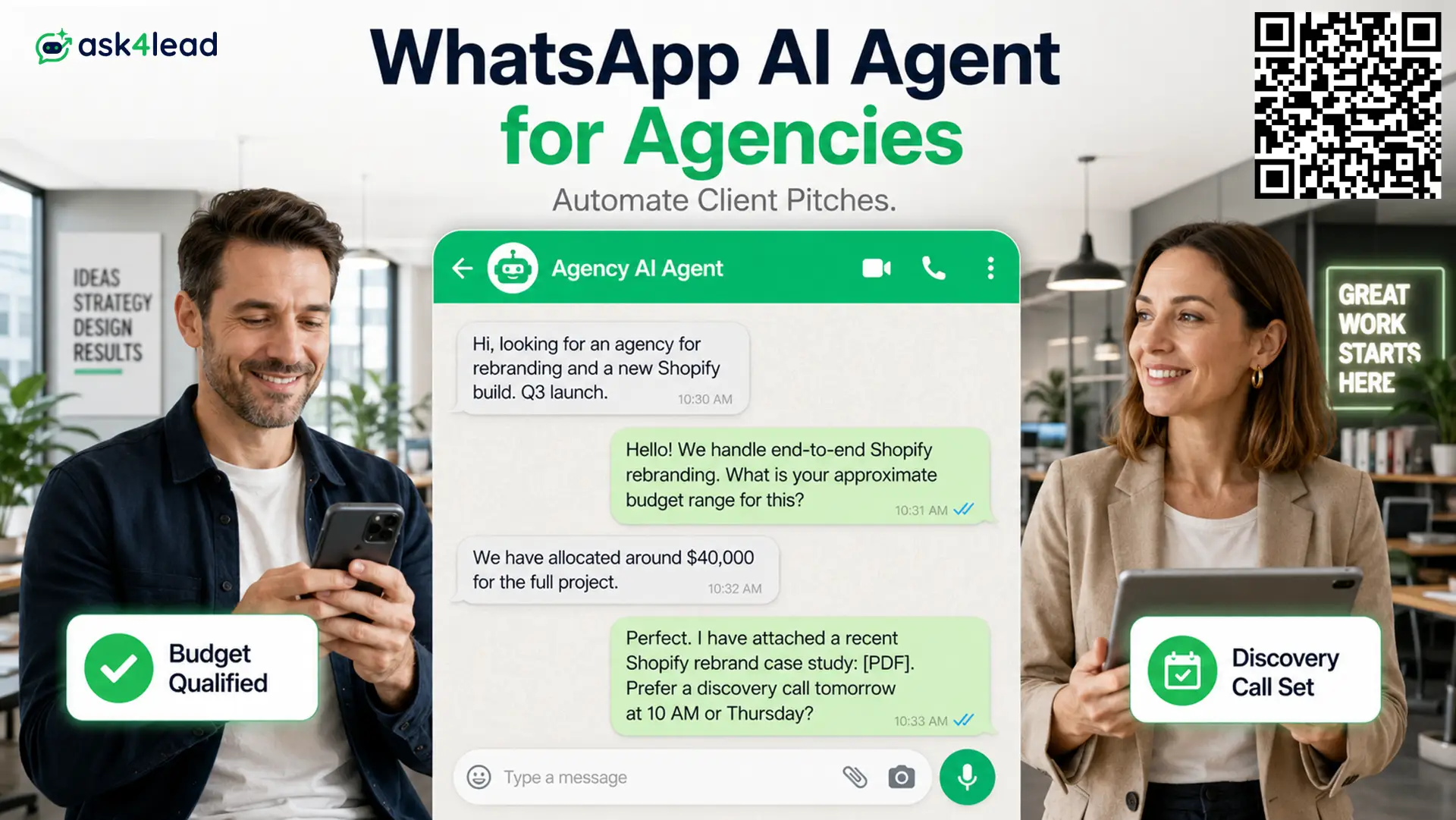
A WhatsApp AI Agent for Agencies is an AI assistant that talks to prospects and clients on WhatsApp in plain language. It qualifies each inbound lead by budget, scope and timeline, then hands your team the lead with full context.
Ask4Lead is a humanized AI WhatsApp chatbot and CRM built for that job. It replies like a person, not a button menu, and holds sensitive messages for your approval.
This page is for founders, growth leads and account directors at agencies that win most new business on WhatsApp.
What a WhatsApp AI Agent for Agencies Does
A WhatsApp AI Agent for Agencies covers 4 jobs: it answers new-business questions 24/7, qualifies and routes each enquiry, handles routine client requests, and re-engages past clients through broadcasts.
| Job | What the agent does |
| New business | Greets click-to-WhatsApp leads, asks about goals, budget and timeline, sends the matching case study |
| Qualification | Scores each lead hot, warm or cold, alerts the account executive who owns that service |
| Client service | Answers status, scheduling and deliverable questions without pulling a manager off billable work |
| Retention | Runs opt-in WhatsApp campaigns for new services and win-back offers |
Most agency inbound now arrives through click-to-WhatsApp ads on Meta and LinkedIn. The agent picks up that traffic the moment it lands, day or night.
Conversation memory ties it together. The agent remembers what a prospect said earlier in the thread and never restarts the brief.
Why Agency Leads Slip Through a Standard WhatsApp Chatbot
Standard chatbots run on fixed button menus. Any brief that does not match a preset option gets dumped into a contact form, and agency briefs are never fixed.
A menu bot fails agencies in 3 ways:
- It cannot read a multi-service request, so “SEO plus paid media at a set ad spend” becomes “Other” and the detail that made the lead valuable is lost.
- It answers a 5-figure retainer buyer with consumer-style canned lines, which reads as unprofessional.
- It hands your team a name and number with no problem, no budget and no urgency, so the first call starts cold.
A real conversation captures what a menu cannot:
- The full blend of services in one brief, not a single dropdown pick
- A real budget range, asked for directly and answered
- The launch or campaign deadline that sets the timeline
Ask4Lead’s AI Sales Assistant asks the open questions, follows the answers, and delivers all 3 to the rep. That is the line between a standard chatbot and a WhatsApp AI Agent for Agencies.
Where to Draw the Line Between AI and Your Team
On WhatsApp, the channel itself punishes bad automation. Meta assigns a quality rating and messaging limits to each number.
A pattern of messages people block or report can throttle that number for every contact.
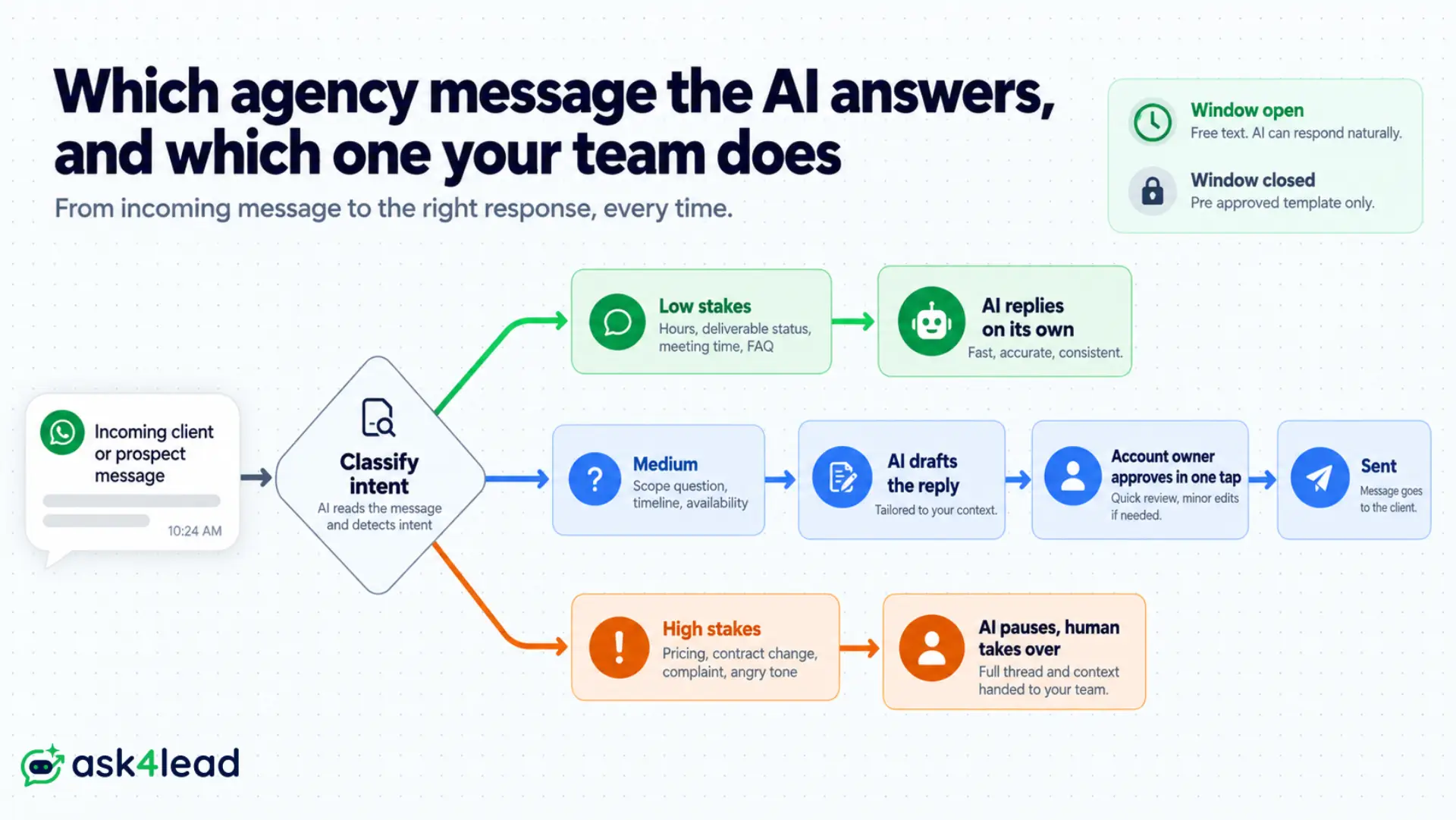
So a WhatsApp AI Agent for Agencies should act alone only on low-stakes questions and route anything sensitive to a person. Use 3 tiers.
| Tier | Message type | Who sends it |
| 1 | Hours, deliverable status, meeting times, FAQs | AI, unsupervised |
| 2 | Scope questions, timelines, availability | AI drafts, account owner approves |
| 3 | Pricing, contract changes, complaints, angry tone | Human takes over, AI pauses |
1. Let the AI answer low-stakes questions unsupervised
Safe to automate: deliverable status, meeting times, office hours, repeat FAQs. These replies land inside WhatsApp’s 24-hour customer service window, where free-form messages cost nothing.
2. Route pricing, scope changes and unhappy clients to a human
Never on autopilot: money, contract changes, complaints, a frustrated tone. Ask4Lead’s human approval for AI replies lets the agent draft the reply and hold it for one-tap sign-off from the account owner.
3. Keep the approval queue visible to your account team
The queue is the trust feature. Every agency owner asks the same thing first: “can I see what it is sending?” Your team works the shared team inbox from the same number, with the full thread on every conversation.
How Ask4Lead Runs Your Agency’s WhatsApp Sales Pipeline
Ask4Lead runs as your WhatsApp AI Agent for Agencies end to end: it connects your number, learns your services from your own documents, and works every inbound thread from first message to booked call.
Setup takes about 15 minutes. Connect the number, upload your documents, set your qualifying questions. Each lead then moves through a 9-stage sales pipeline on its own.
1. Load your decks, rate cards and case studies
Learns only from what you upload: pitch decks, service tiers, pricing matrices, case study PDFs in the AI Knowledge Profile. It never promises a capability you do not sell.
2. Qualify every lead by budget, scope and timeline
3 questions, every time: what they want, what they have allocated, when they need it live. A warm lead that goes quiet gets an automated follow-up, not silence.
3. Book the discovery call inside the chat
Booked in-thread: once a lead clears your threshold, the agent offers real slots and confirms on the spot. It drafts a quote in the same flow when the scope is clear enough to price.
4. Hand the rep a lead that is ready to pitch
No cold first calls: the account executive opens the work queue to a prioritised list, each lead carrying the problem, budget band and urgency. The pitch starts warm.
Running WhatsApp AI Across Multiple Client Accounts
Separate every client from day one. Agencies that run a WhatsApp AI Agent for Agencies across several accounts, or resell it, need each client’s data and conversations walled off from the start. Retrofitting that split later is where most in-house builds break.
1. A separate workspace per client
One workspace per client. Multi-tenant CRM workspaces give each account its own knowledge base, pipeline, inbox and permissions. No client’s leads or templates touch another’s.
2. Coexistence keeps the client on their own phone
The client keeps their app. Meta’s coexistence route connects their existing WhatsApp Business app number to the API with no deletion and no lost history. They keep chatting one-to-one while the API integration runs the AI behind it.
3. Reporting and broadcasts scoped per account
Per-client numbers. Each workspace sends its own opt-in broadcasts and reports its own results, so you can show every client what their WhatsApp line produced.
How to Roll a WhatsApp AI Agent Out Across Your Agency
Do not switch every client onto a WhatsApp AI Agent for Agencies at once. A staged rollout keeps the quality rating safe and builds team trust.
- Pick one pilot service line with steady inbound, like paid media retainers.
- Set the 3 autonomy tiers above so the team knows what the AI sends alone.
- Load the knowledge base and write the qualifying questions for that service.
- Review every draft for week 1, then widen autonomy where the drafts hold up.
- Add the next client once the pilot runs with light supervision.
The reasoning behind each step is in 5 ways AI lifts WhatsApp lead conversion.
What Meta’s Built-In WhatsApp AI Agent Changes for Agencies
Meta now ships a native business agent inside the WhatsApp Business app that answers basic FAQs and recommends products.
It makes the generic “answers questions from your website” bot a commodity, but it stops at the edge of Meta’s own apps.
For an agency, the defensible layer sits outside that boundary:
| Layer | Why Meta’s native agent does not cover it |
| A single memory across web, Instagram, email and phone | The native agent lives inside WhatsApp only |
| Booking, CRM pipeline, quotes and document delivery | No integration with your systems of record |
| Team routing and human handoff with the full thread | It hands off but does not run your team |
| Model and cost control | It bills on Meta’s own models; the Platform pricing lets you choose |
| Setup and white-label for clients | Meta does not sell this |
A WhatsApp AI Agent for Agencies is that layer, not the FAQ bot underneath it.
Core Ask4Lead Features for Agencies
Ask4Lead works as a full WhatsApp AI Agent for Agencies, not a single feature. Every item below maps to one outcome: a small account team signing more retainers without new headcount.
The same stack supports in-house marketing teams.
| Feature | What it does for your agency |
| Plain-English AI conversation | Captures the real scope of a brief with no menu |
| 9-stage CRM pipeline | Tracks every prospect from first message to signed retainer |
| Automated lead follow-ups | Chases warm leads on a schedule so no touch is missed |
| Shared team inbox | Lets every account executive work the same number together |
| Service launch broadcasts | Announces new services and win-back offers to opted-in clients |
| Human approval queue | Holds pricing and complaint replies for one-tap sign-off |
Agency Retainer Scenarios Ask4Lead Handles
These are the moments where a slow or robotic reply costs a retainer, and where a WhatsApp AI Agent for Agencies earns its place.
1. The midnight enterprise enquiry
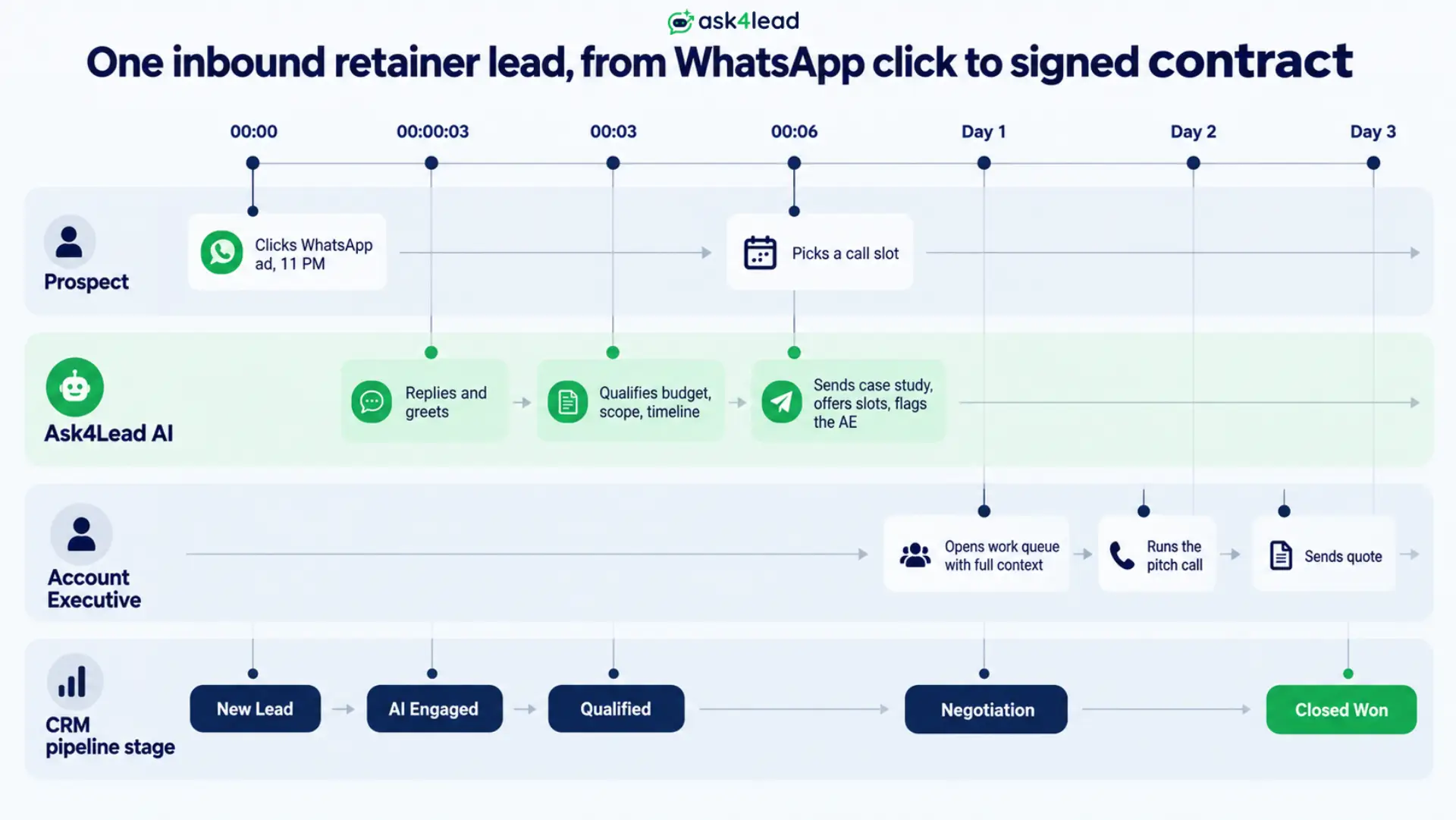
A marketing director sees your ad at 11 PM and asks about enterprise SEO pricing. The agent replies in seconds, asks about current traffic and target markets, and sends a matching case study.
It books a 10 AM call and flags the account executive. Your team starts the day with a qualified lead instead of a missed message.
2. The client escalation mid-campaign
A live client messages in a panic about a spike in Google Ads cost per acquisition. The agent reads the tone, flags the thread, and moves it to your media buyer with the full history.
A fast, accurate human reply in that moment is what stops the client from churning.
3. The dormant-client cross-sell
You have 50 past clients who only bought a one-off build. You broadcast a free technical SEO audit offer.
The agent handles the replies, qualifies who is ready to scale, and books calls. A cold list becomes retainer conversations with no extra manual work.
FAQs
1. Can the agent send our pitch decks and case studies?
Yes. Upload your decks, rate cards and case study PDFs into the AI Knowledge Profile, and the agent shares the right document when a brief matches it. It only answers from material you provide.
2. Will our account team lose control of client conversations?
No. You choose which intents the AI answers alone. Pricing, scope and complaint replies are drafted and held in an approval queue, and anyone can take over a thread in one tap.
3. Does this work if we manage WhatsApp for several clients?
Yes. Each client gets a separate multi-tenant workspace with its own knowledge base, pipeline and permissions. Data never crosses between accounts.
4. What happens outside WhatsApp’s 24-hour window?
Inside 24 hours of a customer’s last message, the agent replies freely at no per-message cost. Outside it, any proactive message uses a pre-approved template, which Ask4Lead manages.
5. Is a generic WhatsApp AI agent still worth it after Meta’s native agent?
A generic FAQ bot is now a commodity. An agent that books calls, runs a CRM pipeline, routes to the right person and works across every channel is not.
6. How is a WhatsApp AI Agent for Agencies different from a button-menu chatbot?
A menu bot makes the prospect pick from options you guessed in advance. The agent asks open questions, understands a multi-service brief, and delivers the exact problem, budget and timeline to your rep.
Turn Your Agency’s WhatsApp Into a Retainer Pipeline
Agency new business runs on speed and context. A prospect who describes a complex brief at midnight should get an intelligent reply, a booked call, and a rep who already knows what they need.
A WhatsApp AI Agent for Agencies gives you that without new headcount, and keeps your team in control of every sensitive message.
Ask4Lead pairs the humanized conversation with a full 9-stage CRM, so no lead falls between the chat and the pipeline.
Start free with 100 AI credits
Sign up free and connect your agency’s WhatsApp number to watch the agent qualify a real inbound lead in your own pipeline.
For the wider playbook, read how to turn WhatsApp into a high-converting sales machine.