
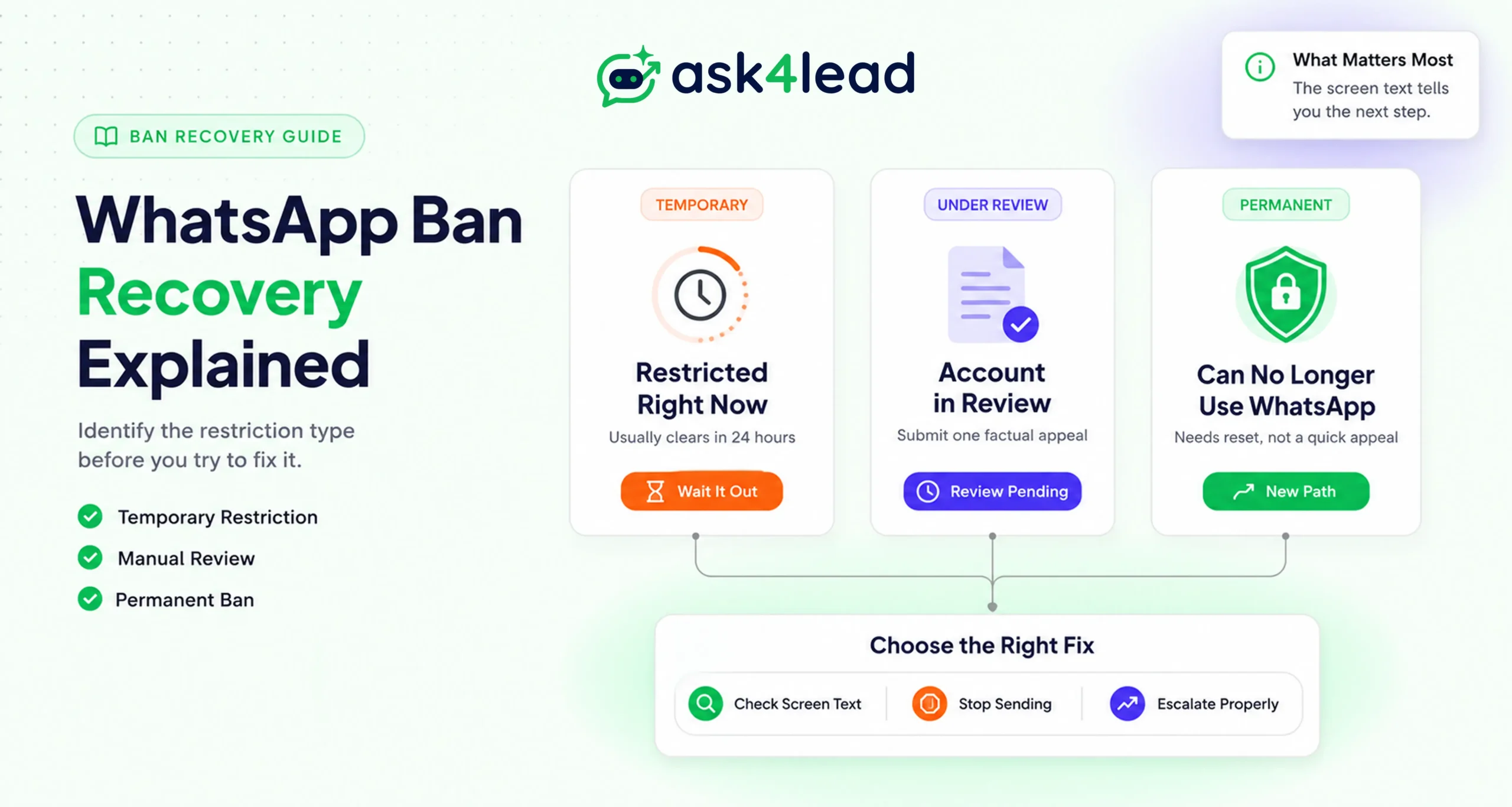
WhatsApp reverses only 1.5% of ban appeals on the first attempt, based on a February 2026 sample of 10,930 cases. That number is exactly why most generic advice on how to get unbanned from WhatsApp Business fails business owners.
Quick answer: open WhatsApp and check which of 3 screens you’re looking at: a restriction with a countdown, an account under review, or a permanent “can’t use WhatsApp” message. Each needs a different fix.
The fix for a temporary restriction can waste your window for a permanent one. Ask4Lead’s guide on why WhatsApp bans happen covers the trigger side. This guide covers what to do once the ban has already landed.
Winning reinstatement and keeping it are 2 separate problems. So this guide covers:
- The exact recovery path for each of the 3 ban types.
- The real data behind why most appeals fail.
- Detection mechanics WhatsApp doesn’t publish anywhere.
- A scam pattern currently targeting banned business owners.
Key Takeaways
- A WhatsApp “ban” is 1 of 3 distinct penalties: a temporary restriction, a permanent ban, or a broadcast-only lock. Each needs a different recovery move.
- An automated policy system reads the first review of any appeal, not a person. That’s why most rejections land in under a minute.
- Appeal success rates are low industry-wide: WhatsApp reverses roughly 1.5% of cases on a first submission, per a February 2026 sample.
- A personal number has no documented recovery mechanism. The official Cloud API does, through Direct Support or a technology partner.
- A fake “pay us to unban your account” scam is actively targeting business owners right now. WhatsApp has no paid recovery service.
- WhatsApp’s 2026 detection system tracks messaging velocity and unanswered-message ratios, not just complaint volume.
What “Banned” Really Means: The 3 WhatsApp Restriction Types
WhatsApp doesn’t have 1 ban. It has 3 separate penalty states, and each shows different on-screen copy with a different realistic outcome.
1. The Exact Screens WhatsApp Shows You
Business owners going through this describe the same 3 screens, almost word for word, regardless of country or industry:
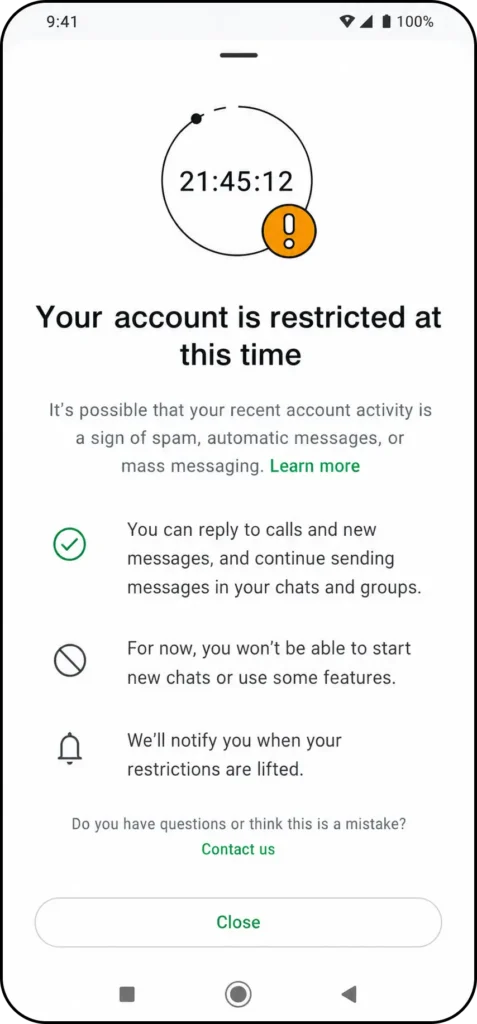
“Your account is restricted right now. It’s possible that recent activity on your account is a sign of spam, automated messages, or bulk messaging.”
That’s the temporary-restriction screen. It includes a countdown and usually clears on its own.
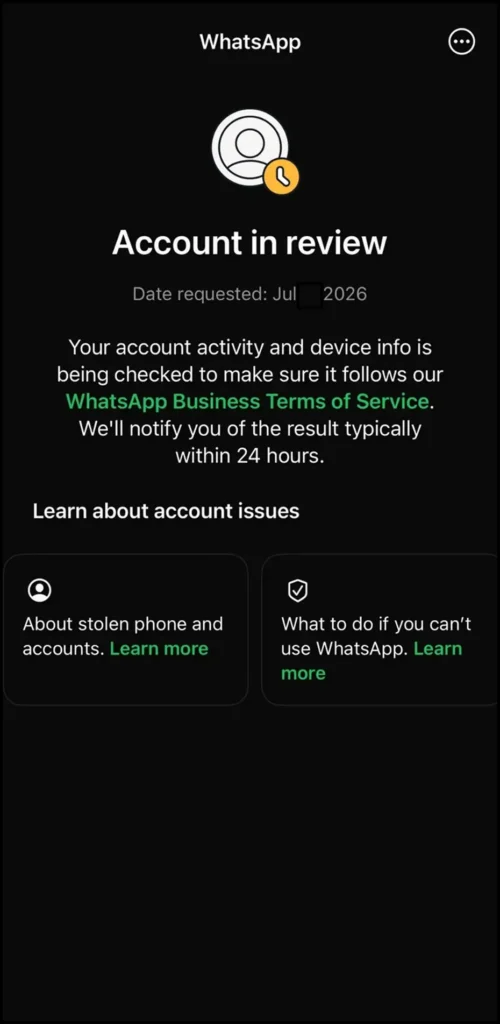
“Account in review. Date requested: [date]. We’ll notify you of the result typically within 24 hours.”
That’s the manual-review holding screen. It appears right after you submit a review request.
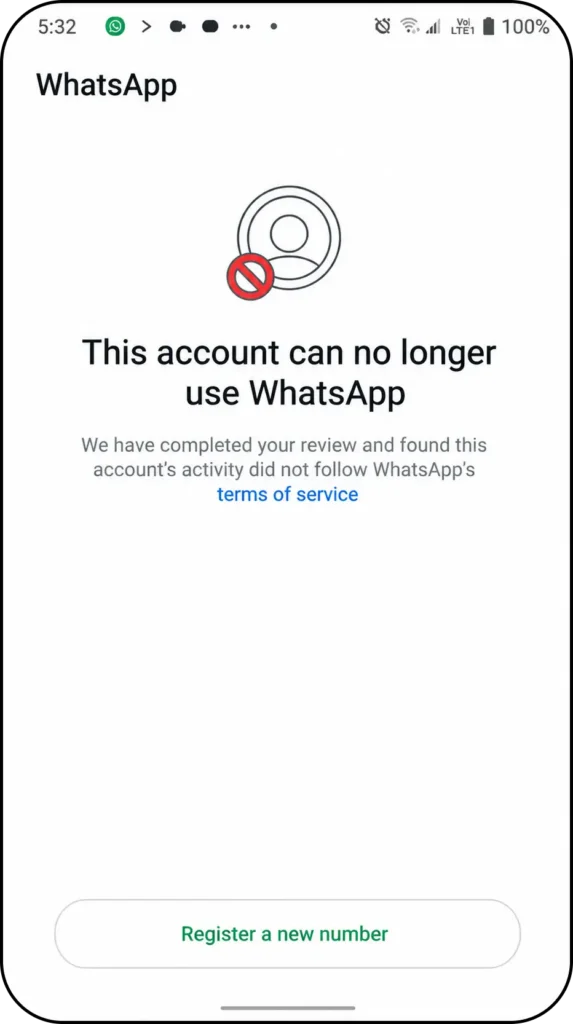
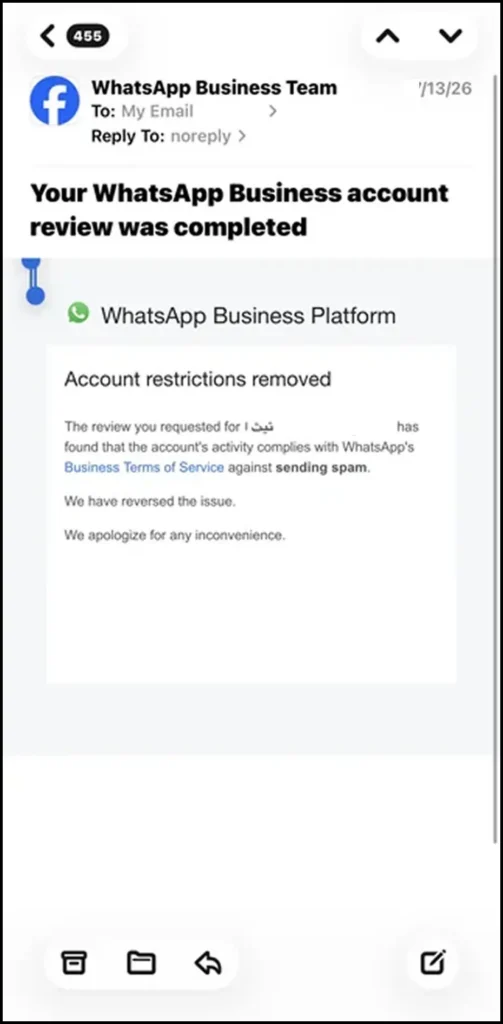
“This account can no longer use WhatsApp. We have completed your review and found this account’s activity did not follow WhatsApp’s Business Terms of Service.”
That’s the settled permanent ban. No countdown, and usually no active review button left to tap.
| What the screen says | What it means | Realistic outcome |
| “Your account is restricted right now,” with a countdown | Temporary restriction | Clears automatically, usually within 24 hours |
| “Account in review,” date requested shown | Under manual (mostly automated) review | Typically 24 hours, sometimes several days |
| “This account can no longer use WhatsApp,” no timer | Settled permanent ban | No reliable appeal; the 60-day reset is the realistic path |
| Broadcast feature greyed out, 1-to-1 chats work fine | Broadcast-only restriction | Meta offers no formal appeal for this today |
2. Why 2 Identical-Looking Bans Can Have Completely Different Fixes
A ban doesn’t hit every account the same way. Ask4Lead calls this the Ban Surface Model: a restriction lands at 1 of 3 surfaces, and mixing them up wastes your recovery window.
- Phone-number surface. Only that number stops sending. A standard review often clears it.
- Business portfolio (WABA) surface. Every number under the business goes down together, usually tied to business verification.
- Developer app surface. Rarest and hardest to recover; often needs a fresh app registration, not a review.
The First 24 Hours After a Ban: What to Do Immediately
The first day decides whether recovery takes hours or weeks. Most owners make it worse in this window by guessing instead of following a sequence.
- Read the exact screen text, not just “I’m banned.” The 3 UI messages above map to 3 different next steps.
- Stop sending, importing contacts, or switching devices. Activity that looks automated during an active review reads as a repeat violation, even when the intent is harmless.
- Screenshot everything, including the date requested and any case or ticket number. This is your evidence for every escalation below.
- Rule out a third-party cause: a modified app (GB WhatsApp, WhatsApp Plus, FM WhatsApp) ever installed on that number, or a recycled SIM with an existing bad reputation.
- Submit exactly 1 review request. Resending the same request repositions it as a duplicate ticket, pushing you back in the queue instead of forward.
1. Why a New SIM Card Alone Rarely Fixes Anything
Buying a new SIM only helps if you warm the number up slowly, instead of pointing it at the old contact list or the same broadcast tool on day 1. That’s because WhatsApp reads the sending pattern and device history together, not the SIM alone.
So if a fresh number repeats the exact behavior that banned the last one, it often attracts the same flag again within days, sometimes hours.
How to Actually Get a Human to Review Your Case
A review request is WhatsApp’s only official recovery mechanism. Knowing how WhatsApp actually processes it, though, changes what you should expect from it.
1. Why the First Review Is Read by a Bot, Not a Person
Most first-line reviews reject or approve within 60 seconds. That speed is the tell: no person examined the account history in that window.
An automated policy layer checks the case against pattern rules first. A human only sees it once that layer flags the case for escalation, and most standard consumer reviews never reach that stage.
A short, factual explanation beats an emotional one. State what you use the number for, and confirm you’ll follow the WhatsApp Business Terms of Service. For example, here’s a sample that performs well:
“We use this number for [customer support / order updates] at [business name]. We believe this restriction may be a false positive, since all recipients opted in through [website form / saved contact]. We’ve reviewed and will continue to follow WhatsApp’s Business Terms of Service.”
That works because it’s factual, names the exact opt-in source (something an automated reviewer can pattern-match against), and makes no demands. A 2 to 3 sentence version performs the same as a long one against an automated first pass.
2. Escalation Channels That Actually Work
Where you escalate depends on your account type and, sometimes, your budget:
- Personal number or free Business App: the in-app “Contact Us” flow, or the official WhatsApp contact form. No dedicated phone line or live chat exists for this tier.
- Official Business API: open a Direct Support case inside Meta Business Suite, or have your technology partner escalate on your behalf. This reaches a queue with real staff behind it.
- Either account type, with Meta Verified: business owners across multiple support forums report the same pattern, that a paid Meta Verified subscription (the same verified-badge program tied to the green tick) connects them to a human agent the free tier doesn’t offer.
None of these guarantee a fix. But for a business losing revenue every day a number stays down, they’re worth weighing against the cost of continued downtime.
The Real Odds of Getting Unbanned From WhatsApp Business
Most articles on this topic tell you to “submit a review and wait.” Almost none tell you what actually happens to that review once you submit it.
A February 2026 sample tracked 10,930 WhatsApp ban appeals. WhatsApp reversed only 302 of them, an approval rate of roughly 1.5%.
India alone saw an average of around 10 million account bans a month across 2025 and 2026. January 2026 hit about 8.17 million bans in 30 days, and February 2026 around 5.48 million.
| Metric | Reported figure |
| First-appeal success rate (Feb 2026 sample) | ~1.5% (302 of 10,930 cases) |
| India monthly ban volume (2025-2026 average) | ~10 million accounts |
| Proactive bans (before any user complaint) | 25-30% of total bans |
| Report-rate threshold that triggers review | above 2% per 1,000 messages sent |
These figures come from independent WhatsApp compliance research, not from Meta’s own disclosures. Meta does not publish appeal success rates, so treat them as the best available industry estimate, not an official statistic.
Even so, the takeaway isn’t that appeals are pointless. If you document your case well, escalate it correctly, and track it through your own account health record, you have a real edge over the average case that pulls that 1.5% figure down.
The 60-Day Reset: What Happens When Nobody Reviews Your Case
Once a number shows the settled “can no longer use WhatsApp” screen with no active review option, the realistic path forward is a wait, not an appeal that reliably overturns it.
Business owners who’ve been through this consistently describe the same window: the number stays fully locked for roughly 60 days, then becomes available to register again as a new account.
WhatsApp has never confirmed this figure in its own published terms. Treat it as a strong, widely observed operator pattern, not a guarantee.
1. What You Get Back, and What’s Gone for Good
Registering the same number again after the reset works like setting up WhatsApp for the first time, not restoring the old account.
- Chat history survives only if you never uninstall the app and a backup exists. Deleting the app during the wait removes that option.
- Group memberships do not carry over. Every group needs a manual re-add.
- Saved contacts on your own phone usually remain, but the number disappears from everyone else’s contact list. Rebuilding that lead base falls on you.
Personal Number vs Business API: Which One Has a Real Recovery Path
A personal WhatsApp number and an official Business API account are not the same problem wearing different labels. One has a documented process. The other largely doesn’t.
| Factor | Personal number / free Business App | Official Cloud API |
| Formal review path for businesses | None beyond the standard consumer flow | Direct Support or a registered technology partner |
| Typical first response | Automated, often under 60 seconds | Automated first pass, with real human escalation available |
| Outcome after a permanent flag | 60-day reset, fresh account | Case-by-case; a low quality rating can recover without a full reset |
| Who can escalate for you | No one, self-service only | A Business Solution Provider (BSP) |
1. If You’re on the Free WhatsApp Business App
There is no equivalent to Direct Support here. The in-app review and the general contact form are the only 2 options, and neither guarantees a human reads the case.
This exact gap is what pushes growing businesses toward the official API instead of a personal number.
2. If You’re on the Cloud API
First, check whether the restriction covers the whole account or applies only to a low quality rating. Those are 2 different events.
A rating drop tied to sending pattern often recovers on its own once behavior improves for a sustained period, without a full review. But if WhatsApp disables the account itself, a Direct Support case moves faster than waiting passively.
How WhatsApp’s Detection System Actually Flags an Account
Almost every mainstream guide on this topic says “avoid spam” without explaining what WhatsApp’s system actually measures. The mechanics are more specific.
Independent testing across more than 50 monitored accounts identified 4 layers WhatsApp’s detection runs in sequence:
- Registration fingerprinting: device and SIM history at the moment a number is set up.
- Behavioral analysis: the sending pattern over time, not any single message.
- User reports and blocks: the recipient-side signal most guides already mention.
- Content pattern matching: repeated or templated text across messages.
None of these thresholds appear in Meta’s own public documentation. They come from observed account behavior, not an official rulebook.
1. The Messaging Velocity Threshold Nobody Publishes
That same research found a rough safe zone. Under 30 messages an hour per active account reads as normal.
30 to 60 an hour enters a warning zone. Beyond 60 an hour moves into what the data classified as a danger zone for detection.
2. The 2026 Unanswered-Message Rule
A newer mechanic is worth knowing before you resume sending after reinstatement. WhatsApp’s system reportedly now tracks messages that go unanswered within 48 hours, on a rolling 30-day window, for both official and unofficial senders.
That shifts enforcement toward engagement quality. A smaller list of people who actually reply is now safer than a large list that mostly ignores you.
Common Myths About Getting Unbanned, Corrected
A lot of half-true advice circulates once an account goes down. 5 of the most common claims about recovery specifically, not prevention, don’t hold up:
| Myth | What’s actually true |
| Emailing WhatsApp support multiple times speeds up the review | Repeat emails to the same channel don’t add priority, and can reset your case as a new, duplicate ticket |
| Switching phones or reinstalling the app clears the ban | WhatsApp ties the restriction to the phone number and account history, not the device |
| You can always appeal a permanent ban with the right wording | Wording barely moves an automated first-pass outcome; the escalation channel you use matters far more |
| Waiting past 60 days improves your odds of reinstatement | Once the reset window passes, waiting longer adds nothing; the number simply becomes available to register fresh |
| A large contact list or high follower count protects an account | Reply rate and opt-in status carry far more weight than list size |
The Fake “Unban Service” Scam Targeting Banned Business Owners
A banned business is a stressed business, and a specific scam pattern has grown around exactly that stress.
Someone reaches out privately, often through Telegram or a WhatsApp DM from an account posing as an “official recovery specialist.” They ask for your phone number, framed as needing it “to check the depth of the ban in the database.”
The pitch usually escalates into a payment request once you engage, sold as a fee that supposedly buys a faster review.
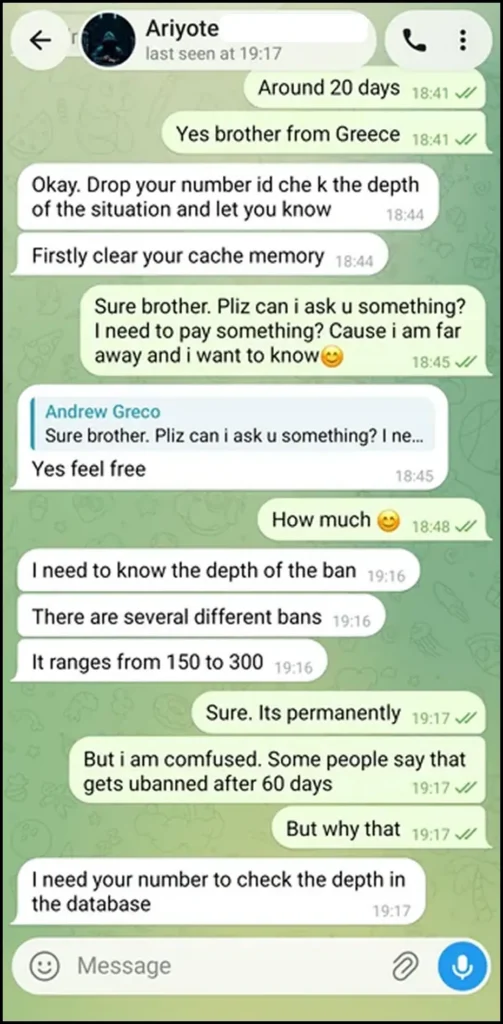
A real chat captured during research into this exact topic, showing the “I need your number to check the depth in the database” pitch and a fabricated price range. Before publishing, blur or crop the sender’s display name/alias so the post documents the scam pattern without amplifying a specific account.
WhatsApp has no paid third-party unban service and never asks for payment to lift a restriction. Anyone offering this is either collecting money for nothing or trying to gain access to the account itself.
Block and report. Never hand over a number, payment, or login access to anyone claiming this role.
Staying Unbanned for Good
Winning reinstatement and keeping it are 2 different problems. In fact, most repeat-ban loops trace back to the same unfixed cause: reinstatement without a behavior change just delays the next restriction.
- Reconnect the number and let it carry ordinary 1-to-1 replies for a few days before sending anything in bulk.
- Rebuild the contact list from confirmed opt-ins only, never a re-imported old list.
- Watch the quality rating weekly through reporting and analytics instead of only checking after something breaks.
- Keep an audit trail of every send and reply ready to attach to a future review request as real evidence.
If an AI agent handles any replies, limit it to your own catalog and services, not open-ended conversation. That matters because Meta’s 2026 policy update specifically restricts general-purpose chatbots, not task-specific ones.
Human approval before an AI-drafted reply sends keeps every automated message inside that boundary. That matters more after a reinstatement than before one.
Businesses running this discipline through a shared team inbox on 1 verified number, instead of scattering sending across personal phones, are the ones that stay off the restriction list for good.
Ask4Lead runs entirely on the official Cloud API through Meta’s Embedded Signup, with human oversight built into every AI-drafted message. Nothing goes out that skips the controls that keep a number in good standing.
Rebuild on a Number That Won’t Repeat the Same Mistake
Sign Up Free for 100 AI Credits and connect a WhatsApp number through the official Cloud API. No unofficial script, no personal-number risk, and a real escalation path if a quality issue ever comes up again.
FAQs
1. How long does it actually take to get unbanned from WhatsApp Business?
A temporary restriction usually clears within 24 hours. A permanent ban has no confirmed timeline from WhatsApp, but affected business owners most consistently report a 60-day wait before the number can register again.
2. Will I lose my chats and contacts once WhatsApp unbans or resets my account?
Chat history survives only if you never uninstalled the app and had a backup ready. Group memberships do not carry over after a 60-day reset, so you’ll need to rejoin every group individually.
3. Does WhatsApp charge a fee to review or unban an account?
No. WhatsApp has no paid unban service and never asks for payment to lift a restriction. Anyone contacting you privately offering this for a fee is running a scam.
4. Why does my WhatsApp Business account keep getting banned right after it’s unbanned?
This loop almost always means you never fixed the root cause, missing opt-in, an unofficial tool, or unchanged sending volume, before resuming activity. As a result, reinstatement without a real behavior change tends to reproduce the same restriction within days.
5. Is a broadcast restriction the same thing as an account ban?
No. A broadcast restriction usually disables only bulk campaign sending while 1-to-1 replies keep working normally, and WhatsApp offers no formal appeal for that specific restriction today.
6. Can an official WhatsApp Business API account get banned even with years of clean history?
Yes. A spike in blocks, a cold contact list, or missing opt-in can restrict an API account regardless of tenure. Tenure lowers the odds; it doesn’t remove the risk.
7. Does upgrading to Meta Verified actually help with getting unbanned faster?
It doesn’t guarantee anything, but multiple business owners have reported that a Meta Verified subscription got them access to a human support agent the free tier doesn’t offer, which can shorten an otherwise unresponsive review.
Conclusion
Recovering a banned WhatsApp Business account isn’t 1 process. It’s 3 different processes, depending on whether you’re facing a temporary restriction, a settled permanent ban, or a broadcast-only lock.
In fact, the data shows most appeals fail because they treat all 3 the same way. So identify which screen you’re actually looking at, and escalate through the correct channel for your account type.
Never send money or account access to anyone offering to “check the depth” of a ban for a fee. And if reinstatement lands, the work that keeps a number stable long-term is fixing whatever triggered the ban, not repeating the same habits and hoping for a different result.
Ask4Lead builds its full feature set around the official Cloud API from day 1, opt-in-first sending, and human oversight on every automated reply. That combination is what keeps a number climbing through the messaging tiers, instead of defending itself on repeat.
Still Stuck on a Restriction?
Chat with Ask4Lead on WhatsApp and get a straight read on what’s actually happening with your account before you try another workaround.
