
A WhatsApp Business Solution Provider (BSP) is the company that connects your business to the WhatsApp Business API, Meta’s paid messaging channel.
You can switch WhatsApp Business Solution Provider and keep the same number, your verified name, and your approved templates.
Only the dashboard, billing, and support behind the number change.
Two routes do this safely: WhatsApp Business API number migration, and WhatsApp Coexistence.
Quick answer: Switching your WhatsApp Business Solution Provider never touches your phone number. Use API number migration if the number is already on the API. Use Coexistence if it is still on the WhatsApp Business App and you want to keep replying from your phone. Your number, display name, quality rating, and approved templates carry over. Chat history does not.
Key takeaways
- Your number, verified name, and approved templates survive the switch. Chat history does not.
- API number migration needs the old provider to disable the 2-step verification PIN first.
- Coexistence lets you switch WhatsApp Business Solution Provider while keeping the WhatsApp Business App on the same number.
- The “switching partners is not supported” error usually means the old provider left a credit line on your account.
- Do not send bulk broadcasts right after a switch. Fresh connections get flagged fast.
What switching your WhatsApp Business Solution Provider actually changes
Switching changes the software layer around your number, not the number itself.
Meta owns your phone number and your WhatsApp Business Account; the provider only holds the API connection, the inbox, and the invoice.
Move the connection, and everything Meta controls stays put.
What your BSP controls and what Meta keeps
- Meta keeps: phone number, WhatsApp Business Account (WABA), display name, quality rating, messaging limits, official business account status.
- The provider holds: API credentials, the message inbox, automation, analytics, campaign tools, and billing.
You are not moving your number when you switch WhatsApp Business Solution Provider. You are re-pointing its connection to a different company.
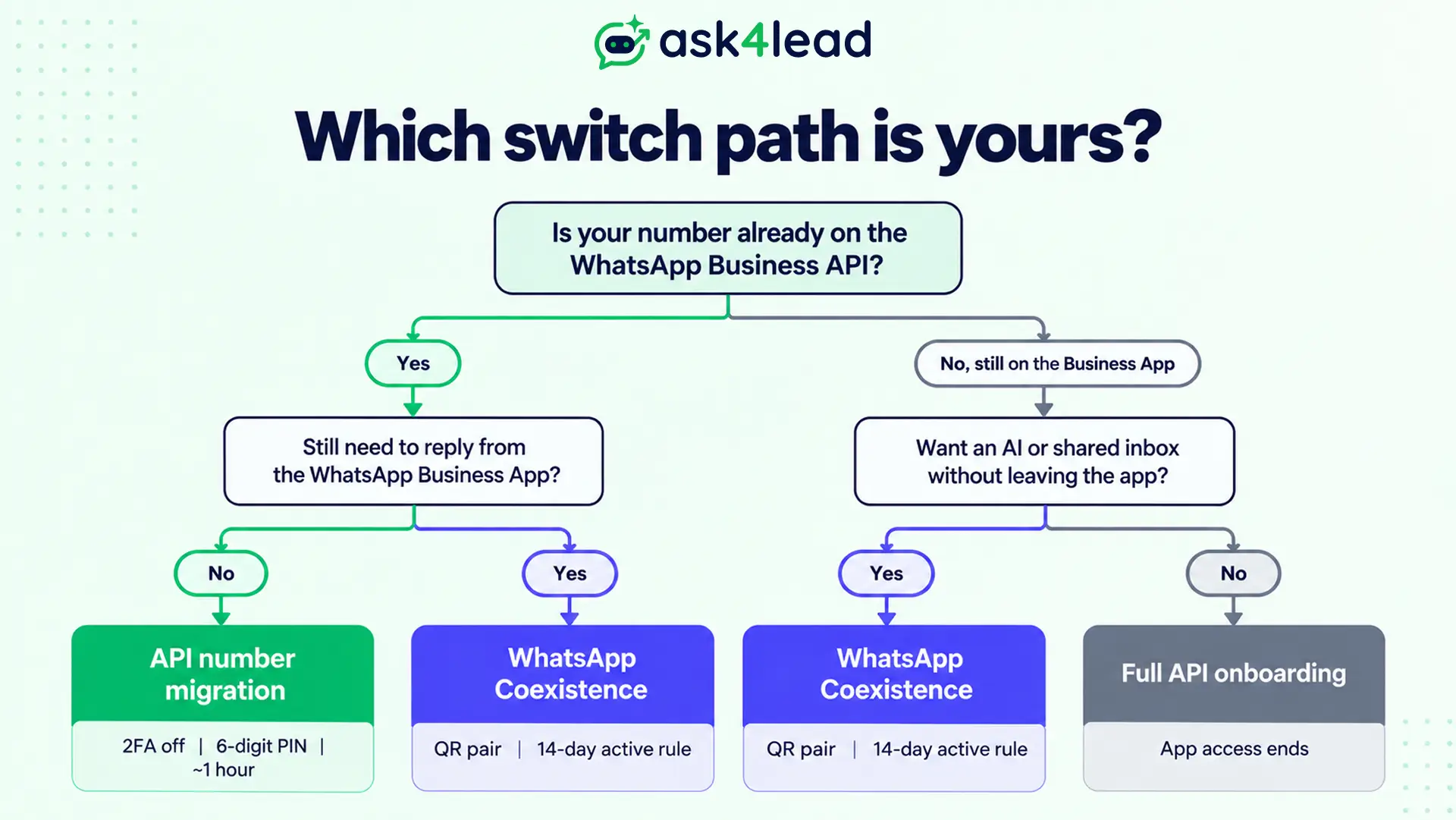
The 2 ways to switch without losing your number
The right path depends on how your number runs today.
- API number migration. For numbers already on the WhatsApp Business API through another provider or a direct Meta setup.
- WhatsApp Coexistence. For numbers still on the free WhatsApp Business App, where you want the app plus a new provider’s tools on the same number.
A one-way move to API-only also exists. It ends WhatsApp Business App access for good, so most businesses skip it.
How to migrate a WhatsApp Business API number to a new provider
This is the standard way to switch WhatsApp Business Solution Provider when your number is already on the API.
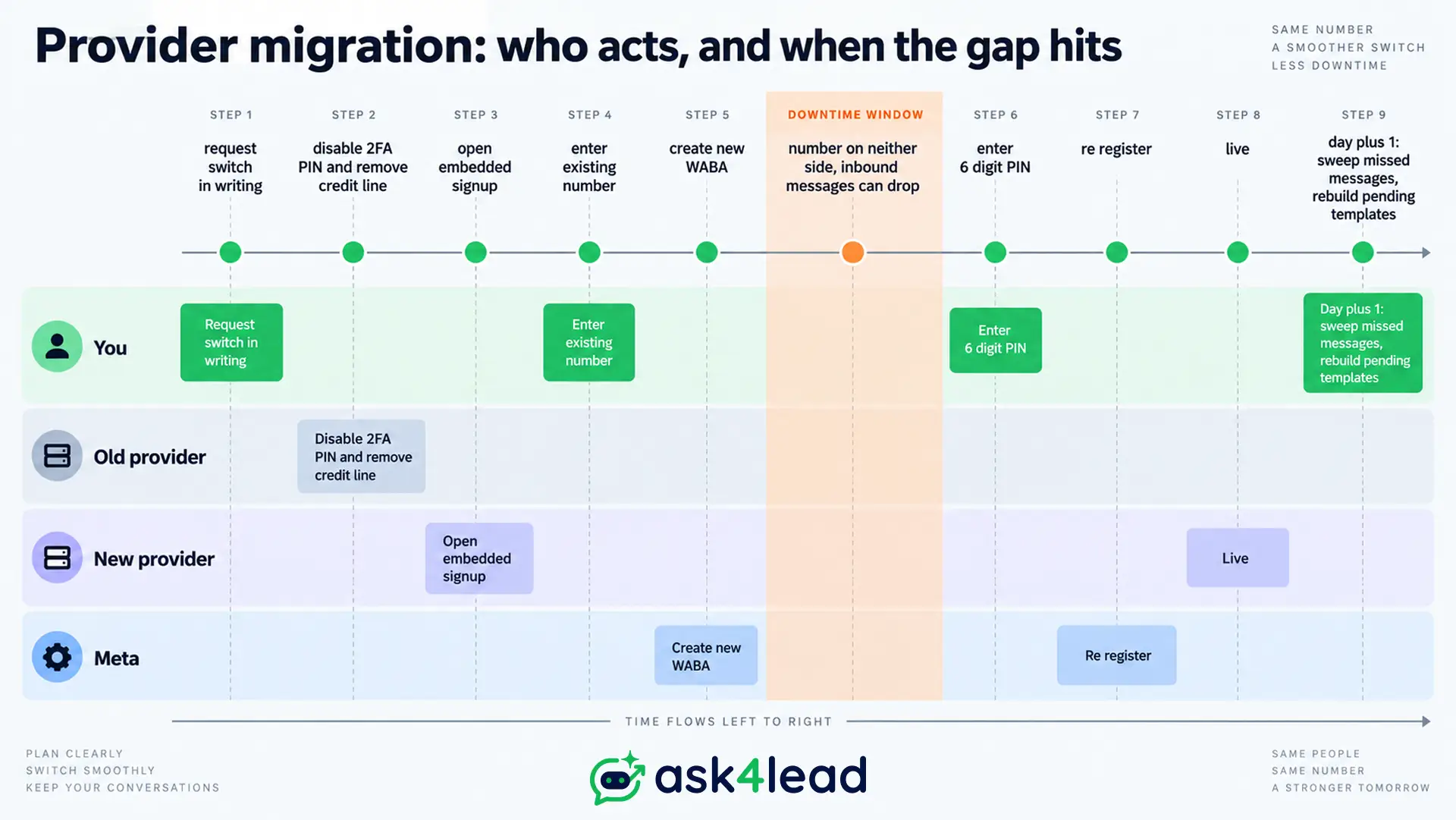
Migration disconnects the number from the old provider and re-registers it with the new one through Meta’s embedded signup.
With preparation, most numbers are live again within an hour.
1. Your pre-switch checklist
This stage is where migrations stall. Clear every item before you start.
- Ask the old provider, in writing, to disable the 2-step verification PIN (2FA) on the number.
- Confirm no billing hold or credit line is left attached to your WABA.
- Keep the SIM active. Meta sends a 6-digit PIN by SMS or call during the switch.
- Check that business verification is approved on both the old and new accounts.
- Export what you need from the old inbox. Conversation history will not follow.
2. The migration steps in order
The sequence matters. Starting signup before the old provider releases the number is the common trap.
- The new provider opens the embedded signup and you enter your existing number.
- Meta detects the number is on the API and creates a WABA under the new provider.
- You enter the 6-digit PIN to finish re-registration.
- Approved high-quality templates copy over. Pending, rejected, and low-quality ones do not.
- Add your payment method, point webhooks at the new provider, and rebuild missing templates.
If a template gets rejected on the new provider, the cause is almost always its category or content, not the move.
3. The short window where inbound messages can drop
During re-registration your number is briefly connected to neither provider. Messages sent to you in that gap can be lost, and you cannot send until it clears.
Run the switch at your quietest hour. The next day, sweep for missed enquiries.
Automated sequences also pause during this window. A provider with reliable follow-up automation makes the catch-up far quicker.
Switching with Coexistence: keep the WhatsApp Business App
WhatsApp Coexistence links a single number to the WhatsApp Business App and a provider’s Cloud API at the same time.
A business that never left the app can add an AI or a shared inbox through a new provider, with no hard migration.
Only a Meta Tech Provider, or a BSP that enables one, can set it up.
1. How Coexistence connects the app and a new provider
You keep the app on your phone and scan a QR code from its Linked Devices screen to pair the number, following Meta’s onboarding flow.
After that, messages sync both ways. A reply the API sends appears in your app chat. A message you type in the app appears in the provider’s inbox. Calls, status, and groups keep working.
2. The 14-day inactivity rule that breaks the Coexistence link
Coexistence depends on the phone with the app staying active. Go 14 days without opening it and Meta drops the pairing as abandoned. The number then reverts to API-only until you re-link.
These actions trigger the same break:
- The phone runs out of data or battery for 14 days straight
- The WhatsApp Business App is uninstalled or the device is reset
- The SIM is swapped or the number moves to a new handset
If the app is part of how your team works, treat opening it as a weekly habit.
3. History import is a one-time choice
At onboarding, Coexistence offers to import up to 6 months of past chats into the new inbox. For some accounts it is only 3 months.
You cannot ask for it again later. Skipping it means disconnecting and redoing the entire onboarding to get it back. Take the import even if you are unsure you need it.
With the history gone, an AI Knowledge Profile that grounds the AI in your own documents keeps answers accurate from the first message.
What you keep and what you rebuild after switching
A switch preserves the parts of your WhatsApp identity that took months to earn. It resets the parts tied to the old provider’s inbox.
| Item | API number migration | Coexistence |
| Phone number | Kept | Kept |
| Verified name / green tick | Kept | Kept if set before onboarding |
| Approved templates | High-quality ones copy over | Rebuilt on the new WABA |
| Quality rating and limits | Kept | Start fresh, no auto-scaling |
| Chat history | Lost | Optional import at onboarding |
| App contacts, calls, groups | Not applicable | Kept |
Coexistence still enforces the 24-hour messaging window. To reach a customer outside it you need an approved template or the rep’s own WhatsApp, so plan for both.
Coexistence throughput is also capped at 20 messages per second. Your daily limits do not auto-scale the way they do on a full API setup, so heavy senders outgrow it.
Rebuilding message templates after the switch is a chance to delete the ones nobody ever used.
Switching errors most guides skip, and how to fix them
Most failed switches throw one of 3 errors, and the wording sends you the wrong way.
| Error message | What it really means | Who fixes it |
| Switching partners is not supported in this flow | Old provider left a credit line on your WABA | The old provider, or Meta support |
| Error while pairing Cloud API | A restricted Meta ad account in the same Business Manager | You, in Business Support Home |
| Business name shows as a number | Display name was not set before onboarding | You, inside the WhatsApp Business App |
1. “Switching partners is not supported in this flow”
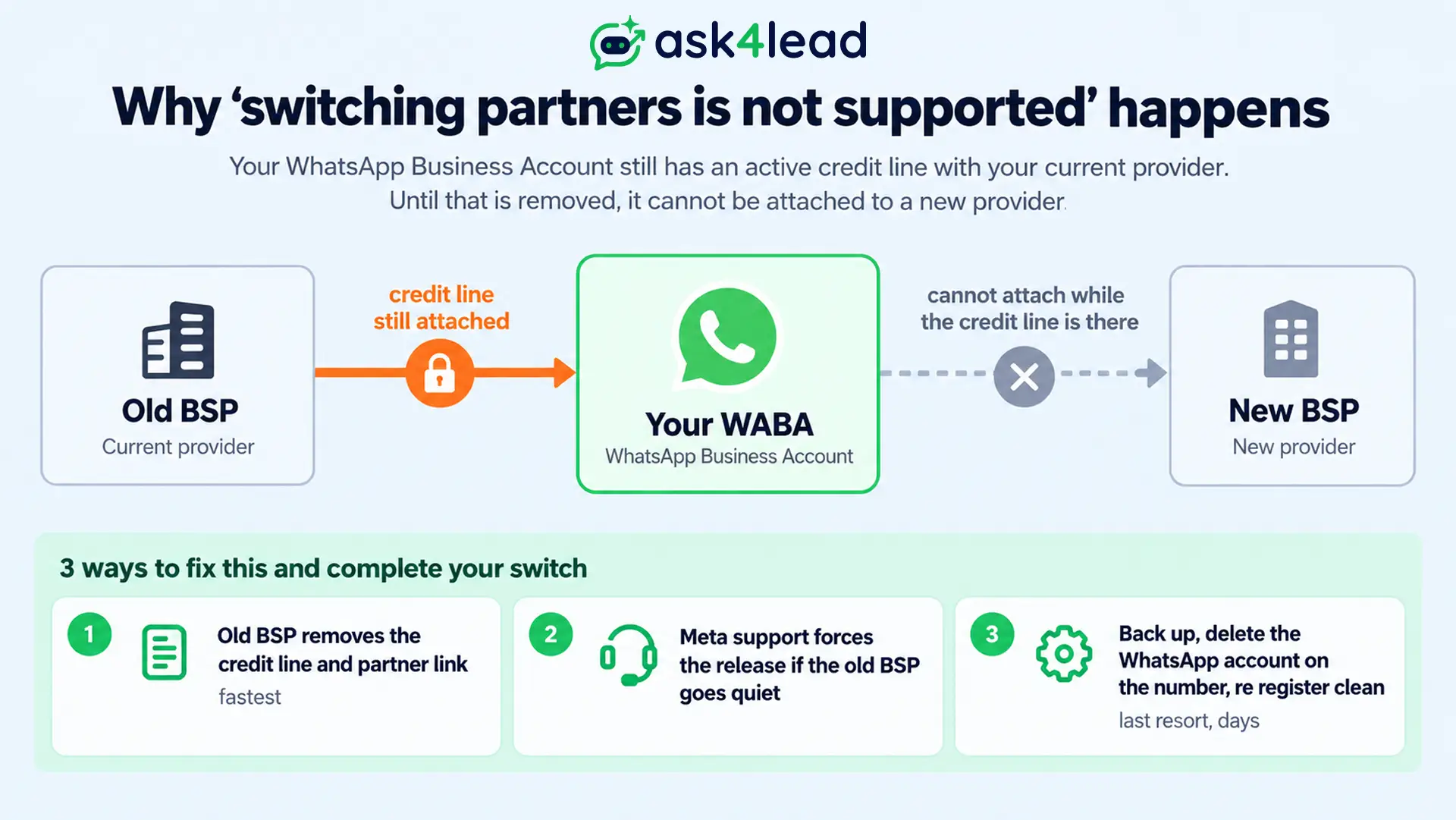
Sometimes shown as “the business is already sharing this WABA with a partner,” this means the old provider left a credit line or partner link on your account after you disconnected.
Meta blocks a new partner from attaching on top. The old provider has to remove the credit line and partner assignment, and Meta support can sometimes force it.
Last resort, reported by businesses stuck for weeks: back up chats, delete the WhatsApp account on the number, wait a few hours, and register it clean.
2. “Error while pairing Cloud API”
This shows at the QR step of Coexistence onboarding and looks like a WhatsApp fault. It is usually an ads fault.
A restricted or disabled Meta ad account anywhere in the same Business Manager blocks the pairing.
Clear the restriction in Business Support Home, update the app, restart the phone, then retry.
3. Your business name shows as a number
If customers see digits instead of your name after a Coexistence switch, the display name was not set before onboarding.
You cannot change it from the web dashboard afterward. Set the business name in the WhatsApp Business App first, then onboard.
The verified green tick is a separate application again.
How switching your WhatsApp Business Solution Provider gets a number banned
A fresh provider connection is a moment Meta’s spam systems watch closely. Four moves turn a routine switch into a block.
- Bulk broadcasts right after a Coexistence switch. Coexistence is built for replies and bot chats, not mass sends. Numbers pushing 1,000 templates a day on a new connection have been banned within days, even inside their limit. Move volume to a full API setup and learn safe bulk sending first.
- Deleting the WABA to reset a stuck migration. A new WABA on the same app-linked number gets the same ID, so the error returns and templates can be stranded.
- Onboarding a brand-new SIM. Meta reads a never-used number as suspicious. Use it normally for a week or 2 first.
- Letting the bot talk over a human agent. Configure the webhook to pause automation on human input, or pick a provider where you approve AI replies before they send.
Watch your WhatsApp account health dashboard for the first 2 weeks.
If a switch does trigger a block, our guide to recovering a banned WhatsApp Business account covers the appeal.
How to choose a WhatsApp Business Solution Provider you will not have to leave again
The cleanest switch is the one you make once. Before you commit your number, test the new WhatsApp Business Solution Provider against the reasons you are leaving the current one.
7 questions to ask before you move
Get the answers in writing, not on a sales call.
- Do you support both API number migration and Coexistence?
- Will my approved templates and quality rating carry over?
- Is there a credit line or contract that would block a future switch away from you?
- What is the price per conversation and per AI action, with no seat minimum?
- How does the bot hand a live chat to a human without the messages colliding?
- Can the AI answer from my own catalogue and documents, not a fixed menu?
- What happens to my number and data if I cancel?
Answers to 5 and 6 separate a real WhatsApp AI agent from a menu bot with a new label.
Why Ask4Lead is built for a clean switch
Ask4Lead is a humanized AI WhatsApp chatbot and CRM by GVM Technologies LLP. It onboards through Meta’s embedded signup and supports Coexistence, so you keep the WhatsApp Business App while you switch.
The AI Sales Assistant holds real conversations instead of button menus, then hands your team a lead with the problem, need, and urgency attached.
A shared team inbox keeps reps off personal WhatsApp, and there is no credit-line lock if you ever decide to leave.
Switch to WhatsApp selling that actually converses
Move your number to Ask4Lead in under an hour, keep your templates and rating, and put an AI on WhatsApp that qualifies leads day and night.
Start free with 100 AI credits, no card and no lock-in.
FAQs
1. Can I switch WhatsApp Business API providers without losing my number?
Yes. Both API number migration and Coexistence keep your number, verified name, and business identity. Only the provider, dashboard, and billing change.
2. Does chat history transfer when I switch WhatsApp Business Solution Provider?
No, with a single exception. API migration starts the new inbox empty. Coexistence offers a one-time import of up to 6 months of history at onboarding, and you cannot request it again.
3. Do I lose my approved templates when I migrate?
High-quality approved templates copy to the new WABA during API migration. Pending, rejected, and low-quality ones do not, and Coexistence rebuilds templates from scratch.
4. How long does WhatsApp number migration take?
Minutes to about an hour with preparation. Your number sits on neither provider during re-registration, so expect a short gap in inbound messages.
5. What does “switching partners is not supported in this flow” mean?
The old provider left a credit line or partner link on your WhatsApp Business Account. That provider must remove it before a new one can connect.
6. Can I set up WhatsApp Coexistence myself?
No. Coexistence runs only through a Meta Tech Provider or a WhatsApp Business Solution Provider that enables it. The raw Cloud API and the free app do not offer it.
Conclusion
Switching your WhatsApp Business Solution Provider is a supported, low-risk move when you follow the right path.
Pick API number migration or Coexistence, get the old provider to release the 2FA PIN and any credit line, and take the history import if it is offered.
The bigger decision is which WhatsApp Business Solution Provider you move to. Choose one whose AI genuinely talks to customers and whose contract lets you walk away, and this switch becomes the last one you need to make.
