
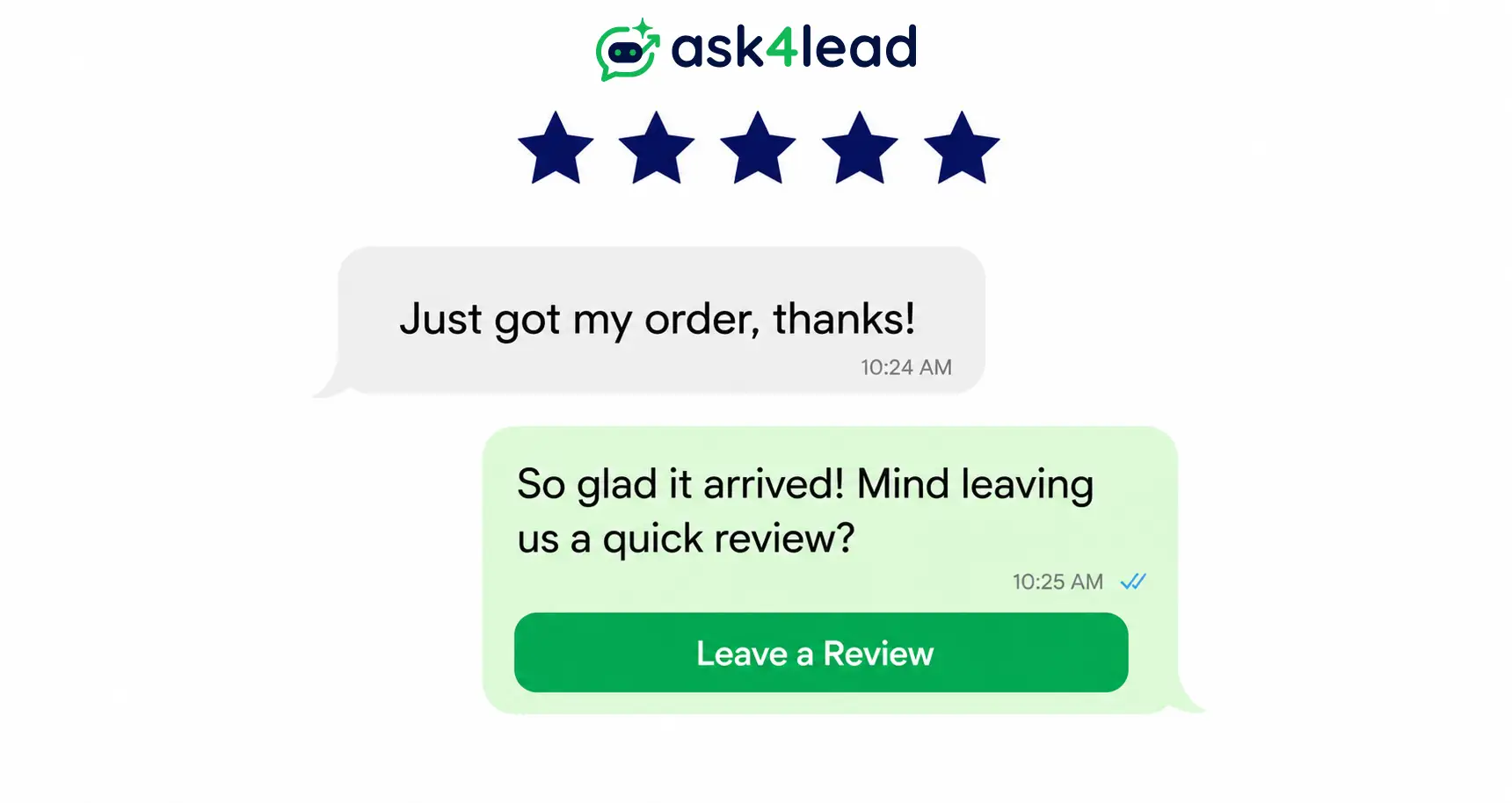
Quick answer: WhatsApp review and testimonial collection automation fires a review request the moment a trigger happens, such as an order delivered or a deal closed. It captures the reply and routes it to a public review link, a testimonial library, or a support queue.
It runs on the WhatsApp Business API, not the free app, and the biggest risk isn’t the setup, it’s the routing logic most guides teach.
Key takeaways
- A review lives on Google or Trustpilot and is public by default. A testimonial is a quote collected with consent for the business’s own site.
- Reviews carry roughly 20% weight in local pack ranking, per Whitespark’s 2026 survey. A stalled review flow is a search visibility problem, not just a trust problem.
- Star-rating routing, where only 4 and 5-star replies get the public review link, is the exact pattern Google’s content policy and the FTC’s 2024 rule both prohibit.
- Getting this right needs 1 clean trigger, 1 template category, and 1 routing rule that treats every customer the same way.
What WhatsApp Review and Testimonial Collection Automation Means
Reviews vs. Testimonials: The Difference That Changes Setup
A review and a testimonial start the same way, a customer replies to a WhatsApp message, but they end up in different places.
| Particulars | Review | Testimonial |
| Lives on | A third-party platform: Google, Trustpilot, an app store | The business’s own site, ads, or sales deck |
| Visible to | The public, by default | Only where the business chooses to show it |
| Needs from the customer | A star rating or written review | A quote, photo, or clip, plus consent to reuse it |
The trigger and template mechanics are close to identical for both. Only the destination link and 1 consent line differ.
Where This Fits Inside an Existing WhatsApp Setup
Review automation isn’t a separate system. It’s a specific use of post-purchase WhatsApp automation, the same category as shipping or booking updates.
Most businesses already have the trigger data:
- An order-delivered webhook from the store platform
- An appointment-complete flag from the booking tool
- A ticket-resolved event from the support desk
Review requests reuse this instead of building something new.
Why WhatsApp Beats Email and SMS for This Ask
The Real Open-Rate Numbers, and Why “98%” Has No Single Source
WhatsApp works for review requests because people read it fast, in a channel they check dozens of times a day. That’s the entire mechanical advantage over an inbox.
Every WhatsApp marketing article quotes a “98% open rate,” but no single named source, including Meta, publishes that exact figure anywhere public.
| Channel | Typical open rate | Typical reply speed | Best fit |
| 85-98% (industry benchmarks; no single official figure) | Minutes | Time-sensitive, high-response requests | |
| 20-25% | Hours to days | Long-form review forms, rating widgets | |
| SMS | 20-30% | Minutes, low reply rate | Short links, no rich media |
Treat 98% as a rough ceiling for a well-run account, not a promise. The gap over email holds even at the low end of that range.
When Email or SMS Still Wins
WhatsApp isn’t always the right channel. Switch to email or SMS when:
- The contact never opted in to WhatsApp messaging
- The review form needs long, structured fields
- The industry restricts unsolicited outreach, such as regulated finance or healthcare in some regions
A full side-by-side on cost and conversion sits in the WhatsApp vs. email marketing comparison.
The Ranking and Revenue Case for This
2 numbers make the business case, not just the trust case, for treating review collection as infrastructure rather than a favor to ask occasionally:
- Review signals carry roughly 20% of local pack ranking weight, up from 16% just 2 years earlier
- Businesses replying to at least 25% of their reviews earn 35% more revenue on average than businesses that don’t
How Much Reviews Actually Move Local Search
That 20% figure comes from Whitespark’s 2026 Local Search Ranking Factors survey. Google Business Profile signals lead at 32%, with reviews close behind on-page SEO.
Review velocity and recency matter as much as raw volume. A profile with 200 reviews from 3 years ago and none since reads as less active than one with 20 fresh reviews from the last quarter.
What a Consistent Review Response Rate Does for Revenue
A Womply analysis of transaction data across more than 200,000 US small businesses found the 35% revenue gap above. Several review-automation blogs misattribute this figure to Harvard; it’s Womply’s data, not a Harvard study.
Automation doesn’t write the responses, but it keeps review volume steady enough that a consistent response rate becomes routine instead of a monthly scramble. The same discipline that makes WhatsApp abandoned cart recovery work applies here: a steady drip beats a one-off campaign.
The 5-Step WhatsApp Review Automation Flow
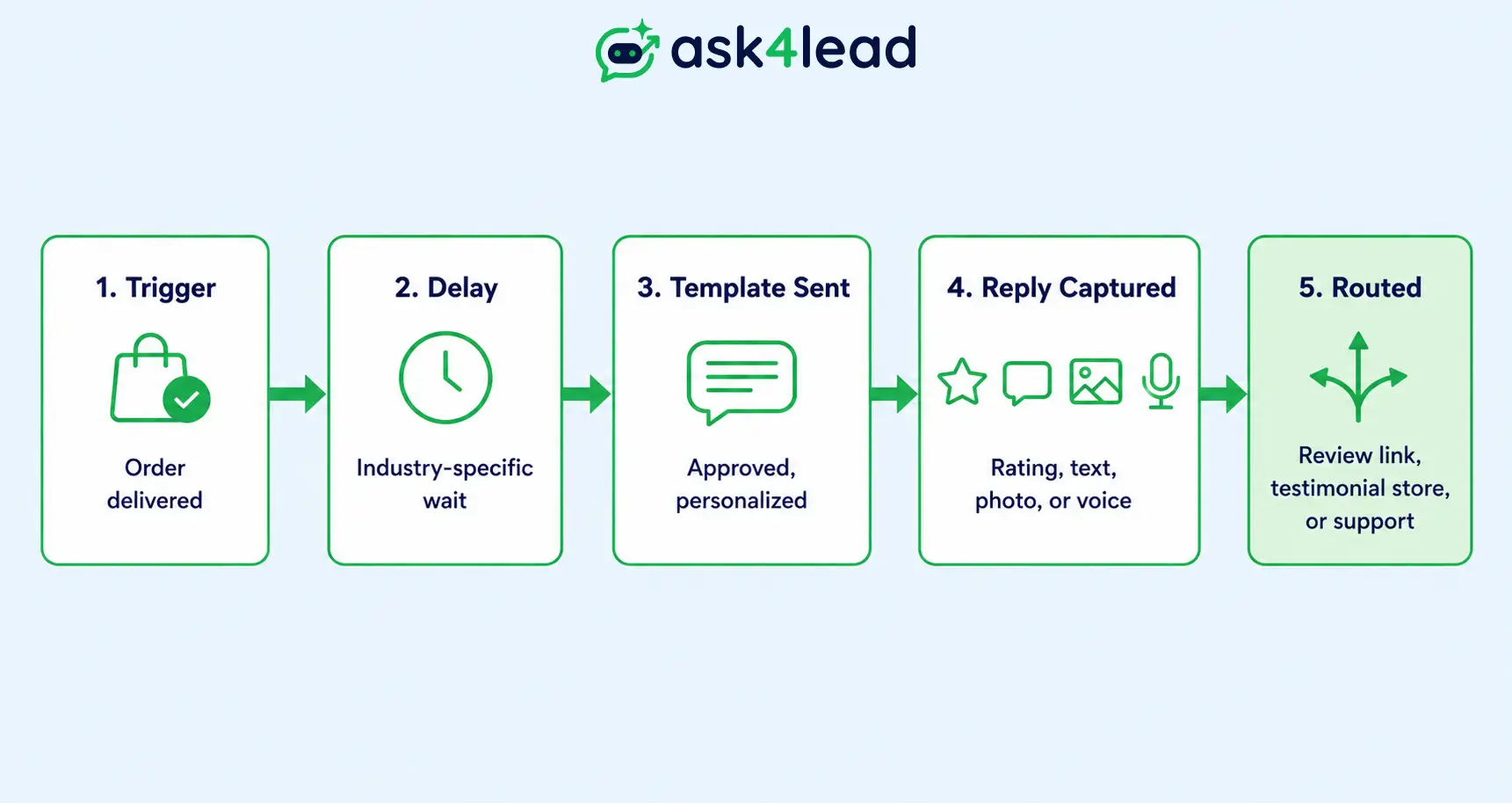
The flow breaks into 5 parts:
- Trigger: an event fires the flow, such as an order delivered or a job closed
- Delay: the system waits for the right moment before sending
- Template sent: an approved, personalized message goes out
- Reply captured: a rating, text, photo, or voice note comes back
- Routed: the reply goes to a review link, a testimonial library, or a support queue
1. Picking the Right Trigger Event
The trigger needs to be an event the business system already tracks:
- An order marked delivered
- An appointment marked complete
- A deal marked closed-won
- A support ticket resolved
A vague trigger like “a week after signup” catches customers who never used the product. That lowers both response rate and review quality.
2. Timing the Request by Industry
Ask too early and the customer hasn’t formed an opinion. Ask too late and the willingness to reply has faded. The right delay is industry-specific.
| Industry | Trigger event | Typical delay |
| E-commerce | Order marked delivered | 24-48 hours |
| Salons and personal care | Appointment completed | 1-2 hours |
| Restaurants and hospitality | Checkout or bill paid | 30-90 minutes |
| Home services and field jobs | Job marked complete | 15-30 minutes |
| Dental and wellness clinics | Appointment completed | 1-2 hours |
| B2B services | Milestone or project completed | Same day |
| SaaS | User hits an activation milestone | Immediately after |
| Real estate | Site visit or deal closed | 1-2 days |
3. Writing the Message and Choosing the Template Category
A review-request template needs:
- 1 clear ask and exactly 1 link, nothing else competing for attention
- 2 variables: the customer’s first name and the order or service reference
- No more than 1 initial message and 1 follow-up
A full breakdown of safe volume limits is in the guide to sending bulk messages without a ban.
One detail almost no guide mentions: skip the same contact for another review request for 30-60 days, even after a second order. Repeated asks read as spam and drag down every future reply rate.
The Review-Gating Trap Almost Every Guide Recommends
1. What Google and the FTC Actually Prohibit
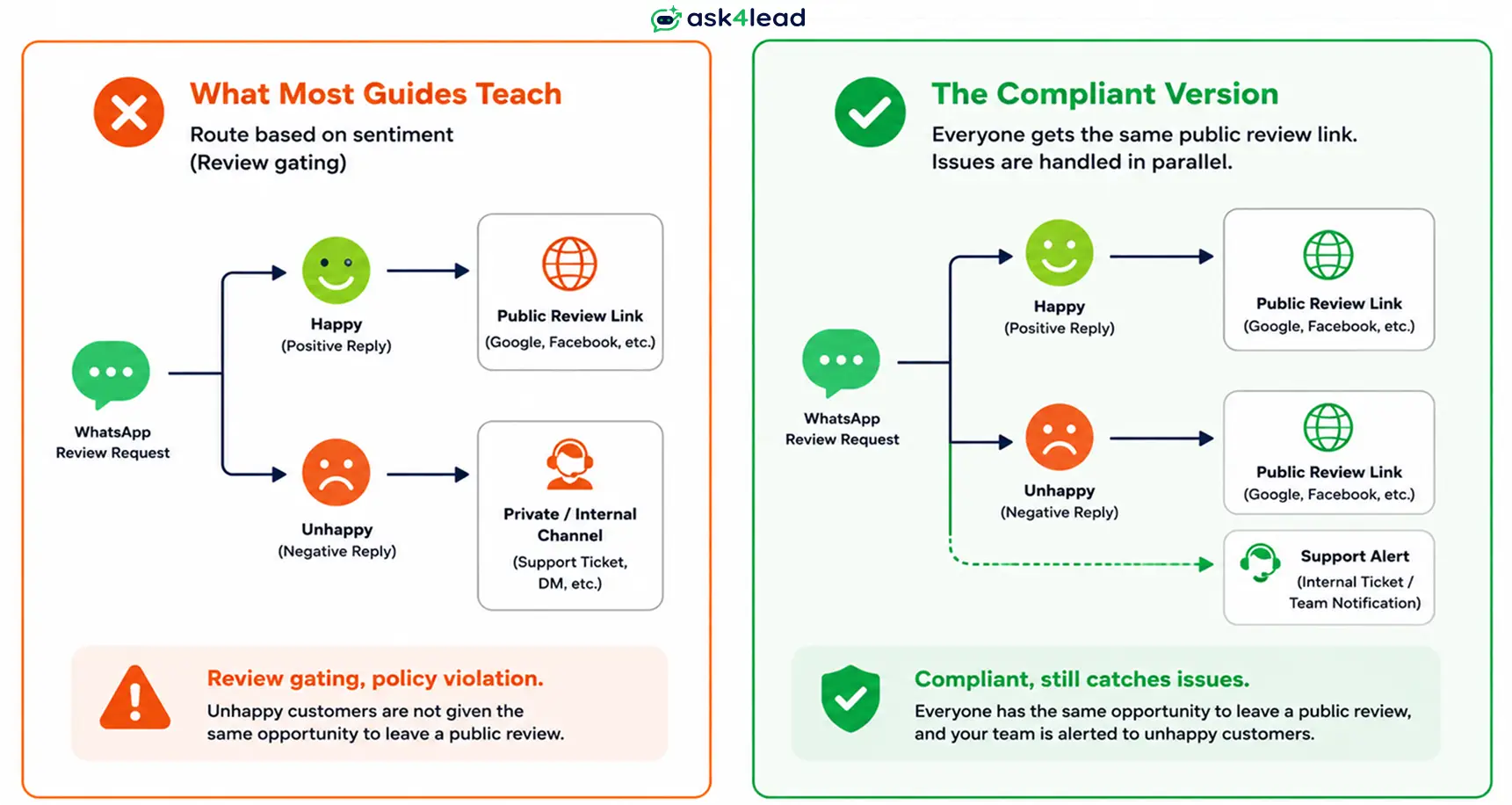
Review gating is asking only happy customers for a public review while routing unhappy ones somewhere else. Google’s Business Profile content policy lists “selectively soliciting positive reviews” under prohibited content, next to paying for reviews.
The pattern shows up across nearly every WhatsApp review-automation article ranking for this topic today:
- Send a star-rating quick-reply first
- Send the Google review link only to customers who tap 4 or 5 stars
- Divert 1-3 star responses into a private support flow instead
That’s the exact prohibited practice, worded as a growth tip. The FTC’s 2024 final rule on fake reviews and testimonials separately bans review suppression, with civil penalties up to $51,744 per violation.
2. The Compliant Path A / Path B Framework
Several guides use “Path A” for happy customers and “Path B” for unhappy ones. The branching itself is sound; what breaks compliance is which path gets the public review link.
In a compliant version, both paths get the same review ask. Path B (unhappy) adds a parallel alert to a human on the support team, sent alongside the ask, not instead of it.
| Customer response | Alert support internally? | Still gets the public review ask? |
| 5-star or clearly happy | No | Yes |
| 4-star or happy | No | Yes |
| 3-star or below, or unhappy | Yes, same message or the next one | Yes |
| No response | Not applicable | 1 follow-up, then stop |
3. Handling Free-Text Replies, Not Just Button Taps
Most star-rating flows assume a button tap. In practice, plenty of customers just type a reply instead:
- “Great service, thanks!”
- “Not happy, the item arrived damaged.”
A flow built only around buttons misses both, and an angry reply sits unread until someone checks manually. Reading sentiment from free text, not just from a tapped rating, is the real difference between a WhatsApp AI agent and a basic chatbot.
Setting Up Review Collection on the WhatsApp Business API
1. Getting Onboarded Through Embedded Signup
Review automation needs the WhatsApp Business Platform, not the free WhatsApp Business App, because it needs pre-approved templates and event-based triggers.
Onboarding now runs through Meta’s Embedded Signup flow inside most providers, Ask4Lead included, instead of a multi-week manual application.
2. Template Approval, Category, and Cost
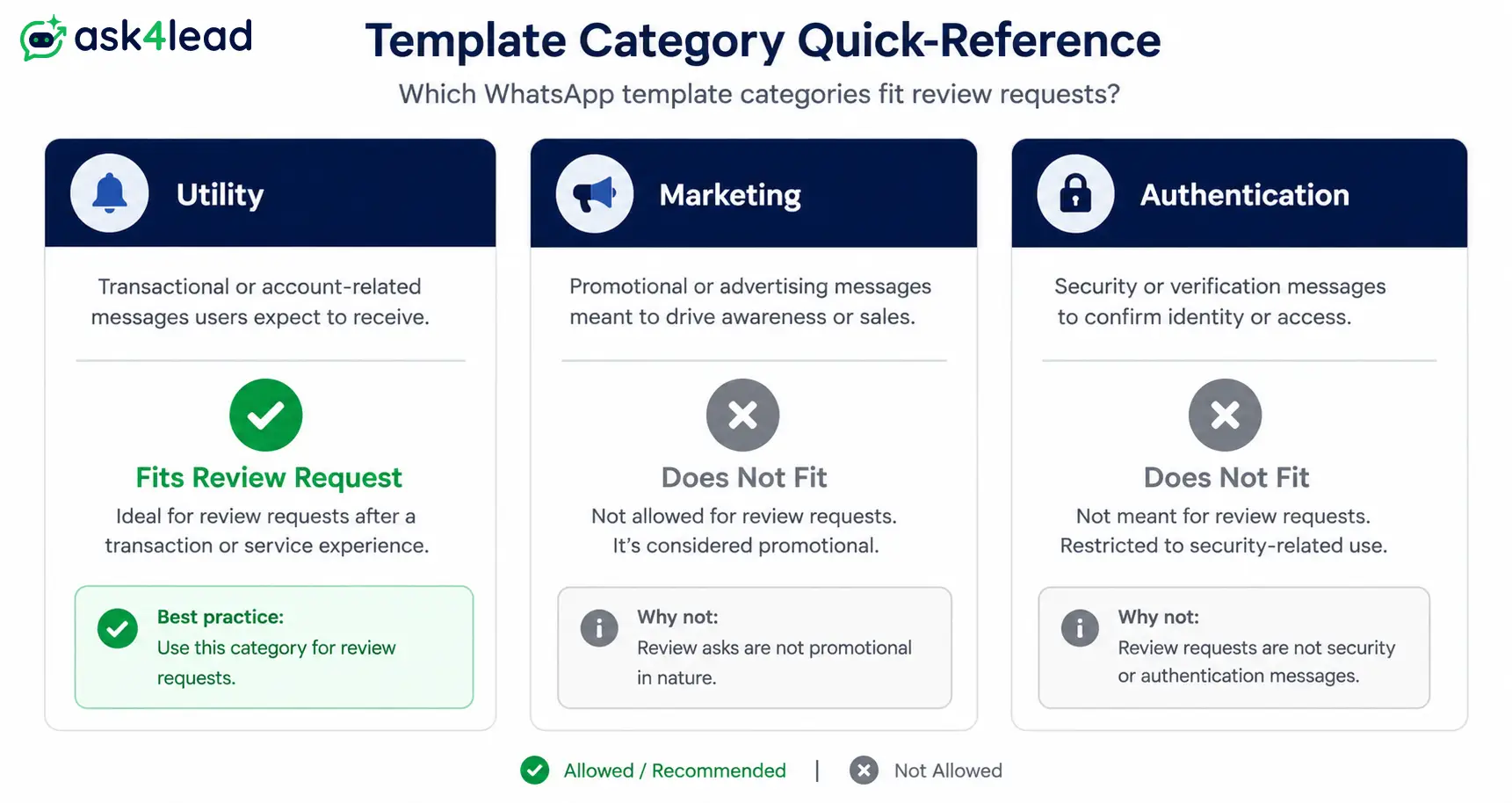
Meta sorts every template into Marketing, Utility, or Authentication. The category changes both the allowed wording and the cost.
| Template category | Fits a review request when | Typical cost |
| Utility | Tied to a specific order or appointment; no promotional language | Lowest; free inside the 24-hour window |
| Marketing | Generic ask, no order reference, or includes an incentive | Highest; charged on every delivery |
| Authentication | Never fits a review request | Not applicable |
If a template keeps getting rejected, the common rejection reasons and fixes covers the specific wording Meta flags most often.
3. Why Flows That Work in Testing Fail in Production
Here’s how a tested review-request flow quietly breaks once it goes live:
- A test order gets a reply inside the 24-hour window, so the message sends free, as plain text
- A real customer takes 2-3 days to reply instead of minutes
- The window has closed, and that same plain-text follow-up silently fails to deliver
The fix: build every follow-up as an approved template from day 1, not as a patch after it stops working. Full mechanics are in the breakdown of WhatsApp’s 24-hour rule.
Turning Replies Into Testimonials Worth Reusing
1. The Questions That Get Usable Testimonial Answers
“Can we share your feedback?” gets a yes or no, not a usable quote. 3 questions consistently produce one instead:
- What problem were you trying to solve before finding us?
- What almost stopped you from signing up or ordering?
- What would you tell someone considering us?
Each question prompts a specific answer instead of a generic compliment.
2. Getting Permission to Publish
Add 1 line to the request: “mind if we share your reply on our website, with your first name?” A yes captures usable consent; silence doesn’t.
That line matters even more for a reply that arrived unprompted, mid-conversation, since the rules on WhatsApp opt-in and consent govern how the contact got messaging permission in the first place.
3. Why a WhatsApp Screenshot Reads as More Credible
A typed testimonial on a landing page can look written by the business. A WhatsApp screenshot, name and timestamp visible, reads as unedited because it visibly comes from a real chat thread.
WhatsApp also supports photos and voice notes, so a testimonial can be richer than plain text. Ask4Lead’s reporting and analytics dashboard surfaces which conversations produced a usable one, so nobody scrolls chat history looking for it.
Connecting Review Automation to the Sales Pipeline
Why Point-Solution Review Tools Create a Blind Spot
Most dedicated review-collection tools live outside the sales system entirely. A 5-star reply lands in a separate dashboard the rep who closed the deal never opens.
A happy customer is the cheapest possible lead for a referral or a repeat purchase. A tool that treats the review reply as the end of the conversation throws that away.
Routing Happy Customers Toward Referrals and Repeat Business
Ask4Lead writes the review-request reply into the same 9-stage sales pipeline the lead came from. A happy reply can move the contact into the Re-Engagement stage for a referral ask or a repeat-purchase campaign.
The same shared team inbox that handled the original sale also carries the review thread, so a support flag lands where the team already looks.
Mistakes That Break a Review Automation Flow
Setup Mistakes That Cost Money or Get Ignored
- Asking before the customer has an opinion. Firing the request the moment an order ships, not after delivery, gets a shrug reply or none at all.
- Using a Marketing-category template for an order-specific ask. Costs more per message than a correctly worded Utility template for the same request.
- Building only for button taps. A customer who types a free-text reply gets missed entirely.
- Asking the same contact again within 30-60 days. Repeated requests read as spam and lower future response rates.
Compliance Mistakes That Create Real Risk
- Gating the review link by star rating. The single most common mistake on this topic; a policy violation, not a growth hack.
- Sending to contacts who never opted in. A fast way to tank a number’s quality rating and get messages throttled.
- No negative-feedback catch running in parallel. The first place an angry customer vents becomes a public review, not a support inbox.
- No human checking the first automated batch. Ask4Lead’s human-approval-before-send control lets someone review early replies before the flow runs unattended.
FAQs
1. Is asking for reviews on WhatsApp legal and compliant in India?
Yes, as long as the contact opted in to messaging and the request goes to every customer equally, not only satisfied ones.
2. How long after a purchase should a review request go out?
For e-commerce, 24 to 48 hours after delivery. For services, 15 to 30 minutes after the job is marked complete.
3. Can WhatsApp review requests be automated without the paid Business API?
Not reliably. The free WhatsApp Business App has no trigger-based automation or approved templates.
4. What is review gating, and why does it matter?
Sending the public review link only to customers who show a positive experience first. Google’s content policy and the FTC’s 2024 rule both treat it as prohibited.
5. Do WhatsApp review requests need a pre-approved template?
Yes, in almost every case, since they go out hours or days after the triggering event, outside the free 24-hour window.
6. How many follow-ups is too many?
1 initial request and 1 follow-up. Anything beyond that reads as pressure and raises the chance of an opt-out.
7. Should the same customer get a review request every time they order?
No. A 30-60 day gap between requests keeps response rates healthy.
8. What’s the difference between review automation and testimonial automation?
The mechanics are nearly identical. A review links to a public platform; a testimonial adds a consent line and stays on the business’s own site.
Once a flow is live, tracking reply rate and review-to-testimonial conversion matters as much as setup. Ask4Lead’s AI dashboard surfaces those numbers without a separate reporting tool.
Conclusion
WhatsApp review and testimonial collection automation comes down to 3 decisions:
- Which event triggers it
- How the message is worded and categorized
- Whether the routing logic treats every customer the same way
Miss the first 2 and the automation is slower or pricier than it should be. Miss the third, gate the review link by star rating, and it’s a policy violation with real financial penalties, not a growth hack.
Ask4Lead runs this flow inside the same platform that already manages WhatsApp campaigns, the sales pipeline, and the shared team inbox, so a review reply never sits disconnected from the deal it came from.
Get Started With Ask4Lead
Ask4Lead gives 100 AI credits free on sign up, enough to test a full review-request flow before committing to a plan.
