
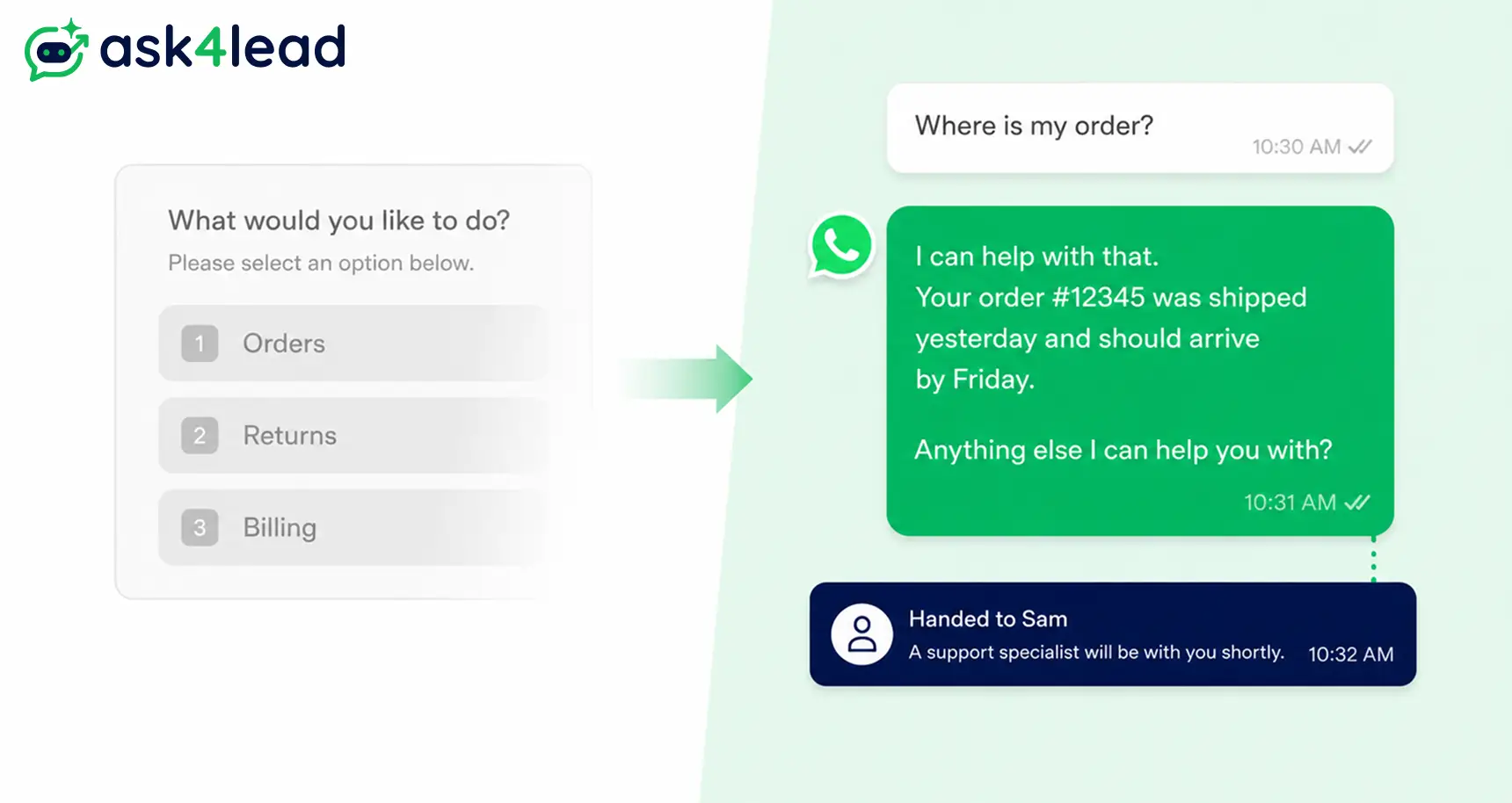
WhatsApp customer support means answering customer questions, complaints, and orders over WhatsApp instead of phone, email, or live chat.
It behaves differently past a handful of chats a day. That’s where most customer support teams start feeling the strain.
This guide covers running support for your own customers. It isn’t about reaching WhatsApp’s own help desk for a restricted personal account; that’s a different problem.
Quick answer: Fix your setup first (app, API, or both), give AI and humans a written handoff rule, and protect your quality rating as volume grows. The order matters more than the tool.
Key takeaways
- Support turns robotic from 3 gaps: 1 phone with 1 agent, menu-only bots, and no AI-to-human handoff rule.
- The free Business App and the Business API are different products, not an upgrade path.
- Most bans come from a sudden spike in outbound volume, not spammy content.
- From 1 October 2026, free-form replies inside the 24-hour window start costing money.
- A written handoff rule, not a bigger team, is what keeps support personal at volume.
A support agent juggling 5 personal WhatsApp numbers, with no shared record of who promised what, is the most common starting point businesses describe.
It isn’t a technology gap. It’s an operating gap a tool alone won’t fix.
What Scaling WhatsApp Customer Support Actually Means
Scaling means handling more chats a day without response quality dropping. It isn’t the same as adding a chatbot.
A bot that replies fast to 200 people with the wrong answer hasn’t scaled support. It has scaled the problem.
Most teams blur 3 different tools together. That’s the root of most planning mistakes.
1. WhatsApp Business App, API, and CRM compared
| Tool | Best for | Agents per number | Automation |
| WhatsApp Business App | 1 person, low volume | 1 device at a time | Basic labels and canned replies |
| WhatsApp Business API | Teams, any volume | Multiple, via a connected tool | Full automation, routing, integrations |
| WhatsApp CRM (built on the API) | Teams that want pipeline, inbox, and automation together | Multiple, with routing rules | Automation plus lead and ticket tracking |
See the full app-versus-API breakdown for setup steps on each.
2. Where manual support actually breaks
Most small teams hit friction between 30 and 60 chats a day on 1 phone. Below that, 1 person keeps up fine. Above it:
- Messages sit unread for hours.
- The same question gets 5 different answers from 5 different staff.
- Nobody can say who is handling which customer right now.
That threshold, not headcount or revenue, signals it’s time to scale.
Why WhatsApp Support Turns Robotic as You Scale
Support doesn’t go cold because a business automated something.
It goes cold because 1 of 3 gaps was never closed before volume arrived. Close the gap, and automation feels more attentive, not less.
1. 1 phone, 1 agent, 1 point of failure
- Every chat lives inside the free app on 1 phone. Only 1 person can reply at a time, and nothing is written down.
- If that person is out sick or leaves, the whole history leaves too.
- A shared WhatsApp inbox any teammate can open fixes this.
2. Menu-only bots that can’t handle real questions
- Most WhatsApp bots show a numbered menu: press 1 for orders, 2 for returns, 3 for billing.
- That works until the question doesn’t fit. The bot loops back to the same menu, and the customer leaves for a competitor.
- The difference between a WhatsApp AI agent and a scripted chatbot is real conversation versus a button tree.
3. AI and humans answering the same customer with no handoff rule
- This gap appears only after automation gets added. AI and a human both try to help the same customer, sometimes in the same minute.
- The customer sees 2 different tones in 1 thread. That’s a coordination failure, not an AI-quality one.
- Fix it with a written rule for when AI can qualify a lead without a human.
WhatsApp Business App or API: Which Foundation Fits Your Support Volume
The free WhatsApp Business App suits a solo owner or 2-person team at roughly 30 to 50 chats a day from 1 device.
Past that, or once a second person needs to reply, the app itself becomes the bottleneck.
1. When the free app is still enough
If 1 person answers every message within a few hours, and nobody else needs visibility, stay on the free app.
Switching early just adds setup work with no benefit yet.
2. When you need the WhatsApp Business API
The API removes the single-device limit and adds a shared inbox, CRM connections, and full automation.
It has no interface of its own, so you reach it through a BSP (an approved API partner) or Ask4Lead’s API integration, via Meta’s Embedded Signup.
3. WhatsApp Coexistence: running the app and API on the same number
Until May 2025, moving to the API meant losing the familiar Business App entirely.
That’s why many small teams delayed switching. Meta’s Coexistence update, rolled out in 2025, changed that.
The same number now runs both, syncing messages both ways. A team can automate routine questions through the API while an owner still opens the app for anything personal.
Coexistence has real limits: some broadcast lists and disappearing messages may not carry over. Confirm current support with your BSP before enabling it on a live number.
Why WhatsApp Accounts Get Banned or Restricted During Scaling
This is the fastest way “scaling support” turns into no support at all.
It catches businesses that never sent a spammy message, because Meta watches for patterns, not just content.
1. The real triggers behind a ban
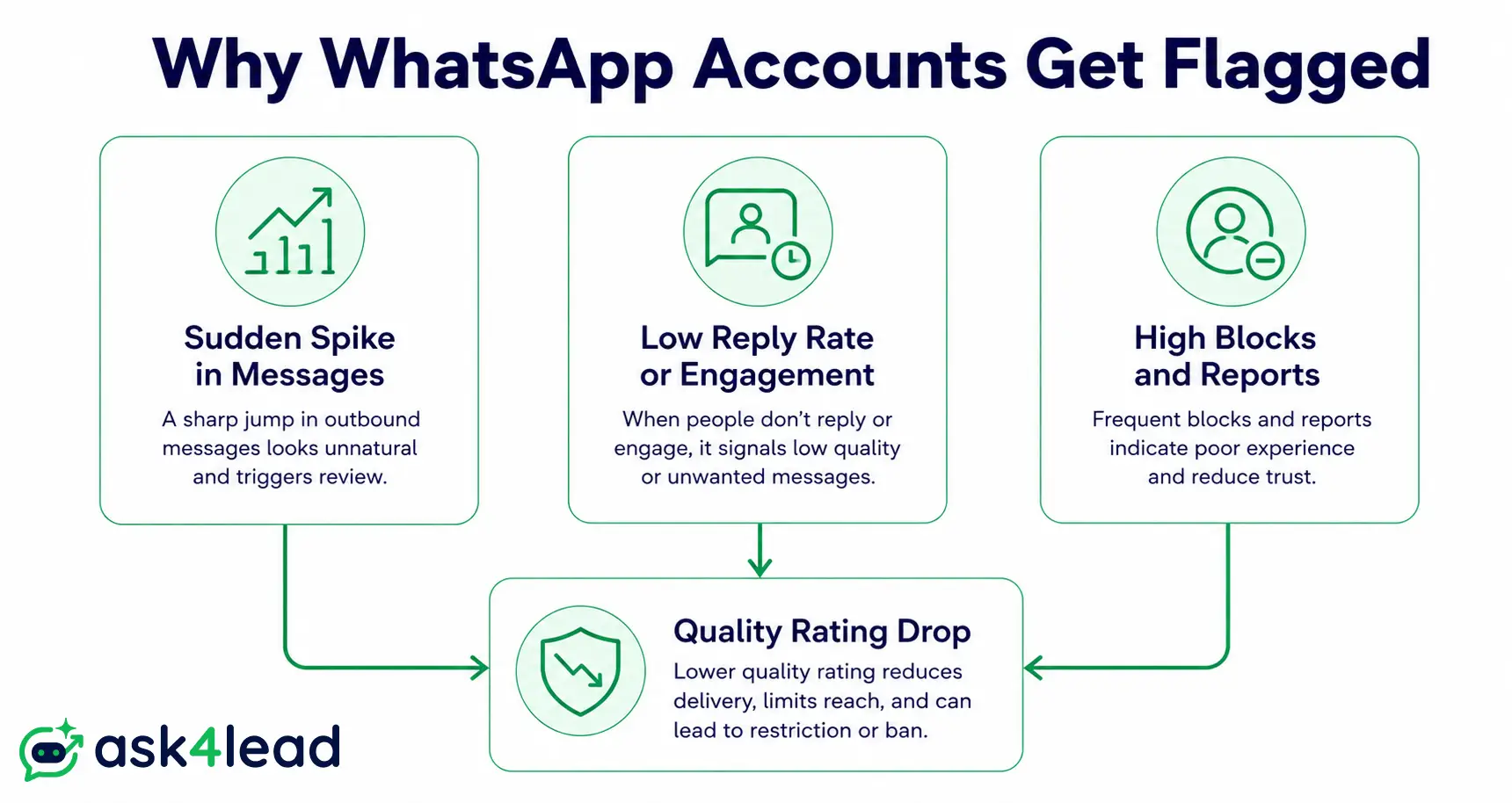
3 patterns explain most restrictions:
- A sudden spike in outbound messages from a number that previously sent very few.
- A low reply or open rate on those messages.
- Customers blocking or reporting the number.
A team jumping from 10 messages a day to 500 overnight can trip the same detection as a spammer, even with real customers.
Even adding a few contacts to a group right after other account activity can trigger a review on a young number.
2. How to protect your quality rating while scaling
Meta ties your daily messaging ceiling to your number’s quality rating.
It climbs as customers reply, and falls as they ignore or block you. New numbers start around a few hundred conversations a day.
Ramp up gradually instead of messaging everyone at once.
Sending even 25 to 50 messages in a short window can look like a burst, even to genuine past customers.
3. Opt-in rules for contacts you collected offline
Say you’ve built a list of 2,000 to 5,000 numbers over several years from in-store purchases or trade shows.
Capture consent at the point of collection, through a purchase, a form, or an inbound message. Don’t cold-message the whole list from WhatsApp first.
If a number gets flagged, recovering a restricted account is possible, but slower than avoiding the flag.
The AI and Human Handoff Framework That Keeps Support Personal
This is the part most WhatsApp support setups skip entirely.
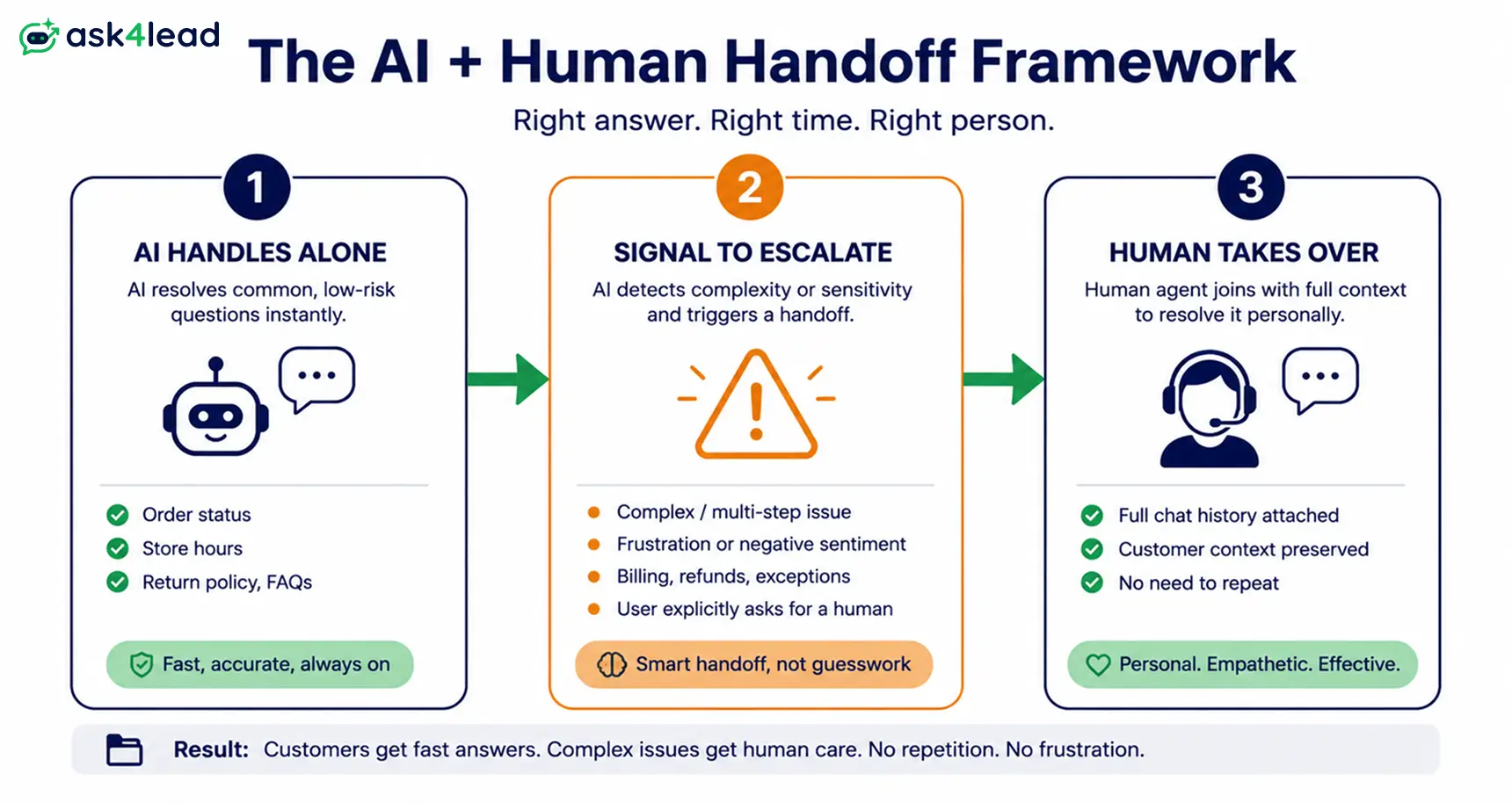
It’s the real answer to scaling without sounding like a robot: a written rule for who owns a conversation, not an assumption.
1. What AI should answer without a human
- Order status, business hours, published pricing, and appointment booking are strong candidates for AI to close out alone.
- That only works if it’s grounded in your real policies, not guessing.
- Ask4Lead’s AI Knowledge Profile trains the AI on a business’s own documents, so answers match what’s actually true.
2. When a human must take over the conversation
- Complaints, refund requests, anything emotional, and any question AI can’t confidently answer should escalate immediately.
- Full history goes with it, so the customer never repeats themselves.
- Anyone stuck in a loop trying to reach a person through Meta’s own WhatsApp support bot knows the cost of no escalation path. Don’t build that same trap for your own customers.
3. Avoiding the “2 replies at once” problem
- The mechanism matters as much as the rule.
- The moment a human is active on a thread, the AI must stop replying automatically, and the reverse.
- In practice: track a status per conversation, AI-active or human-active, so the system knows who can reply.
- Human-approval-for-AI-replies gives an owner one-click takeover of any AI conversation, so 2 replies never land in the same thread at once.
- An AI-sorted work queue then surfaces exactly which conversations need a human next.
What Changes on 1 October 2026, and How to Prepare
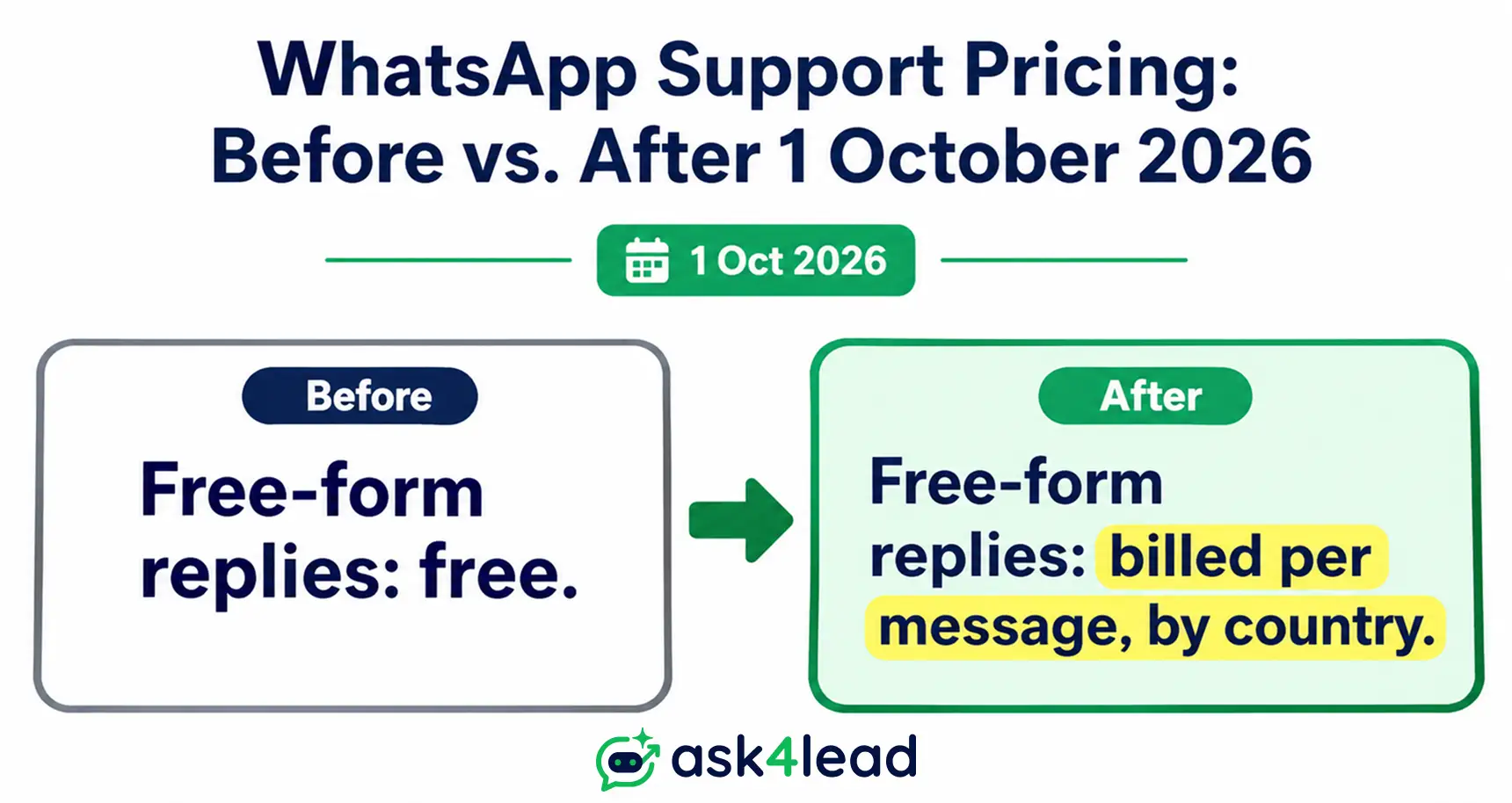
Free-form replies your team or bot send inside WhatsApp’s 24-hour customer service window have been free since November 2024.
That ends 1 October 2026. Meta will start charging for those replies, called service messages, at the same rate it already charges for templates.
1. What’s free today, what becomes billable
Messages a customer sends you stay free, always.
Conversations from a click-to-WhatsApp ad keep a longer free window of up to 7 days.
Marketing and authentication templates were already billed, so nothing changes there. What’s new: free-form replies and templates sent inside the 24-hour window both become billable.
2. 5 ways to cut wasted messages before the deadline
- Cut filler replies. “One moment” costs the same as a real answer once billing starts.
- Combine multi-part answers into 1 message instead of 3 separate sends.
- Swap open questions for quick-reply buttons where the answer set is fixed.
- Cap how often any automated trigger can re-fire on the same conversation.
- Set a daily reply limit per conversation for AI flows, so a confused loop doesn’t rack up billable replies.
Choosing Your Scaling Path: Build It Yourself, a Per-Agent Tool, or a Flat-Rate CRM
Once the foundation and handoff rule are set, only 1 decision remains: which tool runs it. There are 3 realistic paths.
| Path | Best for | Real cost pattern | Human takeover built in |
| Build it yourself on the Meta Cloud API | Teams with a developer on staff | Low software cost, high build and maintain time | You build it |
| Per-agent helpdesk tool | Teams that want a shared inbox fast | Scales per seat, can outpace budget past 4 to 5 people | Usually yes, per seat |
| Flat-rate WhatsApp CRM | Teams that want pipeline, inbox, and handoff together | Flat or credit-based, doesn’t multiply per teammate | Built in by design |
1. Build it yourself on the Meta Cloud API
Full control and the lowest raw software cost. But every piece, inbox, routing, reporting, has to be built and maintained by someone technical.
Only worth it with developer capacity to spare.
2. A per-agent helpdesk tool
Tools like WATI get a working shared inbox running fast.
The tradeoff shows as the team grows: the fifth person added is another paid seat, even if they’re not a full-time agent. The bill can quietly outgrow the value.
3. A flat-rate WhatsApp CRM with built-in handoff
This is where a purpose-built platform earns its cost: pipeline, shared inbox, AI conversation, and human takeover in 1 workspace.
Adding a teammate doesn’t add a line item to the bill.
Ask4Lead runs support and sales through the same 9-stage pipeline, so a support thread that turns into a sale doesn’t need a second tool or a manual handoff.
The Support Metrics That Actually Matter at Scale
Speed alone doesn’t prove support stayed personal.
1. Response time benchmarks
A workable first-response benchmark is under 5 minutes during business hours.
Messaging channels train customers to expect near-instant replies, so AI should close that gap to seconds for confident answers.
2. Escalation and resolution quality
Track how often a chat needed escalation, and how often the same question got asked twice from lost context.
Both, tracked in reporting and analytics, matter more than raw speed alone.
FAQs
1. How do you scale WhatsApp customer support without sounding like a robot?
Give the team 1 shared inbox instead of 1 phone. Write a rule for when AI hands off to a human, grounded in real policy, not a script.
2. Do you need the WhatsApp Business API, or is the free app enough?
The free app suits 1 person at roughly 30 to 50 chats a day. Past that, the API adds multi-agent access and automation.
3. Why do WhatsApp Business accounts get banned or restricted while scaling support?
Usually a sudden spike in outbound volume, a low reply rate, or blocks and reports, not a single flagged word. Gradual ramp-up protects it.
4. Is WhatsApp customer support still free in 2026?
Customer-initiated messages stay free. From 1 October 2026, free-form replies and in-window templates get billed per message, by country.
5. Can multiple agents reply from 1 WhatsApp number at the same time?
Not on the free app, limited to 1 device. The API supports multiple agents on 1 number through a shared inbox, full history visible to all.
6. Is a fast reply the same as good WhatsApp customer support?
No. Speed without a correct answer just moves the frustration faster. Track escalation and repeat-question rates too, not just speed.
Conclusion
Scaling WhatsApp customer support without losing the personal touch is a sequencing problem, not a shopping problem.
Fix the shared-inbox and single-point-of-failure gap first. Pick the WhatsApp foundation, app, API, or Coexistence, that matches your volume.
Write down the handoff rule before volume forces a bad one on you. Then protect your quality rating as you grow.
Businesses that do those 4 things in order stay fast and personal at 10 chats a day and at 1,000. The ones that skip straight to “add a chatbot” are usually the ones customers describe as getting worse, not better, at scale.
If you want that handoff rule built in from day 1, see how Ask4Lead’s AI conversation engine and shared inbox work together. It’s free to start, with 100 AI credits and no card required.
