
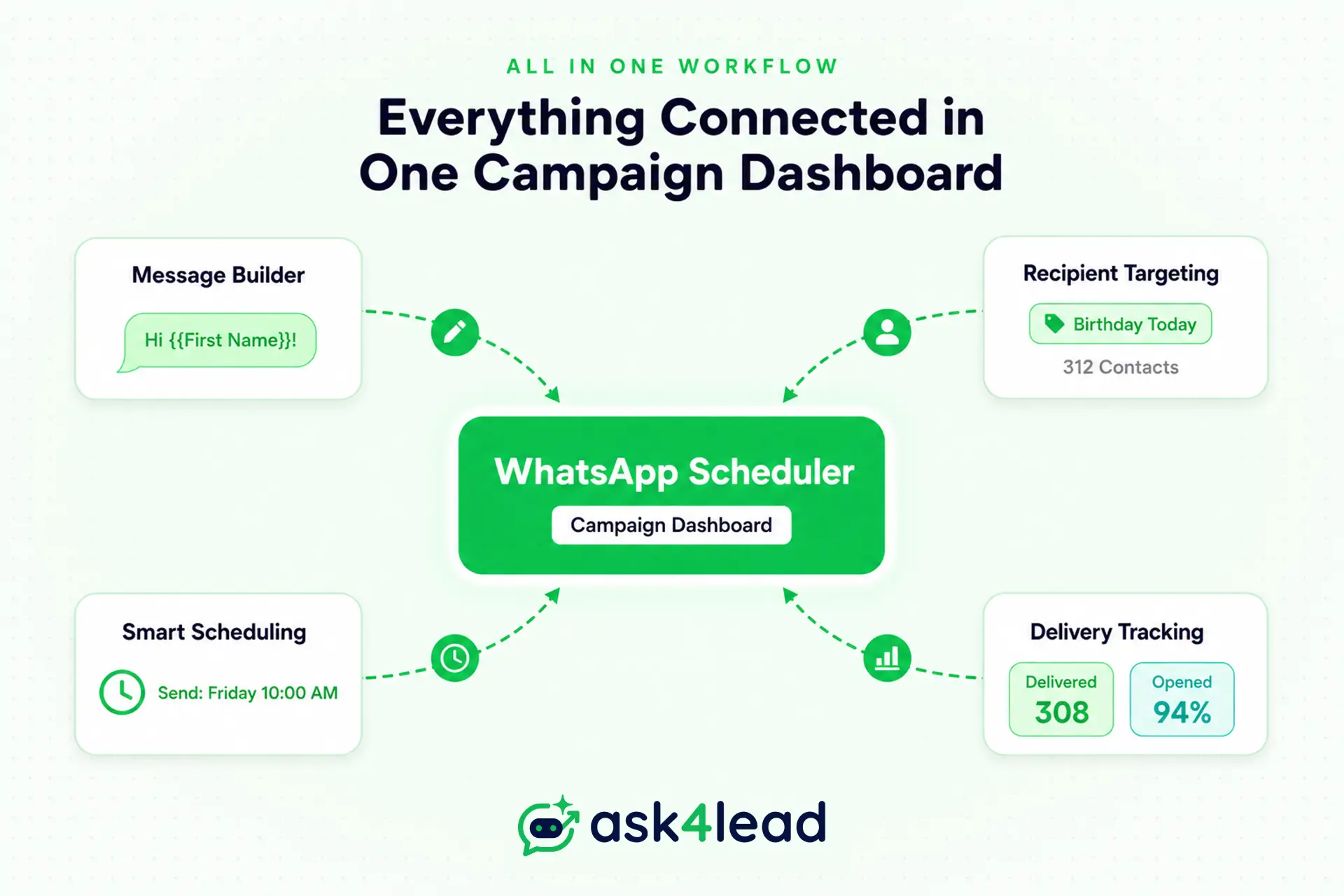
Quick Answer: The native WhatsApp app does not support scheduling messages. Using third-party Android apps is incredibly risky and can get your number banned. The only safe, legal way for businesses to automate sends is through an official API CRM like Ask4Lead.
Every business owner eventually needs to schedule WhatsApp messages to save time.
Following up with a hundred different leads manually is exhausting. If you want to turn WhatsApp into a high-converting sales machine, you cannot rely on sticky notes.
You need a reliable, automated system that remembers to text your customers exactly when you promised you would.
However, doing this safely is critical.
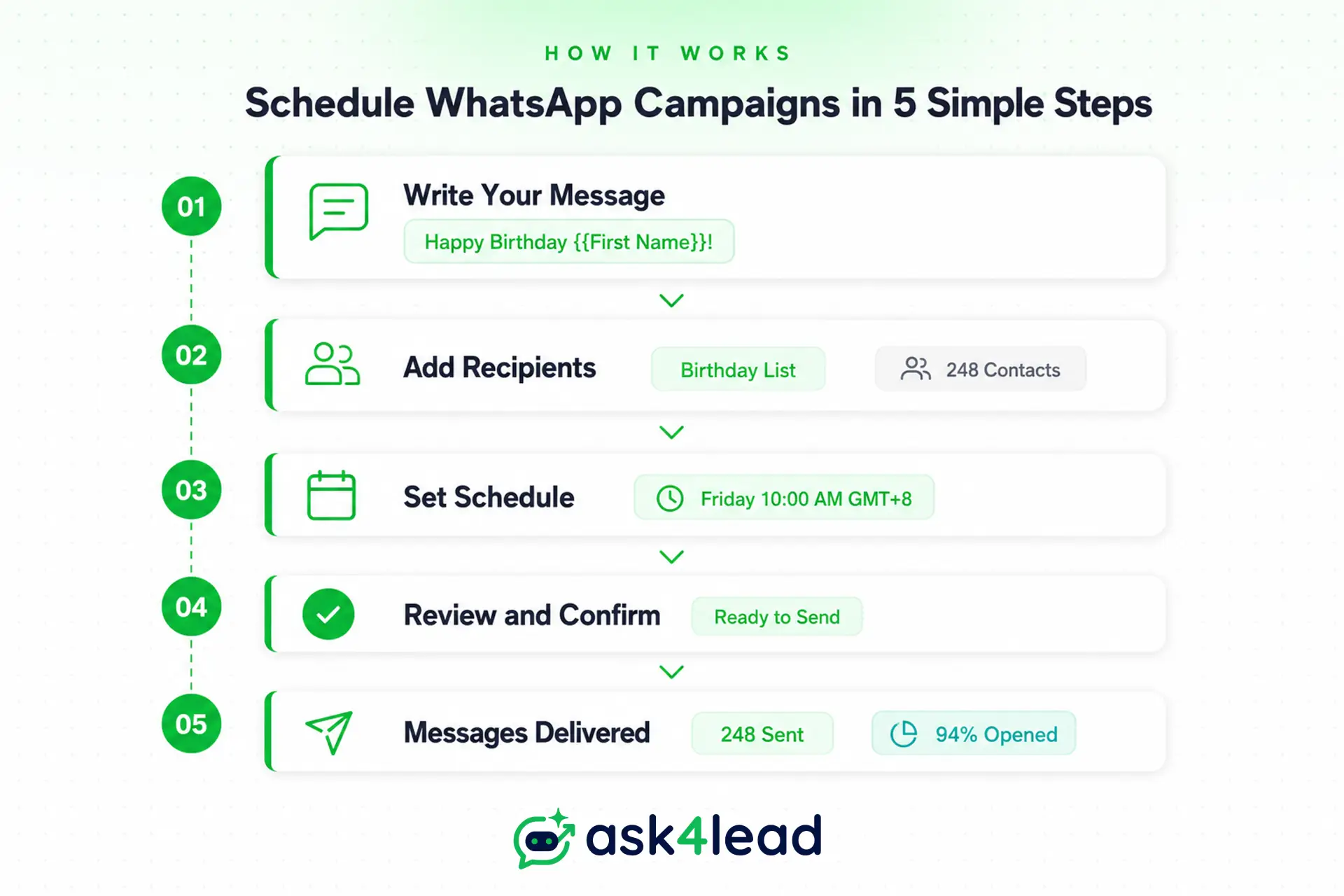
Many founders accidentally download dangerous mobile apps that promise quick scheduling features. These apps often lead directly to permanent account bans, destroying years of built-up customer trust instantly.
In this guide, you will learn exactly how to automate your sales follow-ups legally using verified WhatsApp Business API integration.
The Dangers of Third-Party Android Apps
We need to have an honest conversation about those free scheduling apps you see on the Google Play Store.
Apps like SKEDit use a very risky workaround called Android Accessibility permissions. They literally take over your phone’s screen, open the chat app, and type the text out for you while you are not looking.
This is a massive violation of Meta’s terms of service.
When the system detects this unnatural, automated tapping behavior, it flags your account immediately.
- Your number gets permanently banned.
- Your customers receive a confusing “account deleted” notice.
- You lose all your chat history forever.
Please, do not trust your entire business reputation to a hacky mobile app.
Native Scheduling Hacks (And Why They Fail)
If you use an iPhone, you might have heard about the Shortcuts app workaround.
It allows you to build a personal automation that triggers a text at a specific time of day. This is totally fine if you just want to wish your mom a happy birthday while you are asleep.
However, trying to schedule WhatsApp messages with phone shortcuts is completely useless for a real sales team.
You cannot track open rates or sync the data to a central database.
Most importantly, you cannot manage hundreds of leads simultaneously using phone shortcuts. It is just a temporary band-aid, not a permanent business solution.
How to Schedule WhatsApp Messages Legally
The only professional way to schedule a message is through the official API.
This simply means using a verified software platform that Meta has explicitly approved for business communication. Platforms like Ask4Lead connect directly to this official infrastructure, ensuring your business stays 100% compliant and secure.
You do not need to know a single line of code to use it.
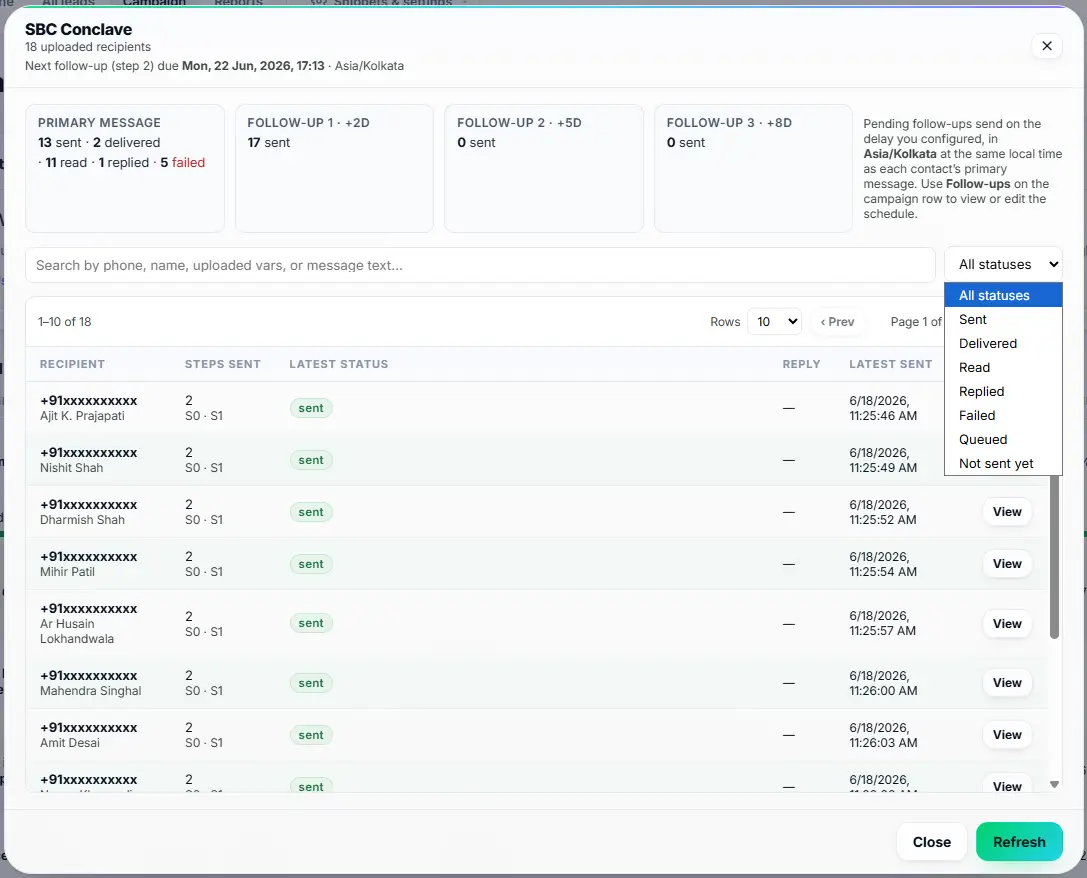
You just connect your Facebook Business account with one click.
Instantly, you gain the power to launch WhatsApp campaigns to thousands of users simultaneously without any fear of account suspension.
Smart Ways to Schedule WhatsApp Messages
Once you are on a safe API platform, your daily workflow becomes incredibly easy.
There are three powerful ways you will use this automated feature every single day to grow your business.
1. Scheduled Bulk Campaigns
- Imagine uploading a simple spreadsheet of your past customers.
- You can schedule a massive Diwali promotional blast to send perfectly at 10 AM on Friday, without lifting a finger on the day itself.
- This ensures your marketing goes out exactly when your buyers are most active online.
2. Automated Sales Follow-Ups
- Your sales representatives can open a chat and set a simple reminder.
- They can configure a personalized check-in to automatically go out to a hesitant buyer exactly forty-eight hours later. This means no lead ever falls through the cracks again.
- This is exactly how you create smart follow-ups that close deals while you sleep.
3. Out-of-Hours Auto-Replies
- You can configure a simple rule that triggers when your office closes at 6 PM.
- If a lead messages you at 9 PM, the system immediately replies, greets them professionally, and schedules a morning callback for your human team.
Old Chatbots vs. Conversational AI
Scheduling a basic message is only half the battle.
What happens when the customer actually replies to your scheduled campaign? If you use an outdated keyword bot, the conversation usually turns into a frustrating disaster very quickly.
Let us look at a highly realistic comparison of how these two systems handle a real customer reply.
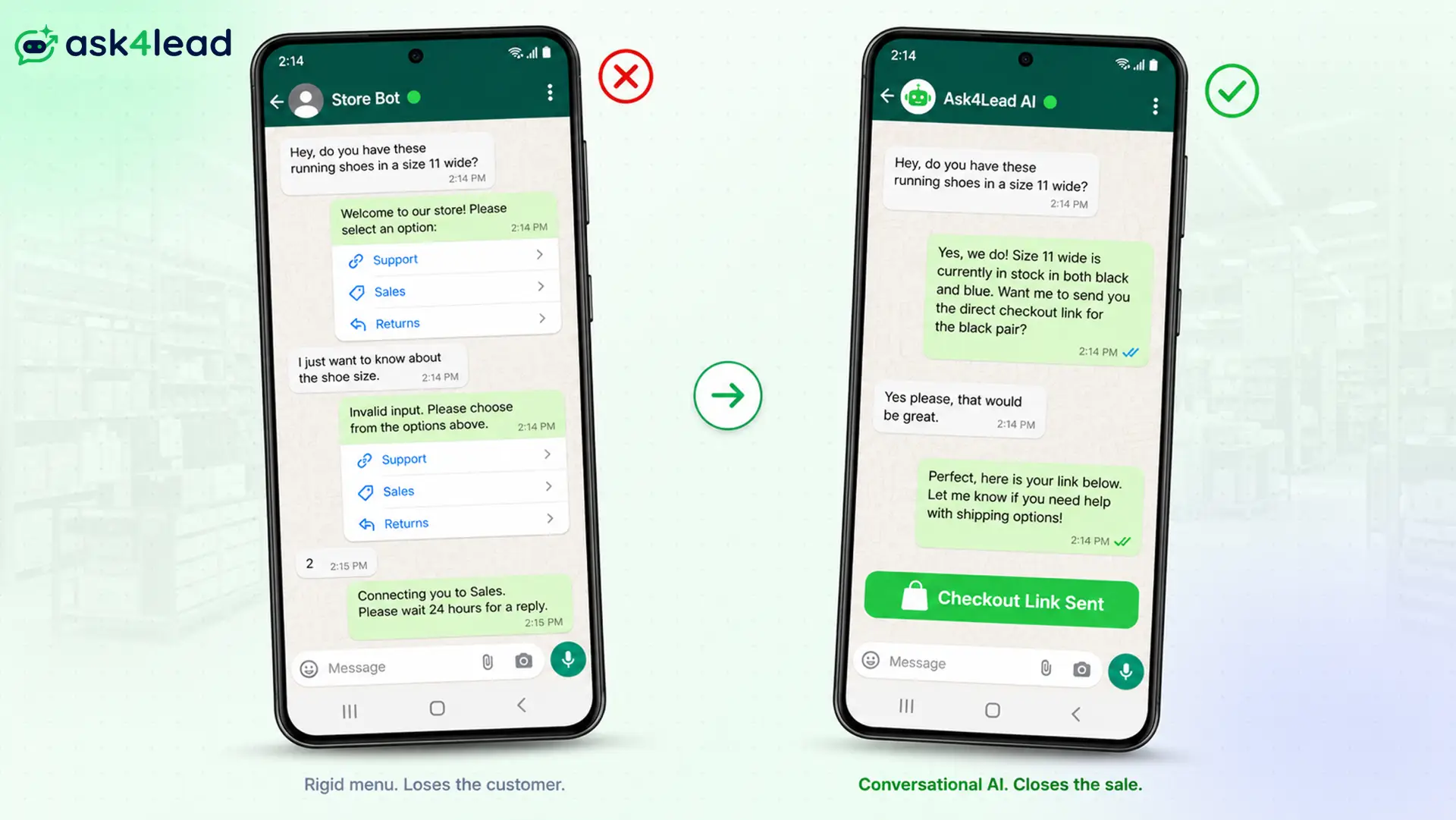
The Frustrating Old Chatbot Experience
Imagine you run an e-commerce store and schedule a blast about a new shoe launch.
A customer receives the message and decides to reply with a question. Here is exactly what happens when you rely on an old, rigid button-menu bot:
- Customer: “Hey, do you have these running shoes in a size 11 wide?”
- Old Bot: “Welcome to our store! Please reply with 1 for Support, 2 for Sales, 3 for Returns.”
- Customer: “I just want to know about the shoe size.”
- Old Bot: “Invalid input. Please reply with 1, 2, or 3.”
- Customer: “2”
- Old Bot: “Connecting you to Sales. Please wait 24 hours for a reply.”
The customer gives up instantly.
According to research by HubSpot, slow or frustrating response times are the primary reason modern buyers abandon a purchase online.
The Ask4Lead AI Sales Experience
Now, let us see how that exact same interaction plays out when you use a modern AI Sales Assistant.
When the customer replies to your scheduled message, the Ask4Lead AI reads the intent behind their words instantly.
- Customer: “Hey, do you have these running shoes in a size 11 wide?”
- Ask4Lead AI: “Yes, we do! The size 11 wide is currently in stock in both black and blue. Would you like me to send you the direct checkout link for the black pair?”
- Customer: “Yes please, that would be great.”
- Ask4Lead AI: “Perfect, here is your link: [Link]. Let me know if you need help with shipping options!”
The customer gets exactly what they asked for in seconds.
This is why upgrading to true conversational AI is mandatory for serious brands today. It actually acts like a highly trained digital employee, not a stupid answering machine.
Real-World Industry Examples
Different industries use automated scheduling in entirely different ways.
The flexibility of the Ask4Lead platform means it adapts perfectly to your specific business model.
Let us explore how two very different businesses maximize their revenue using this technology safely.
1. Real Estate Follow-Ups
- Selling properties requires months of careful nurturing.
- A real estate agent meets a buyer in January who says they want to move in August. The agent simply schedules a friendly check-in text for late June.
- When June arrives, the personalized text sends automatically.
- The buyer is delighted by the agent’s memory and books a viewing instantly. The agent secured a high-value commission simply because they let the CRM remember the timeline for them.
2. Healthcare Clinic Appointments
- Missed appointments cost clinics thousands of dollars every week.
- A healthcare clinic can automatically schedule WhatsApp messages to send out appointment reminders exactly twenty-four hours before a patient is due to arrive.
- If the patient replies saying they need to cancel, the AI instantly offers them three new time slots to rebook.
Why Ask4Lead is the Best Choice
There are dozens of platforms that connect to the official API.
However, Ask4Lead stands out because it was built explicitly for teams that want to close more deals, not just answer support tickets.
It combines the safety of official API scheduling with the incredible power of generative AI.
1. Zero Coding Required
You do not need to hire a developer to use Ask4Lead.
Traditional chatbot platforms force you to build massive, confusing flowcharts that break constantly. With Ask4Lead, you simply upload your product brochure PDF to train the AI instantly.
The system reads your document and immediately learns how to answer customer questions naturally.
2. The Smart Sales Pipeline
As your scheduled campaigns start generating replies, you need a way to organize the chaos.
Ask4Lead features a beautiful visual Kanban board. Every time a new lead replies to a campaign, they appear as a card on your screen.
Your team can easily drag and drop these cards across different stages like ‘Contacted’, ‘Qualified’, and ‘Closed’.
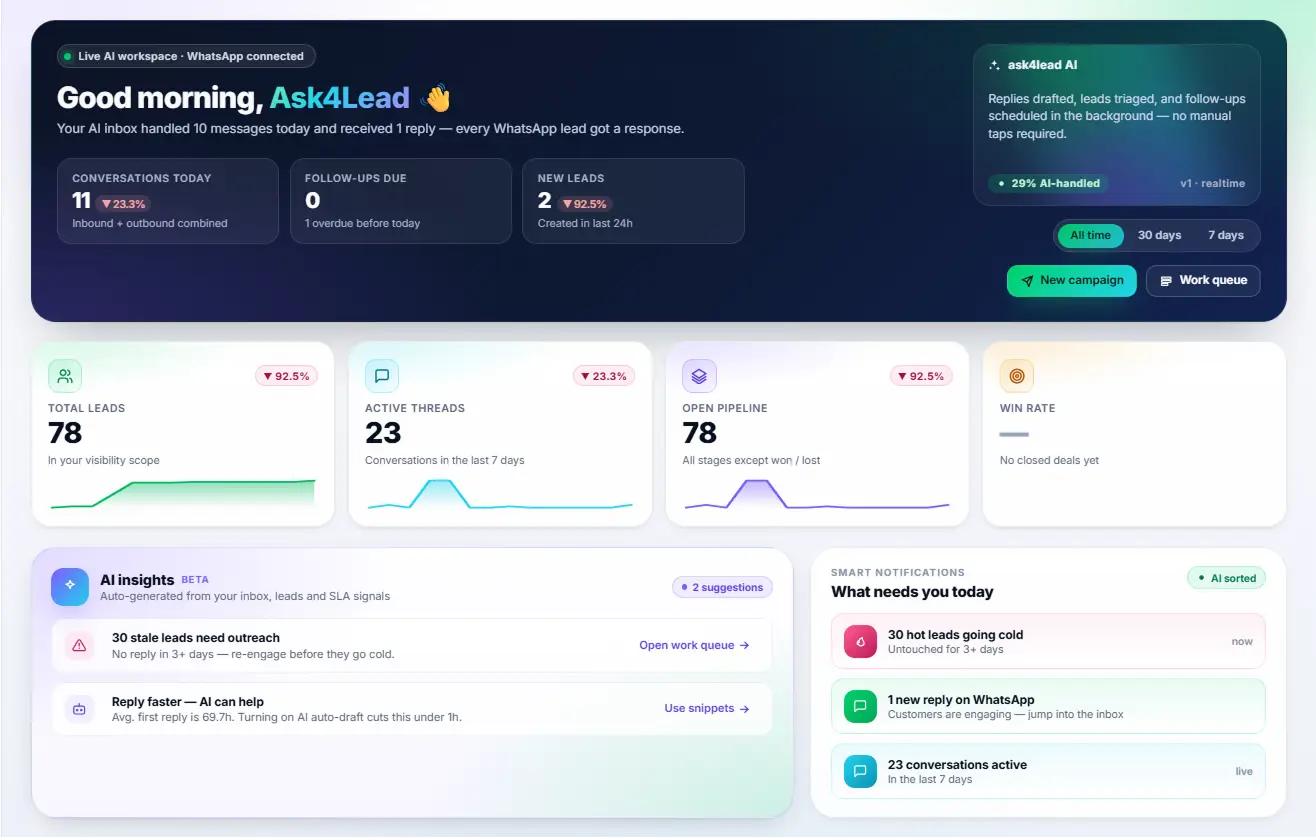
To monitor your entire automated sales process and agent performance, you can track all conversations directly from the AI Dashboard.
Conclusion
Learning how to schedule WhatsApp messages safely changes everything.
It frees you from the constant anxiety of forgetting to follow up with a valuable prospect. By using an official, approved API platform, you protect your business number while drastically scaling your sales volume.
Do not risk your reputation on sketchy third-party Android apps.
Upgrade to a platform that not only schedules your messages but also uses advanced AI to actually help you close the deals when customers reply.
FAQs
1. Can you schedule a WhatsApp message natively in the app?
No, the standard WhatsApp and WhatsApp Business mobile apps do not have a built-in scheduling feature. You cannot simply type a message and select a future time to send it natively. You must use an external tool or an official API platform to achieve this. This limitation exists to prevent the app from being used heavily for spam.
2. Are third-party WhatsApp scheduling apps safe to use?
No, third-party Android apps like SKEDit are extremely dangerous for businesses to rely on. They use screen-hijacking permissions that actively violate Meta’s terms of service. Using these apps very frequently leads to sudden, permanent account bans. You should never risk your primary business contact number on an unauthorized workaround hack.
3. How do I schedule automated follow-ups for my sales leads?
The safest way is to use a dedicated WhatsApp CRM platform like Ask4Lead. Inside your unified chat window, your sales representative can create a ‘Next Step’ task easily. They type a highly personalized message that is scheduled to be automatically sent to the prospect on a specific future date. This ensures no promising lead is ever forgotten.
4. Can I schedule a bulk WhatsApp campaign to 1,000 contacts?
Yes, absolutely. By using an official API integration platform, you can upload a CSV spreadsheet containing 1,000 opted-in contacts. You then select a Meta-approved message template and pick the exact calendar date and time for the broadcast to launch. The system will deliver the massive campaign flawlessly without crashing your phone.
5. What is the difference between away messages and true scheduling?
Away messages are reactive. They only trigger after a customer messages you first outside of your designated business hours. True scheduling, however, allows you to proactively set a specific date and time to send an outbound message to a customer. True scheduling initiates the conversation entirely on your terms.
