
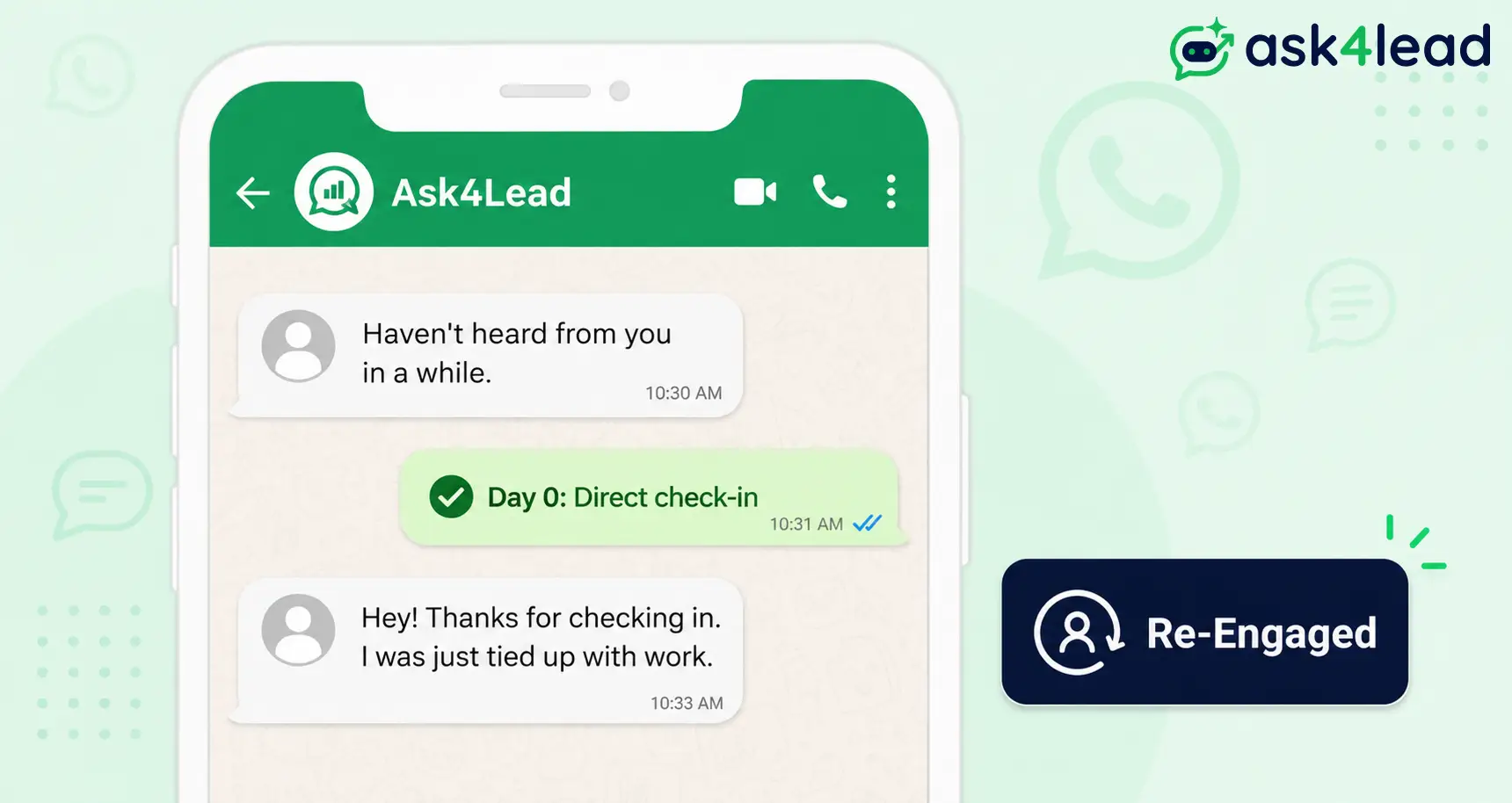
Quick answer: A WhatsApp win-back campaign is a short, approved-template sequence sent to customers who went inactive. It succeeds the moment the customer replies, not when the message is delivered.
A reply reopens WhatsApp’s free 24-hour window. That single reply is what your WhatsApp campaign workflow is actually built to earn.
Key takeaways
- Judge the campaign by replies, not deliveries. A “delivered” tick and an “opened” tick look identical on a dashboard.
- Every win-back message needs an approved Marketing-category template.
- From October 1, 2026, even the free reply thread that follows starts costing per message.
- Segment by behavior (why someone went quiet), not just days since their last order.
- Cap the sequence at 3 messages. Lead with a check-in, close with a discount, never the reverse.
- Most sends will not get a reply. Track re-engagement rate, not close rate.
This guide covers what real WhatsApp Business accounts deal with in 2026, including 3 things most competing guides still miss:
- The exact per-message cost of a win-back send, and the pricing change coming October 1, 2026.
- The precise line Meta draws between a Marketing template and a Utility template.
- What to do to a win-back campaign specifically when your number’s quality rating drops.
What Is a WhatsApp Win-Back Campaign?
A WhatsApp win-back campaign is a short, time-boxed sequence, usually 2 to 3 messages. It targets customers inactive for a defined period.
Each message uses an approved marketing template, since the business reaches out first. The campaign succeeds the moment the customer replies, not when the message is delivered.
1. WhatsApp Win-Back vs. Abandoned Cart Recovery vs. a Regular Broadcast
These 3 get confused constantly. Treating them the same is a common reason win-back messages underperform:
- Abandoned cart recovery: triggered within hours of items left in a cart. Time-sensitive and product-specific.
- Regular broadcast: sent to an active, engaged list. No inactivity threshold.
- Win-back campaign: triggered by weeks or months of silence. Must acknowledge the gap honestly, not pretend the customer never left.
2. A “Delivered” Message Is Not a Win
Meta’s delivery and read receipts confirm the message arrived. They say nothing about intent.
A customer can open a win-back message and still not reply, because the offer wasn’t relevant or the timing was wrong. Reply rate, not delivery rate, predicts revenue.
Why WhatsApp Outperforms Email for Win-Back, and What It Costs in 2026
Every win-back decision comes down to 2 questions. Will the message get seen, and what does sending it cost? Both answers changed in 2026.
1. Real Open and Reply Benchmarks, With the Honest Caveat
Infobip’s 2026 statistics put WhatsApp open rates around 98%. 88% get read within 5 minutes.
The more defensible, measured figure for opt-in marketing broadcasts is closer to 68%. Still well ahead of typical email open rates.
Neither number tells you your reply rate. No credible source publishes a universal win-back benchmark; vendor claims like “3x retention” rarely cite where the number came from.
Track your own first 2 sends as a baseline. Judge every future campaign against that number, not a blog post.
2. What a Marketing Template Costs in 2026
Since July 1, 2025, Meta bills per delivered template message, not per conversation. The rate depends on category and country.
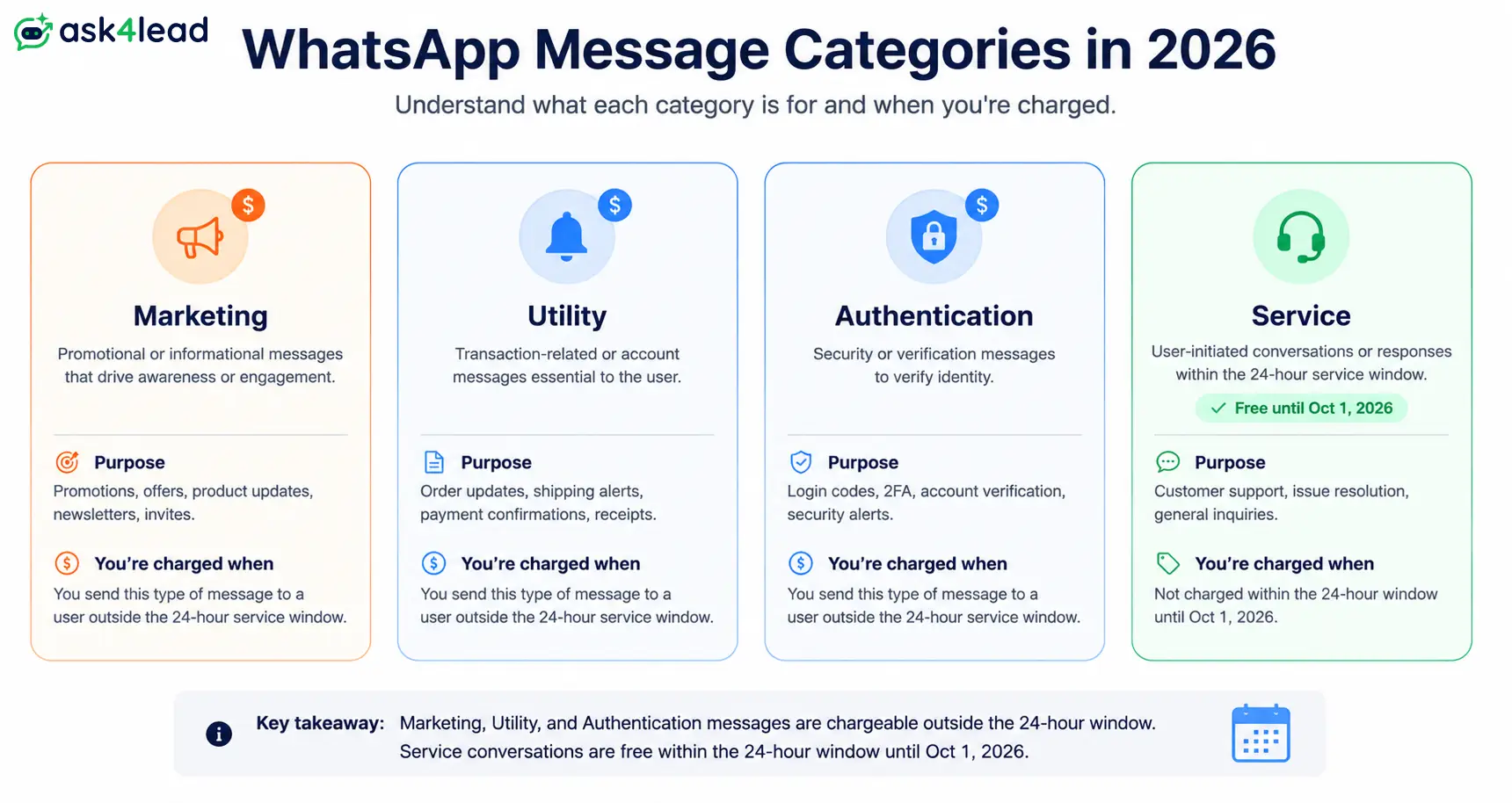
A win-back message always falls into the Marketing category, the most expensive tier:
| Message category | What it covers | Who pays, and when | Roughly what it costs (2026) |
| Marketing | Win-back, promotions, offers, re-engagement | Business, every send, no free tier | ~$0.01 (India) to ~$0.025 (US) per message |
| Utility | Order updates, appointment reminders, receipts | Business, discounted vs. Marketing (~80-90% lower) | Below Marketing rate |
| Authentication | OTPs, login verification | Business, discounted vs. Marketing | Below Marketing rate |
| Service (free-form reply) | Any reply inside the 24-hour window | Free until October 1, 2026 | Billed after Oct 1, 2026 |
These figures come from Meta’s WhatsApp Business Platform pricing documentation.
3. The October 1, 2026 Pricing Change Most Guides Still Miss
Right now, a win-back reply costs nothing to continue. That changes soon.
From October 1, 2026, Meta starts billing free-form service replies too, at the Utility/Authentication rate. A slow reply thread that used to be free will carry a real cost.
Almost none of the current WhatsApp win-back guides mention this. Most were written before the update was confirmed.
4. Coexistence: Automate Without Giving Up Your Phone
Connecting the WhatsApp Business Platform (the API) used to mean giving up the phone app entirely. That trade-off delayed many small teams from automating at all.
Meta’s Coexistence feature, live since May 2025, removes it. The API and the phone app now run on one number at once.
A rep can still reply from their phone the moment a hot lead comes in.
7 Types of WhatsApp Win-Back Messages, and When to Use Each
Most guides pitch one format: a discount. That works for exactly one segment and undersells everyone else.
| Type | Best for | Sample opening line |
| Direct check-in | Customers who went quiet, no clear reason | “It’s been a while since we talked about [X]. Still relevant?” |
| New value / feature update | Customers who churned over a missing capability | “We fixed the thing you told us was too complicated.” |
| Time-bound offer | Price-sensitive lapsed buyers, used last | “This closes Friday: [offer], just for you.” |
| Feedback ask | Customers who bought once, never returned | “What made you stop? One reply helps us fix it.” |
| Social proof / bestseller nudge | Browsers who never converted | “1,200 people bought this last month. Worth a look?” |
| Product or plan recommendation | Customers with a clear purchase pattern | “Based on your last order, this might be next.” |
| Preference check | Anyone unsure they still want updates | “Want fewer updates, or none at all? One tap changes it.” |
The check-in and the closing offer deserve deeper coverage. Getting either one wrong triggers most of the mistakes covered later.
1. The Behavior-Triggered Check-In, Not a Calendar Reminder
A message triggered because “90 days passed” reads like a spreadsheet. A message triggered because something real changed reads like a person paying attention.
Tag each dormant customer with the specific reason they went quiet:
- A failed payment.
- A price objection.
- A missing feature.
When that exact thing changes, that’s your opener, not the calendar date.
2. The Time-Bound Offer, Used Last, Not First
Leading with a discount trains customers to wait for a coupon. It teaches them not to reply until one arrives.
Value-first openers consistently outperform discount-first ones. They give something before asking for anything. Save the discount for the final message, paired with a real deadline.
How to Segment Inactive and Churned Customers Before You Send
Sending the same “we miss you” message to everyone who’s gone quiet is the fastest way to underperform.
A customer who churned over price and a customer who simply hasn’t needed you in 90 days are 2 different conversations.
1. Inactivity Tiers by Days Since Last Activity
| Tier | Days since last purchase, reply, or open | What it usually signals | Message tone |
| Tier 1 | 60-90 days | Gone quiet, not necessarily lost | Light check-in, no discount yet |
| Tier 2 | 90-180 days | Genuinely lapsed | New value or proof, not a guilt trip |
| Tier 3 | 180+ days | Effectively churned | Time-bound offer, clean opt-out |
The right window depends on the purchase cycle:
- Grocery or food brands: trigger Tier 1 in 7 to 10 days.
- Subscription or coffee brands: wait closer to 30 days.
- B2B and service businesses: widen every tier further, since 90 days of silence on a home loan search isn’t unusual. Ask4Lead’s industry playbooks cover these cycles per sector.
2. Behavior Signals That Beat Time Alone
Days-since-last-activity is a starting filter, not the whole picture. Layer in what actually happened:
- Why they went quiet: a failed payment, a price objection, or no current need each deserve a different opening line.
- What changed since: a new feature, a better price tier, or a simpler setup gives a real reason to reach out.
- What they never got: someone who opted in but never converted needs a different message than a one-time buyer.
“We simplified the setup you found confusing” beats “we’d love to have you back.” It proves the business remembers the conversation.
The Compliance Mechanics: Templates, the 24-Hour Window, and Quality Ratings
This is the difference between a campaign that runs and a WhatsApp number that gets restricted overnight.
1. Marketing vs. Utility: The Exact Line Meta Draws
Any message sent first, outside a customer-initiated 24-hour window, needs a pre-approved template.
Submit it through Meta’s template manager before it goes out.
Meta’s category rule is stricter than most businesses assume:
- The moment a template’s wording pushes a sale, a discount, or an offer, it’s Marketing, not Utility.
- This holds even if the same template also contains a real account update.
- A win-back message almost always crosses that line. Plan for the Marketing rate.
Get the category wrong and the template gets rejected. Ask4Lead’s guide to a rejected WhatsApp template covers the fastest fix.
2. The Opt-Out Button That Protects Your Number
Every win-back template needs a clear, one-tap way to stop future messages. Build it into the template, not a buried footer link.
A customer who taps that button costs nothing. One who instead hits WhatsApp’s native “Report” or “Block” button damages the account’s spam signal directly.
Confirm opt-in and consent at signup too, not just the opt-out at send time.
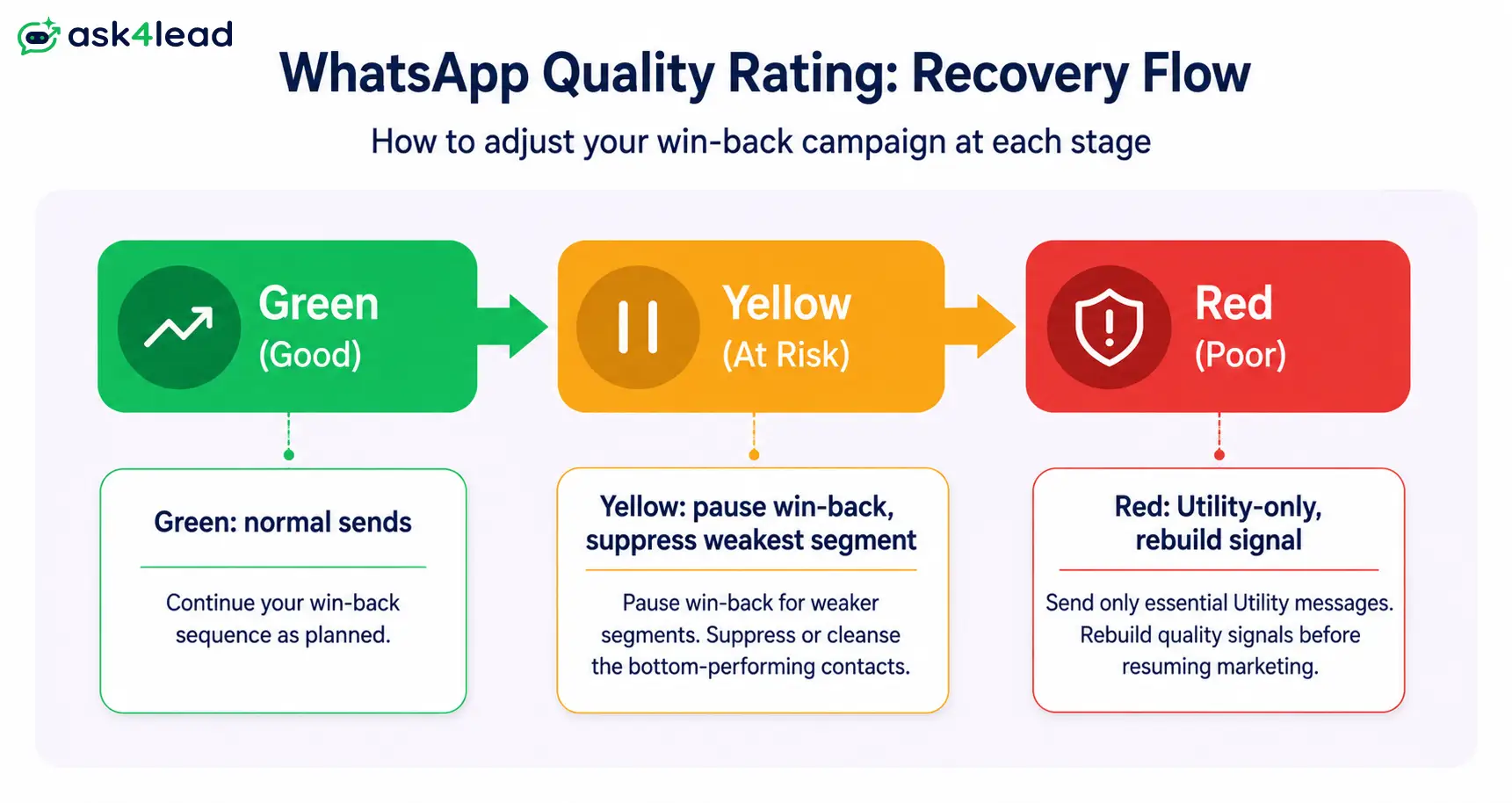
3. Quality Rating: The Metric That Decides If Your Campaign Survives
Meta scores every number on a quality rating: green, yellow, or red. It’s based on block rates and reports.
A blast to an old, unengaged database is one of the fastest ways to drop it to yellow.
If the rating drops, pause win-back sends specifically, not just campaigns in general:
- Suppress the lowest-engagement segment for a full cycle, instead of trying to win them back mid-recovery.
- Send only Utility-category messages for a period, order updates, confirmations, to rebuild a positive signal first.
If a number does get restricted, recovering it takes longer than avoiding the drop.
4. Keep Your Marketing Number Separate From Support at Volume
A win-back blast that trips the quality rating shouldn’t take down live support on the same number.
Once win-back or promotional volume is regular, use a dedicated marketing number. It contains the blast radius of a bad send.
Small teams on one shared number can skip this. Beyond a few hundred marketing sends a week, it stops being optional.
The 3-Message Win-Back Sequence That Converts
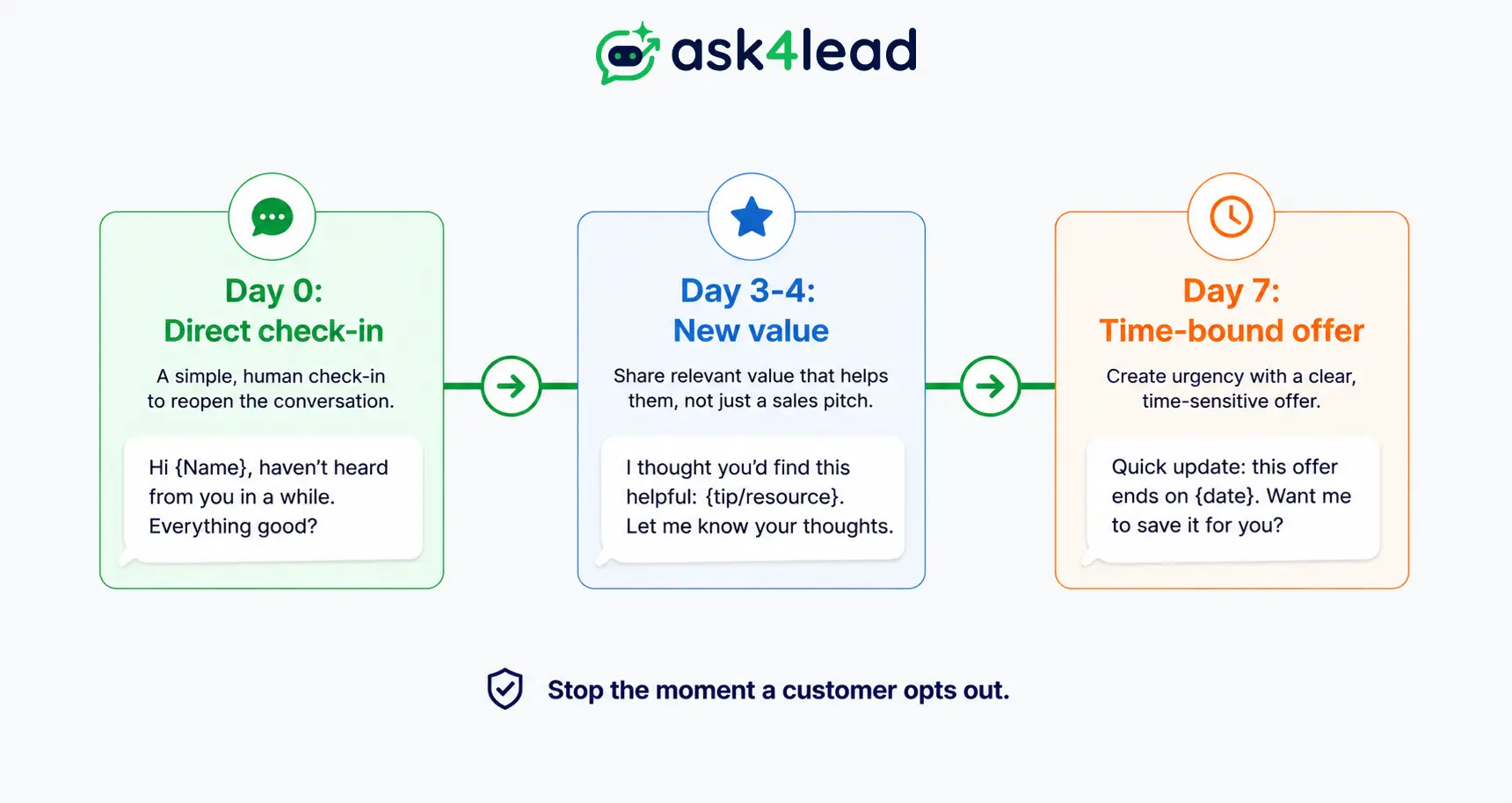
A win-back sequence works best short: 3 messages, spaced days apart, each with a different job.
| Message | When to send | Goal | What it should NOT do |
| 1. Direct check-in | Day 0 | Earn a low-friction reply | Lead with a discount |
| 2. New value | Day 3-4 | Give a real reason to re-open the conversation | Repeat message 1 |
| 3. Time-bound offer | Day 7 | Convert the still-undecided | Skip the opt-out reminder |
Sending more than 3 before someone engages usually just adds opt-outs, not replies.
1. Message 1: The Direct Check-In
Open by naming the gap honestly. Ask a specific, easy-to-answer question, not a vague “how have you been.”
Something closer to: “It’s been a while since we talked about [specific problem]. Still relevant?” It works because it names the actual reason the person engaged.
2. Message 2: New Value, Not a Guilt Trip
If message 1 gets no reply, bring something genuinely new: a feature that shipped, a case study, a price change.
“We’d love to have you back” gives a customer nothing to act on. “We fixed the thing you told us was too complicated” does.
3. Message 3: A Time-Bound Offer With a Clean Exit
The final message is the only one that should carry a discount, paired with a real deadline and a one-tap opt-out.
Customers who don’t respond by then are telling you something real. Respect that answer and stop messaging.
Common Mistakes That Kill WhatsApp Win-Back Campaigns
Most underperforming win-back campaigns fail for the same handful of avoidable reasons:
- Blasting an old, unengaged database in one send. Fastest way to trigger a quality rating drop.
- Sending a generic “we miss you” with no specific reason. Customers can tell a real reconnection attempt from a scheduled cadence message.
- Skipping the opt-out button. Forces customers toward WhatsApp’s native Report or Block option instead.
- Leading with a discount in message 1. Trains customers to wait for a coupon before ever replying.
- Messaging someone who just bought. Reads as careless, not personal.
- Sending win-back messages more than once every few weeks to the same contact. Reads as spam to Meta’s systems.
- Treating every reply the same. A one-word “no” and a detailed pricing question both deserve a reply, but not the same one.
- Mixing win-back volume with support traffic on one number. A rating drop from a bad campaign blocks real support too.
What Happens After They Reply: Turning a Response Into a Sale
The reply is the actual product of a win-back campaign, not the send. What happens next decides whether it becomes a sale.
1. Why an AI-Only Reply Undersells a Warm Response
A generic auto-reply wastes the moment a customer chose to re-engage.
An AI sales assistant grounded in real account history answers the specific thing a customer asks. A bot that only recognizes keyword triggers cannot.
2. Routing the Reply Into a Pipeline, Not a Queue
A win-back reply that lands in an unsorted inbox, on one phone shared across a small team, is easy to miss.
3 things fix that:
- A dedicated pipeline stage. Ask4Lead’s 9-stage sales pipeline has a Re-Engagement stage built for this exact moment.
- A shared inbox. The shared team inbox makes sure nothing sits unanswered on one phone.
- A control layer. Human-approval-before-send control keeps a person in the loop before any discount goes out.
Given the October 1, 2026 pricing change, this matters more going forward. A reply thread that drags on for 10 messages because no one owns it will soon cost real money too.
3. The Metrics That Actually Matter, Not Close Rate
Most win-back sends will not get a reply. That’s normal, not a failure signal.
Track 3 numbers per campaign instead:
- Re-engagement rate: replies divided by sends.
- Conversion rate: replies that turn into a sale.
- Opt-out rate: how many chose to leave.
Compare segments against each other, not an outside benchmark. Reports and analytics show which segment and message actually worked.
FAQs About WhatsApp Win-Back Campaigns
1. What is a WhatsApp win-back campaign?
A sequence of approved marketing templates sent to customers who stopped buying or replying, usually after 60 to 180 days. The goal is a reply, not just delivery.
2. How long should you wait before sending a win-back message?
Use tiers: 60-90 days for quiet customers, 90-180 days for lapsed buyers, 180+ days for churned. Fast-cycle brands trigger sooner; B2B waits longer.
3. Do WhatsApp win-back messages need an approved template?
Yes. Any message sent first, outside a customer-initiated 24-hour window, needs a Meta-approved Marketing-category template. Plain text only works as a reply, never as the opener.
4. How much does a WhatsApp win-back campaign cost in 2026?
Roughly $0.01 per message in India and $0.025 in the US. From October 1, 2026, the free reply thread after a customer responds also starts costing per message.
5. What response rate counts as good for a WhatsApp win-back campaign?
There’s no verified industry benchmark; Meta doesn’t publish reply-rate data. Track your own first 2 sends as a baseline and measure every future campaign against that.
6. Can AI handle WhatsApp win-back replies automatically?
Yes, when it’s grounded in real account data like order history, since a specific reply earns more trust than a repeated pitch. Human approval still matters before any discount goes out.
7. What’s the difference between a win-back campaign and abandoned cart recovery?**
Cart recovery triggers within hours of items left in a cart. A win-back campaign triggers after weeks or months of general inactivity, with no specific action behind it.
8. How many win-back messages should you send before giving up?
Cap it at 3, spaced days apart. Sends beyond that usually raise the block and report rate without adding replies.
Conclusion
A WhatsApp win-back campaign works when segmentation, message, and reply-handling are one system, not 3 separate tasks:
- Get the inactivity tiers right.
- Send an approved template that names the actual reason someone left.
- Protect the account with a real opt-out and an eye on the quality rating.
- Route every reply somewhere it can’t be missed.
Ready to Stop Losing Replies to an Unsorted Inbox?
Ask4Lead is a WhatsApp CRM that runs win-back sequences on the same platform that handles the reply afterward.
A dedicated Re-Engagement stage, a shared inbox, and human approval come built in.
Sign up free with 100 AI credits and see what a routed win-back reply looks like end to end.
