
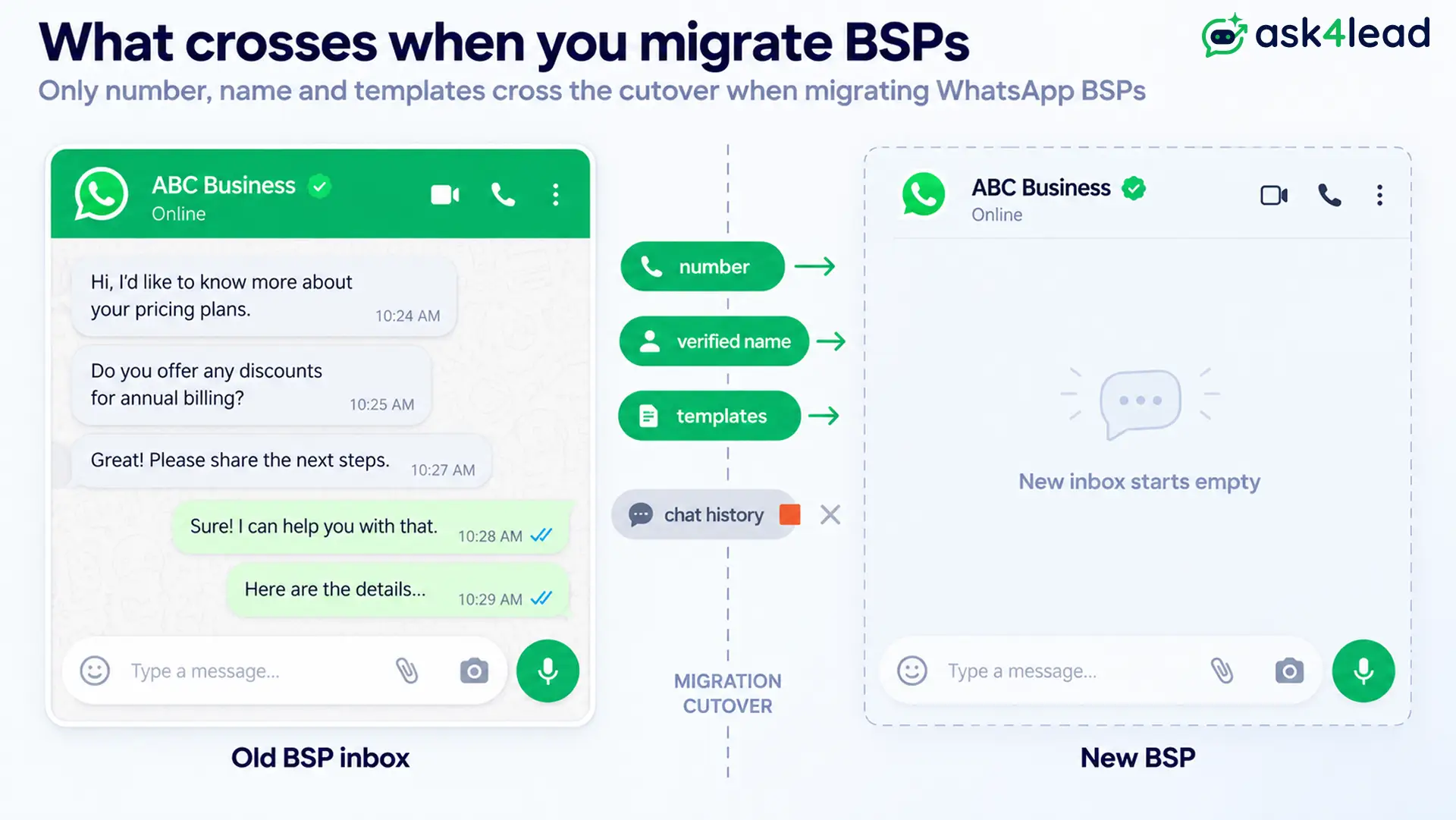
When you migrate BSPs, your WhatsApp number, verified name, quality rating, and approved message templates move to the new provider on their own.
Your chat history, analytics, contact tags, and automations do not.
A BSP (Business Solution Provider) is the Meta-approved company that runs your WhatsApp Business API connection.
This guide covers what happens to each piece of your data during a BSP migration, why, and what to save before you start.
Quick answer: A BSP migration moves the Meta side of your account and leaves the provider side behind.
- Moves with your number: phone number, display name, green tick, quality rating, messaging tier, approved high-quality templates.
- Stays with the old BSP: chat history, analytics, contacts, tags, opt-in logs, chatbot flows, canned replies.
1 thing almost no migration guide says: your approved templates arrive with the quality score wiped to UNKNOWN, so you fly blind on template health for the first 24 hours.
Key takeaways
- Approved templates copy over, but their quality score resets to UNKNOWN and anything past 250 is dropped silently.
- Chat history is not recoverable. Export contacts, tags, and opt-in proof before cutover, not transcripts.
- A new BSP can hold you at Tier 1 for 7 days, and your analytics history restarts from zero.
- A leftover credit line or a restricted Facebook ad account blocks the switch before it starts.
- Coexistence is the only path that imports old chats, up to 6 months, and only once.
What actually happens to your data when you migrate BSPs
A BSP migration sorts your data into 3 outcomes: what stays intact, what copies over damaged, and what is gone for good.
The 3 outcomes: intact, damaged, gone
| Asset | Outcome when you migrate BSPs |
| Phone number, display name, green tick | Survives intact |
| Business verification | Survives intact |
| Quality rating, messaging tier | Survives intact (API migration) |
| Approved high-quality templates | Copied, quality score reset |
| Pending, rejected, low-quality templates | Not copied, rebuild |
| Chat history and media | Gone |
| Message analytics and insights | Gone |
| Contacts, tags, custom fields | Gone |
| Opt-in and consent records | Gone |
| Chatbot flows, canned replies, routing | Gone, rebuild |
Why the split happens
Ownership decides it:
- Meta owns your phone number and your WhatsApp Business Account (WABA), the container for your number, templates, and rating.
- Your BSP owns the software around it: the inbox, automation builder, analytics, and contact database.
Meta’s migration flow moves the WABA to a new provider. It leaves the old software, and everything stored only there, behind.
The rule: if Meta stores it, it travels with your number. If your BSP stores it, export it now or lose it.
Chat history: why it does not move, and what to save instead
Chat history does not transfer when you migrate BSPs. The WhatsApp Business API never stored your conversations as a record you can pull. Your BSP kept them, and that access ends at cutover.
1. The API never held your conversations
Two facts explain the loss:
- Meta’s servers keep message content only briefly, for delivery and troubleshooting. There is no archive to hand over.
- The old on-premises API stored messages on your own server, but Meta retired it. Now the BSP is the only place full history lives.
Losing that record strips your reps of context on every open lead. A shared team inbox that keeps the full thread per contact softens that hit after a move.
2. What a BSP export is actually good for
Most BSPs let you export conversations as a CSV or JSON file. Treat that file as a legal and compliance record, not a BSP migration tool. No platform can re-import it, and the new inbox starts empty.
So spend your export effort on structured data first: contacts, tags, and opt-in timestamps. That data is reusable on the new BSP. A folder of old transcripts is not.
3. The one exception: Coexistence history import
Coexistence runs the WhatsApp Business App and the API on one number at once. If you switch this way, Meta offers a history import at onboarding:
- Up to 6 months of past chats, or 3 months on some accounts.
- One time only. You cannot request it again without disconnecting and redoing onboarding.
Take the import even if you are unsure you need it. With history gone, an AI Knowledge Profile that grounds the AI in your own documents keeps replies accurate from the first new message.
Message templates: copied, but not intact
High-quality approved templates copy to your new WABA and keep their approved status, so you can send them right away. Pending, rejected, paused, and low-quality templates do not copy. Neither does any template’s quality score.
1. Which templates transfer and which you rebuild
A template copies only if all 3 are true:
- Its status is APPROVED.
- Its quality rating is not low.
- No template with the same name already exists on the destination WABA.
A name clash means the copy is skipped, not merged. Category and language carry across unchanged.
A template message is the pre-approved format you need to reach a customer outside the 24-hour service window. Those still work after the move.
2. The quality rating wipe most guides miss
Every copied template lands rated UNKNOWN, not the score it earned before. Per Meta’s template guidelines, each is re-rated after about 24 hours of live sending.
For that first day you have no signal on which templates are healthy. Do not launch a big campaign into that blind spot.
3. The 250-template cap and silent drops
A WABA holds a maximum of 250 templates. Go over that limit and Meta copies templates up to the cap, then drops the rest with no warning or list.
So export your full template library first: name, category, language, body text, variable order, and buttons. Rebuilding from that export in a templates workspace is also the moment to cut the ones nobody sends.
If any come back rejected on the new BSP, the cause is almost always category or content, not the migration.
Quality rating, messaging tier, and analytics
Your quality rating and messaging tier carry over with your number in an API migration. Your analytics history does not. Coexistence is different: it resets both the rating and the tier.
What carries and the first-7-day tier cap
Your current quality rating and messaging tier follow the WABA. A green rating stays green.
One caveat guides skip about a brand-new BSP link:
- It can cap you at Tier 1 for the first 7 days, whatever your history.
- Tier 1 is about 1,000 business-initiated conversations a day.
- The cap lifts once the new connection shows clean sending.
Check the WhatsApp account health view in week 1 to confirm the rating and limit landed right.
Your analytics baseline resets to zero
These metrics stay with the old provider and do not migrate:
- Message insights and conversation counts
- Delivery and read rates
- Template performance history
Screenshot your key numbers before the switch. Without a baseline, you cannot tell if a post-migration dip is the move or a real problem.
On the new side, reports and analytics start logging from day 1.
Contacts, opt-in records, and automations you rebuild
Everything in your old provider’s database is BSP-level data. Contacts, tags, opt-in proof, and every automation you built are gone at cutover unless you exported them first.
1. Contact lists, tags, and custom fields
Export your full contact list with every tag and custom field. This is the highest-value export, because it is the one thing the new platform can actually ingest.
Saved audiences and segments do not carry. Rebuild those by hand on the new BSP.
2. Opt-in and consent records
Your opt-in and consent records prove a customer agreed to be messaged. They are BSP-level data, and losing them is a real exposure under GDPR and India’s DPDP Act.
Export opt-in status with timestamps and source for every contact. Store it somewhere permanent. An audit log that keeps a fixed record of consent and agent actions is worth having on the new provider from day 1.
3. Chatbot flows, canned replies, and routing rules
None of your automation logic moves. That includes:
- Chatbot flows and keyword triggers
- Canned replies and quick-reply snippets
- Routing rules and agent assignment
- Business hours and away messages
Document each flow as a diagram or a screenshot before you lose dashboard access.
Rebuilding dozens of keyword branches by hand is the slowest part of any switch. Ask4Lead’s AI answers from your uploaded catalogue and documents instead, so there is no decision tree to recreate.
The blockers that stop a BSP migration mid-move
Most failed BSP migrations trace to a billing link the old provider never removed, a restricted ad account, or too many retries. None of these is obvious from the error text.
| Error or symptom | Real cause | Who fixes it |
| “Switching partners is not supported in this flow” | Credit line left on your WABA | Old BSP, or Meta support |
| “Error while pairing Cloud API” | Restricted Meta ad account in the same Business Manager | You, in Business Support Home |
| Error code 100, subcode 33 | 2FA PIN still set on the number | Old BSP |
| Migration locked for 72 hours | 10 failed attempts | Wait, then fix the real blocker |
| Number shows connected on old BSP after cutover | Backend not released | Old BSP support ticket |
| Business name shows as digits after Coexistence | Display name not set before onboarding | You, in the app before onboarding |
1. A leftover credit line from your old BSP
A credit line is a billing setup where the BSP pays Meta and invoices you. Leave one attached and the new BSP cannot connect.
Ask the old provider, in writing, to remove the credit line and any partner assignment.
2. A restricted Facebook ad account in your Business Manager
A disabled or restricted Meta ad account anywhere in the same Business Manager can block onboarding. It reads like a WhatsApp fault. It is an ads fault.
Clear the restriction in Business Support Home, then retry. Both sides must also sit under the same Meta Business Manager.
3. A number stuck in the old BSP’s backend
Sometimes the number detaches on Meta’s side but the old provider still shows it connected.
- API to API: the old BSP must release it through a support ticket.
- Coexistence: switch the number back to regular WhatsApp, wait 2 to 4 hours, then reconnect it to Business Manager and the new provider.
4. Your business name shows as digits after Coexistence
On the Coexistence path, your display name must be set in the WhatsApp Business App before onboarding. Miss that step and customers see your number instead of your name.
You cannot fix it from the web dashboard afterward. Set the name in the app first, then onboard, and treat the verified green tick as a separate application.
Your pre-migration data checklist
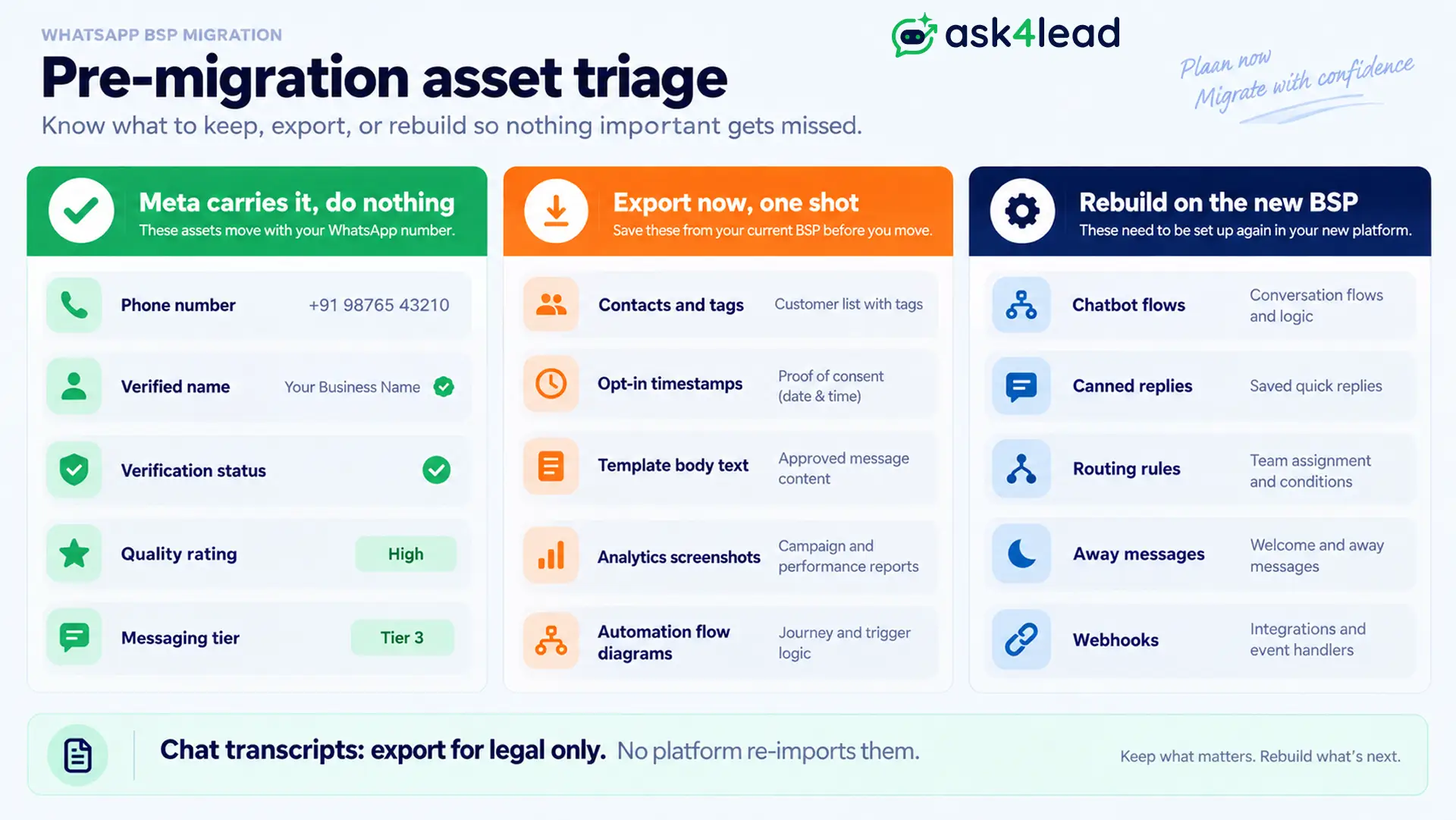
Before you migrate BSPs, export everything your old provider stores and clear the 2 settings that block the switch.
Do it while you still have full dashboard access, because once the WABA detaches, the old dashboard is gone.
1. Export in this order
- Contacts with all tags, custom fields, and opt-in timestamps
- Full template library with body text, variables, and buttons
- Analytics baseline: quality rating, tier, delivery and read rates
- Automation flows, triggers, routing, and away messages as screenshots
- Integration and webhook list with endpoints
- Chat history export, for legal and records only
2. Confirm with your old BSP in writing
- The two-step verification PIN (2FA) is disabled on the number.
- The credit line and any partner link are removed from your WABA.
- Business verification is approved and the display name is set.
Get these on email, not a call. A stalled 2FA request is the single most common migration delay.
3. One cost change to price in
From October 1, 2026, Meta charges for service messages, the free-form replies you send inside the 24-hour window. That reprices any support-heavy flow you rebuild on the new BSP.
Budget for it now. It does not change the migration steps, only the running cost after.
4. Rebuild in hours, not weeks, with Ask4Lead
Ask4Lead is a humanized AI WhatsApp chatbot and CRM by GVM Technologies LLP. It onboards your number through Meta Embedded Signup, then rebuilds the working parts fast.
The AI Sales Assistant runs conversations from your own documents, so there is no keyword tree to recreate. Automated follow-ups restart your drip sequences the same day, so leads do not go cold in the gap.
Start free with 100 AI credits, no card and no credit-line lock-in.
FAQs
1. Does chat history transfer when you migrate BSPs?
No. WhatsApp Business API conversation history is stored by your BSP, not Meta, so it cannot move to a new provider or be imported. Export it from your current provider for your records before the switch.
2. Do I lose my approved WhatsApp templates when I switch providers?
Not the high-quality approved ones. They copy over and stay approved. Pending, rejected, and low-quality templates do not copy, every copied one’s quality score resets to UNKNOWN for about 24 hours, and anything past 250 templates is dropped.
3. Does my quality rating reset when I migrate BSPs?
Not in a standard API-to-API migration. Your quality rating and messaging tier carry over, though a new BSP may hold you at Tier 1 for the first 7 days. Coexistence, the app-to-API path, resets both.
4. How long does a BSP migration take, and is there downtime?
The number cutover takes minutes, with a gap of about 90 seconds where inbound messages can drop. The real time cost is rebuilding templates, flows, and integrations, usually 1 to 3 business days.
5. Why does my migration fail with “switching partners is not supported”?
Your old BSP left a credit line or partner link on your WhatsApp Business Account. That provider must remove it before a new BSP can attach. This is not something you can fix from your side.
6. What should I export before I migrate BSPs?
Contacts with tags and opt-in timestamps first, then your full template library, then an analytics baseline and screenshots of every automation. Export the raw chat history last, and only for compliance.
7. Can I move back to my old BSP later?
Yes. A BSP migration is repeatable in either direction, and the same rules apply each time: templates re-copy, chat history and analytics do not, and the old provider must clear 2FA and any credit line again.
Conclusion
Migrating BSPs is safe for your identity and lossy for everything your old provider built around it:
- Comes back automatically: number, verified name, quality rating, approved templates.
- Ends with the old access: conversations, analytics, contacts, opt-in proof, automations.
So the work is the prep, not the switch. Export the structured data in order, get 2FA and the credit line cleared in writing, and pick a provider that rebuilds automations in hours.
Do that and the move costs you an afternoon, not a quarter. Once you are live, point the new setup at WhatsApp lead generation, and next time choose a provider with no credit-line lock.
