
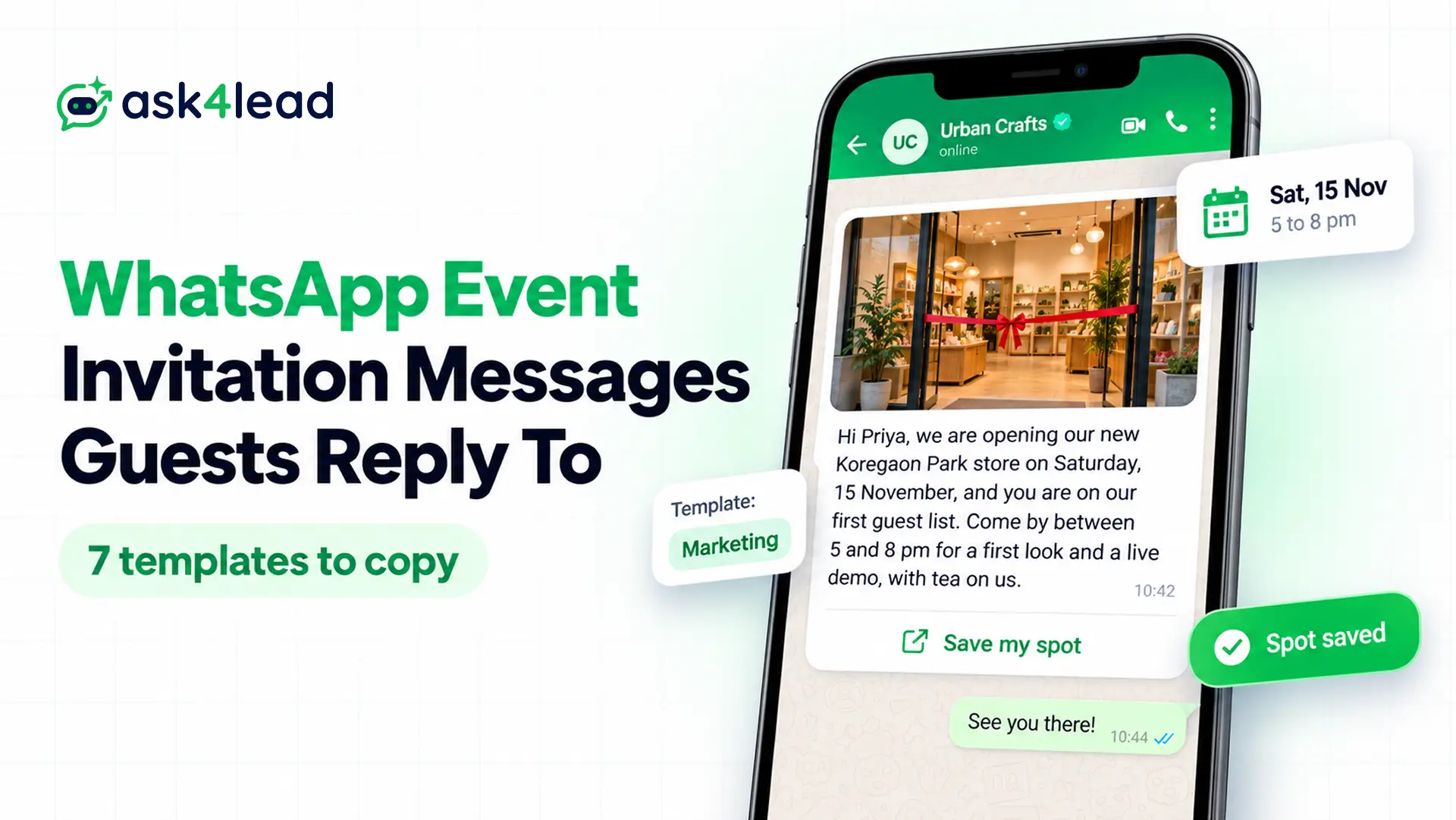
A good WhatsApp message for event invitation puts the event, date, time and place in the first 2 lines, then asks for 1 reply. Below, you get 7 templates to copy, and each one shows its Meta category, variables and buttons.
If you run events often, you can also see how a WhatsApp AI agent for events handles attendee questions after the invites go out.
7 WhatsApp message for event invitation templates
Each template covers one step you need: the invite, the RSVP, the confirmation or the reminder.
A template is a message format Meta approves in advance. You need one when you message a guest first, or after the 24-hour customer service window closes. Meta also asks for a sample value for every variable ({{1}}, {{2}} and so on).
1. WhatsApp invitation message for a store launch event
Hi {{1}}, we are opening our new {{2}} store on {{3}}, and you are on our first guest list. Come by between 5 and 8 pm for a first look and a live demo. Tap below to save your spot, so we can plan the seating.
Header: photo of the store · Button (URL): Save my spot
Variables: first name, area, date. Category: marketing.
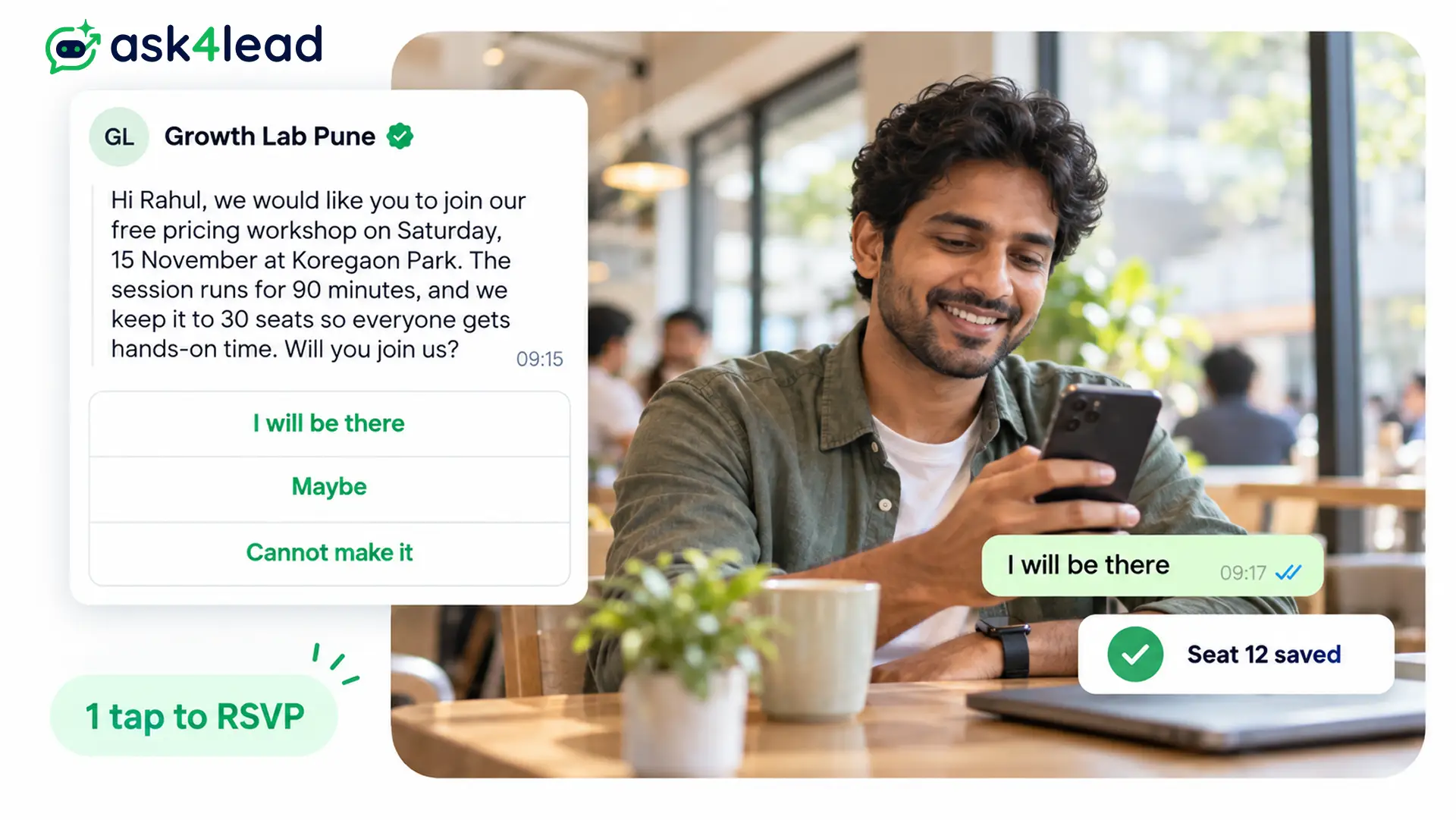
2. Workshop event invitation message with WhatsApp RSVP buttons
Hi {{1}}, we would like you to join our free {{2}} workshop on {{3}} at {{4}}. Since we keep it to 30 seats, everyone gets hands-on time. Will you join us?
Quick replies: I will be there | Maybe | Cannot make it
Variables: first name, topic, date, venue. Category: marketing. Because it uses quick replies only, you also reach guests on WhatsApp desktop.
3. Webinar invitation with a registration link
Hi {{1}}, our free webinar on {{2}} goes live on {{3}} at {{4}} IST. You can ask questions at the end, too. Tap below to register, and then we will send the joining link to this chat.
Button (URL): Register free
Variables: first name, topic, date, time. Category: marketing.
4. Ticketed event invitation message for WhatsApp
Hi {{1}}, tickets for {{2}} on {{3}} at {{4}} are now open. Entry costs Rs {{5}} and also includes lunch. Since the hall holds 200 guests, early booking gets you a better seat.
Button (URL): Book tickets
Category: marketing. Write the currency as text before the variable (“Rs {{5}}”), because Meta rejects symbols such as $ inside a variable.
5. Registration confirmation
Hi {{1}}, thank you for registering for {{2}}. Your seat number is {{3}}, and the event starts on {{4}} at {{5}}. Show this message at the entrance, or reply here for directions.
Quick replies: Need directions | Cannot attend
Category: utility, because your guest’s own sign-up triggers it and it carries no offer.
6. Event reminder the day before
Hi {{1}}, a reminder that {{2}} starts tomorrow at {{3}} at {{4}}. Doors open 30 minutes early, so plan to arrive a little before. If your plans have changed, tap below and we will offer your seat to the waitlist.
Quick replies: Still coming | Cannot come now
Category: utility, as long as you add no upsell.
7. Personal event invitation (no template needed)
Hi Meera, we are celebrating our housewarming on Sunday, 9 November, from 6 pm at our new home in Baner, Pune. It would mean a lot to have you with us, so please reply by Wednesday. Here is the location: [map link]
For a wedding, birthday or puja, you type this from your own WhatsApp, so no approval applies.
Variables every event invitation needs
Every WhatsApp message for event invitation carries the same 5 details, and your guests decide in the first 2 lines. So the date, time and place go there. Also keep fixed words around every variable, because Meta rejects a body made mostly of variables.
| Variable | Sample value | Tip |
| Guest name | Priya | Use it once, in the greeting |
| Event name | Pricing Masterclass | Keep it short so it reads on a phone |
| Date | Saturday, 15 November | Add the weekday, since guests plan by day |
| Time | 11 am IST | Add the time zone when guests join online |
| Venue or link | Koregaon Park, Pune | Put map or join links in a URL button instead |
Is a WhatsApp message for event invitation utility or marketing?
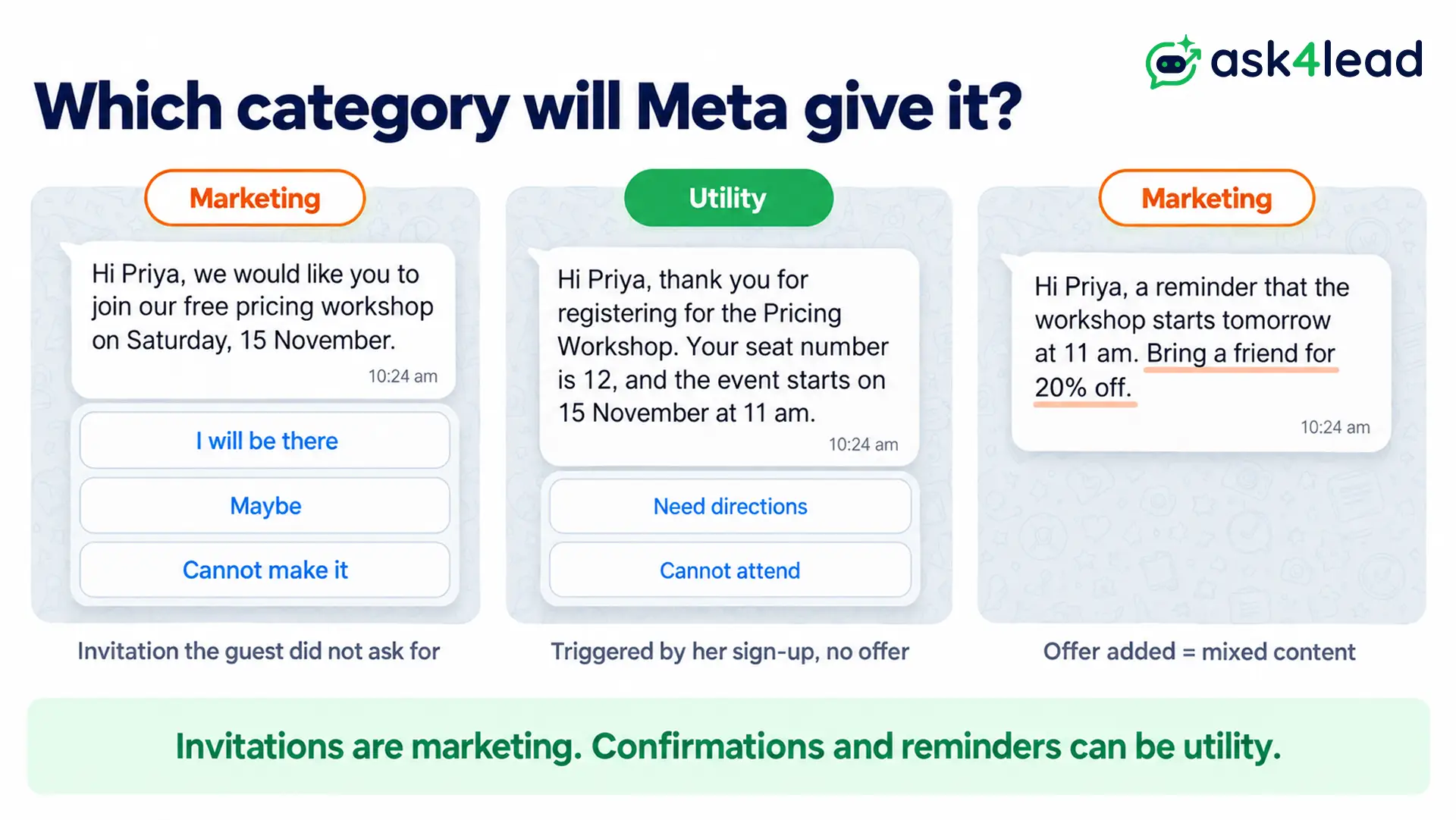
An invitation is marketing. In fact, Meta’s template categorization page uses a festival invitation (“Join us at {{location}} on {{date}}”) as its own marketing example.
By contrast, Meta treats a message as utility when the user’s own action or request triggers it and it promotes nothing. So a confirmation or reminder for a registered guest can be utility. However, a promo added to either one makes it marketing.
| Message | Likely category | Why |
| Templates 1 to 4 (invitations) | Marketing | Because the guest did not ask for them |
| Template 5 (confirmation) | Utility | Because the guest’s sign-up triggers it |
| Template 6 (reminder) | Utility | As long as it carries no offer |
| Reminder plus a discount code | Marketing | Because mixed content counts as marketing |
Marketing costs more than utility on Meta’s pricing page, and Meta charges per delivered template. For that reason, budget every WhatsApp message for event invitation at the marketing rate. The 2026 WhatsApp API pricing breakdown lists rates by country.
RSVP buttons that work on phones and desktop
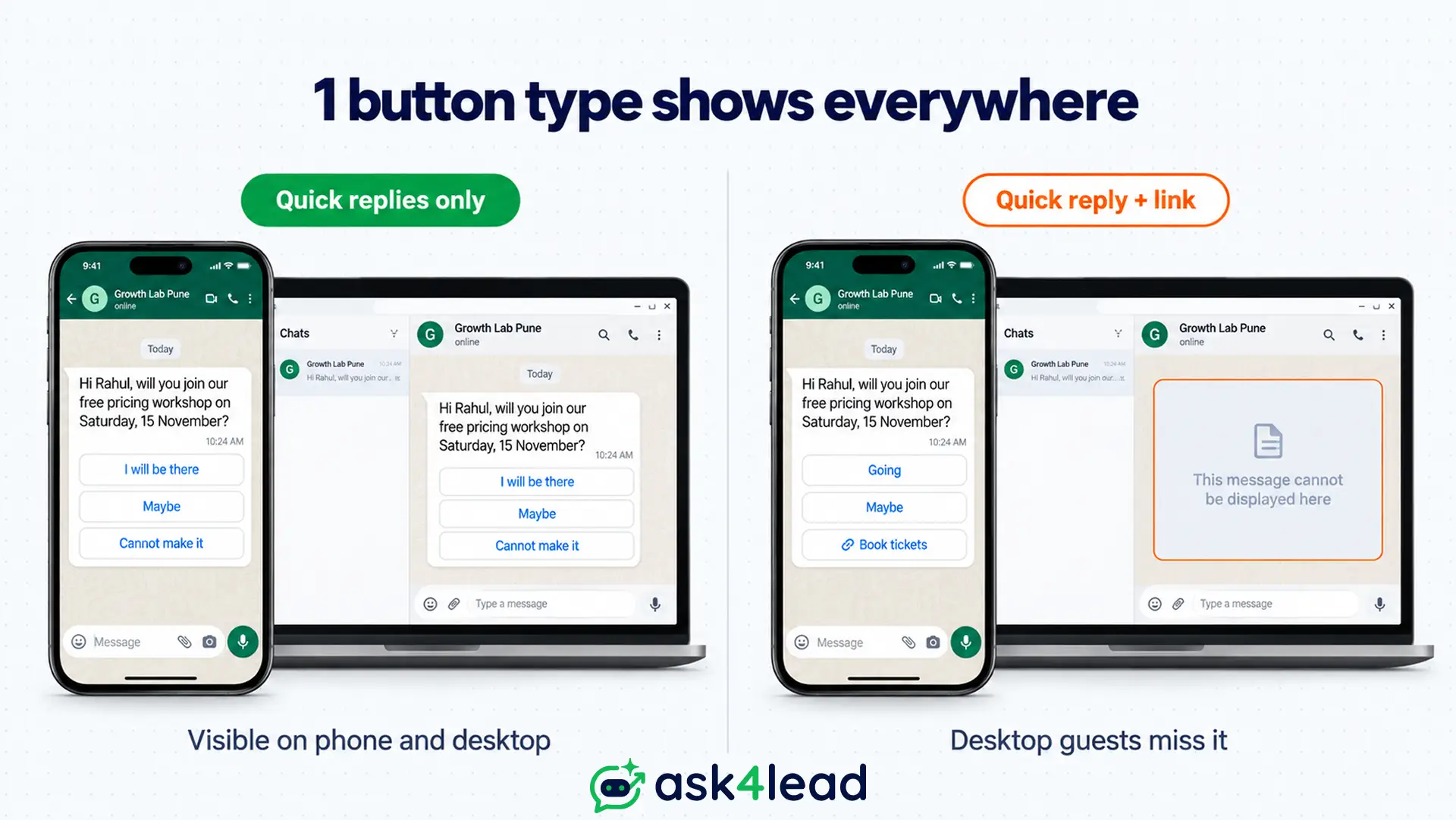
Meta’s template component limits allow up to 10 buttons, 2 URL buttons and 25-character quick reply labels. Even so, 2 display rules matter more for a WhatsApp event invite:
- More than 3 buttons: WhatsApp shows 2 and hides the rest behind “See all options”.
- Mixed button types: WhatsApp desktop cannot show a template with a quick reply plus a URL or call button.
For example, “Going”, “Maybe” and a “Book tickets” link look tidy in the builder. Yet your guest who reads WhatsApp on a work laptop then sees nothing. So pick 1 type per template: quick replies for an RSVP, or a URL button for sign-ups.
Why event invitation templates get rejected
When Meta rejects a WhatsApp message for event invitation, the cause is usually the variables, not the invite itself. Meta’s template review page lists these causes:
- Too many variables for the length of the message.
- A variable opens or closes the body, for instance “{{1}}, join us” instead of “Hi {{1}}, join us”.
- Numbers skip, such as {{1}}, {{2}}, {{4}}.
- Special characters inside a variable, such as #, $ or %.
- Missing sample values for any variable.
Here is a before and after. The draft “{{1}} {{2}} Date: {{3}} Time: {{4}} Venue: {{5}} Link: {{6}}” opens with a variable and is almost all placeholders. In contrast, template 4 carries the same details in full sentences and moves the link into a button.
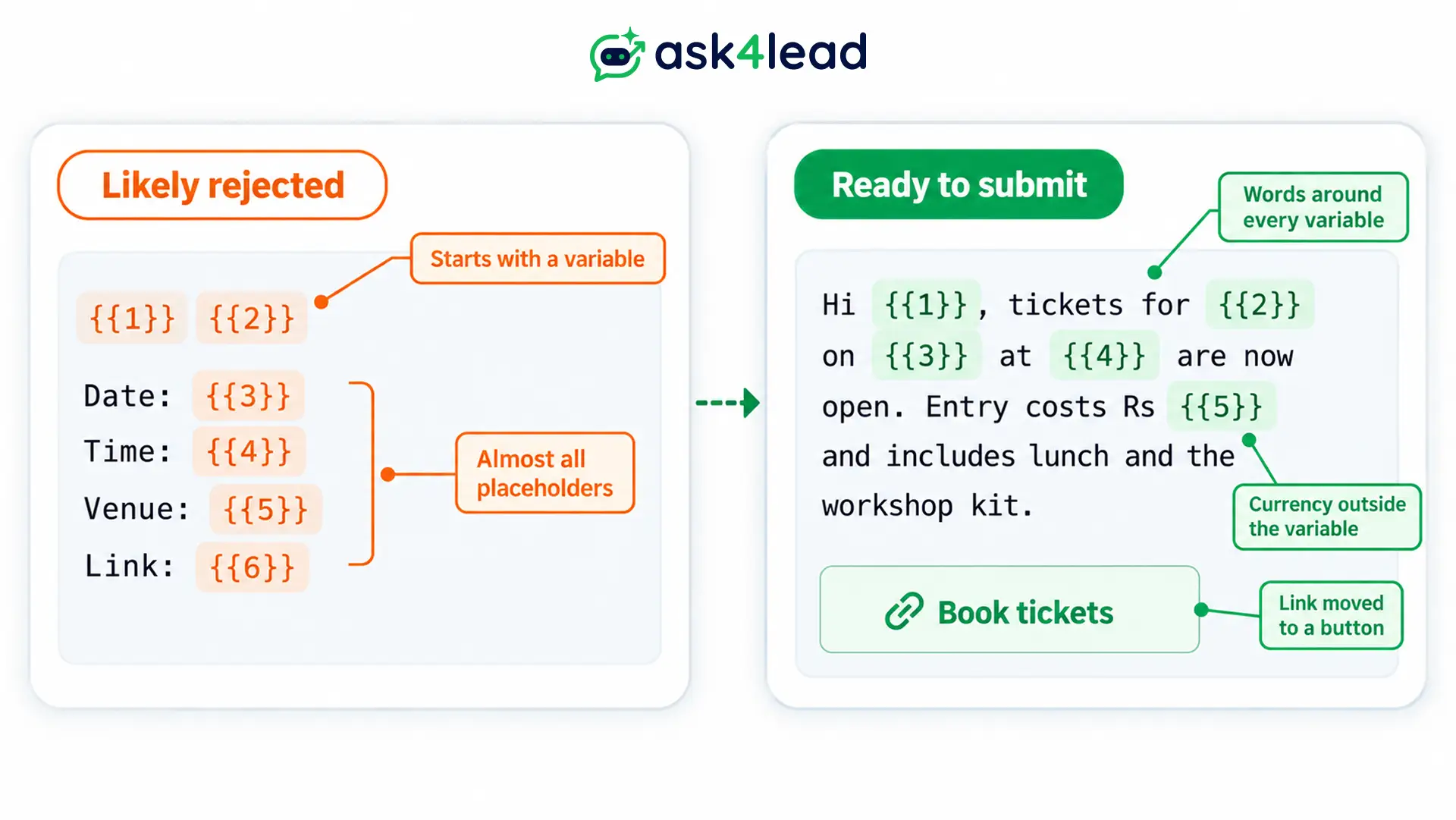
For more causes, see common WhatsApp template rejection reasons. Then, if the venue changes, you can edit an approved WhatsApp template.
When to send each event message: a worked example
Take a free Saturday workshop with 30 seats. This plan keeps each of your guests to 4 messages at most:
- 14 days before: send template 2 to contacts who opted in to WhatsApp messages.
- Right after “I will be there”: the tap opens a 24-hour window, so you can send the confirmation as a normal reply.
- 7 days before: send 1 follow-up to “Maybe” replies only, and then stop.
- 1 day before: send template 6 to everyone who confirmed.
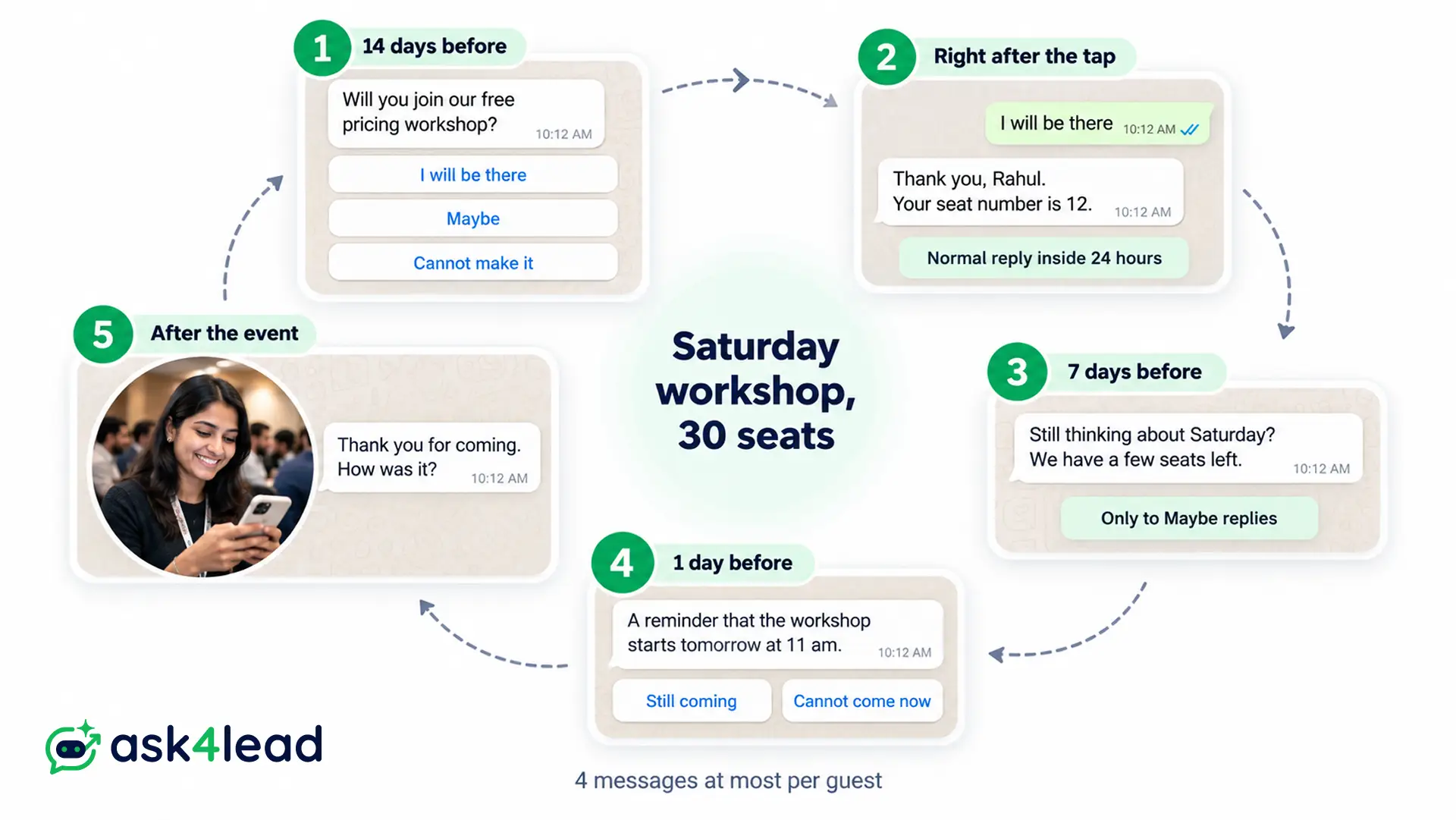
After the event, a review request message closes the loop. You can also schedule WhatsApp messages ahead, so the reminder still goes out on a busy setup day.
This plan does not apply to people who never agreed to WhatsApp messages. Messages to them lead to blocks, and blocks then lower your WhatsApp quality rating.
Personal events and groups: use WhatsApp Events
For a wedding or a society meet-up, you do not need templates for your WhatsApp event invitation. Instead, open the group, tap the attachment icon, choose Event, and add the details.
According to WhatsApp’s Events announcement, members can respond so the whole group sees who is coming. On top of that, people who say yes get a notification when the event is close.
Meanwhile, if you send a WhatsApp message for event invitation from the free Business App, you get no templates or buttons. Its broadcasts also reach only people who saved your number. The App vs API comparison covers when to switch.
Which WhatsApp event invitation to send first
Start with templates 2 and 5, because an RSVP plus a confirmation covers most small events. Once those run cleanly, add the reminder, and then the ticketed invite if you charge entry.
Before you submit, check that you have:
- The date, time and place in the first 2 lines
- 1 button type per template, and 3 buttons or fewer
- Fixed words around every variable, with samples
- No offer inside a confirmation or reminder
Send every WhatsApp message for event invitation from one place
Copying invites from a personal phone stops working once your guest list grows, and RSVPs then get lost across chats. Ask4Lead therefore keeps invites, replies and reminders together:
- Template builder: pick Marketing or Utility, add an image header and quick replies, and preview it on a phone.
- WhatsApp Campaigns: filter guests by tag or pipeline stage, then send now or at a set time.
- AI Sales Assistant: answers “is there parking?” in plain English from your event details.
- Shared team inbox: every RSVP lands in one inbox, so any teammate can reply.
Ask4Lead sells this software, and each feature named here is on its features pages.
Sign Up Free on Ask4Lead: 100 AI Credits Included
FAQs
1. How do I write a WhatsApp message for event invitation?
Put the event name, date, time and place in the first 2 lines, then ask for 1 reply. Templates 1 to 4 follow that order.
2. Can a business send event invitations on WhatsApp?
Yes, to contacts who opted in, through an approved marketing template. So budget for the marketing rate.
3. How do guests RSVP on WhatsApp?
They tap a quick reply such as “I will be there”. In a group, WhatsApp Events also lets members respond inside the event.
4. Is an event reminder utility or marketing?
It is usually utility when the guest registered and it has no offer. However, a discount makes it marketing.
5. How many variables can an event template have?
Meta sets no fixed number, but it rejects templates with too many variables for their length. So keep full sentences around each one.
