
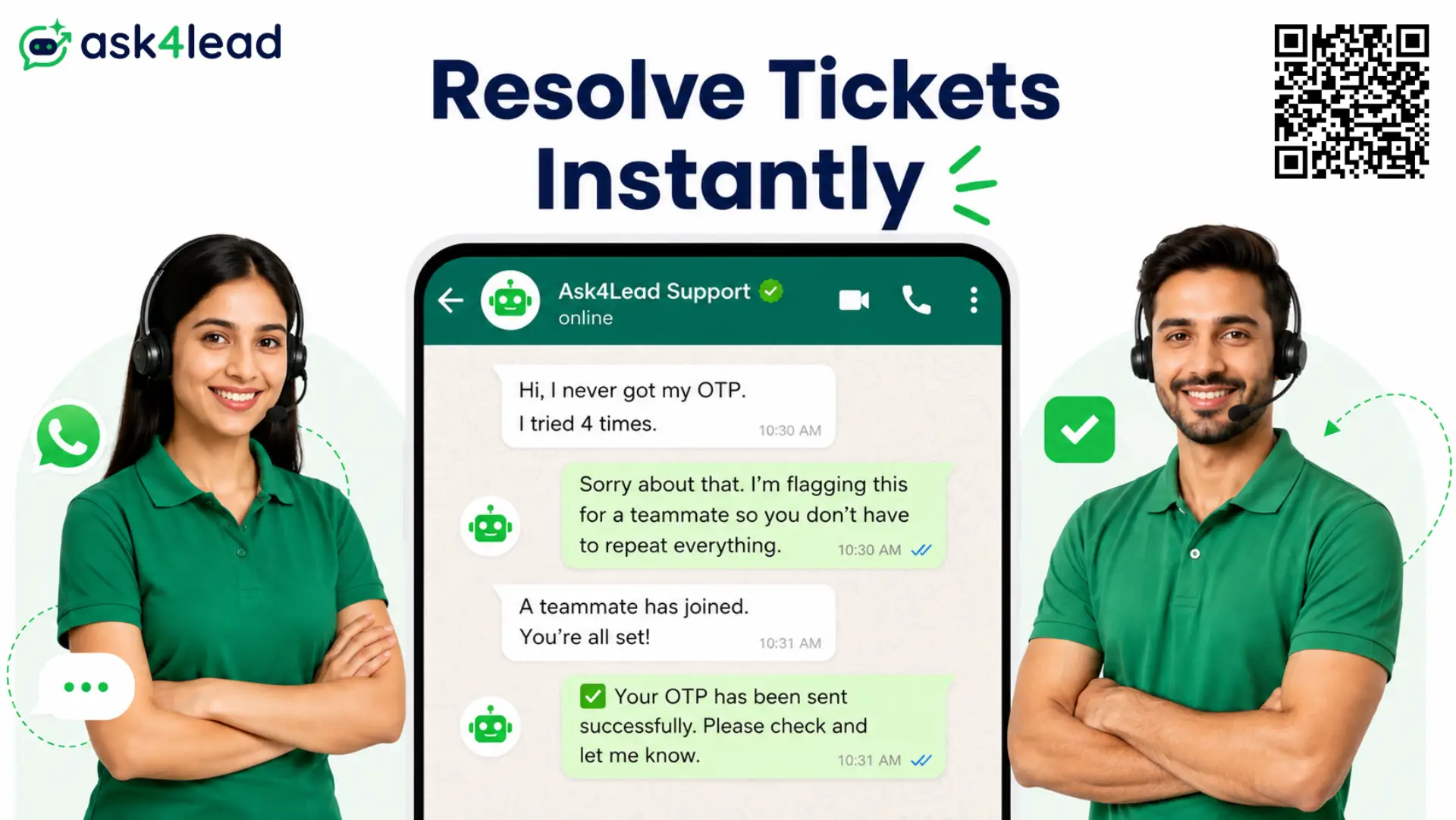
A WhatsApp AI agent for customer support, like Ask4Lead, holds a real, plain-English conversation with customers instead of a button menu.
It reads what a customer already told it, resolves routine tickets on its own, and hands anything complex to a human with full context attached.
The result: fewer repeat questions clogging your queue, and an inbox your team can actually keep up with, 24 hours a day.
Sign Up for Free – 100 AI Credits · Chat with us on WhatsApp
Signs Your WhatsApp Support Has Outgrown Manual Replies
Most support backlogs aren’t a headcount problem. They’re a symptom of one phone trying to do a team’s job.
- Messages sit unread for hours because one phone, one person, is the whole system
- The same question gets 3 different answers from 3 different staff members
- A rigid menu (“Press 1 for Orders”) can’t handle anything off-script
- Nobody can say who is handling which customer right now
- Senior agents spend their day on resets and status checks, not real problems
This is the exact gap Ask4Lead is built to close. Not by replacing your team, by taking the repeat questions off their plate first.
Generic Chatbot vs. Ask4Lead’s AI Agent
A menu-only bot and a real AI agent look similar for the first message. They fall apart differently after that.
| What the Customer Says | Menu-Only Bot | Ask4Lead AI Agent |
| A question off the menu | Loops back to the same options | Answers in plain English, no menu |
| “I already told you this” | Starts the conversation over | Reads the full thread, remembers |
| Something outside its training | Guesses at an answer anyway | Says “I’m not sure” and escalates |
| A question from your own policy | No idea, generic reply | Answers from your uploaded knowledge base |
Grounded Answers From Your Own Knowledge Base
Every reply is pulled from your uploaded help center articles and policies via the AI Knowledge Profile, never a generic guess from the open internet.
Full-Conversation Understanding, Not One Message at a Time
Customers send a burst of short messages, not one tidy line. Ask4Lead’s AI conversation engine reads the whole thread before it replies.
Why “WhatsApp Already Has an AI Assistant” Doesn’t Solve This
Meta’s built-in WhatsApp AI assistant sounds like enough, until a real team sits behind the number.
- No memory of your refund policy or error-code library
- Can’t tell a billing question from a security one
- Lives on one phone, one device, one person at a time
- Can’t hand a ticket to a teammate with its history attached
Ask4Lead runs on that same number, connected through Meta’s official WhatsApp Business Platform instead of an unofficial workaround, so it stays safe from bans.
Every chat lands in a shared team inbox your whole team works from together, not one device.
See Your Support Inbox on Ask4Lead – Sign Up Free
A Real Support Conversation, Start to Finish
Unlike a scripted bot, Ask4Lead reads what a customer already told it and never makes them repeat themselves.
Customer: “Hi, I never got my OTP to log in. I’ve tried resending it 4 times, this is the third time I’m messaging about this.”
Ask4Lead AI: “Sorry about that, and thanks for the details on what you’ve already tried. Since resending hasn’t worked 4 times, this looks like a delivery issue on our end. I’m flagging this for a teammate to check your account directly.”
Customer: “Okay, thank you, I was getting really frustrated.”
Ask4Lead AI: “Completely understandable. I’ve attached everything you told me so whoever picks this up already has the full picture.”
Notice what it didn’t do: repeat a fix the customer already tried, or fake a solution outside its control. It named the real cause and handed off with full context attached.
How Escalation Actually Works (No Dead Ends)
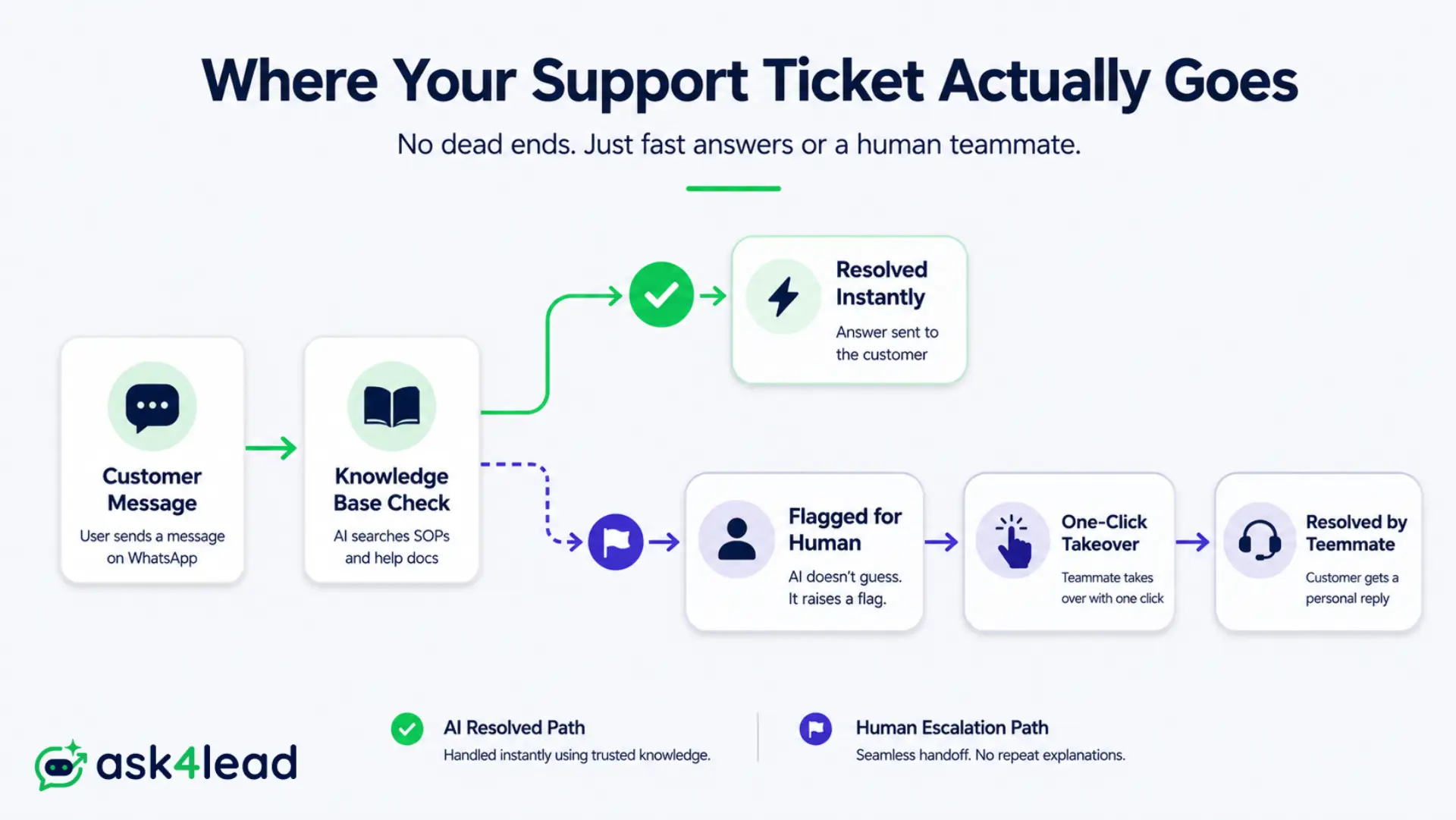
Every conversation can be taken over by a human with one click, at any point. It stays with that human until they hand it back.
1. One-Click Human Takeover, Not a Dead End
The single biggest complaint about AI-only support is getting stuck in a loop with no way out. Ask4Lead’s human approval control lets any teammate take over one conversation instantly, with the AI paused on that thread until handed back.
2. Automatic Flagging for High-Severity Conversations
A furious VIP, a privacy question, a payment dispute, these get flagged the moment the agent detects them. A manager sees it in the work queue before it becomes a public complaint.
3. Human Sign-Off on Every Sensitive Reply
Anything touching a refund amount or account change waits for a human’s approval before it reaches the customer. “The AI promised something we can’t honor” never becomes a real problem.
Give Your Team a Safety Net – Sign Up Free
What This Actually Costs, and Where Support Tools Hide Fees
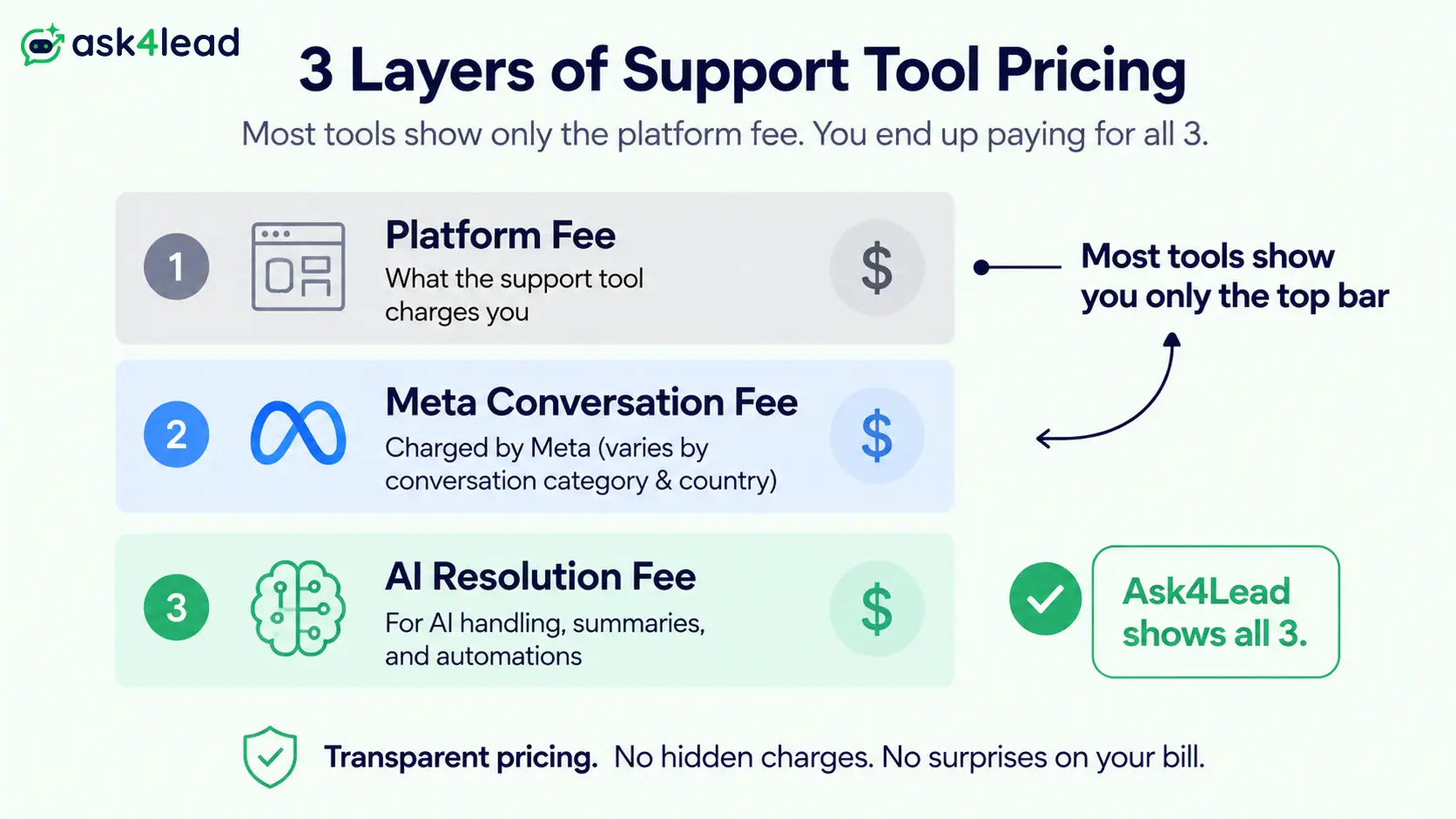
Most WhatsApp support tools bill in 3 hidden layers. Only one of them ever makes it onto the pricing page.
The 3 Hidden Fee Layers
| Cost Layer | Typical WhatsApp Support Tool | Ask4Lead |
| Platform fee | Fixed monthly subscription | Free trial, then pay only for what you use |
| Meta conversation fee | Billed separately, easy to miss | Same Meta rate, visible alongside your usage |
| AI resolution fee | Often per ticket, uncapped | ₹0.50 per credit via Razorpay |
What 100 Free Credits Actually Covers
- No card required to start
- Every resolved conversation tracked in the AI dashboard
- No separate seat fee for adding teammates to the shared inbox
Core Features Built for Support Teams
| Feature | What It Does for Your Team |
| Plain-English conversation | Diagnoses issues through real dialogue, not a fixed menu |
| Knowledge-grounded answers | Reads your help center and policies instead of guessing |
| Human approval before send | Sensitive replies wait for a teammate’s sign-off, every time |
| Shared team inbox | Every support tier works the same queue from one number |
| 9-stage CRM pipeline | Tracks each ticket visually from first message to resolved |
| AI dashboard | Shows resolution rate and response time in one view |
The 9-stage pipeline doubles as a ticket tracker, giving your team the same visibility a dedicated helpdesk tool would, without a second login.
Real Scenarios That Protect Customer Trust
| Scenario | What Happens |
| Midnight login lockout | AI verifies identity, sends a secure reset link in seconds, no ticket waiting by morning |
| Angry refund escalation | AI detects the tone, flags it instantly, a manager takes over with order history already attached |
| Planned outage broadcast | A WhatsApp broadcast alerts customers while the AI fields the “is it back yet?” replies |
FAQs
1. Does the WhatsApp AI agent replace our support team?
No. It resolves routine, well-documented requests and escalates anything complex or emotionally charged to a human with full context attached.
2. How is this different from WhatsApp’s own built-in AI assistant?
The native assistant works from generic knowledge on one device. Ask4Lead is grounded in your own policies and runs through a shared inbox.
3. What happens if the agent can’t answer a question?
It says so, flags the conversation, and hands it to a teammate with everything the customer already said, instead of guessing.
4. Will customers ever get stuck talking to the AI with no way to reach a person?
No. Any teammate can take over a conversation with one click, at any point, and the AI stays paused until it’s handed back.
5. Can we connect our existing help center and refund policies?
Yes. Upload PDFs, help center articles, or policy documents, and the agent answers from that material only.
6. How is pricing calculated?
Pay-as-you-go credits at ₹0.50 each via Razorpay, with 100 free on signup. No separate seat fee for teammates.
If your team is IT-specific rather than general customer support, the dedicated IT service desk guide covers SOP-grounded troubleshooting in more depth.
Give Your Support Team a WhatsApp Agent That Never Ghosts a Customer
WhatsApp has grown past 2 billion users worldwide. For a growing share of your customers, it’s already their first stop for a problem, not email, not a phone tree.
A support agent that answers instantly, escalates honestly, and never leaves someone stuck in a loop keeps that channel working for you, not against you.
See the full guide to WhatsApp customer support at scale for a deeper rollout plan, or browse the other industry playbooks.