
WhatsApp AI rules are the same rules that apply to people. WhatsApp does not ban AI replies on the WhatsApp Business API, the official route Meta gives businesses to send messages from software.
An AI reply breaks the rules when it goes out after the 24-hour window, reaches someone who never opted in, opens a chat without an approved template, or leaves the customer no path to a person.
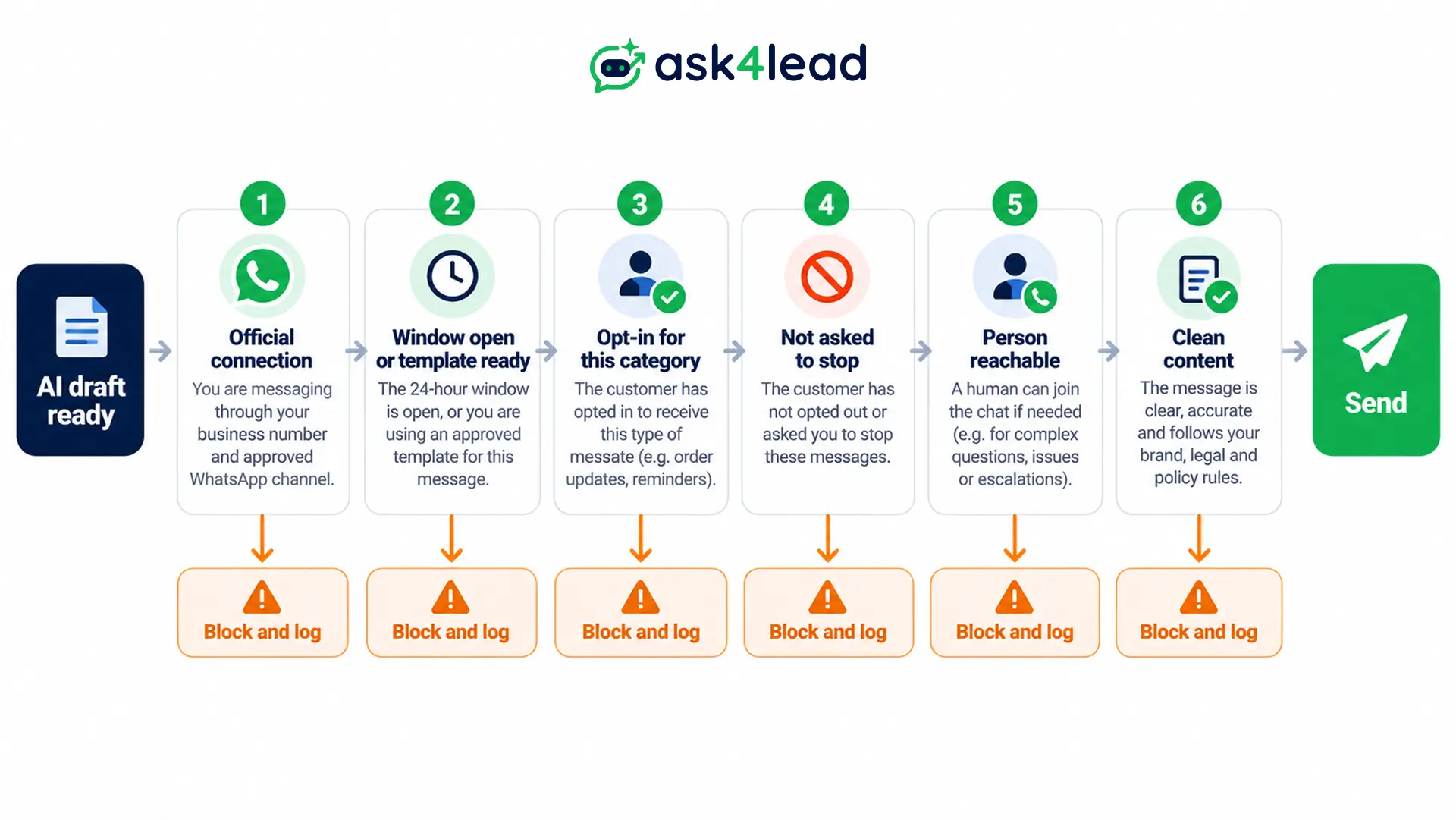
Below are six checks every AI reply should pass before it sends. You also get the one Meta rule written only for AI companies, and the failures that show up after launch.
What the WhatsApp AI rules actually say
WhatsApp has no rule against AI writing a reply. Its rules cover who you may contact, when free text is allowed, which messages need approval, and how a customer reaches a person.
They sit in Meta’s Business Messaging Policy, and an AI reply meets them exactly as a human reply does. Each rule below has a typical way an AI breaks it.
| Rule in Meta’s text | How an AI reply breaks it |
| Contact only people who opted in | The AI messages a scraped or bought list |
| Free text only inside the 24-hour window | The AI answers after the window shut |
| Start a chat with an approved template | The AI writes its own opening message |
| Honour every opt-out | The AI keeps selling after “stop” |
| Offer a path to a person | The AI loops with no way out |
| Protect customer data | The AI quotes one customer’s details to another |
Where WhatsApp AI rules start: the connection you use
Every rule above assumes you connect through the official API. WhatsApp’s consumer terms of service bar auto-messaging and non-personal use, so an AI wired to a personal number or a web wrapper breaks the rules before it writes a word. That holds at 30 messages a day and at 3.
Many builders believe human-like delays and low volume keep an unofficial setup safe. Delays change how a number looks, not what the terms allow. A number customers have known for 20 years is worth far more than the messaging fees you save.
The full ban picture covers what triggers restrictions on the official API too.
WhatsApp AI rules for the 24-hour window
The 24-hour window is the period after a customer’s latest message when you may send free-form replies. It opens and resets with each customer message, so only the customer can extend it.
An AI can reply freely inside it. Outside it, only an approved template can go out.
1. How the window opens and closes
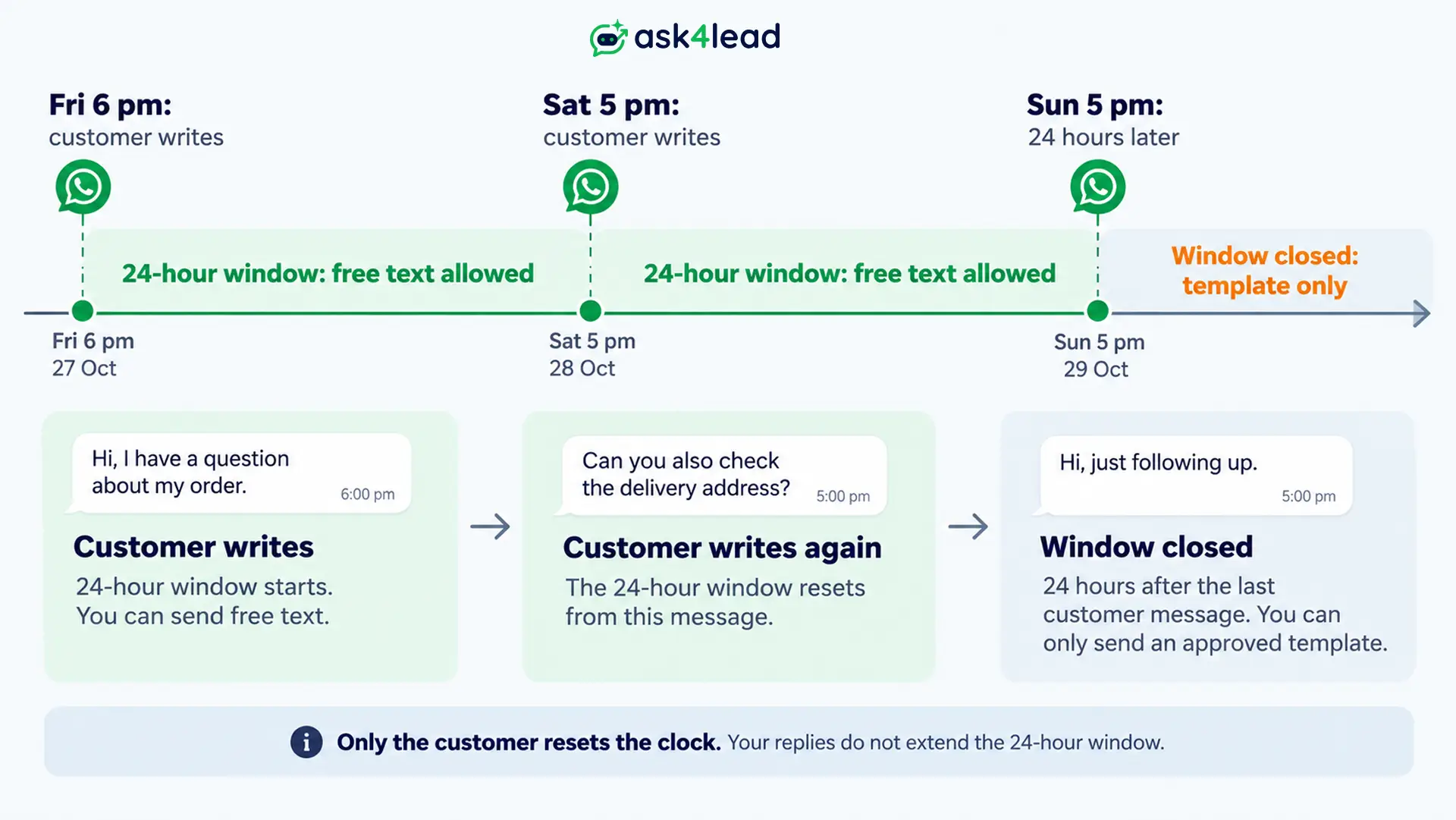
A customer writes at 6 pm on Friday. Your AI can send free text until 6 pm on Saturday. If the customer writes again at 5 pm on Saturday, the clock restarts and runs to 5 pm on Sunday.
Your own replies do not reset it. A customer who arrives from a click-to-WhatsApp ad also opens a free entry point window of up to 7 days, but that changes what Meta charges. Free text is still limited to the 24-hour window. The 24-hour rule guide walks through both.
2. Why AI replies fail silently after the window shuts
When more than 24 hours have passed, Meta returns error 131047 and tells you to send a template instead. The AI still wrote a perfect answer, and the workflow log can still look green. Builders often lose days of replies this way before anyone notices.
Three habits cause most of these failures:
- Delayed jobs: a queue sends the draft hours after the AI wrote it.
- Late approvals: a person approves a draft the next morning, after the window closed.
- Blind retries: the AI retries a failed send and fails again.
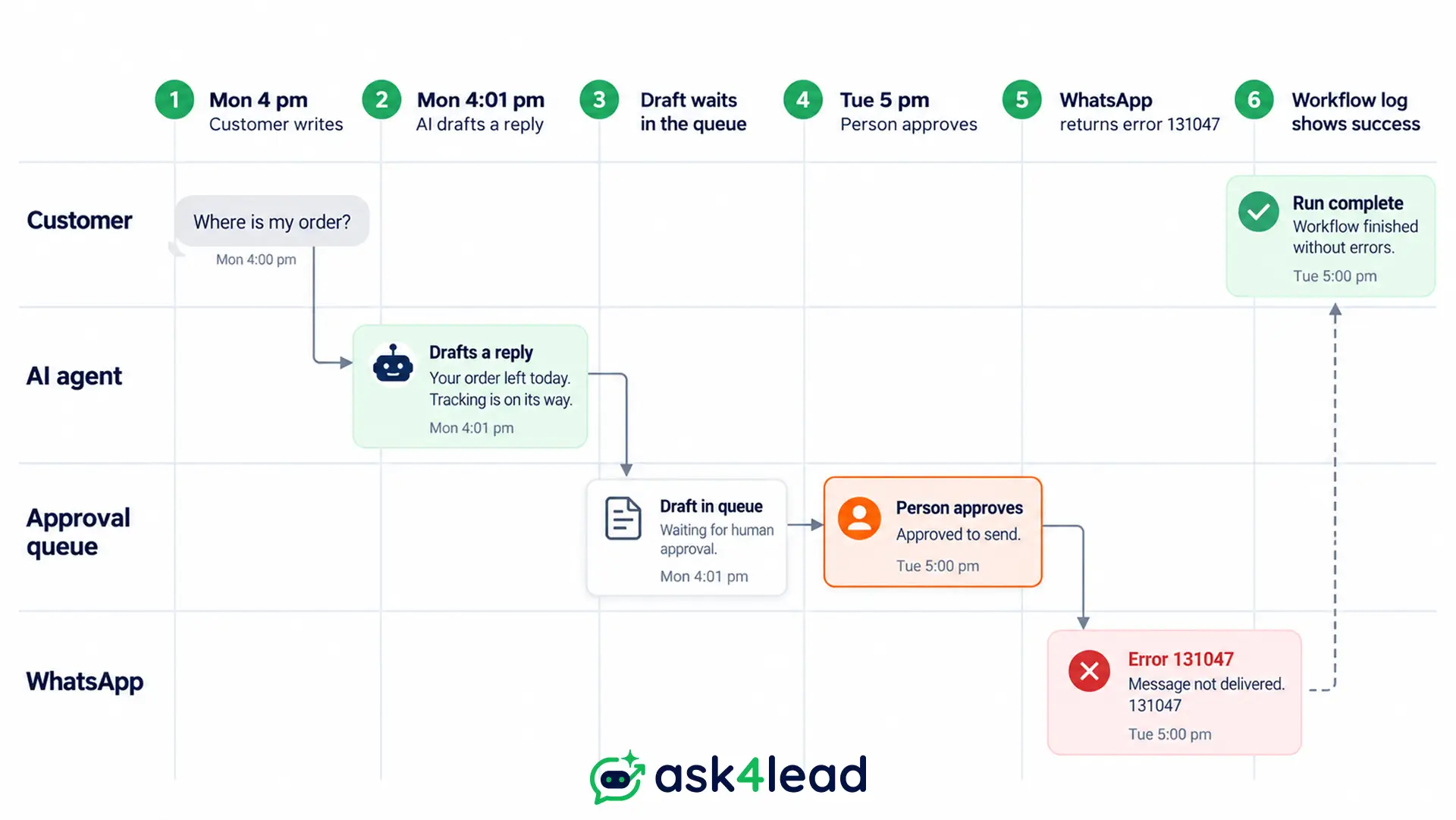
The fix is to check the last customer message time at send time, not when the draft was written. Then count failed and skipped sends separately from sent ones, and alert on error 131047.
3. What a template does and does not fix
A template can reach a customer outside the window. It does not reopen the window. Only a customer reply does that.
So write the follow-up template to earn a reply, with a clear question or a reason to answer. Then let the AI wait. Sending three templates in a row to “keep the chat open” does not work, and it feeds the block and report signals Meta watches.
Templates under the WhatsApp AI rules
Templates are message formats Meta approves before you use them. Under the rules, the AI may pick an approved template and fill its variables, but it may not rewrite the body on the fly. Meta can review, pause or reject any template at any time.
The choice depends on the situation, not on what the AI thinks is helpful.
| Situation | What the AI may send | Watch for |
| Customer wrote 2 hours ago | Free text | Counts as a service message |
| Customer silent 30 hours, you owe an update | Approved utility template | Only for something they asked about |
| Customer silent 30 hours, you want to nudge a sale | Approved marketing template | Friendly wording is still marketing |
| Customer sent “stop” | Nothing | Marketing must end |
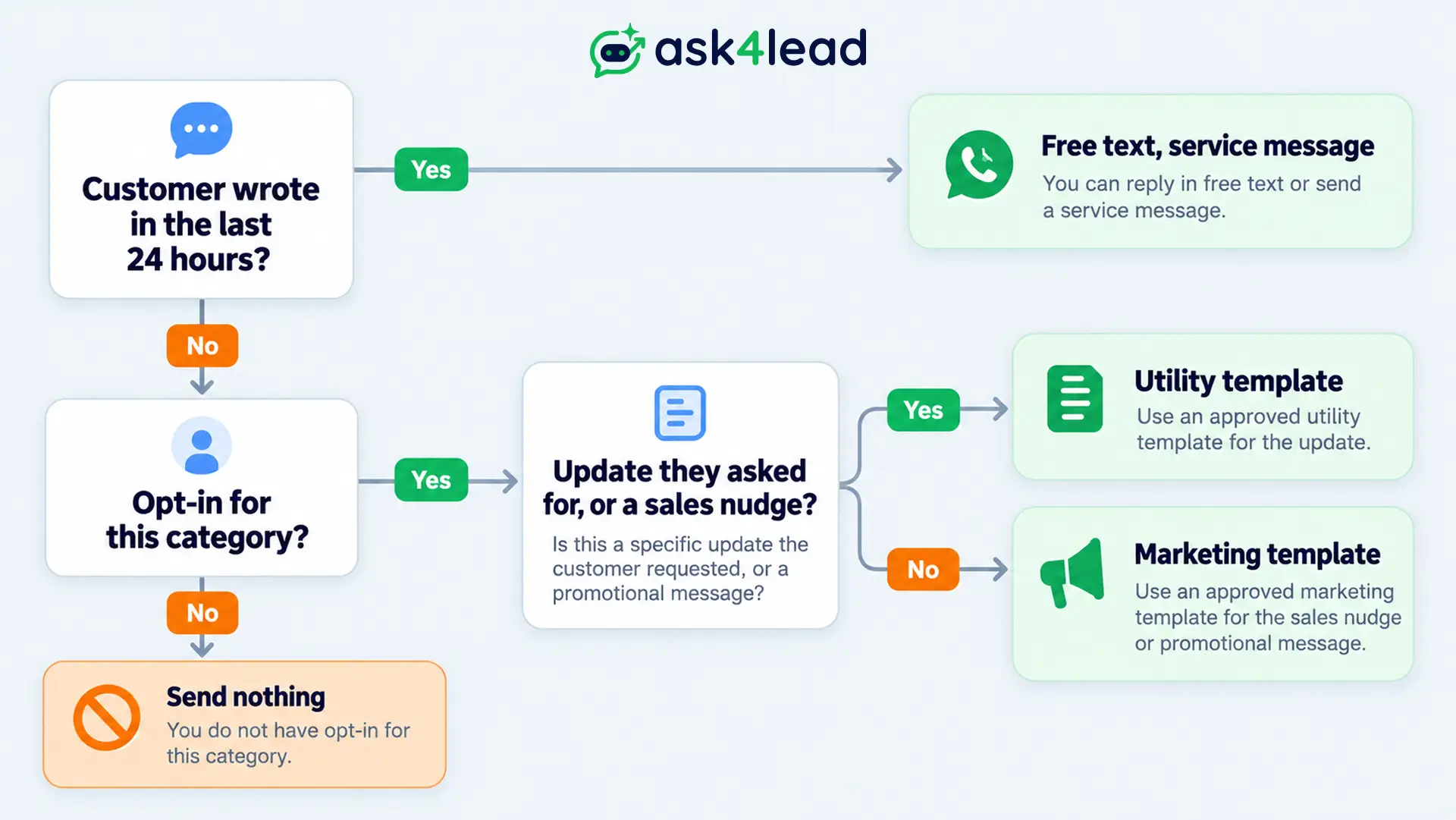
Category matters because Meta lists template misclassification among the violations that lead to restrictions. A utility template with an offer tucked inside is the classic case, and the template rejection guide shows how to fix it.
Meta can also hold back marketing templates to protect the recipient, which returns error 131049. An AI that chases cold leads with templates hits that wall quickly.
Opt-in under the WhatsApp AI rules
Meta allows contact only when the person gave you their number and agreed to hear from you on WhatsApp. A customer who messages you first can receive replies to that question. That does not cover later marketing, and it does not let the AI start new chats.
Many people struggle with what counts as acceptance. Meta says you choose the method and you carry the responsibility for it. A form checkbox that names WhatsApp works, so does a “reply YES” message, as long as you keep a dated record.
If someone fills a web form, you can message first only when the form said WhatsApp messages would follow. Even then, the first message must be an approved template.
Three AI-specific habits keep opt-in clean:
- Stop words: the AI recognises “stop”, “unsubscribe” and local-language versions, then ends marketing without arguing.
- Per-category consent: order updates and offers need separate permission, which Meta recommends as best practice.
- Check before choosing: the opt-in record for that contact and category loads before the AI picks a template.
The opt-in and consent guide covers collection methods and the legal layer.
The WhatsApp AI rules written for AI companies
Meta’s Platform Terms contain one clause aimed at AI companies, not at businesses using AI. Section 4.7 bars AI providers from using the Business API to offer their AI as the main product. A support bot that answers for your own business sits outside that ban.
Meta applies the clause “in its sole discretion” and has not published a list of edge cases. A practical test is whether customers would still message the number if a person answered instead.
If yes, your AI is a front desk, not the product. The clause took effect for existing users on 15 January 2026, and Meta later exempted Italy and Brazil after regulators there stepped in.
Most businesses should care more about the second half of that clause. You must not let WhatsApp platform data train AI models, except fine-tuning a model for your exclusive use. Ask your AI vendor to confirm this in writing. The 2026 terms changes post lists every dated update.
Escalation in the WhatsApp AI rules: the path to a person
The WhatsApp AI rules let you automate replies inside the window, but only with a prompt, clear and direct way to reach a person. The policy lists six options: in-chat transfer to a human agent, a phone number, an email, web support, an in-store visit, or a support form. Meta does not say how many you need, so offer the in-chat option plus one more.
The failure here is a bot that says “I cannot help with that” and repeats it. Set rules for when the chat moves to staff, then test them. The human handoff guide has the triggers.
Should the AI say it is an AI? Meta’s policy text has no line demanding it, but it bans misleading people about your business. In the EU, the AI Act has required telling people they are dealing with an AI system since 2 August 2026. An opening line such as “I am the AI assistant for Rao Dental” is the safe default.
What the AI says: content, data and money
An AI can break the WhatsApp AI rules on content without anyone noticing, because it answers fast and at volume. Meta’s policy sets limits that most prompts never mention:
- Sensitive numbers: never ask for or share full card numbers, financial account numbers or ID numbers.
- Customer data: never forward details from one customer’s chat to another customer.
- Barred goods and services: debt collection, payday loans and several other categories are prohibited outright.
- Health data: do not request health information where local regulations forbid it.
Shared knowledge bases create the second risk. If the AI reads from one pool of past chats, it can leak a name or order from another customer. Keep the knowledge to your own business information, not raw conversations. Wrong prices and invented refund promises break no Meta rule, but your customers will still hold you to them.
How WhatsApp enforces its AI rules
Meta enforces on the account, not on the AI. According to its enforcement page, a warning comes first. Then restrictions grow: a 1 or 3 day block on template sends, a 5, 7 or 30 day block on all sending, an indefinite lock, and finally permanent removal. Severe harm such as scams brings immediate removal.
Negative feedback also counts. Blocks and reports can limit how many messages you send, so watch your quality rating every week. Appeals usually get a decision within 24 to 48 hours, but not every spam violation can be appealed. The banned vs restricted guide explains which one you are facing.
Subscribe to the account_update webhook so a warning reaches your team on the day it lands.
Human review: where to draw the autonomy line
The safest reading of the WhatsApp AI rules is to let the AI answer alone on low-stakes questions such as opening hours, order status and FAQs. Send pricing, refunds, complaints and angry messages to a person for approval. This keeps the risky replies visible and the fast ones fast.
Four habits keep that review honest:
- Window clock on every draft: show when the window closes, and expire the draft when it does.
- Two counters: log sent and skipped, so a message that matched no rule does not vanish.
- Phone-reachable kill switch: one tap should pause all AI sending.
- Edit history: store the AI draft beside the approved version with a one-line reason. Change prompts only after the same fix repeats across several chats.
Run these through the AI agent testing guide before a real number goes live.
FAQs
1. Can WhatsApp ban me for using AI replies?
Not for using AI. WhatsApp restricts accounts for spam, missing opt-in, unofficial tools and heavy blocking, whoever wrote the message. Connect through the official API and the WhatsApp AI rules allow the AI.
2. Can the AI reply after 24 hours?
Only with an approved template. Free text outside the window fails with error 131047, and the window reopens only when the customer writes again.
3. Do the WhatsApp AI rules require opt-in if the customer messaged first?
Not to answer that customer’s question. You still need opt-in before you send marketing or start later chats.
4. Do the WhatsApp AI rules ban ChatGPT-style models?
No. Running a language model behind your own support bot is fine. The ban targets AI companies that distribute their assistant on WhatsApp as the main product.
5. Do I have to tell customers they are talking to an AI?
Meta’s policy text does not require a label. EU law does, since 2 August 2026, and a short disclosure line is the safe default everywhere. Ask a lawyer for your market.
6. What does an AI reply cost?
A free-form AI reply is a service message. Meta gives 1,000 free per business number each month, then charges, about ₹0.115 per message in India. The pricing breakdown shows the other categories.
7. Which error means the window has closed?
Error 131047. It means more than 24 hours have passed since the customer last replied.
Conclusion
An AI reply is safe under the WhatsApp AI rules when it passes the same checks as any message: an official connection, an open window or an approved template, a valid opt-in, a path to a person, and clean content.
Build those checks into the send step, not into the prompt, because a prompt can forget and a guard cannot.
Before an AI reply sends, check that:
- The connection is the official WhatsApp Business API
- The customer wrote within the last 24 hours, or a template is ready
- The contact opted in for this message category
- The customer has not asked to stop
- A person is one tap away
Next, run the failures above on a test number, then add one guard at a time.
Worried one AI reply will cost you your number?
Ask4Lead gives you control at each point where an AI reply can go wrong. Human Approval for AI Replies can force sign-off on every reply and logs the name of who approved it.
Audit Logs record who approved or edited a drafted reply, so you can prove what went out.
The AI Knowledge Profile keeps answers grounded in your own business information. WhatsApp Account Health shows your quality rating and messaging limit before a drop becomes a restriction.
