
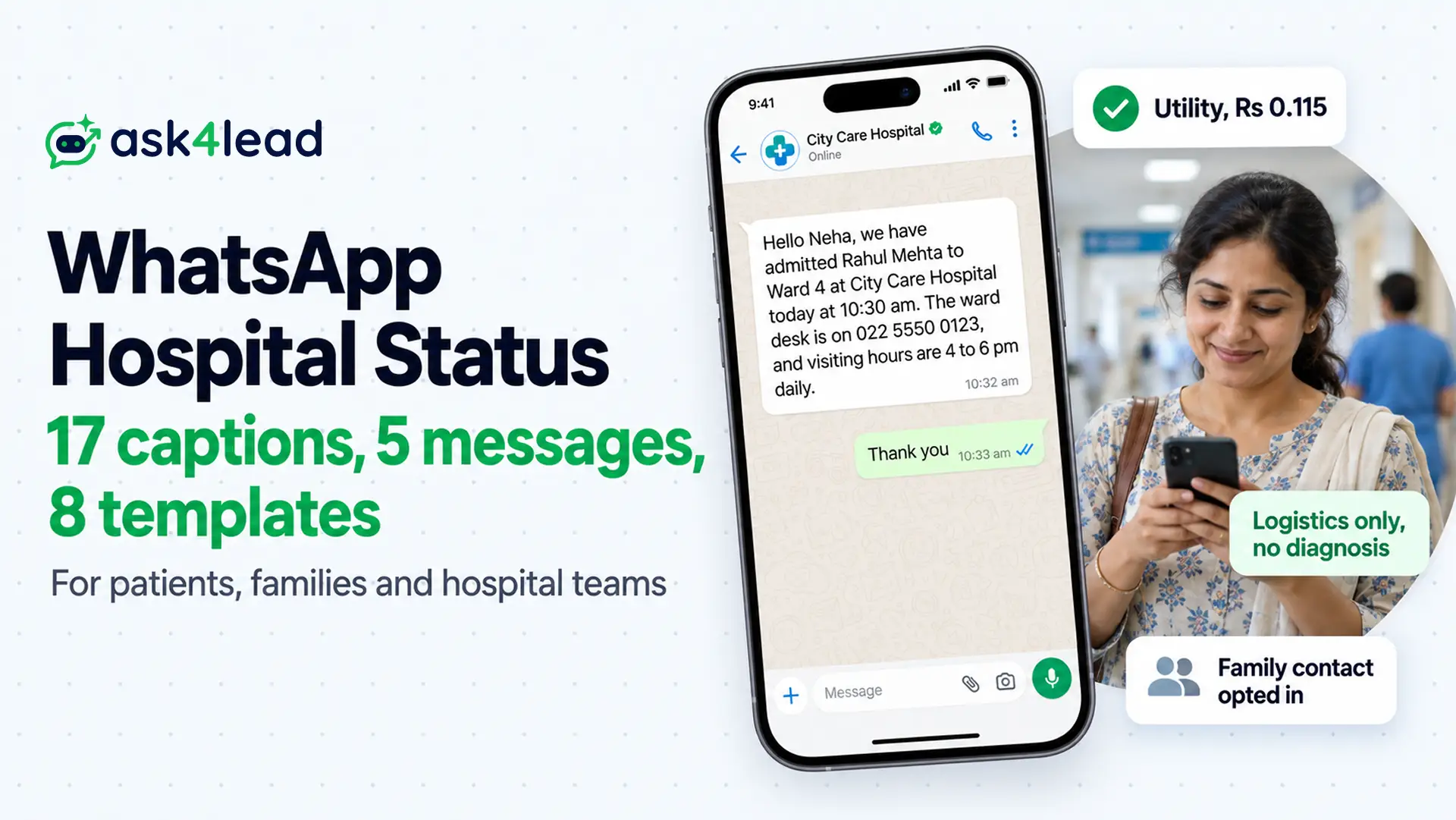
A WhatsApp hospital status is a short update that tells people you, a relative or a patient is in hospital. However, it can take three forms: a Status post that vanishes after 24 hours, a message to family or work, or a template that a hospital sends to a patient’s family.
So below you get 17 captions for WhatsApp Status, 5 update messages and 8 hospital templates, each with its Meta category. If you run a hospital or clinic, read the cost section first, because one promotional line turns a ₹0.115 update into a ₹0.8631 one.
Which WhatsApp hospital status do you need?
People who search for a WhatsApp hospital status want one of three things, but each follows different rules. So pick your row first, then jump to that section.
| What you want | Who reads it | Route to use | Rule to know |
| A caption for your own Status | Your contacts | WhatsApp Status | Because it vanishes after 24 hours, you pick the audience first |
| Tell family or work you are in hospital | One person or a group | A normal chat message | So share only what the patient agrees to share |
| Update a patient’s family from a hospital | The contact the patient named | An approved template on the WhatsApp Business Platform | Because Meta’s health-data policy applies, the contact must opt in |
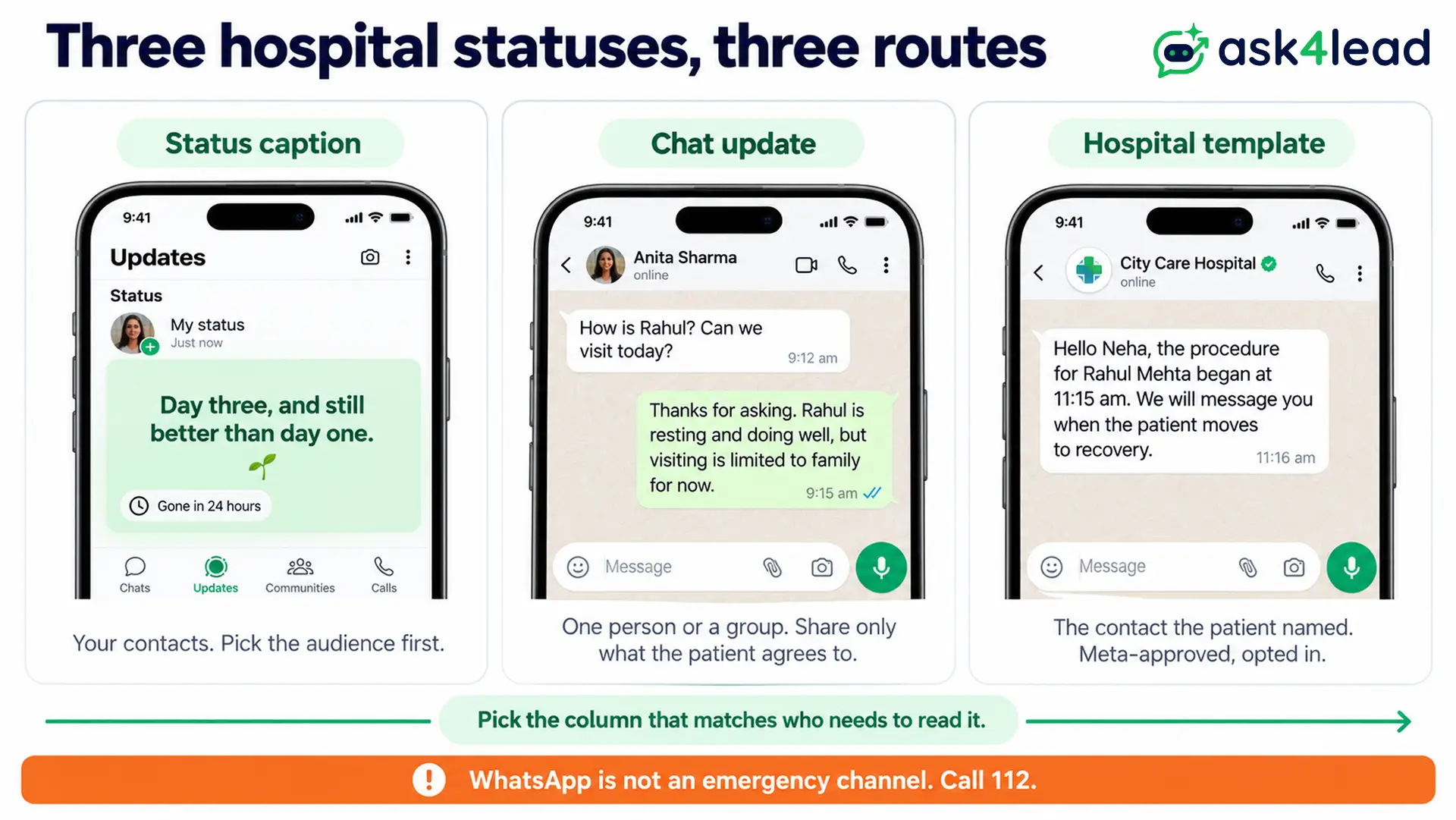
A hospital cannot use a Status post to tell one family about one patient, because every contact sees it. So family updates need the third row.
WhatsApp hospital status captions to post today
First, pick a caption that matches who is in the bed. Keep it short, because people read Status updates in a few seconds. Add an emoji or a photo of your own window or flowers if you like, but never a wristband or another patient.
WhatsApp hospital status for the patient
- Calm: In hospital for a few days, so replies will be slow, but I read every message.
- Thankful: Small surgery done, and big thanks to the nurses who made it easy.
- Progress: Day three, and still better than day one.
- Boundary: Please send prayers, not questions, because I will tell you everything once I am home.
- Recovery: The drip is boring, but the recovery is working.
- Hinglish: Hospital mein hoon, jald wapas aaunga. Dua banaye rakhna, aur chinta mat karo.
WhatsApp hospital status for a family member
- Good news: Dad is in hospital and doing well. Thank you for the messages, and we will update here when there is news.
- Practical: Mum’s surgery went well, but visiting hours are 4 to 6 pm, so please call before you come.
- Prayer: Please keep our family in your thoughts today, because the doctors are hopeful.
- Hinglish: Sab theek hai, chinta mat karo, kyunki doctors aur nurses ka shukriya hai.
WhatsApp hospital status for doctors and nurses
- After a shift: Twelve-hour shift done, and the thank-yous from patients made it worth it.
- Night duty: Night duty again, because someone has to watch over the ward.
- Pride: Every discharge today was a good day for the whole team, so thank you all.
Quiet and serious hospital status
- Waiting room: Waiting rooms make every minute feel longer than an hour.
- Perspective: After a night in the corridor, you learn which people really matter.
- Gratitude: Out of the ICU and into a ward with a window, which feels like progress.
Before you post a WhatsApp hospital status
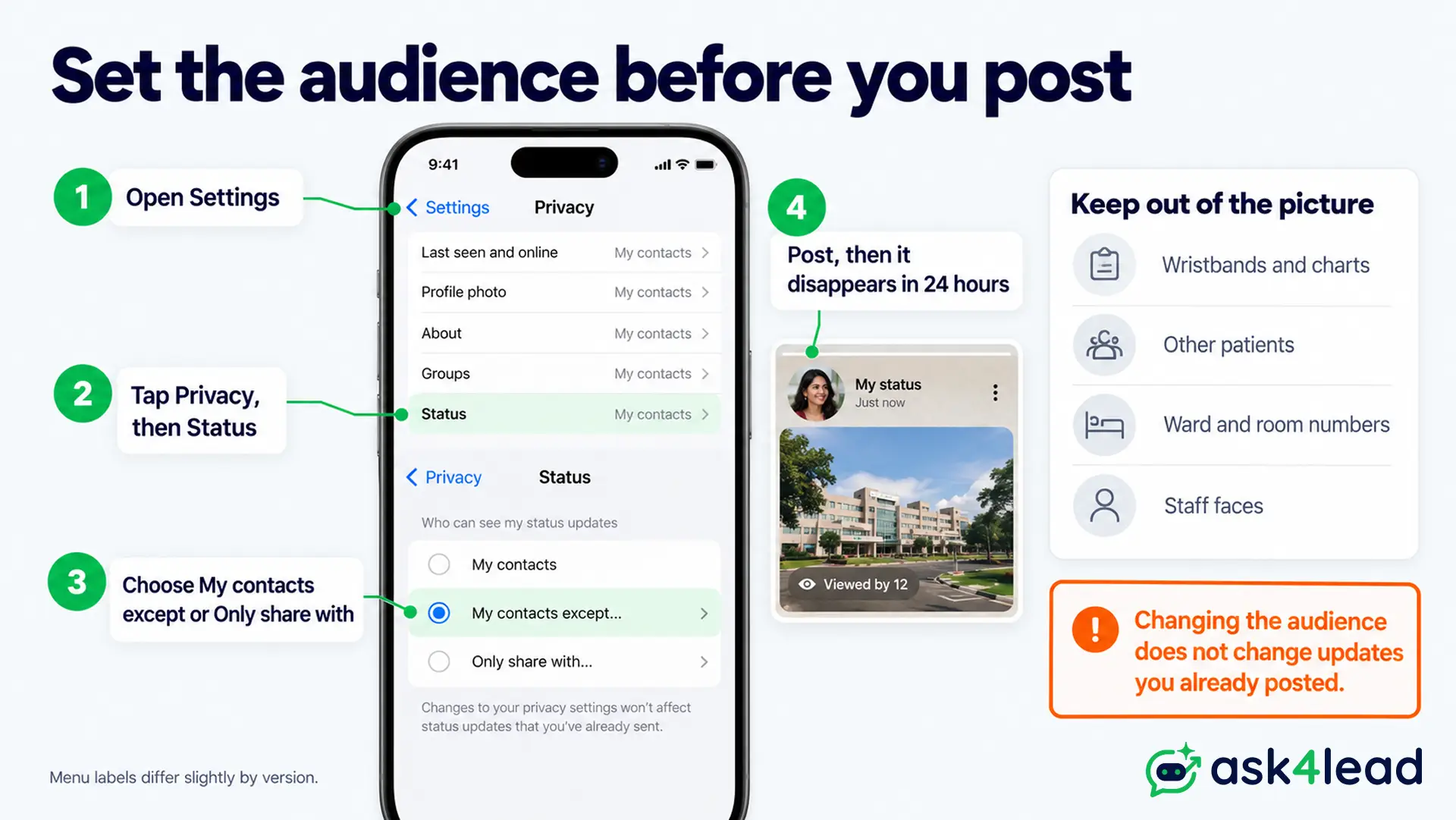
WhatsApp says a Status disappears from view after 24 hours and that you decide who sees it (WhatsApp’s Status page).
So set the audience for your WhatsApp hospital status before you post, not after. Go to Settings, then Privacy, then Status, and choose My contacts, My contacts except, or Only share with.
Also keep these four things out of the picture:
- Wristbands and charts, because they show a name, an ID number or a diagnosis.
- Other patients, even in the background, since they did not agree to appear.
- Ward names or room numbers, when a stranger could use them to find you.
- Staff photos, unless the hospital allows them.
This advice does not apply to a hospital’s own official account. Instead, a hospital that posts opening hours or health tips can use Status, as the business sections below explain.
WhatsApp hospital status messages for family, friends and work
When someone asks “how is he?”, a chat message beats a Status post, because you control who gets the details. So copy a sample, replace each [bracket], and send it to one person or a group. Also share a diagnosis only when the patient agrees.
- Family group: Update on [Name]: they arrived at [hospital] at [time] today. The doctors are running tests, so I will post again by [8 pm]. Please call only if it is urgent, so I can keep the line free.
- Manager or HR: Hello [Manager], I am at [hospital] with a family member who arrived this morning. Because I will be offline today, I will confirm the days I need by [tomorrow noon]. Also, [Colleague] has my handover notes.
- A friend who asked: Thanks for asking. [Name] is resting and doing well, but visiting is limited to family for now. So I will tell you when friends can come.
- A visitor: Thank you for wanting to visit. Since the ward allows two visitors from [4 to 6 pm], please message before you leave home.
- Good news: Good news: [Name] is going home today. Thank you for every call and prayer. We will rest for a week, and then we will reply to everyone.
If you run a business and you will be away, tell clients who covers for you. For example, write “I am unavailable until [date], so please contact [colleague] on [phone] for urgent matters.”
WhatsApp hospital status templates for patients’ families
A WhatsApp hospital status template is a message that a hospital sends to the contact a patient named, about admission, a procedure, discharge, a bill or a queue. However, Meta must approve each template before you send it outside the 24-hour window, and a WhatsApp template rejection usually comes from the body, not the button.
Each sample ends on fixed words, because Meta does not allow a template body to start or end with a variable (a {{1}} placeholder). Also keep every message about logistics, not about the illness.
Admission and procedure updates
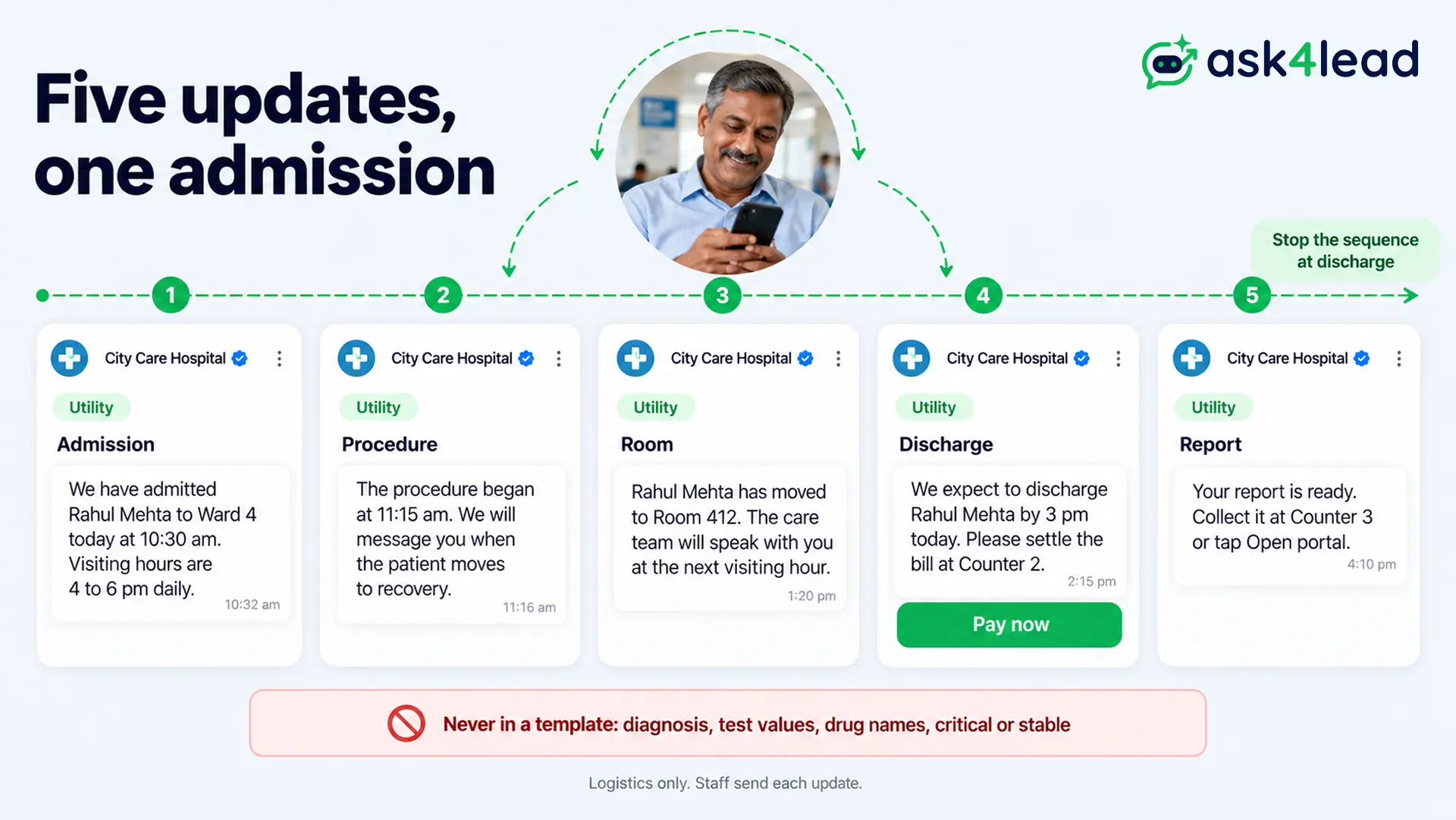
- 1. Admission confirmed (Utility): Hello [Name], we have admitted [patient name] to [ward] at [City Care Hospital] today at [time]. The ward desk is on [phone], and visiting hours are [4 to 6 pm] daily.
- 2. Procedure started (Utility): Hello [Name], the procedure for [patient name] began at [time]. We will message you when the patient moves to recovery. The ward desk is on [phone] if you need us.
- 3. Moved to a room (Utility): Hello [Name], [patient name] has moved to [room number]. The care team will speak with you at the next visiting hour, but you can reply here with questions for the desk.
- 4. Doctor meeting (Utility, buttons Confirm and Cannot attend): Hello [Name], Dr. [Doctor] will meet the family at [time] in [location]. Please keep your phone on. If you cannot attend, tap Cannot attend, and then we will arrange a time that suits you.
Discharge and billing updates
- 5. Discharge expected (Utility): Hello [Name], we expect to discharge [patient name] by [time] today. Please settle the bill at [counter], and then collect the summary from the ward desk.
- 6. Bill due (Utility, button Pay now): Hello [Name], bill [number] for [₹ amount] is due before discharge. You can tap Pay now, or you can visit the billing counter.
- 7. Report ready (Utility, button Open portal): Hello [Name], your [lab test] report is ready. You can collect it at [counter] or tap Open portal to sign in and download it. However, we never send reports in this chat.
Queue and visiting-hour updates
- 8. OPD token (Utility): Hello [Name], your token is [27] for Dr. [Doctor] at [clinic]. About [6] patients are ahead of you, so we will message you when it is your turn.
Visiting-hour changes for one ward are Utility only when they go to the families of patients in that ward. Because a hospital-wide notice to everyone is closer to marketing, keep it out of this list.
Never put a diagnosis, a test value, a drug name or the words “critical” or “stable” in a WhatsApp hospital status template. For example, Meta’s Business Messaging Policy says businesses may not send or request health information where regulations bar it, and it bars telemedicine on WhatsApp. This is general information, not legal advice, so ask your compliance lead about your case.
However, WhatsApp is not an emergency channel. So for an emergency, call 112 (India’s single emergency number, rolled out state by state) or your local ambulance line. Some template libraries offer an emergency template that says “help is on the way”, but a hospital that cannot staff that promise should leave it out.
Category, cost and rejection rules for hospital status templates
Meta bills by category, and the category depends on the message. So check it before you build the template.
Utility or Marketing for a WhatsApp hospital status
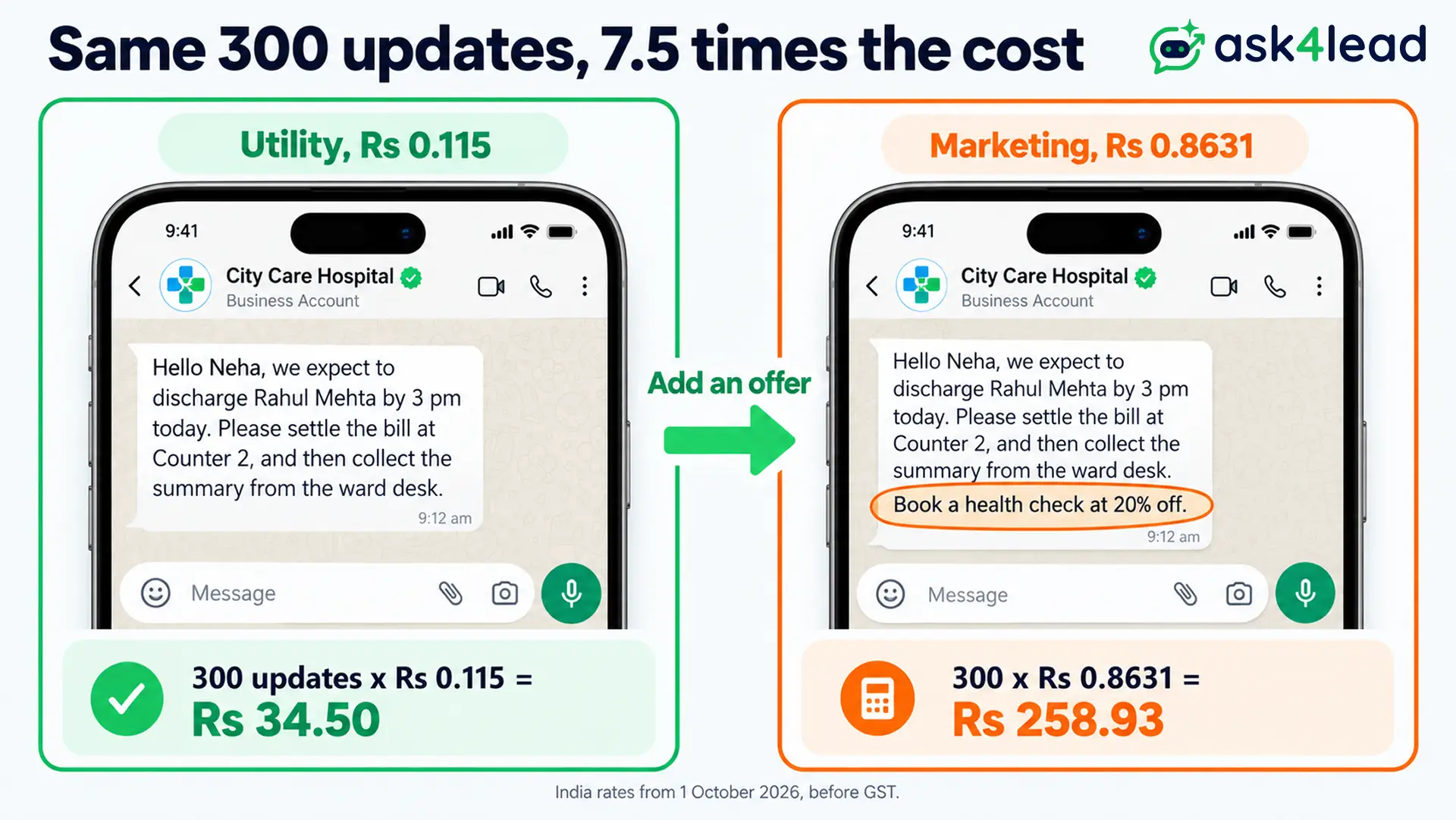
First, a Utility template must carry no promotional intent, and it must be specific to the user or essential to them. Next, Meta’s categorization page says a template that mixes utility and marketing counts as marketing. So a discharge note that adds “book a health check at 20% off” becomes Marketing.
Health-camp invitations, wellness newsletters and package offers are Marketing. So if you plan them, read the guide to WhatsApp event invitation messages and keep them on a separate template.
What a WhatsApp hospital status costs
From 1 October 2026, India’s rate is ₹0.115 per delivered Utility message and ₹0.8631 per delivered Marketing message, before GST. A ward that sends 300 status updates in a month pays 300 × ₹0.115 = ₹34.50 as Utility, but 300 × ₹0.8631 = ₹258.93 as Marketing. That is 7.5 times more.
Meta’s pricing page also says Utility messages inside an open customer window are charged from 1 October 2026. However, a typed reply inside the 24-hour window is a service message, and each number gets 1,000 free a month. For the window itself, read the 24-hour rule explained.
Why a WhatsApp hospital status template gets rejected
| Cause | Fix |
| A diagnosis or drug name in the body | So keep to logistics, and point to the counter or portal |
| An offer line in a status update | So move the offer to a separate Marketing template |
| A variable at the start or the end | So add fixed words before and after it |
| A promise such as “help is on the way” | So remove it, and give the ward desk number instead |
| A send to a number with no opt-in | So collect consent at admission |
Consent comes first. Ask the patient or an attendant at admission which number may receive updates, and then record the answer. The WhatsApp opt-in guide shows the wording.
Meanwhile, India’s data protection rules notified in November 2025 start to apply their notice and consent duties in May 2027, so the healthcare compliance guide maps what to prepare.
For non-clinical notices, such as parking or lift outages, see these WhatsApp alert message examples.
Send every WhatsApp hospital status update from one shared inbox
Ask4Lead, a humanized AI WhatsApp chatbot + CRM, covers the family-update side of a WhatsApp hospital status. First, build each message in WhatsApp Templates, where you pick Utility, add Pay now or Confirm buttons, and track Pending, Approved or Rejected.
Then replies from families land in the shared team inbox, where the ward desk assigns each chat and leaves private notes. Because the Agent, Manager and Admin roles limit what each person sees, a billing clerk does not read a ward chat.
Meanwhile, an AI can answer visiting-hour questions from your approved information, and human approval for AI replies holds each draft until a staff member approves it. So nothing clinical reaches a family without a person. For a notice to a tagged group, WhatsApp Campaigns schedule an approved template for a date and time.
However, Ask4Lead does not read your hospital system, so staff send each patient update themselves. See how a WhatsApp AI agent for healthcare clinics handles bookings, or browse the healthcare industry page.
FAQs
1. What is a good hospital status for WhatsApp?
Pick a short, calm line such as “In hospital for a few days, so replies will be slow, but I read every message.” Add thanks to the nurses if you like.
2. What should I write in a health status?
State where you are, how you feel in one word, and when people can expect a reply. Also leave out diagnoses, ID numbers and other patients.
3. Does a WhatsApp Status disappear?
Yes, because WhatsApp says a Status disappears from view after 24 hours, and you choose who sees it.
4. Can a hospital send patient status updates on WhatsApp?
Yes, through approved templates on the WhatsApp Business Platform, sent to contacts who opted in. However, keep the messages to logistics, because Meta restricts health information.
5. How much does a WhatsApp hospital status message cost in India?
From 1 October 2026, it costs ₹0.115 for a Utility template and ₹0.8631 for a Marketing template per delivered message, before GST.
6. Can I hide my hospital status from some contacts?
Yes. Open Settings, then Privacy, then Status, and then choose My contacts except or Only share with.
Pick your WhatsApp hospital status this week
Match the route to the reader. A caption suits your Status, while a chat message suits family and work, and an approved template suits a patient’s family. So every WhatsApp hospital status has one right route.
Before you send your first WhatsApp hospital status template, check that you have:
- Recorded the family contact’s opt-in at admission
- Kept diagnoses, test values and drug names out of the body
- Kept offers out of every Utility template
- Ended each template body on fixed words
- Added the ward desk number for anything urgent
Next, build the eight templates once, and then reuse them for every admission.
Stop typing the same family update by hand
When the ward desk types every update on a personal phone, a missed message becomes an angry call. So Ask4Lead gives your team four tools for it.
WhatsApp Templates hold your approved updates, the shared team inbox catches every reply, human approval for AI replies keeps a person in charge, and roles with audit logs show who sent what, so you can answer a family complaint with facts.
