
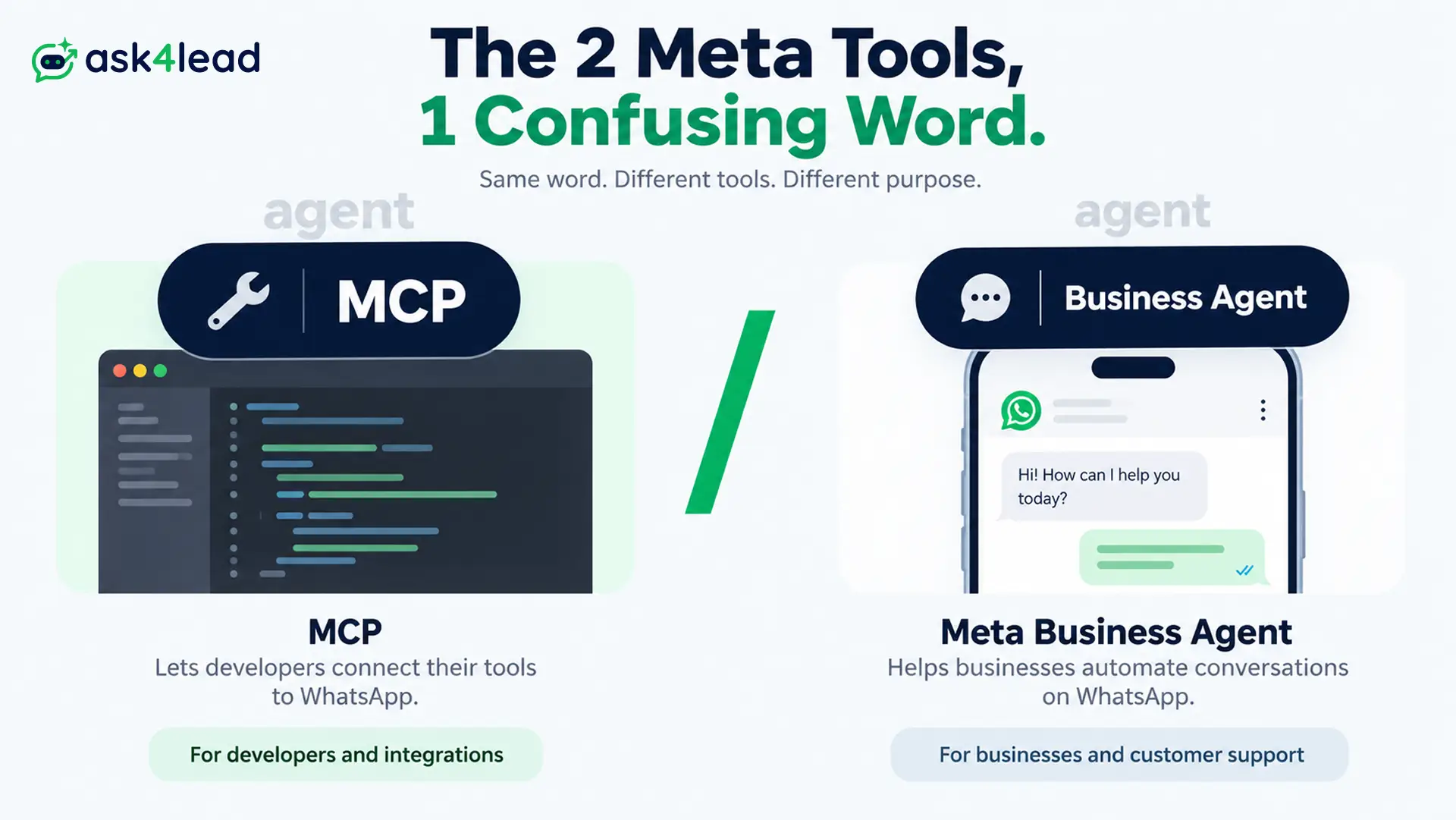
WhatsApp Business Tools MCP is a server Meta launched on September 15, 2026.
It lets AI coding assistants like Claude and Cursor set up a WhatsApp Business Platform account through conversation, not dashboard clicks.
But it does not talk to your customers. For that, most businesses still need a WhatsApp AI agent, a different problem than account setup.
Quick answer: WhatsApp Business Tools MCP automates the technical side of the WhatsApp Business API, accounts, numbers, templates, webhooks. Built for development and testing, not production sending at scale.
Key takeaways
- Automates setup, not conversation. One of 2 MCP servers Meta shipped in 2026.
- Often confused with Meta Business Agent, a completely different product.
- Cannot fix a restricted account or shortcut App Review. Both stay manual.
- Shipped the same quarter Meta began billing Business Agent and service messages.
- Its value scales with how often you repeat WhatsApp setup, not with running it once.
What Is WhatsApp Business Tools MCP
WhatsApp Business Tools MCP connects an AI coding assistant to your WhatsApp Business account.
It runs on the Model Context Protocol (MCP), an open standard for AI models to call real tools.
You sign in through Facebook Login for Business, grant scopes, and the agent can read, and in specific cases change, your setup.
How the Model Context Protocol Works
Think of MCP as a menu of pre-approved actions, not a general password.
For example, ask Claude to “verify my number,” and it picks the matching action from Meta’s menu instead of guessing at an API call.
The security model:
- OAuth ties every session to your Meta developer account. No App Secret in a config file.
- Access tokens never land in your prompt history, Meta says.
- Every action is logged, under your own identity, not shared credentials.
WhatsApp Business Tools MCP vs Meta’s Other Developer MCP
Meta shipped 2 different developer MCP servers in 2026. Confusing them is the most common mistake in early coverage.
| Server | Launched | Covers | Built for |
| Meta Developer Tools MCP | June 30, 2026 (renamed August 18) | Any Meta app: config, App Review, compliance, rate limits, webhooks, docs | Any developer managing a Meta app |
| WhatsApp Business Tools MCP | September 15, 2026 | WhatsApp-only: accounts, templates, test messages, webhooks | Developers onboarding WABAs |
The first tool spans 10 actions, split into Read and Manage tiers. By contrast, the second is WhatsApp-only.
What the MCP Actually Automates
This is an onboarding assistant for the technical, error-prone parts of WhatsApp setup.
The 6 Things It Sets Up
Based on Meta’s own setup documentation:
- Check Terms of Service and Business Verification status.
- Create a WhatsApp Business Account, add a phone number.
- Verify that number by OTP, register it for the Cloud API.
- Draft or edit a message template, report approval status.
- Send a test message to confirm the integration works.
- Configure webhook callback URLs and field subscriptions.
Those steps used to mean tabbing between the console, Graph API Explorer, and docs.
So collapsing that into conversation saves real time, but only for someone who already knows what correct looks like.
Ask4Lead’s own onboarding runs the same Meta Embedded Signup flow. A non-technical owner never touches a Graph API call.
What Still Needs a Human
- Business Verification still needs real documents and Meta’s review queue.
- Templates still go through Meta’s approval. The agent reports status, not approval.
- Quality ratings still apply at volume, whatever the setup path.
- Choosing a Business Solution Provider stays your call, not the agent’s.
WhatsApp Business Tools MCP vs Meta Business Agent
Coverage of this launch keeps conflating 2 products that share only the word “agent.”
Two Products, One Shared Label
WhatsApp Business Tools MCP runs inside your coding assistant, talking to Meta’s developer APIs.
Meta Business Agent is different: Meta’s own AI inside the WhatsApp Business App, talking to customers directly.
Meta’s pricing documentation confirms per-token billing for it, roughly 4 to 5 cents per message.
Side by Side: MCP vs Business Agent
| Particulars | WhatsApp Business Tools MCP | Meta Business Agent |
| Who uses it | Developers, in Claude, Cursor, Codex, ChatGPT | Business owners, in the WhatsApp App |
| Touches | Your account config | Your customer conversations |
| Billing | No charge to use the MCP | ~$2.00 per 1M tokens |
| Customization | None, a setup wizard | Limited to Meta’s own models |
On its own, neither has a real conversation and hands your team a qualified lead.
Meta Business Agent gets closer, but runs only on Meta’s models.
A humanized AI assistant grounded in your own catalog is a more customizable answer.
Why Meta Shipped This Now
Look at the calendar, and a pattern emerges.
Meta’s 2026 WhatsApp Calendar
- June 30: Developer Tools MCP launches (renamed August 18).
- July 1: Meta Business Agent Platform launches.
- August 1: Meta starts billing Business Agent messages per token.
- September 15: WhatsApp Business Tools MCP launches, a rollout The New Stack noted gives the agent no real identity of its own.
- October 1: Service messages inside the 24-hour window that used to be free become billable.
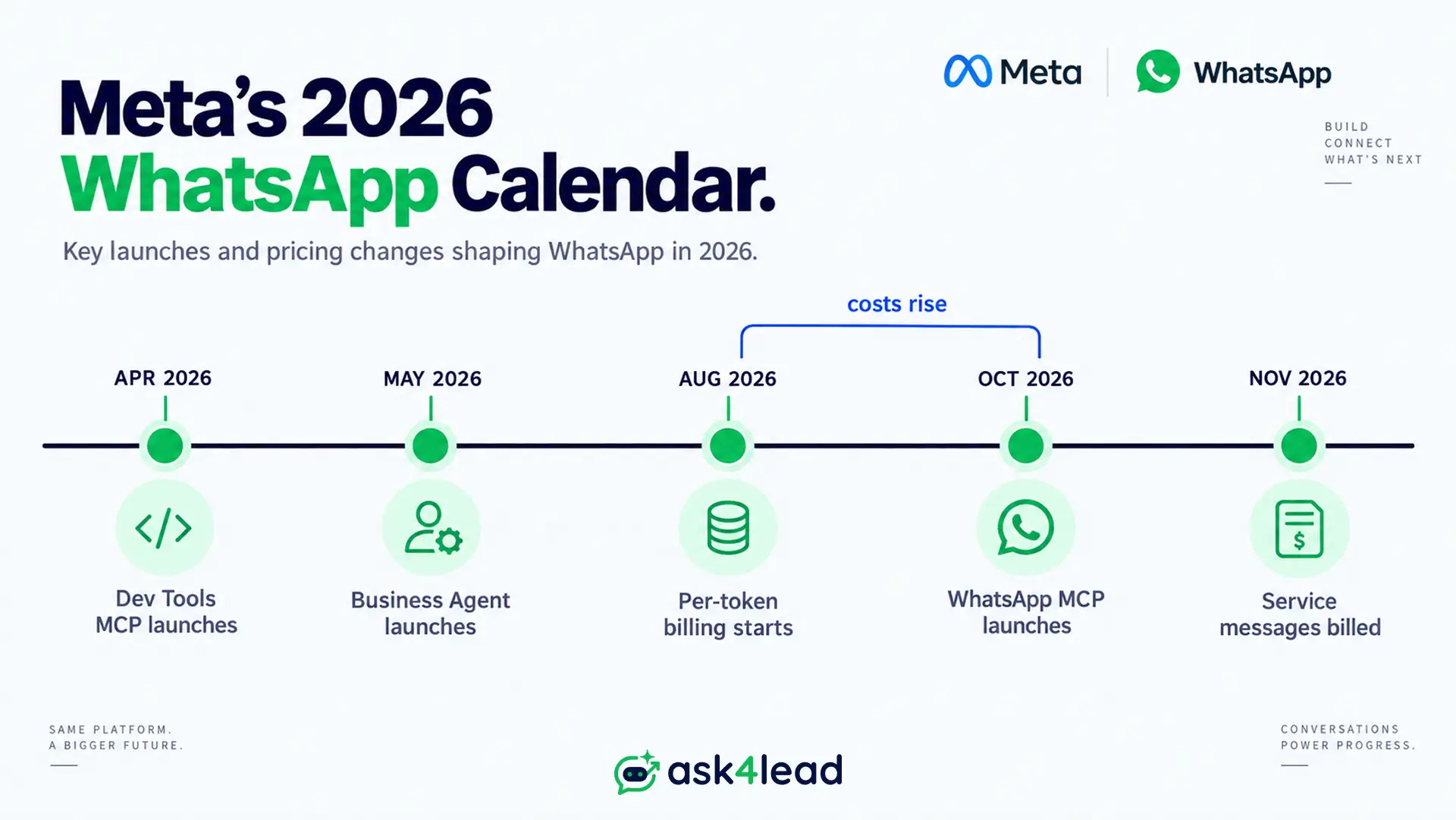
Read together, these dates show a company moving up the stack.
From “here’s an API you build on” to “here’s our agent, our billing, and now our own setup tooling.”
What This Means for Tech Providers and BSPs
In fact, much of the anxiety is really about pricing and Meta Business Agent, not the MCP itself.
Still, the MCP does not remove the role of a BSP, or the work of migrating between providers. It automates console clicks an onboarding team already did by hand.
What faster onboarding does not replace:
- The layer that runs your sales pipeline.
- A shared inbox your team works from, exactly where Ask4Lead sits.
- The choice between tools like WATI or building in-house.
If a business’s whole pitch is “we make setup easy,” this MCP erodes that value.
That is a real signal to move upstream, toward what a setup wizard cannot touch.
The Real Limitations Nobody’s Talking About
Every early write-up covers what the MCP can do. Few, however, cover what it cannot.
1. It Cannot Fix a Restricted Account
Businesses report getting restricted for payment issues even when nothing in their settings changed.
Instead, they are often stuck with a pending invoice that has no matching record to reconcile against.
The MCP can report your account is restricted. But it cannot resolve a billing dispute, which stays exactly as manual and slow as before this launch.
2. App Review Still Grades the Human Part
Tech providers submitting for whatsapp_business_management still face Meta’s human review, taking 1 to around 12 days depending on quality.
What actually gets a submission flagged:
- Screen recordings that show clicks without a real, underlying API call.
- A missing justification for why the app needs each permission.
- A demo video that does not match the stated use case.
- No proof the app actually receives a webhook event.
An AI agent fills in a form faster. Still, it cannot make a reviewer’s judgment call.
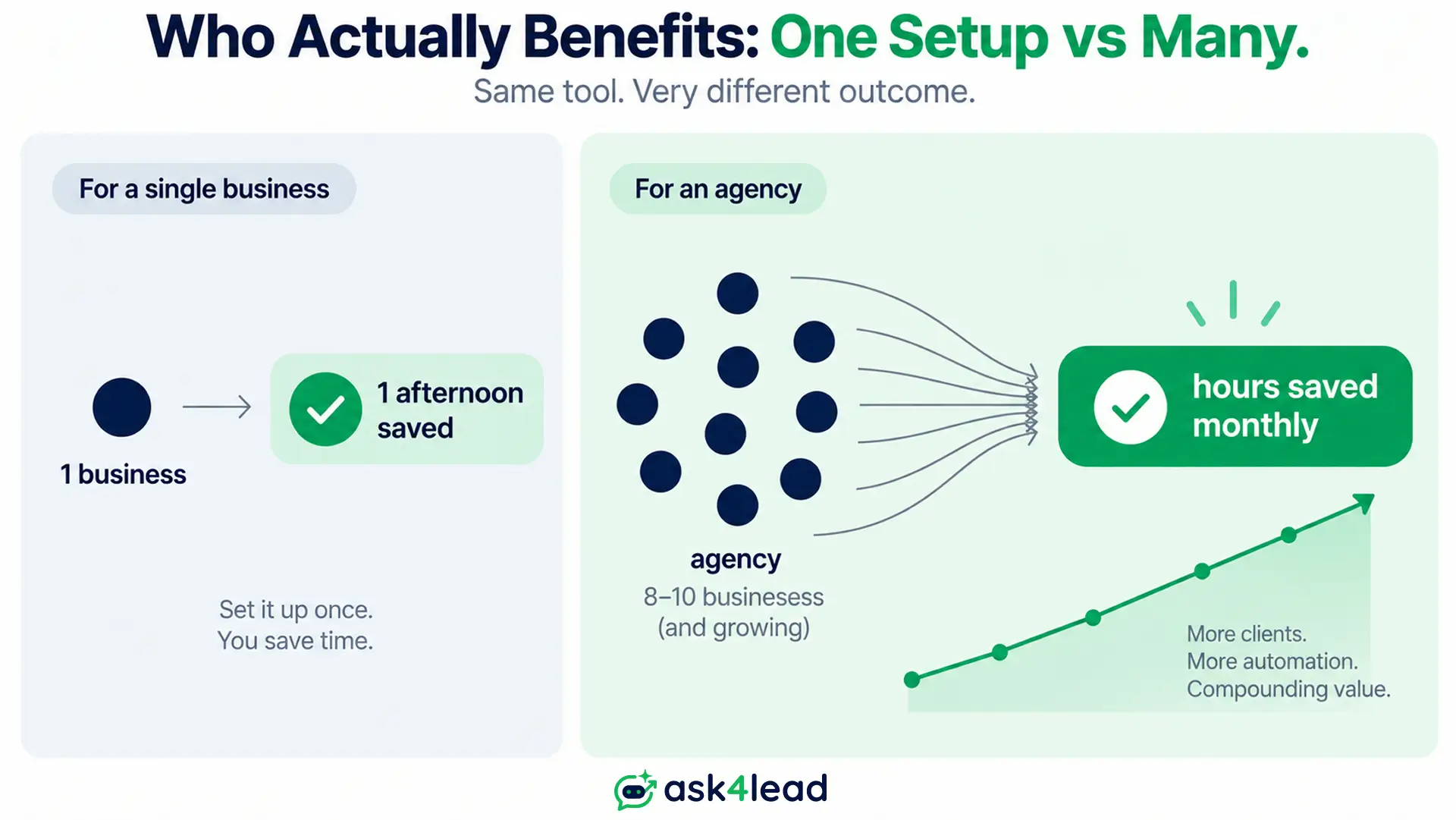
3. It Rewards Repetition, Not a One-Off Setup
Setting up 1 WhatsApp Business Account, once, saves real but modest time, maybe an afternoon.
However, the math changes for an agency repeating this for dozens of clients a month, where the same shortcut compounds fast.
Worth knowing: every MCP request is logged on Meta’s side. Read between the lines, and that looks like real-world usage data feeding Meta’s own Business Agent roadmap.
Who Actually Benefits From This MCP
Match Your Situation to the Right Move
| Your situation | Does the MCP help? | You still need |
| Tech provider onboarding WABAs repeatedly | Yes, meaningfully | A QA pass before production |
| Owner wanting faster lead replies | Indirectly, someone runs it | A platform with conversation built in |
| You want better conversations already | No, it skips your bot’s replies | Ask4Lead’s AI Sales Assistant |
| Weighing a build-it-yourself project | Marginally faster setup only | A ready pipeline, inbox, reporting layer |
The Real Bottleneck Was Never Setup
Talk to any business that has run WhatsApp a year. Setup is rarely the complaint.
It is the follow-up nobody owned, the chatbot that could not handle 1 question outside its menu, or the rep who got a phone number with zero context.
Automating the wizard is useful, but it was never the expensive part of this problem.
What This Means for AI-Powered WhatsApp Automation
Meta has drawn a clear line between 2 automation problems. It is only solving one of them.
Setup Automation vs Conversation Automation
Setup automation answers “how do I connect to the API correctly.”
Conversation automation answers “what should I say, and what happens to that lead next.”
WhatsApp Business Tools MCP is squarely the first. Meta Business Agent reaches toward the second, but stays locked inside Meta’s own models.
Everything in between is still open ground:
- Industry-specific knowledge grounding, not a generic script.
- A sales pipeline with named stages, not a single “lead” bucket.
- A shared inbox your team actually works from every day.
- Campaigns that respect opt-ins instead of guessing at consent.
Where Ask4Lead Fits This Gap
WhatsApp Business Tools MCP fixes a developer’s afternoon, not a customer’s experience, because it was never designed to.
Ask4Lead is built for the part it does not touch:
- Real, plain-English conversations that go beyond a button menu.
- Human approval before anything sends to a customer.
- A full lead handed to your team, grounded in your own AI Knowledge Profile.
Sign Up Free for 100 AI Credits and see a WhatsApp conversation built to talk back, not just to configure the pipes.
FAQs
1. What is WhatsApp Business Tools MCP?
A Meta server, launched September 15, 2026, that lets AI coding assistants set up a WhatsApp Business account: numbers, templates, webhooks, through conversation.
2. Does it work with Claude or Cursor?
Yes, along with Codex and ChatGPT, connected through OAuth via Facebook Login for Business. No API keys in config files.
3. Is it the same tool as Meta Business Agent?
No. This MCP is a developer setup tool that never talks to your customers. Meta Business Agent is Meta’s customer-facing AI, billed separately per token.
4. Can it send WhatsApp messages to real customers?
Only a single test message, to confirm your integration works. Meta says this release is for development and testing, not production scale.
5. Will it replace tech providers or BSPs?
Not directly. It automates manual console steps BSPs already did by hand, but it does not replace the software that runs conversations, pipelines, or inboxes.
6. Is it free to use?
Meta has not published a separate charge for the MCP itself. That said, standard WhatsApp Business Platform costs still apply, including pricing effective October 1, 2026.
Conclusion
WhatsApp Business Tools MCP is real, useful tooling, and a smaller story than the headlines suggest.
It shaves time off setup for people who already know what correct looks like. However, it says nothing to your customers.
Meanwhile, it launched the same quarter Meta began charging more for WhatsApp overall.
The businesses that come out ahead will not be the ones who automated setup fastest. They will be the ones who fixed what was actually costing them leads.
