
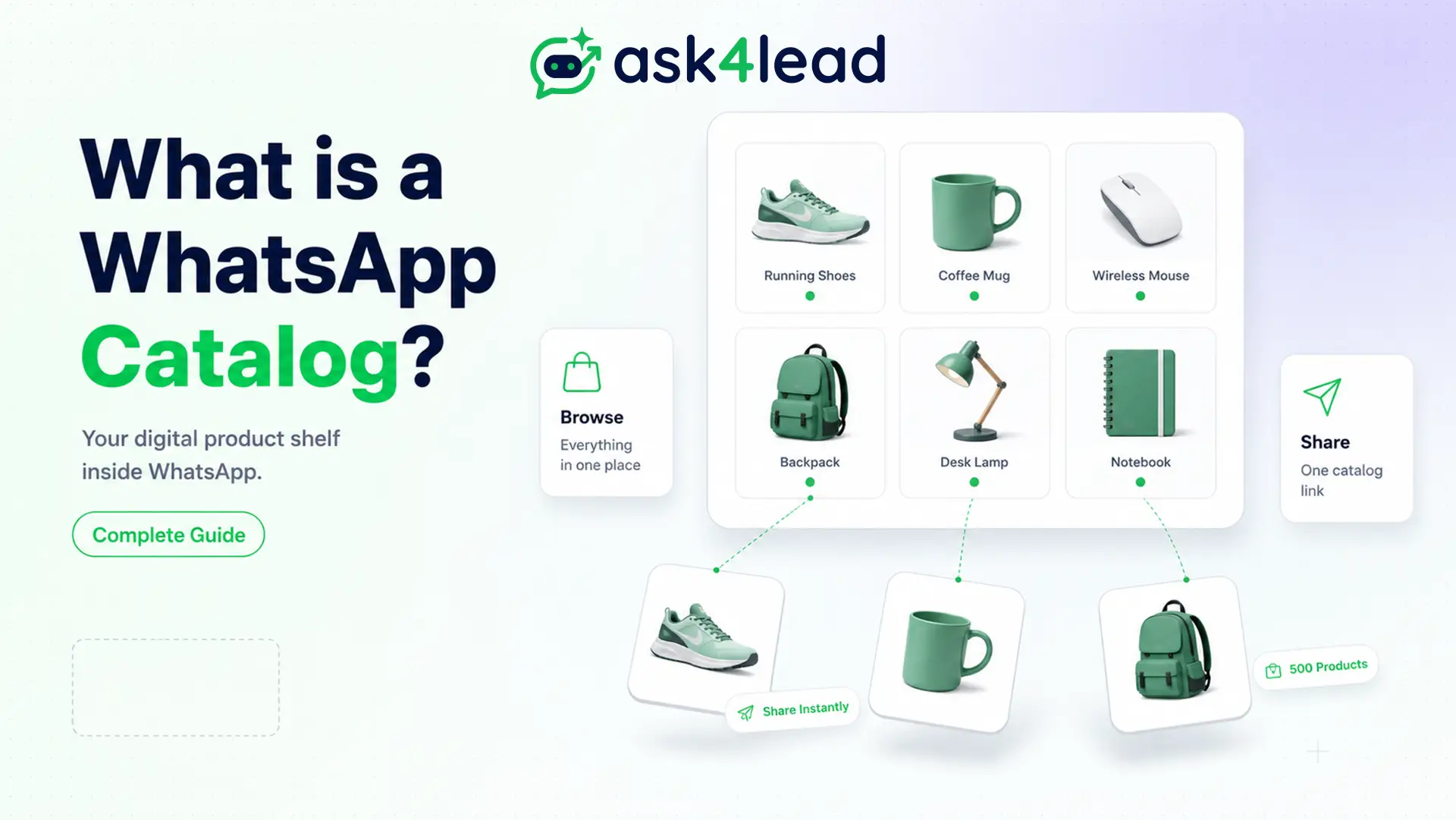
A WhatsApp catalog is a product list that sits on your WhatsApp Business profile, so customers can browse what you sell without leaving the chat. You share the whole thing with a single link. For online stores and local sellers, a catalog replaces the habit of sending product photos one at a time.
There is a catch most guides skip. A WhatsApp catalog is a menu, not a shop, and several of its worst limits are documented nowhere except in seller forums.
Key Takeaways:
- A WhatsApp catalog holds up to 500 products, and each WhatsApp Business Account gets one catalog.
- You share your catalog with a link in the format wa.me/c/[country code][phone number].
- Meta reviews every item against the WhatsApp Commerce Policy. Rejected items show a red exclamation mark.
- A WhatsApp catalog has no checkout in most countries. The customer sends a cart as an order message, and you take payment separately.
What is a WhatsApp catalog?
A WhatsApp catalog is a built-in product showcase on a WhatsApp Business account. Customers tap the shop icon on your profile, scroll your products, and message you about what they want.
A catalogue can list physical goods or services such as consultations and appointments. It lives on Meta’s servers, so deleting the app does not delete your products.
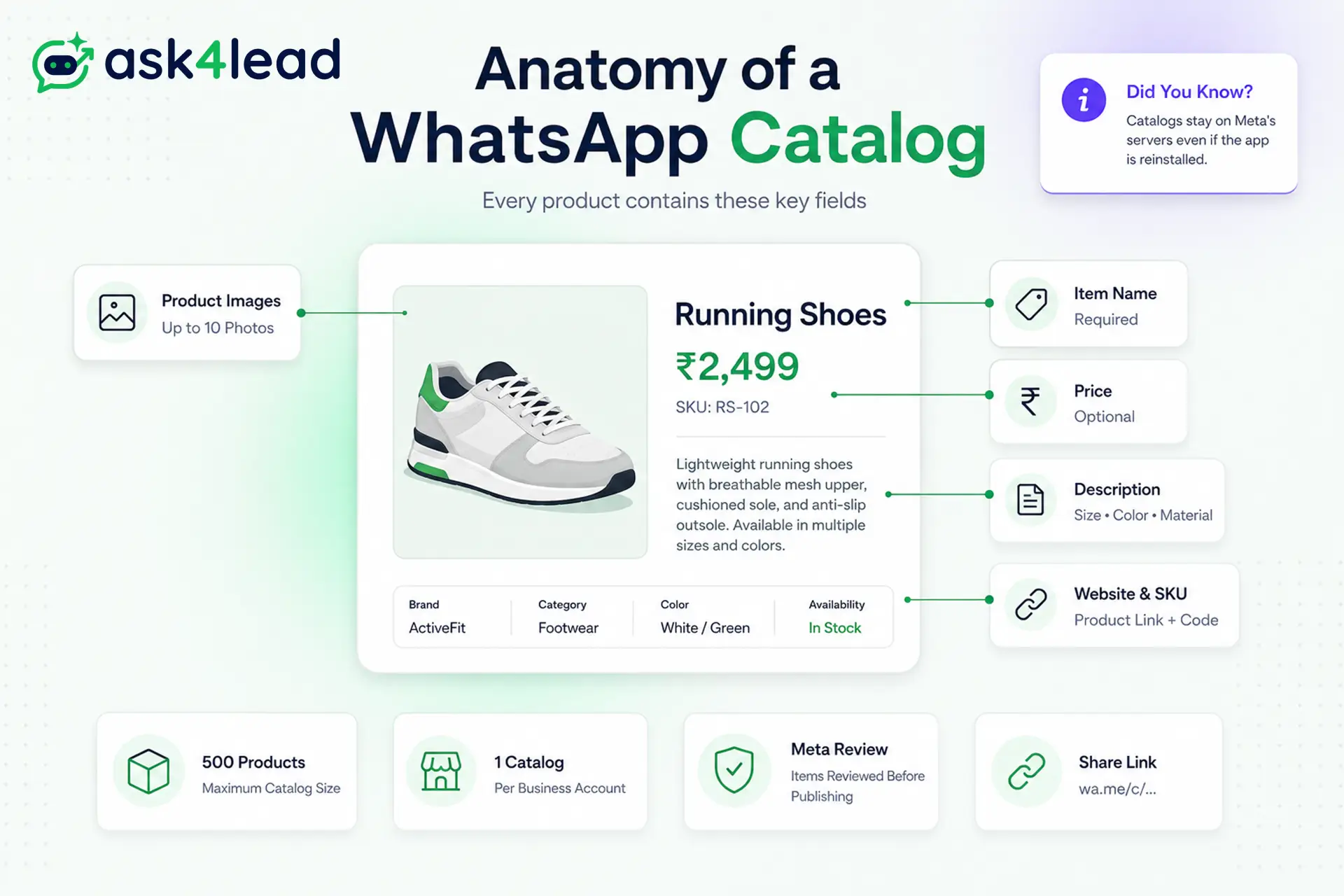
What you can put in a WhatsApp catalog
- Item name (the only truly required field, and best kept under 40 characters).
- Price (optional, so made-to-order goods can leave it blank).
- Description (size, material, variant).
- Product image (up to 10 photos per item).
- Website link (send buyers to a product page).
- Product code or SKU (which the API calls a retailer ID).
Service businesses use the same idea for packages. Ask4Lead’s services catalog works this way, so the AI quotes real prices from a live list.
Listing services when Marketplace blocks you
Facebook Marketplace does not allow service listings, so installers, salons, and repair firms keep getting flagged. A WhatsApp catalog is the compliant workaround.
Package each service as a product with a price, run ads that open a chat, and let customers browse and book. Advertisers report this as a clean funnel that Facebook will not flag, and it suits service businesses that have nowhere else to list.
How to create a WhatsApp catalog step by step
Creating a WhatsApp catalog takes a few minutes in the WhatsApp Business App, and the steps below match WhatsApp’s own catalog help.
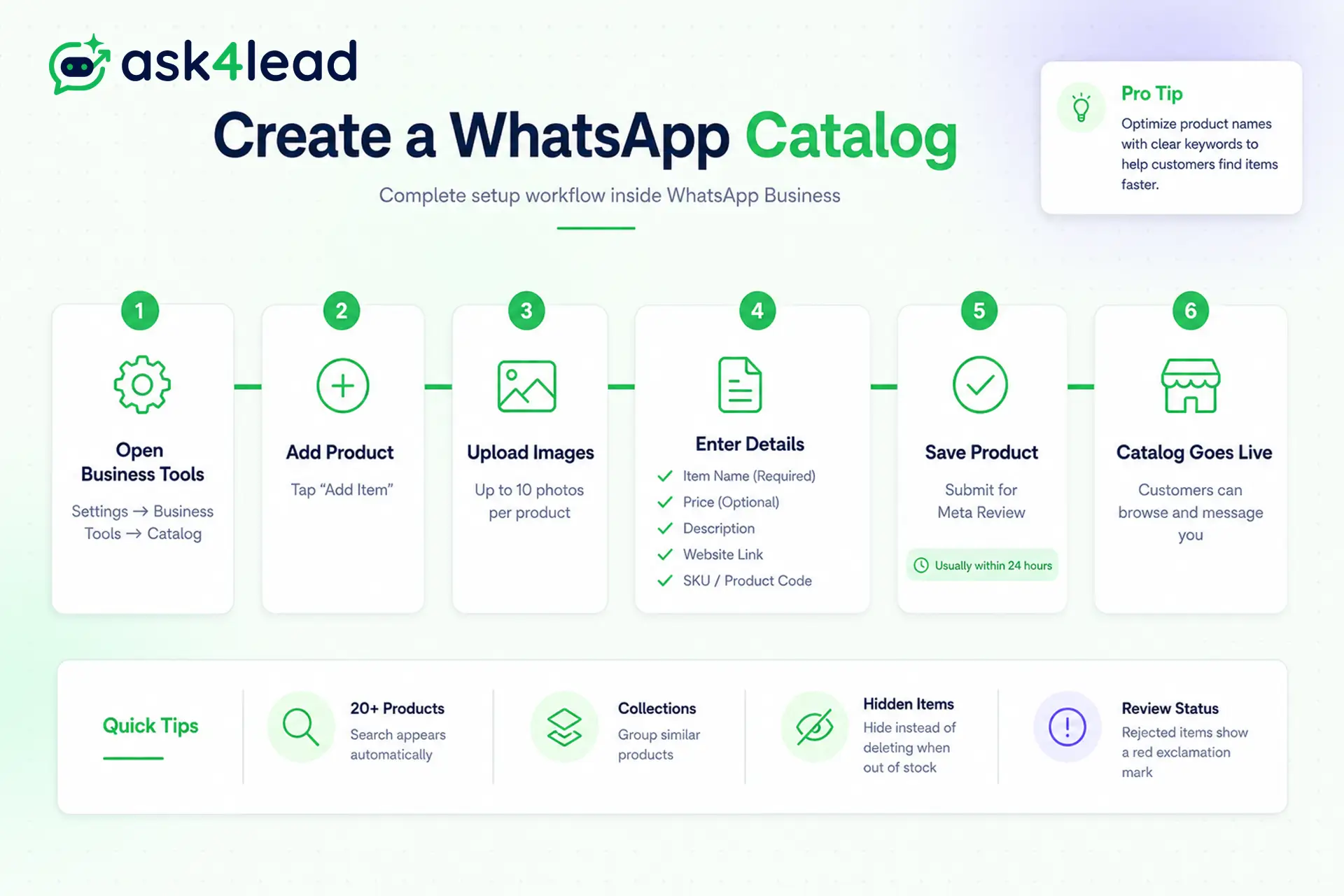
1. Create a catalog and add your first product
- Open WhatsApp Business, tap Settings, then Business tools, then Catalog.
- Tap Add item.
- Add your product photos.
- Enter the item name and price.
- Open More fields for a description, a website link, and a product code.
- Tap Save. Meta reviews the item, usually within 24 hours, before customers see it.
Once you pass about 20 items, WhatsApp adds a search bar to your catalogue.
2. Group products into collections
Collections are folders inside your catalog. Group items into sets like “New arrivals” or “Under 999” so customers stop scrolling.
A new collection can take up to 24 hours to be reviewed.
If you manage your catalogue through Meta Commerce Manager instead of the app, read the collections warning further down before you build them.
How to share your WhatsApp catalog link
Your catalog has its own public link, and this is the part most guides leave out.
The wa.me/c catalog link format
The WhatsApp catalog link format is: wa.me/c/[country code][phone number]
Use your full number with the country code, no plus sign, no spaces, no dashes. For the number +91 98765 43210, your catalog link is wa.me/c/919876543210. Anyone who opens that link lands directly on your catalogue.
Other ways to share your catalog
- Customers can tap the shop icon on your WhatsApp Business profile, or you can share a single item link.
- Drop the wa.me/c link in your Instagram bio, website, or ads.
- Send it inside your WhatsApp campaigns so a broadcast ends on a product.
WhatsApp catalog limits you should know
A WhatsApp catalog is generous for a small shop and tight for a real store.
The 500-item limit and one catalog per account
The 500-item cap applies on the API too, so a large store cannot simply upload everything. List your best sellers and send the rest to your website.
You can still sell past the ceiling in conversation. Ask4Lead grounds its AI in your own brand knowledge, including uploaded catalogues, brochures, and your website, so the assistant can describe and price products that never fit inside the 500.
Image and field limits
- Keep each image roughly 500KB to 5MB.
- Square images near 1080×1080 pixels look sharpest, and text-heavy graphics blur after compression.
- Hiding an item keeps it in your catalogue without showing it, which beats deleting a product you plan to restock.
Why WhatsApp rejects catalog items
Rejections are common, and almost always about what you sell, not how you listed it.
What the WhatsApp Commerce Policy bans
The WhatsApp Commerce Policy blocks entire categories, including:
- Alcohol, tobacco, and vapes.
- Drugs, supplements, and medical or healthcare products.
- Weapons, ammunition, explosives, and live animals.
- Adult products, gambling, betting, lotteries, and real-money gaming.
- Body parts and bodily fluids.
- Digital and downloadable goods, including PDFs, music, games, subscriptions, and accounts.
If your business sits in one of these categories, no rewording will get an item approved.
How to spot and fix a rejected item
A rejected item shows a red exclamation mark next to its image.
- Tap the item, then tap details to read why Meta rejected it.
- Remove wording or images that suggest a banned category.
- Save the item again to send it back for review.
- If the rejection looks wrong, appeal it in Meta Commerce Manager.
Repeat violations can restrict the whole catalogue, so fix rejections rather than resubmitting the same listing.
Problems real sellers hit with WhatsApp catalogs
These are the issues that trip sellers up, from documented limits to bugs that appear in no official guide. Knowing them early saves days.
1. Collections built in Commerce Manager do not appear
This one catches almost every API seller.
Collections, called sets in Meta Commerce Manager, frequently never show inside the WhatsApp catalogue, and Meta’s documentation does not explain why.
Sellers have been asking for a fix for over a year with no answer.
The common workaround is a multi-product message, but that caps at 30 products, so it does not rescue a large catalogue. If categories matter to you, build the catalog in the WhatsApp Business App rather than Commerce Manager.
Or let the conversation do the navigating. With Ask4Lead, a buyer asks for “red kurtas under 999” and the assistant surfaces the right items instantly, so a broken collection never costs you the sale.
2. You cannot reorder your products
Products appear in an order you did not choose, and Commerce Manager offers no way to sort them.
An ordering_index field exists in the API, but it is not exposed in the Commerce Manager interface.
Experienced WhatsApp API providers report that Meta has shipped very few commerce updates lately, so plan around this rather than waiting for a fix.
3. Why your WhatsApp catalog is not showing
If the catalog option is missing, products will not load, or the shop icon returns “Something went wrong,” work through these in order:
- Turn off any VPN on the phone. A VPN is the single most reported cause of a catalogue that will not load.
- Update WhatsApp Business, because older builds carry catalog bugs.
- Complete your business profile.
- Check that catalog features are available in your country.
- Keep images inside the accepted size range.
If the problem survives all five, check WhatsApp’s troubleshooting guide.
4. There is no checkout inside WhatsApp in most countries
WhatsApp does not process payments for catalog orders in most markets. India and Brazil have payment options, but for most sellers there is no cart-to-card checkout.
The catalogue shows the product and price; the transaction happens elsewhere.
5. How customers actually order from your catalog
- The customer adds items to a cart, up to 99 units of each item, with no limit on distinct products.
- They send the cart to you as an order message.
- You confirm stock, then send a quote with the final amount. Ask4Lead builds that quote from the conversation and tracks whether the buyer opened it.
- You collect payment your own way, then arrange delivery.
Three details catch sellers out. A cart belongs to one chat on one device, so it does not follow the customer to their laptop.
Once sent, a cart cannot be edited. And a business cannot send a cart to a customer, only the other way around.
Every order arrives as a chat somebody must answer. When they pile up in a shared team inbox, Ask4Lead makes sure none sits unread while a buyer is still deciding.
Using a WhatsApp catalog on the Business API
Once you outgrow the app, catalogs move to the WhatsApp Business API. Ask4Lead runs on this API, so your catalogue and the conversations it starts sit in one place.
1. Managing your catalog in Meta Commerce Manager
On the API, your catalogue lives in Meta Commerce Manager, gets its own catalog ID, and connects to your WhatsApp Business Account.
You upload products in bulk with a product feed rather than by hand, as described in Meta’s catalog documentation. Feeds sync on a schedule, roughly hourly, so stock counts are never truly live.
2. Sending product messages to customers
- A single product message shows one item.
- A multi-product message shows up to 30 products, grouped into sections.
- A catalog message shows a thumbnail of the full catalogue.
- Messages sent outside the 24-hour window need approved message templates.
One quirk to plan for: product messages sent through the Cloud API do not show the cart icon in the chat header the way the app does.
3. You cannot test catalogs on a Meta test number
- Meta’s free test phone number does not support catalogs.
- To test catalog creation, product linking, or catalog messages, you need a real number on a verified WhatsApp Business Account.
- There is no sandbox, so budget for a spare number and business verification before you plan a catalog build.
4. India rules for product messages
- Indian businesses have an extra step that almost no guide mentions.
- Before you can send single or multi-product messages, your account must supply compliance details for each item, including the country of origin, the importer name, and the importer address.
- Skip this and your product messages simply will not send.
5. Do more than a catalog allows
- Sellers who do this well all say the same thing: the catalogue is the starting point, not the finish line.
- A catalog answers “what do you sell.”
- It never answers “is this in my size” or “can you deliver by Friday,” and it never chases the buyer who browsed and went quiet.
Ask4Lead’s humanized AI sales assistant answers those questions in plain English, then follows up automatically until the buyer decides.
Start free with 100 AI credits and stop losing orders to unanswered chats.
FAQs
1. How do I add a catalog in WhatsApp Business?
Open WhatsApp Business, tap Settings, then Business tools, then Catalog, then Add item. Add photos, a name, and a price, then save. Meta reviews the item before it appears.
2. How many products can a WhatsApp catalog have?
Up to 500 items, and one catalog per WhatsApp Business Account.
3. What is the WhatsApp catalog link?
It is wa.me/c/ followed by your country code and number, with no plus sign or spaces.
4. Why do my collections not show in the WhatsApp catalog?
Collections created in Meta Commerce Manager often never appear. Build them in the WhatsApp Business App instead.
5. Why is my WhatsApp catalog not showing?
Usually a VPN running on the phone, an outdated app, an incomplete profile, or a country restriction. Turn off the VPN first.
6. Why was my WhatsApp catalog item rejected?
It breaks the WhatsApp Commerce Policy. Tap details on the flagged item for the reason, then fix it or appeal in Meta Commerce Manager.
7. Can customers pay inside WhatsApp?
In most countries, no. Payment happens outside the chat, though India and Brazil have options.
The bottom line
A WhatsApp catalog is one of the cheapest sales assets you can build. It takes minutes to set up, and a single link turns any ad or broadcast into a browsable storefront.
Just size your expectations correctly. Meta decides what you may list, and collections and sorting stay unreliable.
Build the catalog, share the link, then put a fast, human reply behind it. That is where a browser becomes a buyer, the same discipline behind good WhatsApp lead generation.
