
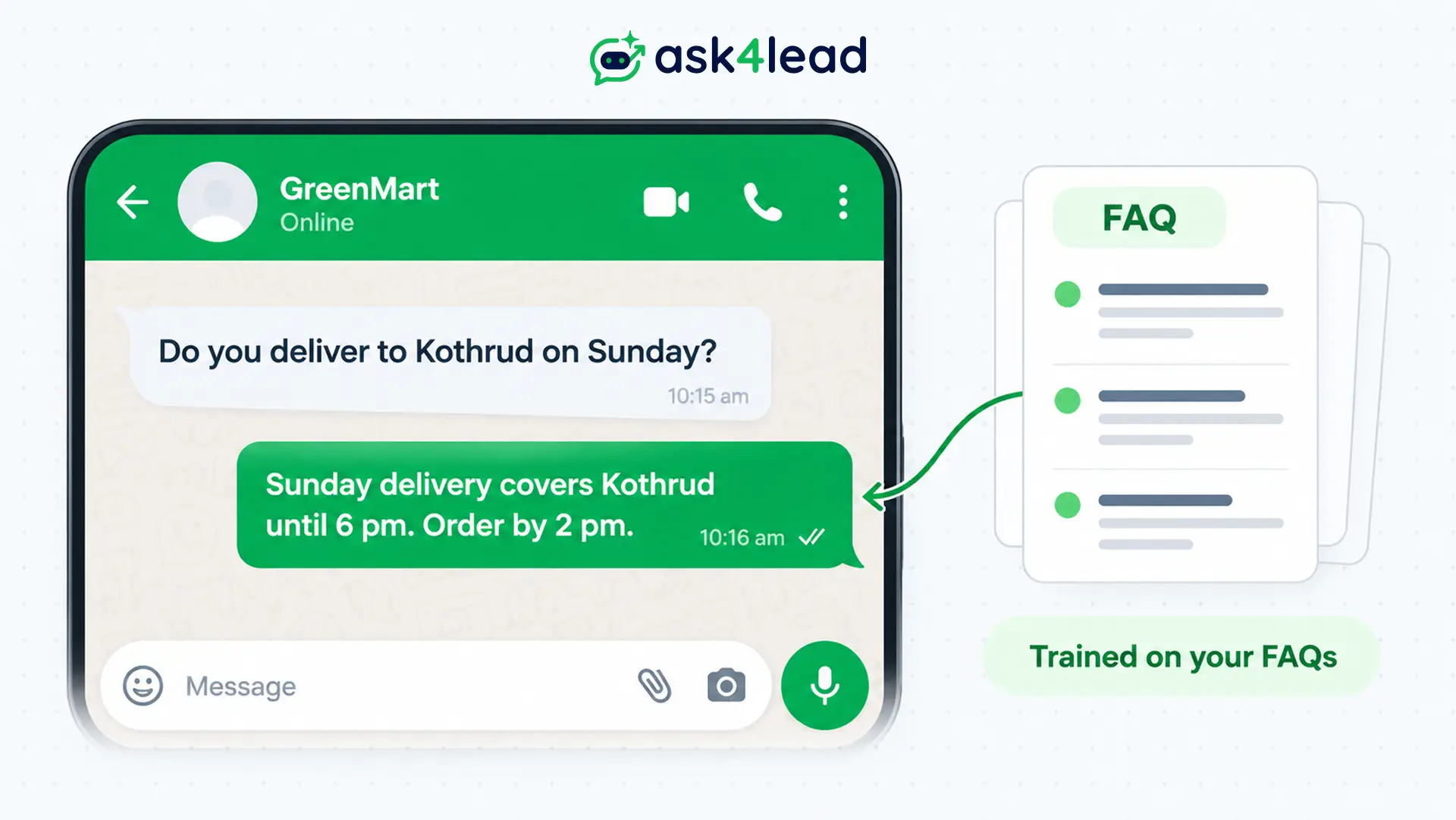
WhatsApp AI training does not mean building a new AI model. It means building an FAQ knowledge base from your own answers, such as FAQs, price lists and policies.
The AI then looks them up before it replies. Tools like Ask4Lead take PDFs, text files and website pages for this job.
First you write the answers, then you load them, test the replies and keep the files current. Below you get 3 ways to approach WhatsApp AI training, 6 steps, a 30-question test sheet and a weekly habit.
What is WhatsApp AI training?
WhatsApp AI training is the work of preparing reference material. It lets an AI assistant answer from your facts, not from guesses.
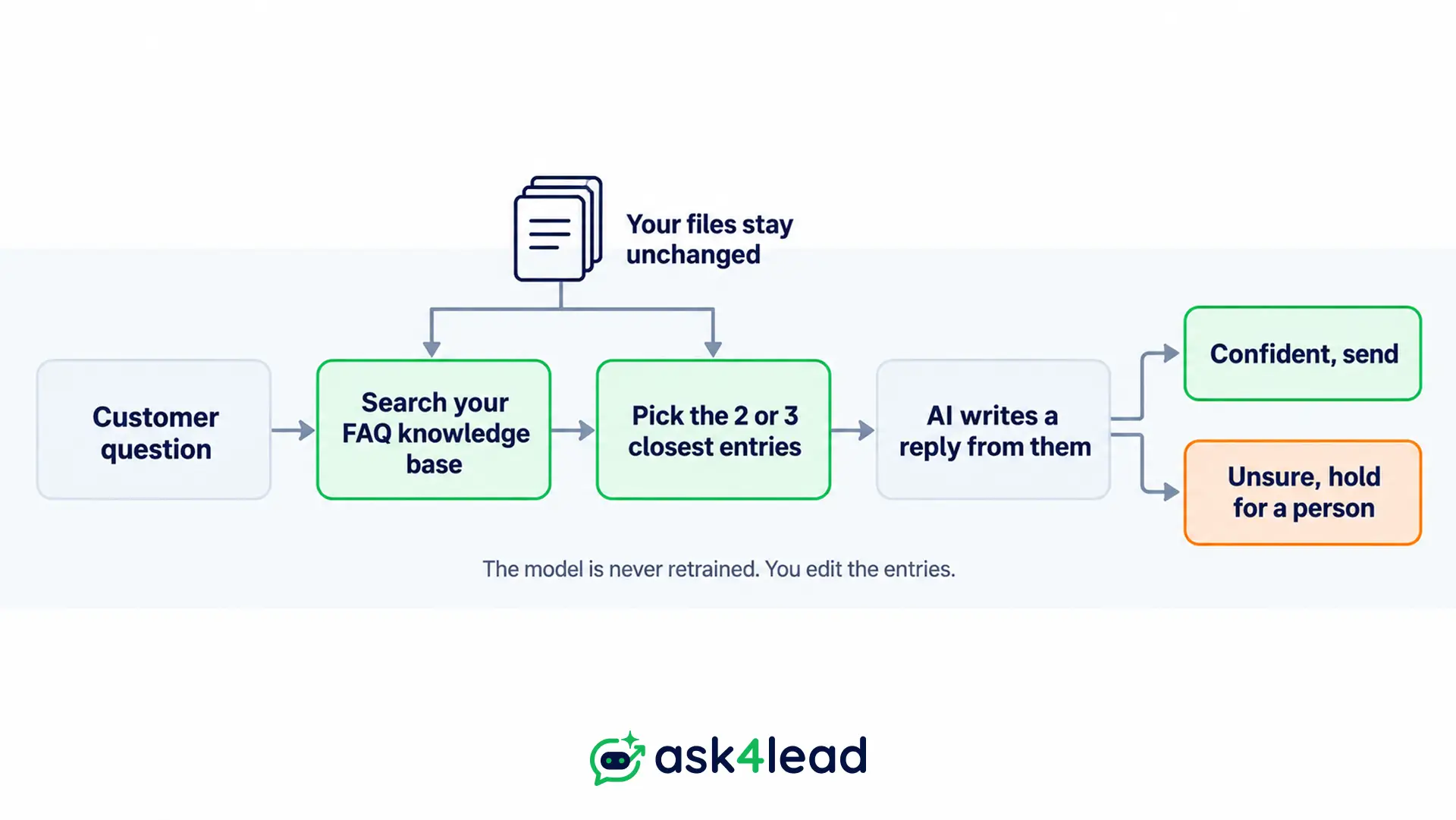
Then the assistant searches your FAQ knowledge base, finds the matching entries and writes a reply from them. Nothing inside the model changes, so an edited answer works on the next message.
However, vendors often call this “training”, and the word misleads. Real model training, called fine-tuning, changes the model itself, while a knowledge base only changes what the model reads.
Fine-tuning needs thousands of examples and a developer, so a price change means starting over.
| Question | FAQ knowledge base | Fine-tuning |
| What you prepare | Written answers and files | Thousands of example chats |
| A price changes | Edit 1 entry | Retrain the model |
| A wrong answer appears | Fix or delete the entry | Collect more examples |
| Suits | Prices, hours, policies | A fixed writing style at huge volume |
Another common mistake is to feed exported chat history in as the training set. Raw chats carry customer names, phone numbers, old prices and one-off exceptions, and the AI then repeats them as rules.
So use past chats to find the questions, not to supply the answers. The data privacy guide covers where personal data goes when it flows into tools.
Three ways to do WhatsApp AI training
You have 3 routes for WhatsApp AI training. Use Meta’s own app, a platform with a built-in knowledge base, or a workflow you build yourself.
The right route depends on your chat volume, who maintains the setup and whether you need a CRM behind the replies.
Meta’s Business AI in the WhatsApp Business app
Meta’s Business AI for the WhatsApp Business app learns from your Facebook Page posts, past chats and website. You can also upload catalogs and price lists.
Before switching it on, you can chat with it as a customer, and topics you flag go straight to you.
It is limited to eligible businesses in select markets. That suits a one-person shop, but it is built for answering, not for a sales pipeline.
A platform with its own AI profile
On Ask4Lead, you paste your website address and upload PDF, TXT or Markdown files. Also, the limits are 20 files of 15 MB each and 10 web pages. Next you pick a tone: professional, casual, empathetic or technical. Then add “Do Not Say” rules and check answers in the built-in test tool.
If your files lack the answer, the AI asks a clarifying question or flags a person. It runs on the official WhatsApp Business API, so your current number stays.
Ask4Lead is our product, so weigh this section with that in mind. This guide to what an AI agent platform includes lists what to compare.
A DIY workflow in n8n
Builders who want full control chain a trigger, a text-or-voice switch, a lookup, an AI node and a send node. Example flows shared by builders run about 10 to 16 nodes, before any handoff or booking logic.
You then own retries, template approvals, message logs and the day an API changes. That pays off when a developer is on staff and your order system needs custom code.
So if you are 1 person on the free app, start with saved replies or Meta’s Business AI. But if you run a team, choose a platform with an AI profile and a shared inbox for several agents. Only a developer with custom order systems should go DIY.
This does not apply if 5 questions fill your whole inbox, because saved replies cost less.
WhatsApp AI training in 6 steps
WhatsApp AI training works in 6 steps: collect real questions, write 1 fact per answer, sort facts by how often they change, set voice and limits, test with a fixed question set, then go live with human approval switched on.
If you skip the sorting step, the AI will quote last year’s price. This WhatsApp AI training example uses a sweet shop in Pune. Treat it as an illustration, not a client result.
1. Start WhatsApp AI training with real questions
First, open the last 100 to 200 chats and tally what people asked. About 20 questions usually cover most of the volume. Beside each question, write the customer’s own words. Include Hinglish, spelling slips and 3 short messages sent in a row.
WhatsApp’s in-app export works 1 chat at a time, so tally from the inbox instead. Then sort every question into 1 of 3 groups:
- Answer fully: hours, delivery area, payment options.
- Answer with a limit: custom orders, bulk pricing.
- Send to a person: complaints, refunds, health questions or money disputes. See when to hand off.
2. Write 1 fact per entry in your FAQ knowledge base
Write each entry as a question, a short answer, the date you checked it and the condition it depends on. When each entry holds 1 fact, the AI can pick the right one. A 6-page PDF that mixes delivery, returns and pricing in 1 paragraph gets quoted in pieces, so split it.
Put the answer first and the next step last. Also add 2 or 3 alternate wordings of the question inside the entry, because customers phrase things differently than your team.
| Weak entry | Strong entry |
| “We deliver across Pune, usually quickly.” | “Delivery: Pune city limits only, Monday to Saturday. Order before 2 pm for same-day. Checked 28 Oct 2026.” |
| “Returns are possible.” | “Returns: sealed boxes only, within 2 days. Send a photo to start.” |
3. Split stable facts, changing facts and customer memory
Each of 3 kinds of information behaves differently, so each belongs in a different place. Mixing them is the quiet cause of most wrong answers, because each kind goes stale at a different speed.
| Kind | Example | Where it lives |
| Stable facts | Delivery area, return rule, hours | Your FAQ knowledge base: documents and web pages |
| Changing facts | Prices, stock, plans | The Services Catalog, with name, description and exact price |
| Customer memory | Name, budget, last order | The lead record built from the chat |
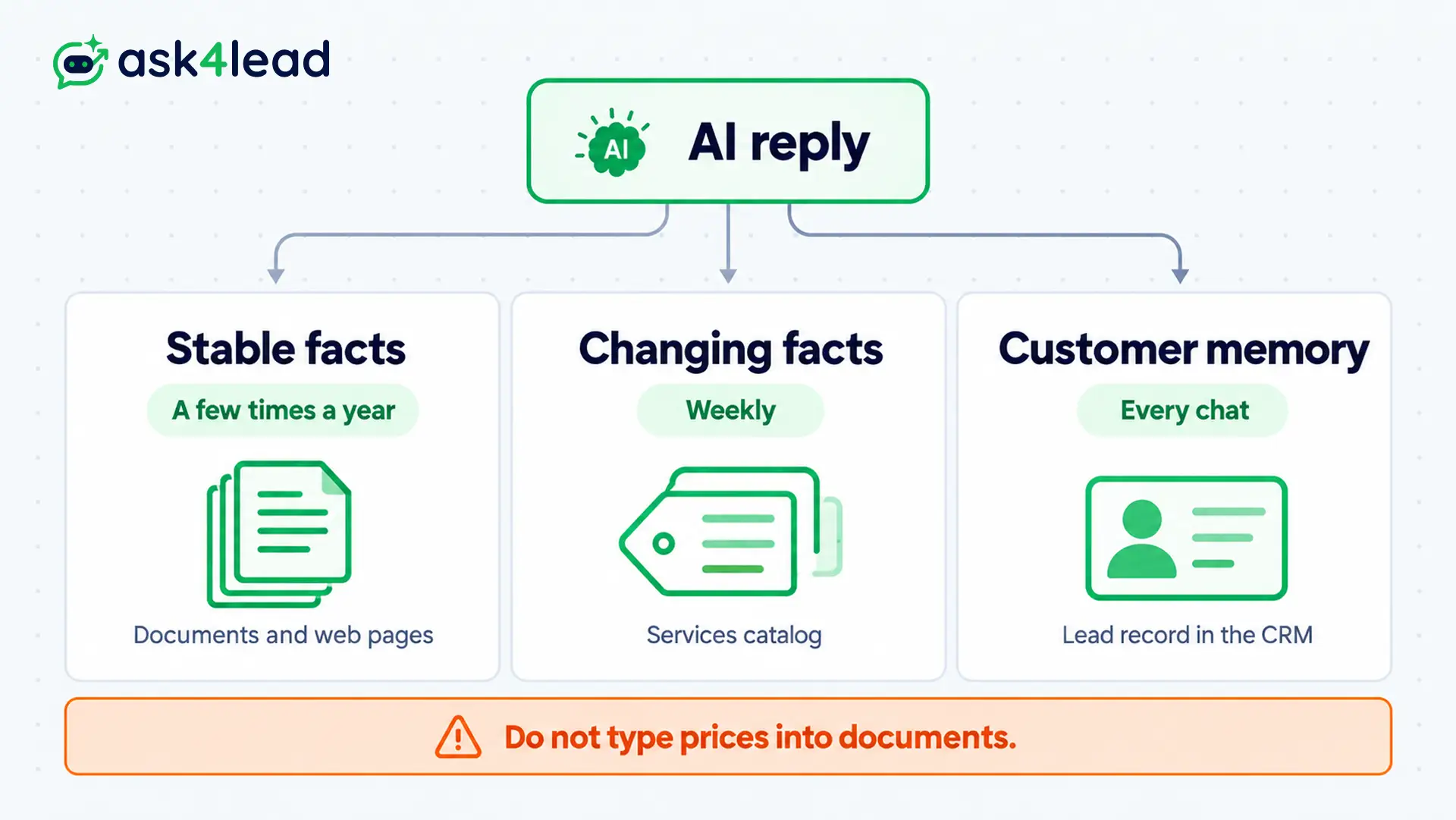
A price typed into a PDF stays there after the catalog changes, so the AI can quote both. In the Services Catalog, however, a price update reaches the AI immediately. An item set to inactive stops being offered.
Builders who run assistants in production keep reference knowledge and customer memory in separate stores for the same reason.
4. Set the voice and the red lines
Then give the AI a voice and a short list of things it must never do. Ask4Lead’s profile takes up to 12 highlights and up to 10 topics to avoid, so pick the ones that matter. Here is a sample for the sweet shop:
Voice: warm, 2 sentences, no slang
Highlights: same-day delivery in Pune; sugar-free range; order before 2 pm
Topics to avoid: medical or diabetic advice; discounts above 10%; refund promises
Also write each red line as a rule a stranger could follow. “No refund promises” works, but “be careful with refunds” does not. Ask4Lead replies in the customer’s language from English files, so test your own languages as well.
5. Test your WhatsApp AI training before customers do
Test your FAQ knowledge base with a fixed set of 30 questions, and keep the sheet so you can rerun it after every change. First use the built-in test tool, then send the same questions from a second phone.
| Question type | How many | A pass looks like |
| In your files, asked 3 ways | 15 | The same correct answer each time |
| Not in your files | 5 | The AI says it will check |
| Two sources disagree | 3 | The newer source wins |
| Angry or risky | 4 | A person gets the chat |
| Messy input | 3 | One correct reply, or a question |
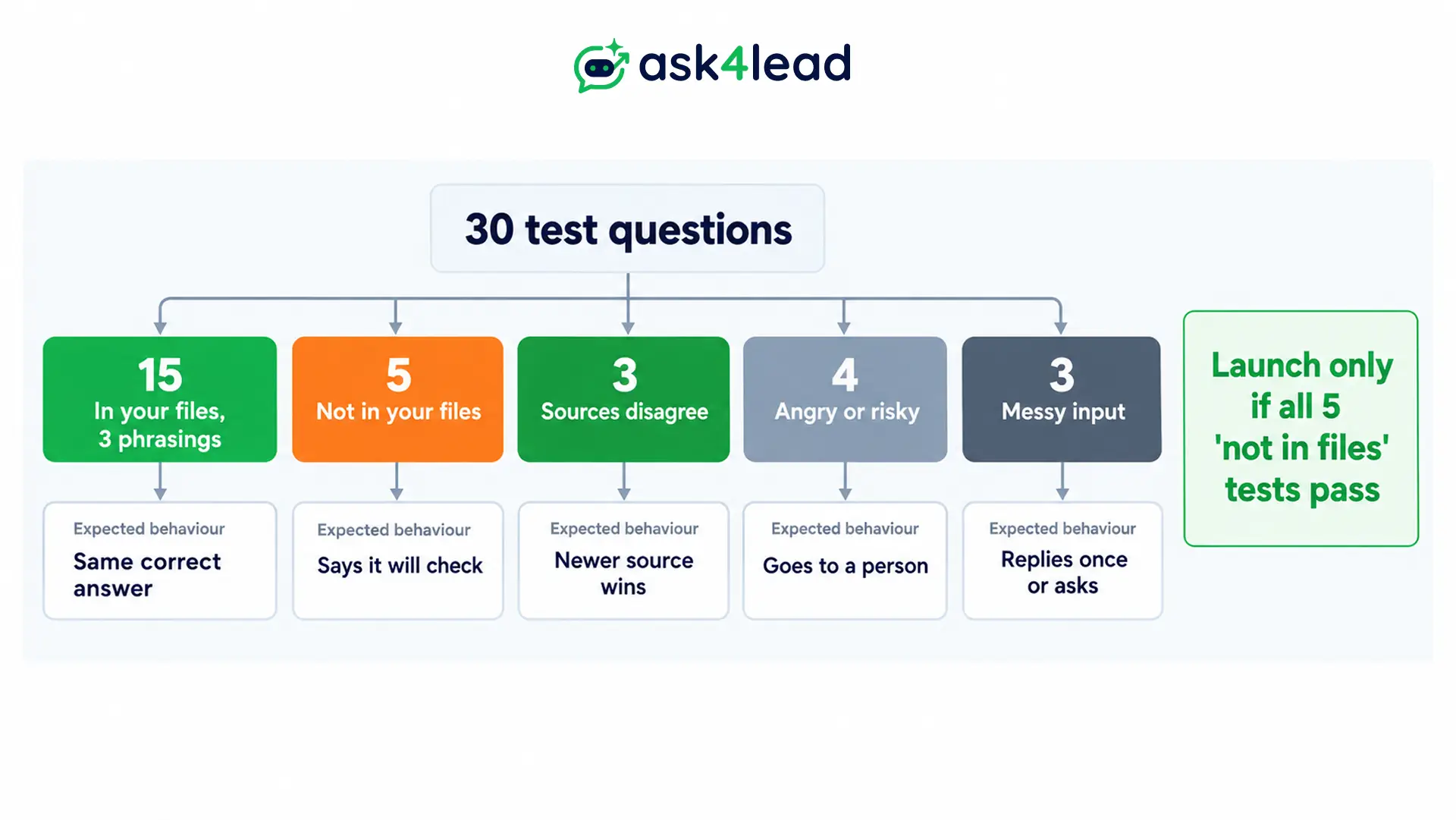
Messy input means 3 quick messages, typos and a voice note. All 5 “not in your files” tests must pass before launch. A confident wrong answer costs more than a slow one. The guide to testing an AI agent also covers handoff tests.
6. Switch on approval, then loosen it
Start with every AI reply held for approval. In Ask4Lead, Human Approval places each draft in the Work Queue, so an agent can edit it and send it.
Then, after a week of clean drafts, hold only the low-confidence replies. The system also sends complex pricing questions to a human manager. You can switch approval on or off per conversation too. Meta’s rules also expect a clear path to a person, which the AI rules guide covers.
Keeping WhatsApp AI training current
Treat your FAQ knowledge base as a product with a weekly review. The AI is only as accurate as the oldest file you left in it.
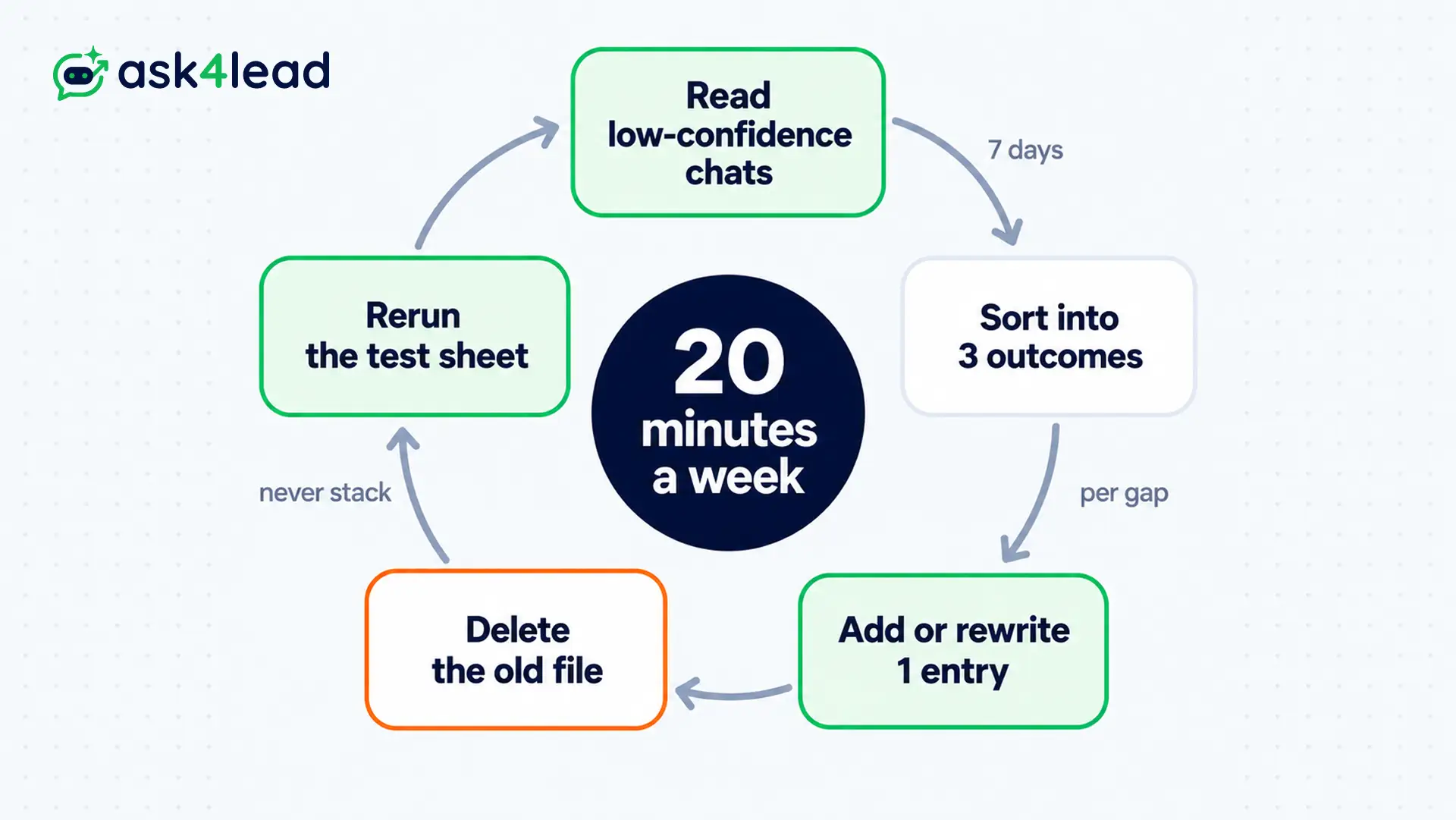
So each week, read what the AI struggled with and fix 1 entry per gap. Then rerun the test sheet.
Review the questions the AI struggled with
The AI Dashboard keeps a Low Confidence log of answers the AI was unsure about. Its Handoffs count then opens the exact chats where the AI asked for a person. Spend 20 minutes a week reading them.
Each item ends in 1 of 3 outcomes:
- New entry: the question was real, and the answer was missing.
- Rewritten entry: the answer existed, but it was too vague to match.
- Stays with a person: the question needs judgment, so no entry will fix it.
Why old files break WhatsApp AI training
Documents that disagree are worse than a gap. For example, an old price-list PDF in the FAQ knowledge base says ₹480 while the catalog says ₹520. The AI may quote either, but the customer will screenshot the lower one.
These 3 habits prevent this:
- Replace, never stack: delete the old file when you upload the new one.
- Date every file name: “delivery-policy-2026-10.pdf” shows its age at a glance.
- Rerun the test sheet: do it after every upload, not only before launch.
What WhatsApp AI training costs
WhatsApp AI training costs time more than messages. The running cost is Meta’s per-message fee for replies, plus your platform fee.
Meta gives each number 1,000 free service replies a month. Beyond that, India charges ₹0.115 per message as of October 2026. Check Meta’s pricing page for current rates.
Suppose a shop sends 2,400 AI replies inside the window, so it pays for 1,400 of them. That is 1,400 × ₹0.115 = ₹161 a month to Meta, before platform and AI fees.
Replies after the 24-hour window shuts need an approved template at a different rate. See how the 24-hour window works for the detail.
Meta bills its own Business Agent separately, at about 4 to 5 US cents per message. Compare it with the full API pricing breakdown.
What an FAQ knowledge base cannot do
An FAQ knowledge base teaches an assistant to answer questions. But it cannot finish tasks that need exact steps, such as taking a booking or issuing a quote.
Those tasks need a fixed flow with set fields, plus a person or system to confirm.
- Bookings: a booking chat collects date, time, name and email in order, then confirms. Builders keep that sequence fixed and let the AI handle the questions around it.
- Quotes: a quote needs exact items and totals. In Ask4Lead, agents build Quotes from the chat instead of leaving the AI to calculate.
- Customer history: an FAQ knowledge base cannot remember who asked last week, so use the CRM record.
- Menus: if all you need is fixed buttons, a button bot is simpler. This button bot versus AI agent comparison shows where each fits.
FAQs
1. Do I need to fine-tune a model for WhatsApp AI training?
No, because an FAQ knowledge base is faster, cheaper and easier to correct. You edit an entry, and the next reply changes.
2. Can I train the assistant on my old WhatsApp chats?
For WhatsApp AI training, use old chats to find the questions, but not to supply the answers. Raw chats hold personal data, outdated prices and one-off exceptions.
3. WhatsApp AI training: how long does it take?
Indexing takes seconds on Ask4Lead, but writing 20 to 30 entries takes roughly an afternoon for 1 person.
4. Which route needs the WhatsApp Business API?
For third-party WhatsApp AI training tools, yes. Meta’s Business AI works inside the app instead, in select markets. Ask4Lead connects through the API and keeps your existing number.
5. Is it allowed to use AI replies on WhatsApp?
Yes, through the API and inside Meta’s rules on the 24-hour window, a path to a person and opt-in consent.
6. Can the AI answer in Hindi or other languages?
Ask4Lead’s feature page says it replies in the customer’s language from English files. Test your own languages and spellings first.
Conclusion
WhatsApp AI training is lookup, not model building. Your FAQ knowledge base is only as good as how clearly you write entries and how often you review them.
Before you launch your WhatsApp AI training, check that you have:
- Tallied the top 20 real customer questions
- Written 1 dated fact per entry
- Moved prices into a catalog and customer details into the CRM
- Passed all 30 questions on the test sheet
- Switched on approval for every reply
Then run the weekly 20-minute review for a month, and watch which questions keep reaching a person. Those are your next 10 entries.
Stop answering the same WhatsApp questions by hand
Typing the same delivery and price answers all day costs you leads, because customers give up waiting. Ask4Lead grounds its AI on your PDFs and web pages, and lets you test answers before launch.
It reads exact prices from the Services Catalog and holds risky drafts in Human Approval. The AI Dashboard shows where answers were unsure.
Meanwhile, the shared team inbox lets your team take over any chat.
